Most budgets fail because they have too many lines. The 50/30/20 rule has three: half of your take-home pay for needs, 30% for wants and 20% for savings and debt. A 50/30/20 budget template on the iPad gives those three numbers a page, so every month you can see at a glance whether rent, takeout or the savings account is winning.

Below are 8 iPad budget planners I’d use for a 50/30/20 budget: full budget planners, two 2027 planners with finance and savings tabs, a zero-based budget kit, an expense tracker and a bill tracker for the needs side. After the list: how the rule works, a worked example on $4,000 a month, needs vs wants, the 60/20/20 and 70/20/10 versions and a 10-minute monthly check-in.
The 8 Best 50/30/20 Budget Templates I Found for iPad
I couldn’t find a single digital planner with a ready-made 50/30/20 page that I’d recommend, so I looked for the pages the method needs: a monthly budget, an expense tracker with categories and a savings or debt tracker. I skipped the Excel and Google Sheets files, Canva templates, print-only worksheets and anything dated 2026 or earlier.
TL;DR: 8 iPad budget templates for a 50/30/20 budget: 3 full budget planners with monthly budget and expense pages, 2 dated 2027 planners with finance, bills and savings tabs, 1 zero-based budget kit, 1 categorized expense tracker and 1 bill tracker for the needs bucket. None has a ready 50/30/20 page; each card says where the three buckets go.
Quick Picks
- Best overall: Digital Budget Planner, Financial Planner
- Best for dated for 2027: Budget Planner 2027 Landscape
- Best for zero-based budgeting: Zero-Based Personal Budget Kit
- Best for expense tracker: Expenses Tracker 4 Years Interactive PDF
- Best for compact budget: Gold Budget Digital Planner/Hyperlinked
- Best for undated monthly: Monthly, Debt, Expense Digital Planner
- Digital Budget Planner, Financial Planner – Best overall
- Budget Planner 2027 Landscape – Best dated for 2027
- Zero-Based Personal Budget Kit – Best for zero-based budgeting
- Expenses Tracker 4 Years Interactive PDF – Best expense tracker
- Gold Budget Digital Planner/Hyperlinked – Best compact budget
- Monthly, Debt, Expense Digital Planner – Best undated monthly
- Debt Payoff Planner 2027 Portrait – Best for the debt part of 20%
- Hyperlinked Bill Tracker Planner – Best for the needs bucket

Best overall
1. Digital Budget Planner, Financial Planner
Orientation: PortraitLayouts: Yearly, Monthly, BiweeklyDates: Undated
Best for: budgeters, savers, biweekly earners. Designed by ThePlannersDelight.
- Monthly budget page and monthly budget breakdown, every month
- Daily spend count and a weekly expense check-in to track as you go
- Sinking funds, savings, debt and bill trackers, plus cash envelopes
- 12 payoff and fund trackers: rainy day, job loss, car repair, debt payoff and more
- 200+ undated pages, 10,000+ hyperlinks and 200+ PNG stickers; GoodNotes, Noteshelf, Notability
This is where I'd run a 50/30/20 budget from start to finish: the monthly budget page holds the three targets, the daily spend count shows where the money goes, and the savings and fund trackers make the 20% visible. It has more than you need in month one, which is exactly why it still fits in month twelve.

Best dated for 2027
2. Budget Planner 2027 Landscape
Orientation: LandscapeLayouts: Monthly, Weekly, Daily + Finance, Bills, Savings tabsDates: 2027Week start: Monday or Sunday
Best for: 2027 budgeters, landscape fans, all-in-one planners. Designed by Print Magic StudioX.
- Dated January–December 2027, Monday and Sunday start files
- 6 subject tabs: Finance, Bills, Savings, Shopping, Goals and Life, 4 templates under each
- Monthly, weekly and 365 daily pages next to the budget tabs
- Landscape spread with a gold coil, sized for the 13-inch iPad Pro; works in any PDF app
The Bills, Shopping and Savings tabs line up almost one-to-one with needs, wants and savings, so the three buckets have a home without any setup. Pick this one if you want your budget in the same file as your 2027 calendar.
Best for zero-based budgeting
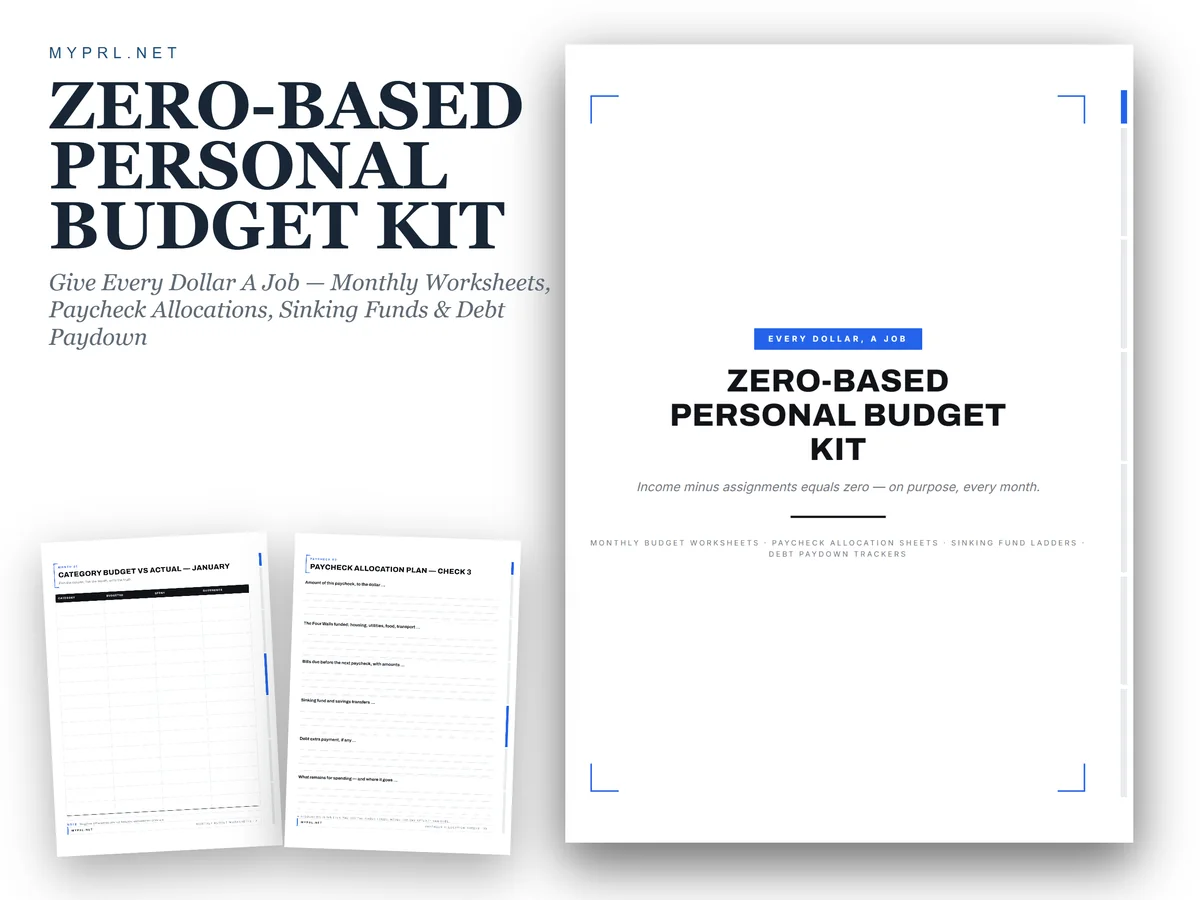
3. Zero-Based Personal Budget Kit
Orientation: Portrait (US Letter)Layouts: Monthly budget, paycheck allocation, sinking funds, debt paydownDates: Undated
Best for: zero-based budgeters, paycheck planners, debt payoff planners. Designed by Healers Hub co.
- 4 guide pages: how zero-based budgeting works, a one-page monthly budget meeting and a payday routine
- 4 monthly budget worksheets and 6 paycheck allocation sheets
- Sinking funds: emergency fund ladder, car repair and registration fund, weekly scorecard
- Debt paydown: 100 payments to debt-free, snowball order ladder, snowball vs avalanche
- 24 US Letter pages, hyperlinked side tabs; GoodNotes, Notability or Xodo
If 50/30/20 feels too loose, this is the next step: the same buckets, but every dollar gets a line. The short guide pages explain the method in plain words, and the paycheck allocation sheets work for biweekly pay. Note the pages are US Letter, so they look like paper on the screen.

Best expense tracker
4. Expenses Tracker 4 Years Interactive PDF
Layouts: 48 monthly expense pages: income, expenses, savingsDates: Undated, 4 years
Best for: expense trackers, typists, long-term budgeters. Designed by Zoom4Design.
- 48 monthly pages, one for each month over 4 years
- Income, expenses, savings and notes sections on every page
- Expense categories on the page: fixed expenses, food, shopping, transportation, entertainment and more (per the cover)
- Editable fields: type directly into the PDF on the iPad or a computer
Expense categories already split by type make the needs-vs-wants sorting easy: fixed expenses and food on one side, entertainment and shopping on the other. And with typed fields, the monthly totals stay neat even if your handwriting doesn't.

Best compact budget
5. Gold Budget Digital Planner/Hyperlinked
Orientation: PortraitLayouts: Monthly, Quarterly bills
Best for: budget beginners, savers, minimalists. Designed by Nann Digital Art.
- 25 pages with an index and hyperlinked tabs, A4
- Budget overview, monthly budget, incomes and expenses, monthly and quarterly bills
- Budget, expense and income trackers
- Savings plan, savings goal, financial goal and debt tracker
- Black and gold design; GoodNotes, Notability, Noteshelf and Xodo
Twenty-five pages is the right size for a first budget: a budget overview for the three targets, an expense tracker and a savings plan for the 20%. If a 200-page finance planner makes you close the app, start here.
Best undated monthly
6. Monthly, Debt, Expense Digital Planner
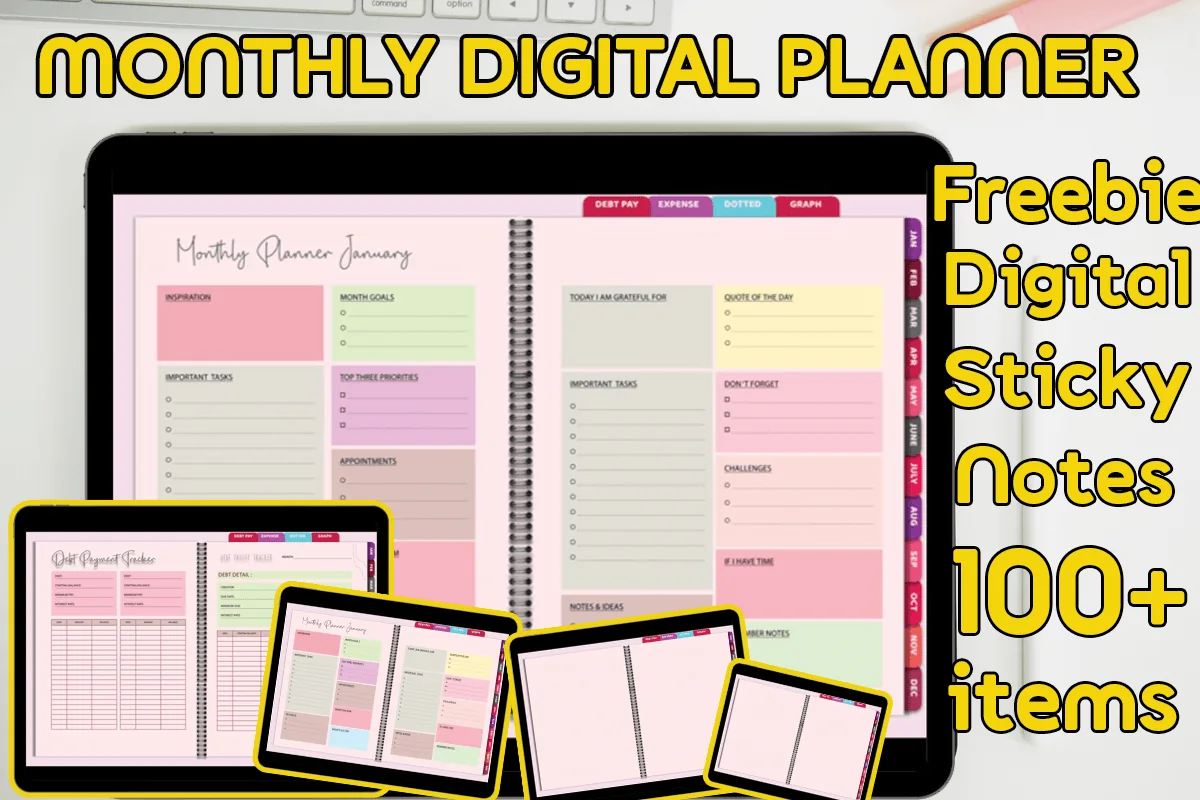
Layouts: Monthly, Debt, ExpensesDates: Undated
Best for: budgeters, debt payoff planners. Designed by MOMAT THIRTYONE.
- 60 hyperlinked pages for 12 months, undated so it can be reused
- 12 monthly planners and 12 debt payment pages
- 24 expense pages, two for each month
- Dotted and graph notes, plus 100+ digital sticky notes (PNG); GoodNotes, Xodo, Noteshelf
Two expense pages a month is a neat fit for 50/30/20: one for needs, one for wants, and the debt page tracks extra payments from the 20%. It's undated, so you can start in any month.
Best for the debt part of 20%
7. Debt Payoff Planner 2027 Portrait
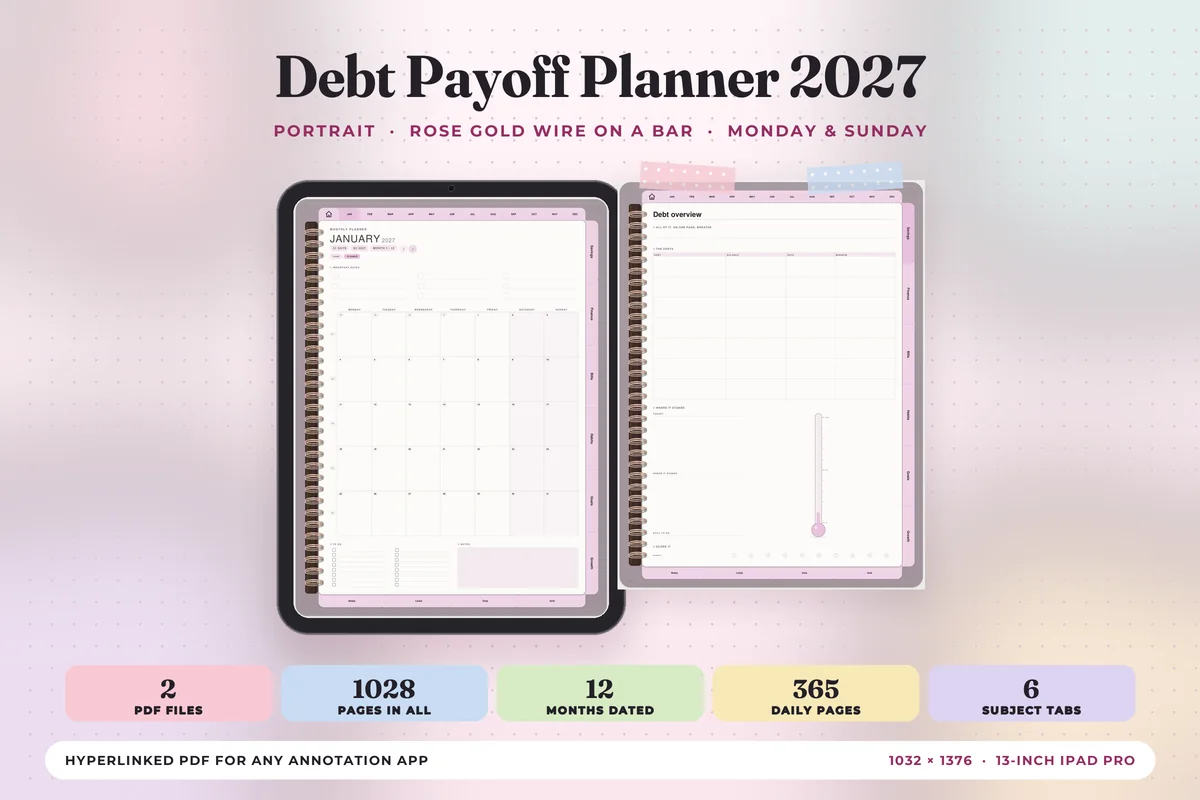
Orientation: PortraitLayouts: Monthly, Weekly, Daily + Savings, Finance, Bills tabsDates: 2027Week start: Monday or Sunday
Best for: debt payoff planners, savers, 2027 planners. Designed by Print Magic StudioX.
- Dated January–December 2027, Monday and Sunday start files
- 6 subject tabs: Savings, Finance, Bills, Habits, Goals and Growth, 4 templates under each
- Debt overview and a savings page with a progress thermometer (per the cover)
- Portrait, rose gold wire design; monthly, weekly and 365 daily pages; any PDF app
The 20% bucket covers both savings and extra debt payments, and this planner keeps the two side by side. Watching the thermometer fill is a good reason to move that money on payday instead of at the end of the month.
Best for the needs bucket
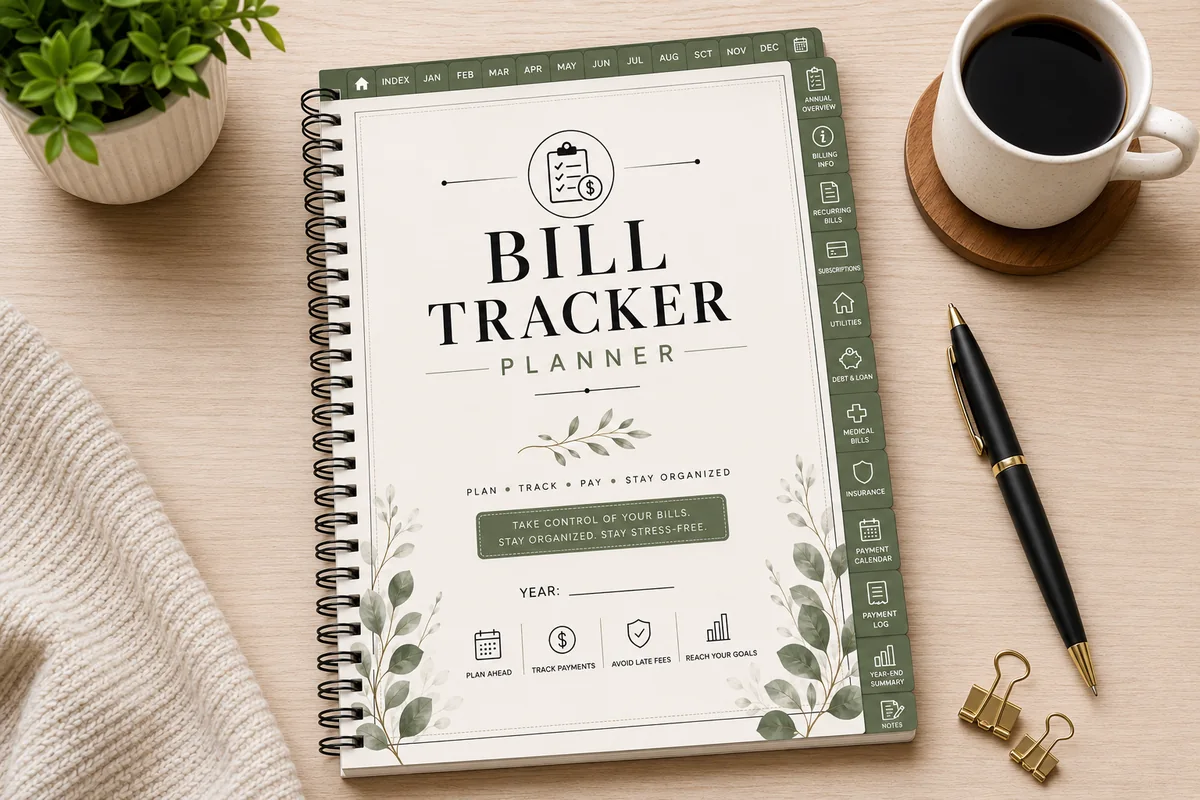
8. Hyperlinked Bill Tracker Planner
Orientation: Portrait (A4)Layouts: Annual bill overview, 12 monthly bill trackersDates: Undated
Best for: bill payers, households, subscription trackers. Designed by Azhir.
- Annual bill overview, 12 monthly bill trackers and 12 monthly payment summaries
- Recurring bills, subscription, utility, medical, insurance and debt and loan trackers
- Bill payment calendar and a payment log
- 52 hyperlinked pages, portrait A4, undated; GoodNotes, Notability, Noteshelf and ZoomNotes
Needs are mostly bills, and this tracker lists them all: rent, utilities, insurance and minimum payments. Add them up once and you'll know right away whether your needs fit in 50% or whether you're a 60/20/20 household for now.
Quick Comparison
| Template | Best for | 50/30/20 fit | Stand-out extra |
|---|---|---|---|
| 1. Digital Budget Planner, Financial Planner | Full 50/30/20 budget | Budget + breakdown pages | Sinking funds & payoff trackers |
| 2. Budget Planner 2027 Landscape | 2027 planners | Bills / Shopping / Savings tabs | Daily pages included |
| 3. Zero-Based Personal Budget Kit | Zero-based budgets | Paycheck allocation sheets | Snowball vs avalanche page |
| 4. Expenses Tracker 4 Years Interactive PDF | Tracking every expense | Income / expenses / savings | Typeable, 48 months |
| 5. Gold Budget Digital Planner/Hyperlinked | First budget | Budget overview + savings plan | Black and gold |
| 6. Monthly, Debt, Expense Digital Planner | Starting any month | 2 expense pages a month | Debt payment page |
| 7. Debt Payoff Planner 2027 Portrait | Paying off debt in 2027 | Savings + Bills tabs | Progress thermometer |
| 8. Hyperlinked Bill Tracker Planner | Needs and fixed bills | Monthly bill trackers | Subscription tracker |
What I Look For in a 50/30/20 Budget Template
- A monthly budget page with room for three targets. Needs, wants and savings at the top of the month, planned against actual.
- An expense tracker with categories. The rule only works if you can sort spending into needs and wants at the end of the month.
- A savings and debt tracker. The 20% should be visible, not a number you hope happened.
- A bill list. Most needs are bills; listing them is the fastest way to see if 50% is realistic.
- Undated, or dated for 2027. Undated pages let you start in any month; a 2027 planner saves writing the dates.
What Is the 50/30/20 Rule?
The 50/30/20 rule is a simple way to split your take-home pay into three buckets: 50% for needs, 30% for wants and 20% for savings and extra debt payments. It was popularized by Elizabeth Warren and Amelia Warren Tyagi in their book All Your Worth, and it stuck because it’s easy to remember. You don’t track 40 categories; you check whether three numbers stay in their lanes.
- Needs (50%): what you have to pay to live and work. Rent or mortgage, utilities, groceries, insurance, transportation, childcare and minimum debt payments.
- Wants (30%): what makes life nicer but could be cut. Eating out, streaming, hobbies, shopping, trips, upgrades.
- Savings and debt (20%): emergency fund, retirement, sinking funds and any debt payment above the minimum.
Gross or Net Income?
Use your take-home pay: what lands in your account after taxes. If money for retirement or health insurance comes out of your paycheck before you see it, you can add it back and count it in the savings or needs bucket, so the picture is complete. If your income changes month to month, use the lowest month of the last few as your base and treat anything above it as extra savings.
A 50/30/20 Budget Example
Here’s what the split looks like on three take-home incomes. This is the whole calculation; a 50/30/20 calculator does nothing more than this.
| Monthly take-home pay | Needs 50% | Wants 30% | Savings 20% |
|---|---|---|---|
| $3,000 | $1,500 | $900 | $600 |
| $4,000 | $2,000 | $1,200 | $800 |
| $5,200 | $2,600 | $1,560 | $1,040 |
Take the $4,000 row. Needs might be rent $1,250, utilities and phone $180, groceries $400, gas and transit $150 and a $20 minimum card payment: exactly $2,000. Wants might be eating out $300, shopping $250, streaming and apps $200, a hobby $250 and a weekend trip fund $200: $1,200. The last $800 goes to the emergency fund, retirement and a sinking fund for car repairs. If rent alone were $1,600, needs would run over 50%, and the fix is to take it from wants first, never from savings.
How to Make a 50/30/20 Budget in a Digital Planner
- Write your take-home pay on the income page. Paid every two weeks? Add both paychecks for the month.
- Do the math once: income × 0.5, × 0.3 and × 0.2. Write the three targets at the top of your monthly budget page.
- Sort every expense category into needs, wants or savings. Use three highlighter colors in GoodNotes, for example blue for needs, pink for wants and green for savings.
- Pay savings first. Move the 20% on payday, before the wants money gets spent.
- Track spending on the expense tracker during the month, with the same three colors.
- Review at month end: compare each bucket with its target and adjust next month’s plan.
Needs vs Wants: Where People Get Stuck
Most 50/30/20 budgets fail on the line between needs and wants. A simple test: would you still have to pay it if you lost your job tomorrow? Then it’s a need. The basic version of a need is a need; the upgrade is a want.
| Expense | Need | Want |
|---|---|---|
| Groceries | Weekly groceries | Takeout, coffee runs, specialty snacks |
| Phone | A basic plan | Unlimited premium plan, a new phone every year |
| Transportation | Car payment, gas, insurance or a transit pass | Rideshares you could skip, car upgrades |
| Debt | Minimum payments | (Extra payments go to the 20% savings and debt bucket) |
| Subscriptions | Internet you work on | Streaming, apps, boxes |
50/30/20 Variations: 60/20/20, 70/20/10 and More
If 50% doesn’t cover your needs, you’re not doing it wrong: in many cities rent alone takes a third of take-home pay. The rule bends, and these are the most common versions, shown on a $4,000 take-home pay:
| Rule | How it splits $4,000 | When it fits |
|---|---|---|
| 50/30/20 | $2,000 needs / $1,200 wants / $800 savings | Average cost of living, a balanced start |
| 60/20/20 | $2,400 needs / $800 wants / $800 savings | High rent, but you still want to save 20% |
| 70/20/10 | $2,800 living costs / $800 savings / $400 debt or giving | Needs and wants together; tight budgets |
| 50/40/10 | $2,000 needs / $1,600 wants / $400 savings | A temporary version when saving 20% isn’t possible yet |
| 80/20 | $3,200 spending / $800 savings | You only want one rule: save first, spend the rest |
50/30/20 vs Zero-Based Budget
A zero-based budget gives every dollar a job until income minus planned spending equals zero. It’s more detailed: you plan each category, not three buckets. Many people start with 50/30/20 to see the big picture, then move to zero-based once they know their numbers. You can also combine them: use 50/30/20 as the target, and a zero-based budget template inside each bucket. Any planner below with a monthly budget page and an expense tracker works for both.
Template, Spreadsheet or App?
A 50/30/20 spreadsheet in Excel or Google Sheets does the math for you, and an app links to your bank. A digital planner does neither: you write the numbers with an Apple Pencil. That’s the point for many people. Writing each expense down makes you notice it, and the budget sits next to your weekly plans, bills and savings trackers in one notebook. If you love automation, use a spreadsheet for the math and a planner for the monthly review.
How to Set Up a 50/30/20 Budget Template in GoodNotes
- Save the PDF and import it into GoodNotes, Notability or another PDF note app.
- Duplicate the monthly budget page twelve times, or use the undated pages for the months ahead.
- On the first budget page, write the three targets in a corner: needs, wants and savings.
- Pick three highlighter colors and use them on every page: budget, expense tracker and bill tracker.
- Add a sticky note or text box with your income × 0.5 / 0.3 / 0.2, so next month you only change the income.
A 10-Minute Monthly 50/30/20 Check-In
- Minutes 1–3: add up each color on the expense tracker.
- Minutes 4–6: compare with the three targets. Over on wants? Note which category.
- Minutes 7–8: confirm the 20% actually moved to savings or extra debt payments.
- Minutes 9–10: write next month’s income and targets, and one change you’ll make.
FAQ
What is a 50/30/20 budget template?
It’s a budget page split into three parts: needs (50% of take-home pay), wants (30%) and savings and extra debt payments (20%). On the iPad it can be a page in a digital budget planner where you write the three targets at the top and track spending against them during the month.
Is the 50/30/20 rule realistic?
For many people it’s a target, not a starting point. If rent is high, needs can take 60% or more. That doesn’t make the rule useless: start with 60/20/20 or even 50/40/10, keep the habit of sorting every expense, and move toward 50/30/20 as income grows or costs drop.
Is 50/30/20 or 70/20/10 better?
Neither is better in general. 50/30/20 separates needs from wants, which helps if you want to see where to cut. 70/20/10 lumps them together as living costs and splits the rest into savings and debt or giving, which is simpler if your budget is tight and you mostly want to protect the savings.
Where do yearly expenses go in a 50/30/20 budget?
Divide them by 12 and set that amount aside every month as a sinking fund. Car registration and insurance go into needs; holiday gifts and vacations go into wants. Several planners above have a sinking funds page for exactly this.
Can I use the 50/30/20 rule if I’m paid biweekly?
Yes. Apply the split to each paycheck, or add both paychecks for the month and split the total. In the months with a third paycheck, many people send the whole extra check to the 20% bucket. My biweekly budget templates guide shows how to assign bills to each payday.
Is there a free 50/30/20 budget template?
There are free spreadsheets and printable worksheets, and they’re fine for learning the math. The planners in this list aren’t free files; what they add are the pages around the split, like expense trackers, bill lists and savings trackers, linked together in one iPad notebook. To mark needs, wants and savings at a glance, add a few budget stickers for GoodNotes.
Final Thoughts
The 50/30/20 rule won’t fix every money problem, but it answers the question most budgets skip: is the overall balance right? Pick a 50/30/20 budget template, write your three targets once a month and spend ten minutes checking them. For full budget planners, see my digital budget planners for iPad; for page ideas, the budget planner ideas list; and for the savings side, my savings challenges for 2027.
You May Also Like
This post is for general education, not financial advice. It contains affiliate links. If you buy through them, I may earn a small commission at no extra cost to you. Learn more.