Payday comes, the bills go out, and two weeks later the account looks emptier than it should. No big purchase, just a lot of small ones: coffee, delivery fees, a subscription you forgot about. A digital budget planner for iPad makes those leaks visible: you plan the month, log what you spend and see in black and white where the money actually goes.
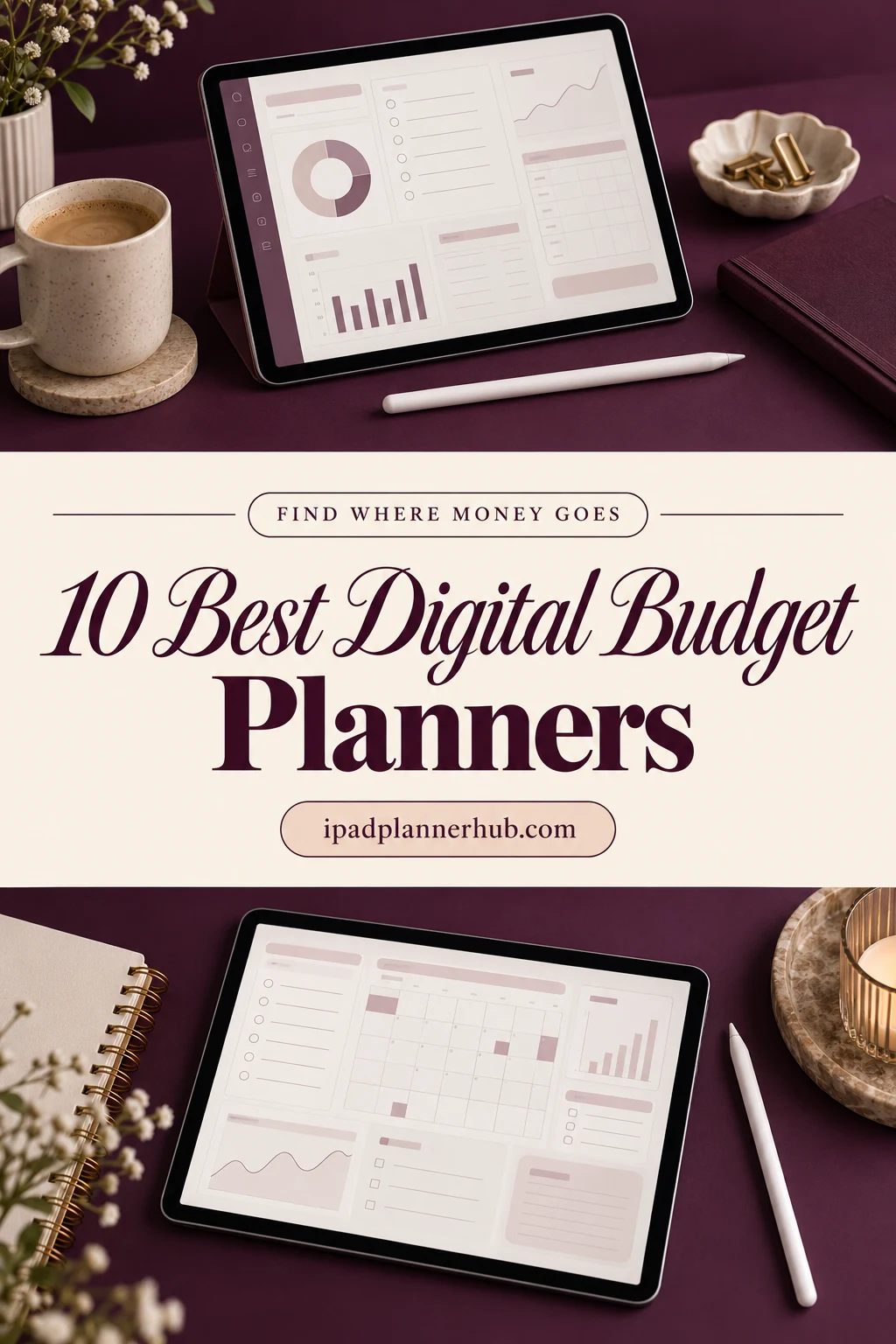
Below are the 10 best budget planners from Creative Fabrica I’d use on my iPad, from a short beginner budget notebook to full systems with bill trackers, sinking funds and biweekly budgets. After the list: what to look for, two simple budget rules and a 30-minute monthly check-in to find where your money goes.
The 10 Best Digital Budget Planners for iPad I Found
I skipped printable workbooks, Canva templates and planners dated for past years. The first five are dedicated budget planners; the last five are everyday planners with finance sections strong enough to run your budget from. All of them work on the iPad in GoodNotes or a similar app.
TL;DR: 10 digital budget planners for iPad: 5 dedicated budget planners (25 to 365 pages) and 5 everyday planners with strong finance sections. Each card lists orientation, layouts and dates, plus who it suits.
Quick Picks
- Best overall: Digital Budget Planner, Financial Planner
- Best for beginners: Gold Budget Digital Planner/Hyperlinked
- Best for savings goals: Budget Digital Planner Hyperlinked Tab
- Best for daily spending log: Undated 365 Day Finance Shopping Digital
- Best for simple and cheap: Undated Budget Planner for GoodNotes
- Best for finance trackers in a planner: 2027 Digital Planner | Monday and Sunday
- Digital Budget Planner, Financial Planner – Best overall
- Gold Budget Digital Planner/Hyperlinked – Best for beginners
- Budget Digital Planner Hyperlinked Tab – Best for savings goals
- Undated 365 Day Finance Shopping Digital – Best daily spending log
- Undated Budget Planner for GoodNotes – Best simple and cheap
- 2027 Digital Planner | Monday and Sunday – Best finance trackers in a planner
- All-in-One Digital Planner 2027 – Best dated 2027
- Budget Planner 2027 Portrait – Best for bills and savings in 2027
- All-in-One Digital Planner ( 112 Pages ) – Best compact all-in-one
- The Joy Undated Digital Planner – Best colorful

Best overall
1. Digital Budget Planner, Financial Planner
Orientation: PortraitLayouts: Yearly, Monthly, BiweeklyDates: Undated
Best for: budgeters, savers, biweekly earners. Designed by ThePlannersDelight.
- 11 templates every month: calendar, monthly and biweekly budgets, daily spend counts
- Sinking funds, cash envelopes, bill, debt and savings trackers
- Weekly expense check-in and a monthly budget breakdown
- 10 payoff and fund challenges: mortgage, car loan, rainy day, vacation and more
- 200+ undated pages, 10,000+ hyperlinks and 200+ stickers; rated 5.0
This is the budget planner I'd recommend first. The daily spend count and weekly check-in are exactly what you need to see where money really goes, and the biweekly budget pages are rare and handy if you're paid every other week. It's minimal, so a lot of numbers never feel messy.
Best for beginners
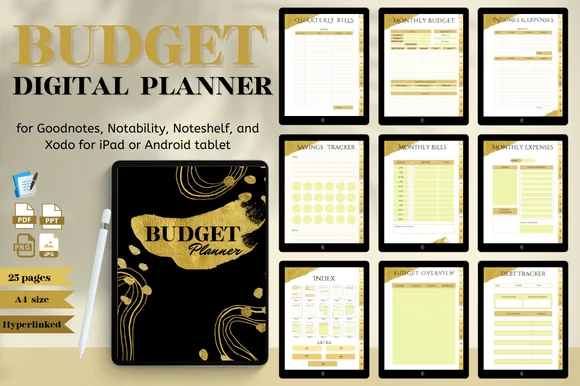
2. Gold Budget Digital Planner/Hyperlinked
Orientation: PortraitLayouts: Monthly, Quarterly bills
Best for: budget beginners, savers, minimalists. Designed by Nann Digital Art.
- 25 pages with an index and hyperlinked tabs
- Monthly budget, incomes and expenses, monthly and quarterly bills
- Budget, expense and income trackers
- Savings goal, savings plan, financial goal and debt tracker
- Black and gold design; works in GoodNotes, Notability, Noteshelf and Xodo; rated 5.0
If big budget planners feel intimidating, start here: 25 pages, all of them useful, and you can learn the whole thing in one evening. The quarterly bills page is a small detail I like, since annual and quarterly payments are the ones that catch people out.
Best for savings goals
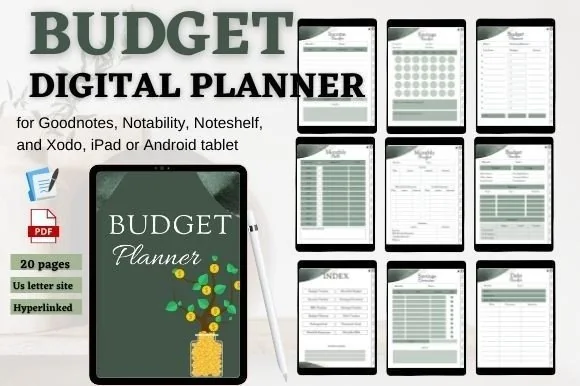
3. Budget Digital Planner Hyperlinked Tab
Orientation: PortraitLayouts: Monthly
Best for: savers, budget beginners. Designed by mixxdigitaldesign.
- 20 pages with an index and hyperlinked tabs
- Budget tracker, monthly budget, income and bills trackers
- Savings overview, savings tracker and savings goal pages
- Debt tracker and financial goal page
- Deep green design; works in GoodNotes, Notability, Noteshelf and Xodo
Similar in size to the gold planner, but with a stronger focus on savings: there's a savings overview next to the budget, so you see both sides of your money on one tab. The calm deep green is easy on the eyes when the numbers aren't.
Best daily spending log
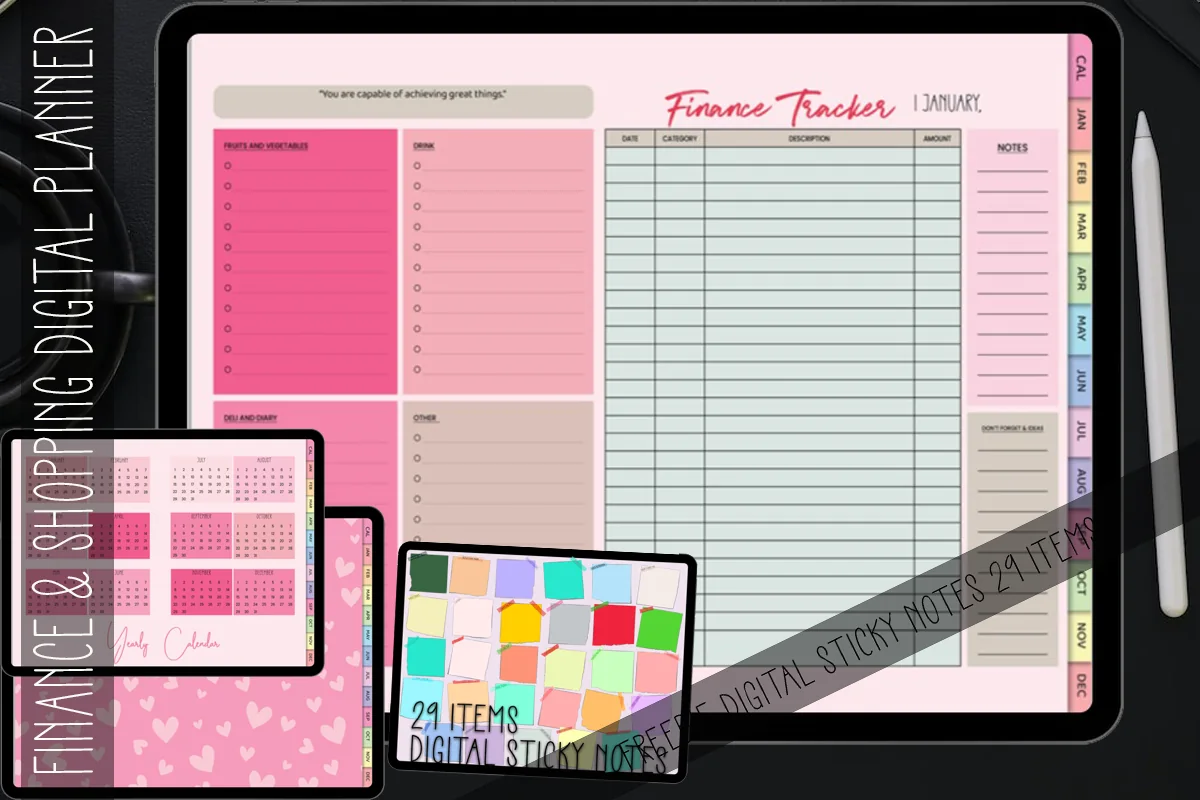
4. Undated 365 Day Finance Shopping Digital
Layouts: Monthly calendar, DailyDates: Undated
Best for: spending trackers, shoppers, daily loggers. Designed by MOMAT THIRTYONE.
- 365 undated daily finance and shopping pages
- A 12-month calendar page linked to the days
- Hyperlinks on every page
- Bonus pastel and colorful digital sticky notes
- Works in Notability, Noteshelf and Xodo
Budgets fail when small purchases slip through. A page for every day makes it a quick habit: jot down what you spent before bed, and at the end of the month you'll know exactly where the money went. Pair it with a monthly budget for the full picture.

Best simple and cheap
5. Undated Budget Planner for GoodNotes
Orientation: LandscapeDates: Undated
Best for: budget beginners. Designed by Perla Designs.
- 30 hyperlinked pages in PDF
- Undated, so you can start any month
- Budget planner pages with a soft pink spiral-notebook look
- Made for GoodNotes
The seller's listing is short, so I'm going by the preview: a compact, pretty budget notebook with linked pages. It's a low-cost way to try budgeting on your iPad before committing to a bigger planner.

Best finance trackers in a planner
6. 2027 Digital Planner | Monday and Sunday
Orientation: LandscapeLayouts: Yearly, Quarterly, Monthly, Weekly, DailyDates: 2027Week start: Monday or Sunday
Best for: dark mode fans, calendar app users, finance trackers. Designed by SuperDigitalPlanners.
- 10 finance trackers: monthly budget, expenses, bills, debt payoff, savings
- No spend challenge and yearly finance overview
- 2027 planner, Monday and Sunday start, dark theme
- Links to Apple Calendar, Reminders and Google Calendar
- Thousands of stickers and 200+ covers
If you want your budget inside your everyday planner, this one has the deepest finance section of the full planners I looked at. The yearly finance overview is a nice place to see the whole year's money on one page.
Best dated 2027
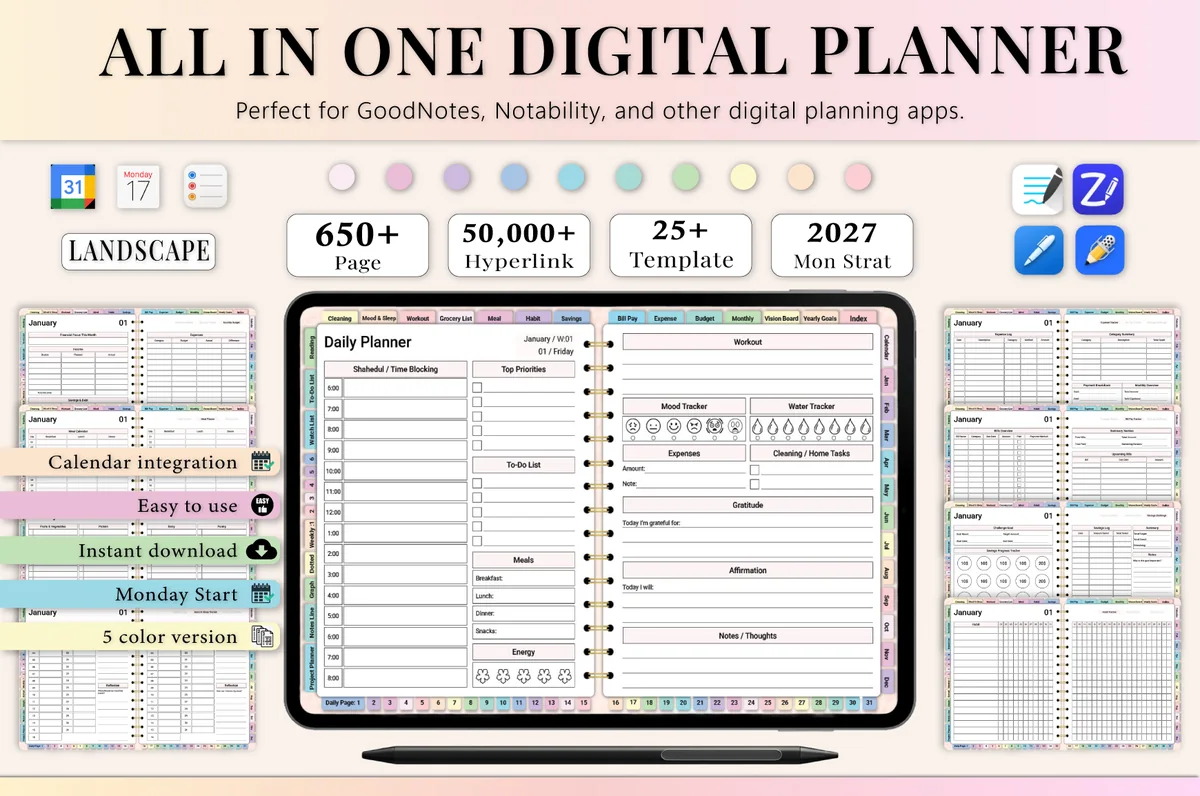
7. All-in-One Digital Planner 2027
Orientation: LandscapeLayouts: Yearly, Monthly, Weekly, DailyDates: 2027Week start: Monday
Best for: busy professionals, budgeters, people who want one planner for everything. Designed by Heartcraft Studio.
- Monthly budget, expense tracker and bill pay tracker
- Weekly budget pages and a savings challenge
- 2027 dated, landscape, Monday start
- 650+ hyperlinked pages in 5 color versions
- Works in GoodNotes, Notability, Noteshelf and ZoomNotes
The weekly budget pages are what make this worth a look: they sit right next to your weekly plans, so you can check spending while you plan the week. Good if you want the dates filled in for 2027.

Best for bills and savings in 2027
8. Budget Planner 2027 Portrait
Orientation: PortraitLayouts: Monthly, Weekly, Daily + Finance, Bills, Savings tabsDates: 2027Week start: Monday or Sunday
Best for: budgeters who also plan their week, 2027 planners, savers. Designed by Print Magic StudioX.
- Dated 2027 with 6 tabs: Finance, Bills, Savings, Shopping, Goals and Life
- 24 subject templates, 4 under each tab
- 12 monthly planners, a weekly page for every week and 365 daily pages
- 2 hyperlinked PDF files, Monday or Sunday start, sized for the iPad
A full 2027 planner where money has its own tabs: bills, savings and shopping sit right next to your weeks and days. It suits people who want to budget inside their everyday planner instead of in a separate workbook.

Best compact all-in-one
9. All-in-One Digital Planner ( 112 Pages )
Orientation: LandscapeLayouts: Monthly, Weekly, DailyDates: Undated
Best for: beginners, minimal planners, budgeters. Designed by Tas Creative Studio.
- Monthly budgeting, expense, saving and bill trackers
- Debt payment, subscription and spending trackers
- Daily, weekly and monthly pages, undated
- Self-care, mood and water trackers
- 112 pages in landscape
Only 112 pages, yet the finance section covers budget, bills, debt, savings and subscriptions. A good fit if you want your money pages in a small life planner rather than a dedicated budget book.

Best colorful
10. The Joy Undated Digital Planner
Orientation: PortraitLayouts: Yearly, Monthly, Weekly, DailyDates: UndatedWeek start: Monday
Best for: color lovers, side hustlers, habit trackers. Designed by GIRLIESPREADS.
- Money pages for revenue, expenses and a budget
- Habits, health and goals pages
- Yearly overview, 12 undated monthly calendars, weekly and daily pages
- 86 hyperlinked pages, undated, Monday start; rated 5.0
A small, cheerful planner where money is one tab among habits and goals. The revenue page makes it handy for a side hustle, and the bright rainbow tabs make checking your budget a little less dull.
Quick Comparison
| Planner | Best for | Budget style | Stand-out extra |
|---|---|---|---|
| 1. Digital Budget Planner, Financial Planner | A full budget system | Monthly + biweekly, undated | Sinking funds & envelopes |
| 2. Gold Budget Digital Planner/Hyperlinked | First budget, no overwhelm | Monthly, undated | Quarterly bills page |
| 3. Budget Digital Planner Hyperlinked Tab | Budget + savings view | Monthly, undated | Savings overview page |
| 4. Undated 365 Day Finance Shopping Digital | Daily spending tracking | Undated, 365 days | A page for every day |
| 5. Undated Budget Planner for GoodNotes | Try budgeting cheaply | Undated | 30 linked pages |
| 6. 2027 Digital Planner | Monday and Sunday | Budget inside your planner | 2027, Mon or Sun | 10 finance trackers |
| 7. All-in-One Digital Planner 2027 | Budget + 2027 calendar | Monthly + weekly | Weekly budget pages |
| 8. Budget Planner 2027 Portrait | Bills, savings, shopping | Monthly + weekly | 6 money and life tabs |
| 9. All-in-One Digital Planner ( 112 Pages ) | Money in a small planner | Monthly, undated | Debt + subscription trackers |
| 10. The Joy Undated Digital Planner | Everyday planner with money pages | Revenue + expenses + budget | Bright rainbow tabs |
What I Look For in a Budget Planner
- A budget that matches your paydays. Monthly pages work if you’re paid monthly; biweekly pages are much easier if you’re paid every other week.
- A place to log spending. A budget is a plan; an expense or daily spend log shows what really happened.
- Bills and subscriptions. A tracker for recurring payments stops the “forgot that one” surprises.
- Savings and debt pages. Seeing a balance go up or down is the best motivation to keep going.
- Undated pages. Most budget planners are undated, so you can start the month you’re ready.
- Not too big. A 25-page planner you fill in beats a 700-page one you avoid. Start small if you’re new to budgeting.
Simple Budget Rules to Start With
You don’t need a complicated system. Pick one of these, write it at the top of your monthly budget page and adjust as you go:
- 50/30/20: 50% of take-home pay for needs (rent, groceries, bills), 30% for wants, 20% for savings and debt payoff.
- 70/10/10/10: 70% for living costs, 10% for savings, 10% for debt or investing, 10% for giving or a goal of your choice.
- Zero-based budget: give every dollar a job until income minus planned spending equals zero. It takes more time but leaves no money unaccounted for.
- Cash envelopes: set a fixed amount for categories like groceries or fun money, and stop when the envelope is empty. Several planners above have digital envelope pages.
Find Where Your Money Goes: a 30-Minute Monthly Check-In
Once a month, ideally the day after payday, sit down with your planner and coffee:
- Add up last month (10 minutes). Total your spending by category from the expense or daily spend log.
- Compare to the plan (5 minutes). Circle the two categories that went over the most. That’s where your money went.
- Check recurring payments (5 minutes). Go through your bills and subscriptions tracker. Cancel anything you didn’t use.
- Plan this month (7 minutes). Write your income, fixed bills and savings first, then share what’s left between the other categories.
- Update savings and debt (3 minutes). Color in your progress. Seeing it move is the best part.
During the month, a quick daily or weekly log is enough. If you want a fun way to save on top of your budget, try one of these savings challenges for 2027.
Budget Planner Ideas: Pages Worth Adding
- Sinking funds for yearly costs like car insurance, holidays and birthdays, so they don’t wreck one month.
- A no-spend tracker for one week a month.
- A wish list with a 30-day rule: if you still want it after 30 days, budget for it.
- A debt snowball page listing debts from smallest to largest.
- A yearly overview to see income, spending and savings month by month.
Budget Notebook, Bill Planner or Savings Tracker: Which Pages You Need
Budgeting planners come in a few shapes, and the name on the listing doesn’t always tell you which one you’re getting. Here’s how the planners above split up:
- Budget notebook: a short budget book planner with money pages only, nothing else to scroll past. The gold planner (#2), the green one (#3) and the pink budgeting notebook from Perla Designs (#5) are all 20–30 pages.
- Budget journal: a page for every day where you jot down what you spent and why. The 365-day finance planner (#4) works this way.
- Bill planner: due dates, amounts and a checkbox for each bill. Look for quarterly bills (#2), a bill pay tracker (#7) or a Bills tab (#8).
- Savings tracker: a goal, a target date and progress you can color in. The green planner (#3) has a savings tracker and overview, and #1 adds sinking funds and fund challenges.
Budget Planner Template or Budgeting App?
Budgeting apps connect to your bank and sort transactions automatically, usually for a subscription. A digital budget planner is manual: you write the numbers yourself. That sounds like more work, but it’s exactly why it works for many people: writing each purchase makes you notice it. A planner is also private, offline and a one-time purchase. Some people use both: the bank app for balances and the planner for decisions.
How to Set Up a Budget Planner in GoodNotes
- Save the planner on your iPad and unzip it.
- Open the PDF, tap Share → GoodNotes → Import as New Document.
- Fill in the yearly overview and your fixed bills first: they rarely change.
- Bookmark this month’s budget and your spending log for one-tap access.
- Keep a clean copy of the file, so you can start fresh next year.
FAQ
What is the best digital budget planner?
For a complete system, the Digital Budget Planner by ThePlannersDelight: monthly and biweekly budgets, daily spend logs, sinking funds and envelopes. If you’re new to budgeting, the 25-page Gold Budget Planner is easier to start with.
How do I start a budget plan?
Write down your monthly take-home income, list your fixed bills, then track one month of spending to see where the rest goes. Plan the next month before it starts (income, bills, savings, then everything else) and compare plan and reality at the end; the 30-minute check-in above walks through it. A simple split like 50/30/20 makes a good first draft, and I explain it with a full example in my 50/30/20 budget template guide. To color-code bills and paydays on the page, add a set of budget stickers.
Is a budget planner for iPad better than a budget planner notebook?
It does the same job as a paper budget planner notebook, with a few practical extras: you can duplicate a month instead of buying a new book, erase without a mess and jump between bills, savings and debt pages with one tap. A budget notebook is just a short planner with money pages only, while bigger budget planners add spend logs, sinking funds and debt trackers. What a PDF can’t do is add up your numbers, so the math is still yours. If you love writing in a physical book, paper is fine; if your iPad is always with you, a digital one is easier to keep up.
Which budget planner has a savings tracker?
Most of them. The green Budget Digital Planner (#3) puts a savings tracker and a savings overview next to the budget, the Gold Budget Planner (#2) has a savings goal and savings plan page, and the Digital Budget Planner (#1) adds sinking funds and 10 fund challenges.
Which all-in-one planners have a budget section?
If you’d rather keep money and the rest of life in one file, look at the planners with a budget section in my list: the 2027 Digital Planner (#6) has 10 finance trackers, the All-in-One 2027 (#7) adds monthly and weekly budget pages, the Budget Planner 2027 (#8) is built around Finance, Bills and Savings tabs, the 112-page All-in-One (#9) has a full finance section, and The Joy (#10) has revenue, expense and budget pages. For a pure planner for budgeting, start with #1 to #5.
Is there a free digital budget planner for iPad?
Free budget PDFs exist, but they’re usually a single page or two. The planners above are low-cost and include linked monthly pages, trackers and savings pages, which makes them much easier to keep up for a whole year.
Is there an Apple budget planner app?
Apple doesn’t make a budgeting app or planner. You can use Numbers templates for spreadsheets, or a PDF budget planner in GoodNotes or Notability if you prefer writing by hand.
How do I create a family budget?
Sit down together, add up all household income and list shared costs first: housing, food, childcare, transport. Then agree on savings and a small personal allowance for each adult, so nobody has to ask about every coffee. A digital planner with separate expense trackers per category keeps everyone on the same page.
Final Thoughts
A digital budget planner doesn’t have to be complicated to work. Pick one that matches your paydays, log your spending for one month, and the leaks usually show up by themselves. Ready to save more on top? See my savings challenges for 2027, or browse all budget planners. Not sure which pages to set up first? See my 32 budget planner ideas. Saving for a wedding? My wedding planner checklist includes a simple budget breakdown. Paid every two weeks? Here are my biweekly budget templates for budgeting by paycheck, and if you want one simple rule for the whole month, see how to set up a 50/30/20 budget on your iPad. Tracking money for a small shop or side hustle? My business planners have income and expense trackers. Budgeting for a holiday? See my digital travel planners with trip budget pages.
Want one planner for the whole year, with budget pages built in? Here are the best digital planners for 2027 I’d keep all year.
You May Also Like
This article is for general information, not financial advice. This post contains affiliate links. If you buy through them, I may earn a small commission at no extra cost to you. Learn more.