Rent is due on the 1st, the car payment on the 20th, and your paycheck lands every other Friday. A plain monthly budget assumes all the money arrives at once, which is why it falls apart by the third week. A biweekly budget template fixes that: you still plan the whole month, but each paycheck gets its own short list of bills and spending, so you always know what this check has to cover.
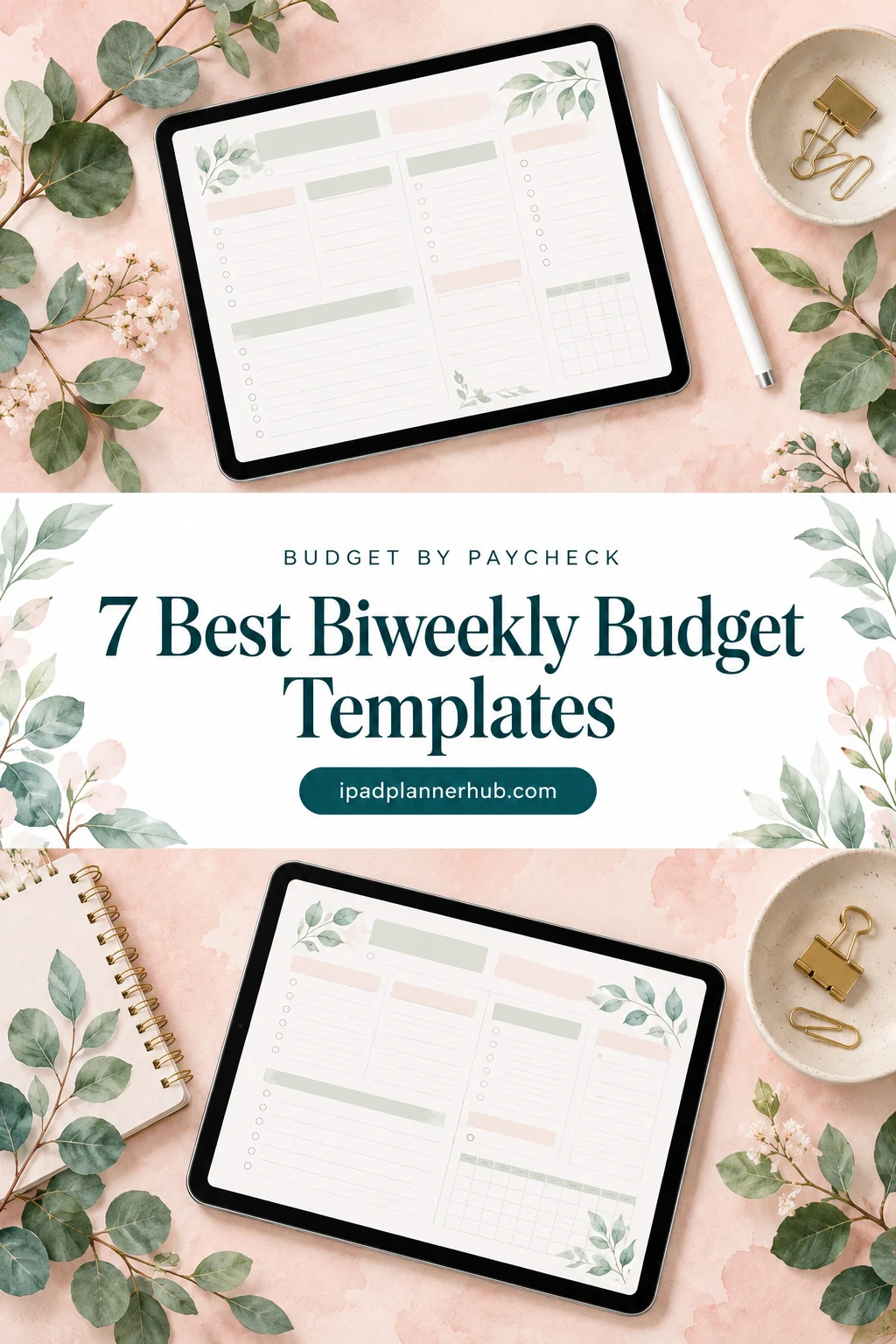
Below are 7 iPad budget templates I’d use to budget by paycheck: one with a ready biweekly page, one bill tracker for matching due dates to paydays, and five monthly planners that split neatly into pay periods. After the list: how a paycheck budget works in 5 steps, a sample split, the 2027 months with a third paycheck and a 15-minute routine for every payday.
The 7 Best Budget Templates I’d Split by Paycheck
I went through the paycheck and budget planners on Creative Fabrica and skipped the printable worksheets, Excel and Google Sheets files, Canva templates and anything dated 2026 or earlier. What’s left are hyperlinked PDFs made for GoodNotes and other iPad note apps.
TL;DR: 7 iPad budget templates for budgeting by paycheck: 1 planner with a ready biweekly budget page, 1 bill tracker for matching bills to paydays, and 5 monthly budget planners with income and bill pages you can split by pay period. Each card lists orientation, layouts and dates.
Quick Picks
- Best for overall for biweekly pay: Digital Budget Planner, Financial Planner
- Best for matching bills to paydays: Hyperlinked Bill Tracker Planner
- Best for dated planner for 2027: Budget Planner 2027 Portrait
- Best for short starter: Gold Budget Digital Planner/Hyperlinked
- Best for income-first layout: Budget Digital Planner Hyperlinked Tab
- Best for debt payoff: Monthly, Debt, Expense Digital Planner
- Digital Budget Planner, Financial Planner – Best overall for biweekly pay
- Hyperlinked Bill Tracker Planner – Best for matching bills to paydays
- Budget Planner 2027 Portrait – Best dated planner for 2027
- Gold Budget Digital Planner/Hyperlinked – Best short starter
- Budget Digital Planner Hyperlinked Tab – Best income-first layout
- Monthly, Debt, Expense Digital Planner – Best for debt payoff
- Undated Budget Planner for GoodNotes – Best minimalist

Best overall for biweekly pay
1. Digital Budget Planner, Financial Planner
Orientation: PortraitLayouts: Yearly, Monthly, BiweeklyDates: Undated
Best for: budgeters, savers, biweekly earners. Designed by ThePlannersDelight.
- A Monthly Budget page and a Bi-Weekly Budget page every month, each with three hyperlinked logs
- Daily spend count, weekly expense check-in and a monthly budget breakdown
- Sinking funds, cash envelopes, bill, debt and savings trackers
- 12 visual payoff and fund trackers: mortgage, car loan, rainy day, job loss fund and more
- 200+ undated pages, 10,000+ hyperlinks and 200+ PNG stickers; GoodNotes, Noteshelf, Notability; rated 5.0
This is the only template in my list with a real biweekly budget page built in, so it's where I'd start if you're paid every other week. The monthly page holds the big picture, and the biweekly page is where each paycheck gets its own small plan. The sinking funds page is handy for the yearly bills a single paycheck can't cover.
Best for matching bills to paydays
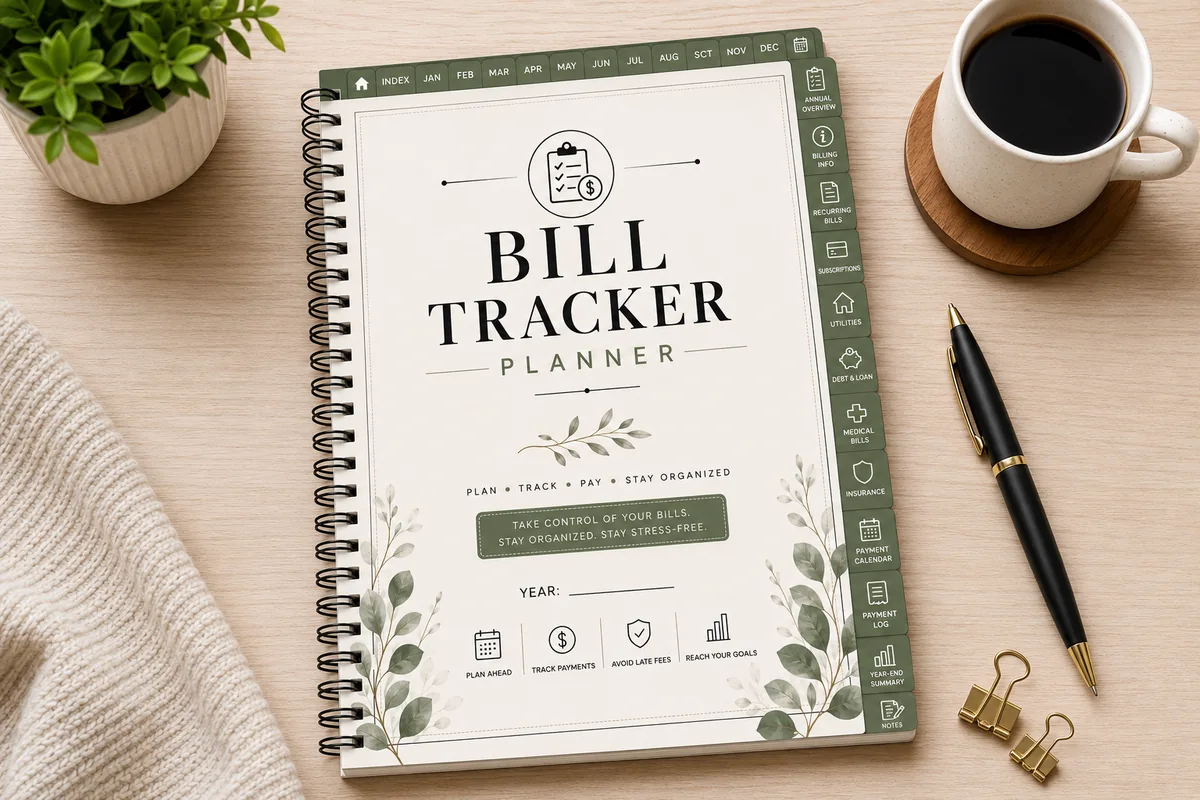
2. Hyperlinked Bill Tracker Planner
Orientation: Portrait (A4)Layouts: Annual bill overview, 12 monthly bill trackersDates: Undated
Best for: bill payers, households, subscription trackers. Designed by Azhir.
- Bill payment calendar and a payment log
- Annual bill overview, 12 monthly bill trackers and 12 monthly payment summaries
- Recurring bills, subscription, utility, medical, insurance and debt and loan trackers
- 52 hyperlinked pages, portrait A4, undated; works in GoodNotes, Notability, Noteshelf and ZoomNotes
Budgeting by paycheck starts with one question: which bill is due before which payday? This planner is only about bills, and that's why I like it here. Mark your paydays on the bill payment calendar, and the split between paychecks almost writes itself. Pair it with any monthly budget page if you want the spending side too.

Best dated planner for 2027
3. Budget Planner 2027 Portrait
Orientation: PortraitLayouts: Monthly, Weekly, Daily + Finance, Bills, Savings tabsDates: 2027Week start: Monday or Sunday
Best for: budgeters who also plan their week, 2027 planners, savers. Designed by Print Magic StudioX.
- Dated January to December 2027, in a Monday-start and a Sunday-start file
- Six tabs of its own: Finance, Bills, Savings, Shopping, Goals and Life, with 4 templates under each
- 12 monthly planners, a weekly page for every week and 365 daily pages with an hourly schedule
- Sized for the 13-inch iPad Pro portrait page and scales to any 4:3 tablet; a landscape version is sold separately
If you'd rather not keep a separate budget file, this one puts the money tabs right next to your calendar. Because it's dated, you can write your 2027 paydays straight onto the monthly pages and see which week each bill lands in. It's the pick for someone who plans the week and the budget in one place.
Best short starter
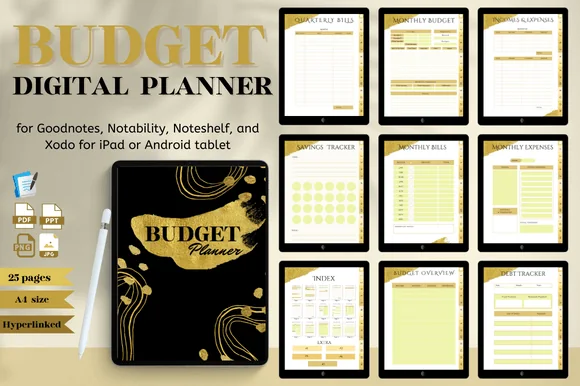
4. Gold Budget Digital Planner/Hyperlinked
Orientation: PortraitLayouts: Monthly, Quarterly bills
Best for: budget beginners, savers, minimalists. Designed by Nann Digital Art.
- 25 pages with an index and hyperlinked tabs, A4
- Monthly budget, incomes and expenses, monthly bills and quarterly bills
- Budget, expense and income trackers
- Savings plan, savings goal, financial goal and debt tracker
- Black and gold design; GoodNotes, Notability, Noteshelf and Xodo; rated 5.0
Short and to the point. I'd use the income tracker as a paycheck log, one line per payday, and the quarterly bills page to see what to set aside from each check before those bills arrive. If a big planner feels like homework, this is the gentle version.
Best income-first layout
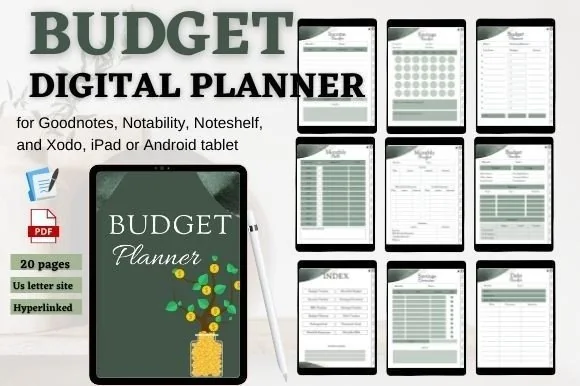
5. Budget Digital Planner Hyperlinked Tab
Orientation: PortraitLayouts: Monthly
Best for: savers, budget beginners. Designed by mixxdigitaldesign.
- 20 pages, US Letter, with an index page and hyperlinked tabs
- Income tracker, monthly budget, monthly bills and monthly expenses
- Budget tracker, savings overview, savings tracker and savings goal
- Financial goal and debt tracker, plus extra pages
- Made for GoodNotes, Notability, Noteshelf and Xodo on iPad
The income tracker sits right next to the monthly budget and bills pages, which is the order a paycheck budget follows: money in, then bills, then everything else. It's small and calm in sage green, so it suits anyone who wants a simple monthly page they can split into two pay periods by hand.
Best for debt payoff
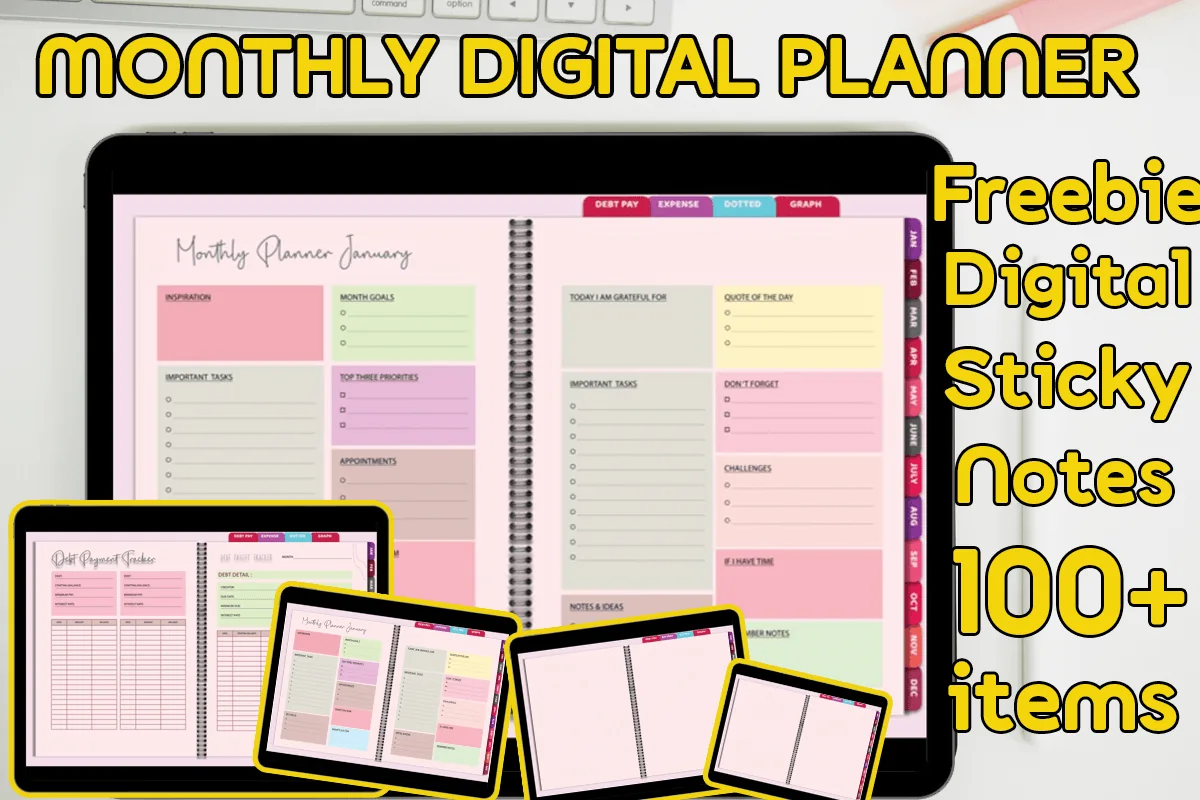
6. Monthly, Debt, Expense Digital Planner
Layouts: Monthly, Debt, ExpensesDates: Undated
Best for: budgeters, debt payoff planners. Designed by MOMAT THIRTYONE.
- 60 hyperlinked pages for 12 months, undated so it can be reused
- 12 monthly planners and 12 debt payment pages
- 24 expense pages, two for each month
- Dotted and graph notes, plus 100+ digital sticky notes (PNG); GoodNotes, Xodo, Noteshelf; rated 5.0
Two expense pages per month is a small detail that fits a twice-a-month paycheck nicely: one page per pay period. The debt payment page each month keeps the extra payment in view, so it doesn't get swallowed by whatever comes up. The colorful two-page spreads are cheerful without getting busy.
Best minimalist
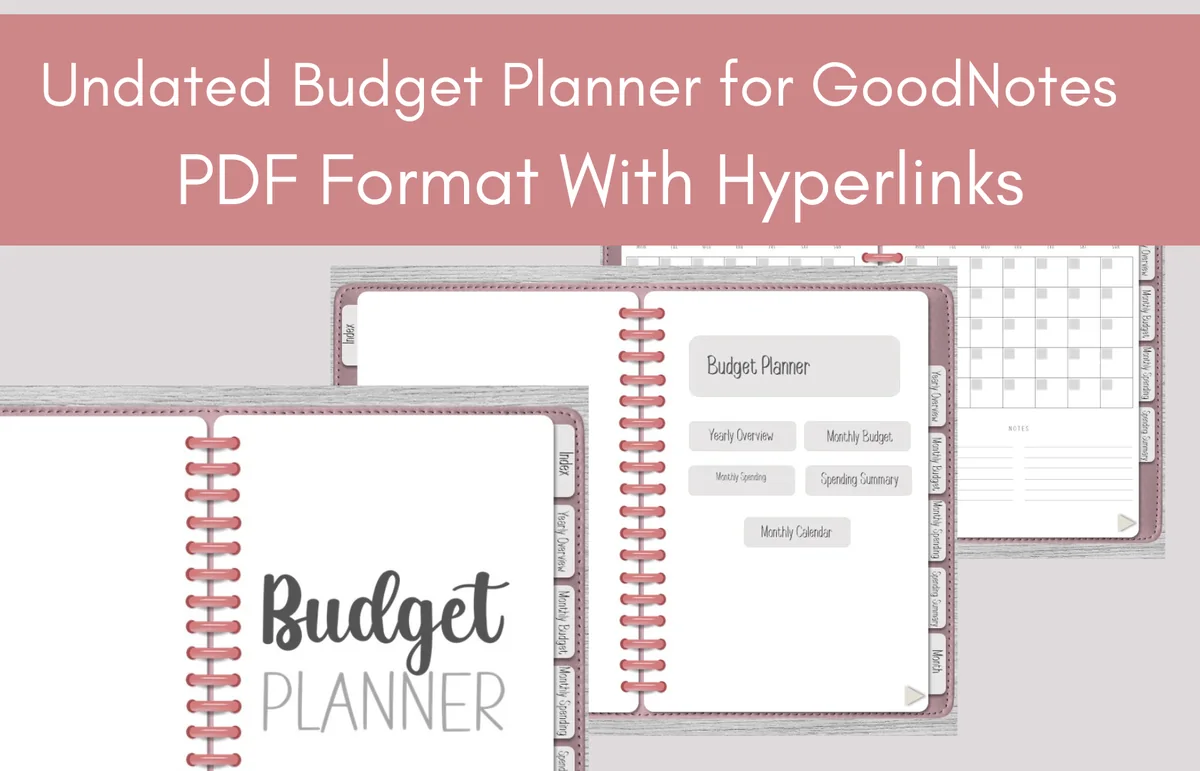
7. Undated Budget Planner for GoodNotes
Orientation: LandscapeDates: Undated
Best for: budget beginners. Designed by Perla Designs.
- 30 pages, hyperlinked PDF for GoodNotes
- Previews show a yearly overview, monthly budget, monthly spending and spending summary
- Monthly calendar page with ring-binder spreads
- Undated, so you can start in any month
Sometimes a plain page works best. The yearly overview is a natural place to list your paydays for the year, and the monthly spending page is easy to divide down the middle for the first and second paycheck. Pick it if you want a template that stays out of the way.
Quick Comparison
| Template | Best for | Paycheck setup | Stand-out extra |
|---|---|---|---|
| 1. Digital Budget Planner, Financial Planner | Biweekly earners | Ready biweekly page | Sinking funds & envelopes |
| 2. Hyperlinked Bill Tracker Planner | Bill-heavy months | Bill calendar + payday marks | Subscription & utility trackers |
| 3. Budget Planner 2027 Portrait | Planning + budget in one | Paydays on dated months | Finance, Bills & Savings tabs |
| 4. Gold Budget Digital Planner/Hyperlinked | Budget beginners | Income log per payday | Quarterly bills page |
| 5. Budget Digital Planner Hyperlinked Tab | Simple monthly split | Income, then bills | Savings goal jar |
| 6. Monthly, Debt, Expense Digital Planner | Paying off debt | 2 expense pages a month | Monthly debt payment page |
| 7. Undated Budget Planner for GoodNotes | Minimalists | Split a monthly page by hand | Yearly overview |
What I Look For in a Paycheck Budget Template
- An income page. A paycheck budget starts with paydays, so I want a place to log each check, not just one “monthly income” box.
- A bill list with due dates. Without due dates you can’t tell which paycheck a bill belongs to.
- Room for two plans a month. Either a real biweekly page or a monthly page wide enough to split into two columns.
- Sinking funds or quarterly bills. Car insurance, gifts and renewals are easier when every paycheck sets a little aside.
- Undated or dated for the right year. Undated pages let you start in any month; a 2027 planner saves you writing the dates.
What Is a Biweekly Budget?
A biweekly budget plans your money one paycheck at a time when you’re paid every two weeks. You still look at the whole month, but bills and spending are assigned to the paycheck that arrives before them. A paycheck planner or paycheck budget template is the same idea for any pay schedule: weekly, every two weeks or twice a month.
Biweekly vs Semi-Monthly vs Weekly Pay
| Pay schedule | Paychecks a year | How to budget |
|---|---|---|
| Weekly | 52 | A weekly paycheck budget template: one small plan per check, with rent split across two or more checks |
| Biweekly (every other Friday) | 26, sometimes 27 | Two paychecks most months, three in two (or three) months a year |
| Semi-monthly (15th and last day) | 24 | Always two paychecks a month on fixed dates; the easiest to split |
| Monthly | 12 | A regular monthly budget template is enough |
Biweekly and semi-monthly sound alike but aren’t. Semi-monthly pay always arrives twice a month. Biweekly pay drifts through the calendar, so a few months get a third paycheck. That drift is the whole reason a biweekly budget template is worth it.
How to Budget by Paycheck in 5 Steps
- List your paydays. Write every payday for the month (or the year) on the calendar or income page.
- List your bills with due dates. Rent, car, phone, utilities, insurance, minimum debt payments, subscriptions.
- Assign each bill to a paycheck. A bill goes to the last paycheck that arrives before its due date. Bills due between the 1st and the 14th usually come from the check before them.
- Give the rest of each paycheck a job. Groceries, gas, savings, debt, sinking funds and fun money, split across both checks.
- Track as you go. Check off bills as they’re paid and log spending, so the next paycheck starts from real numbers.
A Sample Bi-Weekly Paycheck Budget Split
Here’s how a bi weekly paycheck budget template might look with $1,800 take-home pay per check. The numbers are only an example; the pattern is what matters: the big bill goes to one check, smaller bills and more savings to the other.
| Line | Paycheck 1 ($1,800) | Paycheck 2 ($1,800) |
|---|---|---|
| Bills | Rent $1,200 (due 1st), phone $60 (due 8th) | Car $350 (20th), utilities $150 (22nd), internet $70 (25th), insurance $130 (28th) |
| Debt | — | Credit card $300 |
| Groceries and gas | $250 + $80 | $250 + $80 |
| Savings and sinking funds | Savings $100 | Savings $250, sinking funds $100 |
| Fun money and buffer | $60 + $50 buffer | $120 |
| Left to assign | $0 | $0 |
Notice the trick: the month is planned on two paychecks ($3,600), not on the yearly average. Twenty-six checks of $1,800 come to $46,800, or $3,900 a month on average, but no single month actually brings $3,900. Planning on two checks keeps every month safe, and the extra paychecks become a bonus.
Third Paycheck Months in 2027
2027 starts on a Friday and has 53 Fridays, so for Friday paydays it depends on your schedule:
- First payday on Friday, January 1, 2027: 27 paychecks in the year, with a third paycheck in January, July and December.
- First payday on Friday, January 8, 2027: 26 paychecks, with a third paycheck in April and October.
If your payday is another weekday, count it on your calendar once and circle the months with three. Then decide before the money arrives what a third paycheck does: an emergency fund, an extra debt payment, the next quarterly bill or a payday savings challenge. For trackers you color in on every payday, see the biweekly savings challenge section of my savings challenges guide.
How to Budget Every Payday: a 15-Minute Routine
The title promises a template for every payday, so here’s what I’d do on each one. It fits into a coffee break.
- Log the check (2 minutes). Write the actual amount on the income page. Overtime, tips or a smaller check change the plan, so start from the real number.
- Pay or schedule this check’s bills (5 minutes). Open the bill list, check off what’s due before the next payday and set any autopays.
- Move savings first (2 minutes). Transfer savings and sinking funds right away, before spending starts.
- Look back at the last two weeks (4 minutes). Compare spending with the plan for the previous check. Over on groceries? Trim fun money this time.
- Write one note for next payday (2 minutes). A bill that’s coming, a birthday, a trip. Future you will thank you.
Living Paycheck to Paycheck? Start Here
A paycheck to paycheck budget template doesn’t need extra pages; it needs a smaller first goal. Start with a buffer of one week’s groceries kept in checking, so a late bill or a short check doesn’t snowball. Put any third paycheck toward that buffer first. Once the buffer exists, move the bills you can (many companies let you change a due date) so they spread more evenly between your two paychecks.
Biweekly Budget Template, Spreadsheet or App?
Most free biweekly budget templates online are Excel or Google Sheets files. A spreadsheet adds the numbers for you, which is nice, but on an iPad it’s fiddly to edit with a finger. Budgeting apps sync with your bank, though many are subscriptions. A PDF template in GoodNotes sits in between: a single file you keep, written by hand with an Apple Pencil, and quick to open on payday. If you like both, keep the math in a spreadsheet and the plan, the bill check-offs and the payday notes on the iPad.
How to Set Up a Paycheck Budget in GoodNotes
- Save the PDF and open it on the iPad: Share → GoodNotes → Import as New Document.
- On the yearly or income page, write all of your paydays for the year and circle the third-paycheck months.
- On the bill tracker, add the due date next to each bill and a “P1” or “P2” tag for the paycheck that covers it.
- No biweekly page? Draw a line down the middle of the monthly budget page with the ruler tool, or duplicate the page and title one copy per paycheck.
- Bookmark the income page and the bill tracker so they’re one tap away on payday.
FAQ
How do I budget when I get paid biweekly?
List your paydays and your bills with due dates, then assign each bill to the last paycheck before it’s due. Split groceries, gas and savings across both checks, and plan the month on two paychecks, treating any third check as extra.
What’s the difference between a biweekly and a semi-monthly budget?
Biweekly pay comes every two weeks, 26 (sometimes 27) times a year, so the dates move and some months get three checks. Semi-monthly pay comes twice a month on set dates, 24 times a year. A semi-monthly budget can use the same two columns every month; a biweekly one needs a glance at the calendar each month.
How much should I save per paycheck?
A common starting point is the 20% of the 50/30/20 rule: on an $1,800 check that’s $360 for savings and extra debt payments, with $900 for needs and $540 for wants. If that’s out of reach, start with any fixed amount every payday and raise it when a bill is paid off.
What if one paycheck’s bills are bigger than the paycheck?
Usually that’s rent. Set part of the other paycheck aside for it (half the rent from each check works well), or ask the companies behind your smaller bills to move their due dates to the other half of the month.
What is a paycheck planner?
It’s a budget planner organized around paydays instead of calendar months: an income log, a bill list with due dates and a short plan for each paycheck. Template #1 above has a ready biweekly page; the others work as paycheck planners once you split the monthly page in two.
Can I use a biweekly budget template in GoodNotes?
Yes. All seven templates here are PDFs for iPad note apps such as GoodNotes and Notability. You write on them with an Apple Pencil, jump between pages with the hyperlinked tabs and duplicate any page you need more of.
Is a free biweekly budget template enough?
For the method, yes: a free spreadsheet or a blank page with two columns teaches you how a paycheck budget works. A paid template adds the pages around it, like bill trackers, sinking funds and debt payoff, already linked together, which is what keeps people coming back to it after the first month.
Final Thoughts
Budgeting by paycheck isn’t more work than a monthly budget; it’s the same budget, cut along the lines of your real paydays. Pick a biweekly budget template, write down your paydays and bills once, and give each check 15 minutes. For full budget planners, see my digital budget planners for iPad; for page ideas, the budget planner ideas list; or browse all budget planners. Want a simple rule for splitting each paycheck? Try my 50/30/20 budget templates with a worked example.
You May Also Like
This post contains affiliate links. If you buy through them, I may earn a small commission at no extra cost to you. Learn more.