Every January starts the same way: a fresh planner, big plans, neat handwriting. By March the planner is somewhere under a pile of notes, and the plans live in five different apps. A digital planner for iPad makes it a lot easier to keep going, and the best digital planners make it almost effortless: it’s always in your bag, the tabs take you to any day in one tap, and a messy week can be cleaned up with a swipe instead of correction tape.
Below are the best digital planners for 2027 that I’d happily keep all year, ten of the best iPad planners from Creative Fabrica made for GoodNotes and Notability: dated and undated, minimal and colorful, daily, weekly and all-in-one. After the list you’ll find how to choose between them, dated vs undated, what’s inside a 2027 planner, which one fits your life, and the small habits that keep a planner in use long after January.
The 10 Best Digital Planners for 2027 for iPad and GoodNotes
I went through well over a hundred listings and skipped printables, Canva templates, planners made for other devices and anything dated only for past years. Every planner here is a hyperlinked PDF made for the iPad and apps like GoodNotes or Notability. The last two are favorites from my weekly planner roundup that also make great all-year planners.
TL;DR: 10 iPad digital planners for 2027 from Creative Fabrica: dated 2027 and undated, minimal and colorful, daily, weekly and all-in-one. Each card lists orientation, layouts, dates and week start, plus who it suits.
Quick Picks
- Best for dated 2027: All-in-One Digital Planner 2027
- Best for with calendar shortcuts: 2027 Digital Planner | Monday and Sunday
- Best for soft and simple: Undated Digital Daily Life Planner
- Best for health goals: All in One Digital Planner Undated V2.3
- Best for starting any day: Undated Digital Planner
- Best for home life: IPad Daily Digital Planner ( 620 Pages )
- All-in-One Digital Planner 2027 – Best dated 2027
- 2027 Digital Planner | Monday and Sunday – Best with calendar shortcuts
- Undated Digital Daily Life Planner – Best soft and simple
- All in One Digital Planner Undated V2.3 – Best for health goals
- Undated Digital Planner – Best for starting any day
- IPad Daily Digital Planner ( 620 Pages ) – Best for home life
- Undated Digital Planner ( 60 Pages ) – Best lightweight
- Goal Getter Planner 2027 Portrait – Best for goals in 2027
- Undated Weekly Digital Planner – Best weekly-first
- Digital Planner for Ipad, GoodNotes – Best for layout choice
Best dated 2027
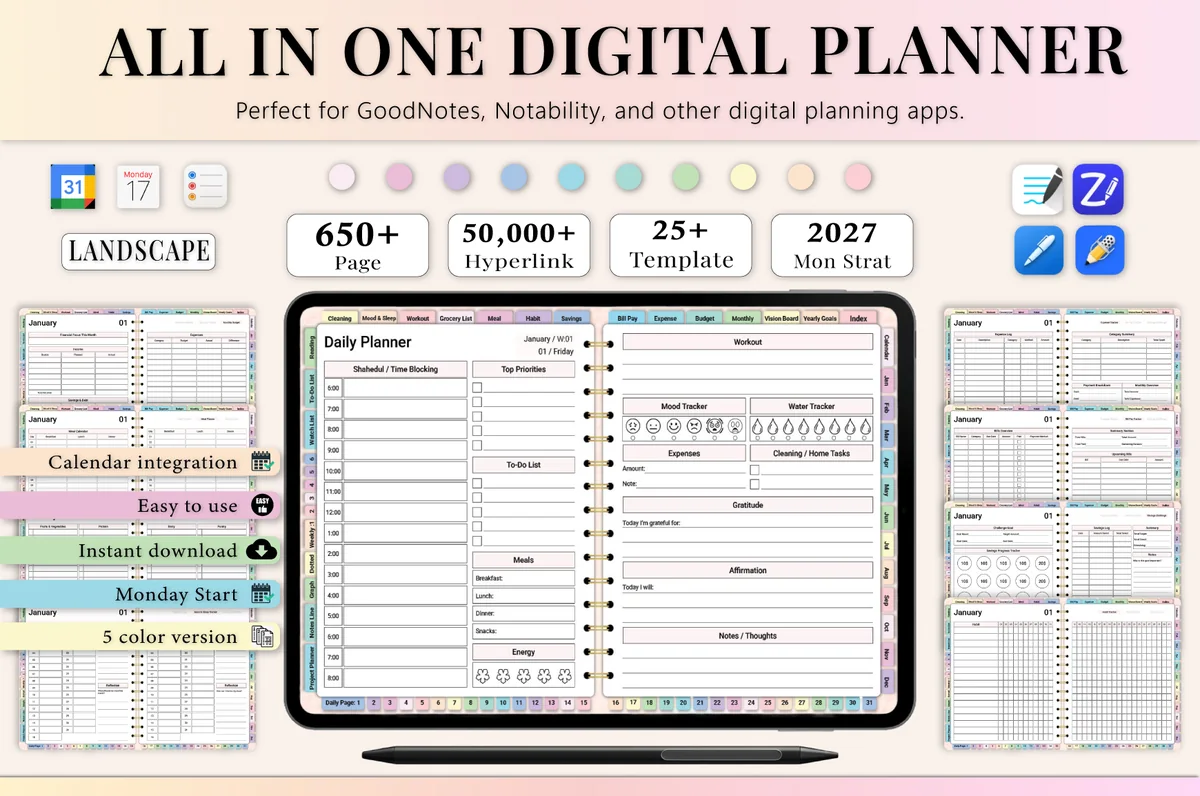
1. All-in-One Digital Planner 2027
Orientation: LandscapeLayouts: Yearly, Monthly, Weekly, DailyDates: 2027Week start: Monday
Best for: busy professionals, budgeters, people who want one planner for everything. Designed by Heartcraft Studio.
- 650+ hyperlinked pages, landscape, Monday start, in 5 color versions
- 2027 year at a glance, yearly goals, vision board and monthly calendars
- Monthly budget, bill and expense trackers plus a savings challenge page
- Habit tracker, meal planner, grocery list and workout log
- Works in GoodNotes, Notability, Noteshelf and ZoomNotes
If you want every date already filled in for 2027, this is the planner I'd open first. It packs money, health and goal pages around the calendar, so there's no need for a second planner for budgets or habits. The landscape layout gives each week plenty of room on a bigger iPad.
Best with calendar shortcuts
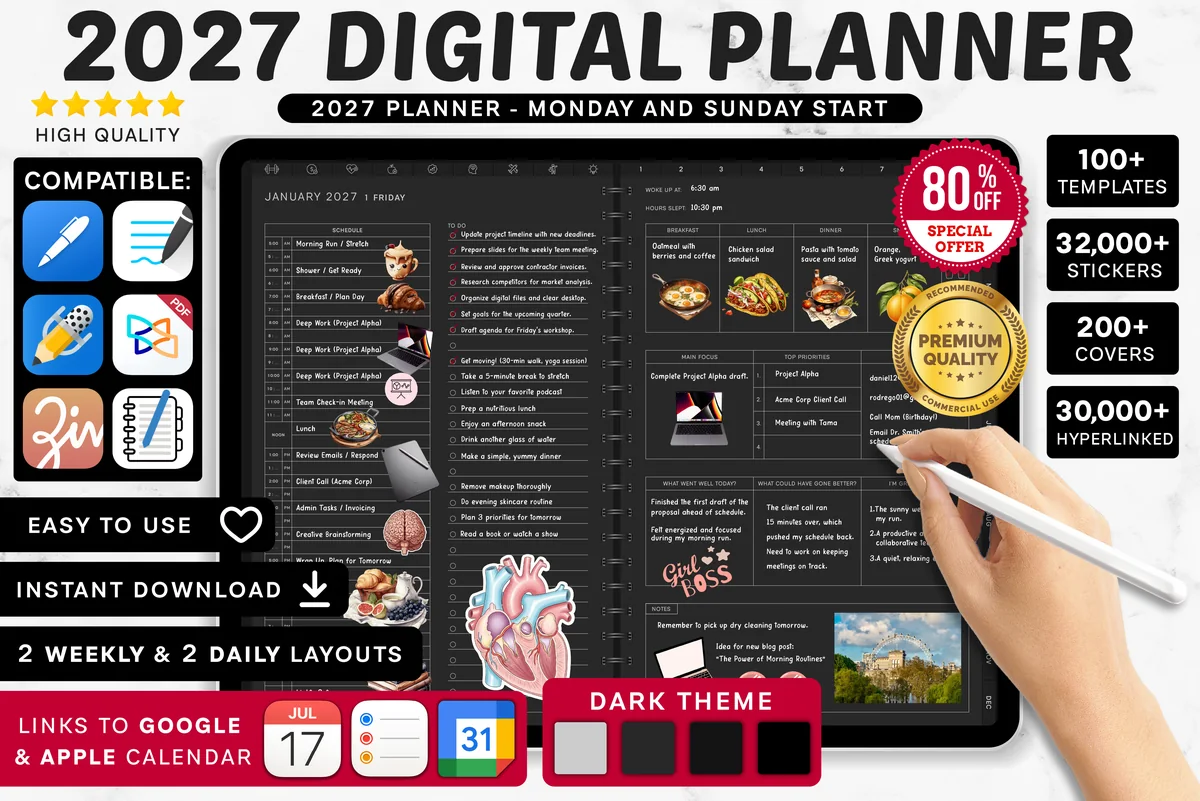
2. 2027 Digital Planner | Monday and Sunday
Orientation: LandscapeLayouts: Yearly, Quarterly, Monthly, Weekly, DailyDates: 2027Week start: Monday or Sunday
Best for: dark mode fans, calendar app users, finance trackers. Designed by SuperDigitalPlanners.
- 2027 planner with Monday and Sunday start versions
- Links that open Apple Calendar, Reminders and Google Calendar
- 2 weekly and 2 daily layouts in a dark theme
- Thousands of pre-cropped stickers and icons plus 200+ covers
- Pages can be duplicated or removed; step-by-step instructions included
The dark theme is easy on the eyes when I plan in the evening, and having two weekly and two daily layouts means the planner can change with a busier season. The calendar buttons open your apps in one tap, which is handy, but they don't copy events onto the pages, so plan to jot the important ones down yourself.
Best soft and simple
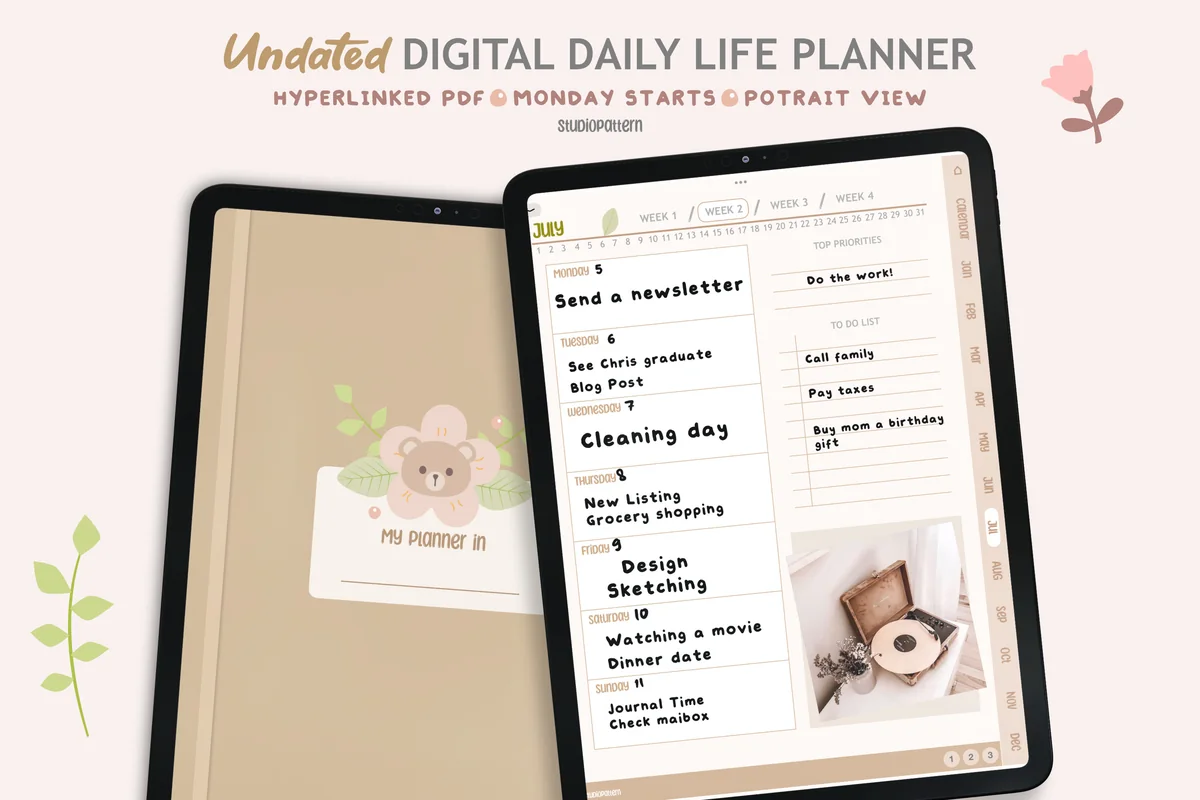
3. Undated Digital Daily Life Planner
Orientation: PortraitLayouts: Yearly, Monthly, Weekly, DailyDates: UndatedWeek start: Monday
Best for: minimalists, soft neutral lovers, beginners. Designed by studiopattern.
- Calendar, yearly overview, monthly, weekly and daily pages
- Undated and hyperlinked, Monday start, portrait
- 4 extra templates and a blank section page
- Matching covers; works in GoodNotes, Notability and Xodo; rated 5.0
Not everyone needs a hundred trackers. This one keeps the calendar, month, week and day, and adds a blank section for whatever matters to you this year. The soft beige pages with tiny illustrations are pleasant to open every morning.
Best for health goals
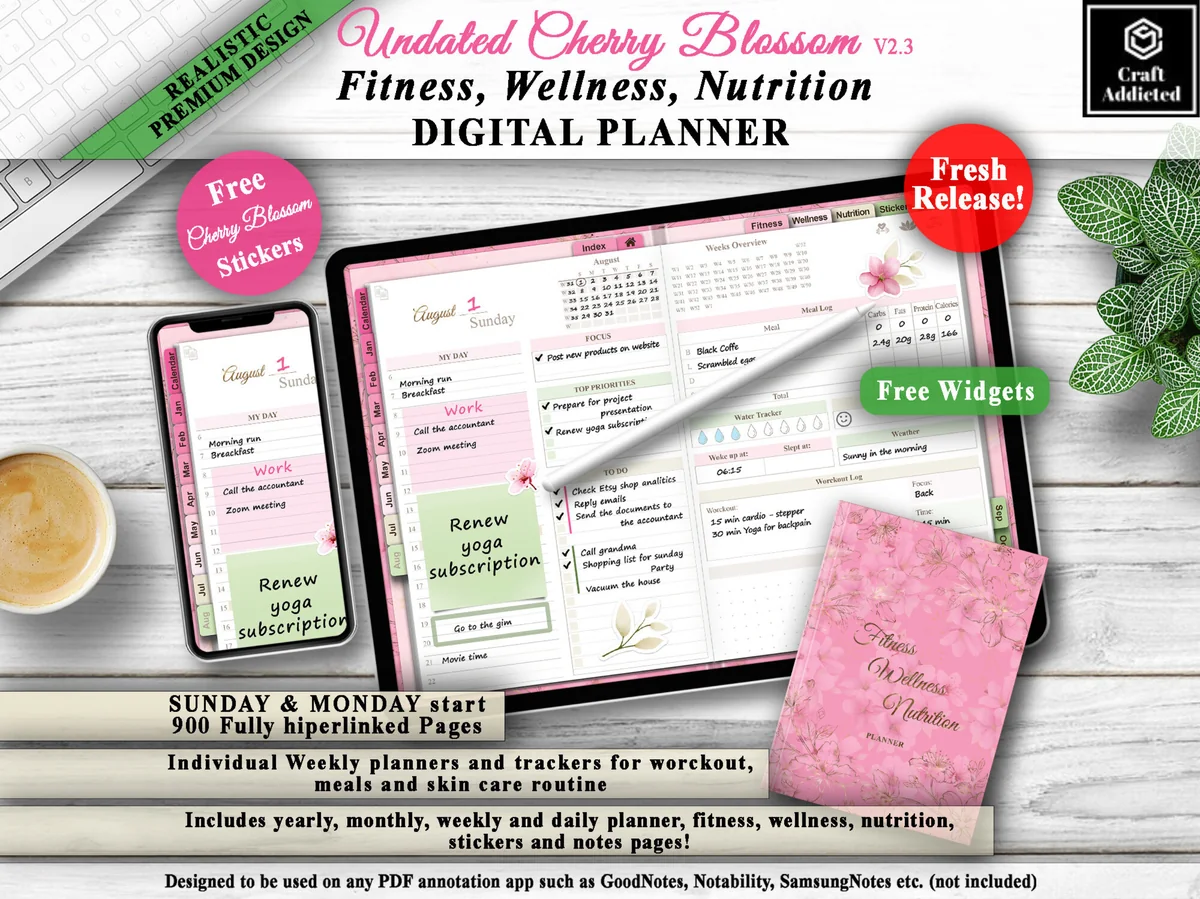
4. All in One Digital Planner Undated V2.3
Orientation: LandscapeLayouts: Yearly, Monthly, Weekly, DailyDates: UndatedWeek start: Monday or Sunday
Best for: fitness fans, wellness planners, pink lovers. Designed by CraftAddicted.
- 900 hyperlinked pages, Sunday and Monday start
- Yearly, monthly, weekly and daily planner pages
- Workout, meal, steps, sleep, water and mood trackers
- Pink cherry blossom design, free stickers and widgets
If 2027 is the year you want to move more and eat better, this planner puts the workout log and meal pages right next to your calendar. It's undated, so you can start in January or the week you're ready.
Best for starting any day
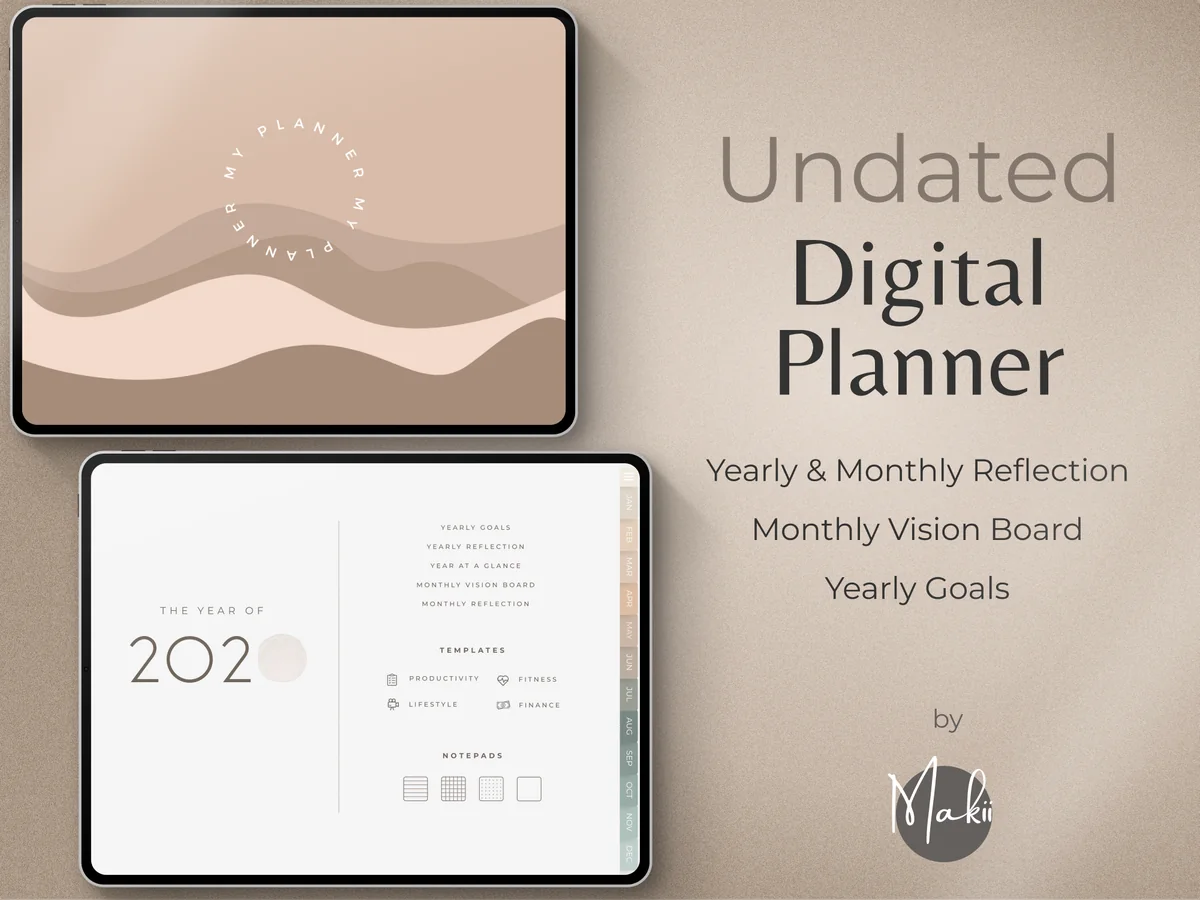
5. Undated Digital Planner
Layouts: Yearly, Monthly, Weekly, DailyDates: UndatedWeek start: Monday or Sunday
Best for: minimalists, reflective planners, goal setters. Designed by Makii.
- Undated, with Monday and Sunday start versions
- Dashboard home page for the things you check most
- Yearly goals, year at a glance and yearly reflection
- Monthly vision board and reflection pages, plus weekly and daily pages
- 250 pre-cropped stickers and modern covers; works in GoodNotes, Notability and Xodo
Not everyone starts a planner on January 1, and this one doesn't mind. I like the dashboard page: one place for goals and reminders, so you don't dig through tabs. The soft beige design and the monthly reflection pages make it feel more like a calm journal than a to-do machine.

Best for home life
6. IPad Daily Digital Planner ( 620 Pages )
Orientation: PortraitLayouts: Yearly, Monthly, Weekly, DailyDates: Undated
Best for: homemakers, busy parents, meal planners. Designed by Tas Creative Studio.
- 620 undated pages, portrait, with an index that links to every page
- Year at a glance, 12 monthly calendars, weekly overviews and daily pages
- Daily, weekly and monthly cleaning planner, meal planner and grocery list
- Budget, subscription and password trackers, self-care planner and gratitude journal
- Works in GoodNotes, Notability, Noteshelf and Xodo
This is the planner I'd suggest to anyone juggling a home: the cleaning schedules and meal pages sit right next to the calendar, so chores and dinners get planned in the same place as appointments. The warm neutral pages keep a lot of content from feeling busy.

Best lightweight
7. Undated Digital Planner ( 60 Pages )
Orientation: LandscapeLayouts: Weekly, DailyDates: Undated
Best for: beginners, wellness planners, Pomodoro fans. Designed by Tas Creative Studio.
- 60 undated pages in landscape, in a pastel lavender design
- Daily pages for each weekday, weekly planner and weekly self-care checklist
- Habit tracker, goal setting, reading log and Pomodoro planner
- Budget, expense, debt, savings and subscription trackers
- Works in GoodNotes, Notability, Noteshelf and Xodo
Big planners can feel heavy, both in GoodNotes and in your head. With 60 pages, this one opens fast and is easy to learn, yet it still covers habits, health and money. Because the daily pages are reusable, you duplicate what you need instead of carrying a full year you might not use.
Best for goals in 2027
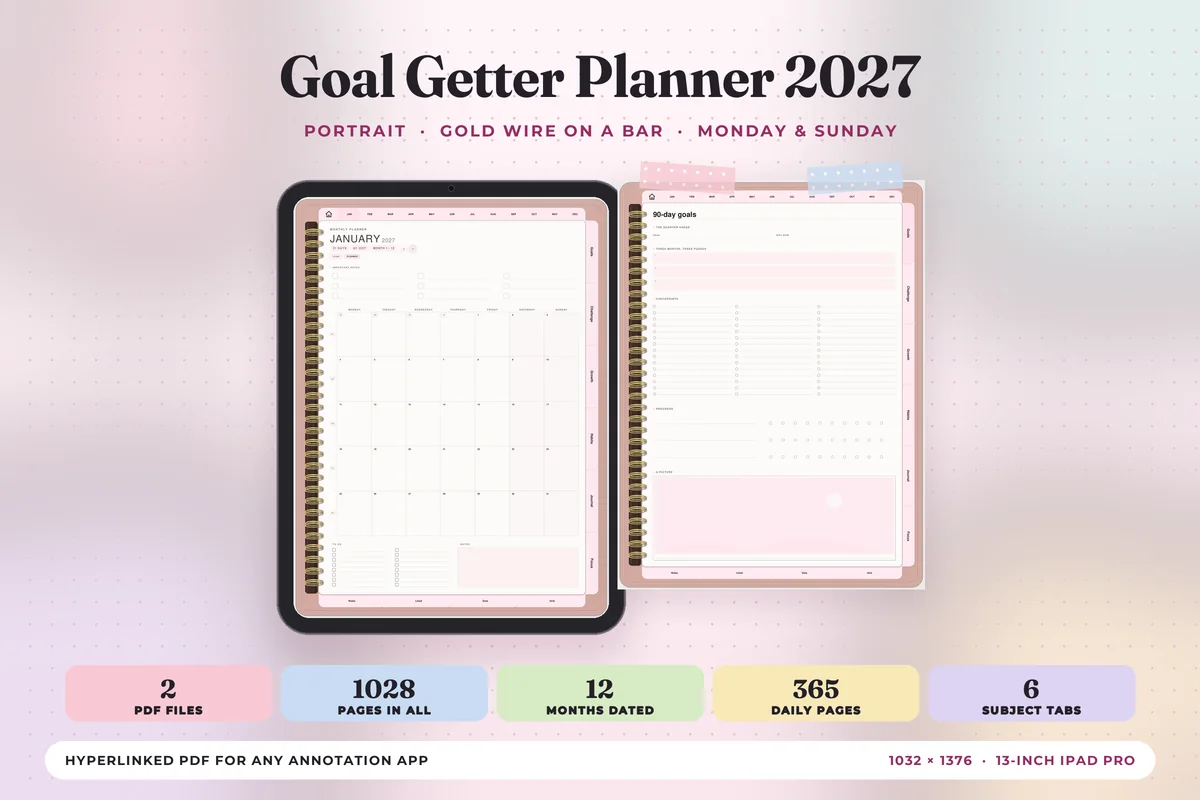
8. Goal Getter Planner 2027 Portrait
Orientation: PortraitLayouts: Monthly, Weekly, Daily + 24 goal templatesDates: 2027Week start: Monday or Sunday
Best for: goal setters, 2027 planners, habit builders. Designed by Print Magic StudioX.
- Dated 2027 with 6 tabs: Goals, Challenge, Growth, Habits, Journal and Focus
- 12 monthly planners, a weekly page for every week and 365 daily pages
- 24 subject templates and 30 pages of note paper
- 2 hyperlinked PDF files, Monday or Sunday start, portrait
A dated 2027 planner built around goals: each week has a "one thing" line and space for wins, and the Goals and Habits tabs keep the bigger picture one tap away. Good for anyone who wants next year to be a year of progress, not just appointments.

Best weekly-first
9. Undated Weekly Digital Planner
Layouts: Yearly, Monthly, WeeklyDates: UndatedWeek start: Monday
Best for: weekly planners, paper planner lovers, minimalists. Designed by NDP Design Studio.
- Undated, Monday start, with a realistic textured cover and spiral
- Year, month and week pages you can reach in a few taps
- A GoodNotes file plus a hyperlinked PDF for other apps
- Notes section with grid, dot, lined and blank pages
- Illustrated PDF instruction guide
This is my favorite from my weekly planner roundup, and it earns a place here because it's undated: start it any Monday in 2027 and keep going into 2028. It looks the most like a paper planner of anything on this list, spiral included, which makes the switch to digital feel less strange.
Best for layout choice
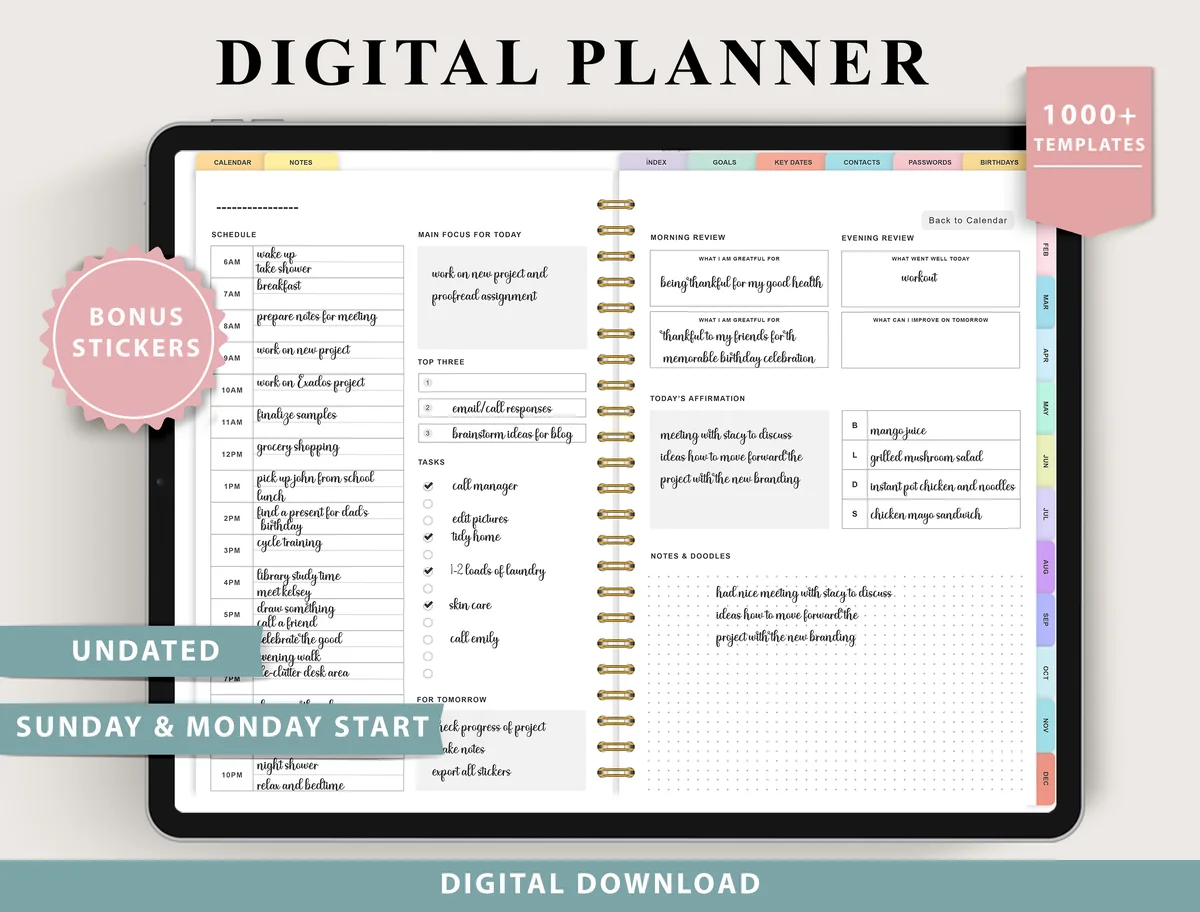
10. Digital Planner for Ipad, GoodNotes
Layouts: Monthly, Weekly (4 layouts), Daily (4 layouts), 100+ templatesDates: UndatedWeek start: Monday or Sunday
Best for: indecisive planners, fitness trackers, finance trackers. Designed by ThePlannersDelight.
- Undated, Monday and Sunday start
- 4 weekly layouts (boxed, horizontal, scheduled) and 4 daily layouts
- 100+ templates: fitness, finance, nutrition, wellness and productivity trackers
- Routines, chores and cleaning, trip planner, birthdays and bucket list pages; bonus digital stickers
Four weekly and four daily layouts in one file mean you can try a boxed week in January and a scheduled one in March. It's undated, so it carries over into the next year too, and the 100+ templates cover fitness, money and home.
Quick Comparison
| Planner | Best for | Dates | Stand-out extra |
|---|---|---|---|
| 1. All-in-One Digital Planner 2027 | A complete dated year | 2027, Monday start | Budget, habit & meal pages |
| 2. 2027 Digital Planner | Monday and Sunday | Dark theme + calendar links | 2027, Mon or Sun start | 2 weekly + 2 daily layouts |
| 3. Undated Digital Daily Life Planner | Simple everyday planning | Undated | Blank section to customize |
| 4. All in One Digital Planner Undated V2.3 | Fitness and wellness | Undated | Workout and meal trackers |
| 5. Undated Digital Planner | Minimal undated planning | Undated, Mon or Sun | Dashboard + reflections |
| 6. IPad Daily Digital Planner ( 620 Pages ) | Home and family planning | Undated | Cleaning + meal planners |
| 7. Undated Digital Planner ( 60 Pages ) | Small, quick to learn | Undated | Pomodoro + health pages |
| 8. Goal Getter Planner 2027 Portrait | Goals and habits | 2027 | 6 goal-focused tabs |
| 9. Undated Weekly Digital Planner | Paper-like weekly planning | Undated | Separate GoodNotes file |
| 10. Digital Planner for Ipad, GoodNotes | Trying different layouts | Undated | 4 + 4 layouts |
Best Planners by Type
The list above covers the best digital planners for a whole year. If you already know the kind of planner you need, each roundup below goes one level deeper, with its own picks and what is inside them:
- Daily digital planners
Style: one full page for every day, with room for tasks, notes and a short schedule.
Best for: anyone who plans the night before and likes a fresh page each morning. - Day planners
Style: hour-by-hour layouts that split the day into time blocks.
Best for: busy days with appointments, shifts or school runs. - Weekly digital planners
Style: the whole week on one or two pages, usually with a notes column.
Best for: a Sunday planning routine and a quick look at the week ahead. - Weekly planner designs
Style: the same weekly idea sorted by look, from minimal to colorful.
Best for: picking a weekly layout by aesthetic first. - Digital monthly planners
Style: a month at a glance with space for deadlines and birthdays.
Best for: people who only need the big picture. - Undated digital planners
Style: blank dates you fill in yourself, often in a minimalist style.
Best for: starting mid-year or skipping weeks without wasted pages. - Digital life planners
Style: one file with calendars, goals, finance and home sections.
Best for: keeping work, home and goals in one place. - Cute and aesthetic digital planners
Style: pastel, floral or kawaii designs with matching stickers.
Best for: a planner you want to open every day. - Digital budget planners
Style: income, bills and spending trackers by month.
Best for: a monthly money check-in; pair with the savings challenges for 2027. - Digital habit trackers
Style: grids and streak pages for daily habits.
Best for: building two or three small habits at a time. - Digital study planners
Style: class schedules, assignment lists and exam countdowns.
Best for: students; see also academic planners that run by semester. - Digital work planners
Style: meeting notes, project pages and priority lists.
Best for: work weeks with many meetings and moving deadlines. - Digital meal planners
Style: weekly menus with grocery lists.
Best for: planning dinners and one shopping trip a week; for training days, the workout planners. - Digital travel planners
Style: itineraries, packing lists and budgets for a trip.
Best for: putting a whole trip in one file.
What I Look For in an iPad Digital Planner
A planner preview can look beautiful and still be annoying to use every day. These are the things I check before anything else:
- Navigation that saves taps. Year, month, week and day pages should all be linked, with tabs you can reach from any page. If finding today takes more than two taps, you’ll stop opening it. A dashboard planner like #5 helps here: one home page for the things you check most.
- The right main layout. Decide where you actually plan: on daily pages, on a weekly spread or on a monthly calendar. Everything else is a bonus.
- Dated 2027 or undated. More on this below, but it’s the biggest choice after layout.
- Made for the iPad. The listing should name GoodNotes, Notability or the iPad. Printables and Canva templates are a different product.
- Portrait or landscape. Portrait feels like a notebook; landscape gives you room for two-page spreads, especially on an iPad Pro.
- Extras you’ll really use. Budget pages, habit trackers and stickers are only worth it if you need them. A smaller planner you use beats a giant one you scroll past.
Dated 2027 or Undated: Which One Should You Pick?
A dated 2027 digital planner has every date already filled in, from January 1 to December 31, so it works as an annual planner and a daily notebook in one file. It’s the closest thing to a paper planner: open it, find today and write. It’s a great choice if you plan almost every day and like seeing the whole year mapped out.
An undated planner has blank dates you fill in yourself. You can start in any month, skip weeks without leaving empty pages behind and keep using the same file in 2028, which makes it a reusable planner. It suits people who plan in bursts, or who are buying a planner in March and don’t want to start with two blank months.
Several planners on my list give you both in one file: dated 2027 pages plus an undated version. If you can’t decide, that’s the safest choice.
What’s Inside a 2027 Digital Planner
Most 2027 digital planners are built the same way, from the big picture down to the day. Here’s what you can expect, using the planners above as examples:
- Year at a glance and yearly goals: one page with all of 2027, plus space for goals or a vision board, as in #1.
- Monthly calendars: twelve linked months for deadlines, birthdays and appointments. #8 has 12 monthly planners.
- Weekly spreads: one spread for every week; some planners give you more than one layout, like the two weekly layouts in #2.
- Daily pages: a page for each day with a schedule and to-do list. #8 has 365 of them.
- Life sections: budget and bill trackers, habit trackers, meal planners and workout logs; #1 packs all of these into one file.
- Extras: covers, stickers, note paper and instructions. Nice to have, but not the reason to pick a planner.
Big all-in-one files run to hundreds of pages (#1 has over 650), while a lightweight undated planner like #7 has 60. More pages isn’t better if you only plan by the week.
Daily, Weekly or All-in-One: Types of Digital Planners for iPad
- Daily planners give each day its own page with a schedule, priorities and a to-do list. Best for busy, appointment-heavy days. My full list: best daily digital planners.
- Weekly planners put the whole week on one spread, so you can balance work, errands and plans at a glance. My picks: best weekly digital planners.
- Monthly planners show the month as a calendar for deadlines, birthdays and big events. Most planners above include monthly pages.
- All-in-one life planners combine all of the above with budget, health, meal and goal pages. Great if you want one file for your whole life, and the reason most planners on this list are big.
Which Digital Planner Is Best for You?
There’s no perfect planner for everyone: the same file can suit one person and be too much for another. If you’re not sure where to start, this is how I’d match the list to your week:
- Busy with appointments and work: #2 makes a good appointment planner, because its links open Apple Calendar, Reminders and Google Calendar. A PDF can’t send reminders, so you plan in the planner and let the calendar app do the pinging.
- Students: #8 comes with 24 subject templates and note paper next to the dated 2027 pages.
- Running a home and family: #6 has cleaning, meal, grocery and budget pages alongside the calendar.
- Health and fitness goals: #4 tracks workouts, meals, steps, sleep, water and mood.
- Minimalists: #3 or #5, both undated with only the essentials, or #7 if you want a small, fast file.
- People who like to switch things up: #10 has 4 weekly and 4 daily layouts in one planner.
How to Keep Using Your Digital Planner All Year
Picking a planner is the easy part. These small habits are what get it past February:
- Use only three sections at first. For example: monthly calendar, weekly spread and one tracker. Add the rest once those feel like a habit.
- Give it a fixed time. Five minutes with your morning coffee, or ten minutes on Sunday evening to set up the week. The planner becomes part of a routine instead of a chore.
- Keep the iPad where you plan. Put GoodNotes on your home screen and leave the planner open on today’s page, so it’s one tap away.
- Don’t restart, just skip. Missed two weeks? Go to today and carry on. With an undated planner you can even move the dates.
- Review each month. At the end of the month, look back at what worked, move unfinished tasks and set two or three goals for the next one.
- Make it pleasant. A new cover for each season or a few stickers on the weekly spread sounds small, but it’s a big reason people keep opening their planners.
How to Make a Planner Feel Like Your Own
A personalized planner doesn’t have to be custom made. Most files on this list leave plenty of room to adjust: #1 comes in 5 color versions, #2 includes 200+ covers and thousands of stickers, and #5 adds 250 pre-cropped stickers. Change the cover each season, color-code your categories and remove the pages you never use (in #2, pages can be duplicated or removed).
If you’d rather create your own planner, start with a simple base and add only what you need. #3 has a blank section page and 4 extra templates, and #10 gives you 100+ templates plus 4 weekly and 4 daily layouts to mix. In GoodNotes you can also import single template pages into any planner, so your notebook grows with you.
Digital Planner Template or Planner App?
Search for a digital planner and you’ll find a lot of apps. They’re a different thing from the planners on this list:
- A planner template is a PDF you open in GoodNotes or Notability and write on with your Apple Pencil. You buy it once, it looks exactly how you like, and it works offline. It doesn’t sync events or send reminders.
- A planner app is software with its own calendar, reminders and sync across devices, usually on a subscription. It’s great for automation, but you type more than you write, and the look is the same for everyone.
If you love handwriting and a planner that feels like yours, a template is the better fit. Many people use both: Apple or Google Calendar for appointments and reminders, and a digital planner for thinking, priorities and the week ahead.
Which iPad Works Best for a Digital Planner?
If you’re choosing a digital planner device, any iPad that works with an Apple Pencil will run these planners. An iPad mini is the most portable and suits portrait daily planners best. A standard iPad or iPad Air is the sweet spot for most people. An iPad Pro gives landscape planners and two-page spreads the most room. Check which Apple Pencil your iPad supports, since models differ.
What You Need to Get Started
- An iPad and a compatible Apple Pencil (or another stylus).
- A note-taking app that supports hyperlinked PDFs: GoodNotes, Notability, Noteshelf or ZoomNotes. GoodNotes and Notability have paid plans, and large planners may need one.
- The planner file from Creative Fabrica (usually a PDF or a ZIP with a PDF inside).
- Optional: a matte screen protector, which makes writing feel more like paper.
How to Set Up Your Planner in GoodNotes
- Save the planner on your iPad and open the PDF (unzip it first if it’s a ZIP).
- Tap Share, choose GoodNotes, then Import as New Document.
- Switch to read-only mode when you want to jump around: tapping tabs and links works best there.
- Pick a cover, move today’s page to your favorites and, if your planner has them, add the calendar shortcuts.
- Duplicate the file before you start writing, so you always keep a clean copy.
Not Ready to Pay? A Free Monthly Planner to Test First
The best digital planners above are paid, so here’s one way to test digital planning for nothing first. Creative Fabrica lists this undated monthly planner as a freebie: no price and no All Access trial. It’s a single monthly calendar, not a full 2027 planner, which makes it a quick test of whether you like writing your month on the iPad.
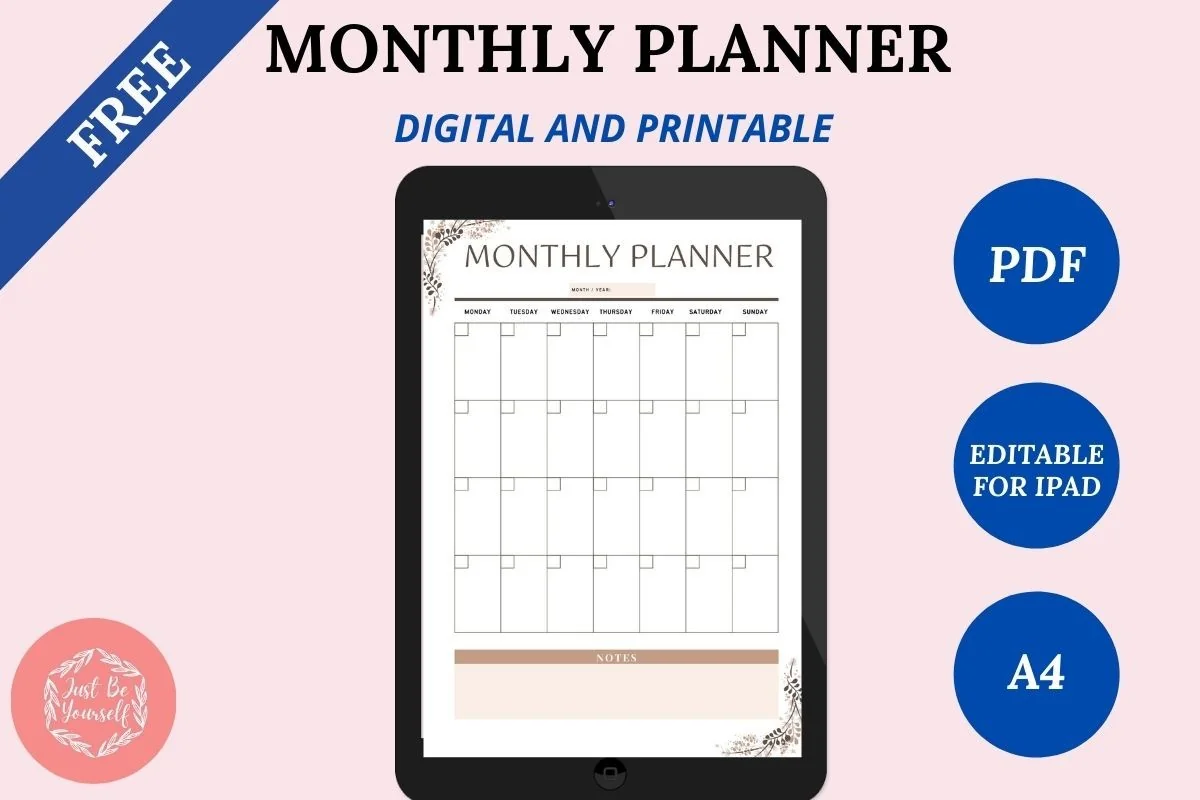
Free undated monthly
FREE Undated Monthly Digital Planner
Layouts: Monthly calendar with a notes boxDates: UndatedFormat: Digital editable PDF + printable PDF
Best for: trying digital planning, appointments and events by month, any year. Designed by JustBeYourSelf.
- Two PDFs in one zip: a digital editable version and a printable one
- Works as a template in GoodNotes, Notability, Noteshelf or any PDF annotation app
- Undated month grid with a notes area, marked editable for iPad on the cover
- One of the most saved freebies of its kind on Creative Fabrica, rated 5.0 from 7 reviews
Because it's undated, you can start it in any month of 2027 and write the dates in yourself. Use it for a few weeks; if you keep opening it, that's the sign a full planner from the list above is worth paying for.
FAQ
What is a digital planner and how does it work?
A digital planner is a PDF planner made for tablets. You import it into a note-taking app like GoodNotes or Notability and write on it with an Apple Pencil, just like paper. The tabs and calendar dates are hyperlinked, so one tap takes you to any month, week or day, and you can add stickers, duplicate pages and erase without a trace.
What is the best digital planner for iPad in 2027?
It depends on how you plan. If you want every date ready, pick a dated hyperlinked all-in-one like #1, or #2 if you like links that open Apple Calendar and Google Calendar. If you’d rather start any day and reuse the file, go undated with #3 or #5, and if you only use one view, a dedicated daily or weekly planner keeps the file light. All ten work in GoodNotes and Notability on any iPad that supports an Apple Pencil.
Are 2027 digital planners out yet?
Yes. Dated 2027 digital planners are already available: #1, #2 and #8 on this list are fully dated for 2027. If you want to start before January, pick an undated planner and write in the dates yourself, so you don’t wait for the new year or leave empty months behind.
Are digital planners worth it?
If you already carry an iPad, yes. Most digital planners are a one-time purchase of a PDF file and usually cost less than a good paper planner; an undated file can even be reused every year. Mistakes disappear with the eraser and all your pages, stickers and trackers live in one place. Planner apps work differently and usually charge a subscription, and if you love the feel of paper, a paper planner may still suit you better.
Can I use my iPad as a planner?
Yes, and it works really well. With a digital planner template in GoodNotes or Notability and an Apple Pencil, your iPad becomes a planner you write in by hand, with clickable tabs, unlimited pages and undo for any mistake. If your note app syncs across devices, the same planner also opens on your iPhone and Mac for a quick look on the go, though writing is most comfortable on the iPad.
Is there a digital planner that syncs with Google Calendar or Apple Calendar?
Not in the app sense: a PDF can’t sync, so your events won’t appear on the planner pages by themselves. Apple doesn’t make a planner template either, only Calendar, Reminders and Notes. Several planners on this list have buttons that open Apple Calendar, Reminders or Google Calendar in one tap, and most people check the calendar in the morning and write the important events on the day’s page.
Is there a free digital planner for 2027 for iPad?
There are free PDF planners you can import into GoodNotes, but they’re usually short and less linked. The planners above are paid, and many are low-cost, with hundreds of hyperlinked pages, stickers and trackers. If you plan almost every day, that difference adds up quickly.
Is there a digital planner for both 2027 and 2028?
The dated planners on this list are made for 2027. For two years in one file, an undated planner is the easier route: you write the dates yourself, so the same file works in 2027 and again in 2028. Keep a clean copy of the original PDF and import it again when you want a fresh start. The same goes for an 18 month planner, for example July 2027 to December 2028: with an undated file you just keep filling in months.
Final Thoughts
Among the best digital planners for 2027, the right one is the one you’ll still open in October. Pick the layout that matches how you actually plan, choose dated or undated based on when you’ll start, and keep it simple for the first few weeks. If you already know you’re a daily or a weekly planner, my daily and weekly roundups go deeper, and you can browse all everyday planners here. If you’d rather start on any day you like, see the undated digital planners; for your job, the digital work planners. Setting goals for the new year? See the digital goal planners that break 2027 goals into weekly steps. Want to try digital planning first? Start with the free options among my digital planner templates, and decorate your pages with GoodNotes stickers. Planning a big event in 2027? My wedding planner checklist breaks it down month by month.
Keep This Page for Next Year
This page stays at the same address every year. When the 2028 planners come out, I check the list again, swap out anything that is no longer sold and add new designs, so a bookmark or a saved pin from today will still lead to a current list next fall.
You May Also Like
This post contains affiliate links. If you buy through them, I may earn a small commission at no extra cost to you. Learn more.