Most people quit tracking workouts for the same reason: the notes app fills up with random numbers nobody reads again. A fitness journal fixes that by giving every session the same simple shape: what you did, how much, how it felt, and what to try next time. On an iPad it’s always with you, easy to search, and ready for the moment you want to see three months of progress on one page.
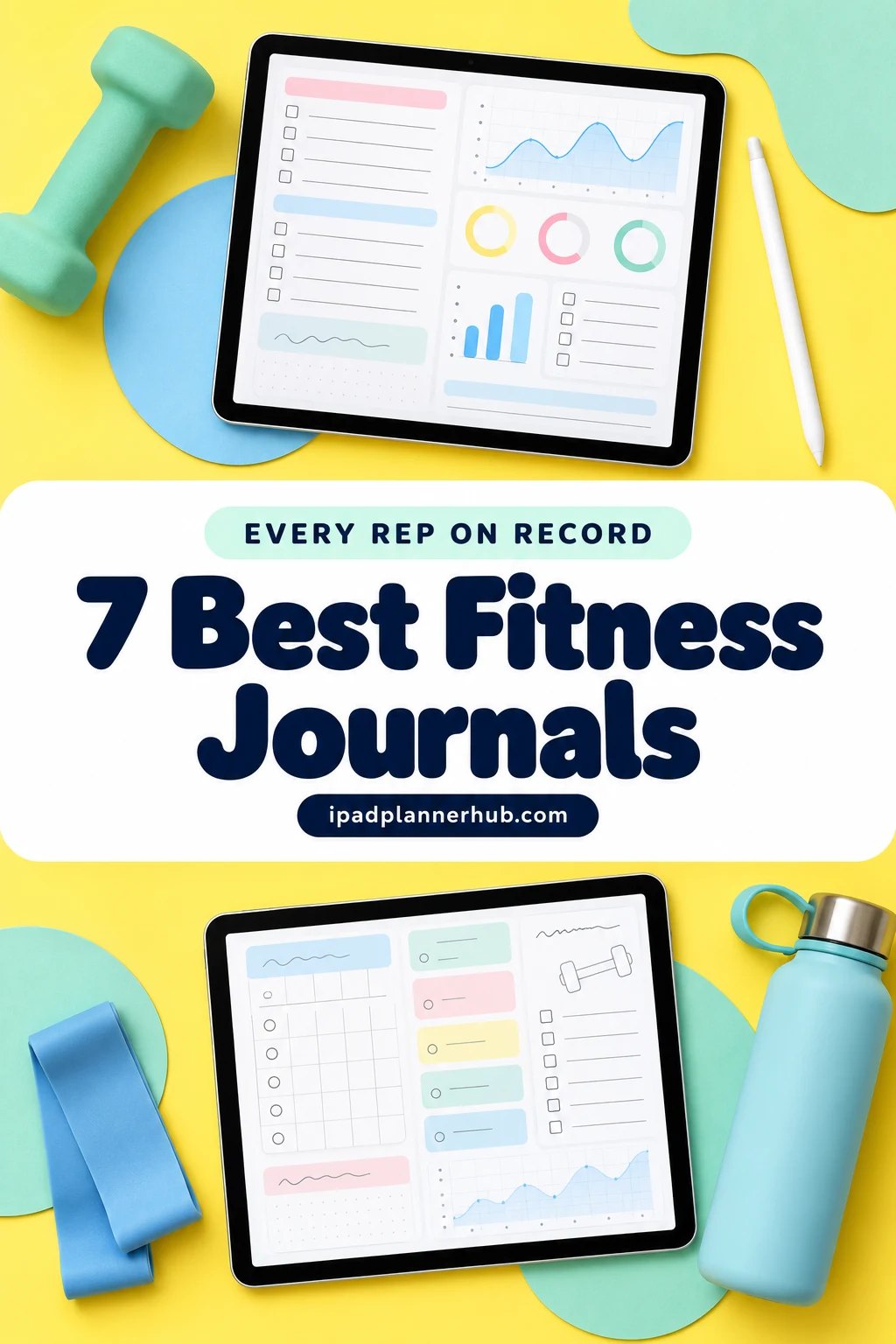
Below are the 7 digital fitness journals and workout logs from Creative Fabrica I’d keep on my iPad, from a classic gym log to a run and walk tracker and a sleep and mood tracker for recovery. After the list: what to log (and what to skip), a week of example entries, 20 fitness journal ideas, how to track progressive overload, and how to set it all up in GoodNotes.
The 7 Best Digital Fitness Journals for iPad I Found
Real digital workout journals are rare: most “fitness journals” on marketplaces are printable books, KDP interiors or Canva templates, and several digital ones are still dated 2026. I kept only PDFs that work in GoodNotes or Notability on the iPad. The first four are true logs; the last three add a planner, a body transformation journal and a recovery tracker.
TL;DR: 7 digital fitness journals and workout logs for iPad: a classic gym log, a weight-loss journal, a week-per-page workout planner, a run and walk log, a dated 2027 fitness planner, a dark-mode body transformation journal and a sleep and mood tracker for recovery. All are PDFs for GoodNotes or Notability; the cards list what each one tracks.
Quick Picks
- Best for gym log: Workout Log – Fitness Tracker
- Best for weight loss: Healthy Weightloss Exercise Log Journal
- Best for week on one page: Daily Fitness & Workout Planner
- Best for runners and walkers: Run & Walk Fitness Tracker
- Best for dated planner for 2027: Fitness Journey Planner 2027 Portrait
- Best for dark mode journal: Workout & Fitness Plan Digital Planner
- Workout Log – Fitness Tracker – Best gym log
- Healthy Weightloss Exercise Log Journal – Best for weight loss
- Daily Fitness & Workout Planner – Best week on one page
- Run & Walk Fitness Tracker – Best for runners and walkers
- Fitness Journey Planner 2027 Portrait – Best dated planner for 2027
- Workout & Fitness Plan Digital Planner – Best dark mode journal
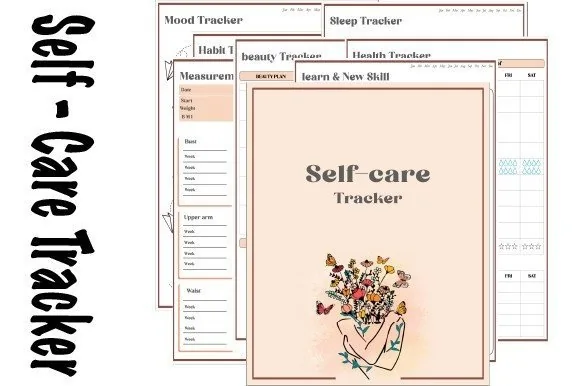
- Self-care Tracker – Best for sleep and recovery

Best gym log
1. Workout Log – Fitness Tracker
Orientation: LandscapeLayouts: Daily workout, Weekly fitness, Exercise logDates: Undated
Best for: gym-goers, strength trainers, home workout fans. Designed by Plamarplanners.
- Daily workout tracker and weekly fitness planner
- Exercise log with activity, time, distance, sets, reps and weight columns (per the cover)
- Cardio tracker, progress summary sheets and a body measurements tracker
- Digital version for GoodNotes or Notability, plus printable US Letter and A4
The closest thing to a classic gym notebook: one row per exercise with sets, reps and weight, so next week you know exactly what number to beat. It's plain and functional on purpose, which is what a workout journal should be.

Best for weight loss
2. Healthy Weightloss Exercise Log Journal
Orientation: PortraitLayouts: Weight-loss goals, weekly health & fitness, workout logs, measurements
Best for: weight loss goals, meal and workout trackers, watercolor fans. Designed by ArtistryByAnnabel.
- Long- and short-term goals, a motivation page and weekly start and goal weight
- Daily meal planner with a water counter, fitness duration and calories
- Weekly and monthly workout logs plus weekly body measurements
- A "head cravings" page, a shopping list and watercolor fruit illustrations; portrait PDF for GoodNotes
The most personal journal on the list: besides workouts it asks what motivates you and gives you a page for cravings, which is where weight-loss journaling usually gets honest. Weekly measurements show progress on the weeks the scale refuses to move.
Best week on one page
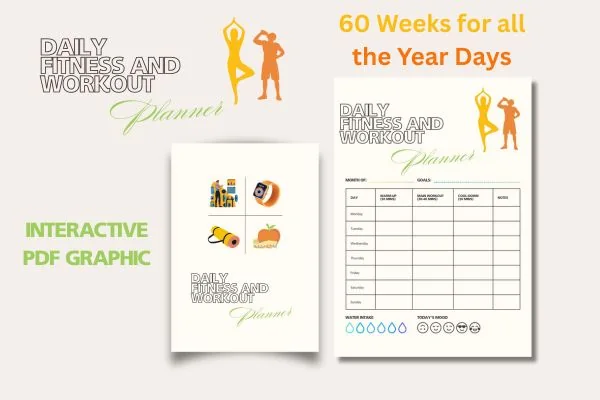
3. Daily Fitness & Workout Planner
Orientation: PortraitLayouts: 60 weekly workout pages, goals and progressDates: Undated
Best for: gym-goers, home workout fans, week-at-a-glance planners. Designed by Zoom4Design.
- 60 weekly pages with a row for every day, Monday to Sunday
- Warm-up, main workout, cool-down and notes columns, plus water and mood (per the preview)
- Goals and progress sections, with cardio and strength split options
- Interactive PDF you can type into on the iPad in GoodNotes, or print
If a page per workout feels like too much, this keeps the whole week on one page, from warm-up to cool-down. Sixty weeks means a full year plus a few fresh starts, so a missed week never ruins the journal.
Best for runners and walkers
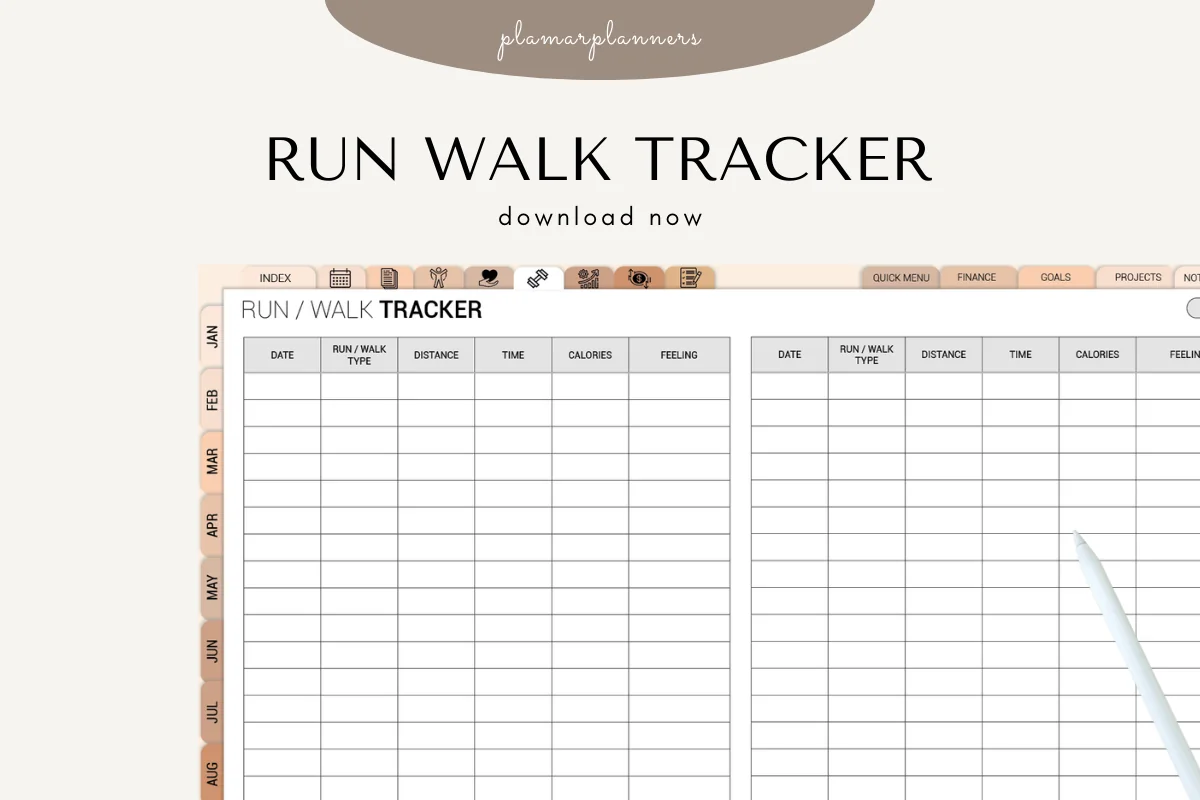
4. Run & Walk Fitness Tracker
Orientation: LandscapeLayouts: Run/walk log, distance, time and pace tracker, progress chartsDates: Undated
Best for: runners, walkers, couch to 5K beginners. Designed by Plamarplanners.
- Daily run and walk log with distance, time, calories and a feeling column (per the cover)
- Distance, time and pace tracker with weekly and monthly progress charts
- Goals and milestones sheet, plus a route tracker or map section
- Digital version for GoodNotes or Notability, plus printable US Letter and A4
Cardio deserves its own log. Whether it's a couch to 5K plan or a daily walk, writing down distance and pace is the simplest way to see you're getting faster, and the feeling column explains the slow days later.

Best dated planner for 2027
5. Fitness Journey Planner 2027 Portrait
Orientation: PortraitLayouts: Monthly, Weekly, Daily + 24 fitness, health, meal and habit templatesDates: 2027Week start: Monday or Sunday
Best for: 2027 goal setters, fitness challenge fans, all-in-one planners. Designed by Print Magic StudioX.
- Dated January to December 2027, in Monday and Sunday start files
- 6 subject tabs: Fitness, Health, Meals, Habits, Challenge and Goals, with 4 templates each
- Monthly, weekly and 365 daily pages with an hourly schedule from 6 am to 9 pm
- Page size made for the 13-inch iPad Pro; works in any PDF app with a stylus
This is a planner first and a fitness journal second, which is the right call if you want workouts next to your calendar instead of in a separate file. The Challenge and Goals tabs make it a good fit for a New Year fitness reset. There's also a landscape version.
Best dark mode journal
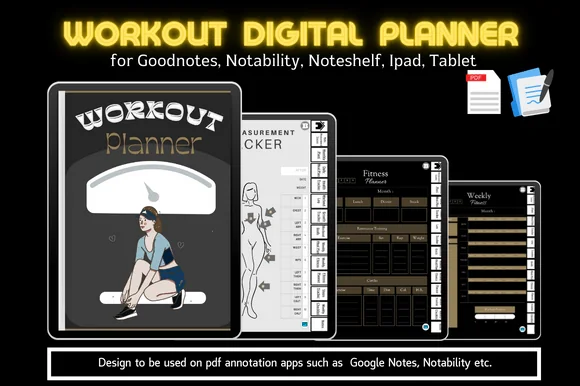
6. Workout & Fitness Plan Digital Planner
Orientation: PortraitLayouts: Monthly, Weekly, Workout log, MeasurementsDates: Undated
Best for: fitness beginners, body transformation goals, dark mode fans. Designed by MoiDigitalPlanner.
- Workout log, workout goals, weekly fitness and fitness planner pages
- Body measurement tracker and a "measurement after" photo page
- Steps tracker, health tracker and growth tracker
- Daily and weekly meal plans; hyperlinked index and tabs
Black pages with gold accents: the only dark-mode journal here, and easier on the eyes at 6 am. The before-and-after measurement pages and the steps tracker make it a natural pick for a body transformation.
Best for sleep and recovery
7. Self-care Tracker
Orientation: PortraitLayouts: Habit, sleep, mood, health, beauty and skill trackers
Best for: self-care trackers, mood trackers, illustration lovers. Designed by dolce_gioia.
- 7 tracker types, including sleep, measurement, health and mood
- 6 mood tracker designs
- A year of trackers; tap a title to jump to the index
- Made for GoodNotes, Notability and Noteshelf on the iPad
Not a workout log, but the other half of a fitness journal: recovery. Coloring in sleep and mood next to your training log shows why some weeks feel heavy. Pair it with #1 or #4.
Quick Comparison
| Journal | Best for | What you log | Stand-out extra |
|---|---|---|---|
| 1. Workout Log – Fitness Tracker | Strength + cardio | Sets, reps, weight | Measurements tracker |
| 2. Healthy Weightloss Exercise Log Journal | Weight loss | Meals, workouts, inches | Cravings page |
| 3. Daily Fitness & Workout Planner | Weekly overview | Warm-up to cool-down | 60 weeks |
| 4. Run & Walk Fitness Tracker | Running and walking | Distance, time, pace | Route section |
| 5. Fitness Journey Planner 2027 Portrait | Planner + fitness | Workouts, meals, habits | Challenge tab |
| 6. Workout & Fitness Plan Digital Planner | Body transformation | Workouts, steps, measurements | Dark design |
| 7. Self-care Tracker | Recovery | Sleep, mood, measurements | 6 mood designs |
What to Log in a Workout Journal (and What to Skip)
A good workout journal is short. If logging takes longer than five minutes, you’ll stop by week three. These are the entries that actually pay off:
- Strength: exercise, sets, reps and weight. This is the core of any gym journal and the only way to know what to lift next time.
- Cardio: type, time, distance and pace, or simply minutes for classes and walks.
- Effort: a 1–10 rating of how hard the session felt. It tells you when to push and when to back off.
- One line on how it felt: energy, pain, mood. Patterns show up after a few weeks.
- Weekly extras: body measurements, steps and sleep, once a week rather than every day.
What to skip: calorie math for every snack (unless weight loss is your goal, see #2), long essays, and decorating. A plain table you fill every time beats a beautiful page you fill twice.
A Fitness Journal Example: One Week of Entries
Here’s what a simple three-day week could look like in a log like #1 or #3:
- Monday, upper body: push-ups 3 × 10, dumbbell rows 3 × 10, shoulder press 3 × 8. Effort 7/10. “Rows felt easy, go heavier.”
- Wednesday, walk and core: 35-minute brisk walk, 2.1 miles; plank 3 × 30 seconds. Effort 5/10. “Tired legs from Tuesday’s stairs.”
- Friday, lower body: goblet squats 3 × 10, lunges 2 × 12 per leg, glute bridges 3 × 15. Effort 8/10. “Slept badly, still finished.”
- Sunday check-in: waist and hips measured, 52,000 steps for the week, three of three workouts done. Next week: heavier rows, add one walk.
20 Fitness Journal Ideas for Before and After a Workout
Numbers show progress; a sentence or two shows why. Use one of these fitness journal ideas when the table is filled in and you still have a minute.
For a yoga class, a useful reflection may be the teacher’s cue you want to remember rather than another training number. The yoga journal prompts give that cue a class reference and space for a question to bring back.
Before the Workout
- What’s my one goal for today’s session?
- Energy right now, from 1 to 10, and why?
- Which exercise am I dreading, and what would make it easier?
- What did I lift or run last time that I want to beat?
- How did I sleep and eat since the last workout?
After the Workout
- What felt strongest today?
- Where did I hold back, and was that the right call?
- Any pain that’s more than normal soreness?
- What would I change about today’s plan?
- One thing I’m proud of from this session.
Weekly and Monthly Check-Ins
- How many workouts did I plan, and how many did I do?
- Which lift or pace improved this month?
- What got in the way of training, and how can I plan around it?
- How do my clothes fit compared with last month?
- Which workout do I actually look forward to?
Mindset and Motivation
- Why did I start, in one sentence?
- What would “fit” look like in my everyday life, not on a scale?
- Which habit outside the gym helps my training most?
- What would I tell a friend who missed a week?
- What’s my next small milestone, and when will I check it?
Looking for prompts beyond fitness? My 40 journaling ideas cover gratitude, reflection and memory pages.
How to Track Progressive Overload in a Workout Journal
Progressive overload just means doing a little more over time: more weight, more reps, more distance or less rest. A journal is the simplest way to make it happen, because you can’t beat a number you don’t remember.
- Write the target before you start. Copy last session’s numbers for each exercise into today’s row.
- Change one thing at a time. One more rep on each set, or a small step up in weight, not both.
- Mark a hit or a miss. A check mark when you beat the target, a dash when you didn’t.
- Repeat the week if you miss twice. Two misses in a row means stay at that level a little longer.
- Review once a month. Compare the first and last week. That page is the best motivation a fitness journal can give you.
The same works for cardio in a run log like #4: add a few minutes, a little distance or a slightly faster pace, one change per week.
Fitness Journal, Fitness Tracker or Workout App?
A fitness tracker (a watch or the Fitness app) measures automatically: steps, heart rate, calories. A workout app counts sets and suggests weights. A fitness journal is where you write what the numbers mean and decide what to do next. They work well together: the watch measures, the journal remembers and plans.
Be honest about the trade-offs. The journals in this list are PDFs: they don’t sync with Apple Health, don’t time your rest and don’t build workouts for you. What they do better is flexibility and focus. You decide what to track, the page looks the same every time, there’s no subscription, and writing with the Apple Pencil makes you pause for a second and actually think about the session.
If you’d rather plan your training week first and log second, my guide to digital workout planners covers weekly plans and workout calendars.
What I Look For in a Fitness Journal
- A real log table: columns for sets, reps and weight, or distance, time and pace for cardio.
- Space to compare: weekly or monthly pages where progress shows on one screen.
- Body and recovery pages: measurements, sleep and mood, so the scale isn’t the only signal.
- Undated, or dated for the year ahead: journals dated for a year that’s ending are skipped.
- Works on the iPad: a PDF for GoodNotes or Notability, ideally with tabs to jump between sections.
How to Set Up a Fitness Journal in GoodNotes
- Save the PDF from Creative Fabrica and open it with GoodNotes (Share → Open in GoodNotes). Notability works the same way.
- Put the journal in a “Fitness” folder, next to your meal planner if you keep one.
- Duplicate the log page you’ll use most and leave a blank copy at the end of the file as a template.
- Write your current measurements and three goals on the first page, so the start line is always one tap away.
- Add the journal to Favorites, so it opens in two taps after a workout.
A 5-Minute Logging Routine After Every Workout
Getting every rep on record is a habit, not a talent. Here’s a routine that fits into the cool-down:
- Minute 1: fill in the table: exercises, sets, reps, weight or distance.
- Minute 2: rate the effort from 1 to 10 and mark the hits and misses.
- Minute 3: write one sentence on how it felt.
- Minute 4: write next session’s targets at the bottom of the page.
- Minute 5: once a week, add measurements, steps and sleep; once a month, compare the first and last week.
If you also want to track water, sleep or stretching, a few habit tracker ideas fit neatly next to the log.
FAQ
What is a fitness journal?
A fitness journal is a record of your workouts and how they went: exercises, sets, reps, weights or distance, plus notes on energy, sleep and progress. Unlike a fitness tracker, it doesn’t measure anything by itself. It helps you see patterns and decide what to do next.
What is the best workout journal for the iPad?
For strength training, I’d pick the Workout Log – Fitness Tracker (#1), with sets, reps and weight on every row. For weight loss, the Healthy Weightloss Exercise Log Journal (#2) adds meals and measurements, and runners will like the Run & Walk Fitness Tracker (#4).
How do I start a fitness journal?
Write down your starting point (measurements, current lifts or a walk time) and one goal. Then log every session with the same few entries: what you did, how much, effort from 1 to 10 and one sentence on how it felt. Review once a week.
Is a digital workout journal better than a paper gym journal?
It depends on where you log. A digital journal on the iPad lets you duplicate pages, search old entries and keep everything in one file with no extra notebooks. A paper gym journal survives a sweaty gym bag better. Many people log in the gym on paper or their phone and copy the key numbers into the iPad journal at home.
What should a fitness journal template include?
At minimum: a log table for exercises, sets, reps and weight (or distance and time), a notes line, and a weekly or monthly review page. Body measurement, sleep and goal pages are useful extras. All seven journals above cover the basics; #2, #5 and #6 add the most extras.
Can a fitness journal sync with the Apple Fitness app?
No. These journals are PDFs for GoodNotes or Notability, so nothing syncs automatically. Use the watch or app for automatic numbers like steps and heart rate, and copy the ones that matter into the journal once a week.
Final Thoughts
A fitness journal doesn’t need to be fancy: one table, filled in after every session, and a quick look back once a month. Pick the journal that matches how you train (gym, weight loss, running or a full planner), keep logging short, and let the numbers tell you when to push. For planning the week ahead, see my best digital workout planners, pair your journal with a few self-care planners for recovery, or browse all workout planners.
Choosing a main planner for next year as well? Start with my list of the best iPad digital planners for 2027.
You May Also Like
This post contains affiliate links. If you buy through them, I may earn a small commission at no extra cost to you. Learn more.