Everyone takes notes in meetings. Far fewer people can find them a week later, or remember who promised to do what. A meeting notes template solves both: the same boxes every time for the agenda, the decisions and the action items, and a place on your iPad where all of it lives together.
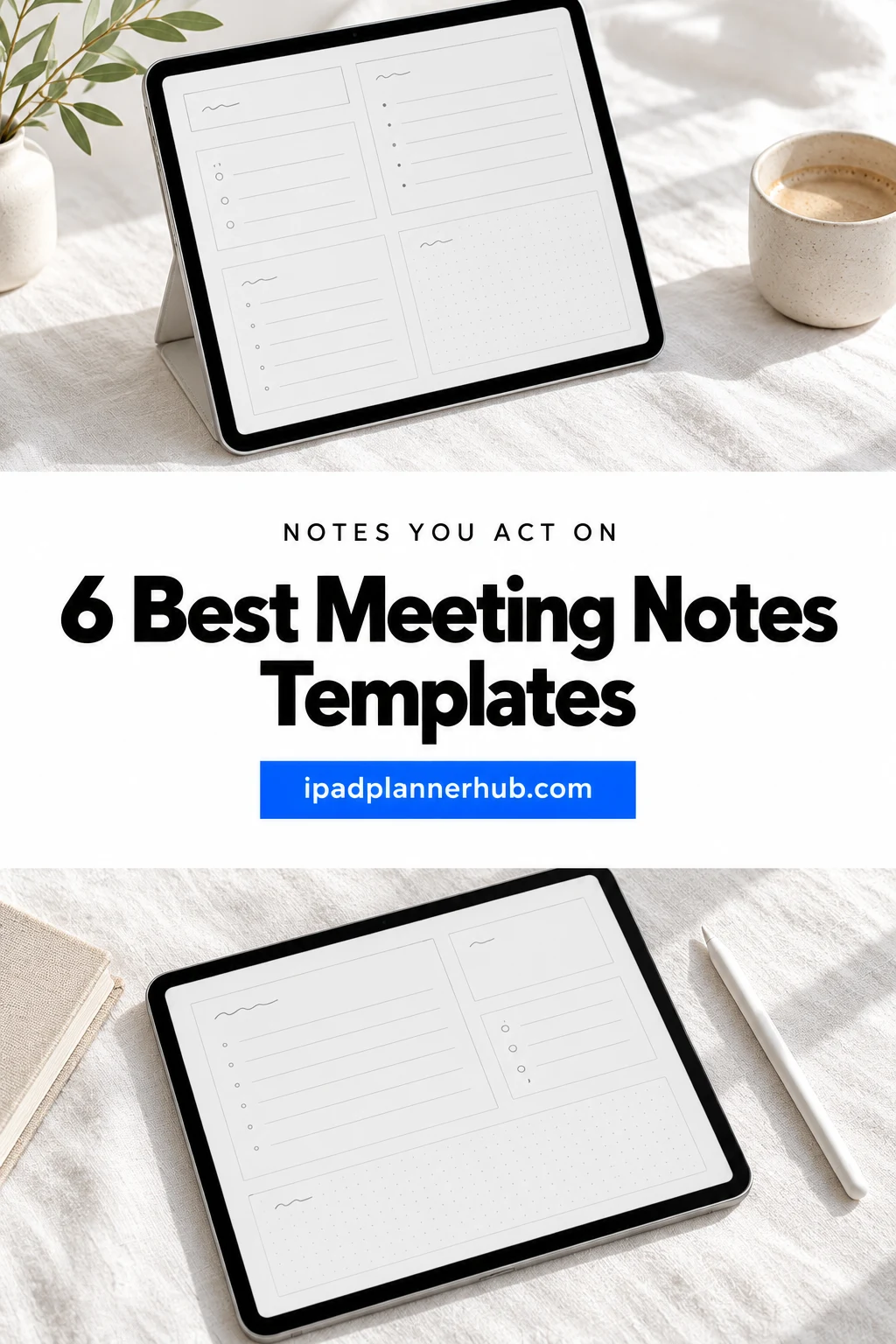
Below are the 6 meeting notes templates for iPad from Creative Fabrica I’d use at work. After the list: what to look for, what to write before, during and after a meeting, a simple meeting minutes layout you can copy and how to set it all up in GoodNotes.
The 6 Best Meeting Notes Templates for iPad I Found
Five are made for meetings; the last one is a work planner with a minutes template. I skipped Word and Canva templates, plain printable sheets without a digital version and anything with past-year dates. All six work on the iPad in GoodNotes or Notability.
TL;DR: 6 meeting notes templates for iPad: two 2027 work planners with a meetings tab, a meeting agenda with action items, 360 linked meeting minutes pages, a cute one-page notes sheet and a work planner with a minutes template. Each card lists orientation, layouts, dates and week start.
Quick Picks
- Best overall: Meeting Notes Planner 2027
- Best for team leads: Team Meeting Planner 2027
- Best for action items: Meeting Planner – Agenda & Action Items
- Best for recurring meetings: Meeting Minutes Digital Planner
- Best for cutest pick: Meeting Notes • Cute Pastel
- Best for work-from-home planner: Pinksy Work Planner
- Meeting Notes Planner 2027 – Best overall
- Team Meeting Planner 2027 – Best for team leads
- Meeting Planner – Agenda & Action Items – Best for action items
- Meeting Minutes Digital Planner – Best for recurring meetings
- Meeting Notes • Cute Pastel – Cutest pick
- Pinksy Work Planner – Best work-from-home planner
Best overall
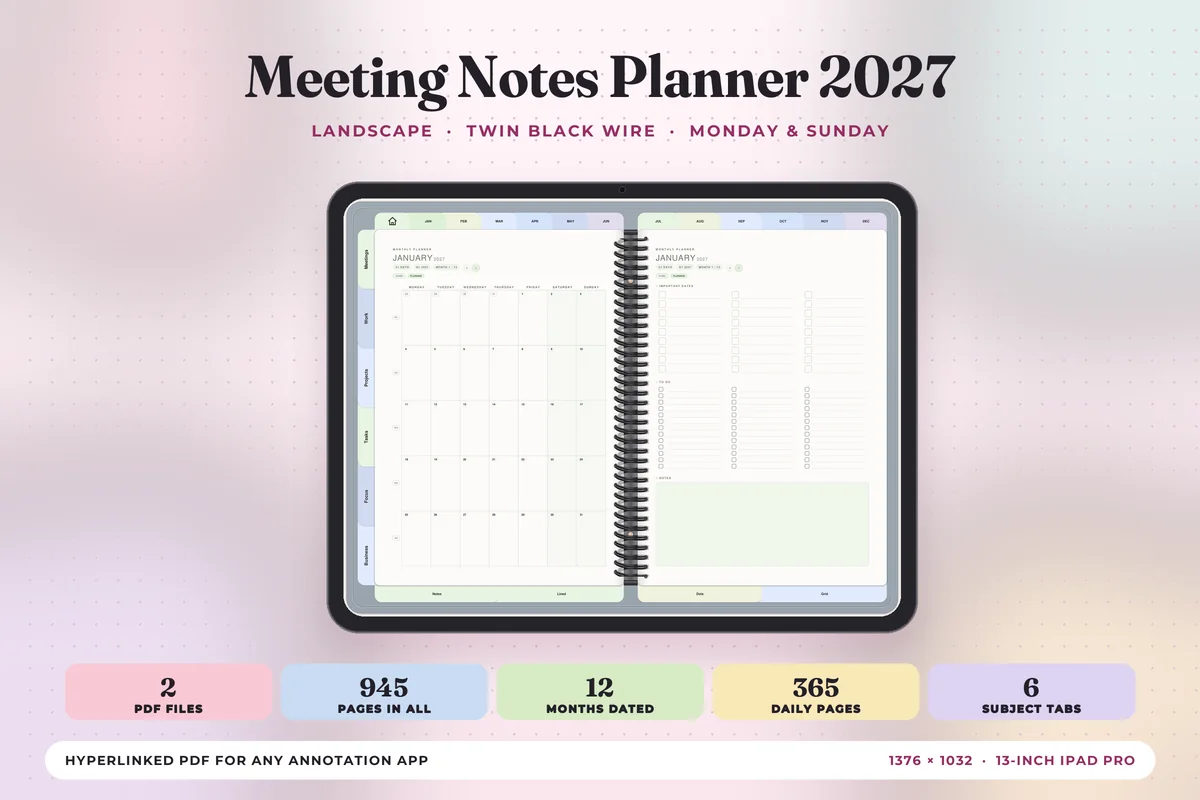
1. Meeting Notes Planner 2027
Orientation: LandscapeLayouts: Yearly, Monthly, Weekly, Daily, MeetingsDates: 2027Week start: Monday or Sunday
Best for: meeting-heavy jobs, managers, two-page spread fans. Designed by Print Magic StudioX.
- Dated January to December 2027, Monday and Sunday start files
- 6 subject tabs: Meetings, Work, Projects, Tasks, Focus and Business, with 4 templates under each
- Weekly page for every week with the week's one thing, wins and what rolls over
- 365 daily pages with an hourly schedule, top 3 and to-do list
- Landscape two-page spreads sized for the iPad Pro
Meeting notes are most useful next to the calendar where the meeting happened, and that's what this planner does: a Meetings tab sits beside your weekly and daily pages. Action items can go straight onto the to-do list of the same day. If you take notes at work every day, this is the one I'd choose.
Best for team leads
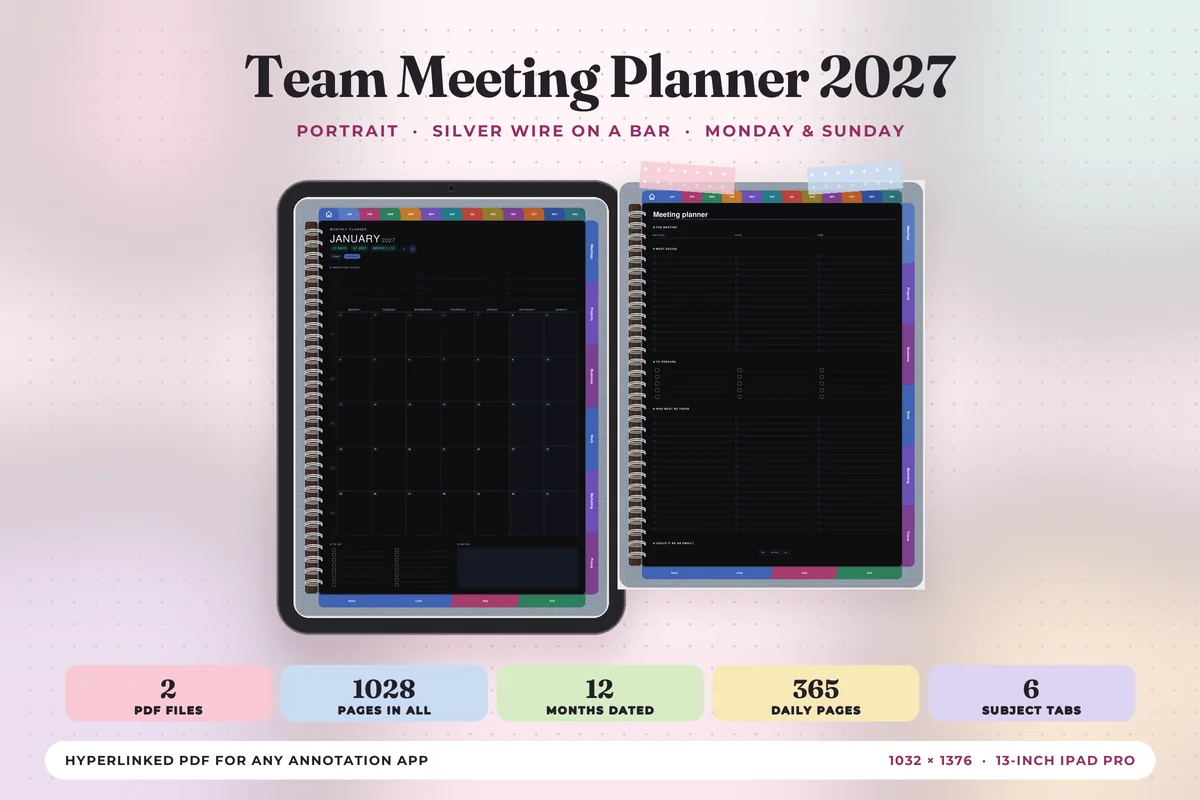
2. Team Meeting Planner 2027
Orientation: PortraitLayouts: Yearly, Monthly, Weekly, Daily, MeetingsDates: 2027Week start: Monday or Sunday
Best for: team leads, marketers, small business owners. Designed by Print Magic StudioX.
- Dated 2027, Monday and Sunday start files
- 6 subject tabs: Meetings, Projects, Business, Work, Marketing and Focus
- Weekly and daily pages with a top 3 and to-do list
- Portrait pages with a silver wire binding, sized for the iPad Pro
Same designer and system as my top pick, but with project, marketing and business tabs instead of tasks, which suits someone who leads the meeting rather than just sits in it. The portrait pages are easier to write on when the iPad is on a table in front of you.
Best for action items
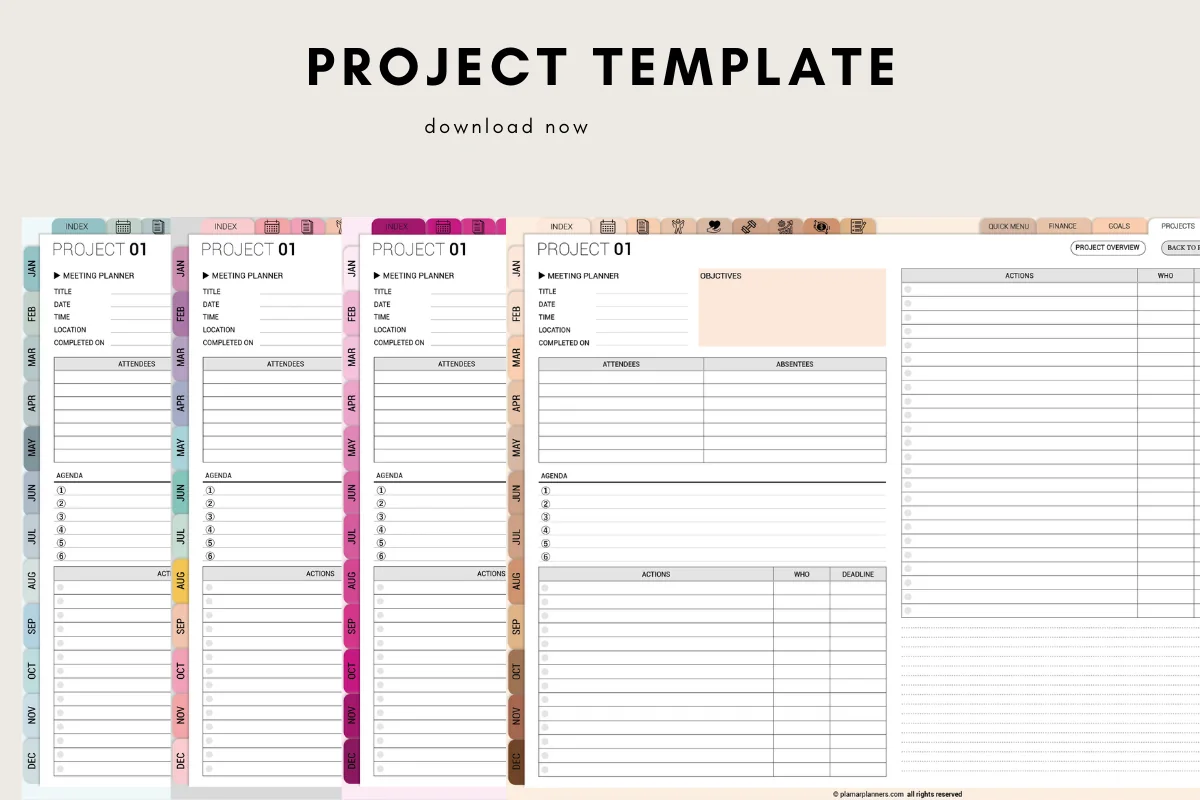
3. Meeting Planner – Agenda & Action Items
Orientation: LandscapeLayouts: Meeting agenda, Attendees, Action itemsDates: Undated
Best for: project managers, client calls, action item trackers. Designed by Plamarplanners.
- Meeting agenda, objectives and topics, date, time and location
- Attendee list, notes and discussion points
- Action items tracker with who and deadline columns, plus follow-up tasks
- Hyperlinked digital version with side tabs; A4 and US Letter PDFs too
- The preview pages are labeled "Project", with the meeting planner on each page
The action items table with "who" and "deadline" columns is the most useful part of any meeting page, and here it gets as much room as the notes. It's a good fit for project meetings and client calls where someone always asks "so who's doing that?"
Best for recurring meetings
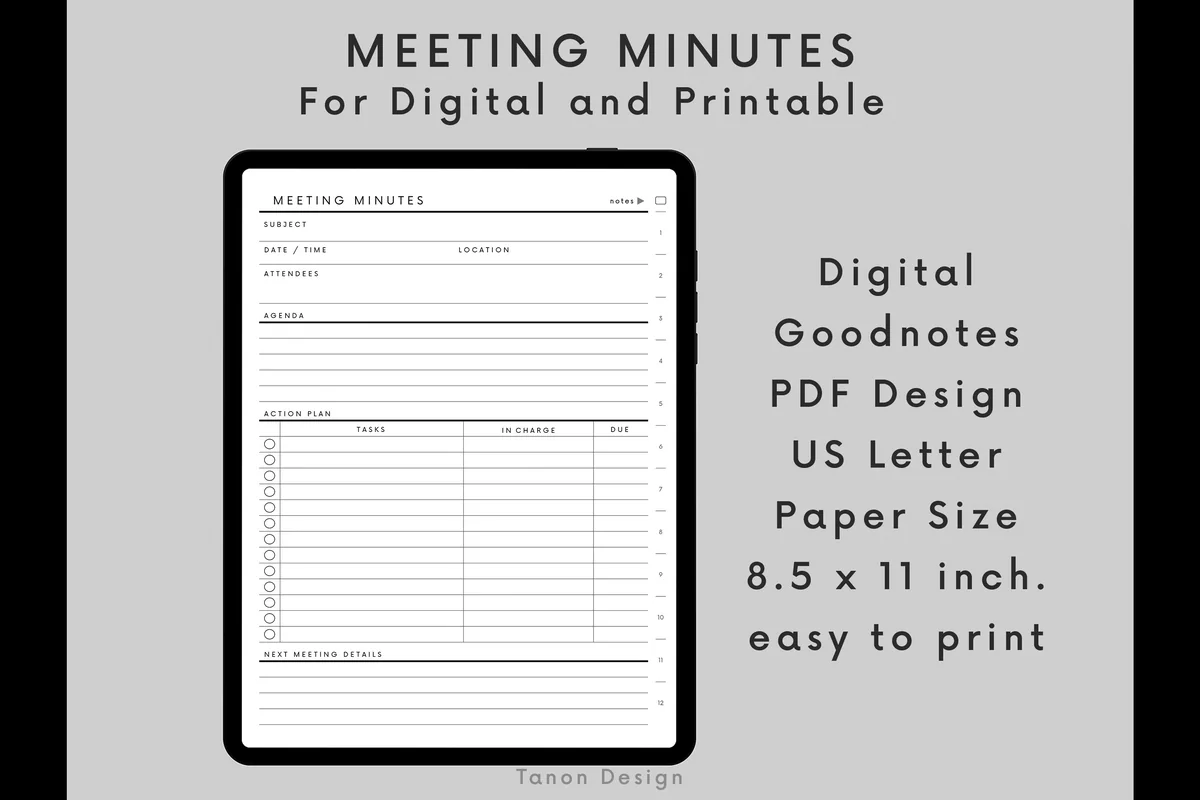
4. Meeting Minutes Digital Planner
Orientation: PortraitLayouts: Meeting index, 12 sections, 360 minutes pagesDates: Undated
Best for: recurring meetings, secretaries and note takers, minimalists. Designed by tanondesign.
- Room for 360 meeting minutes pages in 12 sections of 30
- Hyperlinked meeting index and section pages with date, meeting and notes columns
- Each page: subject, date and time, location, attendees, agenda and an action plan table
- "Next meeting" details at the bottom of every page
- Separate PDFs for GoodNotes and for printing (US Letter)
If you have the same meetings every week, this is the most organized option: give each meeting its own section, and the index shows every date at a glance. The design is plain black and white, which I'd count as a plus for work notes you might share.
Cutest pick
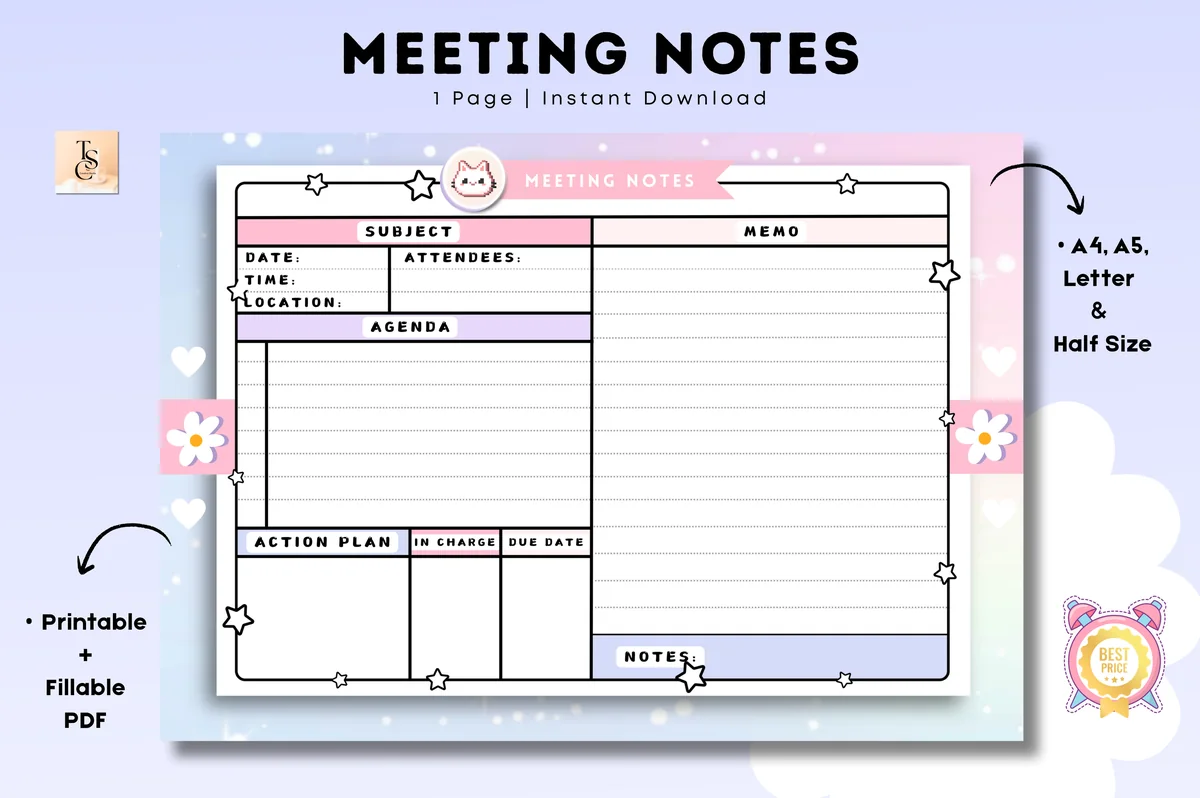
5. Meeting Notes • Cute Pastel
Orientation: LandscapeLayouts: Meeting notes (1 page)Dates: Undated
Best for: cute planners, students, freelancers. Designed by Tas Creative Studio.
- Undated one-page meeting notes, landscape
- Subject, date, time, location and attendees, agenda and a memo column
- Action plan with "in charge" and due date columns, plus notes
- Pastel design with a kitty, flowers and stars
- Digital PDF version for GoodNotes and Notability, plus printable and fillable PDFs
A full meeting page in one sheet: agenda on the left, memo on the right and an action plan at the bottom. It's the cutest template here, so it suits school projects, freelance calls or club meetings more than a formal board meeting.
Best work-from-home planner
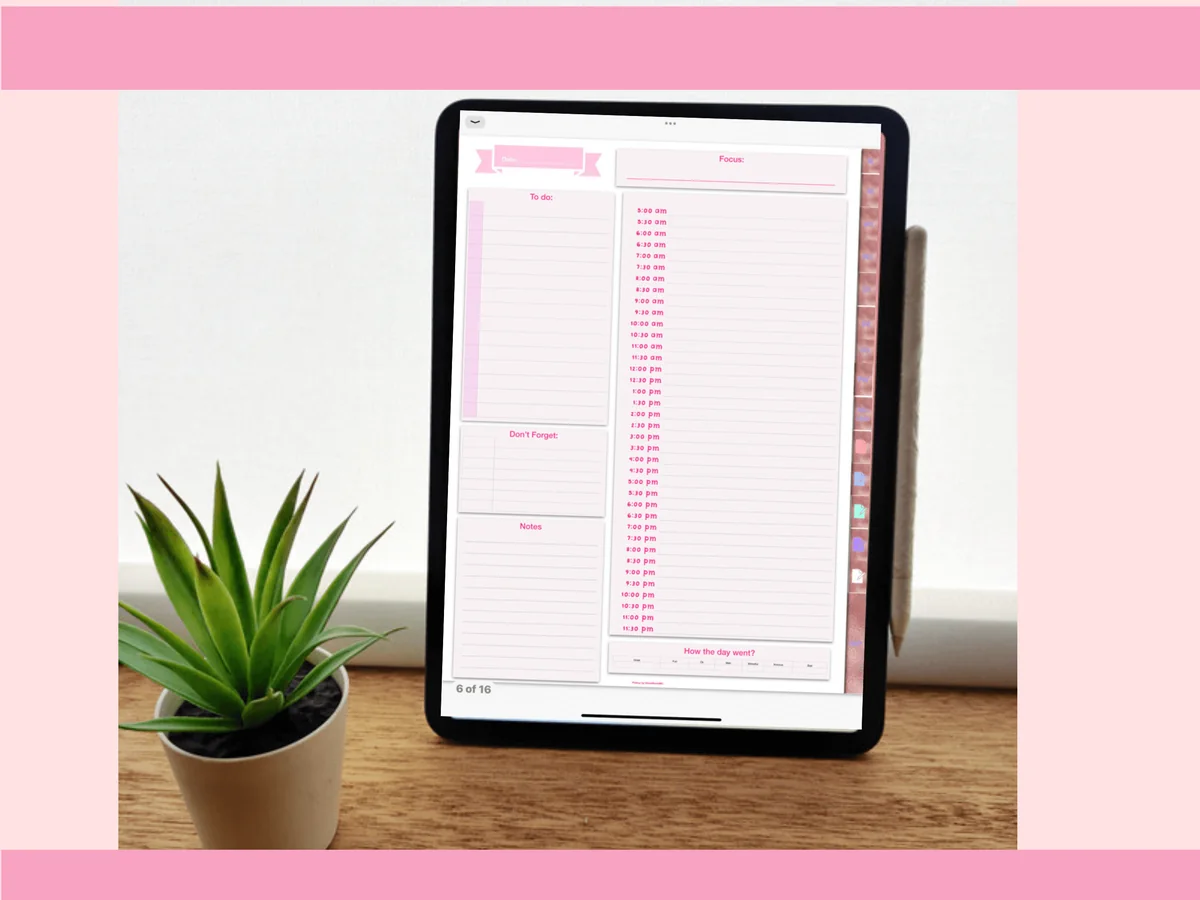
6. Pinksy Work Planner
Orientation: PortraitLayouts: Monthly, Weekly (2 layouts), Daily (3 layouts), Meeting minutesDates: Undated
Best for: remote workers, meeting-heavy jobs, pink lovers. Designed by Pinksy by HimeMarieMC.
- A minutes template for meetings among 16 work templates
- Undated monthly calendar, 2 weekly layouts and 3 daily layouts
- Daily page with an hourly schedule, to-do list and "Don't forget" box
- Index you can tap from the left corner; PDF and GoodNotes files
Made for working from home, with a meeting minutes page for the video calls and a daily page that has the schedule and to-do list side by side. I'd skip the password page it includes; a password manager is a safer place for logins.
Quick Comparison
| Template | Best for | Format | Stand-out extra |
|---|---|---|---|
| 1. Meeting Notes Planner 2027 | Notes + work calendar | 2027 planner | Meetings, projects, tasks tabs |
| 2. Team Meeting Planner 2027 | Leading team meetings | 2027 planner | Projects, marketing tabs |
| 3. Meeting Planner – Agenda & Action Items | Assigning tasks | Undated pages | Who + deadline columns |
| 4. Meeting Minutes Digital Planner | Weekly recurring meetings | Undated, 360 pages | Meeting index by section |
| 5. Meeting Notes • Cute Pastel | Casual meetings, school | Undated, 1 page | Action plan with due dates |
| 6. Pinksy Work Planner | Remote work | Undated planner | Minutes template, 16 work pages |
What I Look For in a Meeting Notes Template
- An action items table. Task, who and deadline. If a template has only lines for notes, the most important part of the meeting gets lost in a paragraph.
- The basics at the top. Date, time, attendees and the subject, so you can find the page later with GoodNotes search.
- Room for an agenda. A few numbered lines you fill in before the meeting keep it on track.
- A way to find old notes. An index, tabs or a planner calendar. Meeting notes are worth little if they’re buried in a 300-page notebook.
- Enough pages. Undated single pages you can duplicate, or a planner with a meetings section for the whole year.
- Made for the iPad. A digital PDF that works in GoodNotes or Notability, ideally with links.
What to Write in Every Meeting
Good meeting notes aren’t a transcript. They’re the few things you’ll need later. Here’s what to write and when.
Before the meeting
- Date, time and who’s coming.
- The goal of the meeting in one sentence: what should be decided or clear by the end?
- Agenda items, numbered, and your own questions for each.
- Open action items from last time, so you can check on them.
During the meeting
- Decisions. Write them as sentences: “We’ll launch on March 3.”
- Action items. Task, owner and deadline, every time. If there’s no owner, ask before the meeting ends.
- Key numbers and facts. Budgets, dates, names you’ll need again.
- Open questions. Anything that wasn’t answered goes on its own line, so it doesn’t vanish.
- Skip the rest. You don’t need who said what, word for word.
After the meeting
- Move your own action items to your to-do list or calendar the same day.
- Send a short recap: decisions, action items, next meeting date.
- Write the next meeting’s date and the first agenda item while you still remember.
A Simple Meeting Minutes Layout You Can Copy
If you’d rather build your own page in GoodNotes, these six blocks are all you need, in this order:
- Header: meeting name, date, time, location or link.
- Attendees: who was there, and who was missing.
- Agenda: 3–5 numbered items.
- Notes and decisions: the largest box, with decisions marked by a highlighter.
- Action items: a table with task, who and deadline.
- Next meeting: date and first agenda item.
Most templates in this list follow the same order. The Meeting Minutes planner and the Cute Pastel page even add a “next meeting” or action plan box at the bottom, which is the part people tend to forget.
Types of Meeting Notes
- Team meetings: status updates, blockers and decisions. A weekly page in a work planner works well.
- One-on-one meetings: the same page every time with your manager or a team member: wins, challenges, goals and follow-ups from last time.
- Client calls: requests, deadlines, budget and what you promised to send.
- Project meetings: milestones and an action items table with owners.
- Formal meeting minutes: attendees, motions or decisions and votes, for boards, school committees or clubs.
Meeting Notes Template or Note-Taking App?
Typing in a notes app is fast and easy to share. Writing on a template with an Apple Pencil is slower, but it keeps you listening rather than transcribing, and the fixed boxes make you write down the decision and the owner instead of everything else. GoodNotes can search your handwriting, so handwritten notes are still easy to find. Many people take notes by hand and send a short typed recap afterwards.
What You Need to Use a Meeting Notes Template on iPad
- An iPad and an Apple Pencil, or another stylus that works with it.
- GoodNotes, Notability or Noteshelf to open the PDF and keep the links working.
- Optional: a keyboard cover, if you’d like to type into text boxes during fast meetings.
How to Set Up Meeting Notes in GoodNotes
- Save the template on your iPad and unzip it if needed.
- Open the PDF, tap Share → GoodNotes → Import as New Document.
- For a single-page template, save it as a custom page template so you can add a fresh meeting page with one tap.
- Make one notebook or section per recurring meeting, and name each page with the date.
- Highlight action items in one color, so you can scan the notebook for everything you still owe.
FAQ
What should a meeting notes template include?
Date and time, attendees, agenda, notes and decisions, an action items table with owners and deadlines, and the next meeting date. Everything else is optional.
What is the difference between meeting notes and meeting minutes?
Meeting notes are your own record of what matters to you. Meeting minutes are the official record of a meeting for everyone: who attended, what was decided and who does what. Minutes are common for boards, committees and formal team meetings.
A conference audience needs a different record from a committee taking minutes. The conference notes layouts keep each speaker and session identifiable, with separate space for claims, questions and the follow-up you choose afterward.
What is the best meeting notes template for iPad?
If you have meetings every day, the Meeting Notes Planner 2027, because your notes sit next to your work calendar and to-do lists. For recurring weekly meetings, the Meeting Minutes Digital Planner with its index; for project and client meetings, the Meeting Planner with its action items table.
How do you take meeting notes on an iPad?
Import a meeting notes template into GoodNotes or Notability, fill in the agenda before the meeting and write decisions and action items during it with an Apple Pencil. Afterwards, move your action items to your to-do list and send a short recap.
Can I use a meeting notes template for one-on-one meetings?
Yes. Use the same page every time and add a short section for follow-ups from the last one-on-one. Keeping all one-on-ones with the same person in one section makes it easy to see progress over months.
For a job interview, keep the conversation notes tied to the particular role rather than a general meeting history. These job search planner pages connect interview reflections with the application and document versions, making the next preparation step easier to locate.
Final Thoughts
The best meeting notes are short and end with an action items table. Pick a meeting notes template with an owner and deadline column, fill in the agenda before you walk in and move your tasks to your list the same day. For the rest of the workday, see my digital work planners and the to-do list templates. If you prefer plain paper for notes, the GoodNotes note templates include Cornell and lined pages. For staff meetings and parent-teacher conferences, my teacher planner ideas include simple notes pages.
You May Also Like
This post contains affiliate links. If you buy through them, I may earn a small commission at no extra cost to you. Learn more.