Most dreams are gone before the kettle boils. You wake up with a whole strange story in your head, reach for your phone, and by the time the coffee is ready there’s one image left, maybe two. A dream journal fixes that with a very small habit: write it down before coffee, even if all you have is three words and a feeling.

Below are 5 picks for a digital dream journal on the iPad that I’d use, from a lucid dream journal with a symbol log to a sleep log with room for dream notes. After the list: 40 dream journal ideas grouped by page type, how to keep a dream journal, a two-minute morning routine, what to write in each entry, gentle lucid dreaming pages, and how to set it all up in GoodNotes.
The Best Digital Dream Journals I Found
Almost every “dream journal” on Creative Fabrica is a KDP interior for printed books, a Canva template or a pack of dreamy digital paper, so those are out. Native iPad dream journals are rare, which is why this list is short: first the one real dream journal I found, then two sleep logs that pair with it, then two planners with a dream journal page or a sleep log tab.
TL;DR: 5 picks for a digital dream journal on the iPad: 1 lucid dream journal with nightly entries and a symbol log, 2 sleep logs (one with a dream notes column, one dated 2027) and 2 planners with a dream journal page or a sleep log tab. Native digital dream journals are rare on Creative Fabrica, so the list is short on purpose: no KDP interiors, Canva templates or digital paper packs.
Quick Picks
- Best for dream journal for iPad: Lucid Dream Journal & Sleep Recall Log
- Best for sleep log with dream notes: Sleep Log – Printable & Digital Sleep
- Best for a 2027 sleep reset: 2027 Sleep Tracker
- Best for all-in-one with a dream journal page: All-in-One Digital Planner
- Best for undated planner with a sleep log: Digital Planner, Self Care, Goodnotes
- Lucid Dream Journal & Sleep Recall Log – Best dream journal for iPad
- Sleep Log – Printable & Digital Sleep – Best sleep log with dream notes
- 2027 Sleep Tracker – Best for a 2027 sleep reset
- All-in-One Digital Planner – Best all-in-one with a dream journal page
- Digital Planner, Self Care, Goodnotes – Best undated planner with a sleep log

Best dream journal for iPad
1. Lucid Dream Journal & Sleep Recall Log
Orientation: PortraitLayouts: Nightly dream entries, clarity ratings, reality checks, recurring symbol log, monthly reviewFormat: Hyperlinked PDF, US Letter, 26 pagesDates: Undated
Best for: dream journal beginners, lucid dreamers, minimalists. Designed by Healers Hub co.
- Dream basics: How Dream Recall Actually Improves, a Dream-Night Checklist and a Dream Baseline Profile
- 10 nightly entry pages (Dream Journal Night 1, Night 2…) with write-in space
- Dream Clarity Ratings by week and a Reality Check Daily Checklist
- Recurring Symbol Log, a Dream-Sign Inventory and a Month of Dreaming Review
- 26 hyperlinked US Letter pages with side tabs; works in GoodNotes, Notability and Xodo
This is the only file I found that is a dream journal from the first page to the last, not a planner with a dream section. The symbol log and the dream-sign inventory are the pages that make a journal useful after a month, because that's where patterns show up. It's new on Creative Fabrica, so there are no reviews yet, and ten entry pages means you'll duplicate them in GoodNotes.
Best sleep log with dream notes
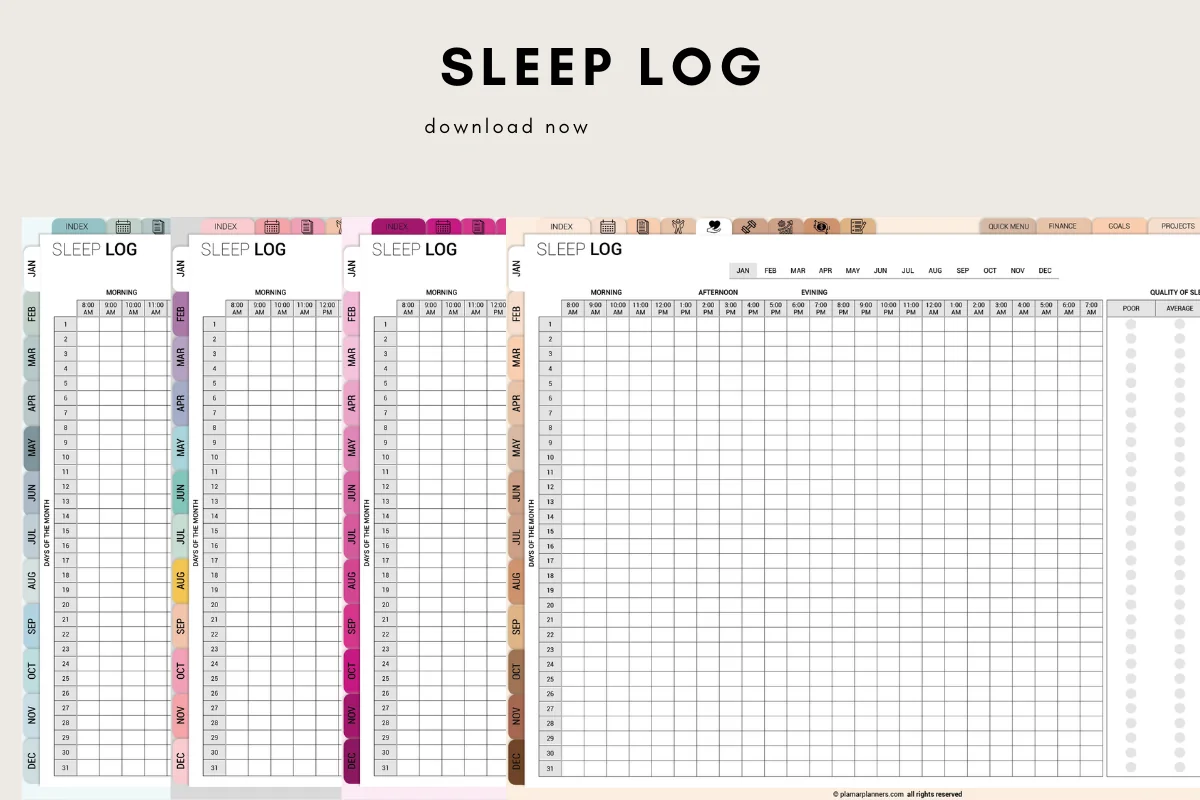
2. Sleep Log – Printable & Digital Sleep
Orientation: LandscapeLayouts: Daily sleep tracker, dream notes, sleep goal, weekly and monthly summariesFormat: Digital PDF + US Letter and A4Dates: Undated (month tabs)
Best for: sleep trackers, data lovers, dream journal beginners. Designed by Plamarplanners.
- Daily sleep tracker with bedtime, wake time, duration and a sleep quality rating
- A Dream Notes section next to the sleep data
- Sleep goal progress plus weekly and monthly summary pages
- Month tabs from January to December, no year printed
- Digital version for GoodNotes and Notability, plus US Letter and A4 PDFs
If you mostly want to see how sleep and dreams connect, this is the simplest way: one grid for the hours, one column for quality, and room for a line about what you dreamed. It's a log rather than a journal, so long dream stories go on a blank page. The month tabs make it easy to jump back and compare.
Best for a 2027 sleep reset
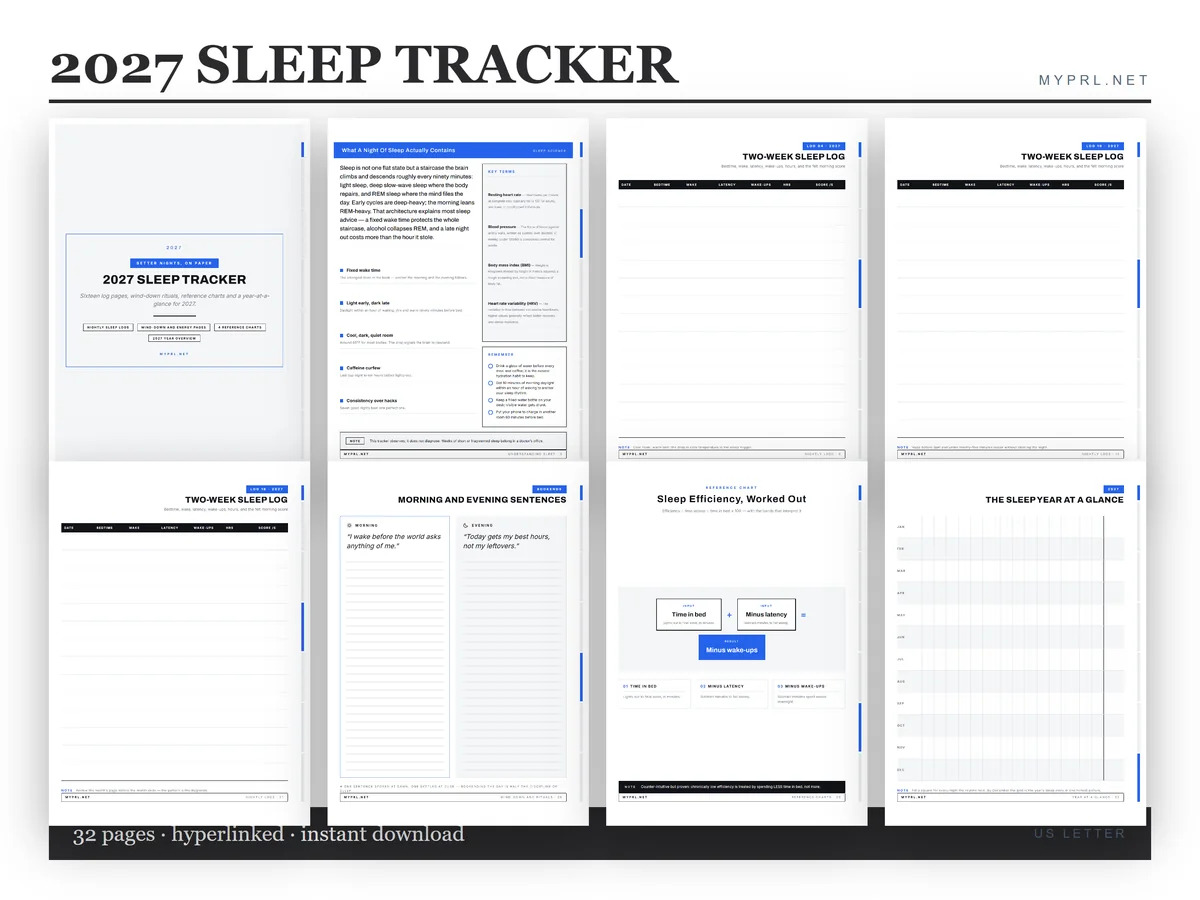
3. 2027 Sleep Tracker
Orientation: PortraitLayouts: 16 nightly sleep logs, wind-down and morning rituals, caffeine curfew, sleep efficiency, year overviewFormat: Hyperlinked PDF + PNG, US Letter, 32 pagesDates: 2027
Best for: sleep resetters, New Year planners, minimalists. Designed by Healers Hub co.
- 16 nightly logs (two-week sleep log pages)
- Wind-down and morning ritual pages and a caffeine curfew table
- Sleep-efficiency pages, 4 quick-reference charts and a 2027 year overview
- A page on five ways sleep tracking backfires
- 32 hyperlinked US Letter pages plus PNGs; works in GoodNotes, Notability and Xodo
There's no dream page here, so I'd pair it with a dream journal rather than use it alone. What I like is the honest angle: it's built to find one useful change, and it even warns you when tracking turns into worrying. It's by the same designer as the lucid journal, so the two look good side by side.
Best all-in-one with a dream journal page
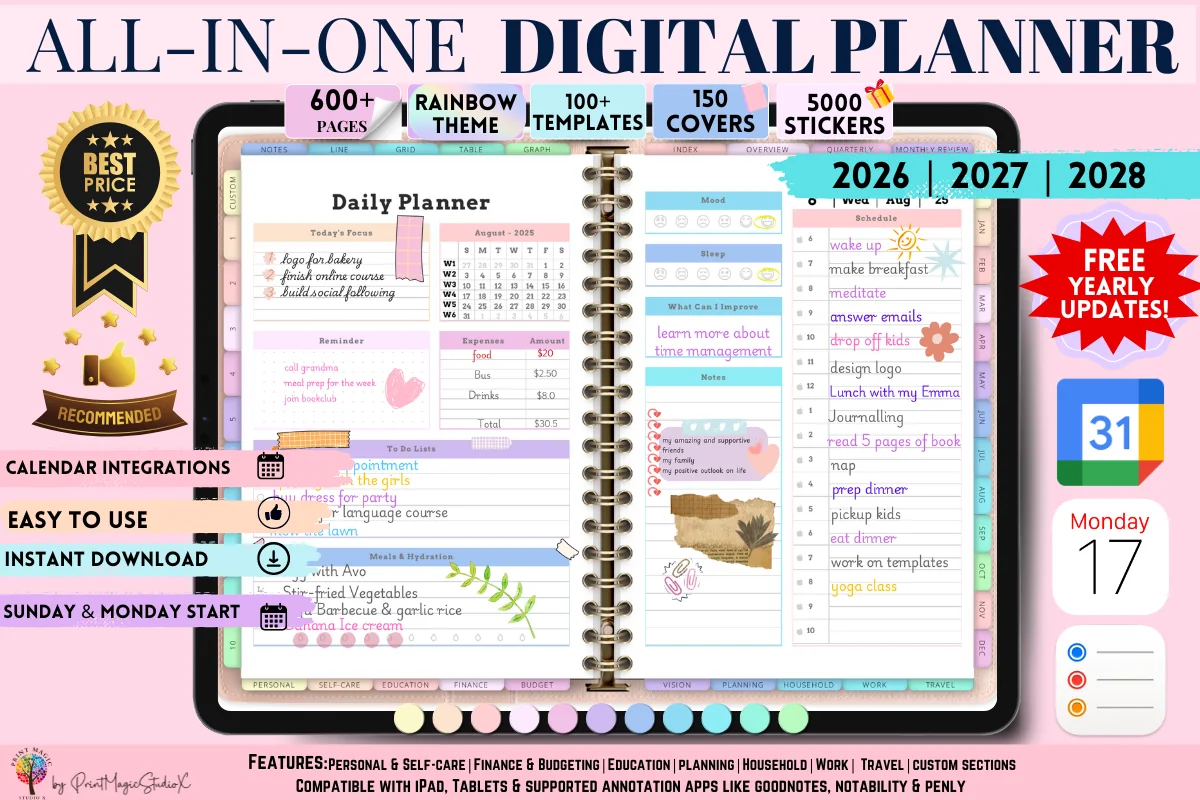
4. All-in-One Digital Planner
Orientation: LandscapeLayouts: Yearly, Monthly, Weekly, Daily, 86 templatesDates: 2026–2028
Best for: people who want one planner for everything, sticker lovers, colorful planners. Designed by Print Magic StudioX.
- A Dream Journal template in the Personal section, next to a Mood Log and a Gratitude Log
- 86 templates across personal, self-care, education, budgeting, travel and more
- Daily, weekly and monthly pages dated 2026–2028, Sunday or Monday start
- 5000 stickers and 150 covers; works in GoodNotes and Notability
- Over 10,000 favorites and a 4.7 rating on Creative Fabrica
A dream journal works better when it's in a notebook you open anyway, and this is the most popular all-in-one I've seen on Creative Fabrica. The dream page sits right next to the mood and gratitude logs, so you can spot a stressful week behind a run of strange dreams. It's dated through 2028, so the 2026 pages are only useful for the next few weeks.
Best undated planner with a sleep log
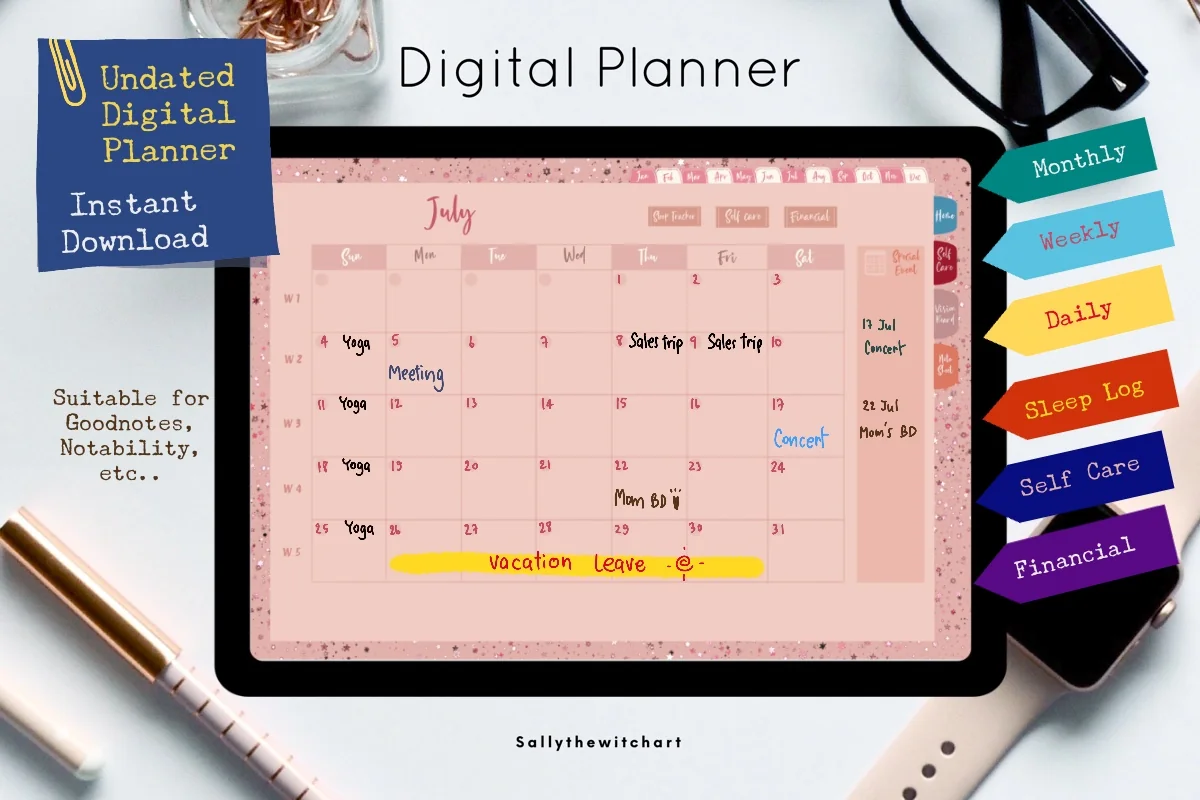
5. Digital Planner, Self Care, Goodnotes
Orientation: LandscapeLayouts: Monthly, Weekly, Daily, monthly sleep tracker, self-care and financial plannersDates: UndatedWeek start: Sunday
Best for: self-care planners, pink lovers, sleep trackers. Designed by Sallythewitchart.
- Undated monthly, weekly and daily pages with clickable tabs
- A Monthly Sleep Tracker tab (Sleep Log) one tap from the monthly page
- Yearly and monthly self-care planners, a monthly financial planner and a vision board
- 10 note pages you can use for longer dream entries
- Pink theme, Sunday start; works in GoodNotes, Notability, Xodo and Noteshelf
Soft pink, undated and simple, so you can start it tonight. The sleep tracker covers the data side, and the note pages are where I'd write the dreams themselves. It has a 5.0 rating, but it's an older file, so don't expect the stickers and extras of newer planners.
Quick Comparison
| Pick | Type | Dream pages | Stand-out extra |
|---|---|---|---|
| 1. Lucid Dream Journal & Sleep Recall Log | Dream journal | Nightly entries + symbol log | Reality checks |
| 2. Sleep Log – Printable & Digital Sleep | Sleep log | Dream notes per night | Monthly summaries |
| 3. 2027 Sleep Tracker | Sleep tracker | None (pair with a journal) | Wind-down rituals |
| 4. All-in-One Digital Planner | All-in-one planner | Dream Journal template | Mood + gratitude logs |
| 5. Digital Planner, Self Care, Goodnotes | Undated planner | Sleep log + note pages | Self-care planner |
40 Dream Journal Ideas by Page Type
Set up the first pages once, then use the entry ideas every morning. The symbol, lucid and sleep pages are weekly or monthly pages: pick one group at a time instead of all of them.
Dream Journal First Page Ideas 1–6
- 1A cover page with the date you started and one line on why you’re keeping it
- 2A “how I sleep now” baseline: bedtime, wake time, how many dreams you remember a week
- 3A short key of symbols you’ll use: a moon for vivid, a cloud for vague, a star for lucid
- 4A color code: one highlighter color per feeling (calm, scared, happy, confused)
- 5A list of dreams you still remember from childhood
- 6An index page that you update with the title of every dream
Morning Dream Entry Ideas 7–14
- 7Give every dream a title, like a short film
- 8Write keywords first, sentences later: people, places, objects, colors
- 9The feeling you woke up with, in one word
- 10A quick sketch of the strangest image
- 11Who was there, and whether you know them in real life
- 12Where it happened, and whether the place felt familiar
- 13A “vividness” score from 1 to 5
- 14One link to your waking life: something from yesterday that showed up
Dream Symbols and Patterns 15–21
- 15A recurring symbol log: each symbol, the dates it appeared, and what it means to you
- 16A recurring dream page: what stays the same, what changes each time
- 17A people log: who appears most often in your dreams
- 18A dream places map: houses, schools and cities that keep coming back
- 19A monthly mood chart of your dreams
- 20“Dream signs”: odd details that repeat, like broken clocks or doors that move
- 21A monthly review: three dreams worth remembering and one pattern you noticed
Lucid Dream Journal Ideas 22–27
- 22A reality check tracker: how many times a day you asked “am I dreaming?”
- 23A lucid moments log: what made you realize you were dreaming
- 24One intention for tonight, written before bed
- 25A clarity rating for each dream, from foggy to crystal clear
- 26A “what I’d do if I knew I was dreaming” list
- 27A weekly count of lucid dreams, without pressure to raise it
Sleep and Evening Pages 28–33
- 28A simple sleep log next to each entry: bedtime, wake time, quality
- 29An evening wind-down checklist: screens off, tea, ten minutes of reading
- 30A caffeine and late snack note, to see what changes your dreams
- 31A “what’s on my mind” box written before sleep
- 32A weekly sleep and dream recall chart
- 33A nightmare page with a rewritten, calmer ending
Creative Dream Journal Ideas 34–40
- 34Turn one dream into a short story or a poem
- 35A dream mood board with stickers and colors from the dream
- 36A “best dream of the month” page
- 37Write the dream from another character’s point of view
- 38A dream dictionary in your own words, not from a book
- 39Ideas and solutions that came from dreams
- 40A year in dreams: one line per month on your favorite dream
How to Keep a Dream Journal
Most people have several dream periods a night and forget nearly all of them within minutes of waking. Keeping a dream journal is mostly about catching that short window. The rest is consistency: dream recall tends to get better when you write every morning, even on mornings when you remember nothing.
- Keep the iPad (or a note) within reach of the bed, with the journal already open.
- Before sleep, tell yourself you’ll remember a dream. It sounds silly, but it sets the morning up.
- When you wake, stay still for a moment and replay what you saw before you move or check messages.
- Write keywords first, then sentences, then the feeling.
- If you remember nothing, write “no dream” and how you slept. The habit counts more than the content.
- Once a week, read back and mark repeating symbols, people and places.
Catch It Before Coffee: a Two-Minute Morning Routine
The title of this post is the whole routine. Coffee, messages and the news are what wipe dreams away, so the dream journal comes first, before any of them. Two minutes is enough:
- 30 seconds: eyes closed, replay the last scene and work backward.
- 60 seconds: keywords and a title on today’s entry page. Voice-to-text or a quick scribble with the Apple Pencil both work.
- 30 seconds: one word for the feeling and a vividness score.
That’s it. You can fill in the full story later in the day, with your coffee, from the keywords. The one thing I’d avoid is a bright screen right before sleep; if the iPad is your journal, set Night Shift and keep the brightness low in the morning too.
What to Write in a Dream Journal Entry
A good entry has the same parts every time, so you can compare them later. This is the template I’d copy onto a GoodNotes page and duplicate every morning:
- Date, title and sleep: when you went to bed, when you woke, how rested you feel.
- The story: what happened, in the present tense (“I’m walking into a school…”), which keeps the memory sharper.
- People, places and objects: a short list under the story, so symbols are easy to find.
- Feeling: during the dream and after waking; they’re often different.
- Waking-life link: anything from the last few days that might have shown up.
- Your own meaning: what it might be about for you. Dream dictionaries are fun, but your associations matter more than a generic list.
Lucid Dream Journal Pages, Without the Pressure
A lucid dream is one where you know you’re dreaming while it’s happening. Many people start a dream journal for exactly this, and a journal really is the usual first step: you can’t notice dream signs you never wrote down. The pages that help are simple: a reality check tracker for the day, a dream-sign list, and a clarity rating for each dream. The Lucid Dream Journal above has all three. I’d keep it relaxed, though. Waking yourself up at night to try techniques costs sleep, and good sleep is worth more than a lucid dream.
What I Look For in a Digital Dream Journal
- Made for iPad apps. A PDF for GoodNotes or Notability, ideally with tabs. KDP interiors and Canva templates are made for sellers, not for writing in.
- A repeatable entry page. One clean page you can duplicate every morning.
- A place for patterns. A symbol log, a recurring dream page or at least a monthly review.
- Sleep next to dreams. Bedtime, wake time and quality explain a lot of dream changes.
- Calm design. Dark or soft pages are easier on the eyes first thing in the morning.
- No past years. I skipped files dated for years that are already over.
Dream Journal Template or App?
Search for a dream journal for iPad and most results are apps: they record voice notes, tag symbols and sometimes offer AI interpretation, usually on a subscription. A PDF template in GoodNotes does less, but it’s yours: no account, no subscription, handwriting and sketches, and the journal sits next to your planner and your mood tracker. If you mostly want quick voice notes at 6 a.m., an app is fine. If you like to write, draw and review by hand, a template is the better fit.
How to Set Up a Dream Journal in GoodNotes
- Import the PDF into GoodNotes (or Notability) as its own notebook.
- Fill in the first pages once: why you’re keeping it, your symbol key and your sleep baseline.
- Duplicate a week of entry pages every Sunday, so the next blank page is always ready.
- Bookmark the symbol log and the monthly review, so you can jump straight there.
- Use the lasso tool to move keywords into the symbol log when you spot a repeat.
- Back up the notebook to iCloud; a dream journal is impossible to recreate.
FAQ
Is it a good idea to keep a dream journal?
For most people, yes. Writing dreams down every morning usually helps you remember more of them, and over a few weeks you start to see repeating people, places and feelings. It’s also a calm, creative way to start the day. If it starts to make you anxious about sleep, take a break.
How do I start a dream journal?
Keep the journal next to your bed, write before you check your phone, and start with keywords and a title. Set up a first page with your symbol key and sleep baseline, then use one repeatable entry page each morning. Ideas 1 to 14 above are enough for the first month.
What should I write in a dream journal?
The story in the present tense, the people, places and objects, the feeling during and after, how you slept, and any link to your waking life. If you only have a fragment, write the fragment: one image is still an entry.
What is the best dream journal for iPad?
If you want a dedicated dream journal, the Lucid Dream Journal & Sleep Recall Log above is the only native iPad dream journal I found on Creative Fabrica, with entries, clarity ratings and a symbol log. If you’d rather keep dreams inside your planner, the All-in-One Digital Planner has a Dream Journal page.
Is lucid dreaming safe?
Noticing that you’re dreaming is harmless for most people. The risk is in some techniques that wake you up in the middle of the night, which cut into your sleep. Keep it light, protect your sleep, and skip lucid dreaming practice if you have a sleep disorder or it makes your nights worse.
When should I talk to a doctor about nightmares or bad sleep?
A dream journal isn’t treatment. If nightmares come several times a week, you’re afraid to fall asleep, you have trouble sleeping for weeks, or bad dreams follow something traumatic, talk to a doctor or a sleep or mental health professional. Your journal can help there: bring the sleep log, it shows patterns quickly.
Final Thoughts
A dream journal works when the morning page is quick: keywords, a title and a feeling, before coffee and before your phone. Add a sleep log, read back once a week, and the patterns show up on their own. If you want a real dream journal, start with the Lucid Dream Journal & Sleep Recall Log; if you’d rather keep dreams in your planner, the All-in-One Digital Planner or the undated self-care planner will do. For more writing ideas, see my journaling prompts and self-care planners, or browse all wellness journals.
You May Also Like
This post contains affiliate links. If you buy through them, I may earn a small commission at no extra cost to you. Learn more.