Some mornings run themselves: coffee, a quick tidy, out the door on time. Others start with the snooze button and never quite recover. The difference is rarely willpower; it’s having a routine you don’t have to think about. A daily routine planner on your iPad helps you design that routine once, from morning to evening, and then simply follow it.
Below are morning, evening and cleaning routine ideas you can copy, then the 8 planners from Creative Fabrica I’d use to plan routines on my iPad, from a single routine page to full planners with chore charts. At the end: how to build a routine that actually sticks.
Morning Routine Ideas
- The 15-minute morning: glass of water, make the bed, open the curtains, check today’s planner page.
- The focused morning: no phone for the first 30 minutes, write three priorities, start the hardest task first.
- The gentle morning: stretch for five minutes, coffee by the window, one line in a gratitude journal.
- The busy-parent morning: lunches packed the night before, bags by the door, a two-minute family check-in on the day’s plans.
Evening Routine Ideas
- The 10-minute reset: clear the kitchen counter, lay out tomorrow’s clothes, charge your devices.
- The planning evening: look at tomorrow’s page, move unfinished tasks, note the first thing you’ll do.
- The wind-down: screens off an hour before bed, skincare, a few pages of a book.
- The reflect-and-rest: one win from today, one thing to let go, lights out at the same time each night.
A Simple Weekly Cleaning Routine
Spread chores across the week so the weekend stays free: Monday kitchen, Tuesday bathroom, Wednesday laundry, Thursday dusting and floors, Friday fridge and groceries, weekend a 15-minute reset only. Add a daily five-minute tidy and most homes stay calm with very little effort.
The 8 Best Daily Routine Planners for iPad I Found
Most “routine planners” on marketplaces are printables, so I kept only digital planners for the iPad. The first is a dedicated daily routine page; the others are planners with real routine, schedule or cleaning pages, chosen for how well they handle the rhythm of a day.
TL;DR: Morning, evening and weekly cleaning routine ideas, plus 8 iPad planners with routine, schedule or cleaning pages. Each card lists orientation, layouts and dates, plus who it suits.
Quick Picks
- Best for simple routine page: Daily Routine – Cozy Pastel Planner
- Best for morning and night routine: The Ultimate Life Reset Digital Planner
- Best for routine planner in a 2027 planner: 2027 Digital Planner | Monday and Sunday
- Best for health routines: All in One Digital Planner Undated V2.3
- Best for daily page with a timed schedule: Undated Yearly Daily Digital Planner
- Best for cleaning routine: All-in-One Digital Planner 2027
- Daily Routine – Cozy Pastel Planner – Best simple routine page
- The Ultimate Life Reset Digital Planner – Best morning and night routine
- 2027 Digital Planner | Monday and Sunday – Best routine planner in a 2027 planner
- All in One Digital Planner Undated V2.3 – Best for health routines
- Undated Yearly Daily Digital Planner – Best daily page with a timed schedule
- All-in-One Digital Planner 2027 – Best cleaning routine
- Digital Planner for Goodnotes – Best for list lovers
- Digital Planner for Ipad, GoodNotes – Best for routines and chores
Best simple routine page
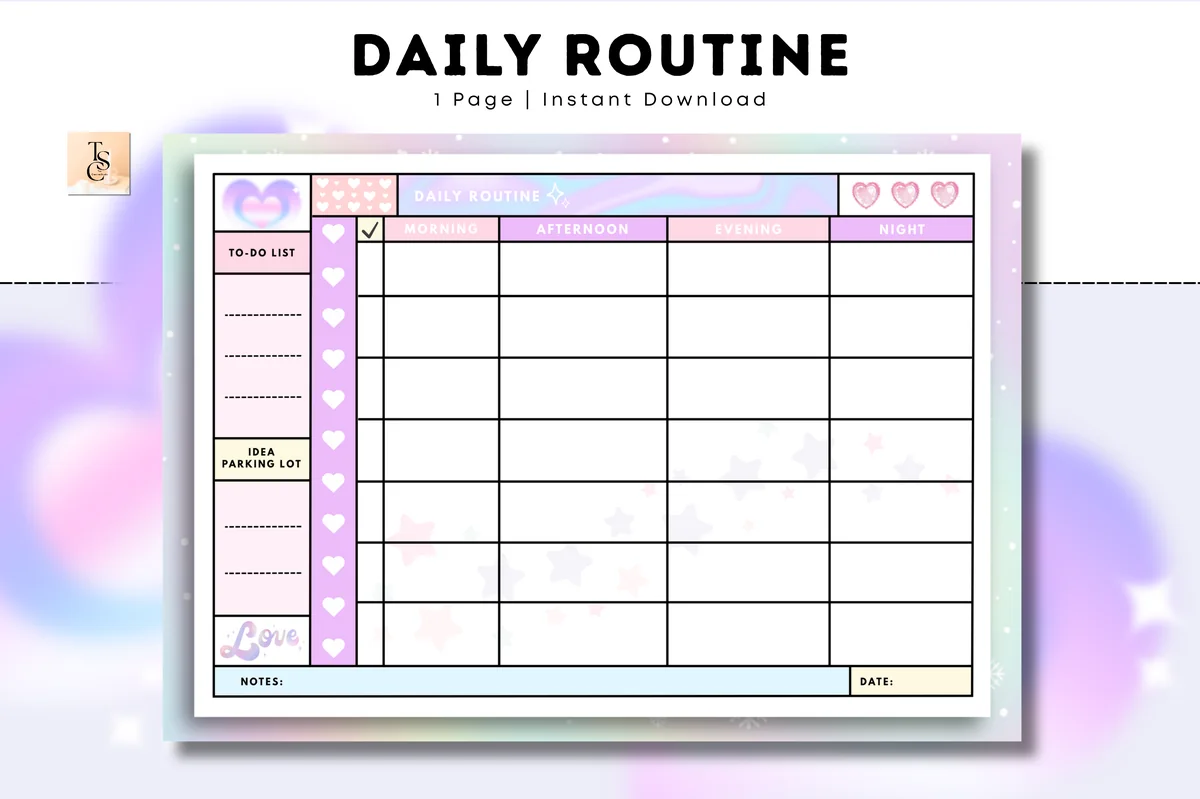
1. Daily Routine – Cozy Pastel Planner
Orientation: LandscapeLayouts: Daily routine (morning to night)Dates: Undated
Best for: routine builders, pastel lovers, families. Designed by Tas Creative Studio.
- One undated daily routine page with morning, afternoon, evening and night columns
- Side panels for a to-do list and an "idea parking lot"
- Cute pastel design with hearts, A4 landscape
- Digital PDF version for GoodNotes, Notability and Noteshelf
This is the clearest routine page I found: four columns, one for each part of the day, and checkboxes down the side. Duplicate it for weekdays and weekends, and you have a routine you can see at a glance.

Best morning and night routine
2. The Ultimate Life Reset Digital Planner
Orientation: LandscapeLayouts: Monthly, Weekly, DailyDates: Undated
Best for: fresh starts, goal setters, self-care seekers. Designed by Tas Creative Studio.
- Productive morning routine and productive night routine pages
- Cleaning checklist, grocery list and 7-day habit tracker
- Daily, weekly and monthly planner with reflections
- Self-care workbook pages; 49 undated pages; rated 5.0
If you want to build your routines from scratch, this planner has dedicated morning and night routine pages next to self-care and goal pages. It's a great fit for a fresh start: decide how you want your days to begin and end, then plan around it.

Best routine planner in a 2027 planner
3. 2027 Digital Planner | Monday and Sunday
Orientation: LandscapeLayouts: Yearly, Quarterly, Monthly, Weekly, DailyDates: 2027Week start: Monday or Sunday
Best for: dark mode fans, calendar app users, finance trackers. Designed by SuperDigitalPlanners.
- Routine planner to design your ideal morning or evening routine
- Priority matrix for sorting tasks by urgency
- 2 weekly and 2 daily layouts, dark theme
- Links to Apple Calendar, Reminders and Google Calendar
The routine planner page sits next to a priority matrix, which is a smart combo: routines handle the same-every-day things, the matrix handles everything else. Dated 2027, with a dark theme for evening planning.

Best for health routines
4. All in One Digital Planner Undated V2.3
Orientation: LandscapeLayouts: Yearly, Monthly, Weekly, DailyDates: UndatedWeek start: Monday or Sunday
Best for: fitness fans, wellness planners, pink lovers. Designed by CraftAddicted.
- Weekly planners and trackers for workouts, meals and a skin care routine
- Daily pages with your day, priorities and a water tracker (per the cover)
- 900 hyperlinked pages, undated, Sunday and Monday start
- Sleep, mood and steps trackers; free stickers and widgets
If your routine is mostly about health, this planner gives each part its own page: a workout plan, a meal log and a skin care routine. The daily page has a water tracker, so the small habits get checked off with the schedule.
Best daily page with a timed schedule
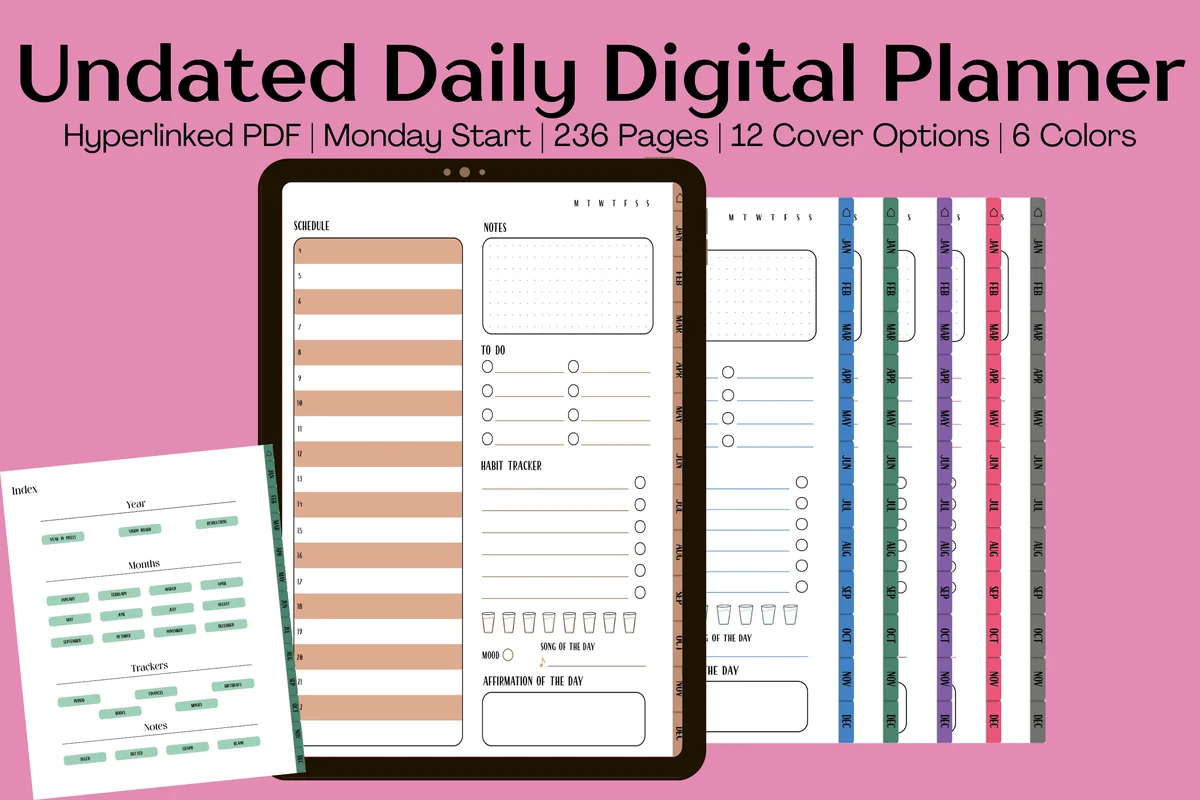
5. Undated Yearly Daily Digital Planner
Orientation: PortraitLayouts: Yearly, Monthly, DailyDates: UndatedWeek start: Monday
Best for: daily planners, mood trackers, habit builders. Designed by Kinu Planners.
- Daily pages with a timed schedule, to-do list and notes
- Habit, mood and hydration trackers on every day
- Song and affirmation of the day
- 236 undated pages, 6 colors and 12 covers
Each daily page has a timed schedule plus small rituals: a habit check, water, mood and an affirmation. It turns your daily page into a gentle routine you repeat every morning.

Best cleaning routine
6. All-in-One Digital Planner 2027
Orientation: LandscapeLayouts: Yearly, Monthly, Weekly, DailyDates: 2027Week start: Monday
Best for: busy professionals, budgeters, people who want one planner for everything. Designed by Heartcraft Studio.
- Monthly cleaning schedule and weekly cleaning tasks
- Habit tracker, meal planning and workout planning each week
- 2027 dated, landscape, Monday start
- Works in GoodNotes, Notability, Noteshelf and ZoomNotes
Cleaning is the routine most people want help with, and this planner builds it into every month and week. Splitting chores across the week is the easiest way to never have a whole Saturday of cleaning.
Best for list lovers
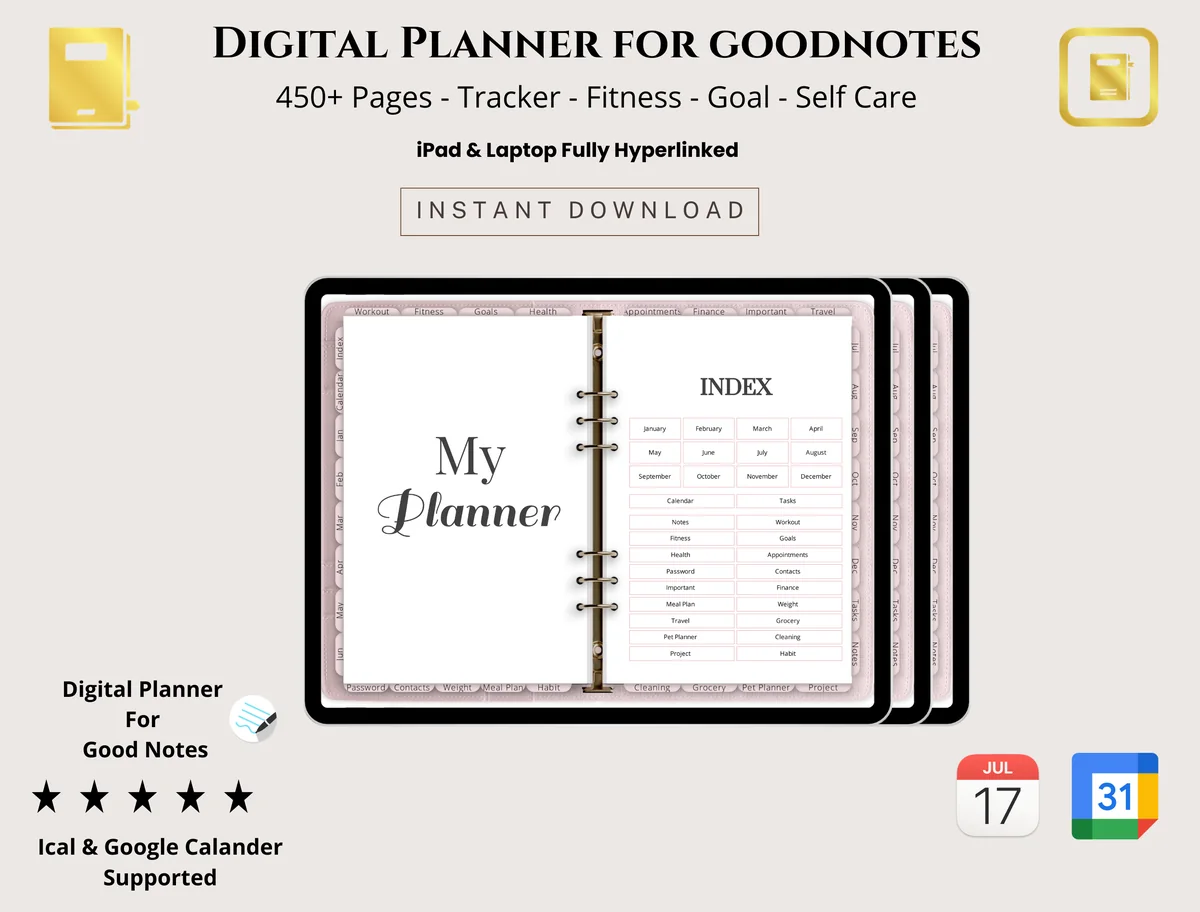
7. Digital Planner for Goodnotes
Layouts: Monthly, Weekly, Daily, Trackers
Best for: students, professionals, budget shoppers. Designed by PlannerPlanet.
- Daily, weekly and monthly layouts
- To-do lists and checklists
- Habit tracker and many trackers for your daily routine
- Goal setting, budget and expense tracker; 450+ pages (per the cover)
If your routine is really a list, this simple planner gives you to-do lists and checklists next to daily, weekly and monthly pages. The habit tracker turns the routine into boxes you tick, and the neutral design suits home, school or work.
Best for routines and chores
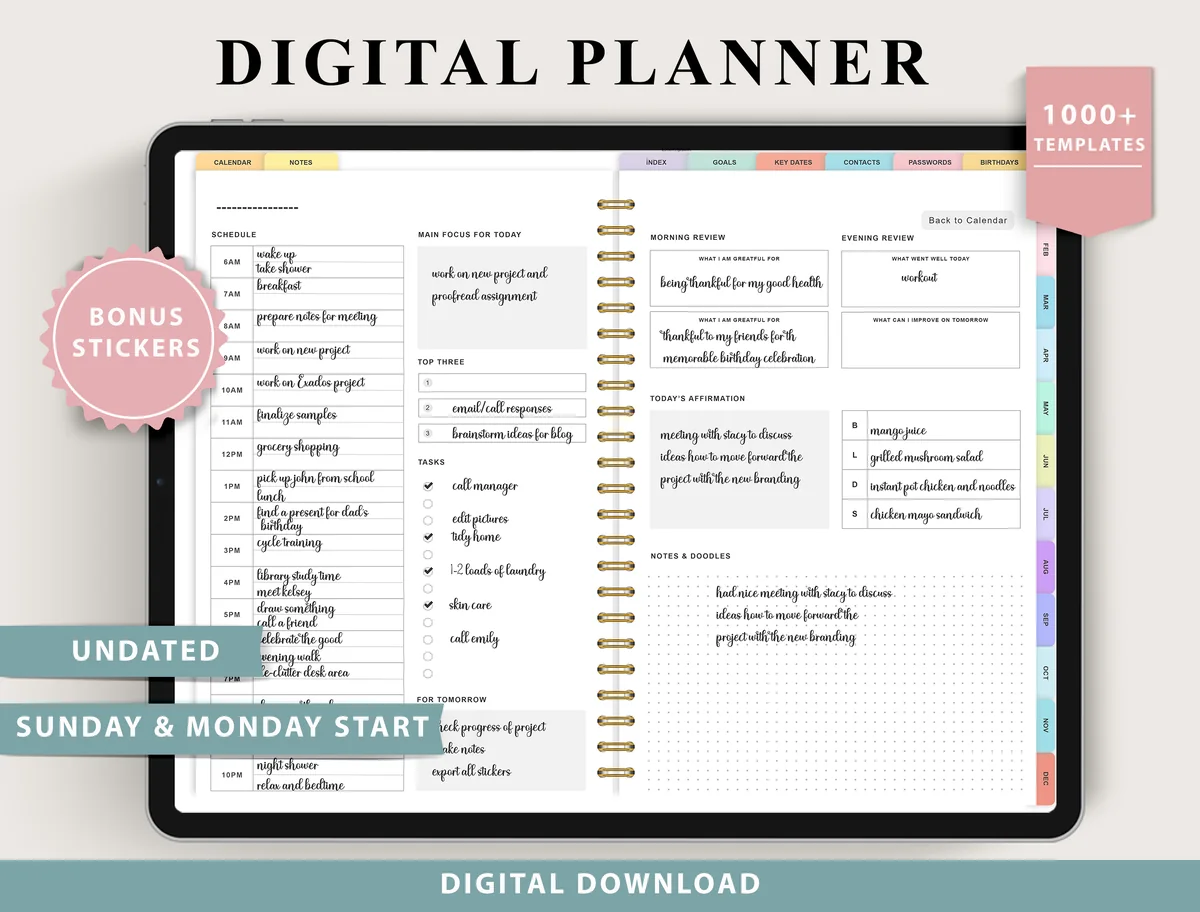
8. Digital Planner for Ipad, GoodNotes
Layouts: Monthly, Weekly (4 layouts), Daily (4 layouts), 100+ templatesDates: UndatedWeek start: Monday or Sunday
Best for: indecisive planners, fitness trackers, finance trackers. Designed by ThePlannersDelight.
- Routines and chores and cleaning pages
- 4 daily layouts, from structured to minimal; 4 weekly layouts
- Habit, sleep and hydration trackers
- Undated, Monday and Sunday start; bonus stickers
Routines live in two places here: on a routines page you set up once, and in the daily layout you fill every morning. Add the chores and cleaning page and the whole home routine is covered. Four daily layouts let you pick the one that matches how detailed your day is.
Quick Comparison
| Planner | Best for | Routine pages | Stand-out extra |
|---|---|---|---|
| 1. Daily Routine – Cozy Pastel Planner | One-page daily routine | Morning to night columns | To-do + idea space |
| 2. The Ultimate Life Reset Digital Planner | Building new routines | Morning + night routines | Self-care workbook |
| 3. 2027 Digital Planner | Monday and Sunday | Routines + priorities | Morning or evening routine | Priority matrix |
| 4. All in One Digital Planner Undated V2.3 | Health routines | Workout, meal, skin care | 900 pages, undated |
| 5. Undated Yearly Daily Digital Planner | A routine on every page | Timed daily schedule | Affirmation of the day |
| 6. All-in-One Digital Planner 2027 | Cleaning built in | Monthly + weekly cleaning | Weekly meal planning |
| 7. Digital Planner for Goodnotes | Routines as checklists | To-do lists + habit tracker | 450+ pages |
| 8. Digital Planner for Ipad, GoodNotes | Routines + chores | Routines, chores, habits | 4 daily layouts |
Also Worth a Look: Morning Routine Planners
The morning routine ideas at the top of this post only work if they live on a page you open every morning. The 8 planners above cover the whole day. These two put the morning and evening routine first, so I’m adding them as extras for anyone who cares most about how the day starts and ends.
Best dated morning routine planner for 2027
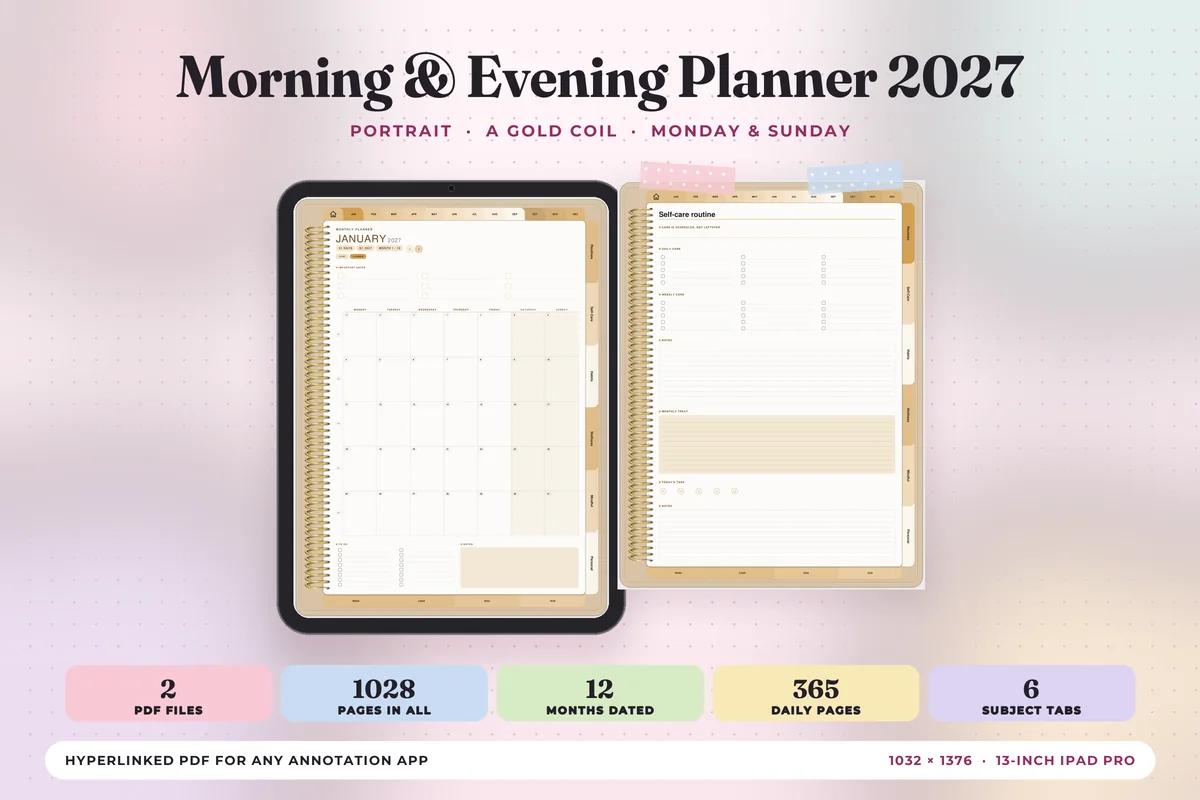
Morning & Evening Planner 2027
Orientation: Portrait (landscape listed separately)Layouts: 12 month-at-a-glance pages, Monthly, Weekly, Daily (hourly 6 am to 9 pm) + 6 subject tabsDates: 2027Week start: Monday or Sunday
Best for: morning routines, evening wind-downs, self-care habits. Designed by Print Magic StudioX.
- Six tabs of its own: Routines, Self-Care, Habits, Wellness, Mindful and Personal, with 4 templates under each
- 365 daily pages with an hourly schedule from 6 am to 9 pm, a top 3, a to-do list and notes
- Two hyperlinked PDFs, Monday start and Sunday start, sized to the 13-inch iPad Pro portrait page
- 30 note pages (lined, dot grid and square grid); a landscape version is sold as a separate listing
This is the one for a morning routine inside a full 2027 planner rather than on a loose page. The Routines and Self-Care tabs sit on every page, so the morning checklist is one tap away from today’s schedule. The gold coil and warm beige pages make it feel more like a journal than an office planner.
Best single routine page
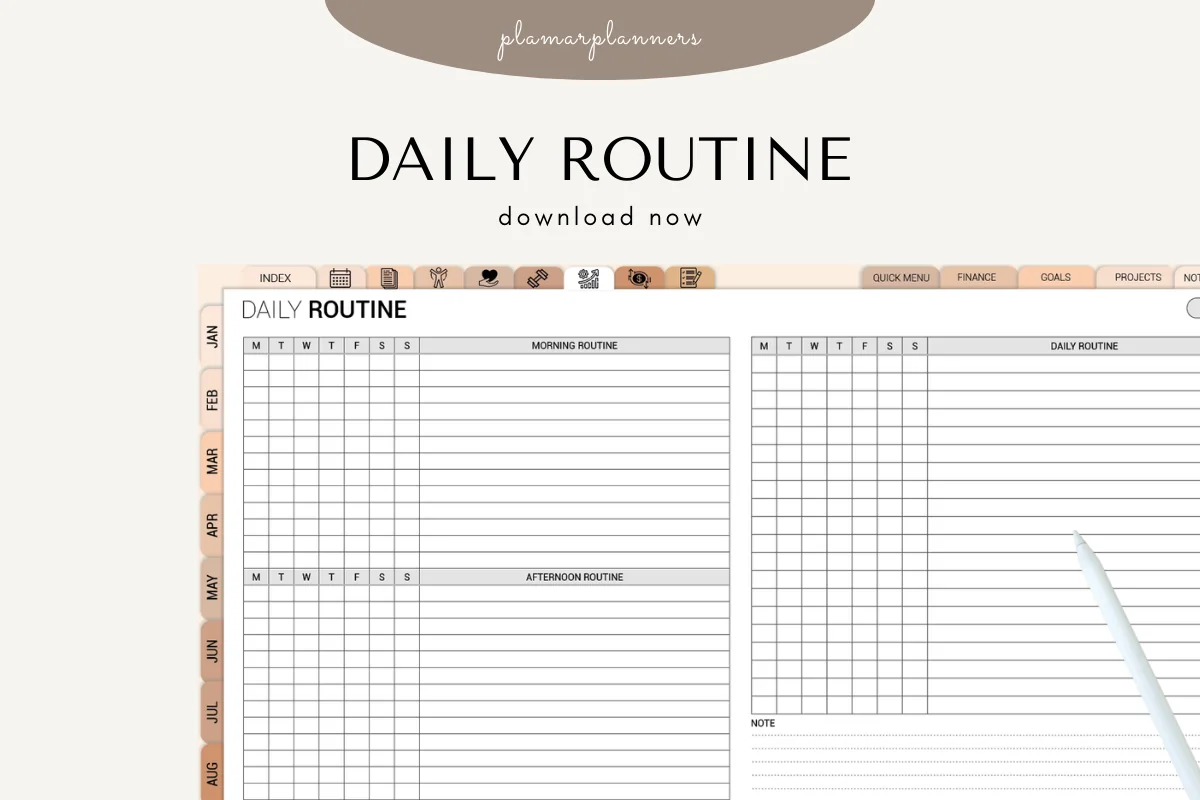
Daily Routine Planner
Layouts: Morning, afternoon and evening routine grids with M to S checkboxes, daily routine list, habits, priorities, notesDates: Month tabs, no year on the pagesFormats: PDF in A4 and US Letter + a digital version for tablets
Best for: a first morning routine, weekly check-ins, simple layouts. Designed by Plamarplanners.
- Morning, afternoon and evening routine blocks, each with a Monday to Sunday checkbox column
- A full daily schedule, a habit tracking section, top priorities of the day and a notes and reflections page
- Sold as a printable, with a digital version that the listing says works in GoodNotes and Notability
- A plain grid layout with month tabs down the side in the previews
I’d use this one for the morning routine ideas above: write the steps once, then tick each weekday in the M to S columns and see by Friday which steps really happen. It’s a routine section rather than a full planner, and the title says printable, so pick it if you want just the routine page and already have a main planner.
Whichever one you pick, keep the morning list to three to five steps and bookmark the routine page, so it’s the first page you see when you open the planner.
Time Management Planner Pages for Your iPad
A routine covers what you do every day. A time management planner covers what fits into the hours that are left. Two kinds of pages do most of that work: an hourly week, so you see where the time goes, and a priority matrix, so you know what to move when the week is full. Both picks below are printable PDFs that the listings say also work in GoodNotes and Notability, which is why they sit here as extras and not in the list above.
Best for seeing your week hour by hour
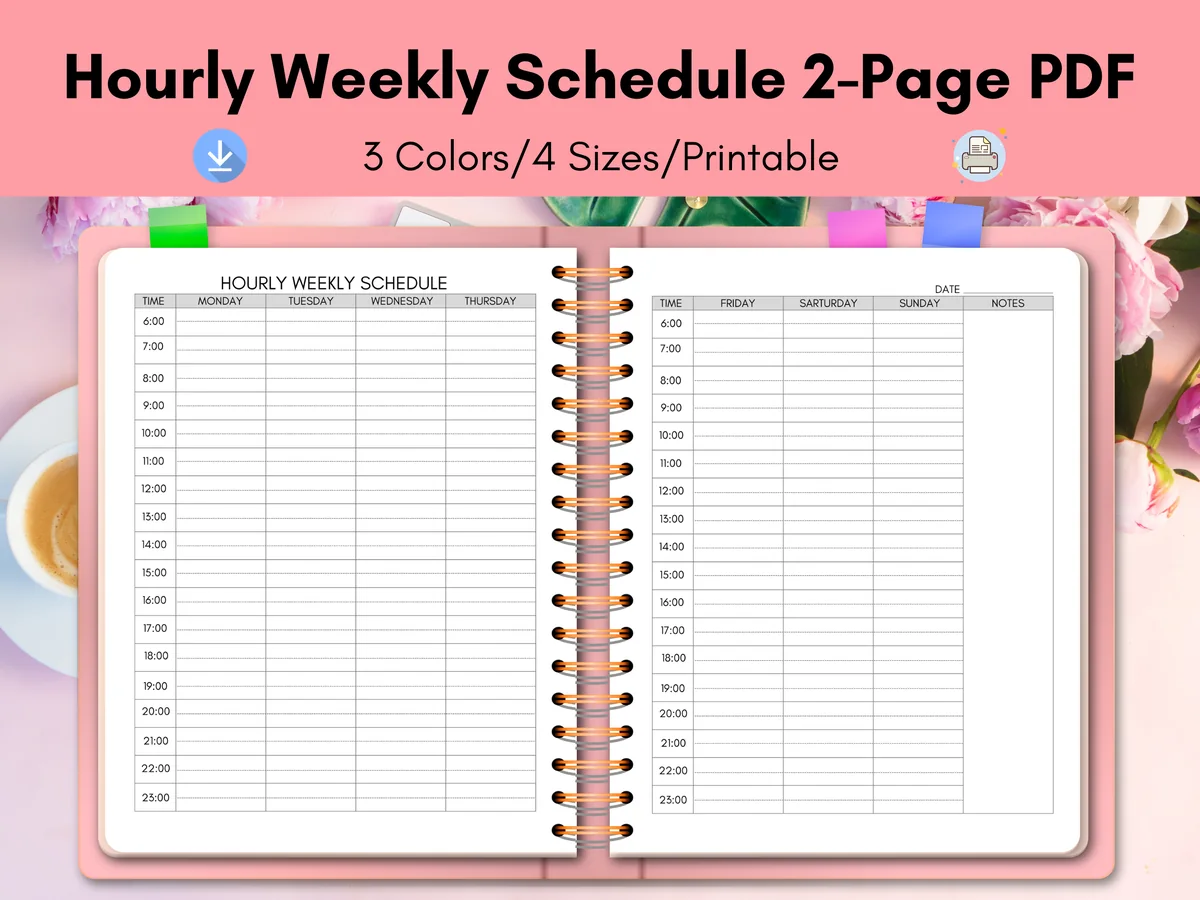
Hourly Weekly Schedule Weekly Planner
Layouts: Two-page hourly week, Monday to Sunday + notes columnDates: UndatedSizes: US Letter, A4, A5, Happy Planner Classic
Best for: time blocking, busy weeks, shift schedules. Designed by Diana Hunter.
- A two-page week: Monday to Thursday on the left, Friday to Sunday and a notes column on the right
- Hourly rows from 6:00 to 23:00 in the previews
- Several color versions in four sizes, plus a user guide
- A plain PDF that the designer says imports into GoodNotes, Notability and Noteshelf
An hourly week is the most honest way to see where your time goes: block the fixed things first (work, school runs, dinner), and the empty rows are the time you really have. It’s a plain sheet with no tabs or links, so I’d import it into GoodNotes as a template and add a fresh copy each week. One small thing: in the previews, Saturday is misspelled in the header.
Best for deciding what matters today
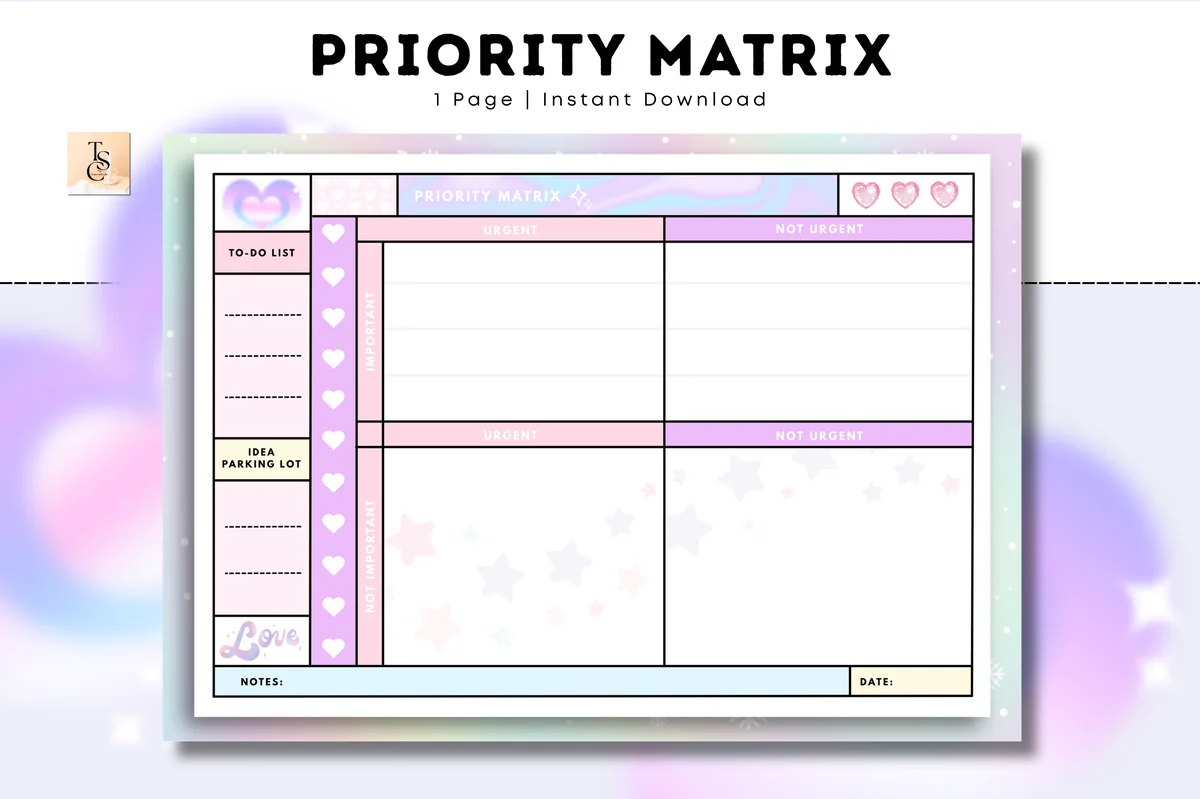
Priority Matrix – Cozy Pastel Planner
Layouts: One-page priority matrix with a to-do list and an idea parking lotDates: UndatedOrientation: A4 landscape
Best for: overfull to-do lists, work and study weeks, quick daily triage. Designed by Tas Creative Studio.
- Four boxes: urgent or not urgent, important or not important
- A to-do list and an idea parking lot down the side, with notes and date fields
- A printable PDF and a digital PDF version
- The listing names GoodNotes, Notability, Noteshelf, Xodo and Samsung Notes
It’s from the same Cozy Pastel series as the routine page at #1, so the two look like they belong together. When the hourly week overflows, this is the page that helps: what’s urgent and important stays, the rest moves or goes. It’s one page, so duplicate it whenever you need a fresh one.
The two work well together: fill the hourly week on Sunday, then use the matrix each morning to choose the three tasks that have to happen. If you’d rather have hourly pages inside a full planner, see my hourly digital planners.
From Morning to Evening: How to Build a Routine That Sticks
- Write down your current day first. For two or three days, note what you actually do and when. A routine built on reality beats an ideal you can’t keep.
- Anchor it to fixed points. Wake-up time, leaving the house, dinner and bedtime are your anchors. Build small routines around them.
- Keep each routine short. Three to five steps per routine. You can always add more once it feels automatic.
- Put it on one page. A morning-to-night routine page you see every day is far more effective than a routine in your head.
- Plan a weekend version. Weekends are different; a lighter routine keeps the habit without feeling strict.
- Review weekly. On Sunday, check what worked and adjust one thing. Small changes keep a routine alive.
What I Look For in a Daily Routine Planner
- Parts of the day, not just hours. Morning, afternoon and evening blocks are easier to follow than a rigid hourly grid.
- Checkboxes. Ticking off a routine step is half the motivation.
- Reusable pages. Undated routine pages can be duplicated for weekdays and weekends.
- Home pages if you need them. Cleaning schedules and chore charts matter if you run a household.
- Made for the iPad. GoodNotes or Notability support, so you can write and tap tabs with your Apple Pencil.
How to Set Up a Daily Routine Planner in GoodNotes
- Import the planner PDF into GoodNotes (Share → GoodNotes → Import as New Document).
- Fill in your routine page once, then duplicate it for each weekday, or keep one master page.
- Bookmark the routine page so it’s the first thing you see when you open the planner.
- Use the same highlighter color for each routine (morning yellow, evening lilac) to read it at a glance.
FAQ
What is a daily routine planner?
It’s a planner page (or section) where you lay out the steps you repeat every day, usually split into morning, afternoon, evening and night. Unlike a daily planner, which changes every day, a routine page stays mostly the same and you just tick it off.
How do I make a daily routine I’ll stick to?
Start small, anchor routines to fixed times like waking up and bedtime, and keep each one to a few steps. Put the routine where you’ll see it every day, then review and adjust once a week.
Routine planner or daily planner: do I need both?
Many people use both: the routine page for the things you do every day, and the daily page for appointments and today’s tasks. If you want both in one, choose a planner with routine pages built in, like the ones above. For daily pages, see my daily digital planners.
Can I use a routine planner for my kids or family?
Yes. A one-page routine works well for family mornings and bedtimes, and planners with chore charts make it easy to share tasks. On an iPad you can even duplicate a page for each person.
How do I start a morning routine?
Pick a fixed wake-up time and attach three or four small steps to it: water, getting dressed, a few minutes of planning. Write them on a routine page in the order you do them and tick them off for a couple of weeks before you add anything new. A short routine you actually finish beats a long one you skip.
How do I get into a routine when my days are all different?
Anchor the routine to things that happen every day anyway, like waking up, lunch and bedtime, instead of to clock times. Keep a short core version for busy days and a longer one for calm days, and review the page once a week to see what really stuck. If what you need is an hour-by-hour schedule for a busy day rather than a routine, my hourly day planners are a better fit.
What is a time management planner?
It’s a planner that shows where your hours go and which tasks deserve them. Most have two parts: a schedule by the hour or by time block, and a way to rank tasks, like a priority matrix or a top 3. A routine page covers the steps you repeat every day, so the two work well side by side. The time management pages above add both to any planner you already use.
Final Thoughts
A good routine makes your day easier before it even starts. Write down your current day, build short morning and evening routines around it, and keep them on one page in a daily routine planner on your iPad. Want routines inside a bigger system? See my all-in-one life planners or browse all daily planners. For more blocks to add to a daily page, see my daily planner ideas. For the housework part of the day, see my cleaning schedule ideas.
If you’re choosing your main planner for next year, start with my list of the 10 best iPad digital planners for 2027.
If routines slip because your brain jumps between tasks, my ADHD planner ideas share layouts built for focus, brain dumps and cleaning.
If bedtime and waking time are the part of your routine you want to record, these digital sleep trackers keep that log separate from the rest of the day.
You May Also Like
If your routine also includes school bags, family meals and children’s appointments, these mom planner ideas offer practical ways to keep those details together.
This post contains affiliate links. If you buy through them, I may earn a small commission at no extra cost to you. Learn more.