A reading journal fills up fast: the TBR pile, the book you’re halfway through, the one you gave up on, the five-star read you want to remember. Bookish stickers turn those lists into something you actually want to open, and on an iPad one “Did Not Finish” label or one sleepy cat on a book stack can be reused on every page, all year.

Below are 8 bookish digital sticker packs from Creative Fabrica I’d use in a GoodNotes reading journal, from a 50-piece set of TBR, DNF and rating labels to cozy watercolor reading corners and two weekly kits with a library theme. After the list: what to look for, a sticker for every stage of a book (from TBR to five stars), book sticker ideas for journal pages, and how to add them in GoodNotes. If your reading pages lean toward blankets and rainy days, cozy digital stickers fit right next to these.
The 8 Best Bookish Digital Stickers I Found
Most “bookish stickers” on Creative Fabrica are SVG cut files for T-shirts, mugs and vinyl decals. I skipped all of those, plus PNG sets sold only for print-on-demand, and kept packs made for digital planners and journals, with GoodNotes, Notability or ZoomNotes named on the page. No more than two packs per designer, so you see different styles.
TL;DR: 8 bookish digital sticker packs for GoodNotes and iPad reading journals: a 50-piece set of TBR, DNF and five-star labels, retro quote stickers, a coquette set, cozy watercolor reading corners, two cute illustrated packs and two pre-cropped weekly kits with book themes. All are transparent PNGs; the cards say which ones also print.
Quick Picks
- Best for tracking reads: Book Lover Stickers + Templates
- Best for fun quotes: Funny Book Lover Stickers Bundle PNG
- Best for coquette pages: Bookish Planner Stickers for GoodNotes
- Best for cozy watercolor: Cozy Reading Corner – 10 PNG Stickers
- Best for kawaii fans: Book Stickers, Digital Stickers
- Best for monthly covers: Book Lover Stickers, Digital Stickers
- Book Lover Stickers + Templates – Best for tracking reads
- Funny Book Lover Stickers Bundle PNG – Best for fun quotes
- Bookish Planner Stickers for GoodNotes – Best for coquette pages
- Cozy Reading Corner – 10 PNG Stickers – Best for cozy watercolor
- Book Stickers, Digital Stickers – Best for kawaii fans
- Book Lover Stickers, Digital Stickers – Best for monthly covers
- Colorful Library Digital Stickers – Best for library weekly spreads
- Books and Coffee Gnomes Digital Stickers – Best for whimsical weeks
Best for tracking reads
1. Book Lover Stickers + Templates
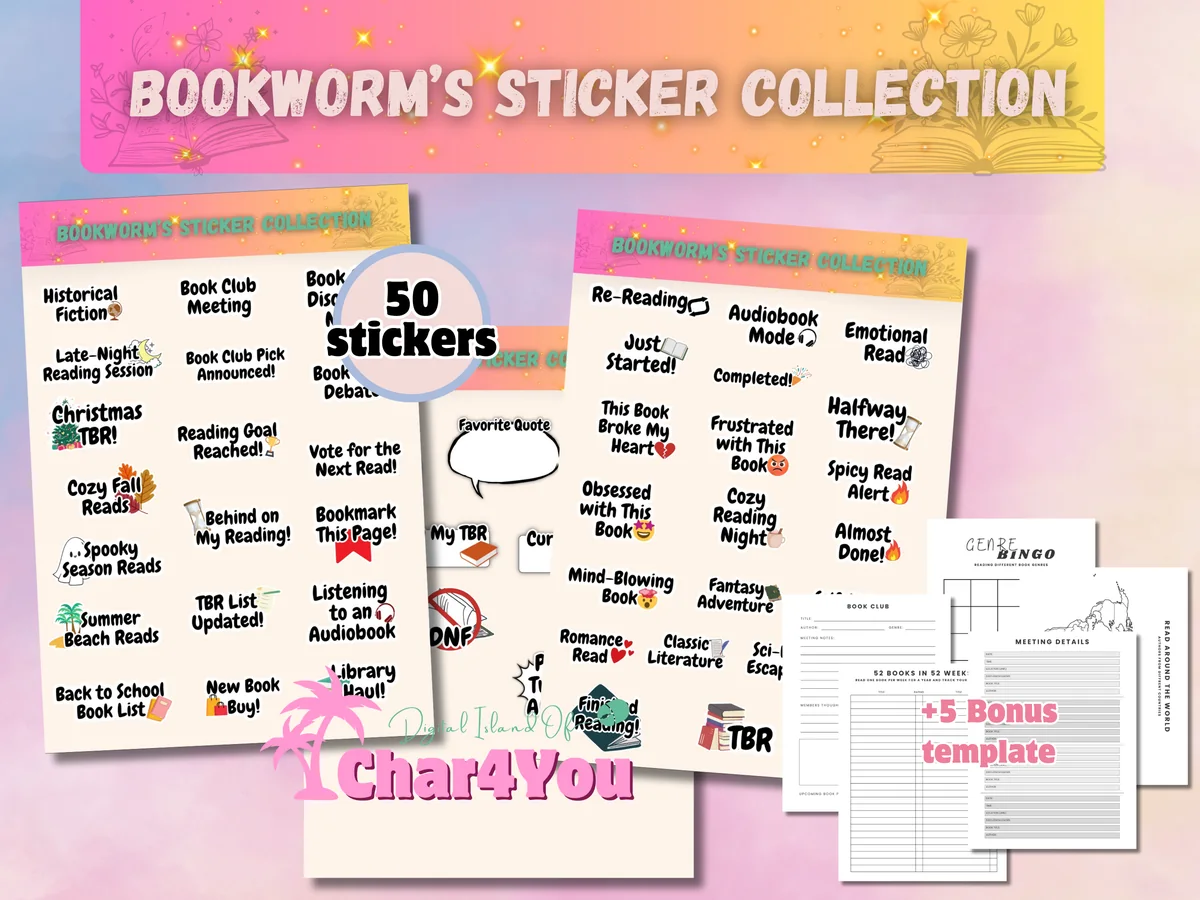
Layouts: 50 bookish labels (TBR, Currently Reading, DNF, 5-Star Read, Book Club Pick, genres)Format: PNG + pre-cropped GoodNotes sheet + printable PDF sheet
Best for: reading trackers, book club members, genre sorters. Designed by Char4You.
- 50 bookish stickers as transparent PNGs
- A pre-cropped GoodNotes sticker sheet for drag-and-drop
- Labels like 5-Star Read, Currently Reading, Did Not Finish, Book Club Pick, Plot Twist Alert and Next Up on My TBR
- Genre and mood labels on the previews (fantasy, romance, mystery, audiobook mode, re-reading)
- A printable PDF sheet for paper journals
This is the pack that does the actual tracking: the labels say what happened to a book, so a reading log becomes readable at a glance. If you only buy one pack for a book journal, I'd make it this one and add a decorative set later.
Best for fun quotes
2. Funny Book Lover Stickers Bundle PNG
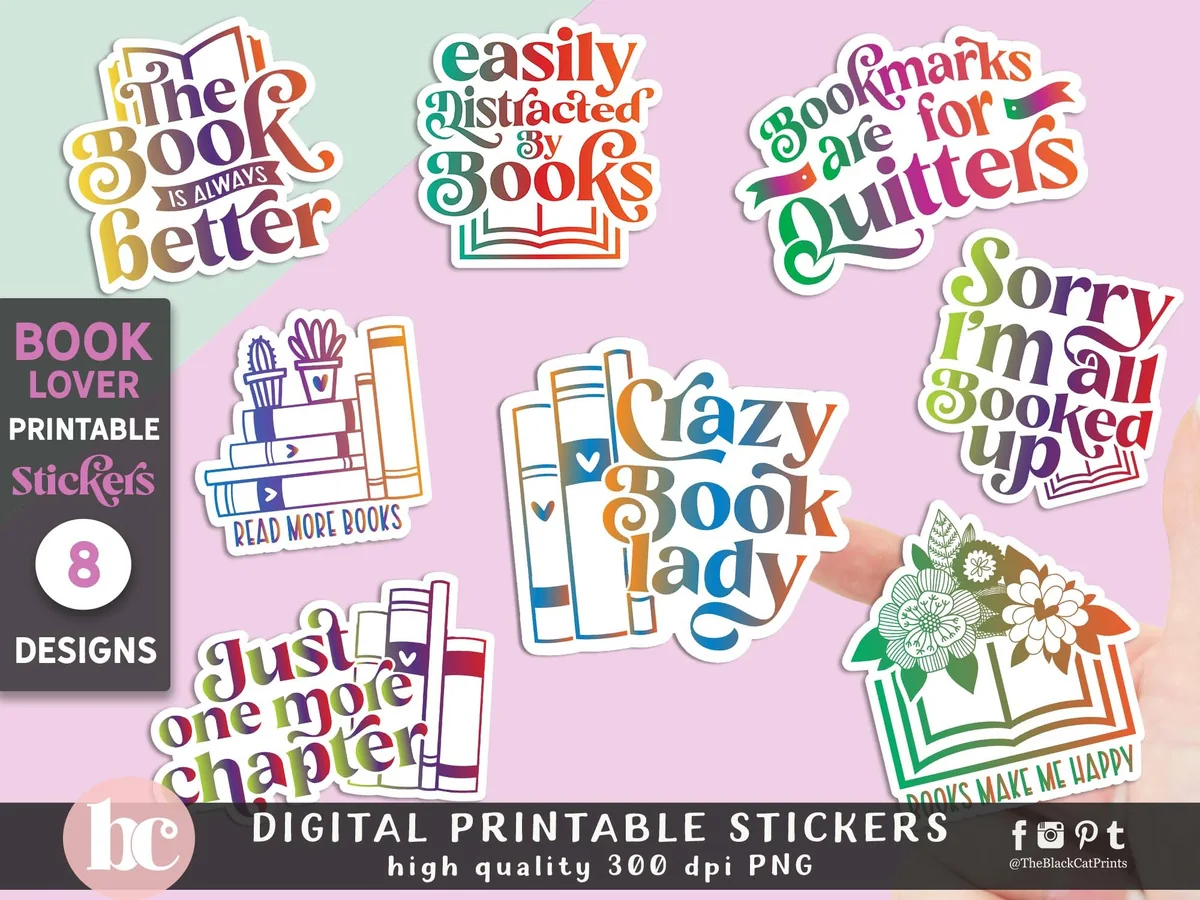
Layouts: 8 retro quote stickers for book loversFormat: PNG 300 dpi + sticker sheet + editable EPS
Best for: BookTok fans, quote lovers, retro style fans. Designed by TheBlackCatPrints.
- 8 retro lettering stickers: The Book Is Always Better, Bookmarks Are for Quitters, Sorry I'm All Booked Up, Just One More Chapter and more
- 8 transparent PNGs, 300 dpi, plus a full sticker sheet
- An editable EPS file if you want to change colors
- Made for GoodNotes and Notability as well as print-and-cut
With over 800 favorites, it's the most-saved pack in this list, and the rainbow retro lettering explains why. Eight stickers is a small set, so I'd use them as page headers, one per month, rather than as everyday decoration.
Best for coquette pages
3. Bookish Planner Stickers for GoodNotes
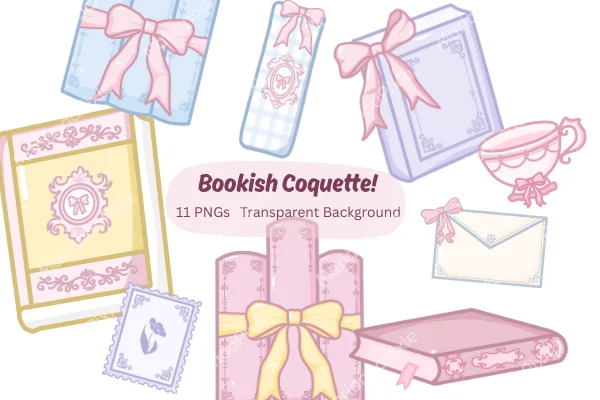
Layouts: 11 coquette bookish stickers (books with bows, bookmarks, envelope, teacup)Format: PNG 300 dpi
Best for: coquette style fans, pastel lovers, students. Designed by MarianaaPixie.
- 11 bookish coquette stickers: books with bows, bookmarks, envelopes, a teacup
- Transparent PNGs, 300 dpi
- Made for GoodNotes, Notability and iPad planners
- Hand-drawn; the previews say no AI involved
Pink and lilac books tied with bows look lovely next to a wishlist or a finished-books page. It's a small set with no text, so pair it with the label pack above if you want your stickers to say something too.
Best for cozy watercolor
4. Cozy Reading Corner – 10 PNG Stickers
Layouts: 10 watercolor reading stickers with captionsFormat: PNG 300 dpi
Best for: cozy readers, watercolor fans, slow journalers. Designed by pakkarada.
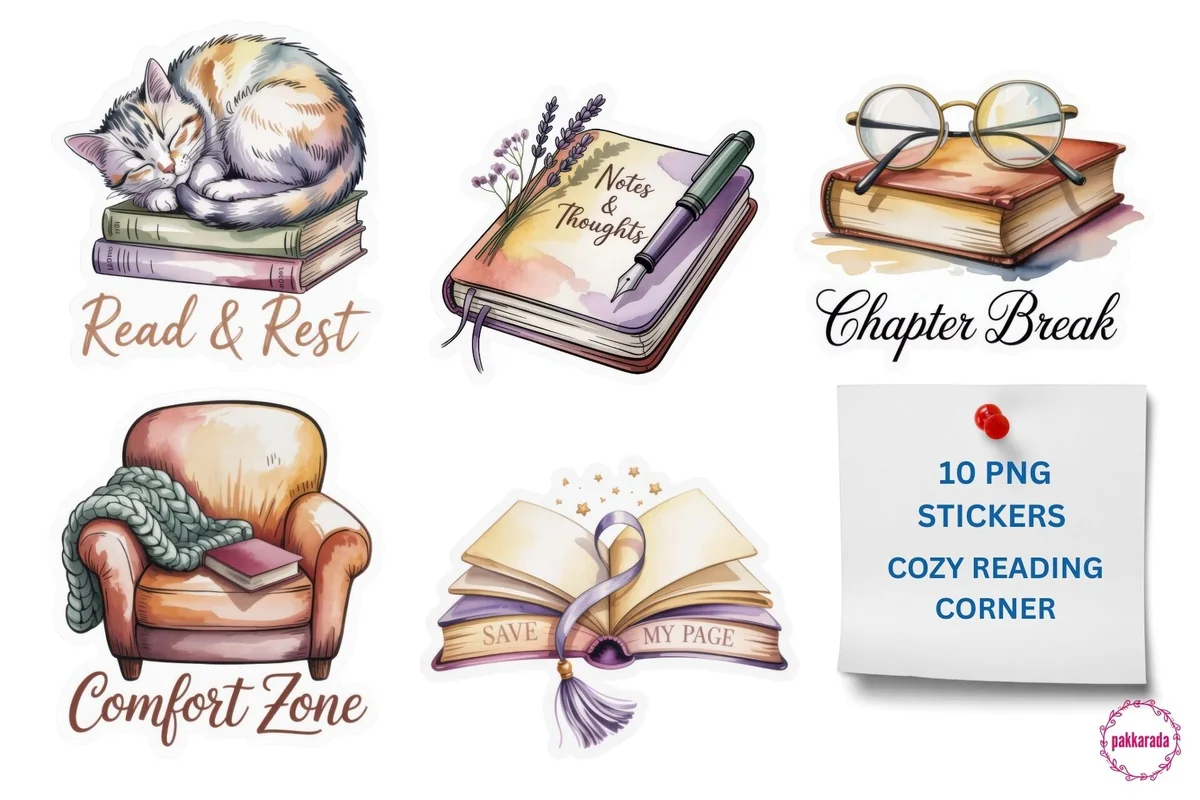
- 10 watercolor stickers with captions: Read & Rest, Chapter Break, Rainy Reads, Comfort Zone, Soft Evening, Book Time
- A My TBR book stack, an armchair, a candle and a sleeping cat on books
- Transparent PNGs, 300 dpi
- Made for GoodNotes and digital planners, also prints
Soft watercolor and little captions make these feel like a cozy evening with a book. Ten pieces is enough for a monthly reading cover and a few highlights, and the My TBR stack fits right on a to-be-read page.

Best for kawaii fans
5. Book Stickers, Digital Stickers
Layouts: Kawaii book, book stack and reading animal stickersFormat: Pre-cropped PNG
Best for: kawaii fans, cat lovers, cute planner fans. Designed by ThePlannersDelight.
- Open books, book stacks and kawaii cats and bunnies reading
- Pre-cropped PNG files
- For GoodNotes and Notability on iPad, also printable
- 5.0 rating on Creative Fabrica
The pink-haired reader surrounded by cats is the sticker I'd put on a finished-books page. It's rated 5.0, and the kawaii style is cheerful without getting childish, which suits a reading log you open every night.

Best for monthly covers
6. Book Lover Stickers, Digital Stickers
Layouts: Reading scenes and book quote stickersFormat: Pre-cropped PNG
Best for: illustration fans, quote lovers, monthly cover makers. Designed by ThePlannersDelight.
- Small reading scenes: a cat by a lamp, a reader in an armchair, piles of books
- Quote stickers like So Many Books, So Little Time and Books Are Uniquely Portable Magic
- Pre-cropped PNG files
- For GoodNotes and Notability on iPad, also printable
From the same shop as the kawaii pack above, but more of a mix: little scenes in square frames plus two quote stickers. The framed scenes work well as a cover image for each month's reading list.
Best for library weekly spreads
7. Colorful Library Digital Stickers
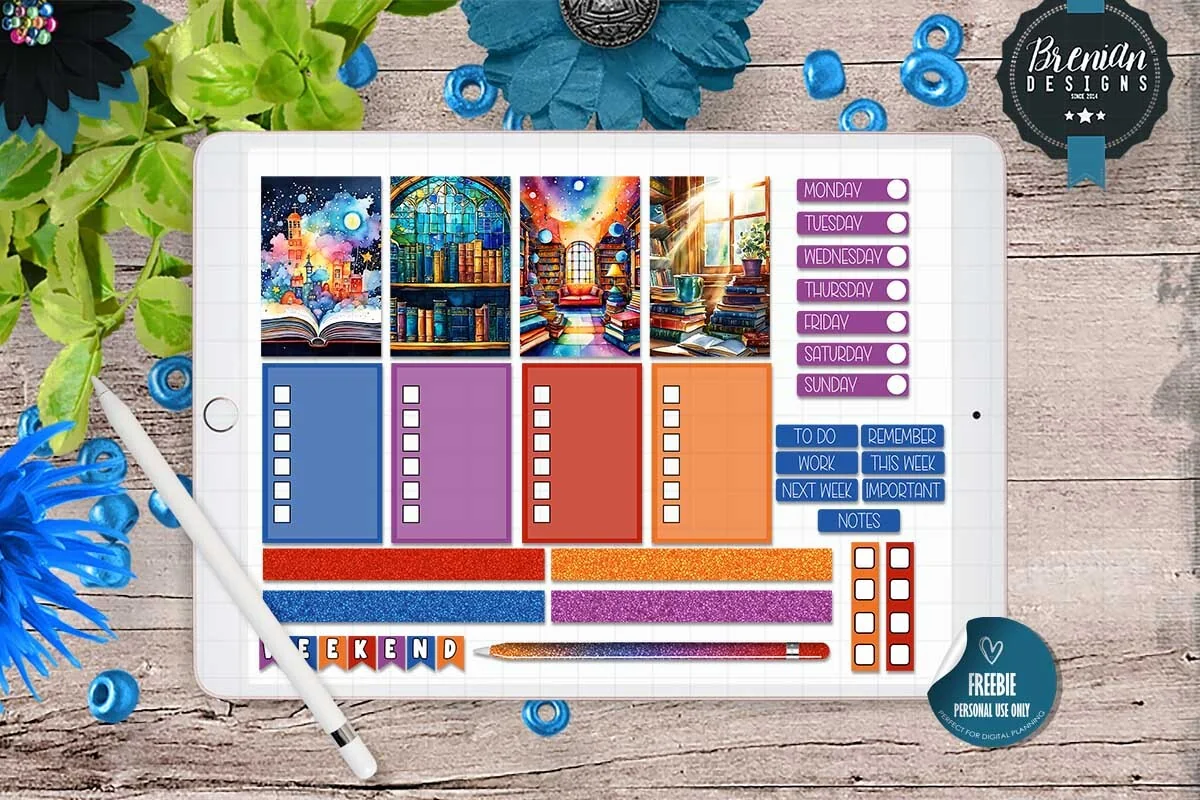
Layouts: 4 library scenes, weekday and to-do labels, checklists, washi stripsFormat: Pre-cropped PNG + PNG sheets + GoodNotes and ZoomNotes files
Best for: weekly spread fans, library lovers, busy readers. Designed by Bren Wotherspoon.
- 4 large library scene stickers in bright colors
- Weekday labels, to-do, remember, important and notes labels
- Checklist boxes and glitter washi strips
- Pre-cropped PNGs, PNG sheets, a GoodNotes file and a ZoomNotes file
- Made for the screen, not for printing
This one isn't just bookish decoration: it's a full weekly kit with a library theme, so the week you plan and the books you read sit on one page. The previews mark it as a freebie for personal use, which makes it an easy one to try first.
Best for whimsical weeks
8. Books and Coffee Gnomes Digital Stickers
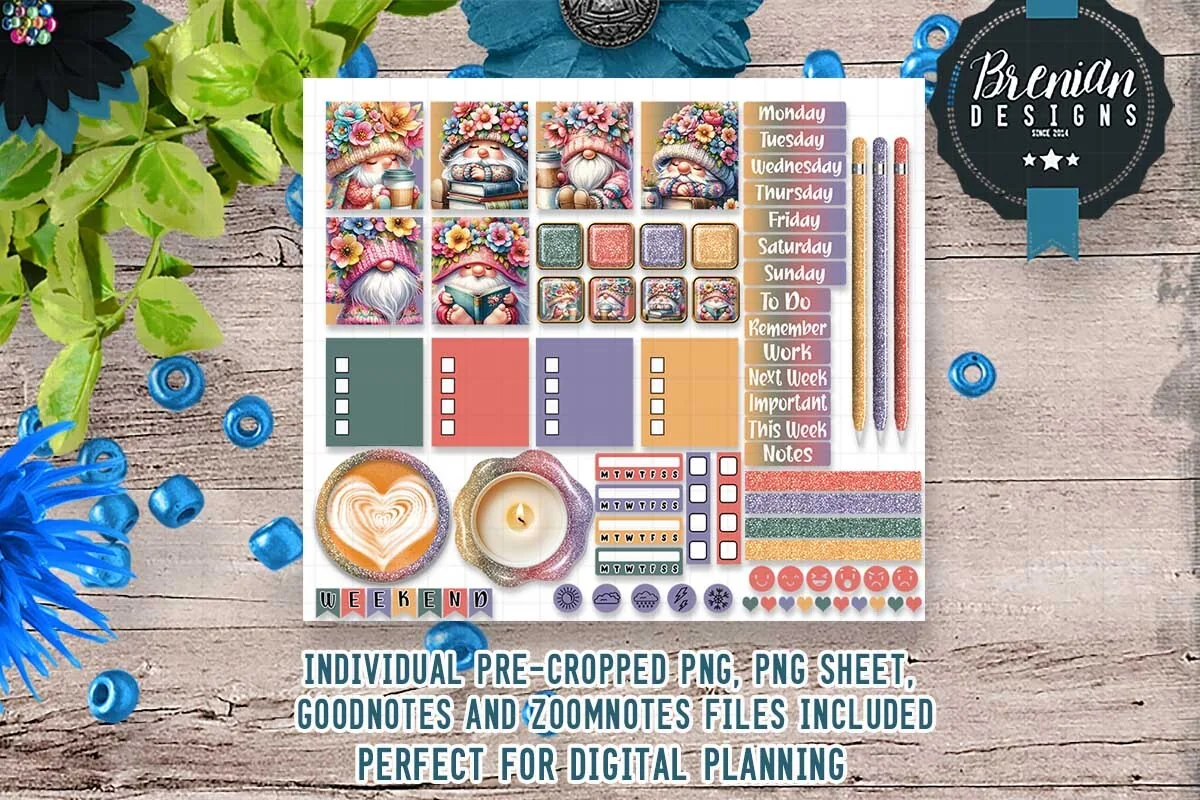
Layouts: 50+ gnome, book and coffee stickers, weekday labels, checklists, washi stripsFormat: Pre-cropped PNG + PNG sheets + GoodNotes and ZoomNotes files
Best for: gnome fans, coffee lovers, weekly planners. Designed by Bren Wotherspoon.
- Over 50 stickers: flower-crowned gnomes with books and coffee, latte and candle circles
- Weekday labels, checklists and glitter washi strips
- Pre-cropped PNGs, PNG sheets, a GoodNotes file and a ZoomNotes file
- Made for the screen, not for printing
Gnomes reading books with a latte are pure whimsy, and the same designer as the library kit, so the two mix well. With 50+ pieces including labels and checklists, there's enough here to decorate a whole month of weekly pages.
Quick Comparison
| Sticker pack | Style | What you get | Stand-out extra |
|---|---|---|---|
| 1. Book Lover Stickers + Templates | Bright text labels | 50 stickers | TBR, DNF and rating labels |
| 2. Funny Book Lover Stickers Bundle PNG | Retro rainbow lettering | 8 quote stickers | Editable EPS |
| 3. Bookish Planner Stickers for GoodNotes | Coquette pastel | 11 stickers | Hand-drawn, no AI |
| 4. Cozy Reading Corner – 10 PNG Stickers | Soft watercolor | 10 stickers | Built-in captions |
| 5. Book Stickers, Digital Stickers | Kawaii pastel | Book and cat stickers | 5.0 rating |
| 6. Book Lover Stickers, Digital Stickers | Mixed illustrations | Scenes and quotes | Framed square scenes |
| 7. Colorful Library Digital Stickers | Bright stained-glass library | Weekly kit | GoodNotes + ZoomNotes files |
| 8. Books and Coffee Gnomes Digital Stickers | Whimsical gnomes | 50+ stickers | Weekly labels and checklists |
What I Look For in Bookish Stickers
- Transparent PNGs, ideally pre-cropped. A JPG with a white background leaves a white box on a cream journal page, and cutting 50 stickers out with the lasso is a chore.
- Labels that track, not only decorate. “Currently reading”, “DNF”, “five stars”, “book club pick” make a reading log readable at a glance. Pretty book stacks are the second layer.
- A style that matches your journal. Coquette pastels, watercolor, kawaii and bright retro lettering all look good alone and busy together. One main style per journal.
- Made for the screen. Many book sticker listings are really for Cricut or sublimation. Look for GoodNotes, Notability or “digital planner” in the description, not just “PNG”.
- Enough pieces for a year. A 10-piece set is fine for monthly covers; for a sticker on every finished book, you want 40 or more, or a label pack you can repeat.
From TBR to Five Stars: Bookish Stickers for Every Stage of a Book
The easiest way to use stickers in a reading journal is to give each stage of a book its own sticker. Then a glance at the page tells you where every book stands, no reading needed:
- To be read. A book stack or “TBR” sticker next to every title on the wishlist page.
- Currently reading. A bookmark or “now reading” label on the book you’re in, moved along as you switch books.
- Progress. A small sticker at 25%, 50% and 75%, or a coffee cup for every long reading session.
- Did not finish. A DNF label instead of crossing the title out. A finished journal shows what didn’t work for you too.
- Finished. One decorative sticker per finished book on the yearly list: by December, the page is a little collage of your year.
- Rating. Five-star labels for the favorites, so you can find them in a second when someone asks for a recommendation.
- Favorite quote. A speech bubble or quote sticker next to the line you copied out.
- Book club. A “book club pick” label and the meeting date, so the club book doesn’t get lost in the TBR pile.
Keep the same sticker for the same stage all year. When “DNF” is always the same red label, a whole year of reading becomes easy to scan.
Book Sticker Ideas for Your Reading Journal
- A book stack on the TBR page
- A sleepy cat on a cozy reads list
- Rainy-day stickers for autumn reads
- A bookmark on the current read
- A teacup on the monthly reading cover
- Five stars for favorites
- A quote sticker for the best line
- Genre labels on the yearly book list
- A gnome or coffee cup for reading streaks
- An envelope for books to lend or gift
- A library scene for library loans
- A “just one more chapter” header for late nights
If your reading journal doesn’t have pages for all of this yet, my digital reading journals roundup has 8 journals with TBR, review and yearly pages, plus 30 reading journal ideas.
Digital Book Stickers vs Stickers for a Kindle or Laptop
A lot of people searching for book stickers want vinyl stickers for a Kindle case, a laptop or a water bottle. The packs above are digital first: you place them on pages in GoodNotes or Notability, not on objects. Some of them also print:
- Digital and print: the label pack (it has a printable PDF sheet), the retro quote stickers (print-and-cut sheet), the watercolor reading corner and both packs from ThePlannersDelight.
- Screen only: the two Bren Wotherspoon kits (library and gnomes) are made for digital planners and not suited for printing.
Printing at home works for a paper journal or a bookmark. For a Kindle or laptop sticker that survives a bag, you need sticker vinyl and a cutting machine, which is a different hobby altogether.
How to Add Bookish Stickers in GoodNotes
- Unzip the pack in the Files app. You’ll see single PNGs, sticker sheets or a GoodNotes file, depending on the pack.
- If there is a GoodNotes file, import it as a notebook: it’s your sticker book. Open it in a second window or tab next to your reading journal.
- For single PNGs, tap the image tool on a journal page and add the sticker from Photos or Files, then resize it.
- Save favorites as Elements. Select a sticker with the lasso and add it to a GoodNotes Elements collection called “Books”, so your DNF label and five stars are one tap away.
- Keep sizes consistent. Same size for the same stage (TBR, DNF, five stars) keeps the page tidy.
New to stickers in GoodNotes? My GoodNotes stickers guide covers pre-cropped sticker books, PNG files and how to make your own stickers.
FAQ
What are bookish stickers?
Stickers for book lovers: book stacks, bookmarks, cozy reading scenes, quotes like “just one more chapter” and functional labels like TBR, DNF or five stars. Digital versions are transparent PNG images you place on pages of a reading journal in GoodNotes or another note-taking app.
Where can I find stickers for my iPad?
Digital sticker packs are sold on Creative Fabrica, Etsy and similar marketplaces as PNG files or ready GoodNotes sticker books. Look for “digital stickers” with GoodNotes or Notability in the description; “bookish stickers” alone often means SVG cut files for vinyl.
Can I use digital bookish stickers on a Kindle?
Not on the screen: a Kindle doesn’t let you add images to books. Packs that also print can go on a paper bookmark or, printed on sticker vinyl, on a Kindle case. On an iPad, they go into your reading journal.
Are there free bookish stickers?
Some. The Colorful Library kit above is marked as a freebie for personal use in its previews. You can also make your own: draw a book stack or a “DNF” label in GoodNotes, select it with the lasso and save it to Elements.
Do these stickers work in Notability or ZoomNotes?
Yes. Transparent PNGs work in any app that lets you add images: Notability, Noteshelf, ZoomNotes and GoodNotes. The two Bren Wotherspoon kits also include a ready ZoomNotes file.
How many stickers do I need for a reading journal?
Fewer than you think. One label pack for the stages of a book plus one decorative set in your style covers a whole year, because digital stickers can be reused as often as you like.
Final Thoughts
The best bookish stickers are the ones that make you want to log the next book: start with a label pack like Book Lover Stickers + Templates for TBR, DNF and five stars, then add one decorative set in your style, from coquette bows to watercolor reading corners. For a journal to put them in, see my digital reading journals; for more sticker styles, my digital scrapbook stickers or all planner stickers. For more cats curled up with books, see my cat stickers for GoodNotes. For reading café pages, add a few coffee stickers.
You May Also Like
This post contains affiliate links. If you buy through them, I may earn a small commission at no extra cost to you. Learn more.