For a lot of people the plan for the day starts with the first cup, so it makes sense that coffee stickers are one of the biggest sticker themes on Pinterest. Search for them, though, and you mostly get labels for coffee bags, vinyl decals for cups and T-shirt clipart. On an iPad you need something else: transparent PNGs or a ready GoodNotes file, small enough for a daily page and reusable every morning of the year.
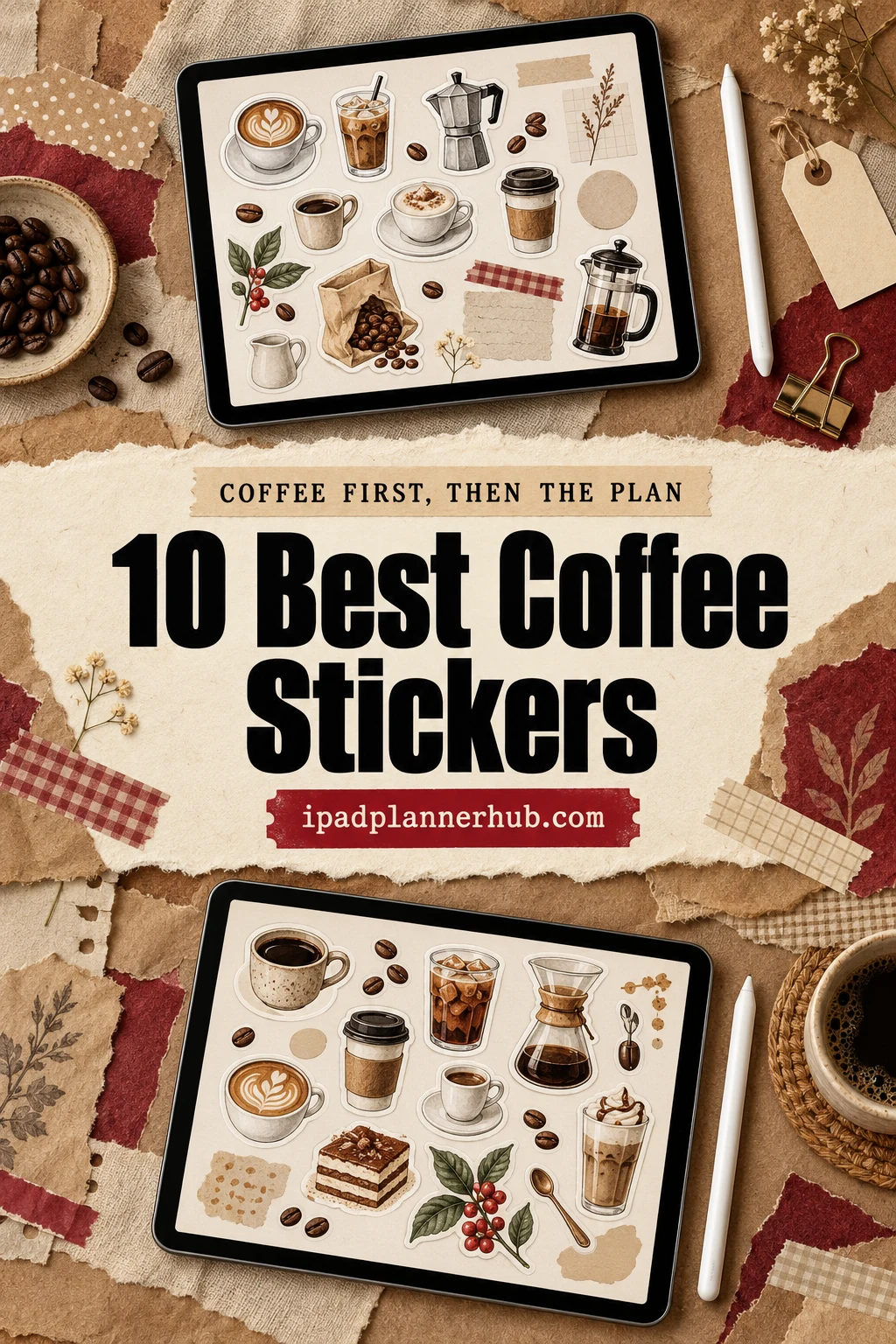
Below are 10 coffee sticker packs from Creative Fabrica I’d use in a GoodNotes planner, from full weekly kits with labels and checklists to simple hand-drawn cups, watercolor quotes, books and coffee, and kawaii pastries with faces. After the list: which style fits which page, what to look for, a 10-minute morning spread, coffee sticker ideas and how to add the stickers in GoodNotes.
The 10 Best Coffee Stickers I Found for a Digital Planner
I skipped SVG cut files, sublimation designs for mugs, printable-only sheets and seasonal sets (pumpkin spice, Christmas cups, spooky lattes), plus packs without any note-taking app in the description. What’s left names GoodNotes, Notability or the iPad. No more than two packs per designer, so you see different styles: weekly kits first, then hand-drawn and watercolor, then cute characters.
TL;DR: 10 coffee sticker packs for GoodNotes and iPad planners, in three groups: weekly planner kits (a latte-brown kit with labels and boxes, two pre-cropped kits with day labels and checklists), hand-drawn and watercolor (café tools, watercolor quotes, espresso gear, books and coffee) and cute characters (kawaii pastries, smiling cups, cats with mugs). The cards say which packs include a GoodNotes file.
Quick Picks
- Best overall: Sweet Coffee Lovers Planner Stickers
- Best for weekly kit: Coffee Bliss Precropped Digital Stickers
- Best for pink café kit: Cafe in Paris Digital Stickers
- Best for minimalist: Hand-drawn Coffee Goodnotes Stickers
- Best for watercolor: Coffee Lovers Watercolor Stickers Pack
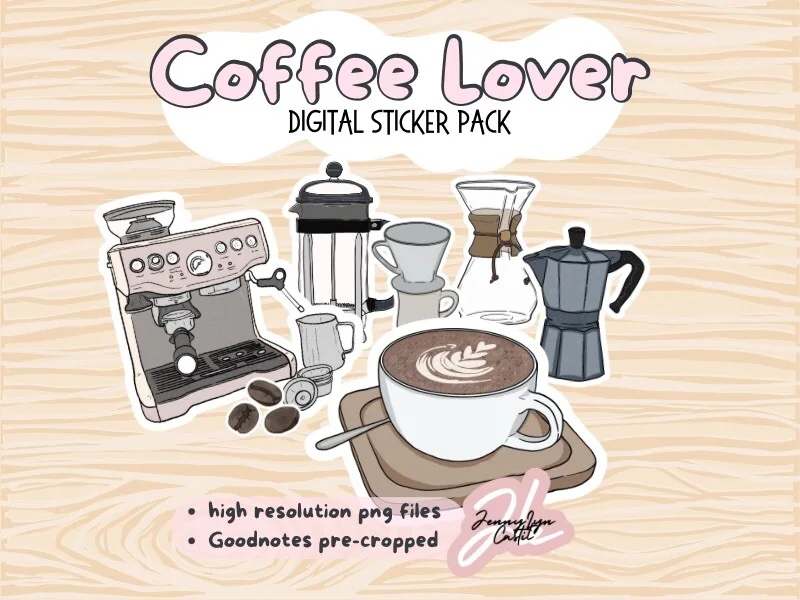
- Best for espresso fans: Coffee Lover Digital Sticker Pack
- Sweet Coffee Lovers Planner Stickers – Best overall
- Coffee Bliss Precropped Digital Stickers – Best weekly kit
- Cafe in Paris Digital Stickers – Best pink café kit
- Hand-drawn Coffee Goodnotes Stickers – Best minimalist
- Coffee Lovers Watercolor Stickers Pack – Best watercolor
- Coffee Lover Digital Sticker Pack – Best for espresso fans
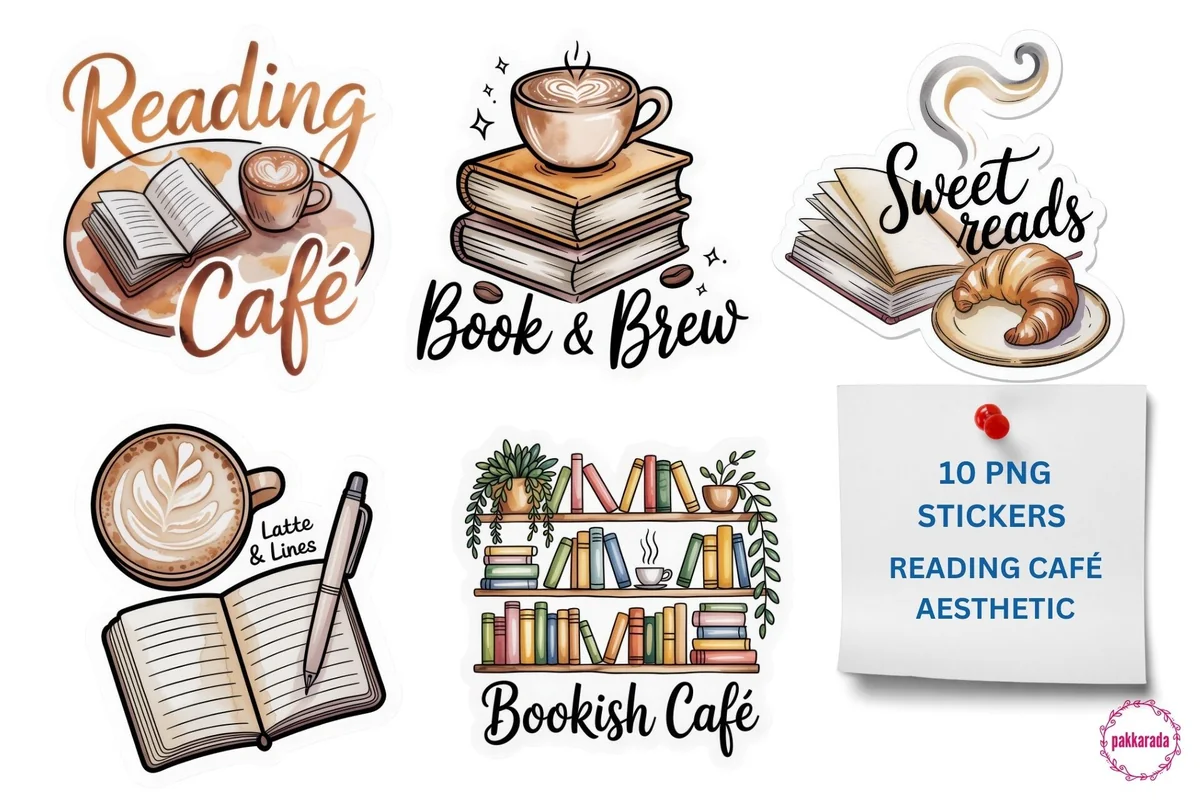
- Reading Café Aesthetic PNG Stickers – Best for reading journals
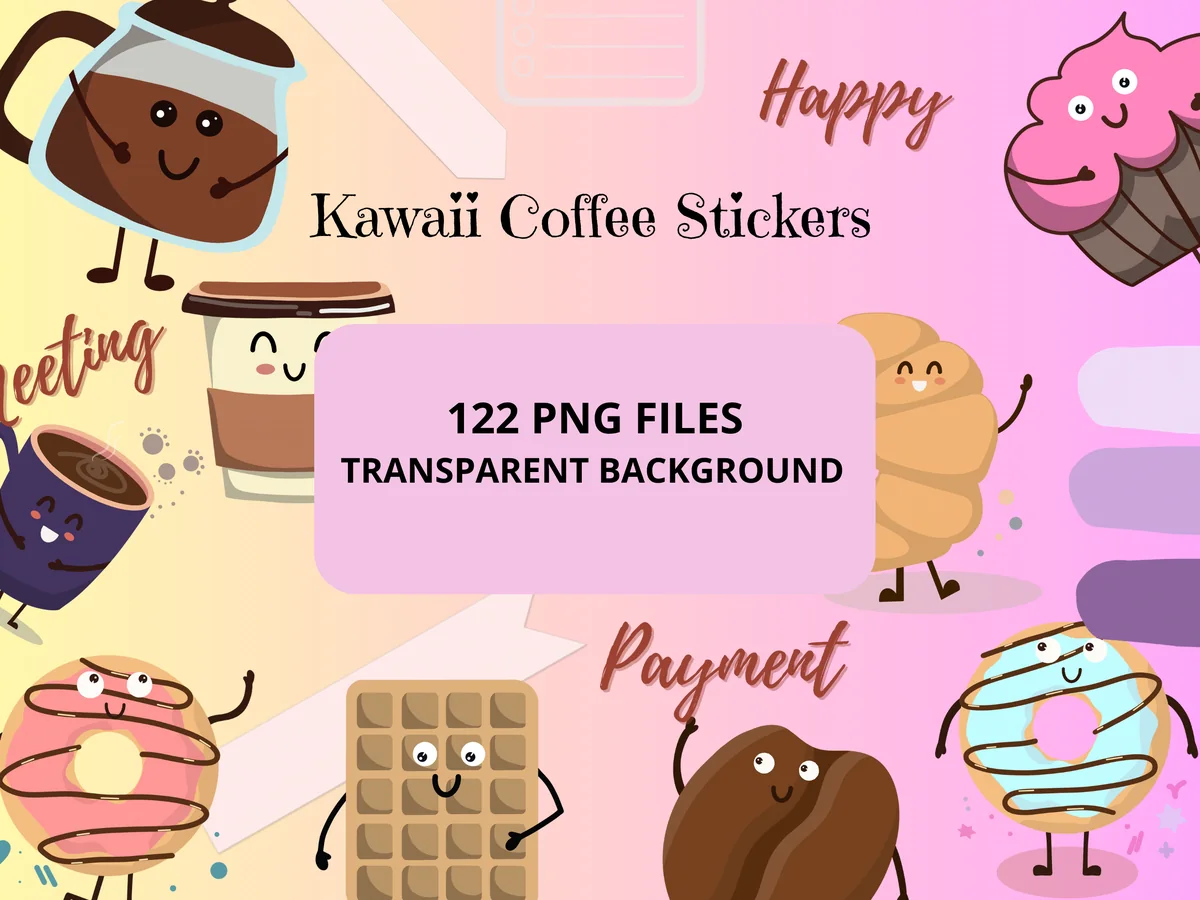
- Kawaii Coffee Stickers PNG and Goodnotes – Biggest cute pack
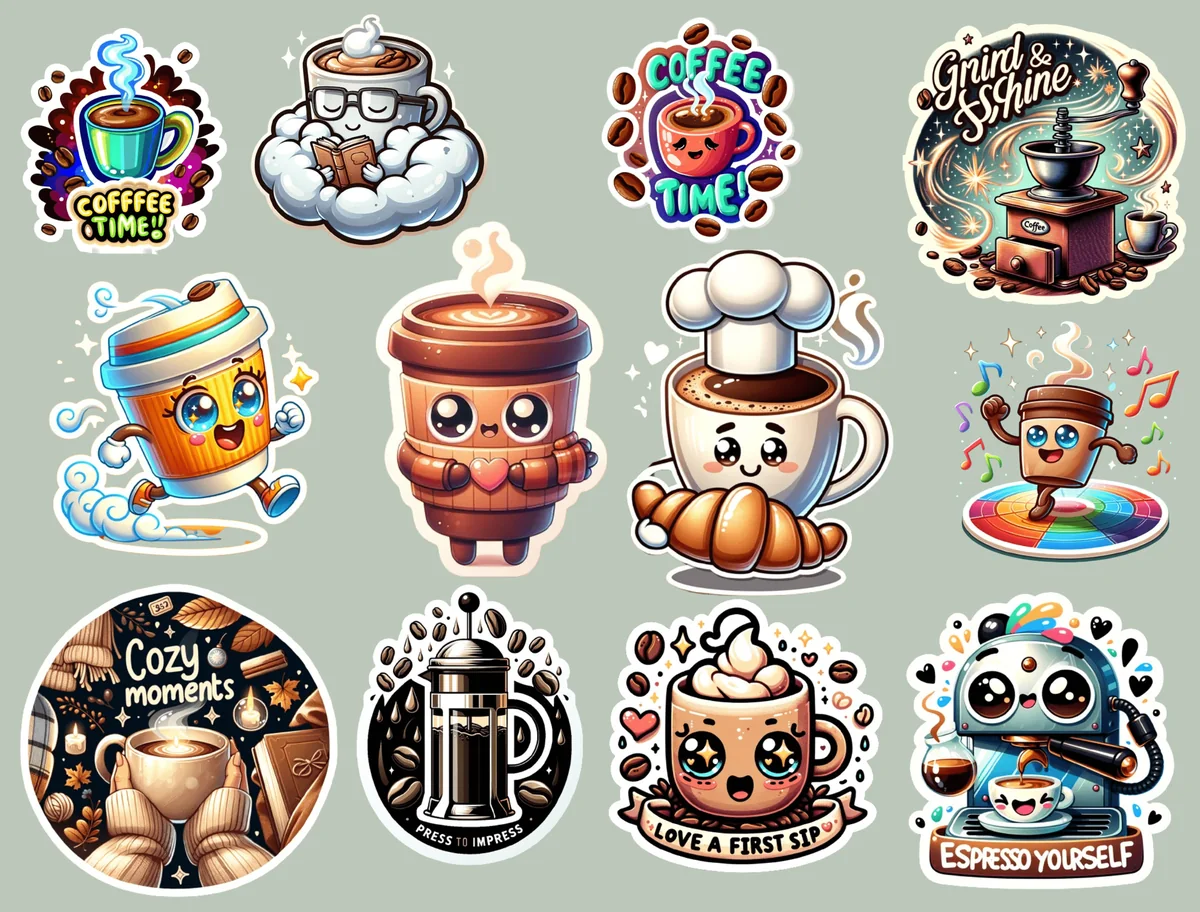
- Coffee Stickers, Digital Stickers – Best bold characters
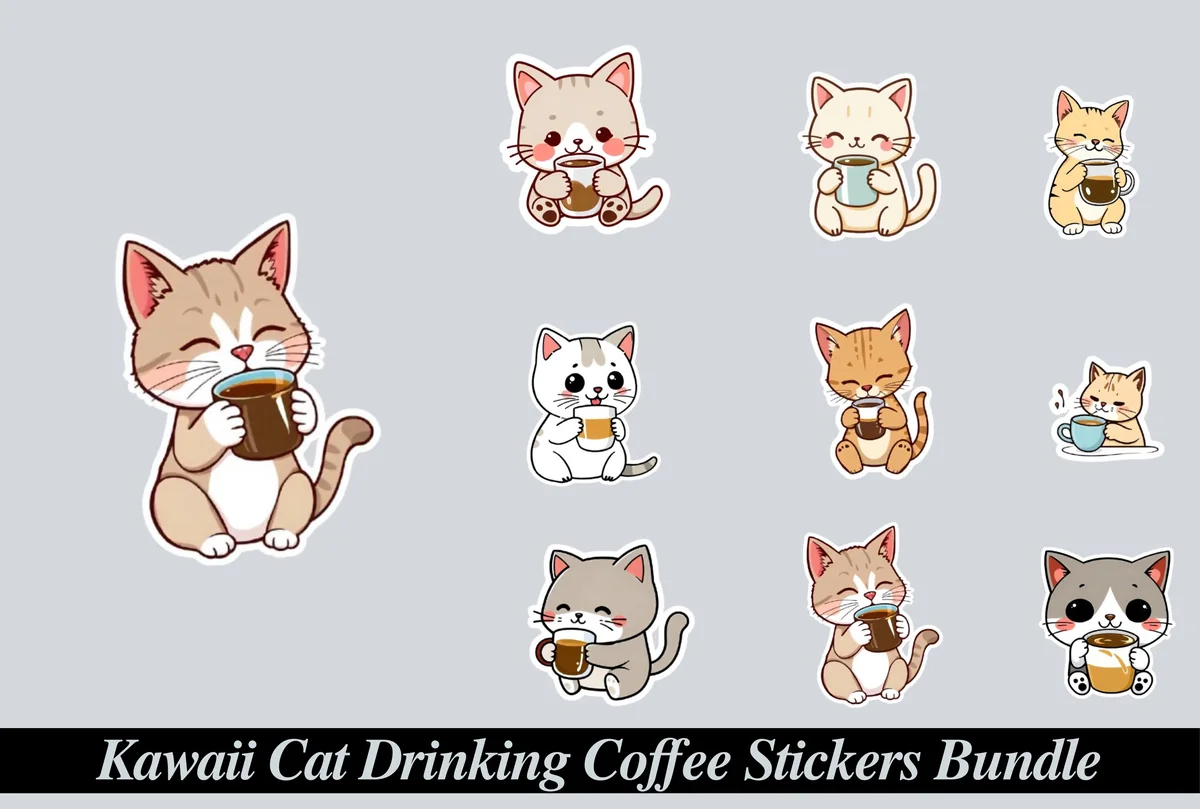
- Kawaii Cat Drinking Coffee Stickers – Best for cat lovers
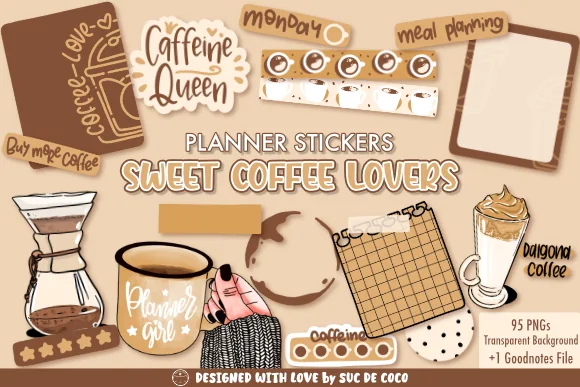
Best overall
1. Sweet Coffee Lovers Planner Stickers
Layouts: Hand-drawn coffee tools, labels (meal planning, shopping list), rating stars, boxesFormat: Transparent PNG 300 DPI + GoodNotes file
Best for: coffee lovers, weekly planners, latte palette fans. Designed by Suc de Coco.
- Transparent PNGs at 300 DPI plus a GoodNotes file (the cover says 95 PNGs)
- Hand-drawn coffee tools: a Chemex, a grinder, moka and milk pots, a dalgona glass, coffee rings
- Planner pieces too: "meal planning", "important" and "shopping list" labels, rating stars, a grid note, patterned boxes
- Short phrases like "Caffeine Queen", "But first coffee" and "Buy more coffee"
This is the most saved coffee sticker set I found on Creative Fabrica, and it earns the spot: it mixes decoration with labels and boxes, so one pack dresses a whole week. The latte-brown palette is calm enough for cream planner pages. If you only buy one coffee pack, I'd make it this one.
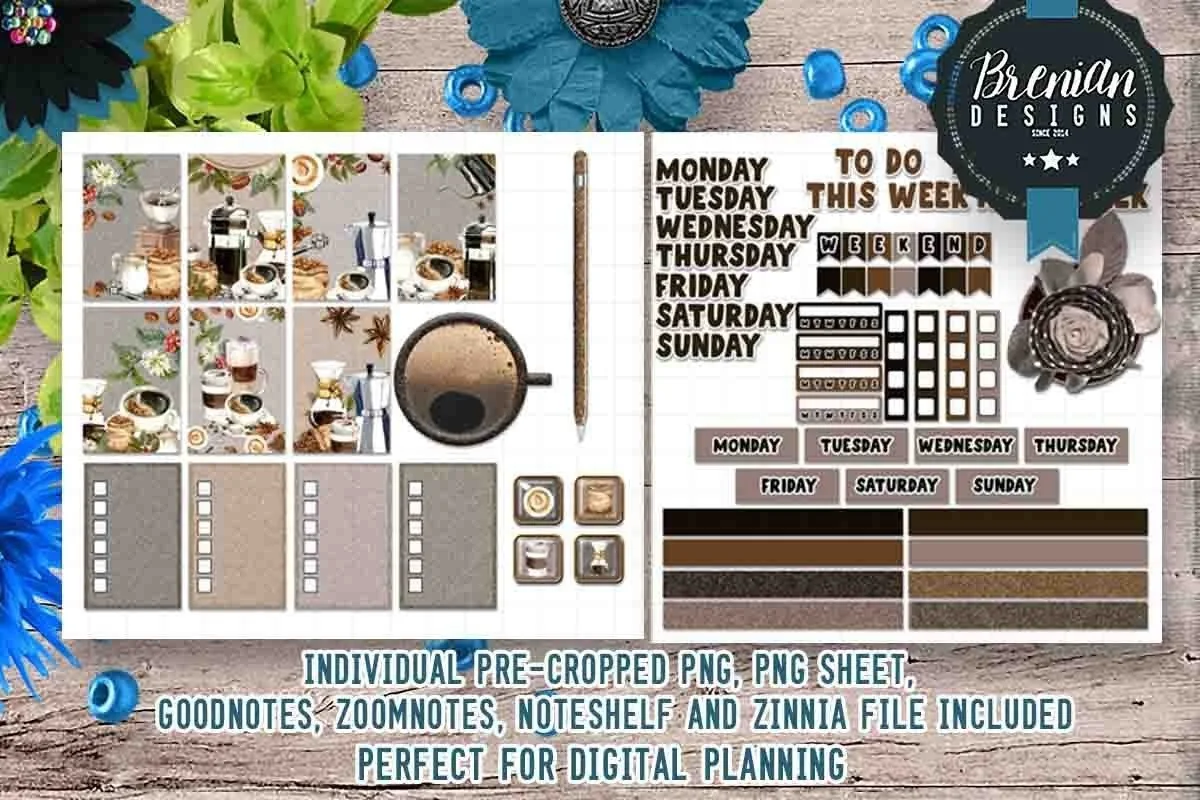
Best weekly kit
2. Coffee Bliss Precropped Digital Stickers
Layouts: 25+ boxes, checklists, day labels, To Do This Week headerFormat: Pre-cropped PNG + GoodNotes, ZoomNotes, Noteshelf, Zinnia files
Best for: vertical weekly planners, planner kit fans, realistic art fans. Designed by Bren Wotherspoon.
- Over 25 pre-cropped stickers in boxes sized for Happy Planner layouts
- Realistic coffee scenes: French press, moka pot, latte, beans and star anise
- Checklist boxes, day labels (Monday to Sunday), a "To Do This Week" header and weekend flags
- Files for GoodNotes, ZoomNotes, Noteshelf and Zinnia, plus a PNG sheet
This is a classic planner kit, the kind people used to buy for paper planners, made for the iPad. Full boxes with realistic coffee art fill a vertical week in minutes, and the checklist boxes do real work. Note that it's sized like Happy Planner boxes, so it fits vertical weekly layouts best.
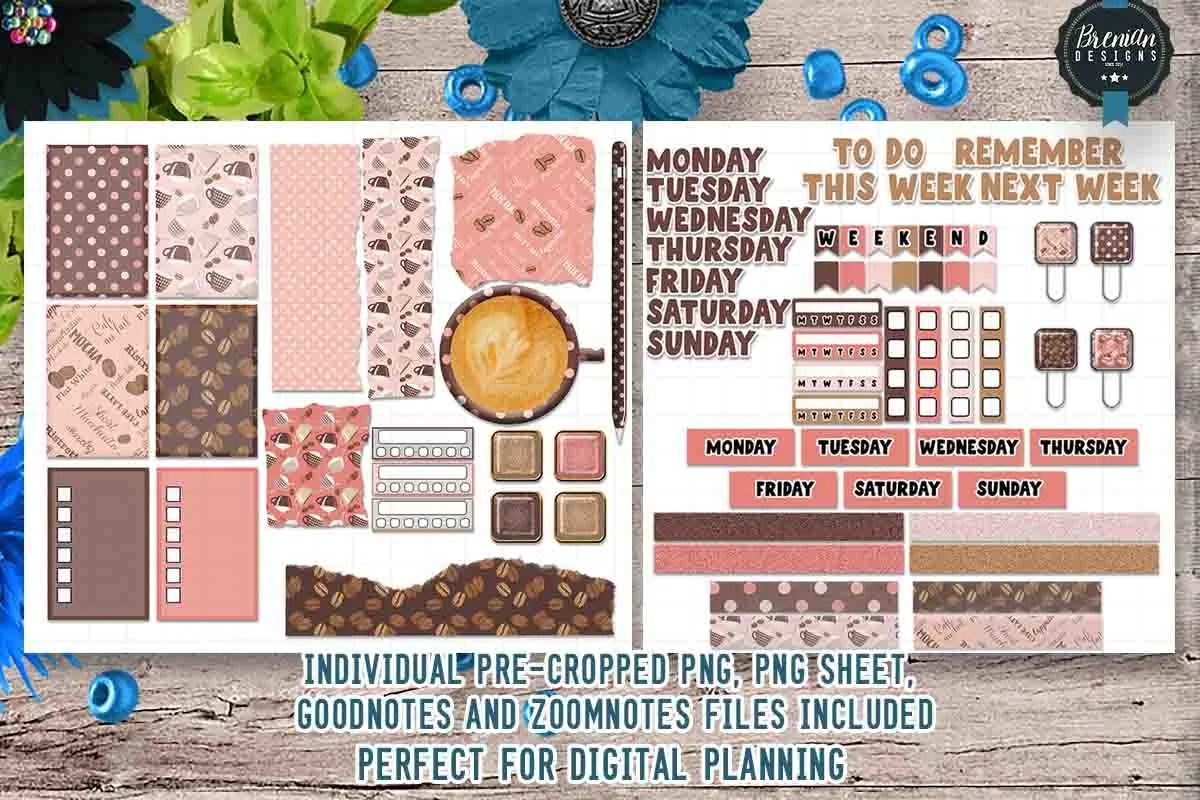
Best pink café kit
3. Cafe in Paris Digital Stickers
Layouts: 50+ pink café boxes, day labels, checklists, next-week headersFormat: Pre-cropped PNG + GoodNotes and ZoomNotes files
Best for: pastel planners, café date lovers, weekly planners. Designed by Bren Wotherspoon.
- Over 50 pre-cropped stickers
- Pink, cocoa and polka-dot boxes with mugs, beans and café words (Mocha, Flat White)
- Day labels, "To Do This Week" and "Remember Next Week" headers, checklists and paper clips
- GoodNotes and ZoomNotes files plus PNG sheets
Same designer and same structure as Coffee Bliss, but a completely different mood: pink and cocoa instead of grey and brown. I'd pick this one if your planner is pastel or if coffee for you means meeting a friend at a café. With 50+ pieces, it covers more than one week.

Best minimalist
4. Hand-drawn Coffee Goodnotes Stickers
Layouts: 20 hand-drawn coffee drinks and toolsFormat: Transparent PNG (72 dpi) + GoodNotes sticker sheet
Best for: minimalists, coffee trackers, daily planners. Designed by The Elisa Design.
- 20 individual PNG stickers with a transparent background
- A pre-cropped GoodNotes sticker sheet
- Coffee tools and drinks: beans, a latte with a heart, iced coffee, a grinder, a moka pot, an espresso machine
- Made for digital use only (72 dpi), not for printing
Small, simple doodles that never crowd a page. These are the icons I'd use for a coffee tracker: one cup per day in the corner of a daily page. Only 72 dpi, so keep them small rather than scaling one up for a cover.
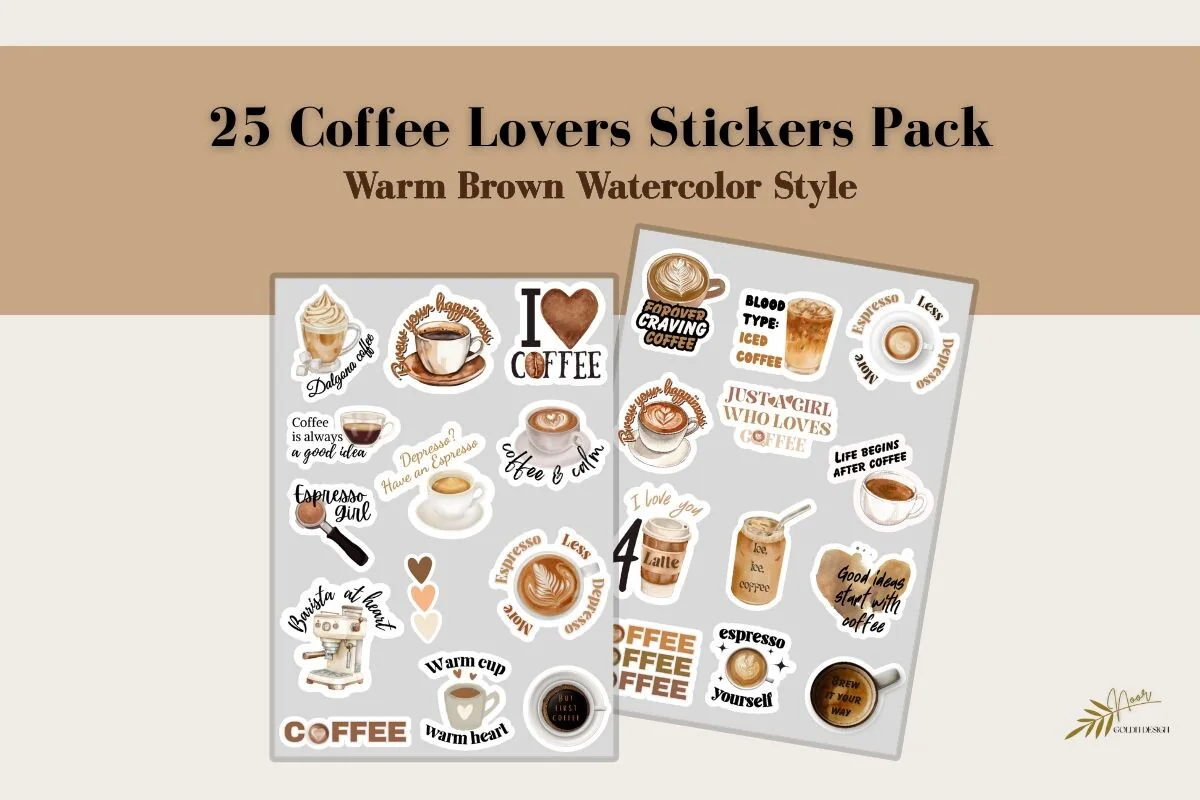
Best watercolor
5. Coffee Lovers Watercolor Stickers Pack
Layouts: 25 watercolor coffee cups and quotesFormat: PNG transparent + white border, A4 sheets PDF/PNG 300 DPI
Best for: aesthetic journalers, quote lovers, watercolor fans. Designed by Golden Design.
- 25 watercolor coffee stickers in warm brown latte tones
- Two PNG versions: transparent background and white border
- Coffee cups and latte art mixed with short quotes ("Coffee is always a good idea", "Blood type: iced coffee")
- Full A4 sheets in PDF and PNG at 300 DPI if you also print
One of the newest packs in the list. The watercolor style looks softer than flat clipart, and the quotes give each page a small joke or a nudge. The white-border version reads like a real sticker on a dark page, the transparent one blends into a light one.
Best for espresso fans
6. Coffee Lover Digital Sticker Pack
Layouts: 9 hand-drawn brewing gear stickersFormat: PNG + GoodNotes sticker book
Best for: home baristas, espresso fans, café list makers. Designed by Faith & Pixels.
- 9 hand-drawn PNG stickers
- A pre-cropped sticker book for GoodNotes
- Coffee gear: an espresso machine, a French press, a Chemex, a moka pot, a pour-over and a latte
A small set, but every piece is a detailed drawing of real brewing gear, not a generic mug. It's the one I'd use on a page about home brewing: beans to try, recipes, or a list of cafés to visit. Nine stickers is little, so pair it with a bigger kit.
Best for reading journals
7. Reading Café Aesthetic PNG Stickers
Layouts: 10 books and coffee stickers with letteringFormat: Transparent PNG 300 DPI
Best for: readers, reading journalers, cozy aesthetic fans. Designed by pakkarada.
- 10 PNG stickers at 300 DPI with a transparent background
- Books and coffee scenes in soft watercolor: "Book & Brew", "Coffee & Chapters", "Chill & Read"
- A cozy reading chair, a bookshelf and cake with an open book
- GoodNotes and digital planners listed in the description
Books and coffee is its own little genre on Pinterest, and this pack fits it exactly. The lettering does the decorating, so one sticker is enough for a reading log header. It is also one of the newest packs in this list.
Biggest cute pack
8. Kawaii Coffee Stickers PNG and Goodnotes
Layouts: 122 kawaii coffee and pastry characters, note pads, tabsFormat: Pre-cropped PNG + GoodNotes file
Best for: kawaii fans, playful planners, pastry lovers. Designed by My Creative Pencil.
- 122 pre-cropped PNG stickers
- A GoodNotes file with all the stickers, ready to use
- Smiling coffee pots, cups, donuts, cupcakes, croissants and waffles
- Pink note pads and tabs for to-dos on the preview sheets
The largest pack in the list, and the most cheerful: every cup and donut has a face. Because it also has plain note pads and tabs, it's not only decoration. The pink-and-yellow palette is bright, so it suits a playful planner more than a neutral one.
Best bold characters
9. Coffee Stickers, Digital Stickers
Layouts: Bold coffee characters with lettering (12 on preview)Format: Pre-cropped PNG
Best for: reward sticker fans, bold color lovers, GoodNotes and Notability users. Designed by ThePlannersDelight.
- Pre-cropped PNG files
- 12 bold coffee characters on the preview: a running cup, a mug in a sweater, a coffee machine with big eyes
- Lettered stickers: "Coffee Time", "Grind & Shine", "Cozy moments", "Espresso Yourself"
- Made for GoodNotes and Notability, also usable for print
These are bigger, glossier and more colorful than the rest, closer to vinyl laptop stickers. That makes them good as a reward for a finished task or as a header, not as small icons. The description doesn't list the exact count, so judge by the preview.
Best for cat lovers
10. Kawaii Cat Drinking Coffee Stickers
Layouts: Kawaii cats with coffee mugs (10 poses on preview)Format: Transparent PNG
Best for: cat lovers, mood trackers, slow morning planners. Designed by PlannerPlanet.
- Kawaii cats sipping coffee from mugs, 10 poses on the preview
- High-quality PNGs with a transparent background
- Made for digital planners in GoodNotes and Notability, also printable
- Soft white outlines around each cat
A cat with a mug is the whole mood of a slow Sunday morning. The set is small and all in one style, so it works as a single repeated character: one cat per day in a mood or coffee tracker. For more cats, see my cat stickers guide.
Quick Comparison
| Sticker pack | Style | What you get | Stand-out extra |
|---|---|---|---|
| 1. Sweet Coffee Lovers Planner Stickers | Hand-drawn latte browns | PNGs + GoodNotes file | Labels, boxes, rating stars |
| 2. Coffee Bliss Precropped Digital Stickers | Realistic coffee art | 25+ pre-cropped stickers | 4 app files incl. Noteshelf |
| 3. Cafe in Paris Digital Stickers | Pink and cocoa café | 50+ pre-cropped stickers | Next-week header |
| 4. Hand-drawn Coffee Goodnotes Stickers | Simple doodles | 20 PNGs | GoodNotes sticker sheet |
| 5. Coffee Lovers Watercolor Stickers Pack | Warm watercolor | 25 stickers, 2 versions | Quotes + white borders |
| 6. Coffee Lover Digital Sticker Pack | Detailed gear drawings | 9 PNGs | GoodNotes sticker book |
| 7. Reading Café Aesthetic PNG Stickers | Watercolor bookish café | 10 PNGs | Lettered headers |
| 8. Kawaii Coffee Stickers PNG and Goodnotes | Kawaii faces, bright | 122 PNGs + GoodNotes | Note pads and tabs |
| 9. Coffee Stickers, Digital Stickers | Bold glossy cartoon | 12 stickers on preview | Lettered characters |
| 10. Kawaii Cat Drinking Coffee Stickers | Kawaii cats | 10 poses on preview | One repeat character |
Kits, Doodles or Characters: Which Coffee Stickers Fit Your Pages
The 10 packs do three different jobs. One pack from each group is plenty; five packs in five styles on one spread look busy.
Weekly planner kits
Boxes, day labels, checklists and headers in one coffee palette. They decorate and organize at the same time, which is what you want for a weekly spread. In this list: the Sweet Coffee Lovers set in latte browns, the Coffee Bliss kit with realistic coffee art for vertical weeks, and the pink Cafe in Paris kit.
Hand-drawn and watercolor coffee stickers
Quieter, more aesthetic pieces for journals and daily pages: simple doodle cups for a coffee tracker, watercolor cups with quotes, detailed espresso gear for home barista notes and books and coffee for a reading journal.
For home barista notes, a cup icon can mark the entry while the writing records what you actually brewed. These coffee tasting journal ideas connect bean details, recipes and personal impressions, giving repeat cups something more specific to compare than the decoration.
Cute coffee stickers with faces
For a playful planner: 122 kawaii cups and pastries with note pads, bold glossy characters that work as reward stickers, and kawaii cats with mugs as one repeated character.
What I Look For in Coffee Stickers for a Digital Planner
- Made for the screen, not the cup. “Transparent PNG”, “pre-cropped” or “GoodNotes file” in the description. “SVG”, “sublimation” and “print and cut” are for craft machines, mugs and paper.
- A ready GoodNotes file when possible. Six of the ten packs here include a GoodNotes sticker file or sticker book, which saves cropping every piece yourself.
- Something useful besides cups. Labels, checklists, note pads and day headers turn a decorative pack into a planning tool. The three weekly kits and the kawaii pack have them.
- One palette per spread. Coffee sets are mostly browns and creams, which is easy to match. Pink (Cafe in Paris) and bright kawaii colors need a planner in the same mood.
- Not seasonal. Pumpkin spice lattes look great for six weeks. For a planner you use all year, pick everyday cups, beans and brewing gear.
- Size and resolution. 300 DPI packs scale well for headers. The 72 dpi doodles are fine as small icons, not for a cover.
Coffee First, Then the Plan: A 10-Minute Morning Spread
The idea behind the title: let the coffee be the signal to plan. The first cup takes about ten minutes, and that’s enough for a simple daily page. Here’s the order I’d follow with coffee stickers on a GoodNotes daily or weekly page:
- Minute 1: the cup. Put one coffee sticker next to the date. It’s a small “page started” mark, and over a month it becomes a coffee log.
- Minutes 2–4: the top three. Write the three tasks that matter today on a checklist or note-pad sticker (the weekly kits and the kawaii pack have them).
- Minutes 5–6: the schedule. Add fixed appointments to the time slots. Nothing else.
- Minutes 7–8: one nice thing. A café you want to try, a book to read with the second cup, a call to a friend. A lettered sticker like “Coffee is always a good idea” works as the header.
- Minutes 9–10: close the page. Save the stickers you used to GoodNotes Elements, so tomorrow it takes one tap.
For a daily layout that fits this kind of morning, see my daily routine planners and daily planner ideas. For slow-day spreads with tea, blankets and rain, see my cozy stickers for GoodNotes.
Coffee Sticker Ideas for Your Planner and Journal
Coffee stickers are most fun when they mean something on the page. A few ways to give them a job:
- A coffee tracker: one cup per day, a different cup for coffee bought out
- A café wish list with a coffee shop sticker as the header
- A latte rating page: café, drink, price, stars
- A home barista log: beans, grind, ratio, how it tasted
- Iced coffee stickers on summer weeks, hot cups in winter
- A “But first coffee” header on Monday
- A reward sticker for every finished task or study session
- Books and coffee stickers on a reading log
- A coffee date with a friend marked with the pink café kit
- A mug-and-cat sticker on slow Sunday pages
- Coffee bean bullets instead of dots in a to-do list
- One coffee sticker per habit streak day
A coffee tracker that shows what coffee costs
One of the most practical uses: a cup sticker for coffee made at home and a café cup for coffee bought out. At the end of the month, count the café cups and multiply by your usual price. It’s the easiest money tracker there is, and it often shows the line item people underestimate. For a full budget page around it, see my digital budget planners; for streaks in general, my digital habit trackers.
Digital vs Printable Coffee Stickers
Many people search for printable coffee stickers for a paper journal, or for stickers to put on cups and lids. The packs above are digital first: you place them in GoodNotes or Notability as many times as you like and never run out. Some of them print too:
- Digital and print: Sweet Coffee Lovers, the watercolor quotes pack (A4 sheets at 300 DPI), Reading Café, the kawaii cups and pastries, the bold characters and the coffee cats.
- Screen only: the hand-drawn doodles (72 dpi) and the two Bren Wotherspoon kits, which the designer says are not suited for printing.
How to Add Coffee Stickers in GoodNotes
- Unzip the pack in the Files app. Depending on the pack, you’ll see single PNGs, PNG sheets or a GoodNotes file.
- If there is a GoodNotes file, import it: it’s your sticker book. Open it in a second tab next to your planner and copy stickers across.
- For single PNGs, tap the image tool on a planner page, add the sticker from Photos or Files and resize it.
- For PNG sheets, add the sheet to a sticker notebook, cut out one sticker at a time with the lasso and copy it to your planner.
- Save favorites as Elements. Select a sticker with the lasso and add it to a GoodNotes Elements collection, for example “Coffee” and “Labels”, so your daily cup is one tap away.
Using Notability, ZoomNotes or Noteshelf? PNG stickers go onto the page as images in any of them, and the Coffee Bliss kit includes ZoomNotes and Noteshelf files. My GoodNotes vs Notability comparison covers how each app handles stickers.
FAQ
Can I use coffee stickers on my iPad?
Yes. Digital stickers are PNG images with a transparent background or sticker books in GoodNotes format. You add them to planner and journal pages in GoodNotes, Notability or another note app, move and resize them, and reuse them as often as you like.
Where can I get coffee stickers for GoodNotes?
Digital sticker shops on Creative Fabrica, Etsy and independent planner sites sell packs made for GoodNotes; the 10 packs above are all on Creative Fabrica. Look for “transparent PNG”, “pre-cropped” or “GoodNotes file” in the description, not “SVG cut file” or “sublimation”.
How do I turn a PNG into a sticker in GoodNotes?
Add the PNG to a page with the image tool, then select it with the lasso and add it to Elements. From then on it works like a sticker: one tap from the Elements panel puts it on any page in any notebook.
How do I make my own coffee stickers?
Take a photo of your own cup, touch and hold the cup in the Photos app to lift it out of the background, then tap Copy and paste it into GoodNotes. You get a sticker of your real latte. You can also draw a simple cup in a drawing app and export it as a PNG with a transparent background.
Are there free coffee stickers for GoodNotes?
Some planner blogs share a few free coffee stickers, usually a handful of cups in one style. A full pack gives you labels, checklists and dozens of pieces in one palette, which is what keeps a planner looking consistent for months.
Do these coffee stickers work in Notability?
Yes. Transparent PNGs work in any app that lets you add images: Notability, Noteshelf, ZoomNotes and GoodNotes. Only the GoodNotes files inside some packs are GoodNotes-specific; the PNGs in the same pack work everywhere.
Final Thoughts
The best coffee stickers are the ones you’ll reach for with your first cup. Start with one weekly kit, like Sweet Coffee Lovers, add one small set for a coffee tracker, such as the hand-drawn cups, and save both to Elements. For more styles, see my GoodNotes sticker packs, the bookish stickers for a reading journal and the cat stickers, or browse all planner stickers. For snacks and meals next to your coffee tracker, see my food stickers for GoodNotes.
You May Also Like
This post contains affiliate links. If you buy through them, I may earn a small commission at no extra cost to you. Learn more.