December is the busiest month in any planner: gift lists, cookie days, school concerts, travel, the card list you start every year and never finish. A few Christmas stickers make those pages feel festive instead of frantic, and in a digital planner they cost nothing extra to reuse: one snowman can sit on every week from the 1st to the 31st.

Below are 8 Christmas digital sticker packs from Creative Fabrica I’d use to plan a cozy December on the iPad, from a 365-piece stash to small sets of presents and a Christmas bucket list. All are made for digital planners: transparent PNGs, and most come pre-cropped for GoodNotes. After the list: what to look for, sticker ideas for December pages, a simple four-page December setup, where to find free Christmas stickers and how to add them in GoodNotes.
The 8 Best Christmas Digital Stickers I Found
I kept only packs made for digital planners and journals. Sets for Cricut, sublimation or T-shirts, and listings with just a handful of clipart pieces, are out. I also kept the list to two packs per designer, so you see different styles, not one shop.
TL;DR: 8 Christmas digital sticker packs for GoodNotes and iPad planners: a 365-piece stash, two pre-cropped GoodNotes sets, cozy and hand-drawn packs with holiday lettering, a cute mini set, a Christmas bucket list and gift stickers in three colors. All are transparent PNGs; the cards say which ones also print.
Quick Picks
- Best for biggest Christmas stash: Christmas DIGITAL PLANNER Sticker Stash
- Best for pre-cropped GoodNotes set: Christmas Snowman Digital Stickers
- Best for cozy mix: Cozy Christmas Sticker Pack
- Best for hand-drawn: Christmas Digital Stickers – Precut
- Best for small cute set: Cute Digital Stickers Christmas Theme
- Best for family traditions: Christmas Bucket List Digital Stickers
- Christmas DIGITAL PLANNER Sticker Stash – Biggest Christmas stash
- Christmas Snowman Digital Stickers – Best pre-cropped GoodNotes set
- Cozy Christmas Sticker Pack – Best cozy mix
- Christmas Digital Stickers – Precut – Best hand-drawn
- Cute Digital Stickers Christmas Theme – Best small cute set
- Christmas Bucket List Digital Stickers – Best for family traditions
- Retro Christmas Digital Stickers – Best retro style
- Christmas Present Digital Stickers – Best for the gift list

Biggest Christmas stash
1. Christmas DIGITAL PLANNER Sticker Stash
Layouts: 365 stickers on 22 PNG sheets + 22-page PDF booklet
Best for: sticker hoarders, plaid lovers, daily decorators. Designed by Wetfish Designs.
- 365 Christmas planner elements in plaid and solid colors
- 22 PNG sticker sheets plus a 22-page PDF sticker booklet
- Bonus: 2 extra sticker sheets
- Works in GoodNotes, Notability, OneNote and other apps
If you decorate every day of December, this is the pack that won't run out: 365 pieces, literally one for every day of the year. The sheets aren't pre-cropped, so I'd spend ten minutes once saving favorites to GoodNotes Elements.
Best pre-cropped GoodNotes set
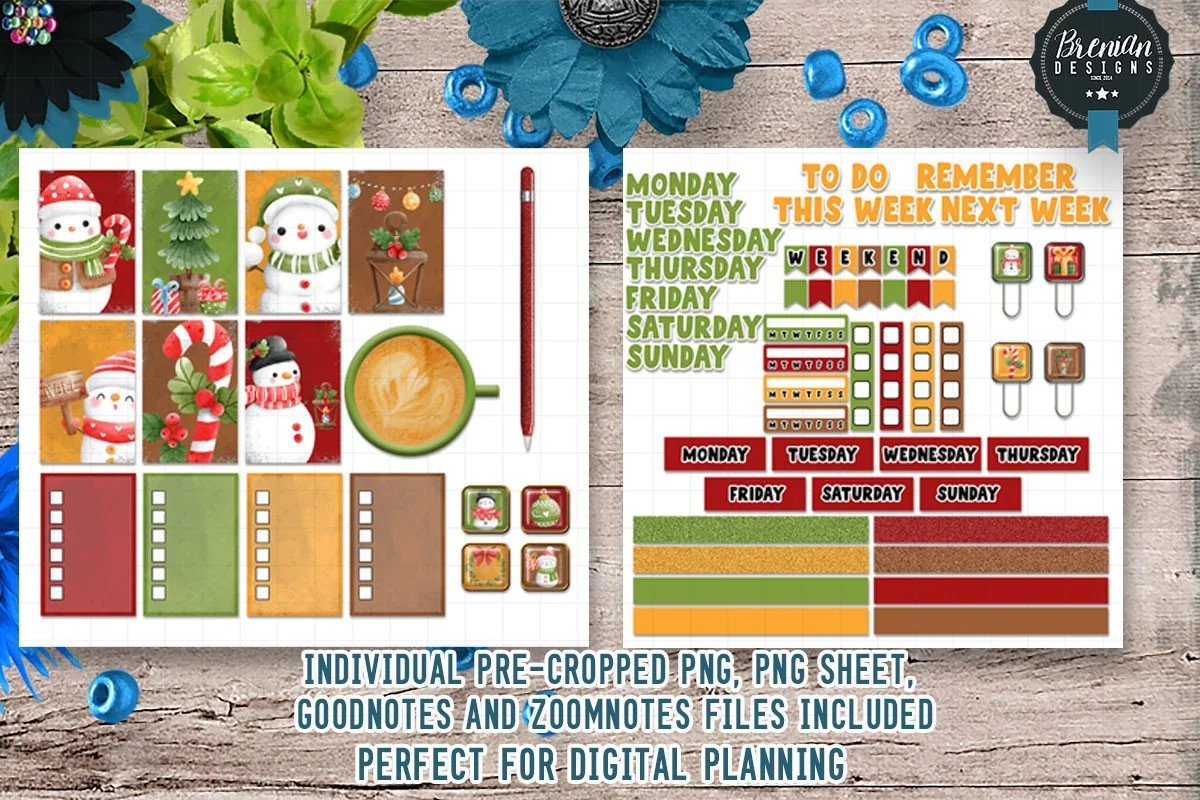
2. Christmas Snowman Digital Stickers
Layouts: 100+ stickers, pre-cropped
Best for: GoodNotes users, winter lovers, busy planners. Designed by Bren Wotherspoon.
- Over 100 snowman and winter stickers
- Pre-cropped PNG GoodNotes file plus PNG sheets
- Bonus ZoomNotes file
- Functional pieces too: weekday labels, To Do, Remember, This Week / Next Week boxes (per the cover)
- Made for screens; the seller says not suited for printing
Snowmen work from December 1st to the end of January, which makes this the best value pack for the season. Pre-cropped and ready in GoodNotes, so you can copy the first sticker a minute after you unzip the file.

Best cozy mix
3. Cozy Christmas Sticker Pack
Layouts: 100+ PNG stickers
Best for: journalers, cocoa lovers, scrapbookers. Designed by jamesinspires6.
- 100+ Christmas stickers: characters, animals, ornaments and gifts
- Holiday lettering and phrases
- Vintage Christmas scenes, cookies, cocoa and warm drinks
- Transparent PNGs for GoodNotes, Notability and digital scrapbooks
The most varied pack here: lettering for headers, treats for bake day, little scenes for a journal page. If you want one set that covers both planning and memory-keeping in December, I'd start with this.

Best hand-drawn
4. Christmas Digital Stickers – Precut
Layouts: 12 pre-cropped PNG sheets (6 transparent + 6 white)
Best for: hand-drawn style fans, journalers, gift list makers. Designed by Little Anny Studio.
- Hand-drawn Christmas characters and hand-lettered phrases
- 12 pre-cropped PNG sheets: 6 transparent, 6 on white
- Transparent version at iPad screen size (2732 × 2048 px), 300 DPI
- White version at US Letter size for printing
Hand-drawn stickers make a digital page feel less digital, and the lettered phrases double as page headers. The transparent sheets are sized for the iPad screen, so they drop straight into GoodNotes without resizing.

Best small cute set
5. Cute Digital Stickers Christmas Theme
Layouts: 20 PNG stickers + 8×10 in PDF sheet
Best for: minimal decorators, kawaii fans, card makers. Designed by MerryDay.
- 20 individual Christmas designs in PNG
- 8 × 10 in PDF sheet for printing on paper or sticker sheets
- Made for digital journals and planners like GoodNotes
- Cute style, made for everyday December pages
Twenty stickers is plenty if you only want a festive touch on the weekly spread and the gift list. A small set is also easier to keep consistent: one style, a few colors, no clutter.
Best for family traditions
6. Christmas Bucket List Digital Stickers
Layouts: Bucket list task stickers
Best for: families, list makers, tradition keepers. Designed by Magnolia Blooms.
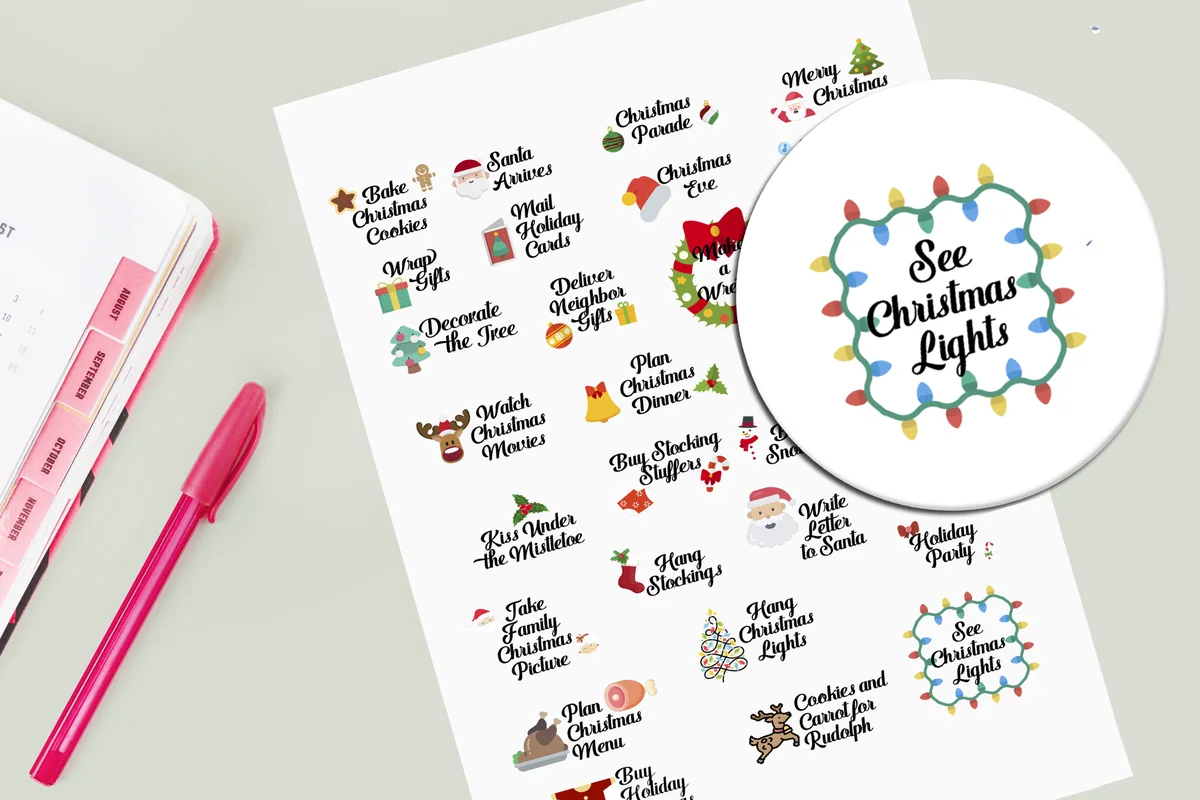
- Task stickers like Bake Christmas Cookies, Watch Christmas Movies, Mail Holiday Cards
- Also: Hang Christmas Lights, Plan Christmas Menu, Take Family Christmas Picture
- Transparent PNGs for digital planners and scrapbooks
- Can also be printed on sticker paper or cut on Cricut or Silhouette
The most useful pack on the list: these stickers are the tasks themselves. Drop one on each day of the bucket list page and you have a family advent plan in five minutes. Pairs well with any decorative set above.

Best retro style
7. Retro Christmas Digital Stickers
Layouts: 50+ stickers, pre-cropped
Best for: retro lovers, GoodNotes users, bold color fans. Designed by Bren Wotherspoon.
- Over 50 retro Christmas stickers
- Pre-cropped PNG GoodNotes file plus PNG sheets
- Bonus ZoomNotes file
- Functional pieces too: weekday labels, To Do, Remember, This Week / Next Week boxes (per the cover)
- Made for screens; the seller says not suited for printing
Same easy format as the snowman set, very different mood: retro colors and shapes that look great on a cream or dark planner. If cute isn't your style, this is the pre-cropped pack I'd pick.

Best for the gift list
8. Christmas Present Digital Stickers
Layouts: 36 PNG stickers (3 colors × 12)
Best for: gift planners, dark planner users, light file fans. Designed by Stickety Cricket.
- 36 present stickers: 12 each in red, green and blue
- Three versions of every sticker: plain, with border, with border and shadow
- Small file sizes so the planner doesn't lag
- Works in all digital planners, including GoodNotes
Exactly what the gift list needs: one present per name, red for bought, green for wrapped, blue for given. The border versions stand out on dark or colorful planner pages, a detail most packs skip.
Quick Comparison
| Sticker pack | Style | What you get | Stand-out extra |
|---|---|---|---|
| 1. Christmas DIGITAL PLANNER Sticker Stash | Plaid and solid | 365 stickers | PDF sticker booklet |
| 2. Christmas Snowman Digital Stickers | Cute winter | 100+ stickers | GoodNotes + ZoomNotes files |
| 3. Cozy Christmas Sticker Pack | Cozy, vintage touches | 100+ stickers | Holiday lettering |
| 4. Christmas Digital Stickers – Precut | Hand-drawn, whimsical | 12 sticker sheets | Prints on Letter too |
| 5. Cute Digital Stickers Christmas Theme | Cute | 20 stickers | Print sheet included |
| 6. Christmas Bucket List Digital Stickers | Functional | Holiday task stickers | Printable too |
| 7. Retro Christmas Digital Stickers | Retro | 50+ stickers | GoodNotes + ZoomNotes files |
| 8. Christmas Present Digital Stickers | Functional, cute | 36 gift stickers | Border and shadow versions |
What I Look For in Christmas Stickers
- Made for digital use. Transparent PNGs or a GoodNotes sticker book. A JPG with a white background shows a white box around every sticker.
- Pre-cropped. Cutting out 50 stickers with the lasso on December 1st is nobody’s idea of cozy.
- A mix of decorative and useful. Snowmen and ornaments set the mood; labels, banners and lettering (“gift list”, “bake day”, “Merry Christmas”) actually organize the page.
- One style per planner. Vintage, cute kawaii and modern gold look great alone and messy together. Pick one look for the season.
- Not just for December 25. Winter pieces (snow, mittens, cocoa) carry the pack into January, which makes it better value.
Christmas Sticker Ideas for Your December Pages
- Advent countdown, one sticker a day
- Present stickers on the gift list
- Cookie or gingerbread on bake day
- Envelope for the Christmas card list
- Tree on decorating day
- Car or plane for holiday travel
- Bow on wrapping night
- Ornament for school and work parties
- Bucket list stickers for family traditions
- Stocking on the holiday budget page
- Star on Christmas Day
- Snowflake on the New Year’s reset page
Keep it to two or three stickers per page in the busy weeks. A December spread covered in snowmen is cute, but you still need to see that the school concert is on Thursday.
A Cozy December in Four Pages
Stickers work best on a small holiday setup, not on every page of the planner. This is the four-page December section I’d make in GoodNotes:
- December overview. The monthly calendar with every party, concert, travel day and delivery deadline. One sticker per event type, so you can scan the month by color.
- Gift list and budget. Who, idea, bought, wrapped, and how much. A present sticker next to each finished name is oddly satisfying. If money is tight this year, see my budget planner ideas for a simple holiday budget page.
- Bucket list and traditions. Cookies, lights drive, a Christmas movie night, the ornament craft. Check them off with stickers instead of ticks.
- Christmas week. Menus, who is coming when, the shopping list for the big dinner. Pair it with a digital meal planner page if you host.
After Christmas, keep one or two winter stickers for the last week of December: it’s a good place for a short year review before the new planner starts.
Thanksgiving & New Year Digital Stickers
Christmas is the middle of the season, not all of it. November pages need something for the Thanksgiving menu and guest list, and the last week of December needs a New Year’s Eve page and a year review. These 5 packs cover both ends, and none of their previews shows a year, so they can come back every season.

Best for Thanksgiving
Very Berry Thanksgiving Digital Planner Stickers
Best for: the Thanksgiving menu, guest list and November spreads. Designed by NDP Design Studio.
- Over 300 hand-drawn Thanksgiving stickers: turkey, pies, pumpkins, autumn leaves
- A hyperlinked GoodNotes sticker book with every sticker already placed
- Individual PNGs plus a blank PDF sticker book for Notability, Noteshelf and ZoomNotes
- Color hex codes included; 150 DPI files, made for the screen, not for printing
The berry and plum palette is the reason I'd pick it: it looks festive without the usual orange-brown overload, and the turkey and pie stickers fit right next to a Thanksgiving menu.
Biggest fall pack
FALL DIGITAL PLANNER Sticker Pack
Best for: decorating every week from September to Thanksgiving. Designed by Wetfish Designs.
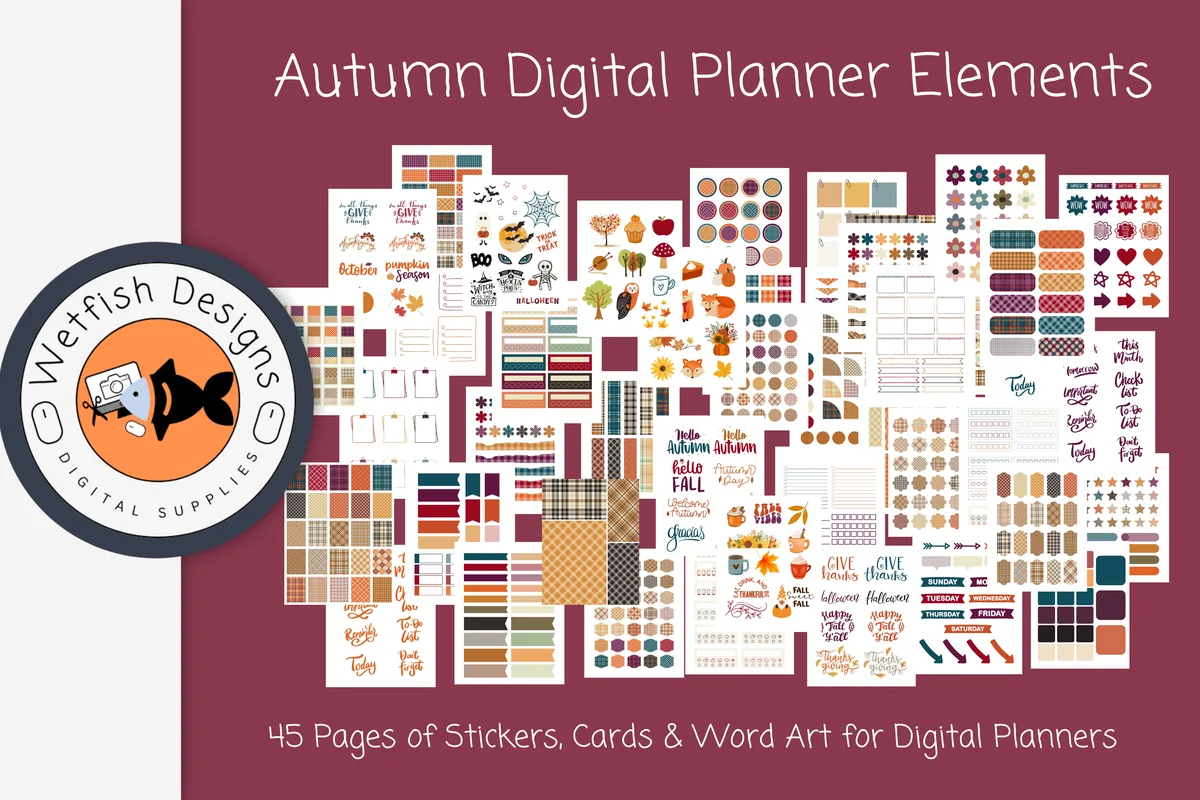
- 750 autumn planner elements in plaid and solid colors
- 45 sticker sheets in PNG and JPG plus a 45-page PDF booklet
- Works in GoodNotes, Notability, OneNote and other apps
From the same designer as the biggest Christmas stash above, so November and December pages match. Like that set, it comes as sheets, so I'd save a few favorites to GoodNotes Elements first.
Best small autumn set
Autumn Delights Digital Stickers
Best for: a quick cozy touch on weekly layouts. Designed by Bren Wotherspoon.
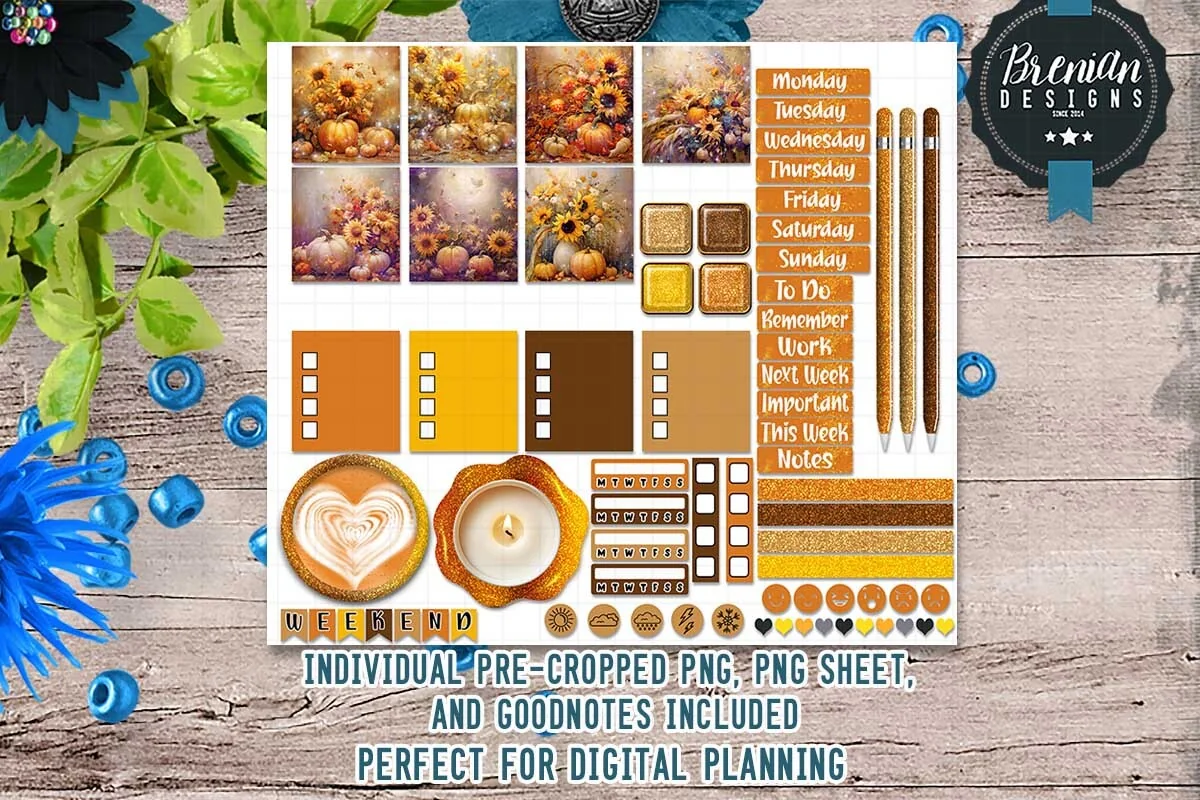
- Over 20 pre-cropped PNG stickers: pumpkin and sunflower photo tiles, weekday labels, to-do boxes
- A GoodNotes file and PNG sheets
- Made for digital planning, not for printing
A small, warm set rather than a stash: enough for a few November weeks, and the weekday labels make it useful beyond decoration.
Best for fun November days
November Wacky Holidays, 30 PNG Stickers
Best for: a November calendar with one small fun day a week. Designed by digitalplannerland.
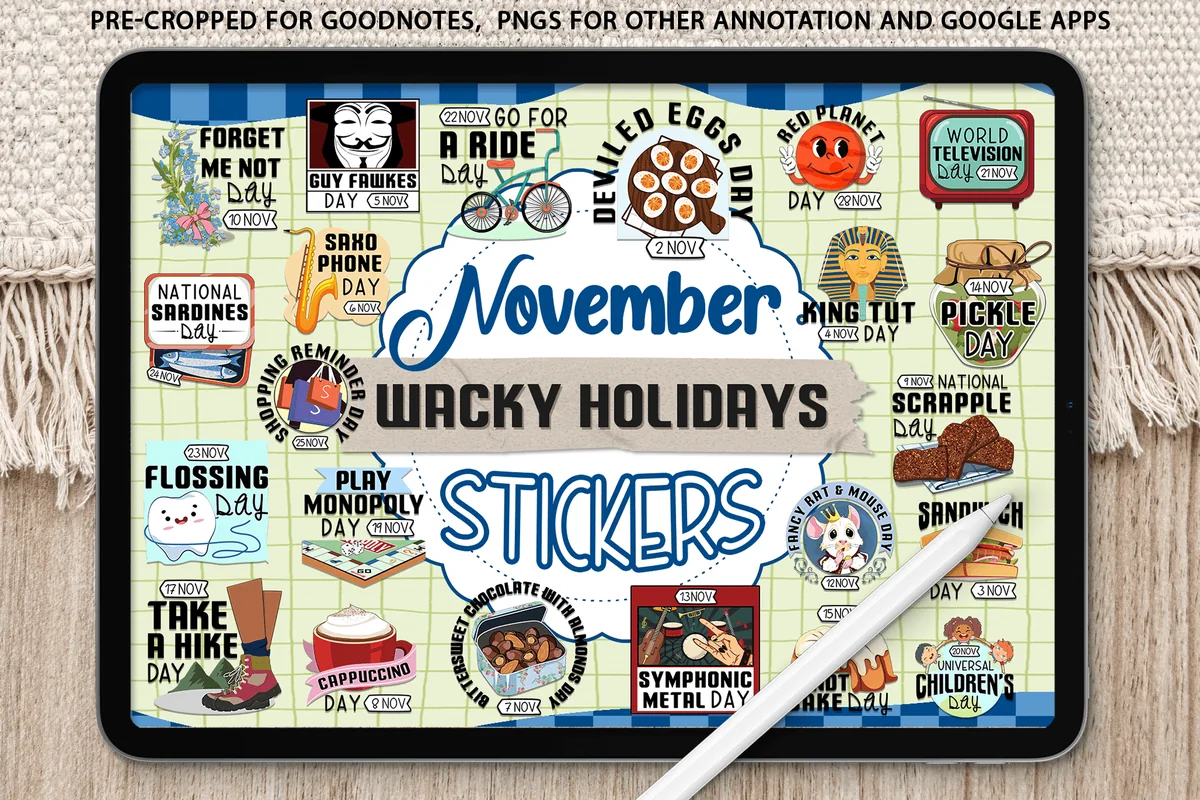
- 25+ stickers for odd November holidays, each with its date: Deviled Eggs Day (2 Nov), Cappuccino Day (8 Nov), Pickle Day (14 Nov), Take a Hike Day (17 Nov)
- Pre-cropped .goodnotes sticker file, import it without unzipping
- Transparent PNGs for Notability and other annotation apps
- Dates without a year, so the set works every November
This one isn't about Thanksgiving at all, and that is why I added it: November has a lot of empty days before the holiday, and a Pickle Day or Go for a Ride Day sticker gives each week a small reason to open the planner.
Best for New Year's Eve
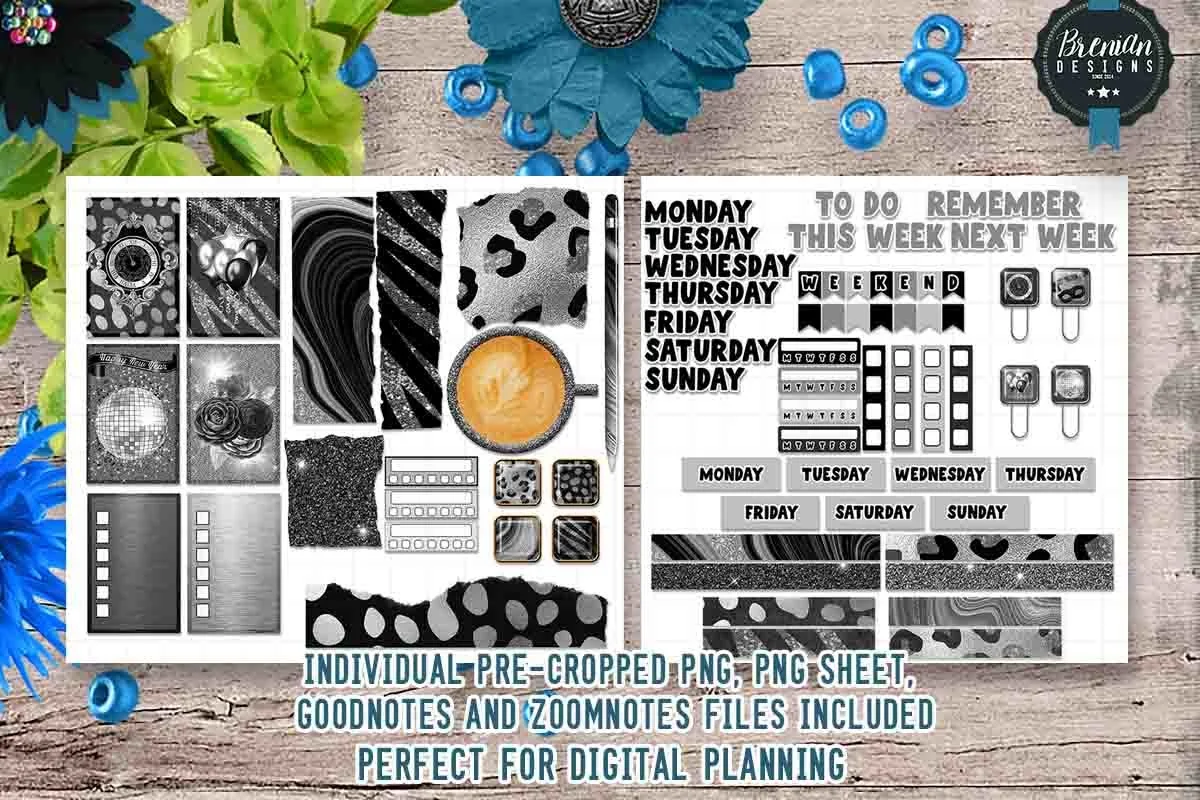
Silver Glam New Year Digital Stickers
Best for: the last week of December and the first page of the new planner. Designed by Bren Wotherspoon.
- Over 50 pre-cropped PNG stickers in silver, black and glitter
- Weekday labels, washi strips and to-do and reminder boxes
- GoodNotes and ZoomNotes files plus PNG sheets
No year printed on the stickers, so it works for any New Year's Eve. The silver and glitter look is the easiest way to make the year review page feel like a celebration.
How to Add Christmas Stickers in GoodNotes
- Sticker book (.goodnotes file): open it from the Files app, circle a sticker with the lasso tool, copy it and paste it into your planner.
- PNG files: save them to Photos or Files, then insert them with the image tool, or drag them onto the page in Split View.
- Keep favorites close: save the stickers you use every week (tree, present, bow) to GoodNotes Elements, so they’re one tap away all month.
The full walkthrough, including how to make your own stickers from photos, is in my guide to GoodNotes stickers.
Digital vs Printable Christmas Stickers
Printable Christmas stickers are made for sticker paper, cards and gift tags. Digital ones are made for the screen: lighter files, transparent backgrounds, pre-cropped for planner apps. Some packs in this list include both (a PNG set plus a print sheet), which is handy if you also make cards or scrapbook pages. If a listing only offers a print-ready PDF sheet, it’s a printable, and you’d have to crop every sticker yourself to use it on the iPad.
Where to Find Free Christmas Stickers
- Creative Fabrica freebies change regularly and often include seasonal sticker sets in November and December.
- The GoodNotes Marketplace has free holiday packs inside the app.
- Your planner’s bonus sticker book: many digital planners include seasonal stickers, so check before buying.
- Make your own: on the iPad, touch and hold the subject of a photo (your tree, a cookie, the dog in a Santa hat), choose Copy and paste it into GoodNotes. It’s the most personal Christmas sticker you’ll have.
One Free Christmas Sticker Set I’d Grab Now
Of the current freebies on Creative Fabrica, this is the Christmas set I’d actually put on a December spread. It has no price tag and doesn’t ask you to start the All Access trial, and it’s made of words rather than pictures, so it pairs well with the decorative packs above.

Free holiday labels
Christmas Stitch Digital Stickers
Stickers: Weekday and header labelsFiles: PNG stickers + a GoodNotes file
Best for: weekly spreads, December to-do lists, appointment reminders. Designed by Bren Wotherspoon.
- Monday to Sunday labels in bold red and green letters, as shown on the cover
- Header words: This Week, Next Week, Important, Remember, Work, Meds, Appointment
- Pre-cropped PNGs, a GoodNotes file and PNG sheets
- Made for the screen only, not for printing
Labels are the stickers I reach for every single week, and these turn a plain weekly page festive without any extra drawing. The Meds and Appointment headers are a small detail I like: December is busy, and those are the things that slip.
FAQ
Can you put stickers on an iPad?
Yes, digital stickers go into note-taking apps like GoodNotes, Notability or Noteshelf. They are transparent PNG images (or a ready sticker book) that you paste onto planner or journal pages, then move, resize and reuse as often as you like.
Where can I find Christmas stickers for a digital planner?
Marketplaces like Creative Fabrica have hundreds of Christmas sticker packs; look for “digital”, “pre-cropped” or “GoodNotes” in the title or description. The 8 above are the ones I’d start with. The GoodNotes Marketplace and planner bonus sticker books are other sources.
Can I print digital Christmas stickers?
Some packs include a print sheet or say the PNGs can be printed on sticker paper; others say they are not suited for printing (lower resolution to keep the planner file light). Check the description before you plan to use them for cards or crafts.
Do Christmas PNG stickers work in Notability?
Yes. The .goodnotes sticker books open only in GoodNotes, but the PNG files that come with almost every pack work in Notability, Noteshelf, Xodo and other apps that let you insert images.
When should I set up my December planner pages?
Mid to late November is ideal: you still have time to plan gifts and budget, and the stickers are ready when the first December events land in the calendar.
Are there Thanksgiving stickers for GoodNotes?
Yes. Look for packs that include a .goodnotes sticker book or pre-cropped PNGs, like the Very Berry Thanksgiving set above: it has over 300 stickers already placed in a GoodNotes file, plus PNGs for other apps.
Final Thoughts
One pack of Christmas stickers in a style you love is enough for the whole month, and a small Thanksgiving or New Year set covers the weeks around it; pick the big stash if you decorate every page, or a small themed set if you only want a festive touch on the gift list and the December cover. For more sticker styles, see my GoodNotes stickers roundup, and for the month itself, my Christmas planner guide, the digital monthly planners or all planner stickers. Need pages to put them on? See my December bullet journal ideas. If you read more over the holidays, my bookish stickers for a reading journal fit TBR lists and book reviews.
Planning to start fresh in January? See my top digital planner picks for 2027, dated and undated. For February pages, my Valentine’s Day stickers range from soft pink icons to an anti-Valentine set.
You May Also Like
To move from Christmas pages into the next celebration, these New Year digital stickers offer three sets for party details and planning pages.
This post contains affiliate links. If you buy through them, I may earn a small commission at no extra cost to you. Learn more.