A planner page with a cat on it is a page you want to open again. Cat stickers are one of the most-saved sticker themes on Pinterest, but most of what comes up are vinyl decals, chat stickers and Halloween clipart. On an iPad, the right pack is different: transparent PNGs or a ready GoodNotes file, a cat for the busy Monday, the rainy Thursday and the lazy Sunday, reused on every page all year.
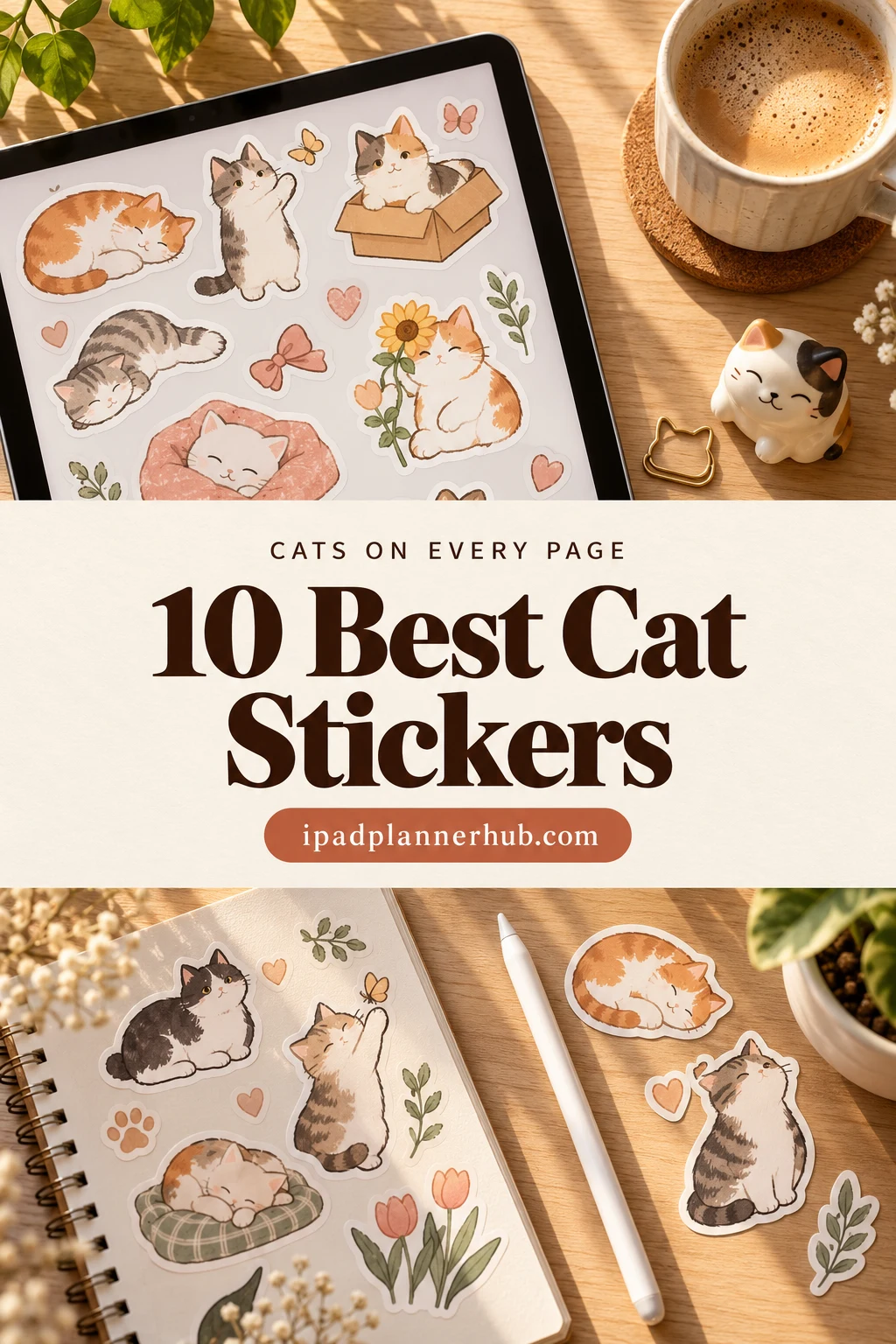
Below are 10 cat sticker packs from Creative Fabrica I’d use in a GoodNotes planner, from a 50-piece chaotic orange cat to sleeping cats, kittens holding to-do notes and black cats that aren’t only for Halloween. After the list: which style fits which planner, what to look for, cat sticker ideas for every page and how to turn your own cat into a sticker.
The 10 Best Cat Stickers I Found for a Digital Planner
Most cat stickers on Creative Fabrica are clipart for T-shirts, mugs and sublimation, or Halloween bundles. I skipped those, plus packs without any note-taking app in the description, and kept sets that name GoodNotes, Notability or the iPad. No more than two packs per designer, so you see different styles: cute and cozy first, then funny and useful, then aesthetic.
TL;DR: 10 cat sticker packs for GoodNotes and iPad planners, in three styles: cute and cozy (a 50-piece chaotic orange cat, 30+ cozy cats, sleeping cats, rainy kawaii cats), funny and useful (a lazy brown cat, cat days and months, kittens holding to-do notes) and aesthetic (bookish cats, doodle cats with sunflowers, black cat faces). All are transparent PNGs; the cards say which ones come with a GoodNotes file.
Quick Picks
- Best overall: Cute Orange Cat PNG Sticker Pack
- Best for cozy pages: Cute & Cozy Cat Planner Stickers PNG PDF
- Best for rest days: Sleeping Cat Stickers, Digital Stickers
- Best for rainy days: Cute Ca Stickers – Wet Cat
- Best for funny pages: Brown Cat Sticker Clip Art PNG
- Best for weekly headers: Funny Cat Stickers
- Cute Orange Cat PNG Sticker Pack – Best overall
- Cute & Cozy Cat Planner Stickers PNG PDF – Best for cozy pages
- Sleeping Cat Stickers, Digital Stickers – Best for rest days
- Cute Ca Stickers – Wet Cat – Best for rainy days
- Brown Cat Sticker Clip Art PNG – Best for funny pages
- Funny Cat Stickers – Best for weekly headers
- Kitten Stickers – Best for to-do notes
- Cute Cat Cozy Reading Stickers – Best for reading journals
- Doodle Cat & Sunflower Sticker PNG File – Best for doodle style
- Black Cat Digital Sticker Collection – Best for black cats

Best overall
1. Cute Orange Cat PNG Sticker Pack
Layouts: 50 orange cat stickers for everyday moments, with and without white borderFormat: GoodNotes collection file + transparent PNG
Best for: orange cat owners, everyday planners, GoodNotes beginners. Designed by helloBerryBloom.
- 50 transparent PNG stickers of one chaotic orange cat
- Each design with and without a white border
- A GoodNotes collection file, ready to use in GoodNotes
- Everyday scenes on the previews: laptop work, reading, cooking, bath time, shopping, spilled coffee, a fish and a milk carton
This is the newest pack in the list and the most complete one: one character, 50 everyday moments, and a GoodNotes file, so there is nothing to crop. Because it's always the same cat, a whole planner decorated with it still looks like one set, which is what I'd want for a weekly spread.
Best for cozy pages
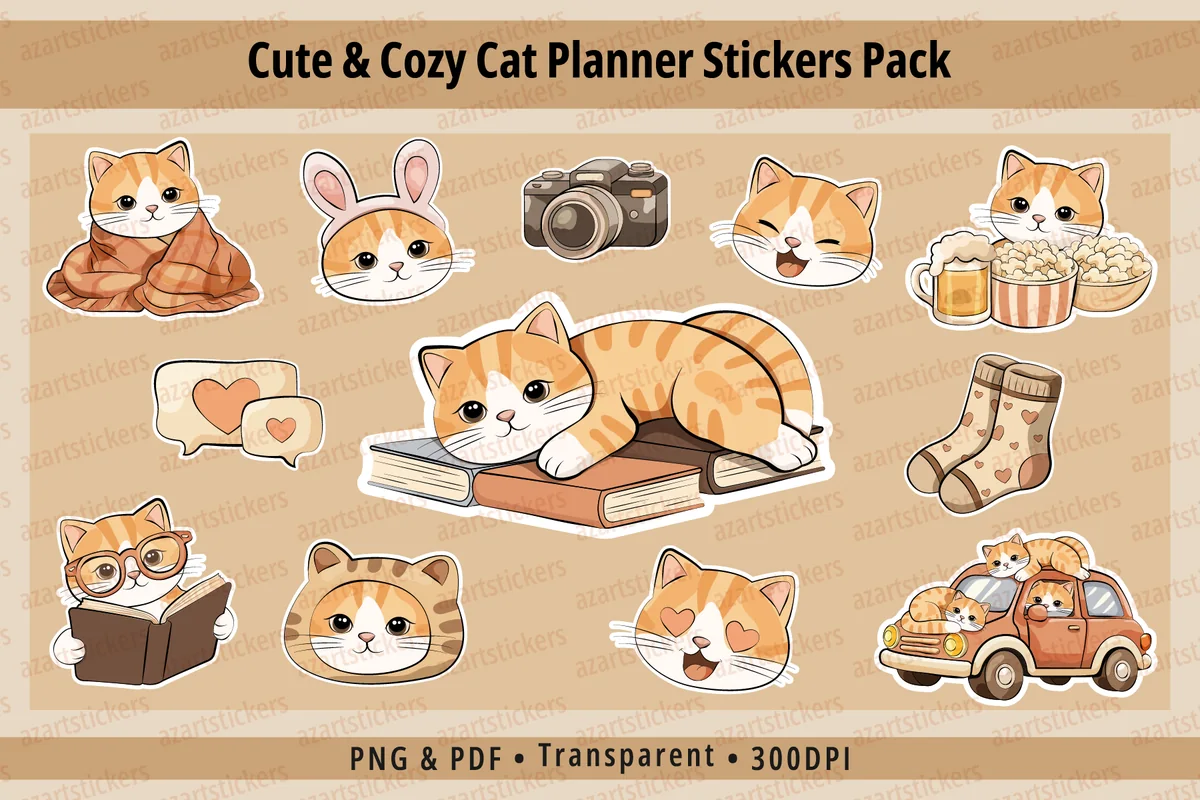
2. Cute & Cozy Cat Planner Stickers PNG PDF
Layouts: 30+ cozy cat stickers with props (blanket, socks, books, fireplace)Format: PNG 300 DPI + sticker sheets + print-ready PDF
Best for: cozy style fans, bullet journalers, warm palette lovers. Designed by azartstickers.
- 30+ cat illustrations with cozy, daily and lifestyle themes
- Individual PNG files with a transparent background, 300 DPI
- Ready sticker sheets plus a print-ready PDF
- Cozy extras on the previews: blanket, socks, books, camera, popcorn, a little car and a fireplace
The warm beige palette is what sells this one: the cats come with props like socks, a fireplace and a book stack, so a single sticker sets the mood of a page. It's a 2026 pack, and the props make it as useful for a reading or weekend page as for a plain weekly.

Best for rest days
3. Sleeping Cat Stickers, Digital Stickers
Layouts: Sleeping cats on pastel cushions (17 on the cover)Format: Digital stickers for GoodNotes and Notability, also printable
Best for: sleep trackers, pastel lovers, minimal decorators. Designed by ThePlannersDelight.
- A set of sleeping cats in soft white, ginger and gray (17 on the cover)
- Cats curled up on pastel cushions, each with a white sticker border
- Made for iPad apps like GoodNotes and Notability, also printable
A sleeping cat says "day off" faster than any text label, so I'd keep this set for rest days, early nights and the sleep column of a habit tracker. It has a 5.0 rating, and the soft colors sit quietly on a busy page.

Best for rainy days
4. Cute Ca Stickers – Wet Cat
Layouts: 11 kawaii wet cat stickersFormat: Pre-cropped PNG for GoodNotes + PNG sheet + PDF
Best for: weather trackers, mood trackers, kawaii fans. Designed by Tabdo.
- 11 kawaii cat stickers, each cat soaked in the rain
- A pre-cropped PNG file for GoodNotes (4096×4096)
- An uncropped PNG sheet and a PDF in 8.5×11" for printing
Eleven wet cats is a small, very specific set, and that's why I like it: it does one job, the rainy day in a weather box or a gloomy day in a mood tracker. The pre-cropped file means each cat is ready to drag onto a page.
Best for funny pages
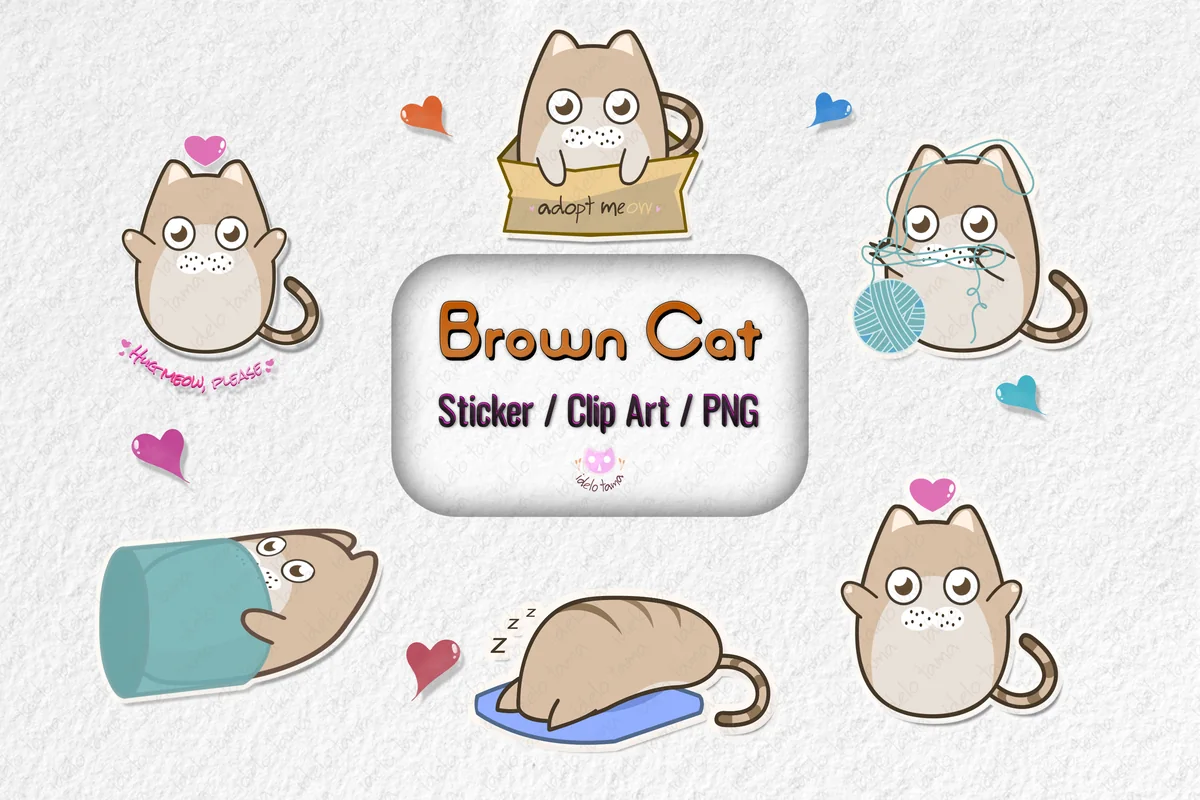
5. Brown Cat Sticker Clip Art PNG
Layouts: 17 funny brown cat stickers + 5 hearts, with and without outlineFormat: PNG + 2 sticker sheets (8×11 in)
Best for: funny cat fans, doodlers, note decorators. Designed by idelotama.
- 17 individual PNG stickers plus 2 sticker sheets (8×11")
- Each cat with and without a white outline, plus 5 heart stickers
- A lazy, round brown cat: in a box, in a cup, with yarn, asleep on a cushion
- GoodNotes and Notability named in the description
With over 100 favorites and a 5.0 rating, this round brown cat is the most-saved pack here. The poses are pure cat behavior (sitting in a box, stuck in a cup, asleep mid-day), which makes it the one I'd reach for to make a dull list a little funnier.
Best for weekly headers
6. Funny Cat Stickers
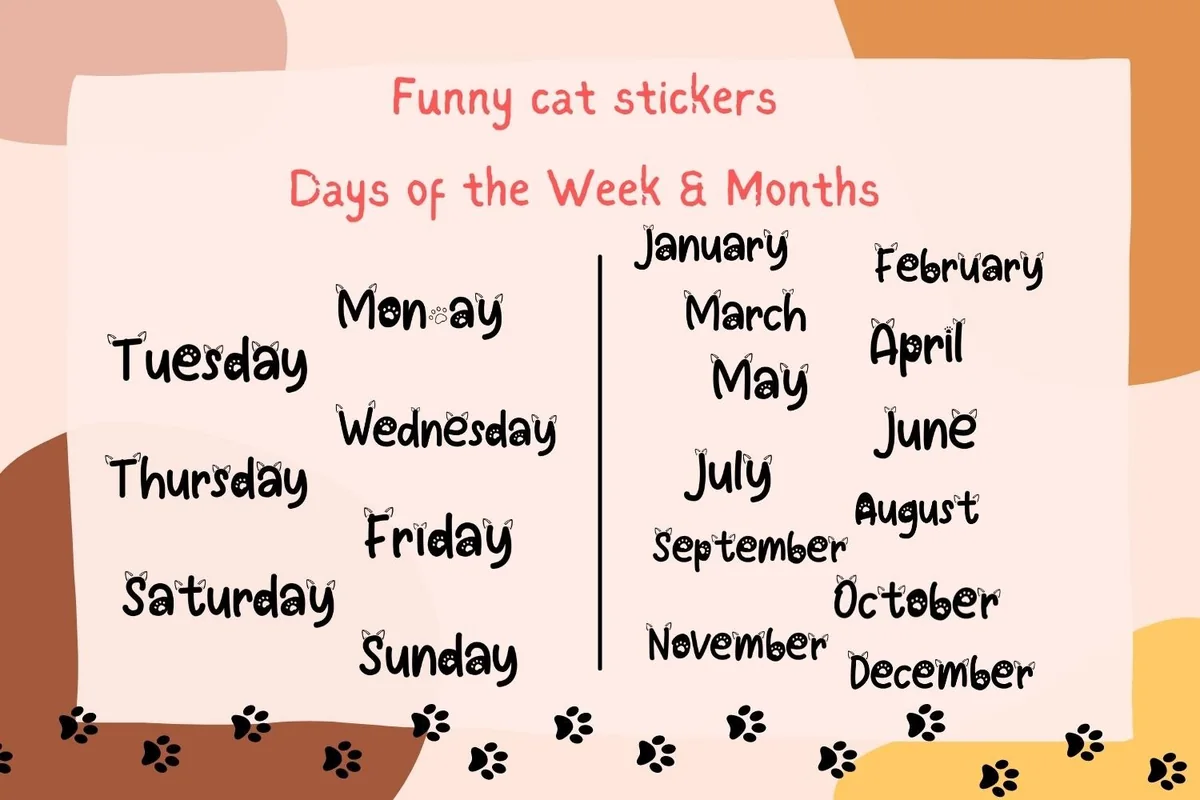
Layouts: 19 headers: 7 days of the week + 12 months with little catsFormat: PNG 300 dpiDates: Undated
Best for: weekly planners, bullet journalers, monthly spread makers. Designed by Aneta Design.
- 19 mini stickers: the 7 days of the week and the 12 months
- Hand-lettered words with little cats on the letters and paw prints
- Transparent PNG, 300 dpi, 10×2" each
- Made for GoodNotes and Notability as well as home printing
This is the practical one: day and month headers with cats sitting on the letters. They're undated, so the same 19 stickers work for every week and every month, and they pair well with any decorative pack above.

Best for to-do notes
7. Kitten Stickers
Layouts: 12 kitten stickers: 6 with blank note pads, 6 die-cut posesFormat: PNG 300 dpi + AI, EPS, SVG, PDF, DXF
Best for: list makers, students, pastel kawaii fans. Designed by Светлана Зиновьева.
- 12 kawaii kitten stickers in ginger, gray, white and calico
- 6 kittens holding a note pad with a blank field for notes or to-dos
- 6 die-cut kittens with a heart, a ball of yarn, a fish or a waving paw
- PNG with a transparent background (300 dpi) plus AI, EPS, SVG, PDF and DXF; GoodNotes named for digital use
The six kittens with blank note pads are what put this set in the list: write a reminder right on the sticker and it becomes a sticky note with a cat on top. It's a fresh 2026 pack, and the vector files let you change colors if you need to.
Best for reading journals
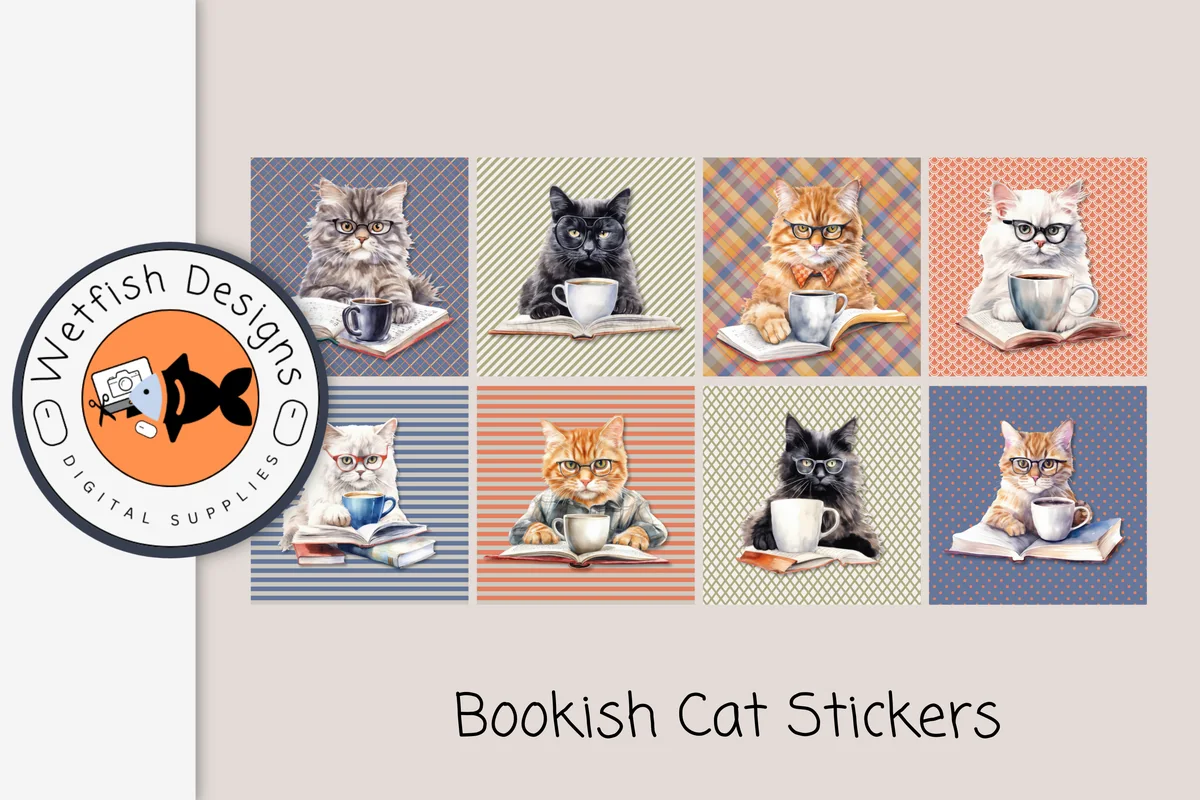
8. Cute Cat Cozy Reading Stickers
Layouts: 8 bookish cat stickers (cats with books and coffee)Format: PNG + JPG 300 dpi + PDF booklet
Best for: book lovers, reading journalers, vintage style fans. Designed by Wetfish Designs.
- 8 bookish cat stickers: cats in glasses with books and coffee
- PNG files saved individually, plus JPG 300 dpi and a PDF booklet
- About 2.65" square, on plaid, striped and dotted backgrounds
- Made for GoodNotes, Notability and iPad planners
These cats look like they have opinions about your book, which is exactly the energy of a review page. Eight stickers is enough for a reading journal: one per genre, or one for each month's favorite read.
Best for doodle style
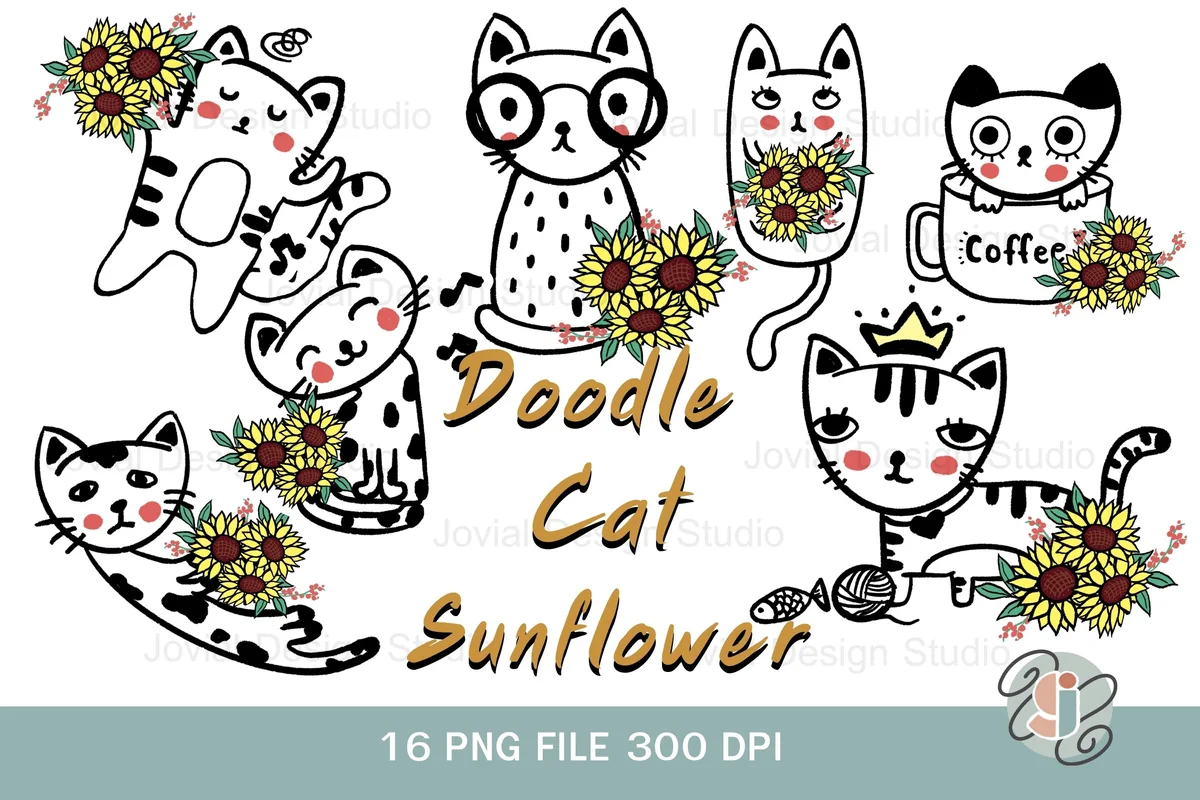
9. Doodle Cat & Sunflower Sticker PNG File
Layouts: 16 doodle cat and sunflower stickers (with and without white stroke)Format: GoodNotes file + PNG 300 dpi
Best for: bullet journalers, minimalists, sunflower lovers. Designed by Wishchy Online.
- 16 PNG files: the designs without a stroke and with a white stroke
- 1 GoodNotes file
- Hand-drawn black-and-white cats with yellow sunflowers, a coffee cup and a crown
- Transparent background, 300 dpi
Line-drawn cats with one accent color fit a bullet journal better than full-color kawaii: they look like your own doodles. The GoodNotes file is a nice extra for a pack this size.
Best for black cats
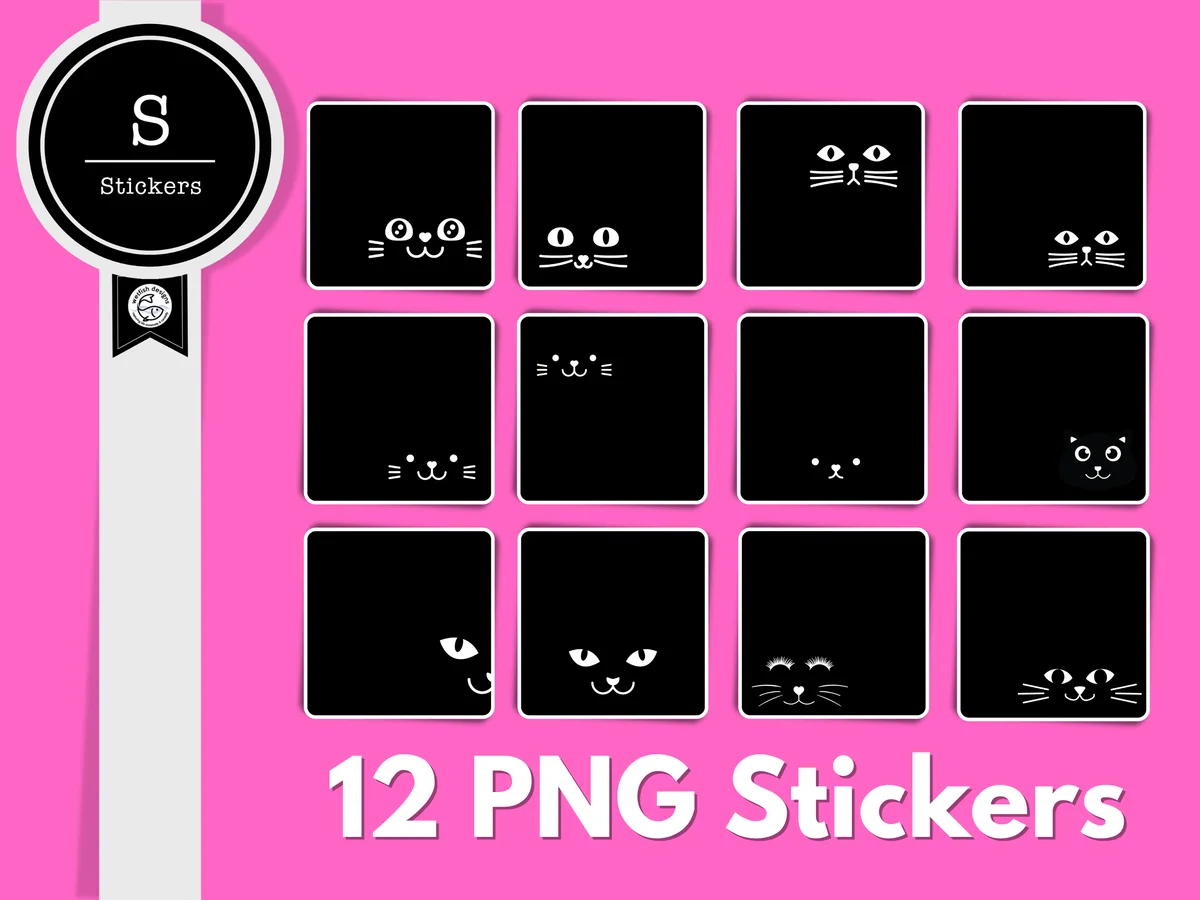
10. Black Cat Digital Sticker Collection
Layouts: 12 black square stickers with cat facesFormat: PNG 300 dpi
Best for: black cat owners, dark theme fans, minimal decorators. Designed by Wetfish Designs.
- 12 black square stickers with cat faces and eyes peeking out
- Transparent PNG files, 300 dpi, about 5.3" each
- Made for GoodNotes, digital scrapbooking and hybrid projects
- Black cats as an everyday theme, not only for Halloween
Most black cat stickers on Creative Fabrica are Halloween sets; this one is plain black squares with eyes, so it works in March as well as in October. On a white or cream page the squares look like little photo frames, which I find more elegant than a cartoon.
Quick Comparison
| Sticker pack | Style | What you get | Stand-out extra |
|---|---|---|---|
| 1. Cute Orange Cat PNG Sticker Pack | Kawaii orange cat | 50 stickers | GoodNotes collection file |
| 2. Cute & Cozy Cat Planner Stickers PNG PDF | Warm cozy kawaii | 30+ stickers | Cozy props as separate stickers |
| 3. Sleeping Cat Stickers, Digital Stickers | Soft realistic | Sleeping cats (17 on the cover) | 5.0 rating |
| 4. Cute Ca Stickers – Wet Cat | Kawaii, detailed | 11 stickers | Pre-cropped GoodNotes PNG |
| 5. Brown Cat Sticker Clip Art PNG | Funny cartoon | 17 stickers + 2 sheets | Most saved, 5.0 rating |
| 6. Funny Cat Stickers | Hand lettering + cats | 19 headers | Days of the week and months |
| 7. Kitten Stickers | Kawaii kittens | 12 stickers | Kittens with blank note pads |
| 8. Cute Cat Cozy Reading Stickers | Painted, vintage | 8 stickers | Cats with books and coffee |
| 9. Doodle Cat & Sunflower Sticker PNG File | Line doodles + sunflowers | 16 PNG files | GoodNotes file |
| 10. Black Cat Digital Sticker Collection | Minimal black squares | 12 stickers | Not Halloween-only |
Cute, Funny or Aesthetic: Which Cat Stickers Fit Your Planner
Cat stickers on Pinterest are searched in three moods, and the packs above split the same way. Pick one main style for your planner and add a second pack only if it does a different job.
Cute cat stickers
Soft colors, round faces, kawaii proportions. They suit pastel and cozy planners and everyday decoration: the chaotic orange cat, the cozy cats with socks and books, the sleeping cats and the rainy kawaii cats.
Funny cat stickers
Cat behavior as a joke: sitting in a box, stuck in a cup, asleep at noon. Funny cat stickers work best on lists and notes, where a page needs a little lightness. In this list: the lazy brown cat, the cat day and month headers and the kittens holding to-do notes, the last two also doing real work on the page.
Aesthetic cat stickers
Fewer colors, more style: painted cats with books and coffee, line doodles with one accent color, minimal black squares with eyes. Aesthetic cat stickers look calm on cream or dark pages and suit bullet journals and reading journals: the bookish cats, the doodle cats with sunflowers and the black cat collection.
What I Look For in Cat Stickers for a Planner
- Transparent PNGs, ideally pre-cropped or in a GoodNotes file. A JPG with a white background leaves a white box on a cream page. Packs with a ready GoodNotes file save the cropping altogether.
- One character or one style. Ten different cats from ten artists look messy on one spread. A set built around one cat (like the orange cat or the brown cat) keeps a planner consistent.
- Stickers that do a job. Day headers, note pads, a rain cat for the weather box, a sleeping cat for a rest day. Decoration is nice; a sticker that replaces a label is better.
- Size and resolution. 300 dpi PNGs stay sharp when you scale them down on a page. Very small source files get blurry when you enlarge them for a cover.
- Not Halloween-only. Black cats in witch hats are great for one month. For a planner you use all year, pick cats without seasonal props.
Cats on Every Page: Cat Sticker Ideas for Your Planner
The fun part of digital cat stickers is that one cat can be reused everywhere. A few ideas for giving each page its own cat:
- A cat on a laptop for work days
- A sleeping cat on rest days
- A wet cat in the weather box on rainy days
- A cat in a box on moving or decluttering day
- A cat with a book on the reading log
- A kitten with a note pad for the top 3 to-dos
- Cat day headers across the weekly spread
- A black cat face on the monthly cover
- A grumpy cat for a hard day in the mood tracker
- A cat with a fish next to the meal plan
- A cat with yarn on the hobby page
- A cat sticker as a reward for every habit streak
If you track your mood or the weather, my mood tracker ideas have layouts where one sticker per day replaces a color key. For weekly spreads to put the cats on, see my weekly planner ideas.
Digital Cat Stickers vs Vinyl Cat Stickers
A lot of people searching for cat stickers want vinyl stickers for a laptop, a water bottle or a phone case. The packs above are digital first: you place them on pages in GoodNotes or Notability, as often as you like, and never run out. Some of them also print:
- Digital and print: the cozy cats (print-ready PDF), the rainy kawaii cats (PDF sheet), the brown cat (sticker sheets), the bookish cats (PDF booklet), the kittens with note pads (vector files) and the cat day headers.
- Best on screen: the orange cat pack is built around a GoodNotes collection file and is made for digital planners.
Printing at home works for a paper journal. For a laptop sticker that survives a bag, you need sticker vinyl and a cutting machine, which is a different hobby altogether.
How to Add Cat Stickers in GoodNotes
- Unzip the pack in the Files app. You’ll see single PNGs, sticker sheets or a GoodNotes file, depending on the pack.
- If there is a GoodNotes file, import it: it’s your sticker book. Open it in a second tab next to your planner.
- For single PNGs, tap the image tool on a planner page and add the sticker from Photos or Files, then resize it.
- For sticker sheets, add the whole sheet to a sticker notebook, then cut out one cat at a time with the lasso and copy it to your planner.
- Save favorites as Elements. Select a sticker with the lasso and add it to a GoodNotes Elements collection called “Cats”, so it’s one tap away on every page.
New to stickers in GoodNotes? My GoodNotes stickers guide covers pre-cropped sticker books, PNG files and how to make your own stickers.
How to Turn Your Own Cat Into a Sticker
The cutest cat sticker is often your own cat. On a recent iPadOS, you can lift your pet out of a photo without any extra app:
- Open a clear photo of your cat in the Photos app, ideally against a plain background.
- Touch and hold the cat until a glowing outline appears, then choose Copy (or Add Sticker).
- Open your planner in GoodNotes and paste: the cat lands on the page without a background.
- Select it with the lasso and save it to Elements next to your other cat stickers.
A photo sticker of your own cat next to illustrated cats looks surprisingly good on a monthly cover or a “pet of the month” corner.
A Free Kitty Kit for Birthday Weeks
One free set on Creative Fabrica puts a black cat on a birthday week, and it’s a nice extra next to the 10 packs above. It’s marked as a freebie, so there’s no cost and no trial. The cat stickers come with planner pieces, so it works as a small kit.

Free cat birthday kit
Happy Birthday Kitty Digital Stickers
Stickers: 25+ stickersFiles: GoodNotes file + PNG cut-outs
Best for: birthday weeks, pink and green spreads, cat lovers. Designed by Bren Wotherspoon.
- A black cat in party scenes on photo cards, as shown on the cover
- Pink and green checklist boxes and colored blocks
- Weekday labels and small tabs
- More than 25 stickers
The black kitty on the party cards is the star, and the pink and green boxes around it make the set useful beyond the party itself. I’d save it for the week of a birthday, a cat’s gotcha day included.
FAQ
What are digital cat stickers?
Cat illustrations saved as transparent PNG images or as a GoodNotes sticker book. You place them on pages of a digital planner or journal in GoodNotes, Notability or another note-taking app, resize them and reuse them as often as you like.
How do I import cat stickers into GoodNotes?
Unzip the pack in Files. A GoodNotes file opens as a sticker notebook; single PNGs go onto a page with the image tool. Save the ones you use most to Elements, and they stay one tap away in every notebook.
Can I make a sticker of my own cat?
Yes. In the Photos app on a recent iPadOS, touch and hold your cat in a photo, choose Copy and paste it into GoodNotes: the background is removed for you. The steps are in the section above.
Are there free cat stickers for GoodNotes?
Some bloggers and sticker shops share small free cat packs, and the GoodNotes blog lists a few free cute sticker packs too. Free sets are usually smaller and mixed in style; a paid pack built around one cat keeps a planner consistent. You can also make your own from a photo, as above.
Do these cat stickers work in Notability?
Yes. Transparent PNGs work in any app that lets you add images: Notability, Noteshelf, ZoomNotes and GoodNotes. Only the GoodNotes files inside some packs are GoodNotes-specific; the PNGs in the same pack work everywhere.
Can I print these cat stickers?
Most of them, yes: several packs include a PDF or sticker sheets for printing at home. For laptop or bottle stickers you’d need sticker vinyl and a cutting machine; these packs are made mainly for digital planners.
Final Thoughts
The best cat stickers are the ones that make a page feel like yours: start with one character pack, like the Cute Orange Cat PNG Sticker Pack, add a useful set such as the cat day and month headers, and save your favorites to Elements. For a planner to put them in, see my cute aesthetic digital planners; for bookish cats and reading pages, my bookish stickers and digital reading journals; for more styles, all planner stickers. For pandas, axolotls and mochi faces, see my kawaii stickers. Cats and coffee go well together: see my coffee stickers for GoodNotes. For February, see my valentine stickers, including a set of valentine animals.
You May Also Like
Planning a page for both pets? These dog digital stickers add puppy scenes, dachshund badges and dog portraits alongside your cat stickers.
This post contains affiliate links. If you buy through them, I may earn a small commission at no extra cost to you. Learn more.