You open your iPad before bed, but a blank diary page asks for more energy than you have left. A one line a day journal gives you a smaller place to begin: one detail you would like to remember, with room to return tomorrow.

I shortlisted three digital products from two designers. There are only two functional formats here: NDP Design Studio’s five-year memory book, and a single-sheet log from Tas Creative Studio in two color schemes. The real buying decision is whether you want to revisit the same date across years or keep a short record on a simple page.
Three One Line a Day Journal PDFs, Two Different Formats
All three listings name iPad-friendly PDF annotation apps. I compared their descriptions and every available preview; I have not used the purchased files. None is a standalone journaling app, and the two Tas designs should not be mistaken for full multi-year notebooks.
TL;DR: Three PDFs from two designers, with two functional formats: a five-year hyperlinked memory journal and two decorative single-sheet logs. The two Tas sheets share the same layout; choose between their colors rather than buying both for different features.
Quick Picks
- Best for comparing five years: One Line a Day Digital Journal / Planner
- Best for pastel single-sheet option: One Line a Day – Cozy Pastel
- Best for coffee-themed single sheet: One Line a Day • Coffee Latte
- One Line a Day Digital Journal / Planner – Best for comparing five years
- One Line a Day – Cozy Pastel – Best pastel single-sheet option
- One Line a Day • Coffee Latte – Best coffee-themed single sheet
Best for comparing five years
1. One Line a Day Digital Journal / Planner
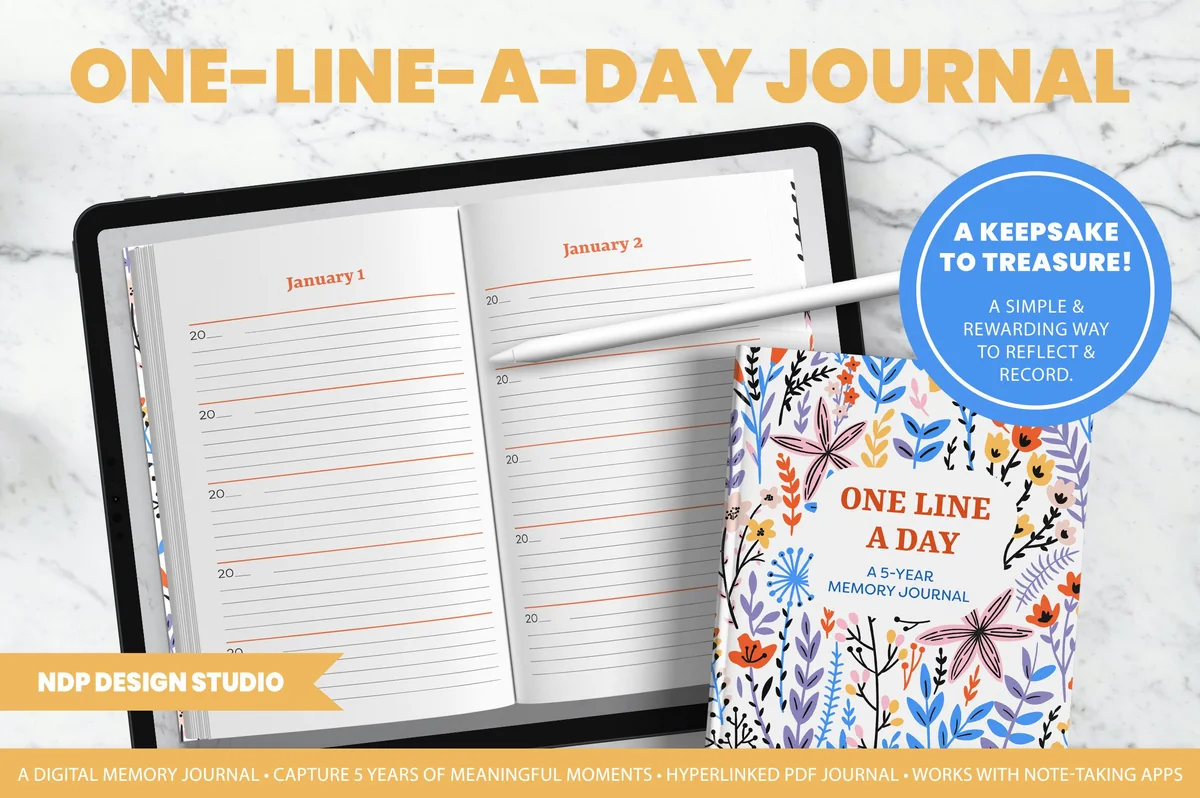
Orientation: Landscape spread shownLayouts: Five year-entry spaces per dateDates: Month/day headings; blank year fields
Best for: seeing the same calendar date across five years. Designed by NDP Design Studio.
- Five-year memory journal PDF with hyperlinked navigation
- Two PDF resolutions, 150 DPI and 300 DPI, plus an illustrated instruction guide
- Month-and-day headings with five separate year-entry spaces
- Floral book-style cover with a landscape journal spread
The repeated date is the reason this book leads my shortlist: next year’s memory sits beside this year’s entry. Blank year fields let you begin with today rather than January. Choose it for a compact annual comparison; the two Tas sheets leave that organization to you.
Best pastel single-sheet option
2. One Line a Day – Cozy Pastel
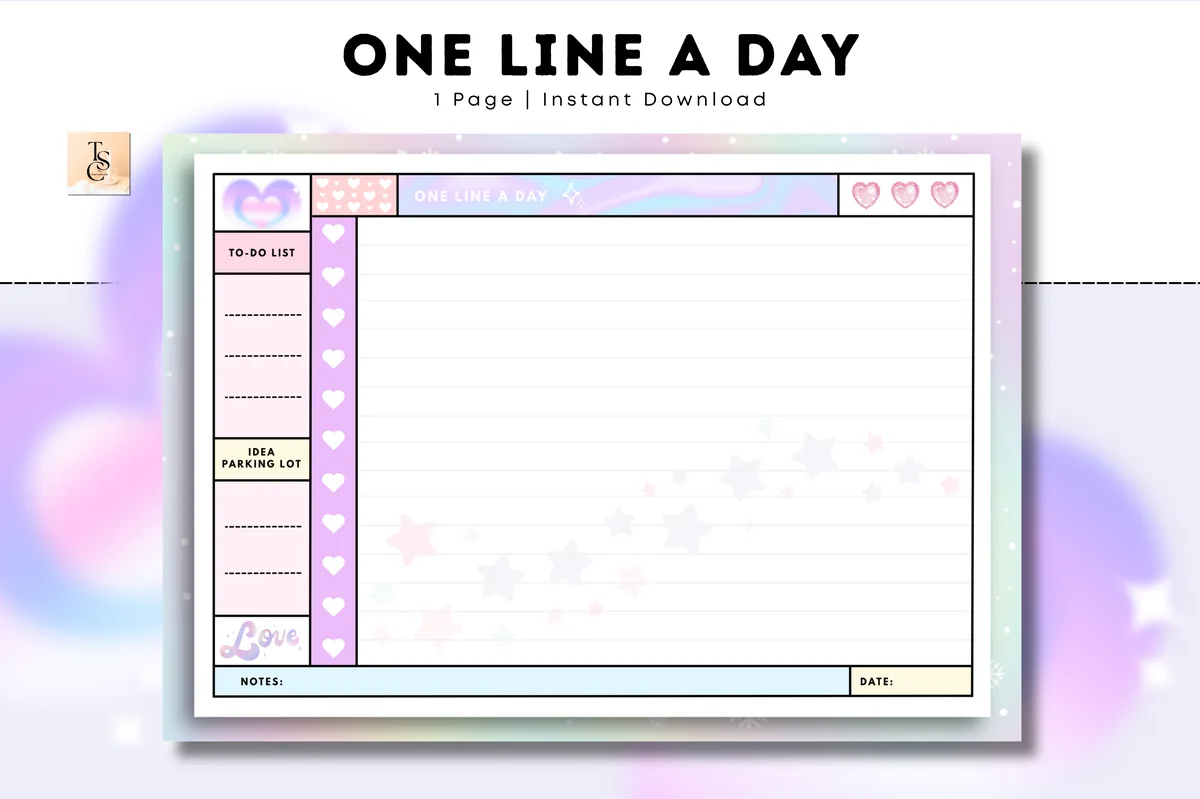
Orientation: A4 landscapeLayouts: Lined log, tasks, ideas and notesDates: Undated; date field
Best for: a short entry beside small task and idea lists. Designed by Tas Creative Studio.
- Undated A4 landscape sheet in printable and digital PDF versions
- PDF format for GoodNotes, Notability and Noteshelf
- One-page preview with a large lined area, To-do list and Idea parking lot
- Pastel hearts and stars, with Notes and Date fields along the bottom
I like the separate task sidebar for keeping a daily memory clear of the to-do list. Cozy Pastel also leaves room for an occasional longer note. You will need to date and organize your own entries: the previews show a single sheet rather than the NDP book’s five-year structure. No linked date index is advertised or shown.

Best coffee-themed single sheet
3. One Line a Day • Coffee Latte
Orientation: LandscapeLayouts: Lined log, tasks, ideas and notesDates: Undated; date field
Best for: the same compact log layout in warm neutral colors. Designed by Tas Creative Studio.
- Undated landscape sheet with printable and digital PDF versions
- PDF format for GoodNotes, Notability and Noteshelf
- Lined main area, To-do list, Idea parking lot, Notes and Date fields
- Brown and cream coffee motifs with a heart border beside the writing area
Coffee Latte offers the same visible field arrangement as Cozy Pastel in brown and cream. Its illustrations decorate the frame rather than supply writing prompts. For this layout, color preference is a good reason to choose one version; buying both adds no different planning sections.
Quick Comparison
| Journal | Format | Best use | Navigation |
|---|---|---|---|
| 1. One Line a Day Digital Journal / Planner | Five-year memory journal | Same-date memories across years | Hyperlinked PDF |
| 2. One Line a Day – Cozy Pastel | Single-sheet PDF | Pastel daily writing with side lists | Manual page organization |
| 3. One Line a Day • Coffee Latte | Single-sheet PDF | Warm neutral alternative to Cozy Pastel | Manual page organization |
Do You Want to See Last Year on Today’s Page?
Picture opening the journal on your birthday next year. Do you want the previous birthday entry already beside the new space, or would you be happy looking through a folder of dated pages? That distinction matters more than the cover. A five-year journal organizes memories by recurring calendar date; a single-sheet log leaves the filing system to you.
- Choose the NDP book for comparison across years. Its previews show five year-entry spaces beneath each month-and-day heading. The floral cover is decorative; the repeated date structure is the reason to buy it.
- Choose a Tas sheet for a small, flexible writing surface. You can put one sentence on each line and date it yourself, or use one copy for each day with a little more room. The sheet has no built-in five-year structure.
- Choose between the Tas colors once. Cozy Pastel and Coffee Latte have the same visible arrangement. Buying both changes the look, not the organization of your memories.
The large lined center of a Tas page may look more generous than the NDP entry spaces. That can help if you occasionally want a longer note, but it also removes the small boundary that makes a one-sentence diary appealing. Decide whether that extra room is useful before treating it as an advantage.
Read the Writing Area Before You Choose the Cover
A product mockup shows the whole page, while your handwriting has to fit in the actual lines. NDP shows a book spread with several short entries per date. The Tas sheets put a large central area next to a narrow sidebar. Those are different writing experiences even though both can hold a sentence about today.
- Short entries over several years: the NDP spaces suit a compact memory, rather than a full account of the day. Avoid buying it for long-form diary pages.
- Tasks beside a memory: the Tas sidebar has a To-do list and Idea parking lot. Keep the memory in the main area so an unfinished task does not become your only record of the day.
- Color and visibility: pastel stars cross part of Cozy Pastel’s main area; coffee motifs frame Coffee Latte. Look at the examples at a realistic screen size and choose the design you can comfortably read.
- Page size: Cozy Pastel is A4 landscape. Coffee Latte’s listing specifies landscape without a paper size, so check its dimensions if you plan to print it as well.
Zoom can make a narrow entry easier to write, but it does not add room to the page. If you usually write large letters, compare the amount you want to say with the space shown. A short test sentence on an existing lined page can help you decide how compact you are willing to be.
Keep One Specific Moment, Even on an Ordinary Day
A sentence works better as a memory cue when it contains something recognizable. “Busy day” gives you a verdict; a person, place or small event gives you something to picture. The examples below are invented to illustrate the difference, not entries from my diary.
If the detail comes from a hobby session, one sentence can preserve the moment while a separate practice note records where to resume. These hobby journal ideas offer session bookmarks and trial records for details that would crowd a daily memory entry.
| Starting point | A more specific sentence |
|---|---|
| Nothing special happened | The bakery had the rosemary bread again, so lunch became toast at my desk. |
| Time with someone | Leah taught me the card game she learned on vacation. |
| A difficult afternoon | The meeting ran late; I was relieved to eat dinner quietly at home. |
You do not need to turn every entry into a polished line or make a hard day sound positive. Use these small prompts when the page feels empty, and leave the rest of the story out if you prefer.
- Something familiar that changed: what was different on your usual route, at lunch or in a conversation?
- A tiny event with a name: who said something memorable, and what was it?
- An activity and a feeling: what did you do, and how did it feel in that moment?
- A detail from home: what were you cooking, repairing, reading or listening to?
- A plain statement: if you do not want to explain the day, a short honest note can stand on its own.
For more open-ended pages, the digital journaling ideas collection explores other ways to use an iPad journal. Keep those longer exercises separate if your aim here is a small daily memory record.
Prepare the PDF Without Creating Extra Work
The useful setup is the one that gets you to the next entry without making you redesign the journal. NDP includes an illustrated guide and two PDF resolutions; with Tas, you organize copies of a single sheet. Follow the instructions included with the files for the app you use.
From files to the first dated entry
- 1Choose the file that matches your purpose. For NDP, the listing includes 150 DPI and 300 DPI PDFs. These are resolution alternatives, not two different diary systems. For Tas, distinguish the digital version from the printable version when opening the received files.
- 2Import one working PDF. Open it in your chosen PDF annotation app and check that the page is readable before writing personal details. If you choose NDP, try its navigation links before adding entries.
- 3Establish the date structure once. In NDP, go to the appropriate month and day and label the current year’s space. With a Tas sheet, decide whether each dated line is a day or each page is a day. Use the same convention so rereading does not become guesswork.
- 4Keep a clean original. If you intend to reuse a Tas sheet, retain an unmarked copy and create working pages using the tools in your app. Adding pages does not create a linked calendar or a same-date view across years.
In the five-year book, avoid changing the page order just to start with today. The calendar date is the organizing principle you will return to next year. On a sheet, a clear month-and-year name for the working document can be more useful than spending an evening adding decorative elements.
Starting Midyear, Leaving Gaps and Finding Entries Again
January is optional. NDP has month-and-day headings with year fields to fill in; the Tas sheets are undated. Start with the actual date instead of making a page of invented catch-up entries. If you begin midyear, the earlier months can simply wait until you reach them.
- A missed evening: leave it blank, or add a brief note later if you remember what happened. Mark a later addition when the distinction matters to you.
- A week away: return to today first. A trip does not need to become a backlog of compulsory diary writing.
- A long entry: keep the short memory in the daily space and put the longer account elsewhere. Do not squeeze several paragraphs into a layout you chose for brevity.
- A future reread: NDP groups years by date. Tas requires your own dated lines or page organization, so do not expect last year’s sentence to appear automatically.
Keep the journal near an activity you already do on your iPad, such as closing your planner for the evening. If that timing becomes awkward, move the entry to another part of the day. The date structure can stay the same.
PDF Journal or App: Where Does the Record Live?
These products provide pages. The app you import them into controls editing, search, storage and any backup features. NDP describes embedded hyperlinks, which are navigation within the document; they are not automatic calendar synchronization. The Tas sheets rely on your own page organization.
- Want a reminder? Use a reminder tool you already trust. A PDF page does not schedule a notification by itself.
- Want to search handwritten entries? Check the capabilities and settings of your annotation app. Buying a journal layout does not guarantee handwriting search.
- Want a private record? Review who can access the device, shared folders and cloud account where you store it. Choose device and app protections separately from the page design.
- Want to keep it for years? Check how your app exports annotated pages and restores a saved copy. An untouched source PDF does not contain the memories you add later.
If you prefer automatic date views or app-based prompts, compare those features in a journaling app before purchasing a PDF. If handwriting on an iPad is the part you enjoy, the templates here let you keep that approach while choosing how much structure surrounds the sentence.
FAQ: Short Entries and Digital Memory Books
Is a one-sentence diary always a five-year journal?
No. One sentence describes the length of the entry. Five years describes an arrangement that groups entries from the same calendar date. The NDP option supplies that arrangement; the two Tas products are single-sheet logs.
Can I begin a five-year memory book on my birthday?
Yes. NDP leaves the year fields blank, so you can open the birthday’s calendar date and begin there. Earlier dates can stay empty until you reach them.
Do Cozy Pastel and Coffee Latte include different planning features?
Their visible field arrangement is the same: a lined main area with tasks, ideas, notes and a date field. The main difference is the palette and decoration. There is no need to buy both for different functions.
Do I need to write something happy every day?
No. A neutral or difficult detail belongs in a personal memory record too. You can also leave a day blank. Nothing in this format requires you to turn an experience into a lesson or gratitude statement.
Can I use these PDFs in OneNote or Google Calendar?
Do not buy them for that purpose. NDP explicitly excludes OneNote and digital calendars such as Google Calendar. The Tas listings name PDF annotation apps, not calendar integration. Check your intended app before purchase.
Choose the Record You Want to Open Next Year
For a one line a day journal built around comparing the same date over five years, NDP is the relevant choice in this shortlist. If that structure feels unnecessary, either Tas sheet offers a place to start, with manual dating and organization. Choose the design you find easiest to read, then date the first entry and save a working copy.
You May Also Like
This article contains affiliate links. I may earn a commission if you purchase through them, without changing the price you pay. Details are in the affiliate disclosure.