The last day of the month arrives, and your task list still looks familiar. These bullet journal monthly review ideas help you separate what actually happened from what you meant to do, then choose what deserves another month of attention.
My starting point is one page and three prompts. The ideas work on paper or in an iPad notebook; the three PDF options later are optional starting pages, not a requirement or prewritten review worksheets.
What belongs in a monthly review?
A monthly log holds the month’s dates and tasks. A monthly review looks back at the evidence and records what you want to remember or change. A monthly review page can be a short list, while a monthly review spread gives photos and notes more room. For the wider setup, see my digital bullet journal ideas; this page stays with the month you have just finished.
- Record: one concrete result, event or memory, with its date if useful.
- Reflect: what helped, what got in the way and what remains uncertain.
- Decide: carry forward, schedule, reduce or release an unfinished commitment.
25 bullet journal monthly review ideas, grouped by purpose
Pick one group that matches the kind of month you had. You can fit several prompts on one spread; these are 25 alternatives, not 25 required pages. Each example shows what you could write on your own page.
Results you can point to: ideas 1–5
- 1Make an evidence timeline. Draw four short rows for the weeks. Add one event or completed piece of work to each, such as “Week 2: sent the application.” Leave a gap when you have no record instead of inventing a balanced month.
- 2Separate finished from busy. Use two columns: outcomes and activity. “Published the portfolio” belongs under outcomes; “researched layouts for three evenings” belongs under activity. Ask whether the activity helped something finish, without treating every unfinished effort as wasted.
- 3Give three wins a receipt. Next to each win, write the detail that makes it real: a date, message, saved document or completed errand. Small wins count. “Made the appointment I kept postponing” tells you more than a general rating of the month.
- 4Review the unfinished list. Make a row for each remaining task and give it a decision. “Book repair: call Tuesday” is actionable; “learn French: park until winter break” is honest. The decision table below shows how to avoid copying everything automatically.
- 5Cross out an expired promise. Choose a commitment that no longer fits. Write why it can end: the event passed, the need disappeared or a different goal matters more. This makes letting go a considered decision rather than an unexplained empty checkbox.
Patterns behind the results: ideas 6–10
- 6Pair a surprise with your response. Split the page into event, response and hindsight. An unexpected work deadline might explain a quiet personal-project month. Note one response worth repeating, such as asking for a revised delivery date before the schedule became impossible.
- 7Keep one useful process. Write down the small arrangement that reduced effort: a packed bag by the door or a shared grocery note. Add the situation where it helped, so “prepare earlier” becomes a repeatable action rather than vague encouragement.
- 8Name a recurring bottleneck. Look for a task that stopped at the same point twice. Record the missing input, decision or resource. “Could not submit without the reference letter” suggests a different next step from “I should try harder.”
- 9Compare calendar space with reality. Choose one planned time block and note what actually occupied it. Include travel, errands and interruptions if you remember them. Use that observation to shorten next month’s commitment; do not reconstruct precise hours from memory.
- 10Describe energy with context. Use a few words about when work felt easier or harder, alongside the circumstances you recorded. Treat this as a personal observation, not a diagnosis or proof of cause. You do not need a daily score to make a useful note.
Habits, learning and everyday life: ideas 11–15
- 11Ask whether a habit tracker helped. Choose one tracked habit and ask what you learned from marking it. Keep the tracker if it informs a decision. Simplify it if filling boxes has become the main task; a blank week does not prove the habit never happened.
- 12Show learning in use. Pair a book, lesson or tutorial with one thing you tried afterward. For example, “Used the presentation lesson to shorten three slides.” A list of books read is a useful memory, but an application note reveals what you want to practice again.
- 13Notice one spending pattern. Use an actual receipt or recorded total to describe a repeated purchase. Add one question, such as whether convenience meals helped during a busy week. Keep guesses separate from totals; this is a reflection page, not financial advice.
- 14Review a returning household task. If the same chore kept reappearing, note its trigger and the size of the job. “Laundry piled up after weekend trips” may suggest a smaller midweek load. Avoid redesigning the whole household from one frustrating afternoon.
- 15Close a conversation loop. List someone you meant to reply to, thank or check in with. Record the next contact you actually want to make. Keep sensitive details out of screenshots or shared journal pages; a name and a private reminder can be enough.
Memories with enough detail to matter: ideas 16–20
- 16Reconstruct a good day. Choose a date and write what made it work: company, pace, place or preparation. Add a gratitude line naming a person or circumstance. Specific details are more useful later than declaring the entire month “good.”
- 17Give a difficult day its context. Write what happened, what was outside your control and what support would have helped. You can leave this prompt blank. A monthly recap does not require reliving every hard event or turning distress into a productivity lesson.
- 18Review one object or subscription. Pick something you used often, ignored or found frustrating. Note an example before choosing to keep, cancel, repair or reconsider it. Put any renewal date in your real calendar; a handwritten PDF note will not send an alert.
- 19Caption a photo instead of decorating around it. Choose one image and add who, where and why you kept it. A meal, finished craft or ordinary walk can tell the month’s story. If the photo already has a full memory spread, link or refer to that page instead of repeating it.
- 20Keep a first-attempt shelf. List a small new experience, such as trying a recipe or speaking up at a meeting. Add what you would change on a second attempt. This catches progress that disappears when the review only asks for finished goals.
Decisions for the next month: ideas 21–25
- 21Use start, stop and continue with evidence. Give each heading one action and one reason from this month. “Continue: Sunday grocery list, because two trips were enough” is clearer than “be organized.” You can leave a heading empty when there is nothing useful to add.
- 22Carry forward one meaningful task. Choose something unfinished that still matters and write its next visible action. If it depends on another person, record the follow-up instead of copying the whole project. Keep the new monthly list short enough to notice what you chose.
- 23Create a parking space. Move a worthwhile idea with no present capacity into a later list. Write a review trigger, such as “after the course ends,” rather than a pretend deadline. Parking should reduce current commitments without hiding a genuinely time-sensitive task.
- 24Design one small experiment. Take one observation and try a modest change: “Put the reading book beside the charger for one week.” Decide what you will notice next month. Avoid promising a total routine overhaul on the strength of one recap.
- 25Make a three-line review for a sparse month. Write one thing remembered, one thing unfinished and one next decision. A calendar entry, photo or message can jog your memory. If you have few notes, say so; the page can still be useful without a full set of statistics.
Three optional iPad PDFs for your own review pages
These three options give you different starting layouts: a flexible notebook, a daily journal and an overview planner. You add the reflection questions yourself. If your current notebook has room, use it before buying another file.
TL;DR: Choose a few monthly review prompts, look back at real notes and finish with one decision for next month. The 25 ideas are layouts you create yourself. Three optional PDFs below provide flexible note pages, a chronological journal or compact month columns; none is presented as a ready-made monthly review kit.
Quick Picks
- Best for a custom reflection spread: Digital Notebook
- Best for looking back through daily entries: Digital Ruled Journal
- Best for comparing short monthly takeaways: Quarterly Planner – 3-Month Goal & Produ
- Digital Notebook – Best for a custom reflection spread
- Digital Ruled Journal – Best for looking back through daily entries
- Quarterly Planner – 3-Month Goal & Produ – Best for comparing short monthly takeaways

Best for a custom reflection spread
1. Digital Notebook
Orientation: LandscapeLayouts: Blank, lined, dotted, graph, two columns and Cornell notesDates: No prefilled calendar dates shown
Best for: pairing a monthly observation with an explanation or next action. Designed by Shades of Zen.
- Twelve sections with dividers and hyperlinked tabs
- Sixteen note templates, including blank, dotted, graph, two-column and Cornell pages
- Landscape PDF notebook for GoodNotes or another PDF annotation app
I like the two-column pages for pairing “What happened?” with “What will I change?” A dot-grid page leaves room for a timeline or memory box instead. You add the month labels and prompts yourself, and the decorative rings take up some writing space. The file’s hyperlinks have not been tested.

Best for looking back through daily entries
2. Digital Ruled Journal
Orientation: PortraitLayouts: Ruled daily pages; month-and-day indexDates: Month names and day numbers without a fixed year
Best for: collecting dated observations before writing a month-end summary. Designed by Island Tulip Designs Co.
- 366 ruled pages and three covers
- Month-and-day index
- Forty journal prompts in PNG and precropped GoodNotes formats
Daily entries give a monthly recap something concrete to refer to. These portrait ruled pages suit short paragraphs better than a wide comparison grid. The index follows months and days, so use it to revisit dated entries before summarizing them. The included prompts cover general journaling; add your own month-end questions.
Best for comparing short monthly takeaways
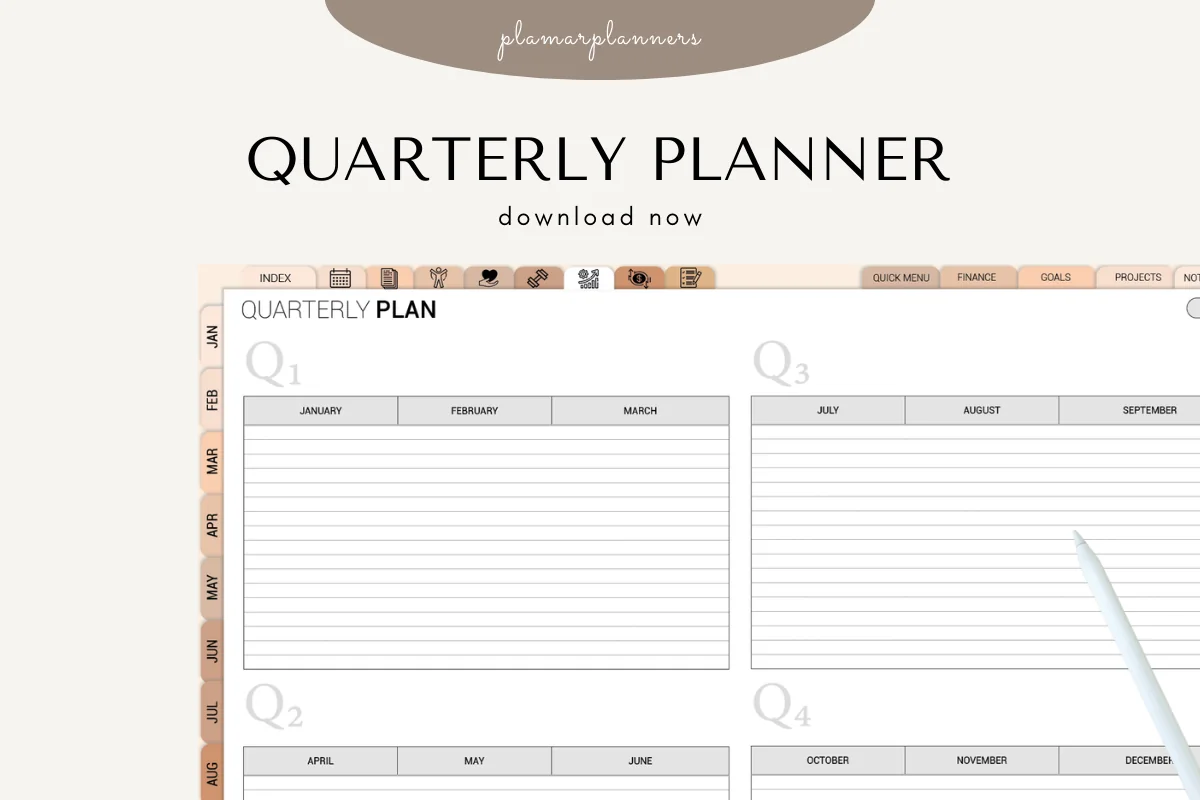
3. Quarterly Planner – 3-Month Goal & Produ
Orientation: LandscapeLayouts: Quarterly overview with monthly writing columnsDates: Undated; fixed calendar month headings
Best for: keeping a one-line result and next adjustment beside neighboring months. Designed by Plamarplanners.
- Landscape overview with Q1 through Q4 and January through December headings
- Lined month columns shown in four color treatments
- Tablet PDF version; the listing names GoodNotes and Notability
The month columns suit brief notes such as “Finished: portfolio; change: fewer parallel tasks.” Side-by-side months make successive takeaways easy to compare, but leave little space for longer reflection. Weekly and reflection pages are advertised without a gallery view of their layouts; ask the seller for examples if those extras matter to your choice.
Quick Comparison
| PDF option | Review use | Starting layout | Main limitation |
|---|---|---|---|
| 1. Digital Notebook | Custom recap and decision columns | Blank, grid and column templates | All review headings are added by you |
| 2. Digital Ruled Journal | Daily evidence for a monthly summary | Portrait ruled pages and date index | No dedicated monthly review spread shown |
| 3. Quarterly Planner – 3-Month Goal & Produ | One-line results across months | Four-quarter overview with month columns | Detailed reflection needs another page |
A simple monthly review template: evidence → meaning → decision
For a simple bullet journal monthly reflection, draw three headings on an existing page. This monthly review layout uses evidence, meaning and a decision, so the review spread stays readable even without decoration. Under evidence, copy a dated note; under meaning, explain what it suggests; under decision, write a small response. Keep an interpretation separate from a fact, especially when a tracker has gaps.
Those dated notes also need a route back to their original pages. These bullet journal index ideas pair specific collection titles with stable page identifiers, so a review can point to the evidence without copying the whole entry.
- Evidence: “Two evening study sessions were interrupted by errands.”
- Meaning: “Evenings may need more buffer; two sessions are not a permanent pattern.”
- Decision: “Try one shorter session before errands next month.”
Decide what to do with unfinished tasks
The official Bullet Journal migration guide explains reassessing unfinished tasks instead of carrying them forward by default. My example below adds a reason beside each decision so that next month’s list has a clear purpose.
Some unfinished tasks still matter but belong beyond the coming month. These bullet journal future log ideas give later commitments a month and a preparation cue, while leaving undated possibilities in a separate someday list.
| Unfinished item | Decision | Reason and next action |
|---|---|---|
| Book a repair | Carry forward | Still needed; call the shop Tuesday. |
| Make a trip photo album | Park | Worth keeping, but no capacity now; revisit after the course. |
| Prepare an event flyer | Release | The event was canceled; no replacement task needed. |
| Renew a membership | Schedule | Check the actual renewal date and set a calendar reminder. |
Keep only the decisions that change what you will do. The review stays with last month’s evidence; a full annual reset belongs in a separate yearly planning session.
When several monthly reviews point to the same shortage of time, reconsider the size of the next commitment. These quarterly planning ideas connect available sessions, competing projects and reserve space before you spread work across the coming months.
Put the review on an iPad without rebuilding your journal
A small setup for your next month-end review
- 1Choose a page you already understand. Use a ruled page for a short written recap, two columns for evidence and decisions, or a dot-grid page for mixed memories and notes. Add the month and year as your own heading. If you are starting from a new PDF, import it through your annotation app’s file-import controls; the exact menu depends on the app version.
- 2Add a few prompts and the source dates. Choose three ideas from the groups above, leaving generous writing space. Put dates or page references beside observations so you can find the original entry later. Photos and decorative elements are optional; on a small screen, room to write matters more than filling every corner.
- 3Finish with a destination for each decision. Write the chosen task in the next monthly log, put a later idea in your parking list, and add any real reminder to your calendar app. A PDF page does not automatically synchronize those decisions. Leave a reference back to this review if the explanation will matter later.
FAQ: monthly reviews and reflection prompts
What are some ideas for a monthly recap in a bullet journal?
Try a few dated wins, a favorite memory or photo, one challenge with context and an unfinished-task decision. For a more personal recap, add books read, a favorite song or a gratitude note. You do not need every category every month.
Does a monthly log replace a monthly reflection?
A monthly log organizes dates and tasks for the month. A monthly reflection looks back at results, memories and patterns. You can put them on facing pages, but keep the review distinct enough that observations are not mistaken for new commitments.
How do I review a month when I missed most of my journal entries?
Use a few reliable anchors from your calendar, photos or messages, then write a short recap. Label anything uncertain. The three-line review in idea 25 is enough; leave tracker totals blank when the underlying entries are missing.
Do I need a special monthly review PDF for GoodNotes?
No. A blank, ruled or dotted page can hold your own questions. The PDFs above offer different page structures, but none is promised as a dedicated monthly review template. Use an existing notebook if it already gives you enough space.
How many monthly review prompts should I use?
Start with three: one result, one memory or observation, and one decision. Add a prompt only when it answers a question you care about. A month with a major project may need more space for outcomes; a quieter month may fit the three-line review.
Close the month with one useful decision
The most useful bullet journal monthly review ideas connect a real detail with a choice you can act on. Keep a memory, name a lesson and decide what moves forward. A short honest review is easier to revisit than a page filled just to make the layout look complete.
You May Also Like
Purchases made through the product links may support this site with a commission; your price stays the same. Read the affiliate disclosure.