You remember going to bed late, but by Friday the nights have blurred together. A digital sleep tracker gives each one a row or a short entry. The useful choice is the one that gives your observations a clear place to go. A beautiful monthly grid is less helpful if what you actually want to write is why Tuesday felt different from Monday.
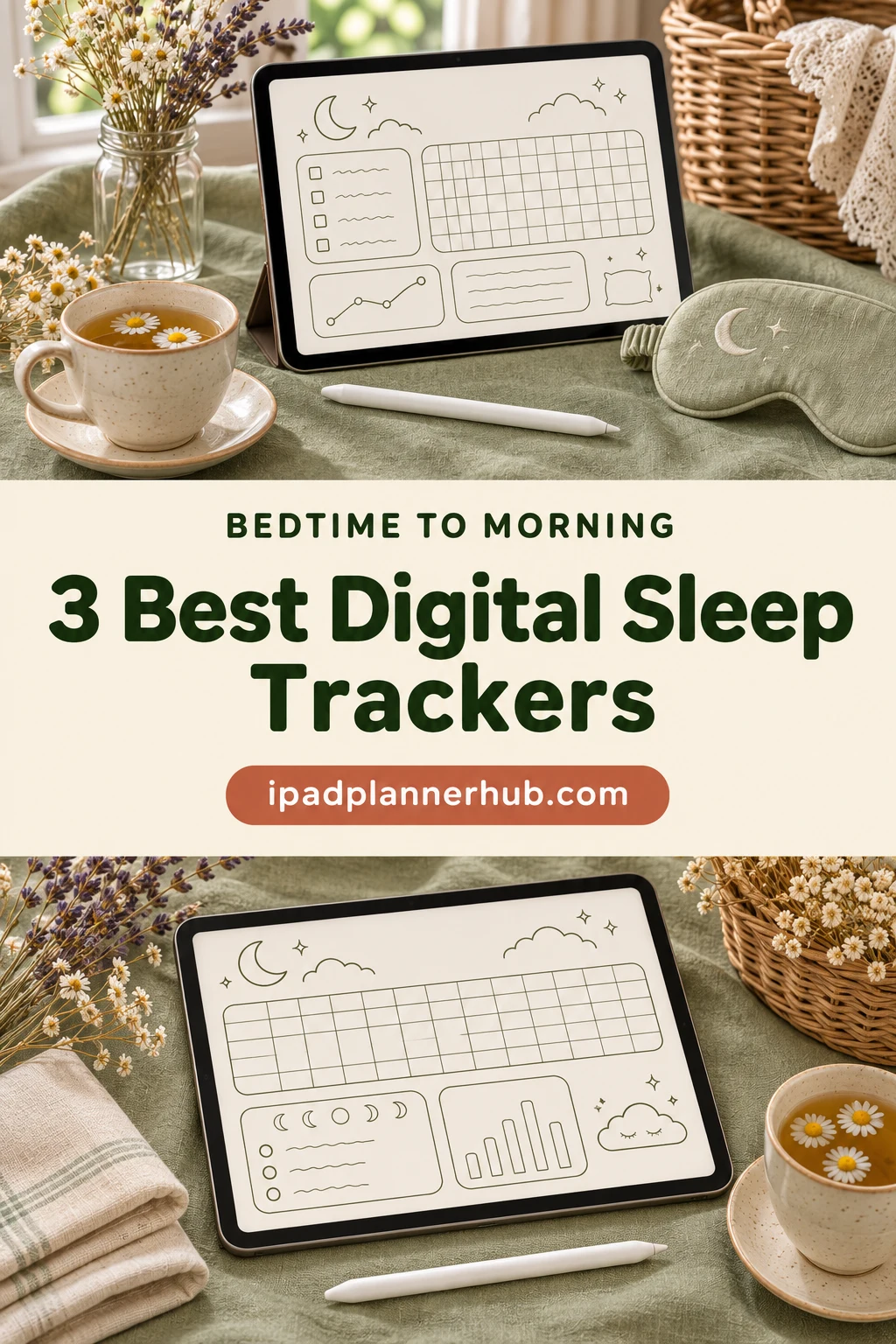
I picked three PDF templates for iPad with different ways to keep that record: linked monthly charts, a plain reusable page and a more detailed notebook with a 2027 overview. I compared their product descriptions and every available preview. I have not purchased or tested the files, so this is a selection based on their layouts and listed features, rather than a hands-on performance test.
What a Digital Sleep Tracker PDF Actually Does
These are pages you fill in yourself in a PDF annotation app such as GoodNotes or Notability. The app holds the document and your handwriting; the template supplies the grid, labels and navigation. You decide what to record and add the marks. No sensor, wearable or bedside device is included.
- Bedtime and wake time: record the times you remember, with AM/PM or a consistent 24-hour format.
- Sleep duration: write your estimate or shade the part of a time grid that represents your sleep.
- Quality and context: use an existing notes area, or add your own annotation, for a short observation. Do not assume every template has a dedicated quality-rating field.
Keep the record small enough to finish in the morning. A PDF cannot determine when you truly fell asleep or distinguish sleep stages. A neat chart is still a personal record, with the gaps and uncertainty that come with remembering a night.
The 3 Best Sleep Tracker PDFs I Would Shortlist
The first two choices are undated monthly charts; the third offers more written structure and a dated year overview. This order favors an easy monthly record before a larger notebook. It is not a ranking of medical accuracy or sleep outcomes.
TL;DR: Choose MOMAT for twelve linked monthly grids, HelArt for a simple reusable chart, or Healers Hub for written nightly logs and a 2027 overview. All three are manual PDF templates; none automatically measures sleep.
Quick Picks
- Best for linked monthly grids: Sleep Tracker Monthly
- Best for a simple PDF page: Sleep Tracker Printable
- Best for detailed nightly notes: 2027 Sleep Tracker
- Sleep Tracker Monthly – Best for linked monthly grids
- Sleep Tracker Printable – Best for a simple PDF page
- 2027 Sleep Tracker – Best for detailed nightly notes
Best for linked monthly grids
1. Sleep Tracker Monthly
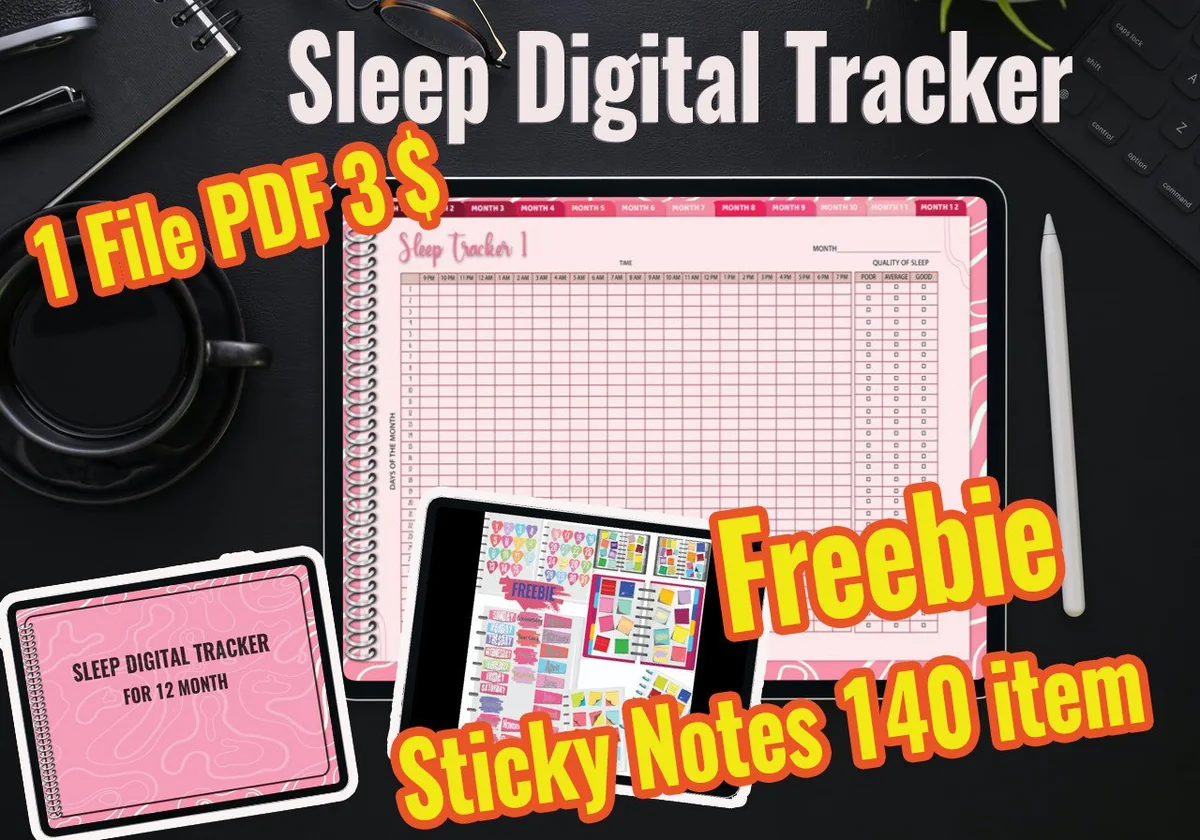
Orientation: LandscapeLayouts: Monthly sleep gridsDates: UndatedWeek start: Numbered days
Best for: keeping twelve months of handwritten sleep records together in a dedicated linked PDF. Designed by MOMAT THIRTYONE.
- 12 monthly sleep-tracker pages, one page per month
- Hyperlinks between the monthly pages
- Pink landscape grids with numbered rows and month tabs
- PDF for GoodNotes, Notability, Xodo and Noteshelf; sticky-note extras are also listed
Linked months make this my first choice for a consistent year of records. The pink border and spiral detail take up screen space, so check whether the hourly cells are comfortable at your usual zoom. Choose it for the tracker rather than the bonus count: the description lists 100+ sticky-note items, while the cover advertises 140.
Best for a simple PDF page
2. Sleep Tracker Printable
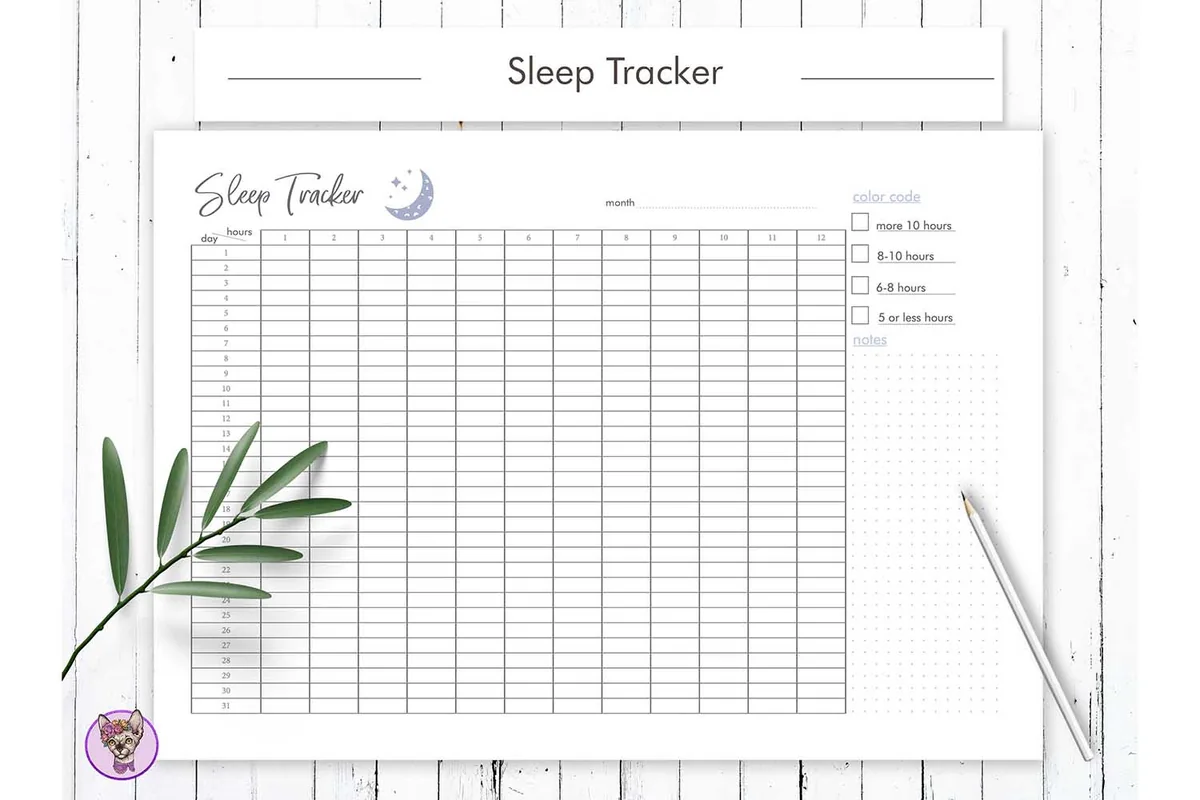
Orientation: Landscape page shown in previewsLayouts: Monthly grid, duration color key, notesDates: UndatedWeek start: Numbered days
Best for: adding a plain monthly sleep chart to an existing iPad notebook without buying a larger planner. Designed by HelArtShop.
- PDF files in A4, A5 and US Letter sizes
- Month field, numbered daily rows and a duration grid labeled 1 to 12 hours
- A color-code key for sleep-duration bands and a notes area
- The seller explicitly allows digital use on iPad in GoodNotes and Notability
The light grid, small moon detail and blank month field make this the simplest page to add to an existing notebook. Three paper sizes also help if you switch between iPad and print. Read the numbered hours as duration columns, not a bedtime-to-wake-time clock. No hyperlinked month system is advertised; keep the color key short and use the notes area for context.
Best for detailed nightly notes
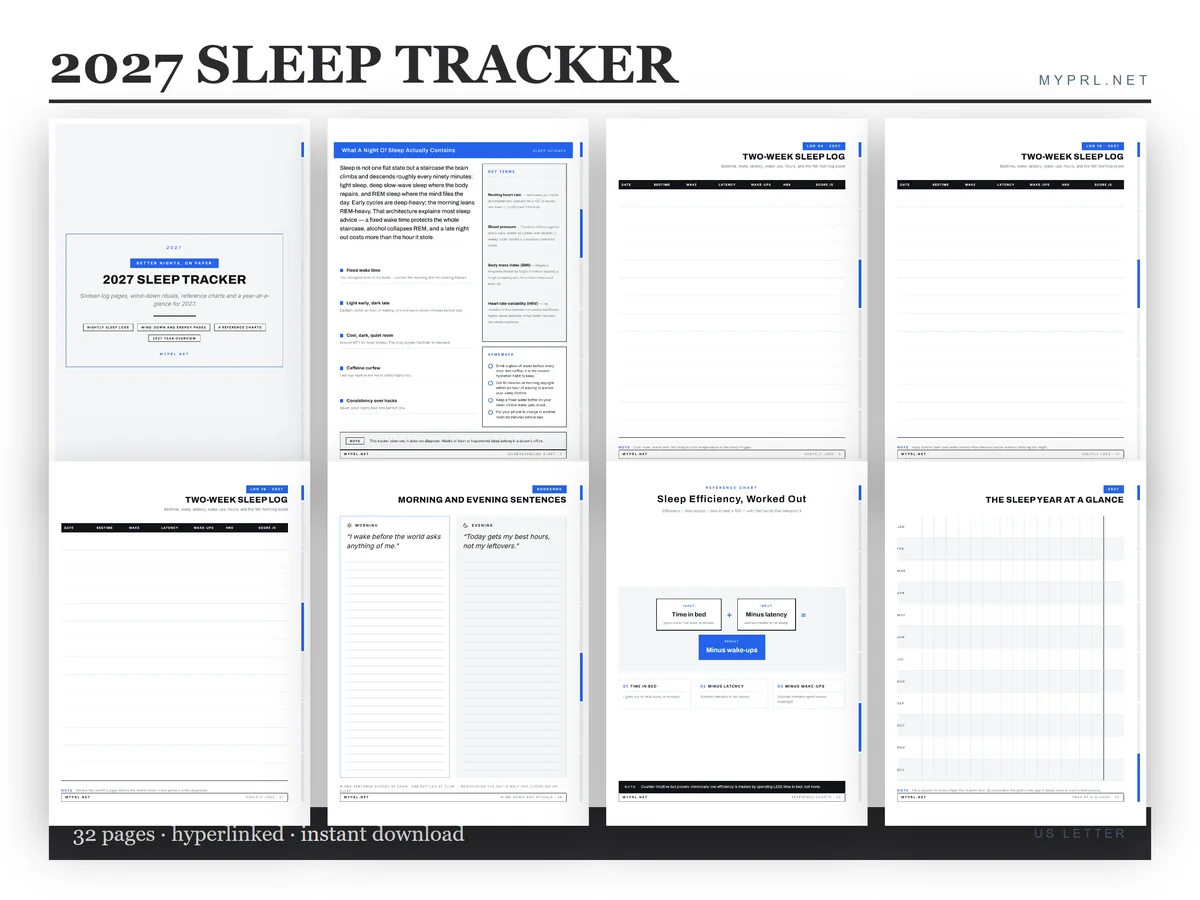
3. 2027 Sleep Tracker
Orientation: Portrait pagesLayouts: Two-week logs, routines, reference chartsDates: 2027 year overviewWeek start: Write-in logs
Best for: a structured sleep notebook with room for written entries and separate routine pages, especially when planning for 2027. Designed by Healers Hub co.
- 32 pages in a hyperlinked US Letter PDF, plus page PNGs
- 16 nightly-log pages using two-week sleep-log layouts
- Wind-down and morning-ritual sections, a caffeine-curfew table and sleep-efficiency pages
- Four quick-reference chart pages and a 2027 year overview
Written entries have more room here than in the monthly coloring grids. Separate routine sections keep planning apart from the nightly record. The title and year overview are dated 2027, which limits its appeal as an evergreen notebook. Treat its educational pages as product content, not personalized medical guidance.
Quick Comparison
| Tracker | Page format | Navigation | Dates |
|---|---|---|---|
| 1. Sleep Tracker Monthly | 12 monthly pages | Linked months | Undated |
| 2. Sleep Tracker Printable | Single-page chart in 3 sizes | No hyperlinks advertised | Blank month field |
| 3. 2027 Sleep Tracker | 32-page notebook | Linked sections | 2027 overview |
Choose the Layout Before the Color
Before choosing a design, imagine filling it in after an ordinary morning. Do you want to shade one horizontal line, write two times, or describe interruptions? The answer matters more than the cover. Use these differences to narrow the choice.
- Choose MOMAT if you want a year of matching monthly pages. Twelve linked months make navigation the main advantage. You still enter the information by hand.
- Choose HelArt if your planner already has enough sections. Its landscape duration chart, labeled 1 to 12 hours, can be a separate page in your existing notebook. It does not supply an AM/PM bedtime-and-wake-time axis. The seller allows iPad use despite the word Printable in the name.
- Choose Healers Hub if you need written entries. Two-week logs and separate routine sections provide a different structure. Check that the 2027 overview fits when you intend to use it.
Monthly Grid or Written Sleep Diary?
A monthly grid makes the shape of a month easy to scan: the rows sit together, so a later start or a missing entry is visible. The trade-off is space. A tiny cell cannot comfortably hold a long explanation, and color alone cannot tell you what happened during a night.
A written log leaves more room for context. The 2027 notebook uses two-week sleep-log pages rather than promising a single annual heat map. That format suits short notes beside each entry without a complicated color system.
Read the Clock Range Before Buying
A sleep grid can look flexible until you follow the printed times across it. Check where the day begins, whether it crosses midnight in the order you expect, and how small each interval is. If you sleep during the day, inspect that section of the chart as carefully as the nighttime hours.
- Can you follow a sleep period across midnight without losing your place?
- Are the cells large enough to shade accurately at your normal iPad zoom?
- Will a second sleep period or nap fit without being confused with the main night?
- If you need exact written times, is there a suitable field or enough space to add a note?
For shift work, check that the visible time range covers your actual sleep period. A write-in log can be easier to adapt when a fixed hourly chart is awkward.
Set Up a GoodNotes Sleep Tracker Without Overbuilding It
Start with a small, repeatable record. There is no need to create a dashboard, a dozen colors and a scoring system before the first entry. The routine below is an optional way to organize your own annotations, not a feature promised by every file.
A simple first setup
- 1Keep an untouched copy. Save the original file before adding marks. Give your working notebook a descriptive name, such as Sleep Log – November. That makes the template easier to find again and leaves you a clean starting point if you later change your annotations.
- 2Open the page you will actually use. Pick the current month in a linked file, or a blank chart or log in a simpler one. Zoom to the area where you will write. Look at the time labels and decide whether each row refers to the evening date or the following morning.
- 3Add one small key. Choose a single mark for estimated sleep and a separate mark for missing information. If you want a quality note, use a few plain words in the notes area. Keep your added labels distinct from the original page so you can tell what the template supplies.
- 4Try one sample entry. Use an invented example before recording a real night. Check that your marks are readable and that the page has room for the information you care about. Erase that sample afterward. If the cells are uncomfortable to use, simplify the record before adding more fields.
For a hyperlinked file, check how your annotation app opens PDF links; writing mode and link interaction can work differently. MOMAT and the 2027 tracker include links; HelArt does not advertise a link system.
What to Write Each Morning
You do not need to reconstruct a night minute by minute. Use the same few labels every day and leave a gap when you cannot remember something. A blank space is more useful than an invented number.
- Date: make it clear which night the entry describes.
- Times: note bedtime and final wake time; distinguish time in bed from your estimate of time asleep.
- Interruptions: add a brief note if you remember waking for a while.
- Your observation: write a short description such as rested, tired or unsure, without treating it as a clinical score.
The NHLBI sleep-diary guidance includes sleep and wake times, naps and how rested you feel. NHLBI insomnia guidance also describes keeping a diary to discuss patterns with a doctor. A template is a place to keep those observations, not a diagnosis.
An Example That Crosses Midnight
Here is a made-up entry to show the difference between a time interval and estimated sleep. Suppose you went to bed at 11:00 p.m. and got up at 7:00 a.m. That is eight hours between the two times. It is not automatically eight hours asleep: any time spent awake belongs outside that estimate.
On a grid, you could shade the estimated sleep interval and add a short note about an interruption. On a written log, you could enter the two times and your estimate separately. Use whichever convention is easy to repeat, and put the convention in your key rather than change it from day to day.
Make the Finished Monthly Record Easy to Read
The point of returning to the chart is to understand your own notes. Review the labels and context before deciding whether there is a question worth following up. A colorful run of squares does not explain itself.
A short review of your own notes
- 1Check what is missing. Look for unfilled rows and uncertain estimates before comparing entries. If you skipped a weekend, leave that visible. Filling the gap with an average would make the page appear more complete while hiding what you actually know.
- 2Read the words beside the marks. A late bedtime on a travel day and a late bedtime on an ordinary workday can look identical in a chart. Use your own short notes to distinguish them. You do not need a separate tracker for every possible explanation.
- 3Write one question. Put a plain question in the margin, such as whether the page has enough space for awakenings. This can be a question about the template itself. Avoid treating a repeated color as proof that one habit caused a particular night.
If you would rather keep evening habits beside your daytime routine, the digital habit tracker selection covers that wider planning task. This article stays with sleep records, rather than trying to turn a sleep chart into a complete wellness planner.
Template or App? Decide What You Want Recorded
A PDF is a good fit when you want a visible page, handwritten notes and control over your own labels. Its limits are equally clear: these listings do not offer automatic sleep detection, stage measurements or a live connection to a health dashboard. Hyperlinks move between pages; they do not turn the file into a measuring device.
- Want manual entries? A template gives you a consistent place for them.
- Want sensor-based records? This shortlist does not compare devices or their accuracy.
- Want reminders, automatic totals or calendar sync? Do not assume the PDF includes them. Check your app separately and treat any app feature as separate from the template purchase.
A dream journal has another job: recording remembered scenes, themes and reflections. If that is what you want to write, see the dream journal ideas and template selection. You can keep both kinds of notebook, but a sleep-time chart does not need a dream prompt on every row.
FAQ About Sleep Tracker PDFs
Which annotation apps do the sellers list?
All three sellers list GoodNotes and Notability compatibility. They are PDF-based products, so you fill the pages in yourself. The annotation app is separate from the template; check that you can open and annotate PDFs in your own app before purchasing.
Which tracker is undated?
MOMAT shows numbered monthly grids without a fixed year. HelArt has a blank month field and numbered daily rows. The Healers Hub notebook is titled 2027 Sleep Tracker and includes a 2027 year overview, so its annual section is dated.
Does the PDF calculate how many hours I slept?
No automatic calculation is advertised for these files. Record your own estimate. A color key or a printed sleep-efficiency page is a place to enter information, not evidence that the PDF computes it for you.
Can I print the same file?
HelArt includes A4, A5 and US Letter PDFs, and the 2027 notebook is described as a print-ready US Letter PDF. MOMAT is presented primarily as a digital tracker. Check the individual listing for printing details; paper sizes vary.
Is there a free tracker in this shortlist?
These are commercial product listings. Bonus sticky notes or the word Freebie on a preview do not mean the tracker itself is free. I have not verified a free Creative Fabrica offer for this article, so there is no free-product recommendation here.
When should I ask a doctor about my sleep?
If sleep problems affect your daily life, seek professional advice rather than rely on a planner. NIH guidance suggests keeping a diary before a visit. Bring your observations and questions; neither the chart nor a product’s educational pages can diagnose or treat a sleep disorder.
Final Thoughts: Choose the Page You Can Fill In
My first choice for a compact monthly record is MOMAT because the twelve linked pages keep the format consistent. HelArt makes more sense if you want a simple page inside a notebook you already use. The 2027 tracker is the option for more written structure and a forward-looking year overview.
The best digital sleep tracker for this kind of planning is one whose labels make sense to you on a sleepy morning. Start with times and one short note, keep uncertainty visible, and add detail only when you have a clear use for it. The goal is an understandable record, not a flawless page.
You May Also Like
This article contains affiliate links. If you buy through them, I may earn a commission at no extra cost to you. Read the affiliate disclosure.