Typing a diary into an app is fast, but it rarely feels like yours. Writing by hand slows you down in a good way, and a GoodNotes journal gives you that on the iPad: real pages, an Apple Pencil, your own handwriting, and tabs that open today’s page in one tap. No shelf of half-used notebooks, no lost pages.
Below are the 7 digital journals from Creative Fabrica I’d write in on my iPad, from a 365-day lined journal to a dark mode notebook for late nights and two guided journals for days when the words don’t come. After the list: journal file vs journal app, what makes a good GoodNotes journal template, how to set one up and a 10-minute evening routine.
The 7 Best GoodNotes Journals for iPad I Found
I skipped printable journals, KDP interiors, Canva templates and anything with old dates, and kept PDF journals made for writing by hand in GoodNotes or Notability. The first four are open journals for your own words; the last three add some structure: daily ratings, prompts or a planner around the journal page.
If an open journal still leaves you unsure what to use it for, browse these empty notebook ideas before choosing your first section. They focus on the notebook’s job, while the comparisons here help you choose the digital file.
TL;DR: 7 GoodNotes journals for writing by hand on the iPad: a 365-day lined journal, a monthly tie dye journal, a blank sectioned notebook, a dark mode notebook, two guided journals (ADHD and mental health prompts) and a planner with a journal page. All undated except where noted; each card lists pages, orientation and who it suits.
Quick Picks
- Best overall: 365 Days Daily Digital Journal
- Best for color lovers: Digital GoodNotes Journal – Tie Dye
- Best for free-form writing: Watercolor Hyperlinked Digital Notebook
- Best for dark mode: Dark Mode Digital Notebook – Gold Theme
- Best for ADHD: ADHD Digital Journal
- Best for prompts: Mental Health Prompt Journal
- 365 Days Daily Digital Journal – Best overall
- Digital GoodNotes Journal – Tie Dye – Best for color lovers
- Watercolor Hyperlinked Digital Notebook – Best for free-form writing
- Dark Mode Digital Notebook – Gold Theme – Best dark mode
- ADHD Digital Journal – Best for ADHD
- Mental Health Prompt Journal – Best for prompts
- Undated Digital Planner Journal – Best for one-file journaling
Best overall
1. 365 Days Daily Digital Journal
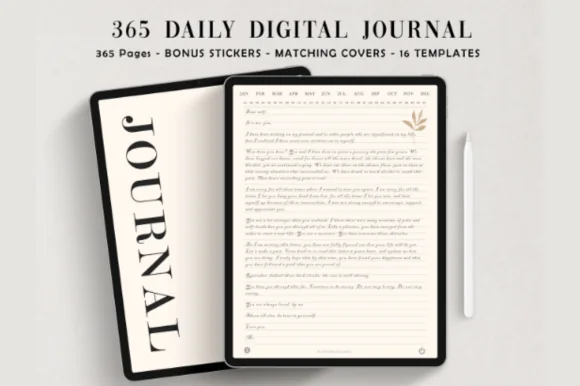
Orientation: PortraitLayouts: 365 lined daily pages, 16 page templatesFormat: Hyperlinked PDF, narrow and wide lined versionsDates: Undated
Best for: daily writers, minimalists, first-time journalers. Designed by ThePlannersDelight.
- 365 undated daily pages, 384 pages in total
- Hyperlinked month and day tabs on every page
- Two versions: narrow lined and wide lined
- 16 extra page templates, matching covers and digital stickers
- Ivory, minimalist design for GoodNotes or Notability; rated 5.0, 500+ favorites on Creative Fabrica
This is the GoodNotes journal I'd open first: tap the month, tap the date, write. The choice between narrow and wide lines is a small detail that matters a lot when you write with an Apple Pencil, since bigger handwriting needs wider rows. It is also the most saved journal in this list.
Best for color lovers
2. Digital GoodNotes Journal – Tie Dye
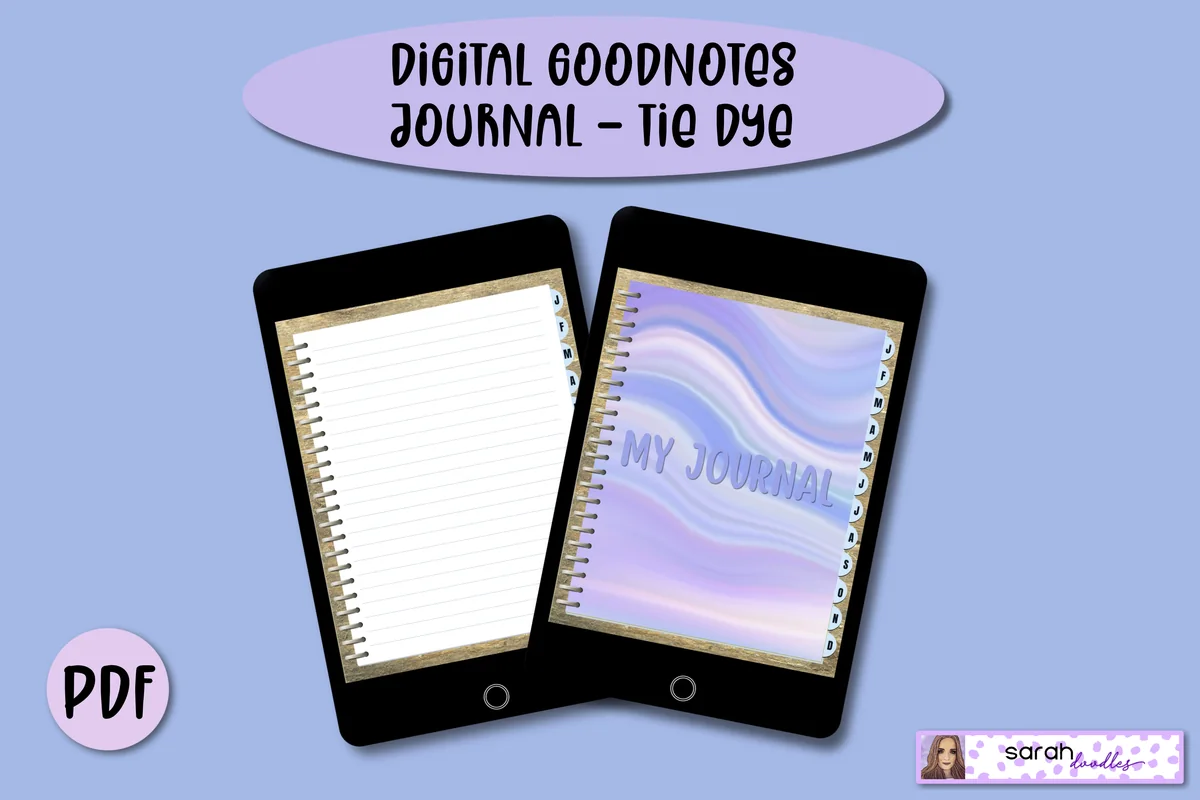
Orientation: PortraitLayouts: 12 monthly covers, 5 lined pages per monthFormat: Hyperlinked PDFDates: Undated
Best for: colorful journalers, monthly writers, casual journalers. Designed by Sarah Doodles.
- Undated journal with a tie dye cover page for every month
- Hyperlinked month tabs down the side
- 5 lined pages per month to keep the file light
- Add more lined pages in GoodNotes with Add Page → Current Template
- Works in GoodNotes, Notability, Noteshelf and Xodo
If 365 pages feel like pressure, this one is gentler: a pastel tie dye divider for each month and a few lined pages behind it. You add pages only when you have something to say, so there's never a pile of empty days. I'd pick it for a relaxed, write-when-you-want habit.
Best for free-form writing
3. Watercolor Hyperlinked Digital Notebook
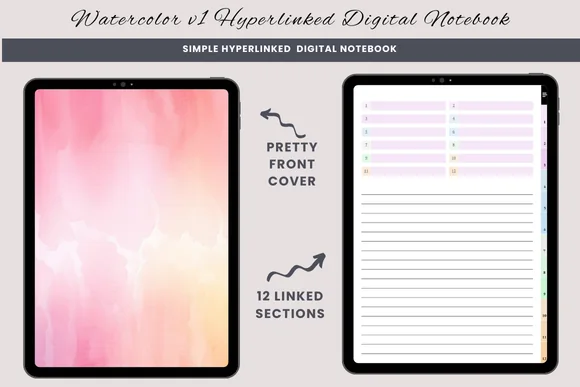
Orientation: PortraitLayouts: 12 sections with lined, blank and half-lined pagesFormat: Hyperlinked PDFDates: Undated
Best for: free-form writers, sketch and write journalers, topic-by-topic journalers. Designed by daysfilledwithjoy.
- 12 hyperlinked sections with watercolor dividers
- Three paper types in each section: lined, blank and half-lined
- Index page to name your sections
- Duplicate any page to add more
- Made for GoodNotes and other PDF annotation apps
Not every journal needs dates. Here you name 12 sections yourself, for example morning pages, dreams, ideas and letters, and pick lined, blank or half-lined paper as you go. The half-lined page is my favorite: a sketch or photo on top, a few lines of writing below.
Best dark mode
4. Dark Mode Digital Notebook – Gold Theme
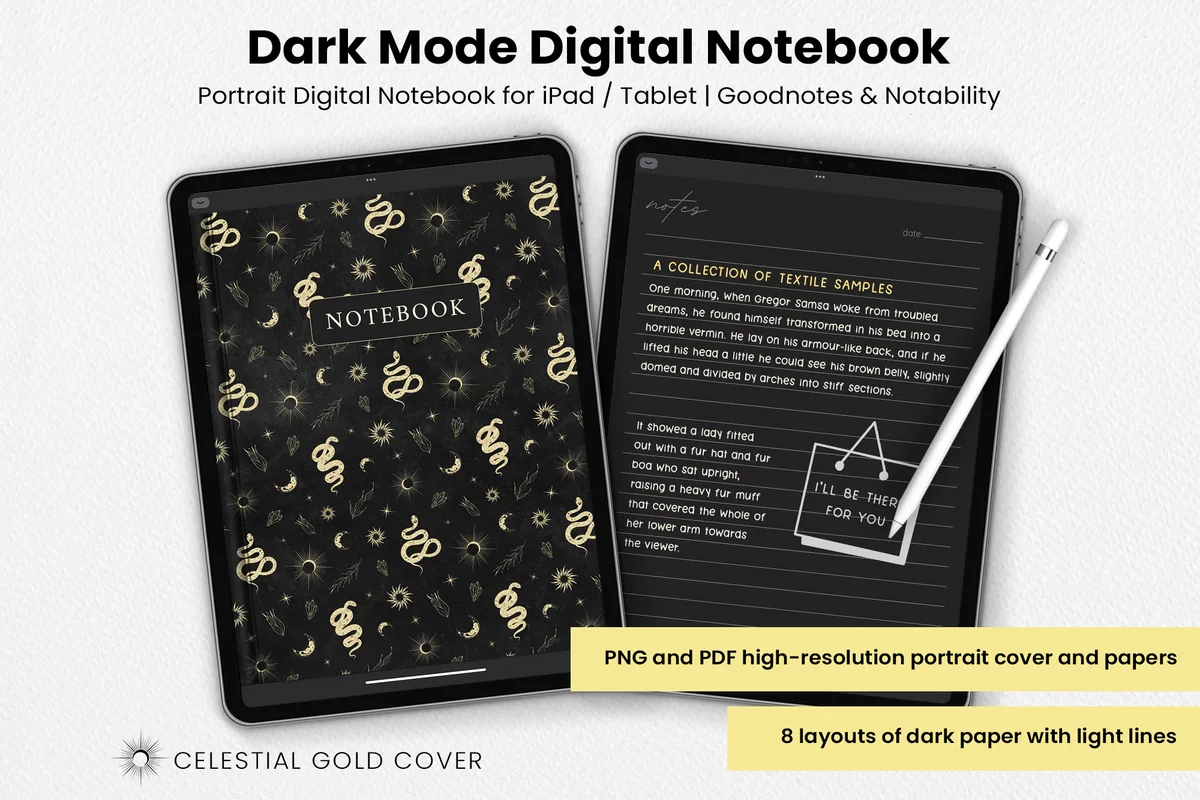
Orientation: PortraitLayouts: 8 dark papers: lines, dots, squares, notes, to-do, numbered list, columns, habit trackerFormat: PDF + PNG, celestial gold cover
Best for: night writers, dark mode fans, celestial style lovers. Designed by catsquills.
- Portrait dark mode notebook for GoodNotes and Notability
- Celestial gold cover with moons, suns and snakes
- 8 dark papers: lines, dots, squares, notes, to-do, numbered list, columns, habit tracker
- PDF and PNG files, 8.5 x 11 inch
A night journal on a white page is like reading in a lit room at midnight. These dark papers with light lines are much easier on the eyes, and the gold celestial cover suits evening writing. It isn't hyperlinked, so I'd treat it as a simple notebook: add the paper you need and write.
Best for ADHD
5. ADHD Digital Journal
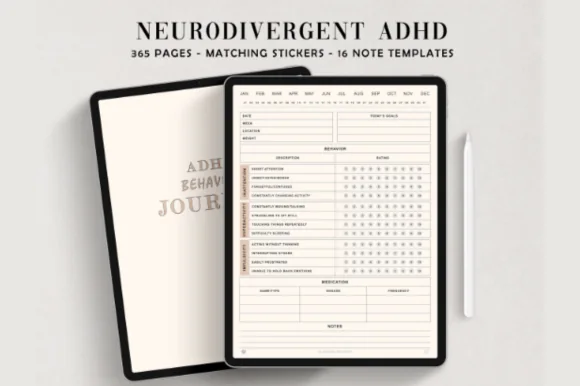
Orientation: PortraitLayouts: 365 daily behavior pages, 15 note templatesFormat: Hyperlinked PDF, 100+ stickersDates: Undated
Best for: ADHD brains, pattern trackers, people who log symptoms for appointments. Designed by ThePlannersDelight.
- 365 undated daily pages built as a behavior journal
- Daily rating rows for focus, restlessness, forgetfulness and more
- Medication, today's goals and notes on each page
- 15 note templates and 100+ pre-cropped stickers
- Hyperlinked months and days; rated 5.0, 400+ favorites
This is a journal for people who don't like journaling: you rate a few rows, jot one goal and a note, and you're done in two minutes. After a few weeks the pages show patterns that are easy to miss day to day. Same designer and navigation as my top pick, with a very different page.
Best for prompts
6. Mental Health Prompt Journal
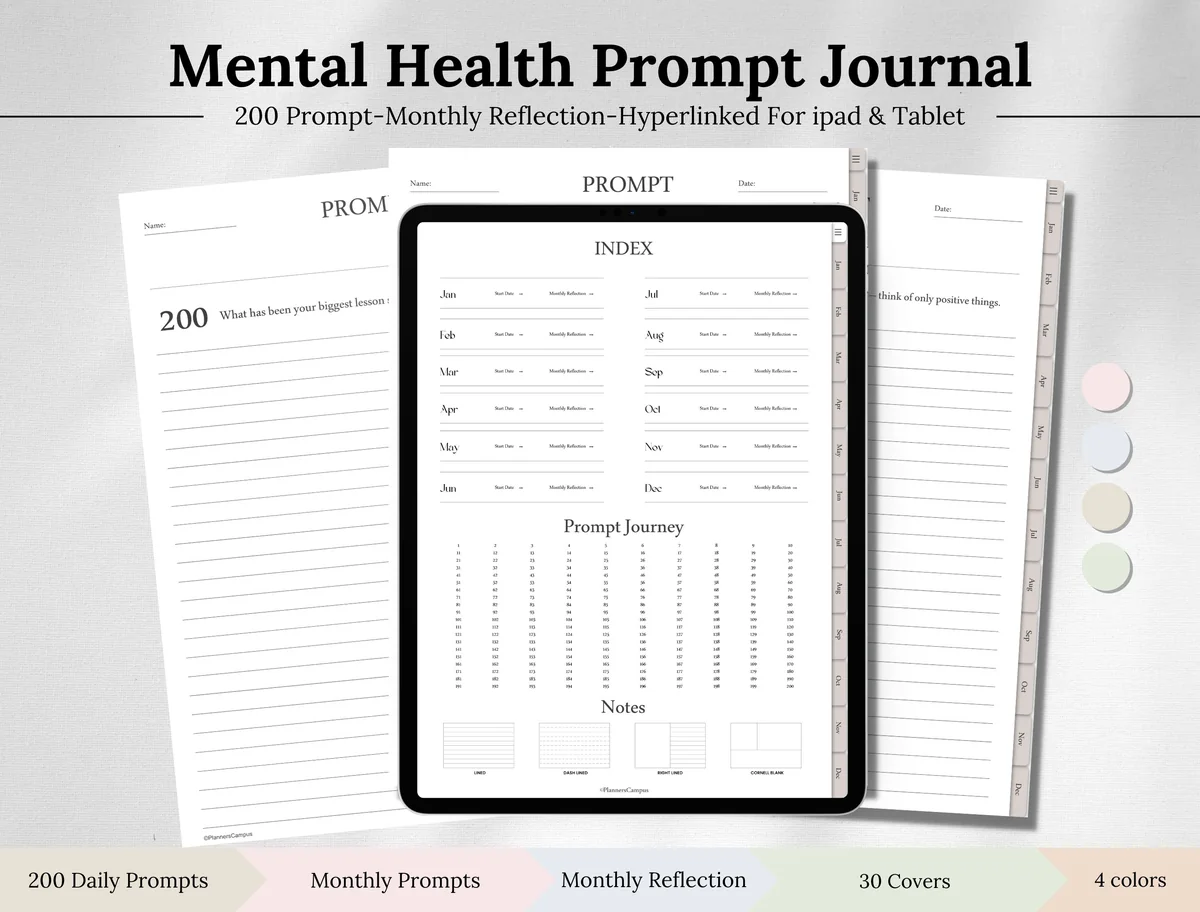
Orientation: PortraitLayouts: 200 daily prompts, monthly prompts, monthly reflection, monthly calendar, notesFormat: Hyperlinked PDF, 4 colors, 30 coversDates: Undated
Best for: journal lovers, reflective writers, minimalists. Designed by Planners Campus.
- 200 hyperlinked daily prompts with a prompt journey index
- Monthly prompts and monthly reflection pages
- Monthly calendar and notes pages
- 4 colors and 30 covers
- Works in GoodNotes, Notability, Xodo and Noteshelf; rated 5.0
Every page starts with a question, so you never stare at empty lines. The numbered prompt grid on the index page jumps to any of the 200, so you can follow them in order or pick one that fits the day. I'd choose it for gentle, regular check-ins rather than a long diary.
Best for one-file journaling
7. Undated Digital Planner Journal
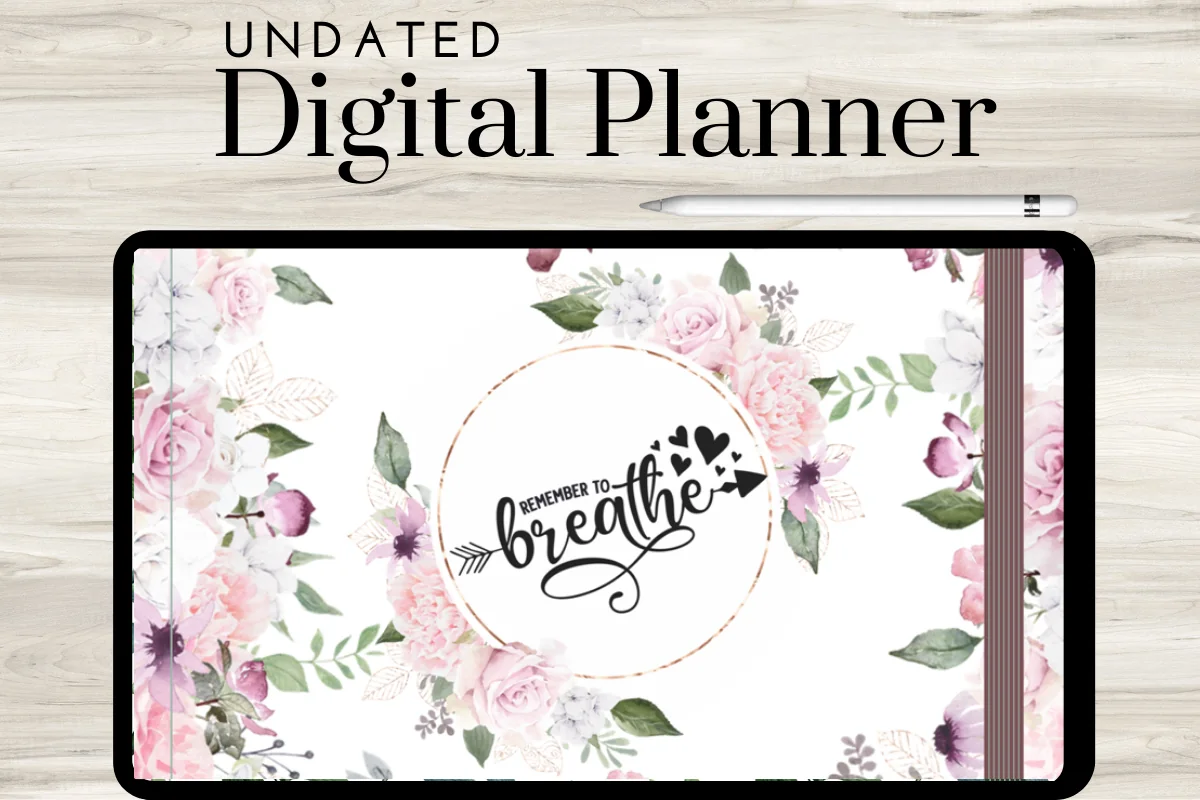
Orientation: Landscape (two-page spread)Layouts: Daily with journal page, Weekly, Monthly goals, Gratitude, Habit tracker, Meal plan, Scrapbook, Bible studyDates: Undated
Best for: one-file people, faith journalers, memory keepers. Designed by ArtistryByAnnabel.
- Landscape two-page spreads with clickable tabs
- Undated daily pages with a journal page, plus weekly overviews
- Monthly goals, gratitude, habit tracker and meal plan pages
- Scrapbook pages for photos and Bible study pages
- Made for GoodNotes or similar note-taking apps
If you'd rather not juggle a planner and a journal, this pink floral file puts both in one place: plan the day on the left, write on the journal page, and paste photos into the scrapbook section. The Bible study pages make it a good fit for faith journaling too.
Quick Comparison
| Journal | Best for | Pages | Stand-out extra |
|---|---|---|---|
| 1. 365 Days Daily Digital Journal | A page a day | 365 lined daily pages | Narrow or wide lines |
| 2. Digital GoodNotes Journal – Tie Dye | Write-when-you-want | Monthly dividers + lined pages | Tie dye cover each month |
| 3. Watercolor Hyperlinked Digital Notebook | Free-form journaling | 12 sections, 3 paper types | Half-lined sketch pages |
| 4. Dark Mode Digital Notebook – Gold Theme | Night writing | 8 dark paper layouts | Celestial gold cover |
| 5. ADHD Digital Journal | ADHD pattern tracking | 365 daily rating pages | Medication + goals rows |
| 6. Mental Health Prompt Journal | Prompted writing | 200 prompts + monthly reflection | 4 colors, 30 covers |
| 7. Undated Digital Planner Journal | One file for everything | Daily, weekly, monthly + journal | Scrapbook + Bible study |
GoodNotes Journal or Journal App?
Search for a “digital journal” and most results are apps: Day One, Journey, Apple’s own Journal app. They’re good at what they do: typing, photos, location, reminders and search. A journal template for GoodNotes is a different thing: a PDF notebook with lined pages and clickable tabs that you fill in by hand.
A handwritten notebook can also hold the decisions behind a photograph. These photography journal ideas pair a selected image with its file identifier, a shooting observation and a question for the next attempt, so the page remains connected to your original pictures.
- Pick a journal app if you mostly type on your phone, want automatic reminders and like adding location and weather to entries.
- Pick a GoodNotes journal if you think better with a pen, want pages that look like a real notebook, like to mix writing with sketches, stickers and photos, and want a file that stays yours: no subscription, and you can export it as a PDF at any time.
One honest limit: a PDF journal doesn’t remind you to write and doesn’t sync with your calendar. A phone alarm fixes the first; the second rarely matters for a journal.
What Makes a Good GoodNotes Journal Template
- Hyperlinks. Month and day tabs on every page. A 365-page journal without links means a lot of scrolling.
- Undated pages. You can start on any day, skip days without guilt and reuse the file next year.
- The right line height. Handwriting with an Apple Pencil is usually bigger than on paper. Wide lines or a choice of line sizes help a lot.
- Paper choice. Lined for writing, blank for sketches and collages, half-lined for both.
- Orientation. Portrait feels like a notebook; landscape two-page spreads suit an iPad in a keyboard case.
- A look you’ll want to open. Minimal ivory, pastel, watercolor or dark mode: pick the one that makes you want to write tonight.
Which Digital Journal Fits How You Write
- Every day, a few lines: a 365-day lined journal with day tabs.
- A few times a week: a monthly journal where you add pages as you need them.
- Lists, sketches and ideas: a blank sectioned notebook with mixed paper.
- Late at night: a dark mode journal.
- Stuck on what to write: a guided journal with prompts or simple rating rows.
- Plans and thoughts together: a planner with a journal page on every day.
Looking for topics rather than a notebook? My 40 journaling ideas for beginners and 60 journaling prompts pair well with any journal above.
For writing practice in another language, a useful topic can be one conversation you want to have. These language learning journal ideas turn that situation into sentence attempts, checked corrections and follow-up questions; you add the headings to your own notebook.
What You Need to Start a Digital Journal
- An iPad and an Apple Pencil or another stylus. A matte screen protector makes writing feel closer to paper.
- A note-taking app: GoodNotes or Notability. Most journals here also open in free PDF apps like Xodo.
- A journal PDF from the list above.
- Optional extras: GoodNotes covers to change the look, and scrapbook stickers or digital washi tape for decorated pages.
How to Set Up a Journal in GoodNotes
- Unzip the file in the Files app if it came as a ZIP, then open the PDF and choose Share → GoodNotes → Import as New Document.
- Switch to read-only mode when you want to jump around: taps on tabs and links work only there.
- Need more pages in a month? Go to a blank lined page and tap Add Page → Current Template.
- Bookmark today’s page or add it to Favorites, so the journal opens right where you stopped.
- Save your favorite pen and highlighter colors in the toolbar, so every entry looks consistent.
- Back up your notebooks: turn on iCloud sync in GoodNotes or export the journal as a PDF once a month.
A 10-Minute Evening Journal Routine on iPad
- Minute 1: open the journal, tap today’s date, put the phone away.
- Minutes 2 to 6: write what happened today in plain sentences. No editing, no pretty handwriting.
- Minutes 7 to 8: add one line on how you felt and one small thing that went well.
- Minute 9: write one thing for tomorrow.
- Minute 10: add a sticker, a photo or a doodle if you like. Done.
Missed a day? Skip it and write today. An undated journal never leaves a row of empty dated pages behind, and that is half the reason people keep going.
If returning still feels like too much writing, compare the smaller spaces in these one line a day digital journals. The choice is between a memory book arranged across years and a single-sheet log, rather than another full diary page to fill.
FAQ
Can I use GoodNotes for journaling?
Yes. GoodNotes is one of the most popular apps for handwritten journaling on the iPad. Import a journal PDF, write with an Apple Pencil, add photos and stickers, and the hyperlinked tabs work in read-only mode. Notability works in a similar way.
What is the difference between a digital journal and a journal app?
A journal app (Day One, Apple Journal) is built for typing, with reminders, search and photos attached to each entry. A digital journal for GoodNotes is a PDF notebook you write in by hand. If you like writing with a pen, the PDF journal feels much closer to paper.
Can you lock a journal in GoodNotes?
GoodNotes doesn’t put a password on a single notebook. To keep a journal private, protect the iPad with a passcode or Face ID, and on recent versions of iPadOS you can long-press the GoodNotes icon and choose Require Face ID, so the app itself asks for it.
Is there a free GoodNotes journal template?
GoodNotes includes plain lined and blank paper, which is enough to start for free. Free journal templates online are usually a single page. The journals above are paid files with hundreds of hyperlinked pages, covers and stickers; many are also included with a Creative Fabrica All Access subscription.
Do I need an Apple Pencil for a digital journal?
Not strictly. You can type with text boxes in GoodNotes, and any cheaper stylus works for handwriting. An Apple Pencil gives the smoothest writing and palm rejection, which matters most for long entries.
Can a journal help with stress or anxiety?
Many people find that writing things down helps them notice patterns and calm racing thoughts, and guided journals like the mental health and ADHD journals above make it easier to start. A journal is a helpful habit, not a treatment. If you’re struggling, please talk to a doctor or a mental health professional.
Final Thoughts
The best GoodNotes journal is the one you open tonight. If you write most days, start with the 365-day lined journal; if you write when life gives you something to say, the monthly or blank journals feel lighter; if blank lines stop you, go for prompts. Keep it on the home screen, write a few lines by hand, and let the pages add up.
Want a journal for one topic? See my digital gratitude journals, digital reading journals and digital bullet journal ideas. For daily check-ins, try these mood tracker ideas or ADHD planner ideas, and if you like writing at night, the dark mode digital planners match the dark notebook above.
You May Also Like
This post contains affiliate links. If you buy through them, I may earn a small commission at no extra cost to you. Learn more.