Sunday evening, a blank week, five subjects and a stack of curriculum guides: that’s where most lesson planning starts. A good lesson plan template makes the blank week less blank. The boxes tell you what to decide (objective, activity, materials, check for understanding), so planning becomes filling in, not inventing the format every time.
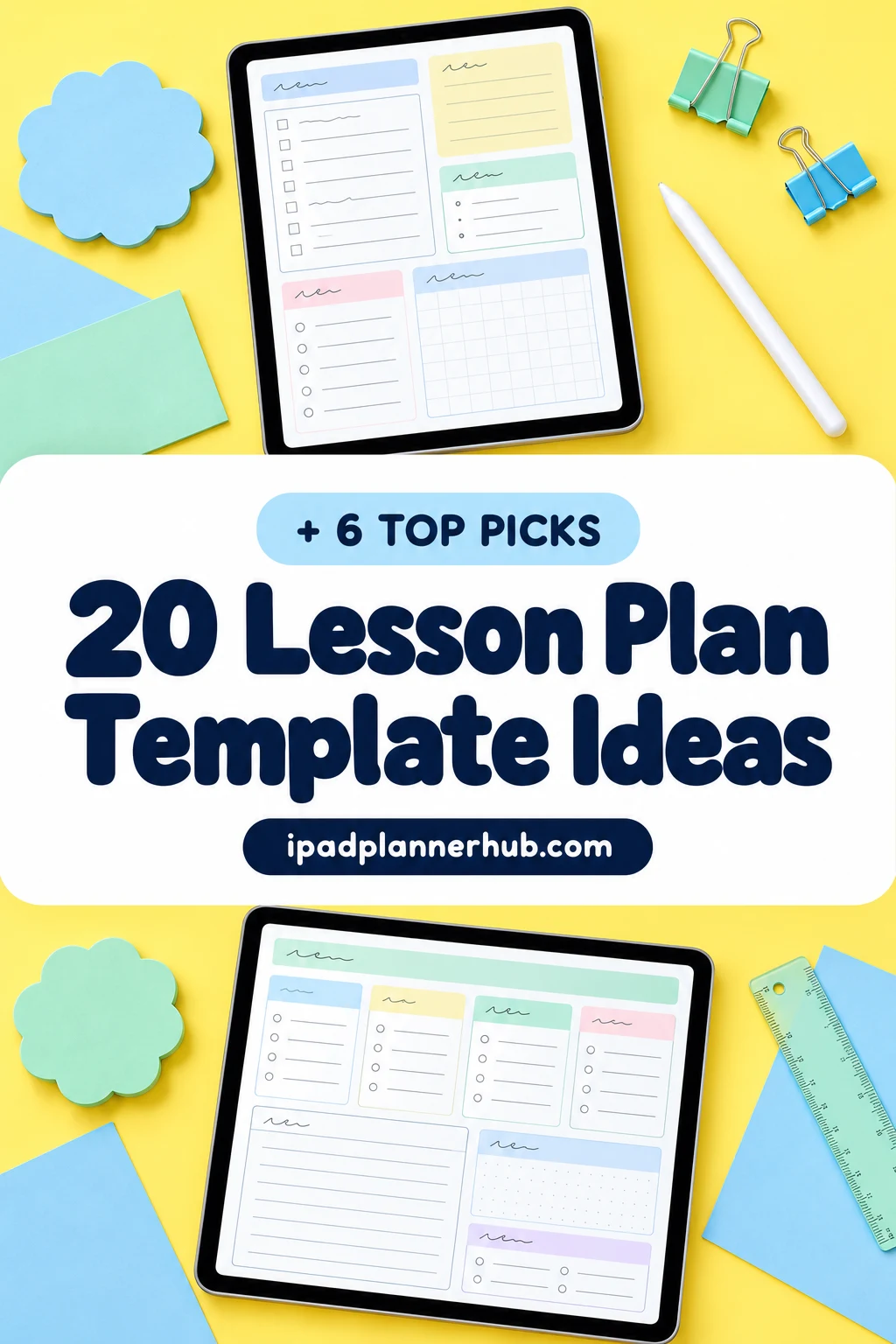
Below are 20 lesson plan template ideas sorted by format: daily, weekly, unit and term plans, sub days and homeschool. Then the 7 parts every lesson plan needs, how to make a simple free template in GoodNotes, and the 6 digital lesson planners for the iPad I found on Creative Fabrica, from one-page weekly lesson plans to a full hyperlinked teacher lesson planner.
20 Lesson Plan Template Ideas, by Format
Pick one daily and one weekly format to start with. The rest are pages you add when the school year asks for them: a unit plan in August, sub plans before flu season, a homeschool log if you teach at home.
Daily Lesson Plans 1–5
- 1Classic daily plan: objective, materials, steps, check for understanding
- 2Simple lesson plan template: three boxes for before, during and after
- 3Timed plan: warm-up, mini-lesson, practice, exit ticket, with minutes
- 4Observation-day plan with standards and differentiation
- 5Reflection line: what worked, what to change next year
Weekly Lesson Plans 6–10
- 6Weekly grid by subject: days across, subjects down
- 7Weekly grid by class period for middle and high school
- 8Weekly plan by activity for preschool: circle time, art, story
- 9Week at a glance with the copies-to-make list
- 10Idea parking lot next to the grid
Unit and Term Plans 11–14
- 11Unit plan: big idea, essential questions, final assessment
- 12Term plan: units by month for each class
- 13Standards tracker: taught, reviewed, assessed
- 14Pacing calendar with holidays and testing weeks
Sub Days and Special Days 15–17
- 15Substitute lesson plan: routines, seating chart, where things are
- 16Emergency plans: three no-prep lessons for any day
- 17Field trip or assembly day plan
Homeschool 18–20
- 18Weekly plan per child, subjects down the side
- 19Done log: what each child actually finished
- 20Unit study page with books, field trips and projects
What Goes in a Lesson Plan: The 7 Basic Parts
Formats differ, but almost every lesson plan template is built from the same parts. If your template has a box for each, you won’t walk into class without one of them:
- Objective: what students will be able to do by the end, in one sentence.
- Standards: the curriculum goal or standard the lesson covers.
- Materials: handouts, slides, books, supplies.
- Opening: a warm-up or hook that connects to what they already know.
- Instruction and practice: the mini-lesson, then guided and independent practice.
- Assessment: how you’ll check understanding, like an exit ticket or quick quiz.
- Closure and reflection: a short wrap-up, plus a note to yourself on what to change.
A daily plan uses all seven. A weekly lesson plan usually keeps just the objective and main activity per box and leaves the details for the days that need them.
Weekly Lesson Plan Template: By Subject, by Period or by Activity
The weekly lesson plan template is the page you’ll open most, so choose its grid by how your week is shaped:
- By subject (days across, subjects down): elementary teachers and homeschool families who teach several subjects to the same kids.
- By class period: middle and high school teachers with one subject and several groups. One row per period, and the same lesson often runs twice.
- By activity: preschool and pre-K, where the week is circle time, art, story and outdoor play around one theme.
Whatever the grid, keep each box short: the objective and the main activity. If a box needs more, that lesson gets a daily plan.
Homeschool Lesson Plans: A Homeschool Planner on the iPad
A homeschool planner needs fewer pages than a classroom one, but two of them matter more. The first is a weekly plan per child, because siblings rarely do the same math. The second is a done log. Plans change constantly at home, and the log of what each child actually finished is what you’ll want when you look back at the year or need to show records for your state.
On the iPad, keep one notebook per child in GoodNotes: the weekly lesson plan on top, the done log behind it, and unit study pages at the back. Each week, duplicate the plan, fill it in on Sunday and tick things off as you go. A weekly lesson plan template with weekend rows or an activity layout (both are below) fits homeschool weeks better than a classroom period grid.
The Best Lesson Plan Templates for iPad: 6 Digital Planners I Found
Honest note: on Creative Fabrica most lesson plan templates are printables, Canva templates, slide decks or KDP interiors, and several teacher planners are still dated for a past school year. These 6 have a digital PDF for the iPad and GoodNotes. The first five are lesson planners; the last is a student planner with six lesson planner layouts that also works for tutors and student teachers.
TL;DR: 20 lesson plan template ideas sorted by format (daily, weekly, unit and term, sub days, homeschool), then 6 digital lesson planners for the iPad: three one-page weekly lesson plans, a hyperlinked teacher lesson planner, a compact teacher organizer and a planner with six lesson layouts. Each card lists orientation, layouts and dates, plus who it suits.
Quick Picks
- Best for one-page weekly lesson plan: Weekly Lesson Plan – Cozy Pastel
- Best for hyperlinked lesson planner: Digital Teacher Planner
- Best for preschool and homeschool: Preschool Weekly Lesson Planner Bundle
- Best for sunday-to-Saturday lesson plan: Weekly Lesson Plan • Coffee Latte
- Best for compact teacher lesson planner: Teacher Planner Digital PDF or Goodnotes
- Best for trying different lesson layouts: STUDENT DIGITAL PLANNER for Goodnotes
- Weekly Lesson Plan – Cozy Pastel – Best one-page weekly lesson plan
- Digital Teacher Planner – Best hyperlinked lesson planner
- Preschool Weekly Lesson Planner Bundle – Best for preschool and homeschool
- Weekly Lesson Plan • Coffee Latte – Best Sunday-to-Saturday lesson plan
- Teacher Planner Digital PDF or Goodnotes – Best compact teacher lesson planner
- STUDENT DIGITAL PLANNER for Goodnotes – Best for trying different lesson layouts
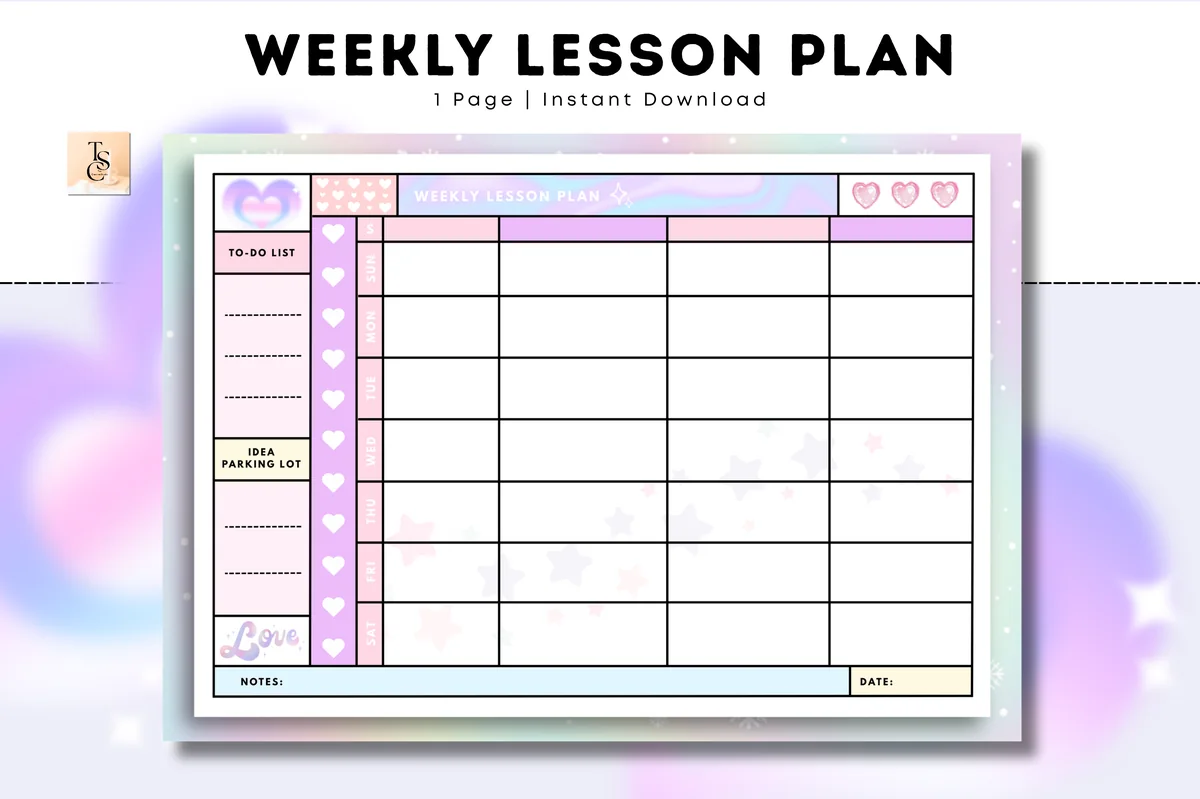
Best one-page weekly lesson plan
1. Weekly Lesson Plan – Cozy Pastel
Orientation: LandscapeLayouts: Weekly lesson planDates: Undated
Best for: teachers, homeschool parents, pastel lovers. Designed by Tas Creative Studio.
- Undated weekly lesson plan, A4 landscape
- To-do list and an idea parking lot next to the grid
- Digital PDF version (a printable version is included)
- Works in GoodNotes, Notability, Noteshelf and other PDF apps
If you only want the lesson plan itself, start here: one weekly grid you duplicate every Sunday. The idea parking lot on the side is the part I like most, because that's where next week's good ideas usually get lost. Soft pastels, lots of room to write.
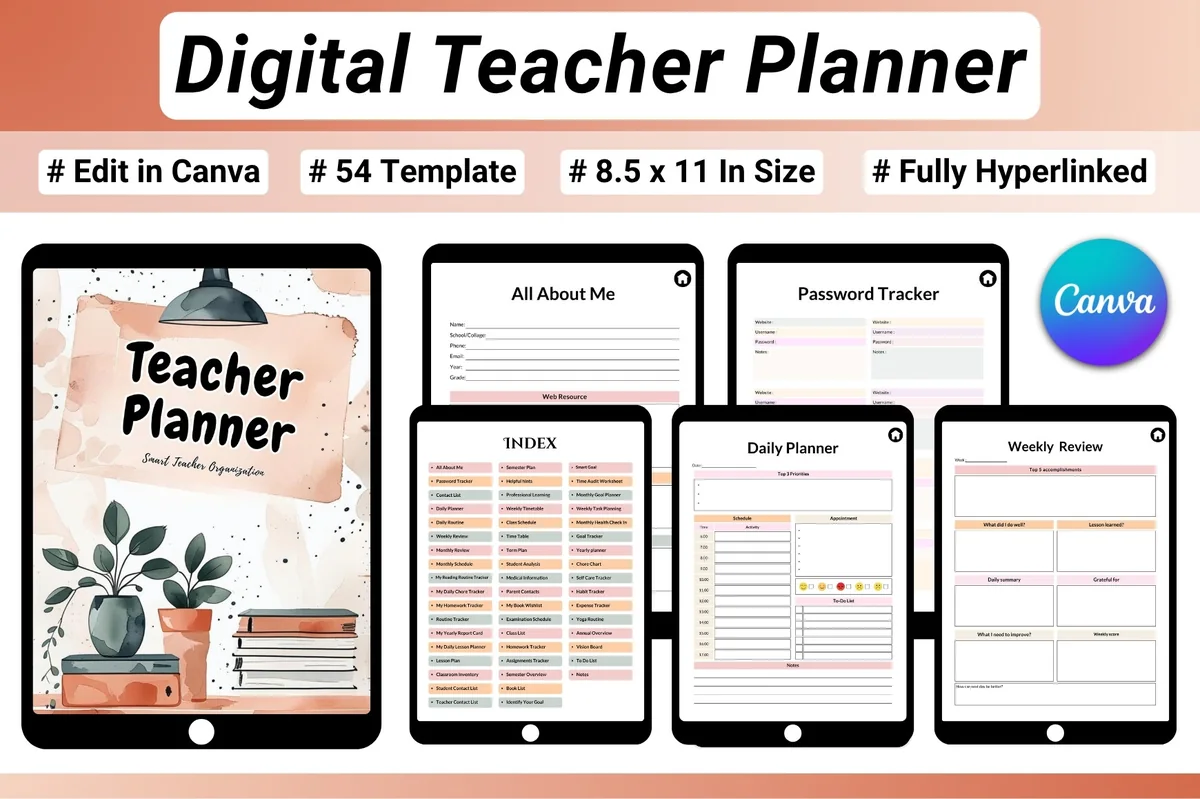
Best hyperlinked lesson planner
2. Digital Teacher Planner
Orientation: PortraitLayouts: Daily & weekly lesson plans, Term plan, Timetable, Report cardDates: Undated
Best for: classroom teachers, homeschool teachers, tutors. Designed by Heartcraft Studio.
- 54-page fully hyperlinked PDF with an index, US Letter
- Daily lesson planner, weekly lesson plan, semester plan and term plan
- Class schedule, weekly timetable, homework and assignment trackers, report card
- Works in GoodNotes and Notability; an editable Canva link, JPG and PNG are included too
This is the one for teachers who want every level of planning in one place: the term plan, the weekly lesson plan and a daily lesson planner for observation days. The index jumps to any section, so you aren't scrolling through 54 pages in the middle of class. Warm terracotta design.
Best for preschool and homeschool
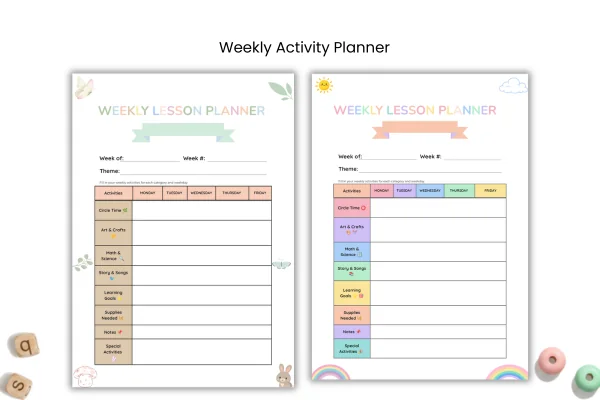
3. Preschool Weekly Lesson Planner Bundle
Orientation: PortraitLayouts: Weekly lesson planner by activity (2 themes)Dates: Undated
Best for: preschool and pre-K teachers, daycare educators, homeschool families. Designed by AtelierPlanCo.
- Weekly lesson planner, Monday to Friday, with week, week number and theme
- Rows for circle time, art and crafts, math and science, story and songs, learning goals and supplies
- Two themes: Rainbow Pastel and Nature Pastel
- Digital PDF for the iPad (GoodNotes, Notability) plus print PDFs and PNG
Most lesson plan templates assume subjects and periods; this one is built around preschool activities and a weekly theme, which is how pre-K and homeschool weeks actually run. The supplies row is a small thing that saves a trip to the cupboard every morning.
Best Sunday-to-Saturday lesson plan
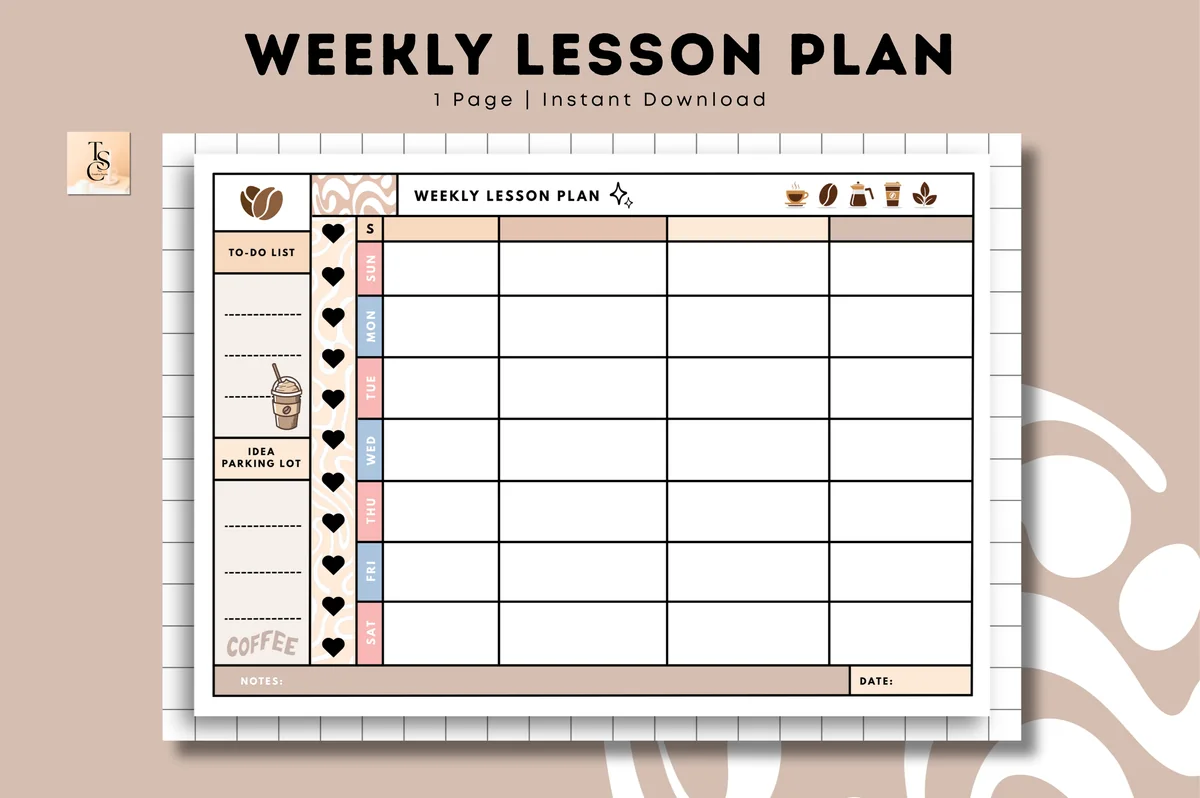
4. Weekly Lesson Plan • Coffee Latte
Orientation: LandscapeLayouts: Weekly lesson plan (Sun–Sat)Dates: Undated
Best for: teachers, homeschool parents, coffee-tone lovers. Designed by Tas Creative Studio.
- One-page undated weekly lesson plan, landscape
- Sunday to Saturday rows with four columns for lessons
- To-do list, idea parking lot and a notes line
- Digital PDF version for GoodNotes, Notability, Noteshelf and XODO
The same simple idea as the pastel one, in coffee browns and creams. Weekend rows are handy for homeschool families and tutors who teach on Saturdays, and the four columns work well as subjects or class periods.
Best compact teacher lesson planner
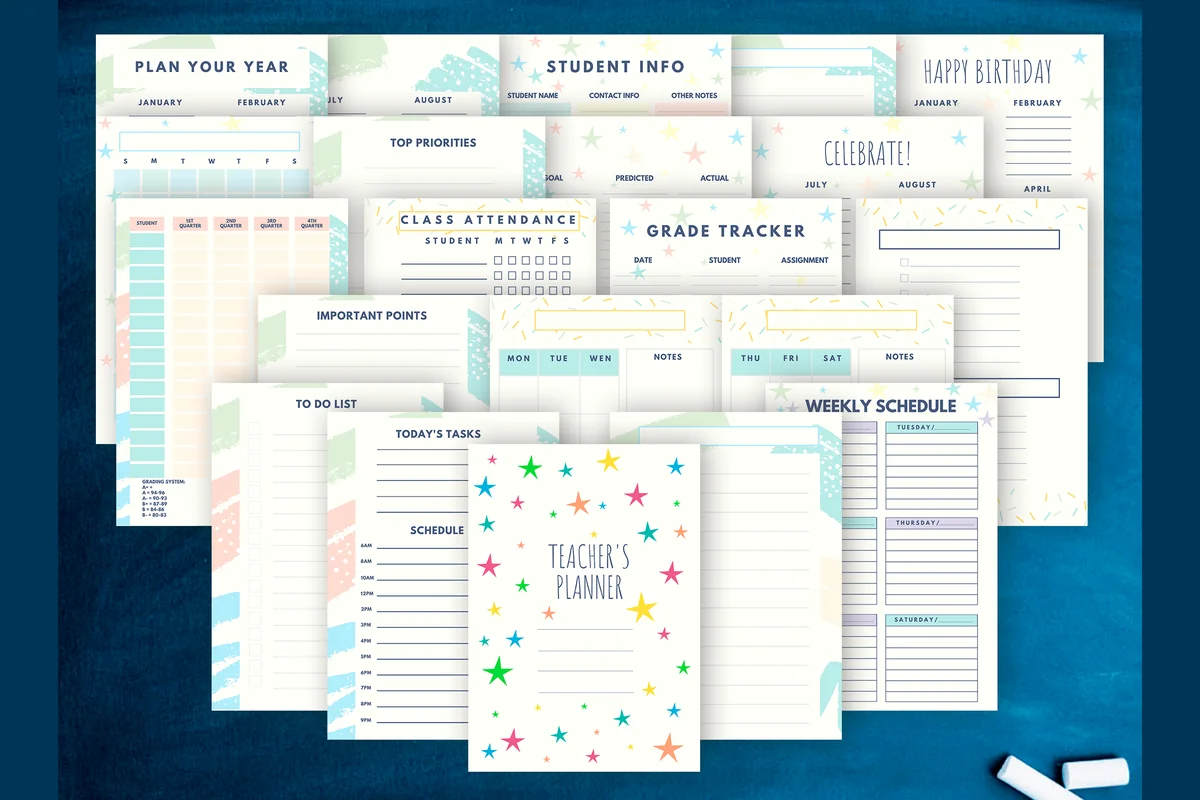
5. Teacher Planner Digital PDF or Goodnotes
Orientation: PortraitLayouts: Yearly, Weekly, Attendance, Grades, Student infoDates: Undated
Best for: elementary teachers, high school teachers, sticker lovers. Designed by CuteShopClipArt.
- 22 pages, A5, PDF and PNG
- Weekly schedule, today's tasks with a schedule, to-do list
- Plan-your-year, student info, class attendance and grade tracker pages
- Bonus: 133 stickers on a transparent background
A small teacher lesson planner that puts the week next to the things you check during it: attendance and grades. It's only 22 pages, so duplicate the weekly schedule for the whole term. The confetti-star design is cheerful without getting in the way.
Best for trying different lesson layouts
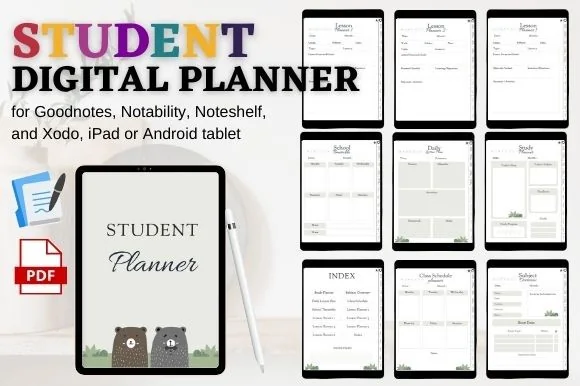
6. STUDENT DIGITAL PLANNER for Goodnotes
Orientation: PortraitLayouts: Class schedule, Timetable, Subjects, Lesson planner (6)
Best for: high school students, student teachers, simple planners. Designed by mixxdigitaldesign.
- 6 lesson planner layouts and a daily lesson plan
- Class schedule, school timetable and subject overview
- Hyperlinked index and clickable tabs
- Works in GoodNotes, Notability, Noteshelf and Xodo
It's sold as a student planner, but the description lists "Lesson Planner 1" to "Lesson Planner 6" plus a daily lesson plan, which makes it a handy sampler for student teachers and tutors. Try each layout for a week and keep the one you actually fill in.
Quick Comparison
| Template | Best for | Lesson pages | Stand-out extra |
|---|---|---|---|
| 1. Weekly Lesson Plan – Cozy Pastel | Weekly planning, homeschool | Weekly lesson grid | Idea parking lot |
| 2. Digital Teacher Planner | Classroom teachers, tutors | Daily, weekly, term, semester | 54 hyperlinked pages |
| 3. Preschool Weekly Lesson Planner Bundle | Pre-K, daycare, homeschool | Weekly plan by activity | Weekly theme line |
| 4. Weekly Lesson Plan • Coffee Latte | Tutors, homeschool, weekends | Weekly grid, Sun–Sat | Coffee-tone design |
| 5. Teacher Planner Digital PDF or Goodnotes | Pre-K to high school | Weekly schedule, daily tasks | 133 stickers |
| 6. STUDENT DIGITAL PLANNER for Goodnotes | Student teachers, tutors | 6 lesson layouts, daily plan | Hyperlinked index |
Free Lesson Plan Template: Make a Simple One in GoodNotes
Looking for a free lesson plan template? You can build a basic one in GoodNotes in about ten minutes, no extra file needed:
- Create a new notebook with a landscape grid or dotted paper template.
- On page one, draw a table with the shape tool: five columns for Monday to Friday, one row per subject or period. Hold the pen at the end of a line and GoodNotes straightens it.
- Type the headers with the text tool so they stay neat.
- Add a narrow box on the side for a to-do list and lesson ideas.
- Duplicate the empty page before you write on it, and keep that copy as your master. Every Sunday, duplicate the master and fill it in.
A homemade blank lesson plan template does the job. What paid templates add is the design, ready daily pages, term plans and hyperlinked tabs, which start to matter once you have a whole year of plans in one file.
Reuse Your Lesson Plans Next Year
This is the quiet advantage of a digital lesson planner. In August, you don’t start from zero:
- Duplicate last year’s notebook and rename it for the new year.
- Erase the dates, keep the lessons. Use the reflection line from idea 5 to see what to change.
- Paste links to slides, videos and worksheets right into the lesson box, so next year’s plan opens the materials too.
- Keep sub plans in their own file and export them as a PDF when you need to email them in the morning.
What I Look For in a Lesson Plan Template
- A grid that matches how you teach: by subject, by period or by activity.
- Room to write with a pencil: big boxes, especially on an 11-inch iPad in landscape.
- Undated pages, so the template works for any school year and you can skip holiday weeks.
- A digital PDF made for the iPad, not only a printable or a Canva file.
- A side box for notes and ideas: the copies list, the lesson that ran long, the idea for next week.
FAQ
What is a basic lesson plan format?
A basic lesson plan template has an objective, materials, the lesson steps (opening, instruction, practice) and a way to check understanding at the end. Everything else, like standards, differentiation and reflection, can be added as you need it.
How do you write a weekly lesson plan?
Start from the unit plan: where should each class be by Friday? Then write one line per lesson in the weekly grid, just the objective and main activity, add the materials to a copies list and check the school calendar for assemblies or early release days. Details go into daily plans only for lessons that need them.
Is there a free lesson plan template for GoodNotes?
You can make a free lesson plan template yourself in GoodNotes with a grid paper notebook and the shape and text tools (steps above). Ready-made digital lesson plan templates on Creative Fabrica are paid, but the one-page weekly lesson plans are low-cost and reusable every year because they’re undated.
What’s a good lesson plan template for preschool?
Preschool weeks run on activities and themes, not subjects, so look for a weekly lesson plan template with rows like circle time, art and crafts, story and songs, plus a line for the weekly theme and supplies. The Preschool Weekly Lesson Planner Bundle above is built exactly that way.
Should I use a daily or a weekly lesson plan template?
Most teachers plan weekly and write daily plans only when they need detail: observation days, new units, sub days. New teachers often prefer daily plans for the first year, because they help think through every step of a lesson.
What’s the difference between a lesson planner and a teacher planner?
A lesson planner holds only lesson plans: daily, weekly and unit pages. A teacher planner adds everything around teaching, like grades, attendance, parent contacts and meetings. If you need the whole teacher side too, see my teacher planner ideas.
Final Thoughts
Choose one weekly lesson plan template, fill it in on the same day every week, and add daily, unit or sub plan pages only when the year asks for them. The template matters less than the habit. For everything around lessons, from grade books to parent logs, read my 35 teacher planner ideas; for the calendar side of the school year, see the digital academic planners, or browse all teacher planners.
Color-coding subjects helps a weekly grid read at a glance; my GoodNotes color palettes have hex codes ready to copy. And if you’re choosing a main planner for next year, start with the best digital planners for 2027.
To decorate the plan after the lesson details are in place, compare these teacher digital stickers for your digital pages.
You May Also Like
This post contains affiliate links. If you buy through them, I may earn a small commission at no extra cost to you. Learn more.