The first week of a semester always looks the same: five syllabi, twenty deadlines, three exam dates, and a group project nobody has started. A digital academic planner is where all of that goes before it gets lost: one class page per subject, every due date on the calendar, and a week view that tells you what to start tonight.
Set out the fixed classes before filling the gaps with assignment work. These class timetable ideas help you choose a layout around the way your classes actually repeat, alongside the broader semester pages compared here.

Below are the 6 digital academic planners from Creative Fabrica I’d pick for high school and college, from a full semester planner with an exam timetable to a simple student planner with grades. After the list: academic planner ideas, how to set up a whole semester in one evening, and what to look for before you buy.
The 6 Best Digital Academic Planners I Found
I only kept planners for the iPad with real school pages: class schedules, assignment trackers, subjects or grades. Planners dated for a school year that has already ended (there are many on Creative Fabrica) are out, so everything here works for the year ahead.
TL;DR: 6 digital academic planners for iPad: a semester planner for college, three all-round student planners, a set of subject notebooks for lecture notes and a small assignment tracker. None is dated for a past school year. Each card lists orientation, layouts and dates, plus who it suits.
Quick Picks
- Best for college: Digital Semester Planner for Goodnotes
- Best for light and dark versions: Student Planner: Printable & Digital
- Best for simple timetable: STUDENT DIGITAL PLANNER for Goodnotes
- Best for grades: Simple Student Planner
- Best for lecture notes: Digital Student Notebook Hyperlinked
- Best for small assignment add-on: Editable Student Planner
- Digital Semester Planner for Goodnotes – Best for college
- Student Planner: Printable & Digital – Best light and dark versions
- STUDENT DIGITAL PLANNER for Goodnotes – Best simple timetable
- Simple Student Planner – Best for grades
- Digital Student Notebook Hyperlinked – Best for lecture notes
- Editable Student Planner – Best small assignment add-on
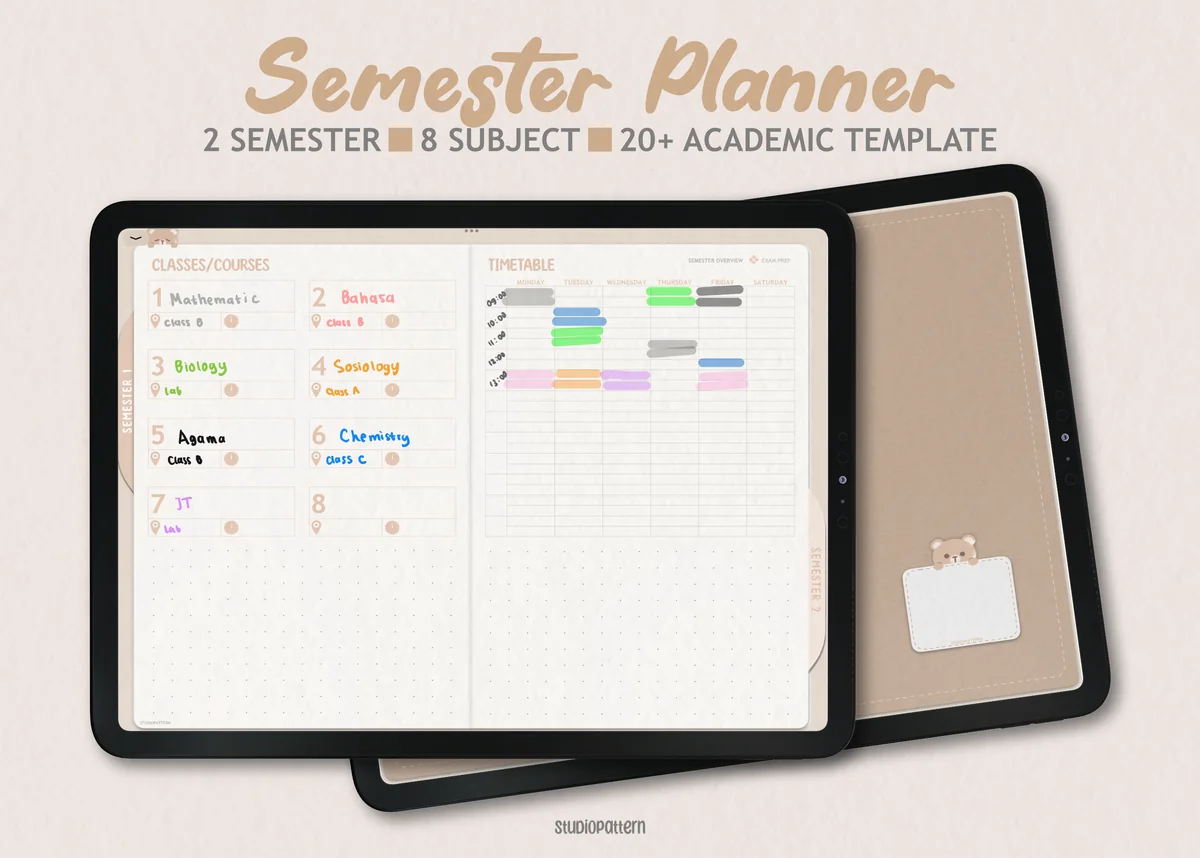
Best for college
1. Digital Semester Planner for Goodnotes
Orientation: LandscapeLayouts: Semester, Classes (8), Exam timetableDates: Undated
Best for: college students, high school students, exam season. Designed by studiopattern.
- 2 semesters with 8 classes each, a semester dashboard and timetable
- Exam timetable and exam preparation pages
- Class overview with trackers for assignments, lecture notes, reading and grades
- Calendar elements for GoodNotes whose colors you can change
This is the one I'd hand to a college student. Every class gets its own overview with assignments, readings and grades, and the exam timetable sits right next to it. It's undated, so it works for any semester.
Best light and dark versions
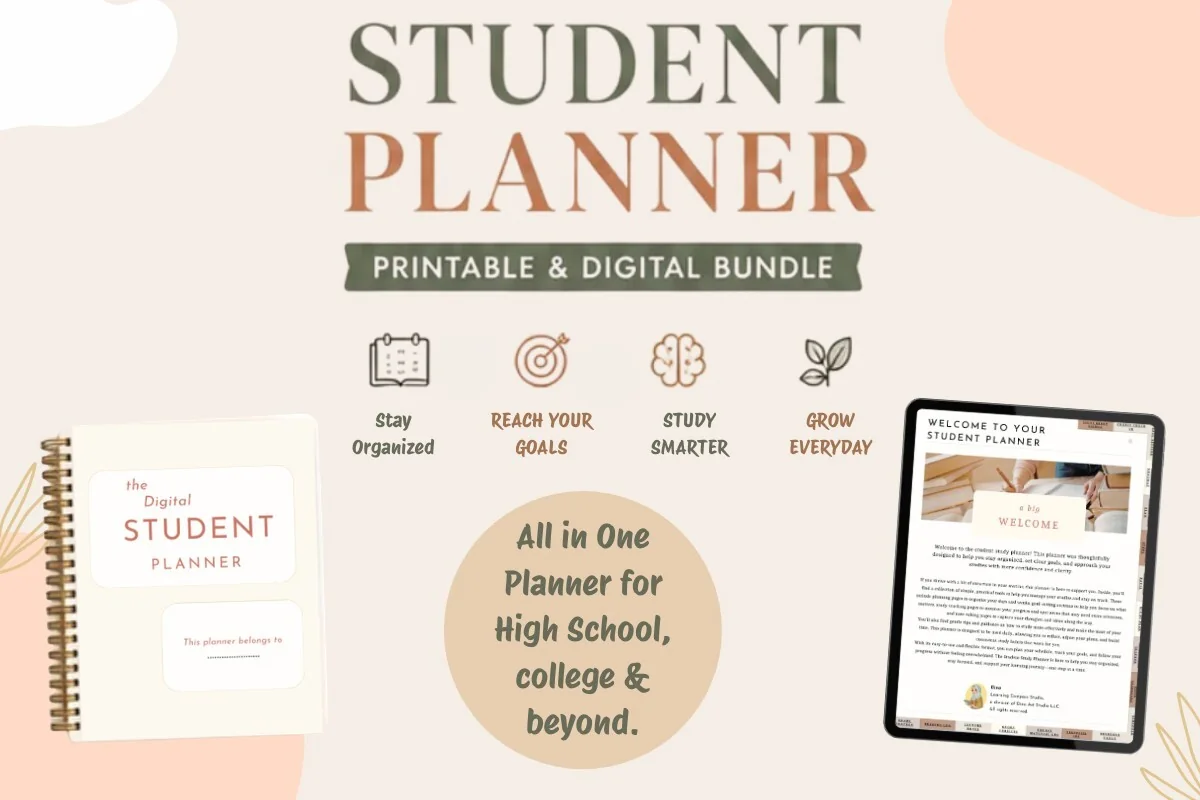
2. Student Planner: Printable & Digital
Orientation: PortraitLayouts: Yearly, Monthly, Weekly, Daily, Class schedule, AssignmentsDates: Undated
Best for: high school students, college students, dark mode fans. Designed by Dina Art Studio.
- 2 hyperlinked digital versions: light and dark theme
- Yearly reviews, monthly roadmap, weekly game plan and daily pages
- Class schedule and assignment tracker
- Undated, plus a printable version for a binder
Two digital files, one light and one dark, with the same layout. The pages go from a yearly review down to a daily plan, so it doubles as a life planner for school. It's made for middle school up to college.
Best simple timetable
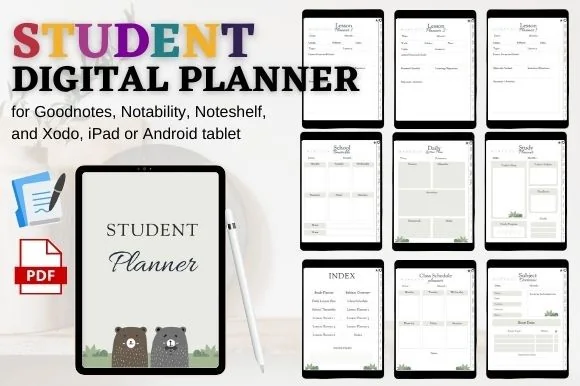
3. STUDENT DIGITAL PLANNER for Goodnotes
Orientation: PortraitLayouts: Class schedule, Timetable, Subjects, Lesson planner (6)
Best for: high school students, student teachers, simple planners. Designed by mixxdigitaldesign.
- Hyperlinked index with shortcuts and clickable tabs
- Class schedule, school timetable and subject overview
- Study planner and daily lesson plan pages
- 6 lesson planner layouts and notes pages
A plain, calm planner with exactly the school pages you need: a timetable, subjects and a study plan. The six lesson planner layouts make it interesting for student teachers too.
Best for grades
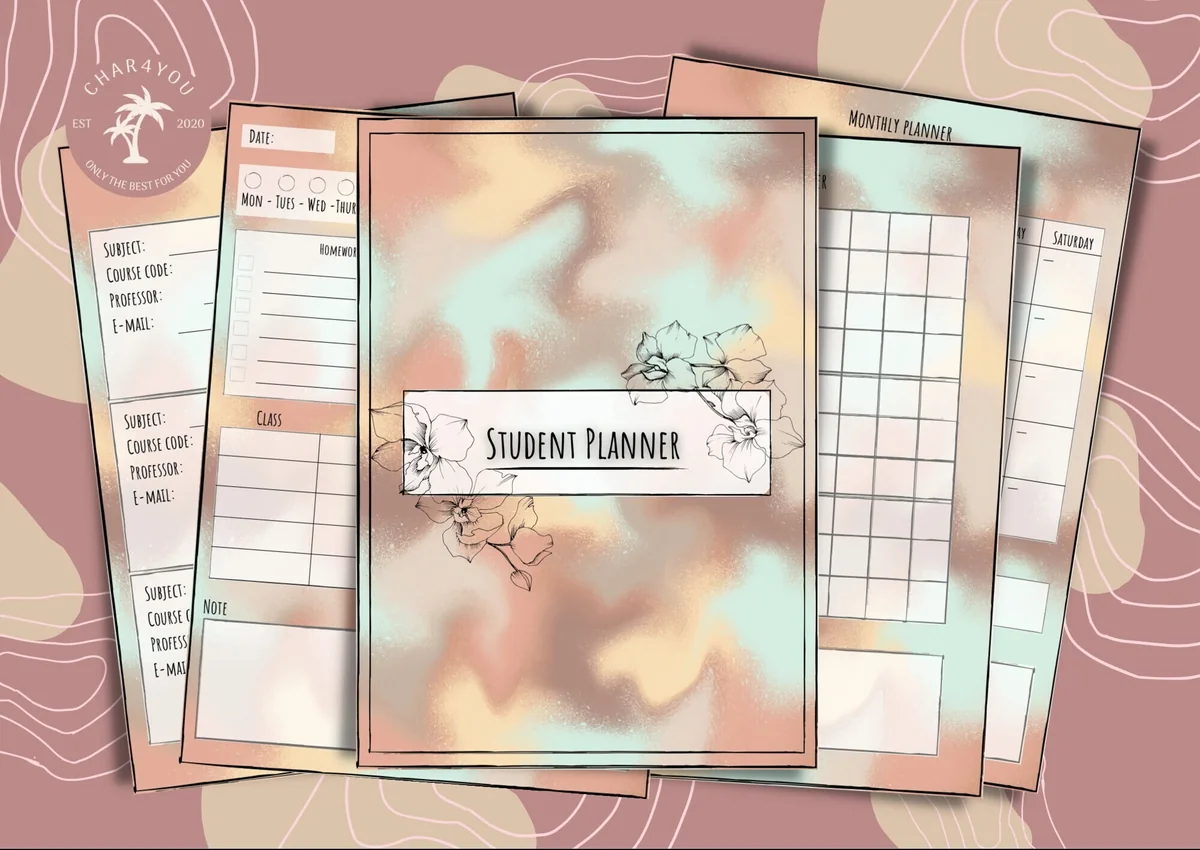
4. Simple Student Planner
Orientation: PortraitLayouts: Monthly, Weekly, Daily, Class schedule, GradesWeek start: Monday or Sunday
Best for: high school students, college students, budget shoppers. Designed by Char4You.
- Class schedules, class information and grade tracking
- Daily, weekly and monthly pages (Monday or Sunday start)
- Study tracker and lined or blank note pages
- Color and black-and-white versions, 12- or 24-hour time
Everything a high school year needs and nothing more: classes, grades, study hours and a calendar. The black-and-white version is a nice blank canvas for your own subject colors.
Best for lecture notes
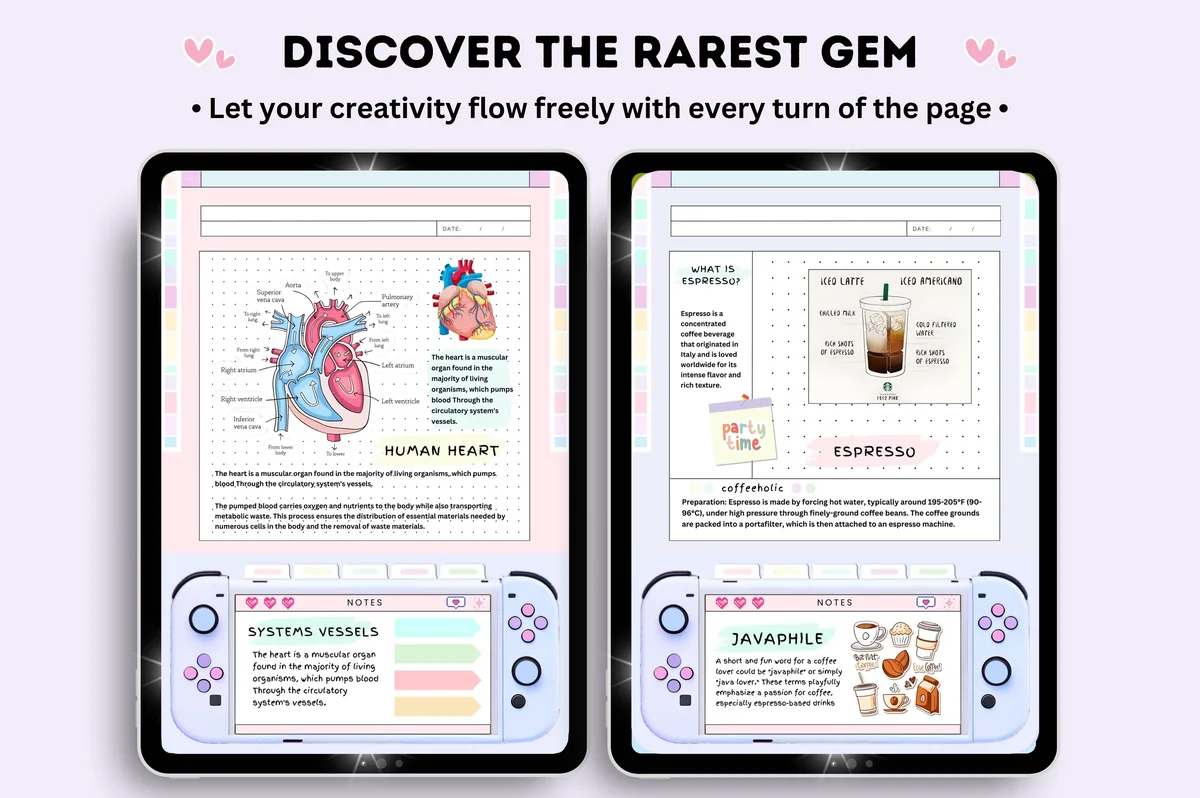
5. Digital Student Notebook Hyperlinked
Orientation: PortraitLayouts: 6 subject notebooks, 16 note templatesDates: Undated
Best for: note takers, pastel lovers, sticker lovers. Designed by Tas Creative Studio.
- 6 pastel notebooks in 6 colors, undated
- 16 note templates and 552 pages (per the cover)
- Quick menu with links on every page
- Bonus: 5-page sticker book
Not a planner but the perfect partner for one: six notebooks in six colors, so each subject gets its own. Pair it with any planner above and keep both in a "School" folder in GoodNotes.
Best small assignment add-on
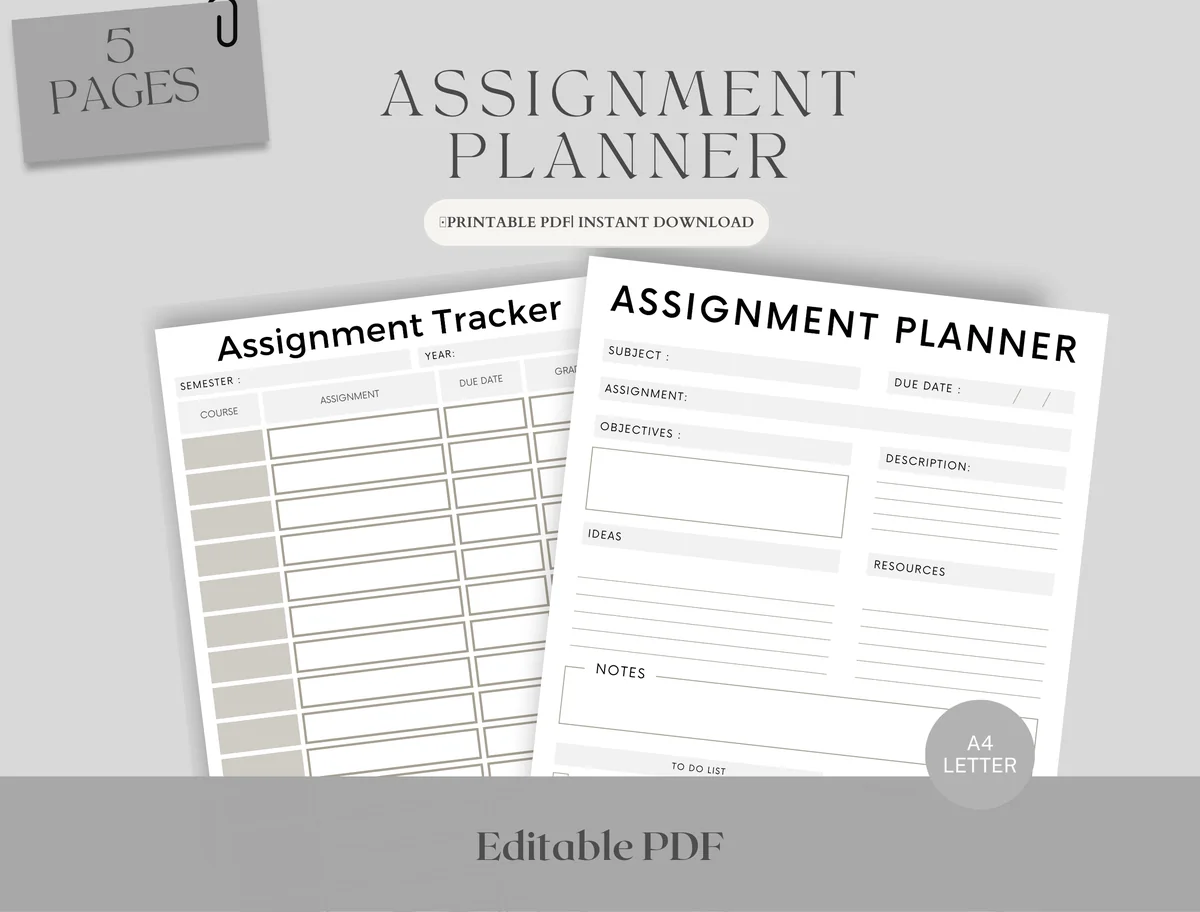
6. Editable Student Planner
Orientation: PortraitLayouts: Monthly, Weekly, AssignmentsDates: Undated
Best for: high school students, college students, deadline jugglers. Designed by Upbeat.
- Assignment tracker and assignment planner pages
- Weekly schedule in 2 versions (hourly or free) and a monthly page
- Fillable PDF, A4 and Letter
- Works in GoodNotes, Notability and other PDF apps on the iPad
Only five pages, but they're the ones students actually reach for: an assignment list and a page to break one big assignment into steps. Add it to a notebook you already use if you don't want a whole new planner.
Quick Comparison
| Planner | Best for | School pages | Stand-out extra |
|---|---|---|---|
| 1. Digital Semester Planner for Goodnotes | College semesters | 8 classes, exams, grades | Class trackers |
| 2. Student Planner: Printable & Digital | Middle school to college | Class schedule, assignments | Light and dark theme |
| 3. STUDENT DIGITAL PLANNER for Goodnotes | High school, student teachers | Timetable, subjects, lessons | 6 lesson planner layouts |
| 4. Simple Student Planner | High school | Classes, grades, study log | Black-and-white option |
| 5. Digital Student Notebook Hyperlinked | Note takers | Subject notebooks | 6 colors, sticker book |
| 6. Editable Student Planner | Deadline jugglers | Assignments, weekly schedule | Only 5 pages |
Academic Planner Ideas: Pages Worth Adding
Most student planners come with a calendar and a class schedule. These are the extra pages that make a real difference during the semester; if your planner doesn’t have them, duplicate a notes page and make your own.
For Classes
- Semester overview: all classes on one page
- Weekly class schedule
- Syllabus summary per class
- Professor or teacher contacts and office hours
- Reading list per subject
- Lecture notes, one notebook per class
For Deadlines and Grades
- Assignment tracker with due dates
- Exam timetable
- Grade tracker (and what you need on the final)
- Group project page: who does what by when
- Study log: hours per subject
For Life Around School
- Part-time job shifts
- Clubs, sports and extracurriculars
- Student budget
- Habit tracker: sleep, water, workouts
- Goals for the semester
For more ideas focused on revision and exams, see my study planner ideas.
How to Set Up Your Semester in One Evening
This is the part that makes an academic planner work, and it takes about an hour at the start of each semester:
- Collect every syllabus. Open them side by side on the iPad (Split View helps) or keep them as PDFs in the same GoodNotes folder.
- Fill the class pages. One page per class: time, room, teacher, grading breakdown, textbook.
- Copy every date into the monthly calendar. Exams, papers, quizzes, presentations, breaks. Use one color per class.
- Build the assignment tracker. Everything with a due date goes in one list, sorted by date.
- Plan backwards for big tasks. For a paper due in week 10, write “outline” in week 7 and “draft” in week 8.
- Set a weekly review. Sunday evening, 15 minutes: check the next two weeks and move tasks into the week view.
Color-coding the classes helps a lot here. I shared ready-made hex codes for subject colors in my GoodNotes color palettes.
Academic Year or Calendar Year Planner?
An academic planner follows the school year (usually July or August to June) instead of January to December. That way one planner covers the whole year of classes without switching in the middle of the winter semester.
With digital planners there’s an even simpler option: undated. Most planners in this list have no fixed dates, so you can start in August, January or the week you finally get organized, and reuse the file next year. If you prefer a dated calendar, check the cover image before you buy: many academic planners online are still dated for a past school year.
What I Look For in an Academic Planner
- Class pages, not just a calendar: a place for each subject’s schedule, teacher and grading.
- An assignment tracker, because the monthly calendar alone gets too crowded by week three.
- Exam pages: a timetable and room for a revision plan.
- Hyperlinks to jump between class pages and the calendar in one tap.
- Note templates so lecture notes can live in the same file, or a matching notebook.
- No past dates on the cover or inside.
A Digital Student Planner for High School vs College
High school: the same classes every day, so a weekly timetable and a homework list do most of the work. A simple student planner with a class schedule and a grade page is enough.
College: a different schedule every day, fewer but bigger deadlines and more reading. Here a semester planner with class overviews, an exam timetable and a reading tracker pays off, and so does a separate notebook per class for lecture notes.
Academic Planner Template or Student App?
Student apps are good at reminders and syncing with the school calendar. A PDF planner in GoodNotes can’t send notifications or sync with Apple Calendar. What it does better: everything is in one place next to your notes, writing a deadline by hand helps you remember it, and you’re not one notification away from social media. Many students use both: the planner for planning, the phone for alarms.
If you also want a study page beside your textbook while the iPad displays lecture slides, compare these study planners for paper and iPad. The selection includes daily and weekly sheets alongside larger files, with printing sizes explained separately.
How to Set Up an Academic Planner in GoodNotes
- Save the planner file from Creative Fabrica and unzip it in the Files app.
- Open GoodNotes, tap New → Import and choose the PDF (pick Monday or Sunday start if there are two versions).
- Keep the hyperlinks working: write on the pages, but don’t rearrange the main pages the tabs link to.
- Duplicate class or note pages as needed (tap the page thumbnail → Duplicate).
- Make a folder “School” for the planner and your class notebooks, so everything is one tap away.
FAQ
What is an academic planner?
A planner built around the school year, with pages for classes, assignments, exams and grades on top of the usual monthly and weekly calendar. It usually runs from summer to summer instead of January to December.
When should I start an academic planner?
A week or two before classes start, so you can set up the class pages as soon as the syllabi arrive. With an undated digital planner you can also start mid-semester; just begin with the current month.
What’s the difference between an academic planner and a regular planner?
The school-specific pages and the dates. A regular planner covers January to December and gives you general weekly pages; an academic planner adds class schedules, assignment trackers and exam pages and follows the school year.
Is a digital planner good for students?
Yes, especially if you already take notes on an iPad. The planner, lecture notes and PDFs of your readings can live in one app, pages never run out, and you can move a deadline without crossing anything out.
Can I use an iPad as a student planner?
Yes. Import a PDF planner into GoodNotes, Notability or a similar app and write on it with an Apple Pencil. Hyperlinked tabs work like a paper planner’s dividers, only faster.
Final Thoughts
For college, I’d start with the semester planner; for high school, the simple student planner is enough. Whatever digital academic planner you choose, the hour you spend copying every date from your syllabi is what makes it work. For study sessions and exam prep, see my digital study planners, or browse all student planners. For more college-only options, from semester dashboards to assignment trackers, see my top college planners for iPad. Teaching instead of studying? See my teacher planner ideas for the whole school year.
For a full-year planner to pair with this, browse the best digital planners for iPad in 2027.
You May Also Like
This post contains affiliate links. If you buy through them, I may earn a small commission at no extra cost to you. Learn more.