You found a digital planner you love, and then the app asks you to pay too. So what is the real GoodNotes price in 2026? The short answer: you can start for free, the paid plans cost $11.99 or $35.99 a year, and on an iPad there’s also a one-time purchase if you hate subscriptions. Which one makes sense depends on how many notebooks you need and whether you use anything besides Apple devices.
Below you’ll find every GoodNotes plan side by side, the math on subscription vs one-time purchase, how GoodNotes compares with Notability on cost, and 5 ways to pay less. At the end there are 5 planners (3 of them free) that keep digital planning cheap. Prices are as of October 2026, taken from the official GoodNotes and Notability pricing pages and the US App Store.
GoodNotes Price in 2026: Every Plan at a Glance
| Plan | Price (US) | How you pay | What you get |
|---|---|---|---|
| Free | $0 | Free forever | 3 notebooks, 100 MB storage, basic note-taking tools |
| Essential | $11.99 a year | Yearly, 7-day free trial | Unlimited notebooks, 5 GB storage, basic AI features, unlimited audio recording |
| Pro | $35.99 a year | Yearly, 7-day free trial | Everything in Essential plus sync across devices, cloud drive integration, real-time collaboration and full AI features |
| Special Edition | $35.99 once | One-time purchase, Apple only | Unlimited note-taking on Apple devices without a subscription; no Goodnotes Cloud |
| AI Pass | $9.99 a month | Optional add-on | Extra AI use on top of a plan; not needed for planning |
For teams there’s also a Teams plan at $120 per seat a year, but that’s for companies, not for personal planning. Prices can differ outside the US and inside the App Store, so check the price shown at checkout before you pay.
Does GoodNotes Cost Money?
Not to start. GoodNotes is free to install, and the free plan has no time limit. The catch is the size: you get 3 notebooks and 100 MB of storage, and some extras such as layers and the template library are kept for paid plans. For planning, three notebooks go further than it sounds. One all-in-one planner, one notes notebook and one spare is a perfectly workable setup.
You’ll feel the limit if you keep a separate notebook for every class, project or journal. That’s usually the moment people move to a paid plan.
GoodNotes Subscription or One-Time Purchase?
GoodNotes moved to yearly plans, but on Apple devices it still sells a one-time option, the Special Edition, for $35.99. Here’s how the money works out over time:
- Special Edition vs Pro: both cost $35.99, but Pro charges that every year. After 3 years Pro has cost $107.97 and the Special Edition still $35.99.
- Special Edition vs Essential: three years of Essential ($35.97) cost the same as the one-time purchase. If you plan to use GoodNotes for longer than three years, the one-time option is cheaper.
- What the Special Edition doesn’t do: it works on Apple devices only and doesn’t include Goodnotes Cloud. If you also take notes on Windows, Android or in a browser, you need a subscription.
If all your planning happens on one iPad, I’d lean toward the one-time purchase. If you want your planner synced between an iPad and a Windows laptop, Pro is the plan that does that.
5 Best Ways to Pay Less for GoodNotes
1. Start on the free plan and keep everything in one planner
The free plan’s limit is notebooks, not pages. An all-in-one planner with calendar, budget, habit and meal pages counts as one notebook, even with hundreds of hyperlinked pages. Add a notes notebook and you may never need to upgrade. If you’re weighing GoodNotes against a free all-in-one workspace, see Notion vs GoodNotes for planning.
2. Pick Essential if you only need more notebooks
Essential ($11.99 a year) removes the notebook limit at a third of the Pro price. Pro adds sync across devices, collaboration and full AI features. If you plan on one iPad and don’t share notebooks, those are features you’d pay for and never open.
3. Buy the one-time Special Edition if you stay on Apple
One payment of $35.99 and no renewals. It pays for itself after one year compared with Pro and after three years compared with Essential. Use the 7-day free trial of a paid plan first if you’re not sure you need more than the free version.
4. Use a student or school discount
GoodNotes offers a student discount through Student Beans: verify your student status there and the discount is applied to your subscription at checkout. The exact amount is shown after verification, so I won’t promise a number. K-12 schools can get Goodnotes Education for free, so if you’re a teacher or student, ask your school before paying yourself.
5. Already paid for GoodNotes 5? Check your upgrade price
GoodNotes gives people who bought GoodNotes 5 a discount on upgrading, and the discount is shown inside the app on iPad and iPhone. Before buying at the full price, open the upgrade screen on the device where you bought GoodNotes 5 and compare.
One more small saving: GoodNotes has a marketplace of templates and stickers ($1.99 to $9.99 per item in the App Store). Free planner templates and sticker packs from other sites import into GoodNotes the same way, so you don’t have to buy stationery inside the app.
GoodNotes vs Notability: Which Costs Less?
Notability is the other big handwriting app on the iPad, and its pricing works differently: the free Starter plan gives you 5 notes, and the paid plans are billed yearly or monthly.
| App | Free plan | Cheapest paid plan | One-time option |
|---|---|---|---|
| GoodNotes | 3 notebooks | Essential, $11.99 a year | Special Edition, $35.99 (Apple only) |
| Notability | 5 notes | Lite, $11.99 a year on notability.com ($14.99 in the App Store) | Not on its pricing page (the App Store lists a separate Notability Classic purchase at $49.99) |
Notability’s bigger plans are Plus ($15.99 a year on its website, $19.99 in the App Store) and Pro ($79.99 a year on its website, $99.99 in the App Store), built around audio transcription and AI study tools. On cost alone, the cheapest paid tiers are close. GoodNotes wins for planners because of its one-time option and because a whole hyperlinked planner counts as one notebook. Notability wins if you record lectures and want them transcribed.
Do You Need to Pay for a Planner Too?
The app and the planner are two different things. GoodNotes is the notebook app; a digital planner is a PDF you import into it. Planners are sold separately, usually as a one-time purchase, and some good ones are free. An undated planner is the budget pick, because you can reuse the same file every year. You can find more in my roundups of digital planner templates (3 free, 7 worth buying) and the best undated digital planners.
5 Planners That Keep Digital Planning Cheap
Three free templates to try planning without spending anything, and two paid planners that cover a whole year in a single notebook, so they work even on the free plan.
TL;DR: 5 planners that keep the cost of digital planning low: 3 free templates (a monthly planner, a daily page and a Cornell notes page) and 2 paid planners that cover a whole year in one notebook, so they fit even the 3-notebook free plan. Each card lists orientation, layouts and dates, plus who it suits.
Quick Picks
- Best for free monthly planner: FREE Undated Monthly Digital Planner
- Best for free daily planner: Digital Daily Planner Freebie (5 Colors)
- Best for free notes template: Free Goodnotes Cornell Notes Template
- Best for one-notebook year: All-in-One Digital Planner 2027
- Best for to reuse every year: Undated Digital Planner
- FREE Undated Monthly Digital Planner – Best free monthly planner
- Digital Daily Planner Freebie (5 Colors) – Best free daily planner
- Free Goodnotes Cornell Notes Template – Best free notes template
- All-in-One Digital Planner 2027 – Best one-notebook year
- Undated Digital Planner – Best to reuse every year
Best free monthly planner
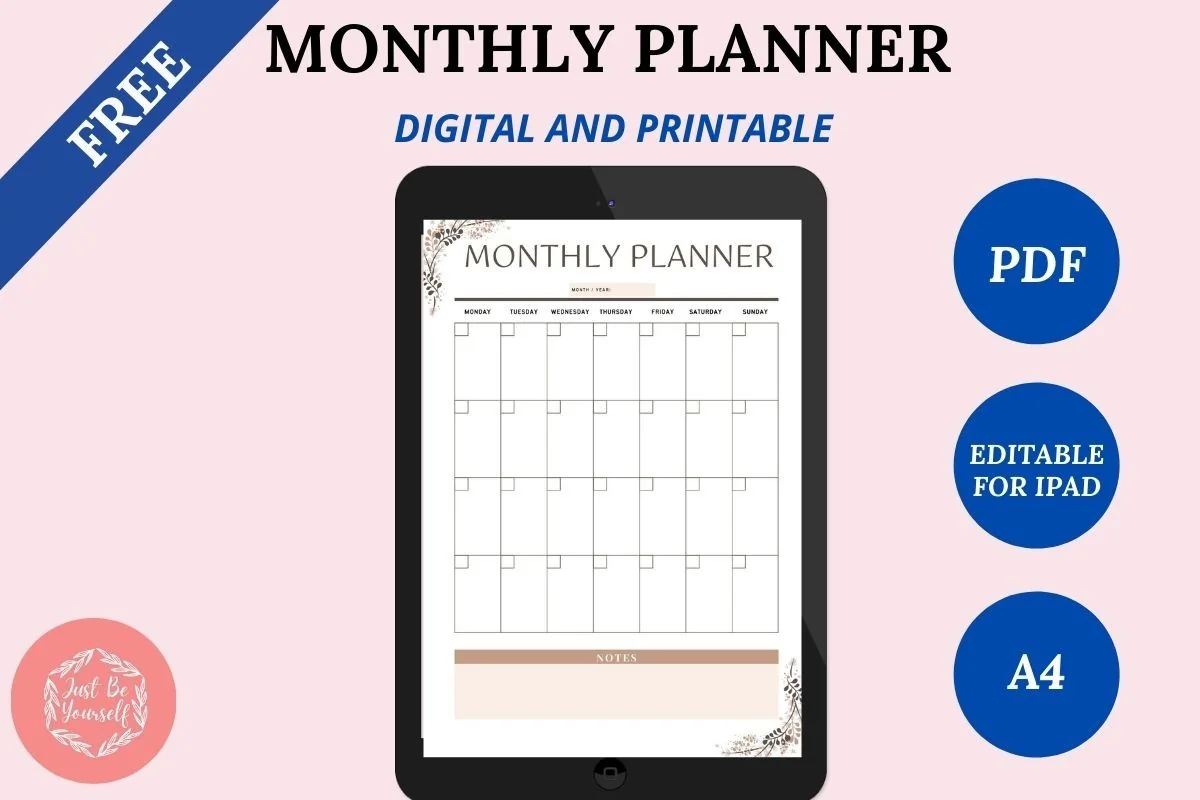
1. FREE Undated Monthly Digital Planner
Layouts: MonthlyDates: Undated
Best for: beginners, monthly planners. Designed by JustBeYourSelf.
- Free undated monthly planner, A4
- Editable digital PDF plus a printable PDF
- Duplicate as many months as you need
- Works in GoodNotes, Notability and Noteshelf
Free app, free planner: the cheapest possible test of whether planning on the iPad is for you. One clean monthly page, duplicated twelve times, takes up only one of the three notebooks on the free plan.

Best free daily planner
2. Digital Daily Planner Freebie (5 Colors)
Orientation: PortraitLayouts: DailyDates: Undated
Best for: beginners, free planner seekers, daily planners. Designed by yarasdigitalshop.
- Free undated daily page, A5, in 5 color versions
- To-do list and an hourly schedule from 8:00 to 12:00
- Meal plan boxes plus water and mood trackers
- Works in GoodNotes, Notability or any PDF app
When a month view is too coarse, this free page adds the detail: a to-do list, an hourly schedule and a meal plan on one sheet. Duplicate it inside the same notebook, and a whole year of days still uses just one slot on the free plan.
Best free notes template
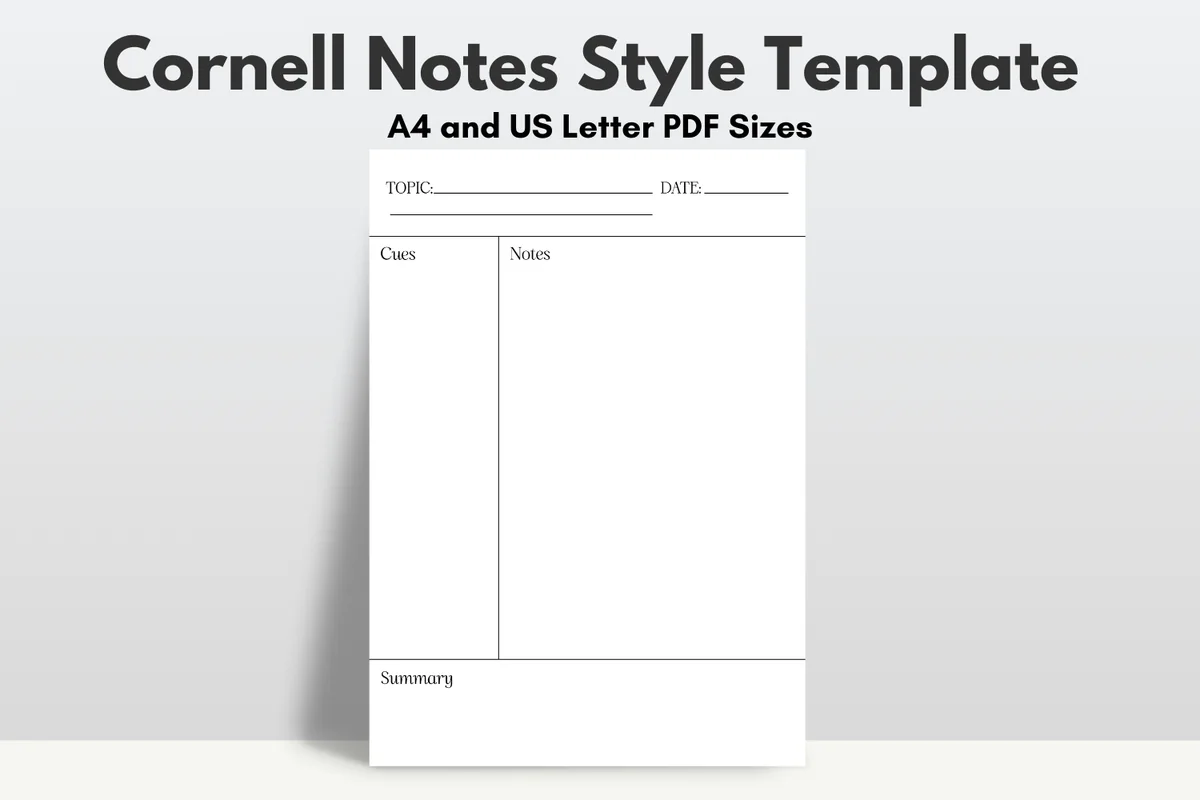
3. Free Goodnotes Cornell Notes Template
Orientation: PortraitLayouts: Cornell notes page
Best for: students, note takers, meeting notes. Designed by diyhomeprintables.
- Cornell notes layout: cues column, notes and a summary box
- Topic and date at the top
- A4 and US Letter PDF
- Free
GoodNotes sells paper templates in its own marketplace, but a free Cornell page covers what most students need. Import it as a custom page template and add it to any notebook.
Best one-notebook year
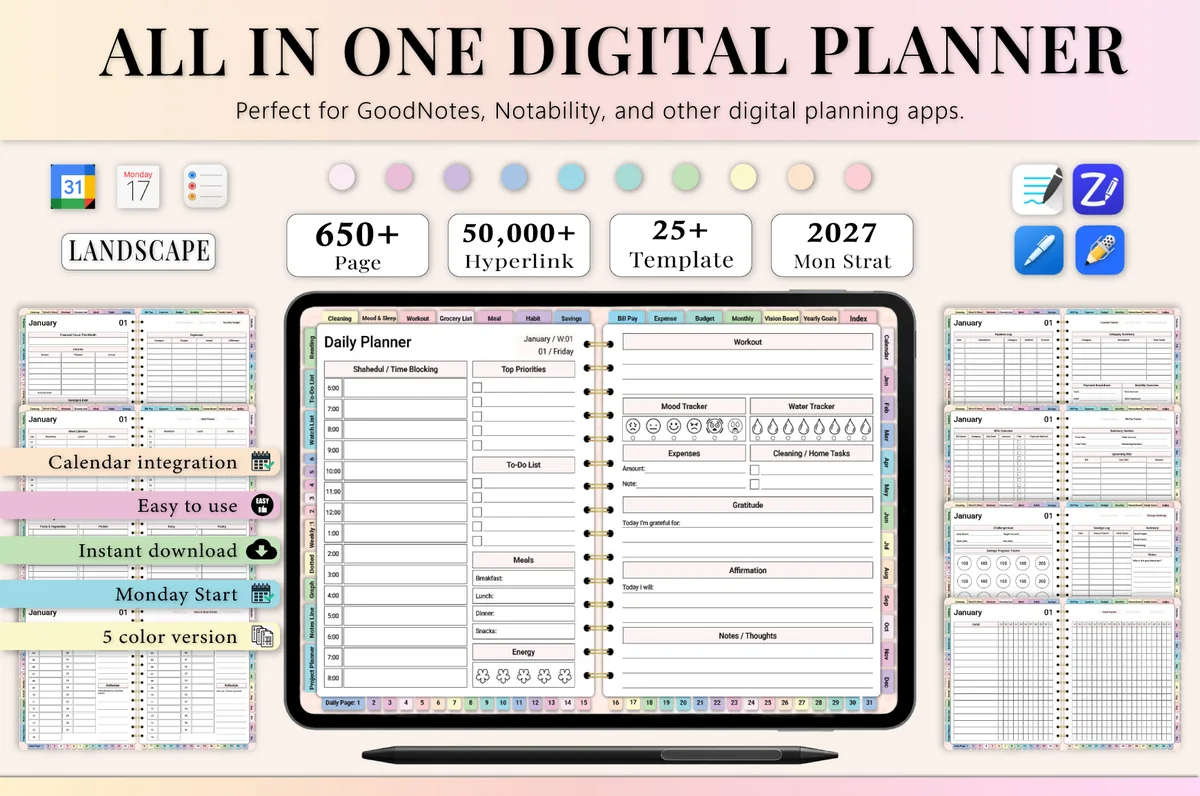
4. All-in-One Digital Planner 2027
Orientation: LandscapeLayouts: Yearly, Monthly, Weekly, DailyDates: 2027Week start: Monday
Best for: busy professionals, budgeters, people who want one planner for everything. Designed by Heartcraft Studio.
- 650+ hyperlinked pages, landscape, Monday start, in 5 color versions
- 2027 year at a glance, yearly goals, vision board and monthly calendars
- Monthly budget, bill and expense trackers plus a savings challenge page
- Habit tracker, meal planner, grocery list and workout log
- Works in GoodNotes, Notability, Noteshelf and ZoomNotes
If you stay on the free plan, the notebook count matters more than the price. This one packs calendar, budget, habits and meals into a single file, so it uses one notebook slot instead of four separate planners.
Best to reuse every year
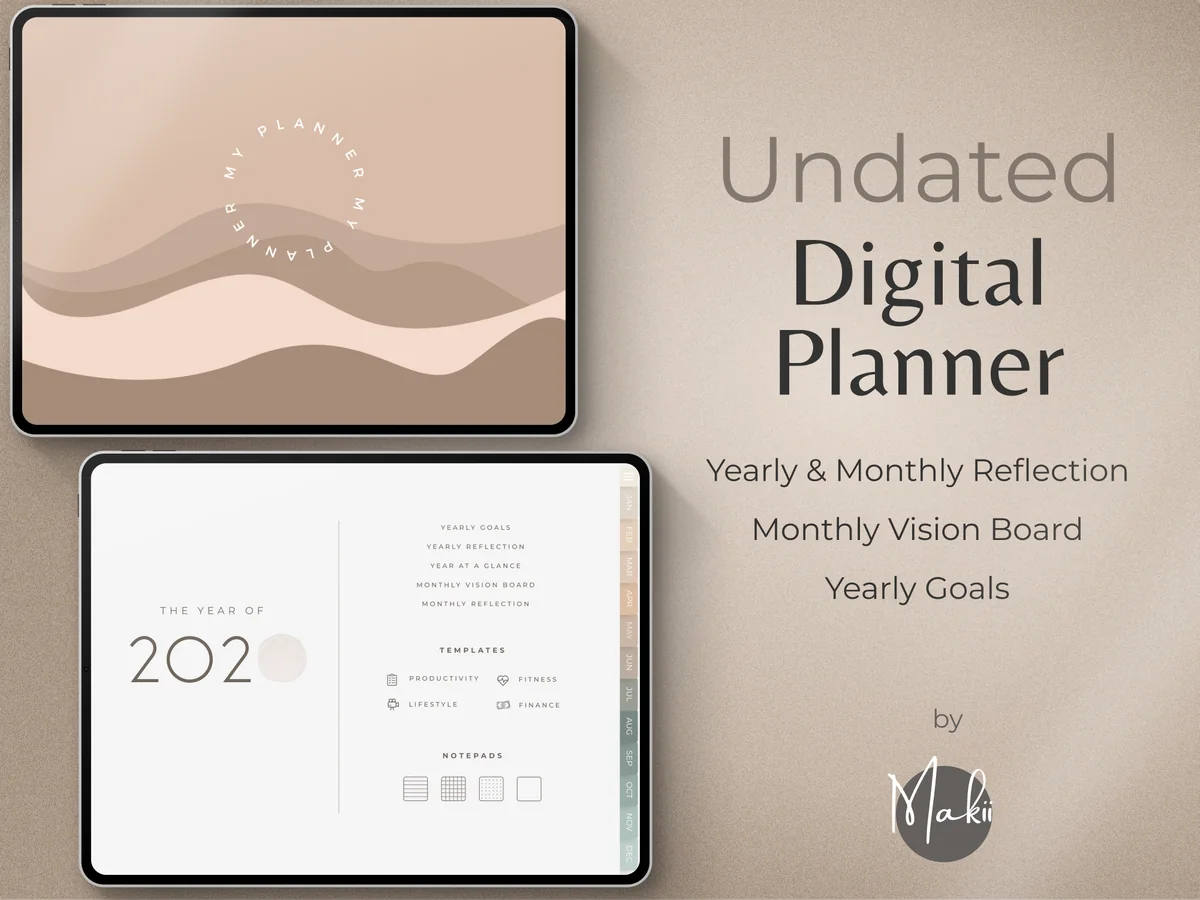
5. Undated Digital Planner
Layouts: Yearly, Monthly, Weekly, DailyDates: UndatedWeek start: Monday or Sunday
Best for: minimalists, reflective planners, goal setters. Designed by Makii.
- Undated, with Monday and Sunday start versions
- Dashboard home page for the things you check most
- Yearly goals, year at a glance and yearly reflection
- Monthly vision board and reflection pages, plus weekly and daily pages
- 250 pre-cropped stickers and modern covers; works in GoodNotes, Notability and Xodo
Undated means one purchase for as many years as you like: duplicate the clean file each January. The 250 stickers included also save you from buying sticker packs later.
Quick Comparison
| Planner | Price | Why it saves money | Stand-out extra |
|---|---|---|---|
| 1. FREE Undated Monthly Digital Planner | Free | One notebook for a whole year | Undated, reuse every year |
| 2. Digital Daily Planner Freebie (5 Colors) | Free | Duplicate daily in one notebook | 5 color versions |
| 3. Free Goodnotes Cornell Notes Template | Free | Replaces paid paper templates | A4 and Letter |
| 4. All-in-One Digital Planner 2027 | Paid | Budget, habit & meal pages in one file | Dated 2027, Monday start |
| 5. Undated Digital Planner | Paid | Undated, reuse every year | 250 stickers included |
FAQ
Is GoodNotes a one-time purchase?
It can be. The main plans are yearly subscriptions, but on Apple devices you can buy the Special Edition once for $35.99. It covers unlimited note-taking on Apple devices without Goodnotes Cloud or cross-platform sync.
How much does GoodNotes cost for iPad?
The app is free to install. On the iPad you can stay on the free plan (3 notebooks), pay $11.99 a year for Essential or $35.99 a year for Pro, or buy the Special Edition once for $35.99. Prices are US prices as of October 2026.
Is GoodNotes free for college students?
Not automatically. College students can use the free plan or get a student discount on a subscription through Student Beans. Free access through school applies to K-12 schools with Goodnotes Education and to institutions that provide GoodNotes on managed devices.
What is cheaper, Notability or GoodNotes?
Their cheapest paid plans cost about the same per year. Over several years GoodNotes is usually cheaper, because its one-time Special Edition costs less than the Notability Classic purchase listed in the App Store ($49.99) and isn’t renewed every year. Both have a free plan: Notability’s Starter keeps 5 notes, while GoodNotes gives you 3 notebooks, and since one planner is one notebook, that goes further for planning.
Can I use GoodNotes on Windows or Android?
Yes. GoodNotes works on Apple devices, Android, Windows and the web, and core note-taking and PDF markup are available on all of them. The one-time Special Edition is Apple only, so for other platforms you need a subscription.
Is it worth paying for GoodNotes?
If you plan or take notes on your iPad most days, yes: $11.99 a year is less than most paper planners. If you only need one planner and one notes notebook, the free plan may be all you need, so start there and upgrade when you hit the limit.
What is the zoom window in GoodNotes?
The zoom window is a magnified writing box at the bottom of the screen: you write large in the box and GoodNotes places small, neat handwriting on the page. It’s handy for filling the small boxes of a planner, like time slots and habit trackers.
How do I use GoodNotes?
Create a notebook or import a PDF planner with New → Import, then write with the Apple Pencil using the pen, highlighter and eraser at the top. Tap hyperlinked tabs to jump between pages, and use the lasso tool to move, resize or convert handwriting to text. Pages can be added, duplicated or reordered from the page overview.
Final Thoughts
Start free, put your whole year in one all-in-one or undated planner, and think about the GoodNotes price only when you run out of notebooks. Still deciding between apps? See GoodNotes vs Notability. If you stay on the iPad, the one-time Special Edition is the cheapest choice over the long run; if you need Windows or Android too, Essential or Pro is the way. Once the app is sorted, pick your pages from my best digital planners for 2027, color your notes with these GoodNotes color palettes and decorate them with GoodNotes stickers, or browse all how-to guides.
You May Also Like
This post contains affiliate links. If you buy through them, I may earn a small commission at no extra cost to you. Learn more.