A teacher’s planner holds more than any other planner: lesson plans for five subjects, a grade book, parent emails, duty schedules, and the sub plans you hope you’ll never need. That’s why the paper teacher binder gets so heavy by October. These teacher planner ideas sort all of it into pages, so you can pick what your school year actually needs and leave the rest out.
Use a consistent visual label for the school tasks you need to spot quickly. These teacher digital stickers compare packs for teacher-planning pages, rather than treating every decorative school icon as a useful lesson-planning marker.
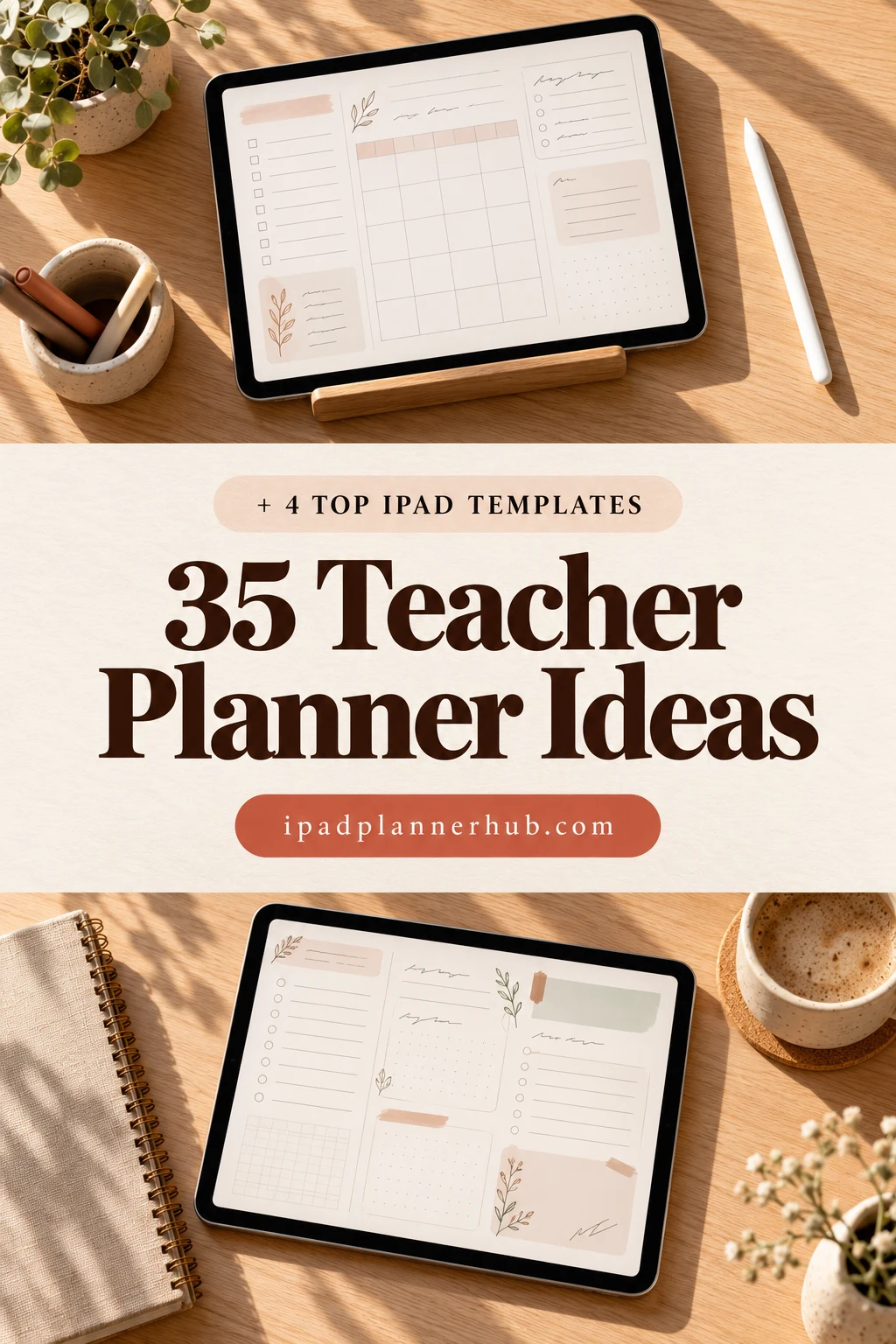
Below are 35 ideas grouped by job: before the year starts, lesson planning, students and grades, communication, and pages just for you. Then the 4 best teacher planners for the iPad that I found on Creative Fabrica, the templates I’d use to build a digital teacher planner, from a full teacher organizer to a one-page weekly lesson plan. After that: how to organize a teacher binder on the iPad and plan a week of lessons in 30 minutes.
35 Teacher Planner Ideas, by Job
You don’t need all 35. Most teachers use eight to twelve of these every week; the rest are once-a-year pages. Start with the ones that replace a sticky note you keep losing.
Before the Year Starts 1–8
- 1Year at a glance with school holidays and breaks
- 2Class rosters, one page per class
- 3Seating chart you can redraw anytime
- 4Classroom rules and routines
- 5Curriculum map: units by month
- 6Emergency sub plans
- 7Supply list and classroom budget
- 8Classroom inventory: books, tech, materials
Lesson Planning 9–17
- 9Weekly lesson plan grid by subject
- 10Daily lesson plan: objective, materials, check for understanding
- 11Unit plan overview
- 12Standards or curriculum tracker
- 13Small group rotation plan
- 14Lesson idea parking lot
- 15Links to slides, videos and worksheets
- 16Copies-to-make list for the week
- 17Homeschool subject log, one row per day
Students and Grades 18–24
- 18Grade book
- 19Attendance tracker
- 20Turn-in checklist for assignments
- 21Reading levels and progress checks
- 22Behavior and observation notes
- 23Accommodation reminders (no names, just initials)
- 24Student birthday calendar
Communication and Meetings 25–30
- 25Parent contact log
- 26Parent-teacher conference notes
- 27Staff meeting minutes
- 28Field trip and permission slip tracker
- 29Duty schedule: bus, lunch, recess
- 30Class newsletter topics
Just for You 31–35
- 31Teacher to-do list for the week
- 32Professional development log
- 33Self-care check-in for report card season
- 34Ideas to try next year
- 35Wins and kind notes from students
A note on privacy: grades, behavior notes and accommodations are sensitive. If you keep them on a personal iPad, follow your school’s data rules, use initials instead of full names, and lock the device with a passcode.
Lesson Planner Ideas for Every Subject
The lesson plan is the page you’ll open most, so its layout matters. Three formats cover almost everyone:
- Weekly grid by subject (days across, subjects down): the classic for elementary teachers and homeschool families who teach several subjects to the same kids.
- Weekly grid by class period: better for middle and high school teachers with one subject and several groups.
- Daily lesson plan: objective, materials, steps, check for understanding, homework. Great for new teachers, observations and sub days.
For homeschool, add a simple log next to the weekly grid: what each child actually finished. Many states ask for records, and a filled-in weekly page is the easiest one to keep.
The Best Teacher Planners for iPad: 4 Digital Templates I Found
Honest note: on Creative Fabrica most teacher planners are printables, Canva templates or KDP interiors, and several digital ones are still dated for a past school year. These 4 work on the iPad in GoodNotes and cover the ideas above together: a teacher organizer, a weekly lesson plan, lesson planner layouts and meeting notes.
TL;DR: 35 teacher planner ideas grouped by job (start of year, lesson planning, students and grades, communication, just for you), then 4 iPad templates that cover them together: a teacher organizer, a weekly lesson plan, lesson planner layouts and meeting minutes. Each card lists orientation, layouts and dates, plus who it suits.
Quick Picks
- Best for all-round teacher organizer: Teacher Planner Digital PDF or Goodnotes
- Best for one-page weekly lesson plan: Weekly Lesson Plan – Cozy Pastel
- Best for lesson planner layouts: STUDENT DIGITAL PLANNER for Goodnotes
- Best for staff and parent meetings: Meeting Minutes Digital Planner Goodnote
- Teacher Planner Digital PDF or Goodnotes – Best all-round teacher organizer
- Weekly Lesson Plan – Cozy Pastel – Best one-page weekly lesson plan
- STUDENT DIGITAL PLANNER for Goodnotes – Best for lesson planner layouts
- Meeting Minutes Digital Planner Goodnote – Best for staff and parent meetings
Best all-round teacher organizer
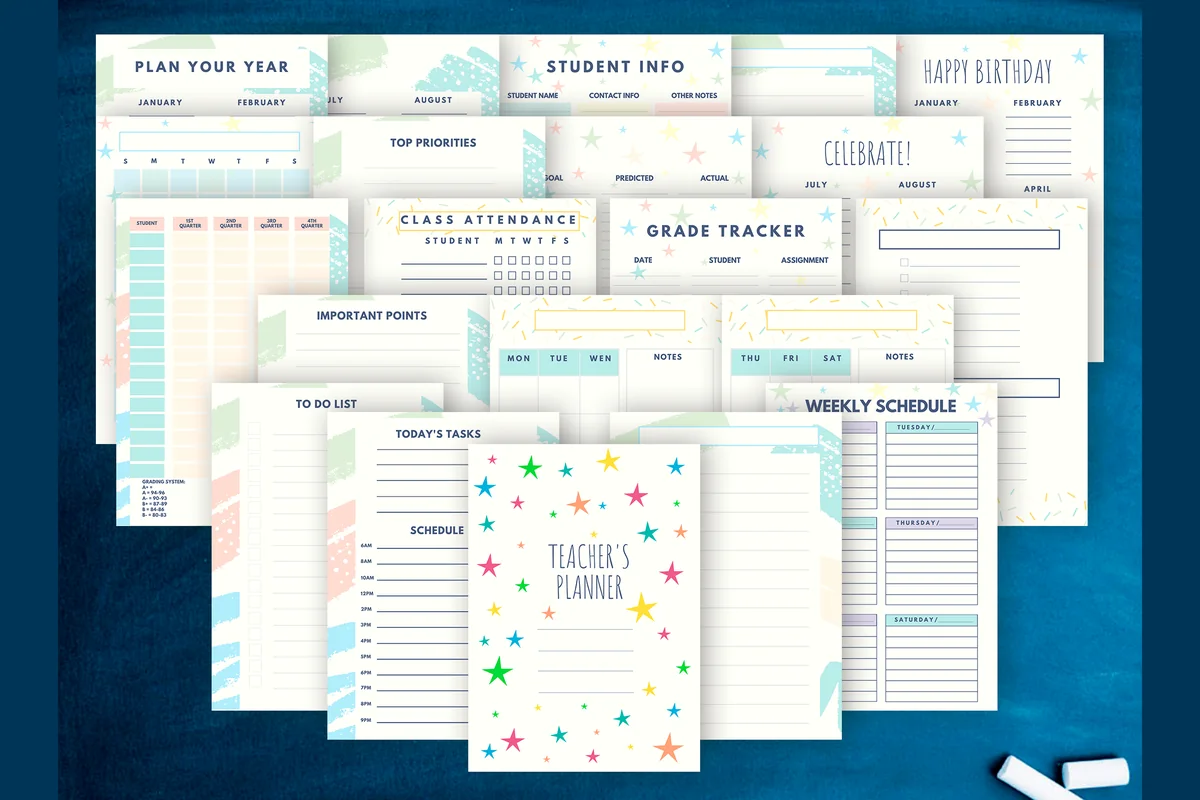
1. Teacher Planner Digital PDF or Goodnotes
Orientation: PortraitLayouts: Yearly, Weekly, Attendance, Grades, Student infoDates: Undated
Best for: elementary teachers, high school teachers, sticker lovers. Designed by CuteShopClipArt.
- 22 pages, A5, PDF and PNG
- Plan-your-year, student info, class attendance and grade tracker pages
- Weekly schedule, to-do list and important points pages
- Bonus: 133 stickers on transparent background
This covers the core of the ideas list: a year plan, student info, attendance, grades and a weekly schedule, with a cheerful star design. It's compact at 22 pages, so duplicate the weekly pages for the whole term.

Best one-page weekly lesson plan
2. Weekly Lesson Plan – Cozy Pastel
Orientation: LandscapeLayouts: Weekly lesson planDates: Undated
Best for: teachers, homeschool parents, pastel lovers. Designed by Tas Creative Studio.
- Undated weekly lesson plan, A4 landscape
- To-do list and an idea parking lot next to the grid
- Digital PDF version (a printable version is included)
- Works in GoodNotes, Notability, Noteshelf and other PDF apps
The simplest way to start: one weekly grid you duplicate every week. I like the "idea parking lot" on the side; that's where lesson ideas go before they get lost. Soft pastel colors, lots of room to write.
Best for lesson planner layouts
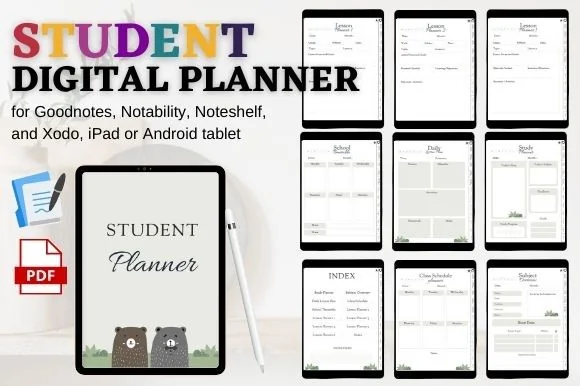
3. STUDENT DIGITAL PLANNER for Goodnotes
Orientation: PortraitLayouts: Class schedule, Timetable, Subjects, Lesson planner (6)
Best for: high school students, student teachers, simple planners. Designed by mixxdigitaldesign.
- 6 lesson planner layouts and a daily lesson plan
- Class schedule, school timetable and subject overview
- Hyperlinked index and clickable tabs
- Works in GoodNotes, Notability, Noteshelf and Xodo
It's sold as a student planner, but the six lesson planner layouts and the daily lesson plan make it just as useful on the teacher's side of the desk. A plain, calm design that doesn't compete with your notes.

Best for staff and parent meetings
4. Meeting Minutes Digital Planner Goodnote
Orientation: PortraitLayouts: Meeting index, 12 sections, 360 minutes pagesDates: Undated
Best for: recurring meetings, secretaries and note takers, minimalists. Designed by tanondesign.
- Fully hyperlinked: an index with 12 sections
- 30 meeting minutes pages per section, 360 in total
- Minimalist design, US Letter
- PDF for GoodNotes on the iPad plus a printable version
Staff meetings, IEP meetings, parent conferences: give each one a section and you'll always find what was agreed. Not a planner on its own, but it fills the communication part of the ideas list better than any all-in-one.
Quick Comparison
| Template | Best for | Teacher pages | Stand-out extra |
|---|---|---|---|
| 1. Teacher Planner Digital PDF or Goodnotes | Pre-K to high school | Year plan, attendance, grades | 133 stickers |
| 2. Weekly Lesson Plan – Cozy Pastel | Weekly planning, homeschool | Weekly lesson grid | Idea parking lot |
| 3. STUDENT DIGITAL PLANNER for Goodnotes | Daily lesson plans | 6 lesson layouts, timetable | Hyperlinked index |
| 4. Meeting Minutes Digital Planner Goodnote | Meetings, conferences | Meeting minutes (360) | 12 linked sections |
Teacher Binder Organization on the iPad
A digital teacher binder is just a folder in GoodNotes with a few notebooks inside. The tabs I’d use, in this order:
- Calendar: year at a glance, monthly pages, duty schedule.
- Lesson plans: weekly grids, then daily plans for observations and sub days.
- Classes: rosters, seating charts, small groups.
- Grades and attendance.
- Communication: parent contact log, conference notes, meeting minutes.
- Sub plans: routines, class lists, where things are. Export this one as a PDF so you can email it in the morning.
- Ideas: lesson ideas, next-year notes, kind notes from students.
Give each tab one color and use the same colors on the matching pages. If you want ready hex codes, I collected some in my GoodNotes color palettes.
How to Plan a Week of Lessons in 30 Minutes
- Look at the unit plan (5 minutes): where should each class be by Friday?
- Fill the weekly grid (15 minutes): one line per lesson, just the objective and the main activity.
- Make the copies list (5 minutes): every worksheet and handout for the week.
- Check the calendar (5 minutes): assemblies, early release, meetings. Move lessons around them.
Details go into a daily plan only when you need them. Duplicating last year’s week and editing it is often faster than starting from a blank page, which is one big advantage of a digital planner.
What I Look For in a Digital Teacher Planner
- A lesson plan layout that matches how you teach: by subject or by period.
- Class and student pages: rosters, attendance, grades.
- An academic-year calendar or undated pages, never a past school year.
- Room to write: teacher planners fill up fast, so bigger boxes beat cute decorations.
- Works in GoodNotes or Notability on the iPad, not only as a printable or a Canva template.
Digital Teacher Planner or Paper Binder?
Paper is easy to grab during class and never runs out of battery. A digital planner wins on everything else: lesson plans you can duplicate and reuse next year, links to slides and videos right on the page, a grade book that’s never left at school, and one iPad instead of a three-inch binder in your tote. Many teachers keep a printed weekly page on the desk and the full planner on the iPad.
How to Set Up a Teacher Planner in GoodNotes
- Get the PDF from Creative Fabrica and save it to the Files app.
- In GoodNotes, create a folder called “Teacher Binder” and import the planner with New → Import.
- Duplicate the weekly lesson plan page for every week of the term (tap the thumbnail → Duplicate).
- Add the other templates (meeting minutes, lesson planners) as separate notebooks in the same folder.
- Turn on iCloud backup in GoodNotes settings, so a lost iPad doesn’t mean a lost grade book.
FAQ
What should be in a teacher planner?
At minimum: a year-at-a-glance calendar, weekly lesson plans, class rosters, attendance and a grade book. Most teachers also add a parent contact log, meeting notes and sub plans. The list above has 35 ideas to choose from.
What is the best planner for teachers?
The best teachers planner is the one that covers the jobs you actually do every week. For most classroom teachers that’s an all-in-one like #1 above: a year plan, student info, attendance, a grade tracker and a weekly schedule in one file. If you mostly need a place for lessons, a one-page weekly lesson grid like #2 is simpler, and a meeting log like #4 is a great add-on for staff meetings and parent conferences. Great teacher planners don’t have the most pages; they have the pages you open daily. For a preschool teacher planner, keep it lighter still: use the weekly grid for themes and centers instead of subjects, and add a parent communication log and a short notes page per child.
Can a digital teacher planner replace a teacher gradebook?
For your own records, often yes. A planner with grade tracker pages, like #1 above, works as a simple teacher gradebook for quick scores, missing work and notes on each student. Most schools still want final grades in their own system, so think of the planner page as your working copy and the school system as the official one.
What is a teacher planner?
A planner made for the school year rather than the calendar year: lesson plans, a weekly schedule, class rosters, attendance and grade pages, parent contacts and important dates in one place. Regular planners are built around your days; a teacher planner is built around your classes, which is why it usually runs August to June. A digital teacher planner on the iPad adds hyperlinked tabs, so you jump from the week to a class list in one tap.
Can I use an iPad as a teacher planner?
Yes. Import a digital teacher planner PDF into GoodNotes or Notability and write on it with an Apple Pencil. You can duplicate lesson plan pages, paste in links and images, and keep everything in one folder.
What’s the difference between a teacher planner and a lesson planner?
A lesson planner is only for lessons: weekly or daily plans by subject. A teacher planner adds everything around teaching, like calendars, grades, attendance, meetings and parent communication. Many teachers combine a teacher organizer with a separate lesson plan template.
Is a digital lesson planner good for homeschool?
Yes, especially with a weekly grid by subject: plan the week on Sunday, tick off what each child finished, and the filled pages become your attendance and progress records.
When should teachers set up their planner?
In the summer, a week or two before school starts: the calendar, rosters and first unit. Lesson plans are easier to fill week by week once you know your classes.
Final Thoughts
Pick the teacher planner ideas that replace your loose sticky notes, put them into one folder on the iPad, and plan your lessons in the same place every week. For the calendar side of the school year, see my digital academic planners and digital monthly planners, or browse all teacher planners.
If you’re choosing your main planner for next year, start with my list of the 10 best iPad digital planners for 2027.
Planning the lessons themselves? My lesson plan template ideas cover daily, weekly, unit and homeschool formats.
You May Also Like
This post contains affiliate links. If you buy through them, I may earn a small commission at no extra cost to you. Learn more.