
Right after “yes” comes the question nobody warns you about: what do we actually have to do, and when? Venue, photographer, invitations, rings, a seating chart, a marriage license. A wedding planner checklist turns that cloud of tasks into a timeline, so each month has a short list and nothing important gets left for the last week.
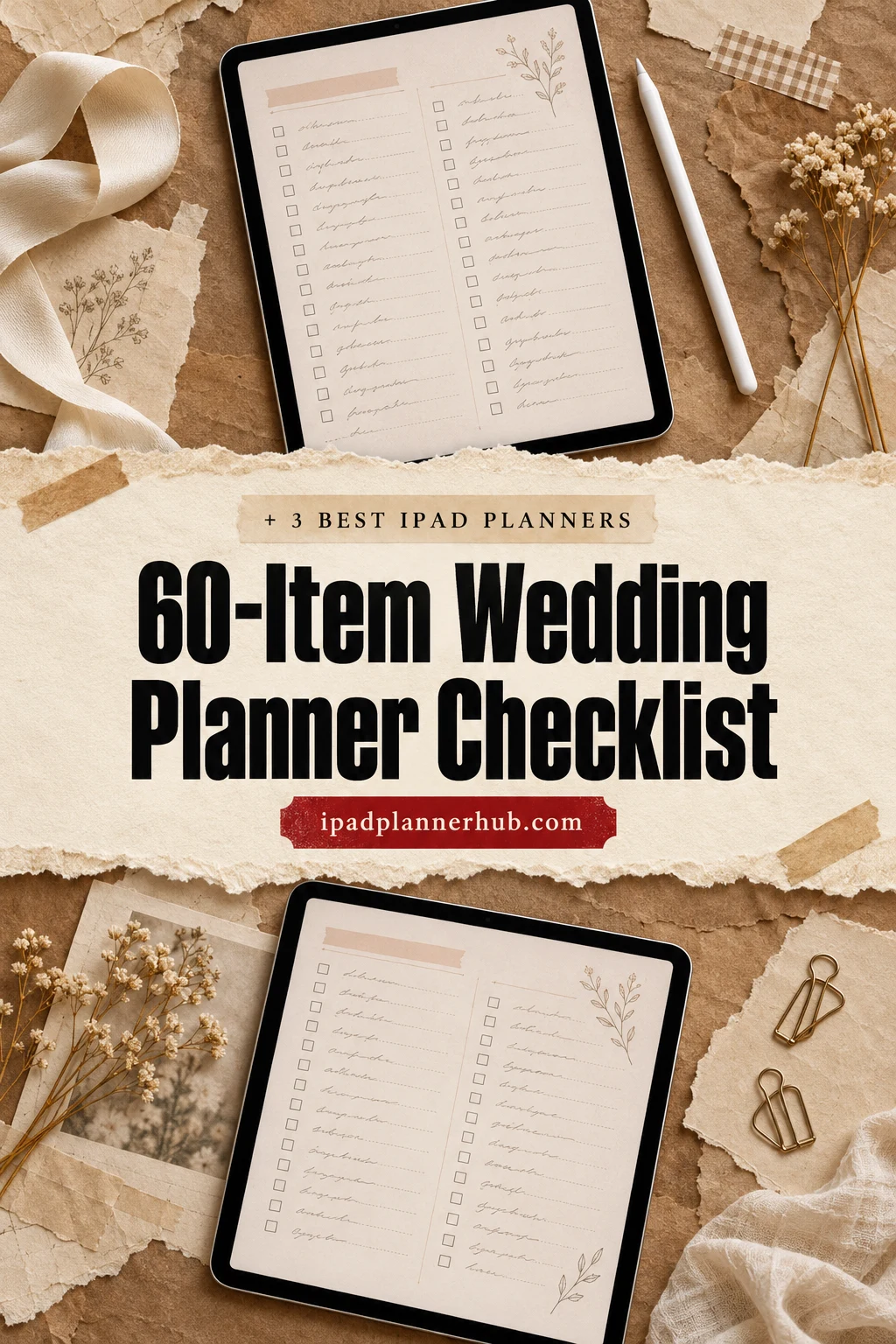
Below are 60 to-dos, month by month, from 12+ months before the wedding to the thank-you notes after it. Then 3 iPad planners from Creative Fabrica I’d use to keep it all in one place: a dedicated wedding planner, an all-in-one 2027 planner with event and budget pages, and a travel planner for the honeymoon. After that: a simple wedding budget breakdown, wedding binder tabs and how to share the plan with your partner.
60-Item Wedding Planner Checklist, Month by Month
This timeline assumes about a year of planning. Engaged for less? Start at the row that matches your date and do the earlier rows first, quickly: venue and date always come before everything else.
12+ Months Before 1–8
- 1Set a total budget together (and who pays for what)
- 2Draft a first guest list with rough numbers
- 3Pick a season or a short list of dates
- 4Agree on the style: big party, small dinner, destination
- 5Tour venues and compare what’s included
- 6Book the venue and lock in the date
- 7Start your wedding planner: budget, guests, vendors
- 8Ask your wedding party
9–11 Months Before 9–16
- 9Book the photographer
- 10Book a videographer, if you want one
- 11Book the caterer (if the venue doesn’t cater)
- 12Book the band or DJ
- 13Book the officiant
- 14Set up a wedding website
- 15Take engagement photos
- 16Start a mood board for flowers, colors and decor
6–8 Months Before 17–24
- 17Shop for the dress or suit
- 18Send save-the-dates
- 19Book the florist
- 20Reserve hotel room blocks for guests
- 21Create your registry
- 22Book hair and makeup
- 23Plan the honeymoon
- 24Order rentals: tables, chairs, linens, tent
4–5 Months Before 25–32
- 25Order invitations
- 26Cake tasting and order
- 27Book transportation for the day
- 28Plan the rehearsal dinner
- 29Buy the wedding rings
- 30Choose ceremony music
- 31Pick outfits for the wedding party
- 32Book honeymoon flights and hotels
2–3 Months Before 33–40
- 33Mail invitations (6–8 weeks before the date)
- 34Check marriage license rules where you marry
- 35First dress or suit fitting
- 36Write your vows
- 37Finalize the menu with the caterer
- 38Buy favors and guest book
- 39Order signs and the welcome board
- 40Buy shoes and accessories
Final Month 41–50
- 41Track RSVPs and chase late replies
- 42Give the final headcount to the caterer
- 43Make the seating chart
- 44Write a day-of timeline, minute by minute
- 45Final fitting
- 46Confirm every vendor: time, place, contact
- 47Send the shot list to the photographer
- 48Pick up the marriage license
- 49Prepare envelopes with vendor payments and tips
- 50Break in your shoes
Wedding Week 51–56
- 51Pack an emergency kit (safety pins, stain pen, painkillers)
- 52Rehearsal and rehearsal dinner
- 53Drop off decor and favors at the venue
- 54Hand the rings to someone you trust
- 55Pack for the honeymoon
- 56Sleep, eat and drink water
After the Wedding 57–60
- 57Send thank-you notes
- 58Return rentals and suits
- 59Preserve the dress and bouquet
- 60Name change paperwork, if you’re changing it
Marriage license rules (waiting periods, how long it’s valid, documents) differ a lot by state and country, so check the official site for where you marry as soon as you have a date.
A Simple Wedding Budget Breakdown
The budget is the first page of any wedding planner, because it decides the guest list, the venue and almost everything after. There’s no official formula, but this rough split is a common starting point for a traditional wedding:
| Category | Share of budget | Includes |
|---|---|---|
| Venue and catering | 40–50% | Venue fee, food, drinks, cake, service |
| Photo and video | 10–15% | Photographer, videographer, albums |
| Attire and beauty | 8–10% | Dress or suit, alterations, hair, makeup |
| Flowers and decor | 8–10% | Florist, rentals, lighting, signs |
| Music and entertainment | 5–10% | Band or DJ, ceremony musicians |
| Stationery and extras | 5% | Invitations, favors, transport, officiant |
| Buffer | 5–10% | The things you forgot (there are always some) |
Track every deposit and due date next to the budget, so the same page works as a wedding budget tracker. Vendors usually take a deposit at booking and the rest close to the date, so the last two months are when most of the money actually leaves your account. My digital budget planners help if you’re saving for the wedding at the same time.
The Best iPad Planners for Your Wedding Checklist
Honest note: most wedding planners on Creative Fabrica are printables or Canva templates. There’s one digital wedding planner made for the iPad that I’d recommend, plus an all-in-one 2027 planner with event and budget pages and a travel planner for the honeymoon. All three open in GoodNotes.
TL;DR: A 60-item wedding planner checklist from 12+ months out to after the wedding, a simple budget split, then 3 iPad planners to run it: a dedicated digital wedding planner, an all-in-one with a wedding section, and a travel planner for the honeymoon. Each card lists orientation, layouts and dates, plus who it suits.
- Wedding Digital Planner, IPad Planner – Best dedicated wedding planner
- 2027 Bundle Digital Planner – Best all-in-one for a 2027 wedding
- GoodNotes Travel Journal Planner – Best for the honeymoon

Best dedicated wedding planner
1. Wedding Digital Planner, IPad Planner
Orientation: PortraitLayouts: Monthly, Weekly, Daily, 10 wedding sectionsWeek start: Monday or Sunday
Best for: engaged couples, boho lovers, detail planners. Designed by TrendyCreative.
- 10 sections: gifts, vendors, guests, pre-wedding events, honeymoon, ceremony and reception, hotels, venue, attire
- Vendor list, cake and photo checklists, music and song lists
- Guest list, seating chart, rehearsal dinner planner, venue comparison
- Daily, weekly and monthly pages, Monday or Sunday start, portrait
This covers almost every row of the checklist above, each with its own page: venue comparison, vendor list, guest list, seating chart, even the rehearsal dinner. The soft, boho-chic design looks right for a wedding without being too sweet.
Best all-in-one for a 2027 wedding
2. 2027 Bundle Digital Planner
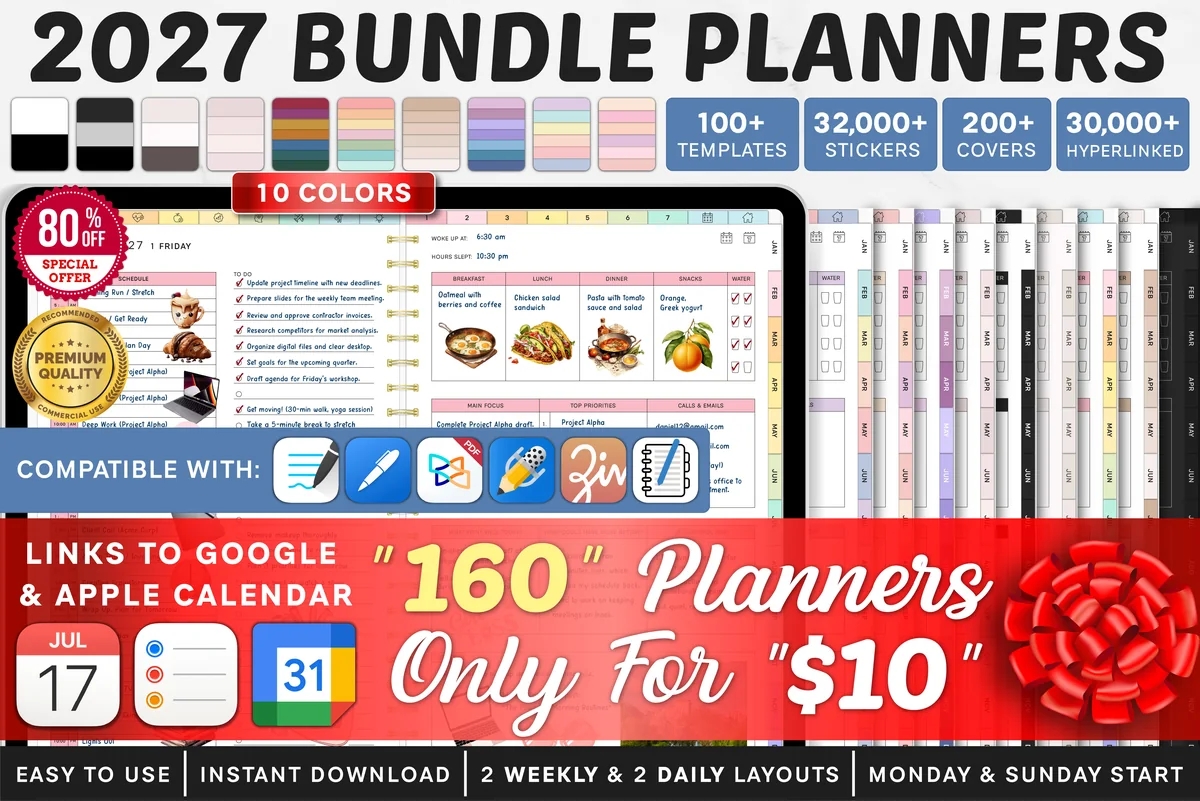
Orientation: LandscapeLayouts: Yearly, Quarterly, Monthly, Weekly, DailyDates: 2027Week start: Monday or Sunday
Best for: goal setters, challenge fans, color lovers. Designed by SuperDigitalPlanners.
- Dated 2027, Monday or Sunday start, yearly to daily pages
- Event planner, monthly budget and travel budget pages
- Links to Apple Calendar, Reminders and Google Calendar
- 10 color themes and 200+ covers
There's no wedding tab here, but for a 2027 wedding that's fine: the event planner holds the big day, the monthly budget keeps an eye on costs, and the calendar links send fittings and tastings to your phone. Everyday life stays in the same file.
Best for the honeymoon
3. GoodNotes Travel Journal Planner
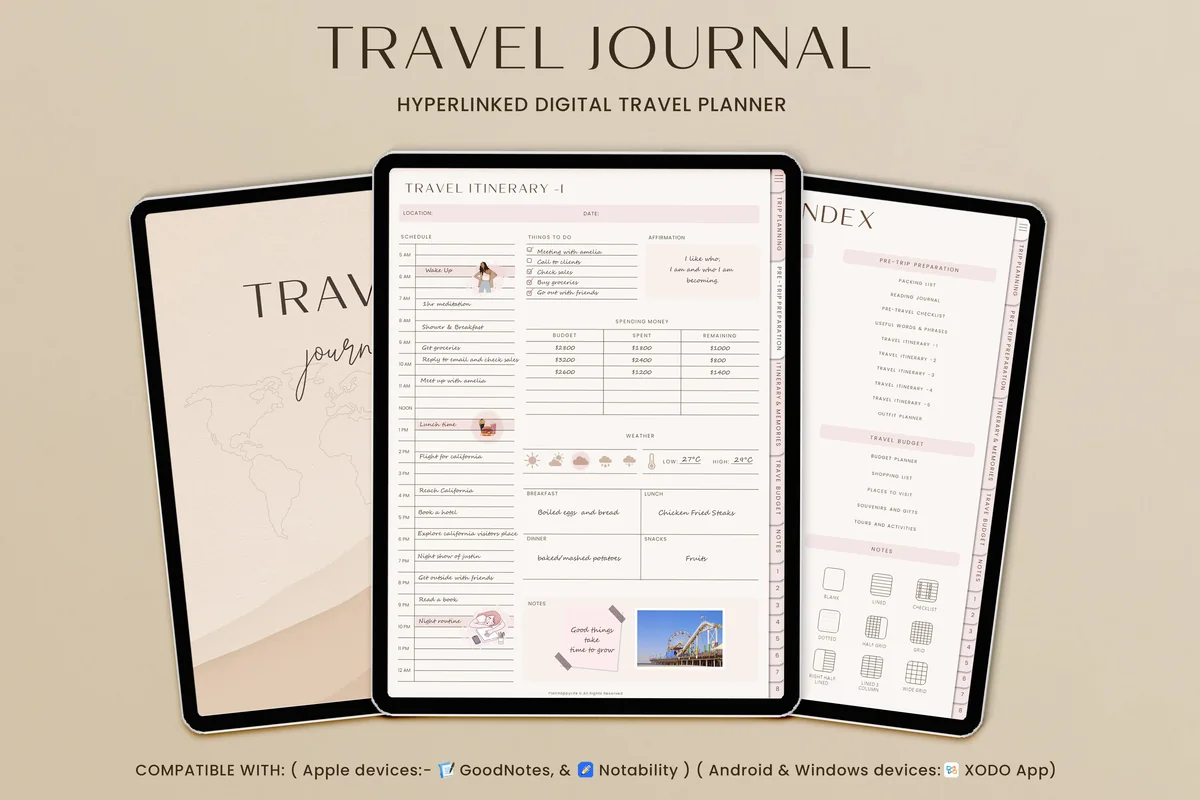
Orientation: PortraitLayouts: Trip planning, Itinerary, Journal, BudgetDates: Undated
Best for: big-trip planners, boho lovers, travel journalers. Designed by TrendyCreative.
- Destination and accommodation research, flight and transport pages
- Packing list, pre-travel checklist and 5 itinerary layouts
- Travel journal, memories page and world maps
- Budget planner, portrait, fully hyperlinked
The honeymoon is the one part of the wedding that's pure fun to plan. This planner handles research, bookings and packing, and afterwards the journal pages turn it into a keepsake of your first trip as a married couple.
Quick Comparison
| Planner | Best for | Wedding pages | Stand-out extra |
|---|---|---|---|
| 1. Wedding Digital Planner, IPad Planner | The whole wedding | 10 wedding sections | Venue comparison, seating chart |
| 2. 2027 Bundle Digital Planner | Wedding + everyday life | Event planner + budget | Calendar links |
| 3. GoodNotes Travel Journal Planner | Honeymoon | Itinerary, packing, budget | Travel journal and maps |
Wedding Planner Binder: Tabs That Work
Whether it’s a dedicated wedding planner or a folder in GoodNotes, these tabs cover everything:
- Timeline and checklist
- Budget and payments
- Guest list and RSVPs
- Vendors and contracts
- Venue and ceremony
- Attire and beauty
- Decor and mood board
- Seating chart
- Day-of timeline
- Honeymoon
Save vendor contracts and quotes as PDFs in the same GoodNotes folder. When the florist asks what you agreed on, the answer is two taps away.
What to Put in Each Tab of a Wedding Binder
- Timeline: the month-by-month checklist above, with today’s tasks highlighted.
- Budget: the total, the split by category and a payment log with due dates and deposits paid.
- Guests: names, addresses, RSVP status, meal choices and plus-ones. #1 already has a guest list template and a seating chart for this.
- Vendors: one page per vendor with contact details, quote, contract, deposit and the final payment date.
- Venue and ceremony: times, the order of the ceremony, readings and music.
- Attire and beauty: fittings, accessories, hair and makeup trials.
- Decor: a mood board with photos, colors and flower ideas.
- Seating chart: tables, who sits where and any notes for the venue.
- Day-of timeline: an hour-by-hour schedule and a list of who to call if something goes wrong.
- Honeymoon: bookings, documents and a packing list. Planning a destination wedding? The destination, accommodation and transport pages in #3 work for the wedding trip as well as the honeymoon.
Digital Wedding Binder or Paper Binder?
A paper wedding binder with printed dividers is nice to flip through with family, but it gets heavy and lives in one place. A digital wedding binder on your iPad is a GoodNotes notebook or a hyperlinked wedding planner where each tab is one tap away: you can paste in photos for the mood board, import vendor contracts as PDFs and keep the whole thing with you at every appointment. If you’d like a ready-made wedding binder template, the wedding planner at the top of my list above already has most of these tabs. Professional planners use the same structure for clients: in GoodNotes, that’s one duplicate of the file per couple.
Wedding Day Schedule Template, Hour by Hour
The day-of timeline is the page people leave too late. Here’s a sample for a 4 p.m. ceremony; shift every row to match your own start time, and copy it onto the daily page for your wedding date in #1 or onto a blank notes page:
| Time | What happens | Who needs to know |
|---|---|---|
| 9:00 | Hair and makeup start | Stylists, wedding party |
| 12:30 | Lunch for everyone getting ready | Wedding party |
| 1:30 | Photographer arrives: details, getting-ready shots | Photographer |
| 2:30 | Dressed; first look and couple portraits, if you’re doing them | Couple, photographer |
| 3:15 | Wedding party and family photos | Family, wedding party |
| 3:45 | Guests arrive, ceremony music starts | Venue, musicians, ushers |
| 4:00 | Ceremony (20–40 minutes) | Officiant, everyone |
| 4:40 | Cocktail hour, remaining family photos | Caterer, photographer |
| 6:00 | Reception: entrance, dinner, toasts | DJ or band, caterer, speakers |
| 7:30 | First dance, cake cutting, dancing | DJ or band, photographer |
| 10:00 | Last dance and send-off, vendors pack up | Venue, rentals, transport |
Leave 10 to 15 minutes of buffer between rows, because photos and hair always run over. Then make two versions: the full one for vendors, and a short wedding party schedule with only the times and places that matter to them (hair slots, photo call, toasts). The second one works as a wedding day itinerary for the bridal party, and it fits on one screenshot they can keep on their phones.
Running this sheet is the main job of a day of wedding planner. A coordinator usually steps in during the final weeks, confirms every vendor and keeps the day on time, while a full wedding planner helps from the start with budget, vendors and design. Whether a wedding planner is worth it depends on your budget and how much time you have. If you’re interviewing one, ask how many hours they cover on the day, when they take over and how they handle vendor problems, and note the answers on that vendor’s page. If you don’t hire either, hand the schedule and the vendor contact sheet to one calm friend.
Wedding Planner Ideas That Save Stress Later
- A wedding wardrobe planner: every outfit for every event (engagement shoot, shower, rehearsal, ceremony, reception, honeymoon) with fittings and accessories.
- A vendor contact sheet to hand to your coordinator or a trusted friend on the day.
- A “decided” page: colors, flowers, menu, songs. When you second-guess at 2 a.m., check what you already chose.
- A gift and thank-you tracker: who gave what, and whether the note is sent.
- A mood board page: paste screenshots from Pinterest straight into GoodNotes.
- A wedding planning journal page: a few lines after each appointment or decision. A year later it reads like the story of how the day came together.
Digital Wedding Planner or Paper Wedding Planner Book?
A paper wedding planner book is lovely to keep, but a wedding changes constantly: guest numbers, quotes, seating. On the iPad you erase and rewrite without crossing out, duplicate the guest list page when it grows, paste in inspiration photos and attach vendor PDFs. And it’s always with you at the venue walkthrough. If you want a keepsake, export the finished planner as a PDF and print the pages you love.
How to Plan the Wedding Together on One iPad Planner
- Import the planner into GoodNotes and create a folder “Wedding” for it, contracts and inspiration.
- Use GoodNotes’ sharing option to send your partner (or a parent who helps, like the mother of the bride) a link to the document, or export a PDF after each planning session.
- Give each person a pen color, so you can see who added what.
- Hold a 20-minute “wedding meeting” once a week: check this month’s checklist row, payments due and open questions.
- Keep a “waiting for” list: quotes requested, replies pending.
FAQ
What is a wedding planner binder?
It’s one place for everything about the wedding, split into tabs: timeline, budget, guests, vendors, venue, attire, decor, seating, the day-of schedule and the honeymoon. It can be a paper binder with dividers or a digital wedding binder in GoodNotes on your iPad.
What should I include in a wedding planner?
A timeline checklist, the budget with payments, the guest list with RSVPs, vendor contacts and contracts, venue details, a seating chart and a day-of timeline. Nice extras: a mood board, a wardrobe planner and a gift tracker.
How far in advance should I start planning a wedding?
Twelve to eighteen months is common, mainly because popular venues and photographers book up early. Smaller weddings can be planned in a few months; the checklist is the same, just compressed.
When should wedding invitations go out?
Usually six to eight weeks before the wedding, with the RSVP deadline about three to four weeks before. Save-the-dates go out much earlier, around six to eight months ahead, or even earlier for a destination wedding.
What is the first thing to do when planning a wedding?
Agree on the budget and a rough guest count together. Those two numbers decide which venues fit, and the venue decides the date.
Can I use an iPad as a wedding planner?
Yes. Import a digital wedding planner PDF into GoodNotes or Notability, write on it with an Apple Pencil, and keep contracts, quotes and inspiration photos in the same folder.
How do I plan a wedding timeline?
Start from the date and work backwards: about 12 months out book the venue and set the budget, 9–6 months out the photographer, caterer and attire, 3 months out invitations, final details in the last month. For the day itself, write an hour-by-hour schedule and share it with your vendors and wedding party.
How do I organize a wedding day?
Make one timeline for the day (getting ready, ceremony, photos, reception) with buffer time between steps, and a contact list of every vendor. Give a copy to one person you trust, so you don’t have to answer questions on the day. A wedding planner with a day-of schedule page keeps everything in one place.
Final Thoughts
Take the wedding planner checklist one row at a time, and the wedding stops feeling like one giant task. Start with budget, guests and venue this month; everything else has its own place later. For the trip afterwards, see my digital travel planners, or browse all wedding planners.
Still looking for an all-in-one setup? See my top digital planner picks for 2027, dated and undated.
You May Also Like
This post contains affiliate links. If you buy through them, I may earn a small commission at no extra cost to you. Learn more.