A number without a date or a unit is surprisingly hard to use later. These weight loss tracker ideas focus on building a clear personal record in GoodNotes or another iPad annotation app: what you wrote, when you wrote it and what the entry means. You do not need a beautifully filled page or a downward line to have a useful log.
I picked five digital tools with different structures, from a two-page tracker to a monthly planner with notes. Below the selection are 15 layouts and filing ideas you can adapt to a notebook you already own. These are record-keeping suggestions, not a diet, a target weight or a promise of weight loss.
Choose the record before the decoration
- One value over time: begin with date, value, unit and a short notes column.
- Several measurements: choose a grid with stable column labels and enough room for units.
- One place for everyday planning: use a planner with a tracker section and keep the private record bookmarked separately.
A ready-made challenge box is not the same thing as a measurement row. Decide whether a page records observations, completed actions or a goal. Mixing those jobs makes a pretty tracker difficult to interpret.
TL;DR: Start with a dated log and a visible unit. Choose a compact tracker for a few fields, a measurement grid for several values, or a planner if you also need daily pages. The five options below serve different record-keeping jobs; your entries and interpretation remain manual.
Quick Picks
- Best for a compact two-page start: Weight Loss Tracker Printable, Digital
- Best for a measurement grid: Body Progress Tracker – Printable & Digital
- Best for weekly notes and measurements: Healthy Weightloss Exercise Log Journal
- Best for keeping the log near daily plans: Daily Digital Planner, Pastel Pink
- Best for a portrait monthly binder: Monthly , Finance,Weight,Digital Planner
- Weight Loss Tracker Printable, Digital – Best for a compact two-page start
- Body Progress Tracker – Printable & Digital – Best for a measurement grid
- Healthy Weightloss Exercise Log Journal – Best for weekly notes and measurements
- Daily Digital Planner, Pastel Pink – Best for keeping the log near daily plans
- Monthly , Finance,Weight,Digital Planner – Best for a portrait monthly binder

Best for a compact two-page start
1. Weight Loss Tracker Printable, Digital
Orientation: PortraitLayouts: Goals and numbered boxesDates: Open month label
Best for: a small standalone tracker rather than a full daily planner. Designed by MOMAT THIRTYONE.
- Two-page PDF in 8.5 × 11-inch portrait format
- Goal and motivation fields, month heading and numbered boxes in the preview
- Seller lists GoodNotes, Notability, Xodo and Noteshelf compatibility
This is the smallest starting point here: a focused pair of pages instead of another whole planner. I like the open month label for keeping separate periods. The numbered boxes are not a dated measurement table or an automatic chart. Add your own dated log alongside them, and give any shading a neutral meaning such as a completed record review rather than pounds lost.

Best for a measurement grid
2. Body Progress Tracker – Printable & Digital
Orientation: Not specifiedLayouts: Measurement grid and goalsDates: Week rows
Best for: keeping several measurements together on a labeled page. Designed by Plamarplanners.
- PDFs in US Letter and A4 sizes; digital use in GoodNotes and Notability
- Gallery shows body outline, goals row and weekly body measurement grid
- Description also lists photo and comparison pages
The visible grid makes this the clearest match for readers who want columns for more than a single value. Label units before you begin and use only the measurements you actually need. You can leave body outlines and photo features unused. Keep this page separate from daily task lists so a private measurement record does not appear every time the planner opens.
Best for weekly notes and measurements
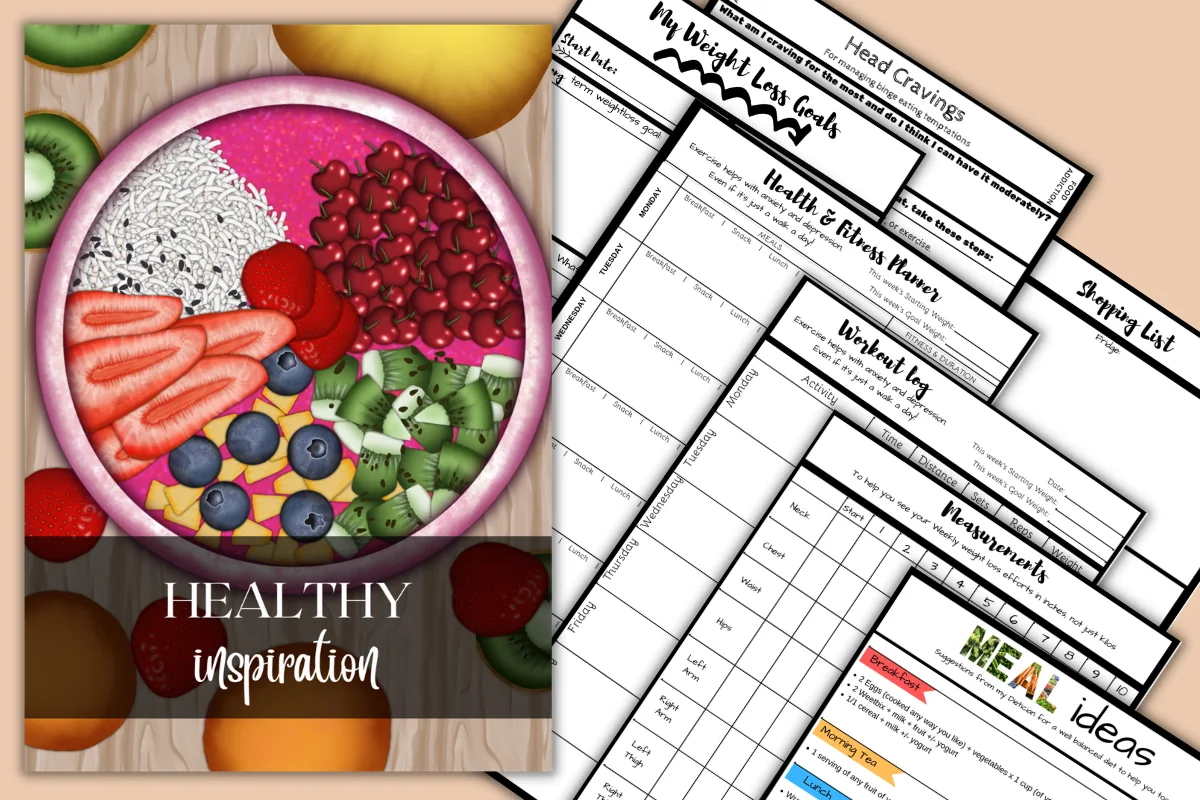
3. Healthy Weightloss Exercise Log Journal
Orientation: PortraitLayouts: Weekly logs and measurementsDates: Weekly / monthly sections
Best for: keeping a weight record beside a more detailed journal. Designed by ArtistryByAnnabel.
- Portrait PDF that the seller explicitly permits importing into GoodNotes on iPad
- Weekly starting-weight fields and a body measurement table
- Food, workout and shopping pages; seller also includes meal suggestions
There is more writing space here than in a color-in tracker. The measurement table and weekly starting-weight field are useful for organizing observations. Treat the included meal suggestions and craving prompts as optional seller content, not personalized health advice. Choose it for the record pages if those suit you, and skip sections that do not belong in your own care plan.

Best for keeping the log near daily plans
4. Daily Digital Planner, Pastel Pink
Orientation: LandscapeLayouts: Daily, finance, shopping, trackerDates: Undated
Best for: a weight-tracking page inside a compact everyday planner. Designed by MOMAT THIRTYONE.
- Undated PDF for GoodNotes, Notability, Xodo and Noteshelf on iPad or tablet
- 31 linked daily pages, five finance pages and six weekly shopping pages
- One weight loss tracker page and more than 100 sticky-note items
This pink landscape planner puts its weight page beside everyday admin. That convenience is the reason to choose it; the single tracker is not an extensive measurement journal. Keep a clearly dated note page with it if you need more space for entries. The gallery shows decorative number boxes, so decide what they mean before using them rather than assuming they form a calculated progress chart.

Best for a portrait monthly binder
5. Monthly , Finance,Weight,Digital Planner
Orientation: PortraitLayouts: 48 pages with two tracker pagesDates: Undated
Best for: keeping monthly planning and a weight section in one file. Designed by MOMAT THIRTYONE.
- Undated 48-page PDF with daily, weekly, monthly and finance sections
- Two weight loss tracker pages, three dotted note pages and linked navigation
- PDF in a ZIP archive with sticky-note files; GoodNotes, Xodo and Noteshelf listed
The portrait layout and dedicated dotted notes distinguish this option from the wide pink daily planner. Use the note pages for a dated ledger and the weight section as a simple month divider. Its finance and debt pages are extra organizational sections, not part of a health calculation. Start by bookmarking only the pages you will use so the larger bundle stays easy to navigate.
Quick Comparison
| Digital tool | Record-keeping job | Page structure | Navigation or format |
|---|---|---|---|
| 1. Weight Loss Tracker Printable, Digital | Compact starting page | Two portrait pages | Manual entries |
| 2. Body Progress Tracker – Printable & Digital | Several measurements | Weekly grid and body outline | GoodNotes / Notability |
| 3. Healthy Weightloss Exercise Log Journal | Weekly record plus notes | Portrait journal pages | PDF for GoodNotes |
| 4. Daily Digital Planner, Pastel Pink | Daily planning with a tracker | Landscape spread | Linked daily pages |
| 5. Monthly , Finance,Weight,Digital Planner | Monthly filing and notes | Portrait planner, dotted notes | Hyperlinked sections |
15 weight loss tracker ideas for clearer iPad records
Choose two or three ideas for your first page. The examples below describe layouts you can make yourself; they do not mean every selected product includes each layout. Keep the original template untouched until you know which fields are worth retaining.
Start with a readable entry
- 1Date-first ledger. Use four columns: date, value, unit and note. Write the complete date rather than just a day number so the page still makes sense after export. Leave enough row height for handwriting without shrinking the entire page. If an observation is missing, write “not recorded” rather than guessing. A simple ledger can remain useful even if you later decide to stop using charts.
- 2A visible unit key. Put the unit beside the column heading, not in a tiny footnote. If an old record uses a different unit, preserve its label instead of silently copying it into the new column. For a measurement page, label length and weight separately. This small layout choice helps prevent two unrelated values from looking comparable merely because they sit next to each other.
- 3Observed and planned fields. Separate actual entries from optional goals with clear headings. An empty goal box is fine; it is not an incomplete observation. If you use the goal fields included by a seller, keep them visually distinct from the dated record. I would use plain labels such as “recorded” and “planned” rather than color alone, especially when a page may be printed in grayscale.
- 4A short context margin. Reserve a narrow column for factual notes such as “different scale” or “entry copied from appointment notes.” Do not use the margin to diagnose why a value changed. If you do not know the reason, leave it unknown. A context field is most helpful when it explains how an entry was recorded, rather than turning every line into a judgment about effort.
Arrange a week or month
- 5Weekly summary sheet. Use a week-start heading and a short list of the dates actually recorded. The sheet can summarize a week without demanding a measurement every day. Add one line for questions you want to revisit, then stop. A weekly page is a filing choice, not advice about how often you should weigh yourself; choose a recording routine appropriate to your situation.
- 6Monthly ledger with spare rows. Write the month and year at the top, then keep rows in chronological order. Leave some unused rows rather than forcing a new record into the wrong date. When the month closes, add a simple “continued on” reference if you need another page. An undated template is useful here because you can create the next month without carrying over a previous calendar.
- 7An optional hand-drawn line chart. Keep the original dated values beside any chart you draw. Label both axes and use a consistent scale across pages you intend to compare. Leave gaps where no value was recorded instead of inventing points to make a smooth line. The graph is a different view of the entries, not a diagnosis, a forecast or proof that a particular routine caused a change.
- 8A separate measurement grid. If you choose to record body measurements, give each measurement its own named column and unit. Avoid copying every possible field from a template just because it exists. Keep the original dates visible so an occasional measurement is not mistaken for a weekly series. Blank cells can stay blank. You can also skip this page entirely and keep a single-value ledger instead.
Make the page easier to use
- 9A neutral annotation key. Choose two or three symbols with practical meanings: a dot for a copied entry, a question mark for something to clarify and a small check for a reviewed page. Write the key on the page. Avoid using red for “bad” body data or making every entry part of a winning streak. The symbols should explain the record rather than score your body.
- 10A correction trail. If you copy a value incorrectly, cross out the mistaken entry once and write the corrected value with a brief correction note. On an editable iPad page, it is tempting to erase everything without a trace. Keeping a readable correction matters when you later compare the page with another record. Do not replace an observation merely because it looks different from the surrounding entries.
- 11A private questions page. Keep questions for a healthcare professional on their own page, with references to relevant entry dates. Write what you want to ask rather than an answer you have inferred from a graph. A separate questions page is easier to find than scattered sticky notes. Before sharing it, check that the exported pages contain only the information you intend another person to see.
- 12A non-number reflection box. Add an optional question such as “Was this page easy to use?” or “Which field was confusing?” This keeps the reflection focused on your recording system. You do not have to assign a body score or find a positive change every week. If tracking feels distressing, a shorter page is not necessarily the answer; pause and seek appropriate support.
Keep the record understandable later
- 13An index for active and closed pages. Create a short contents page with the current log first and completed months below. Use explicit names such as “March record” rather than several copies named “new tracker.” Link or bookmark the pages using your app’s available tools. This is a filing system you build around the PDF; it does not add automatic navigation to a product that lacks hyperlinks.
- 14An end-of-period review. Close a month with three practical notes: which dates are included, which entries remain uncertain and where the next record begins. Do not fill missing days to make the page look complete. Keep questions separate from conclusions. A closed page should tell a future reader what it contains without requiring you to remember the circumstances of every mark or decorative sticker.
- 15A shareable copy with a clear title. Keep your editable working file and create a separate copy when you need to share selected pages. Give it a recognizable title and date range. Open the copy before sending it to check legibility and page order; confirm that private notes or photographs are not included unintentionally. The aim is a readable record, not an elaborate report or an automatically generated health assessment.
Build one useful page before copying a whole year
Start with the information you need to retrieve later. You can make the page in an existing digital notebook or adapt a selected tracker, but do not buy a large planner solely because it has more boxes. A comfortable writing area and clear labels matter more than the number of decorative elements.
- Set the heading: name the record and add its date range.
- Test a sample row: use a clearly marked fictional entry to check handwriting size, then remove it before real use.
- Check the page at normal zoom: dates, decimal points and unit labels should be readable together.
- Duplicate only after checking: preserve an empty original and make working copies in your annotation app.
For example, a page headed “April personal record” might contain date, recorded value, unit, context and question-reference columns. It does not need a target, a deadline or a reward section. If the template has these fields, leave them unused when they do not serve your purpose.
Make room for context beyond body weight
A weight loss tracker journal can hold more than numbers. If useful for your own record, add a brief written observation about energy levels, sleep, mood or activity alongside the date. These optional notes describe your experience; they do not establish why a measurement changed. Choose a few personally relevant fields so logging stays manageable rather than turning into a second job.
- Food and drink: if a food log is part of your agreed care routine, leave space for what and when you ate or drank. A blank notes page can hold this history without promising calorie calculations.
- Habits and movement: record a factual observation such as a walk or a bedtime, without treating it as proof of a weight-loss result. Keep exercise details in your separate workout record.
- Comparable entries: note the scales, time and conditions used for a reading. If these differ, mark the difference so you do not confuse a change in recording conditions with a meaningful trend.
- Review time: you might set aside a weekly filing session to check dates and missing labels. This is a schedule for reviewing the page, not a requirement to weigh daily or weekly.
- Clinician questions: if you are receiving weight-management treatment, keep questions and dated observations together for your healthcare professional. Do not change medication or doses based on a tracker alone.
Choose a weight loss tracker template by the task it makes easier: a compact record, a measurement grid or a journal with space for context. A printable version can also serve as an iPad writing surface when the seller explicitly supports digital annotation, as with the hybrid tools in this selection. Check the individual format before importing; a paper-oriented layout may need more zoom than a landscape digital planner.
Read a weekly average alongside your journal notes
If your existing routine includes several comparable readings per week, reserve a summary row for their weekly average. Add the recorded values and divide by the number of readings, using the same unit throughout. For a fictional example, 170, 171 and 169 pounds give an average of 170 pounds; label that result as a three-reading average so the calculation stays transparent.
Keep the original entries behind the summary, and record how many readings each week contains. Compare equivalent periods rather than selecting whichever individual number looks most encouraging. If your routine uses one reading per week, retain that dated entry without inventing extra values to calculate an average.
Review a plateau without rewriting the record
If you describe an unchanged stretch as a plateau, mark its actual date range and keep the observations intact. A review after four weeks can bring together the recorded values, gaps and questions you want to discuss, without estimating missing days. The page shows what you recorded; it cannot explain the cause or separate changes in body composition.
Your review can also go beyond the scale by noting completed walking workouts or another habit already linked to your health goals. If your routine includes water intake, give it a separate labeled field rather than mixing it into the weight column. Choose details that feel useful or motivating to revisit, and remove fields that you struggle to manage.
Template or app: which job needs doing?
A PDF-based iPad record is useful when you want a page you can annotate and arrange yourself. Handwritten entries do not become calculations just because they are on a tablet. If you need reminders, automatic graphs, device imports or calendar synchronization, check the functions of your chosen app separately; a planner page alone does not supply them.
- Manual page: flexible labels and room for context, with entries and calculations handled by you.
- Dedicated app: consider it when automatic data handling is essential, after checking its actual functions and privacy settings.
- Spreadsheet: a different tool for calculations; this selection focuses on writing and filing records on iPad.
For a separate exercise record, compare the digital workout planners. If you want a longer narrative around your notes, the fitness journal selection has a different emphasis. Keep your measurement log distinct from training sets or workout targets so the two records remain easy to read.
Frequently asked questions about weight tracker pages
What should a weight loss tracker include?
For a basic personal log, date, recorded value and unit are a practical starting point. Add a short context column only if it helps you interpret the record later. Goals, photographs and body measurements are optional fields, not requirements for a valid entry.
How do I set up my log in GoodNotes?
You can write a manual log on a notebook page or import a compatible PDF and annotate it. Use the template’s headings where they suit your record and add your own labels where they do not. Check your app’s current import, duplication and export controls rather than expecting the PDF to install new app features.
Is a weekly or monthly page better?
Choose the period that makes your notes easiest to find. A weekly page leaves room for context; a monthly page keeps a longer sequence together. Neither layout sets a medically appropriate weighing frequency. That is a separate decision from how you organize the pages.
Can a free notebook page work instead?
A notebook you already own can be enough for date, value, unit and notes. The paid options above provide prearranged pages and different filing structures. Compare that convenience with the time needed to build your own grid. Access through a subscription promotion does not make a product independently free.
Which tracker is the most accurate?
This article compares page structures, not scales, medical devices or measurement accuracy. A template records what you enter. Clear dates and units can reduce transcription confusion, but they cannot verify the accuracy of the original measurement or determine your health.
Does tracking help, and how often should I update the page?
A dated journal gives you a record to review instead of relying on memory, but filling boxes does not guarantee that you will lose weight. Update the page when you make an observation within your chosen routine, then use a weekly review to check labels and collect questions. Your preferences can shape the layout: some people want a compact ledger, while others need space to describe their weight management journey. Keep the recording schedule separate from decisions about how often to weigh yourself.
When should I pause tracking or ask for help?
If recording weight makes you anxious, leads to repeated checking or affects how you eat, pause and speak with a qualified healthcare professional. The NHS guidance on anorexia symptoms identifies frequent weighing among possible warning signs and advises getting medical help when you suspect an eating disorder. A tracker does not diagnose or treat one. Ask your clinician about appropriate monitoring if you have a health condition or are unsure whether weight tracking is suitable for you.
Keep the useful fields and leave the rest
A useful weight loss tracker helps you retrieve a record you can understand later: dated entries, visible units and enough room for a factual note. I would start with the plain ledger, test it on one page and add only the ideas that solve a real filing or readability problem. A complete-looking chart is less useful than an honest record with clearly marked gaps.
You May Also Like
I receive affiliate compensation when a reader buys through a qualifying link here. This does not add a charge to your purchase. My affiliate disclosure explains the arrangement.