Starting a workout routine is easy; the third week is hard. Motivation fades, you can’t remember what you lifted last time, and without a plan the gym turns into wandering between machines. A digital workout planner on your iPad fixes both ends: you plan the week’s sessions in advance and log every workout, so you can see progress and keep going when motivation doesn’t.
Below are the 6 best planners for fitness from Creative Fabrica I’d use on my iPad, from a dedicated workout log book to everyday planners with a solid fitness section, and each one works as a fitness journal too. After the list: what to log so progress becomes visible, four simple weekly workout plans from 3 to 5 days, and whether a template or a fitness app suits you better.
The 6 Best Digital Workout Planners for iPad I Found
Almost every “fitness planner” on marketplaces is a printable book or a Canva template, so I kept only digital planners for the iPad, and skipped one that is still dated 2026. The first two are dedicated fitness planners; the other four are planners with a real fitness section, chosen for how well they handle workouts.
TL;DR: 6 iPad planners for workouts: 2 dedicated fitness planners with workout logs and body measurements, and 4 everyday planners with a real fitness section. Each card lists orientation, layouts and dates, plus who it suits.
Quick Picks
- Best for complete fitness planner: Workout & Fitness Plan Digital Planner
- Best for gym log: Workout Log – Fitness Tracker
- Best for fitness section in a 2027 planner: 2027 Digital Planner | Monday and Sunday
- Best for a 30-day challenge: Digital Planner Cute Pastel ( Undated )
- Best for workouts on the weekly page: All-in-One Digital Planner 2027
- Best for simple fitness pages: Undated Digital Planner, Life Planner
- Workout & Fitness Plan Digital Planner – Best complete fitness planner
- Workout Log – Fitness Tracker – Best gym log
- 2027 Digital Planner | Monday and Sunday – Best fitness section in a 2027 planner
- Digital Planner Cute Pastel ( Undated ) – Best for a 30-day challenge
- All-in-One Digital Planner 2027 – Best for workouts on the weekly page
- Undated Digital Planner, Life Planner – Best simple fitness pages
Best complete fitness planner
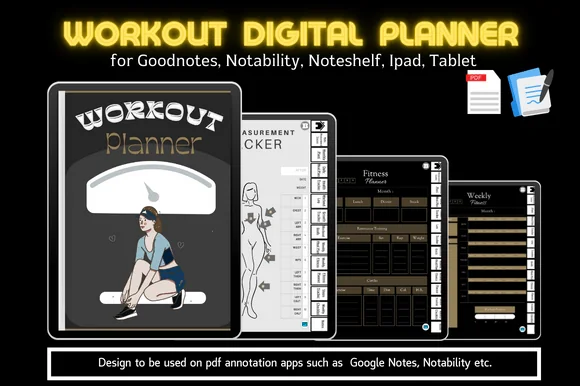
1. Workout & Fitness Plan Digital Planner
Orientation: PortraitLayouts: Monthly, Weekly, Workout log, MeasurementsDates: Undated
Best for: fitness beginners, body transformation goals, dark mode fans. Designed by MoiDigitalPlanner.
- Workout log, weekly fitness page, fitness planner and workout goals
- Body measurement tracker, growth tracker and before/after measurement photo page
- Steps tracker, health tracker and a weekly checklist
- Daily and weekly meal plans; hyperlinked tabs, made for GoodNotes on the iPad
Everything for a fitness goal sits in one dark, sporty planner: the plan, the log, the measurements and the food. The before/after photo page is the motivating part; seeing progress is what keeps people going when the scale doesn't move.

Best gym log
2. Workout Log – Fitness Tracker
Orientation: LandscapeLayouts: Daily workout, Weekly fitness, Exercise logDates: Undated
Best for: gym-goers, strength trainers, home workout fans. Designed by Plamarplanners.
- Exercise log with sets, reps and weights
- Daily workout tracker and weekly fitness planner
- Cardio tracker, progress summary sheets and body measurements
- Digital version for GoodNotes and Notability, with tabs for every month
This is a proper training log: one row per exercise with sets, reps and weight, so you know exactly what to lift next time. If you follow a strength program, that's the page you'll open most. Clean and neutral, no distractions.
Best fitness section in a 2027 planner
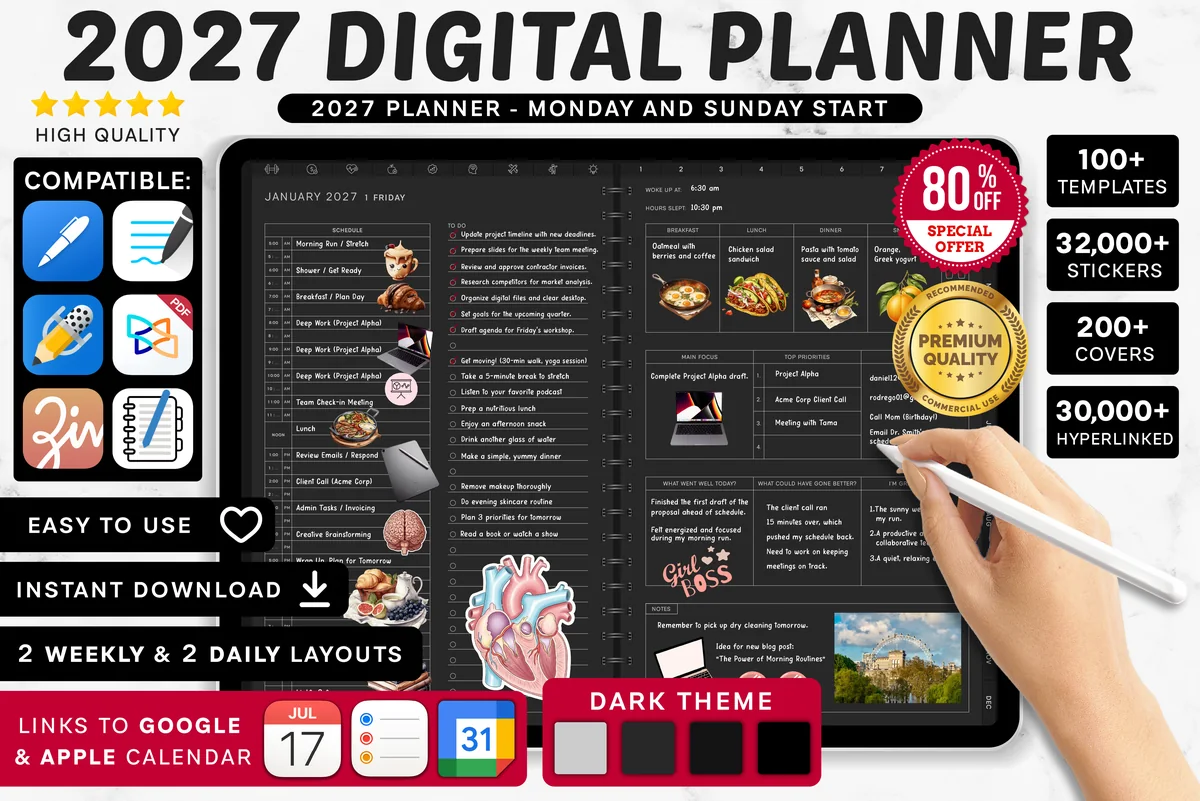
3. 2027 Digital Planner | Monday and Sunday
Orientation: LandscapeLayouts: Yearly, Quarterly, Monthly, Weekly, DailyDates: 2027Week start: Monday or Sunday
Best for: busy professionals, dark mode fans, calendar app users. Designed by SuperDigitalPlanners.
- Fitness section with 8 trackers: fitness goals, workout calendar, planner and log
- Workout checklist so you pack everything for the gym
- Nutrition trackers and a meal plan in the same file
- Dated 2027, links to Apple Calendar, Reminders and Google Calendar
The workout calendar is the page I'd use first: block your sessions for the month the way you'd book a meeting. With the log and goals in the same planner as your work week, training stops being an afterthought.
Best for a 30-day challenge
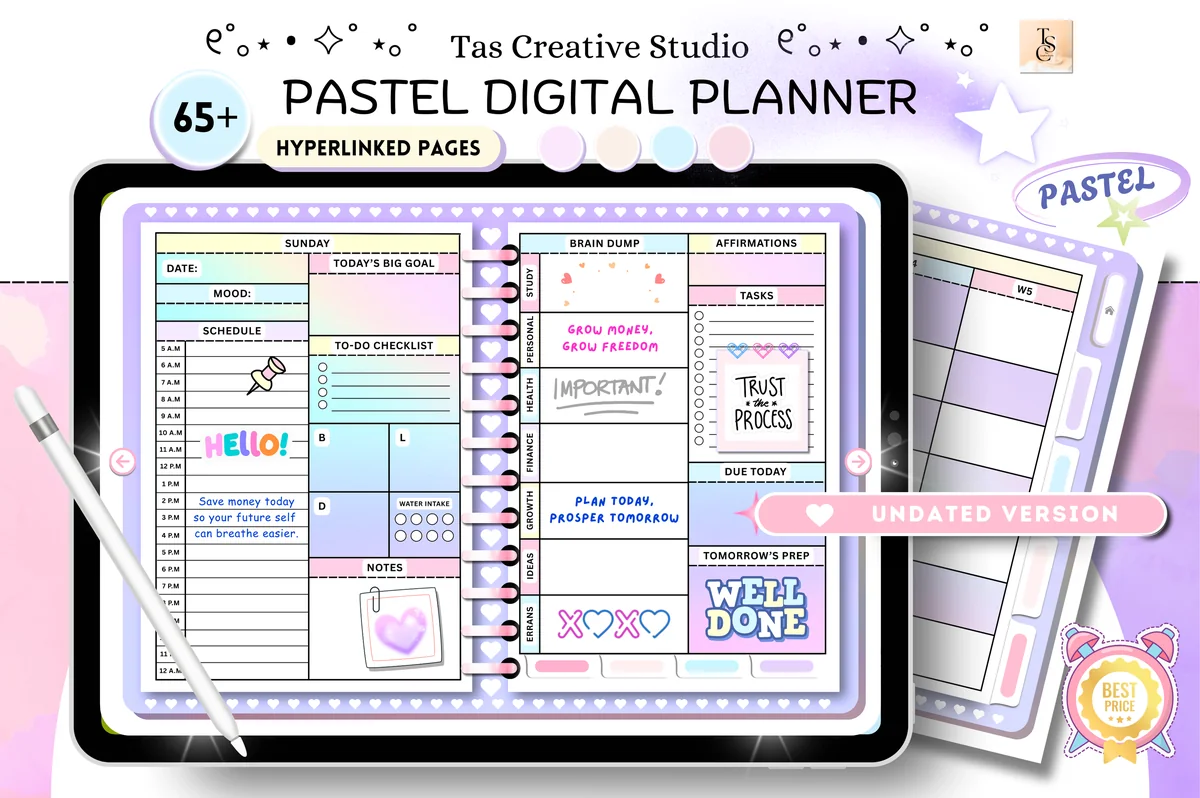
4. Digital Planner Cute Pastel ( Undated )
Orientation: LandscapeLayouts: Monthly, Weekly, DailyDates: Undated
Best for: pastel lovers, challenge fans, beginners. Designed by Tas Creative Studio.
- Monthly workout plan
- 30-day fitness challenge and 30-day mental health challenge
- Weekly meal tracker and vitamins and supplements page
- 68 undated hyperlinked pages, landscape, rated 5.0
A 30-day challenge is one of the easiest ways to start moving again, and this planner has one built in, next to a monthly workout plan. The pastel design keeps it light, which matters when the goal is to make exercise feel less like a chore.

Best for workouts on the weekly page
5. All-in-One Digital Planner 2027
Orientation: LandscapeLayouts: Yearly, Monthly, Weekly, DailyDates: 2027Week start: Monday
Best for: busy professionals, budgeters, people who want one planner for everything. Designed by Heartcraft Studio.
- Workout log every month and workout planning on every weekly page
- Workout planner, habit, mood and sleep trackers in a health section
- Meal planner and grocery list for the food side
- 655 pages, dated 2027, landscape
Here workouts are part of the weekly page, so you plan training in the same glance as meetings and dinners. That's the simplest way to make sure sessions actually happen. Add the sleep tracker and you'll see how rest affects your workouts.
Best simple fitness pages
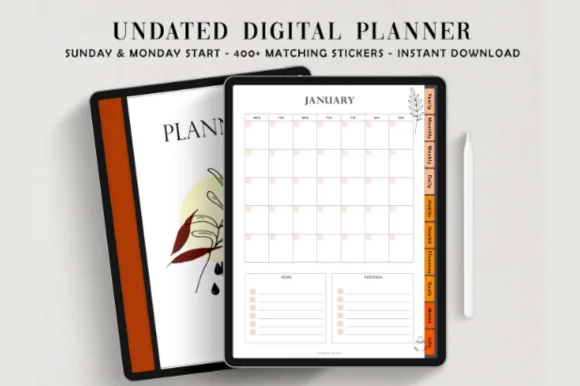
6. Undated Digital Planner, Life Planner
Layouts: Yearly, Monthly, Weekly, DailyDates: UndatedWeek start: Monday or Sunday
Best for: autumn aesthetic lovers, organized planners, habit trackers. Designed by ThePlannersDelight.
- Health section: workout log, body progress, meal planner and mood tracker
- Monthly habit tracker for workout streaks
- Goal planner, goals wheel and vision board
- 110 undated pages, Monday and Sunday start files, 1,800+ stickers
Not everyone needs a dedicated gym planner. Here a workout log and a body progress page sit next to a habit tracker and goals, which is plenty for walks, yoga or a couple of gym days a week. Warm autumn colors, too.
Quick Comparison
| Planner | Best for | Workout pages | Stand-out extra |
|---|---|---|---|
| 1. Workout & Fitness Plan Digital Planner | A full fitness goal | Log + measurements + steps | Before/after photo page |
| 2. Workout Log – Fitness Tracker | Strength training | Sets × reps × weight | Cardio tracker |
| 3. 2027 Digital Planner | Monday and Sunday | Workouts in a yearly planner | 8 fitness trackers | Workout calendar |
| 4. Digital Planner Cute Pastel ( Undated ) | Getting started | Monthly plan + 30-day challenge | Supplements page |
| 5. All-in-One Digital Planner 2027 | Weekly workout planning | Monthly log + weekly plan | Sleep tracker |
| 6. Undated Digital Planner, Life Planner | Light fitness tracking | Workout log + body progress | Habit tracker |
Log It, See It, Keep Going: What to Track
- Every session: date, exercise, sets × reps × weight (or time and distance for cardio), and one word for how it felt.
- Every week: how many sessions you did versus planned. Three out of three beats five planned and two done.
- Every month: body measurements or a progress photo, and your best lift or longest run.
- Progress rule: when all sets feel doable, add a little weight, one more rep or a few more minutes next time. Your log tells you when.
That’s the “see it” part: after a month of logging, the numbers show progress even on days when the mirror doesn’t.
4 Simple Weekly Workout Plans to Start With
- Beginner, 3 days: full-body workouts on Monday, Wednesday and Friday (squat, push-up or chest press, row, plank), plus a walk on two other days.
- Intermediate, 4 days: upper body on Monday and Thursday, lower body on Tuesday and Friday, one easy cardio session on the weekend.
- Home, no equipment: 20–30 minutes of bodyweight circuits three times a week (squats, lunges, push-ups, glute bridges, planks) and a daily step goal.
- Intermediate, 5 days: a 5 day workout plan with push (chest, shoulders, triceps) on Monday, pull (back, biceps) on Tuesday, legs on Wednesday, then upper body on Thursday and lower body on Friday; rest or walk on the weekend.
Write the plan on your weekly page, then check each session off. If you’re new to exercise or have a health condition, it’s worth checking with a doctor or a trainer first.
How to Build Your Own Workout Plan in 6 Steps
The four plans above are starting points. Once you know what you like, a workout planner makes it easy to build your own exercise plan and adjust it as you go. This is the order I’d fill in the pages:
- Write down one goal and your starting point. “Run 5 km without stopping” or “squat with more weight by spring”, plus what you can do today. That first entry is what your progress will be measured against.
- Choose the days you can really keep. Look at your weekly calendar first, then block the sessions. Three you’ll do beat five you’ll skip.
- Mix the types of exercise. Strength on some days, cardio on others, and a few minutes of stretching or mobility at the end. One color per type on the monthly page shows the balance at a glance.
- Write the exercises with a target. Sets and reps for strength, time or distance for cardio. Write the program once on a template page and copy it into the weekly spread.
- Plan the rest days, too. Mark them on the calendar so a day off feels like part of the plan, not a missed workout.
- Log, then review once a month. Use the progress rule from the tracking list: when every set feels doable, add a little. Once a month, look at the log and the measurements and change one thing.
If you like a habit tracker, add one line for “workout done” next to water and sleep. A row of checked boxes is a quiet reason to keep going on the weeks when the numbers don’t move.
Workout Journal or Workout Planner: Which Do You Need?
A planner looks forward: which days you train, what you’ll do, what the goal is. An exercise journal looks back: what you actually lifted, ran or stretched, and how it felt. You need both, and the good news is that the best workout journals for iPad are really both in one file. #1 and #2 on my list behave like a classic gym journal with a log page per session, while #5 and #6 add a workout log to a full life planner.
If yoga classes appear in your weekly plan, keep the intended class separate from the notes you write afterward. A yoga practice record can preserve the class source, an observation and a teacher question without treating each session as a target to beat.
If you want a daily fitness planner, look for a daily workout tracker (#2 has one) and duplicate it every training day. If you’d rather keep a health and fitness journal that also covers food, sleep and mood, #1, #5 and #6 put those pages in the same file. If logging is the part you care about most, my list of digital fitness journals covers dedicated workout logs, a weight-loss journal and a run and walk tracker.
A Fitness Journal Example: One Entry
Here’s what one day in my fitness journal would look like. It takes about two minutes after the session:
- Date and plan: Tuesday, lower body A.
- Log: squats 3 × 8, Romanian deadlifts 3 × 10, lunges 2 × 12 per leg, 10-minute walk to cool down.
- Compared with last week: squats up one small step in weight; lunges the same.
- How it felt: legs heavy at the start, strong by set three.
- Next time: add one rep to the deadlifts.
What I Look For in Workout Planners
- A real log. Space for sets, reps and weight, not just a checkbox that says “worked out”.
- A weekly or monthly plan. Sessions planned in advance actually happen.
- Measurements or progress pages. Proof of progress keeps motivation up.
- Food nearby. Training and meals go together; a meal plan in the same file helps.
- Made for the iPad. GoodNotes or Notability with hyperlinked tabs, so logging between sets takes seconds.
Workout Planner Template or Fitness App?
Fitness apps are great at counting: steps, heart rate, guided workouts, automatic charts. A workout planner template on the iPad is better for planning and reflecting: your own program, notes on how each session felt, measurements and meals on the same page. There’s no subscription, and writing a session down makes it feel like a commitment. Many people use both: the watch or app for the numbers, the planner for the plan. Workout planner templates also work as a fitness tracker template for anything an app doesn’t count: how a session felt, measurements, meals.
How to Set Up a Workout Planner in GoodNotes
- Import the PDF into GoodNotes (Share → GoodNotes → Import as New Document).
- Write your program once on a template page: exercises, sets and target reps.
- Duplicate the workout log page for each session, so last week’s numbers are one swipe back.
- Bookmark the current week and the log; you’ll open them at the gym.
- Take measurements on the first day of each month and add them to the progress page.
FAQ
How do I set up a workout plan as a beginner?
Keep it small: three full-body sessions a week, a few basic exercises, and a short note after each one. A workout planner helps beginners more than anyone, because a simple plan tells you what to do when you walk into the gym, and a log shows progress early, when results aren’t visible yet. The 3-day plan above is a good start; if you’re new to exercise or have a health condition, check with a doctor first.
What should a good workout planner include?
A weekly or monthly workout schedule, a log with sets, reps and weight, a place for goals, and a progress page for measurements or photos. Meal planning and a habit tracker are useful extras.
Can AI like ChatGPT create a workout plan?
An AI chat tool can draft a starting plan if you tell it your goal, the days you have and the equipment you can use. Treat it as a draft: it doesn’t see how you move or how a session felt. Copy the plan into your workout planner, log what you actually do, and adjust from your own numbers. For injuries or health conditions, a doctor or a qualified trainer is the better source.
Is a digital fitness planner better than a paper workout log book?
For most people, yes, as long as the iPad is with you at the gym or at home. A digital fitness planner does everything a paper fitness log book does, but you can duplicate a log page instead of running out of them, jump between months with tabs and keep your plan, log and progress photos in one file. Unlike paper fitness journals, it’s never left at home. If you’d rather not take the iPad to the gym, note your sets on your phone and copy them in the evening.
Is there a free digital fitness planner?
For a free start, you can draw a simple workout log on a blank GoodNotes page. The planners above are paid, usually a few dollars, and many are included in Creative Fabrica’s All Access subscription; you get ready layouts with hyperlinks and progress pages.
What is a workout log, and how do I track my workouts?
A workout log is a record of every training session: the date, exercises, sets, reps and weight (or time and distance for cardio), plus a quick note on how it felt. Compare with last week before you start, so you know when to add weight or reps, and the log will show your progress and plateaus over weeks and months. In a digital planner you can duplicate the log page as often as you need.
What is the best workout planner for iPad?
If you want to plan sessions and keep meals and body measurements in the same file, the Workout & Fitness Plan Digital Planner (#1) is the one I’d pick. If logging matters most, the Workout Log – Fitness Tracker (#2) has an exercise log with sets, reps and weights, a cardio tracker and tabs for every month. Already using an everyday planner? #3 to #6 add a fitness section to it, so one file covers the whole week.
Can I use a digital planner as an online fitness planner?
Partly. These are PDF planners for GoodNotes or Notability, not web apps, so there’s no online account or automatic workout data. If your note app syncs between your iPad and phone, your exercise planner goes with you, but you fill it in by hand. #3 is the only one here with links to Apple Calendar, Reminders and Google Calendar.
Final Thoughts
Workouts stick when they’re planned and progress is visible, and that is all good workout planners really do. Pick a planner for fitness that matches how you train, write a simple weekly plan in your digital workout planner, log every session, and look back once a month. Fuel it well with my digital meal planners, add a few habit tracker ideas, or browse all workout planners. Cooking ahead for busy training days? See my meal prep planners.
If you’re choosing your main planner for next year, start with my list of the 10 best iPad digital planners for 2027.
You May Also Like
This post contains affiliate links. If you buy through them, I may earn a small commission at no extra cost to you. Learn more.