The essay is on the syllabus, the lab report is in a class announcement, and the discussion post is hiding in another tab. An assignment tracker gives those scattered commitments one place to land on your iPad, with a next action beside each deadline.
Start with a readable list you can update between classes. Below are five study planners with different levels of structure, followed by twelve ways to turn that list into a working system. Some have dedicated assignment pages; others give you a study or daily task layout to adapt yourself.
TL;DR: Start with one semester deadline list, then give each active assignment a next action and a submission check. These five iPad study planners offer different starting points: dedicated assignment pages, wider academic organization or a daily task sheet.
Quick Picks
- Best for a focused assignment workflow: Editable Student Planner
- Best for subject-by-subject organization: Digital Semester Planner for Goodnotes
- Best for matching deadlines to study time: Simple Student Planner
- Best for planning the next study session: STUDENT DIGITAL PLANNER for Goodnotes
- Best for a single daily action list: Study Planner • Coffee Latte
- Editable Student Planner – Best for a focused assignment workflow
- Digital Semester Planner for Goodnotes – Best for subject-by-subject organization
- Simple Student Planner – Best for matching deadlines to study time
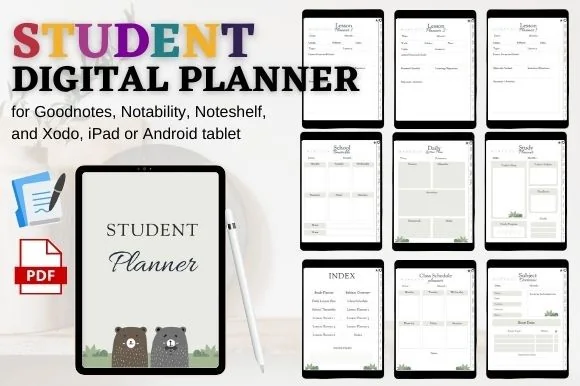
- STUDENT DIGITAL PLANNER for Goodnotes – Best for planning the next study session
- Study Planner • Coffee Latte – Best for a single daily action list
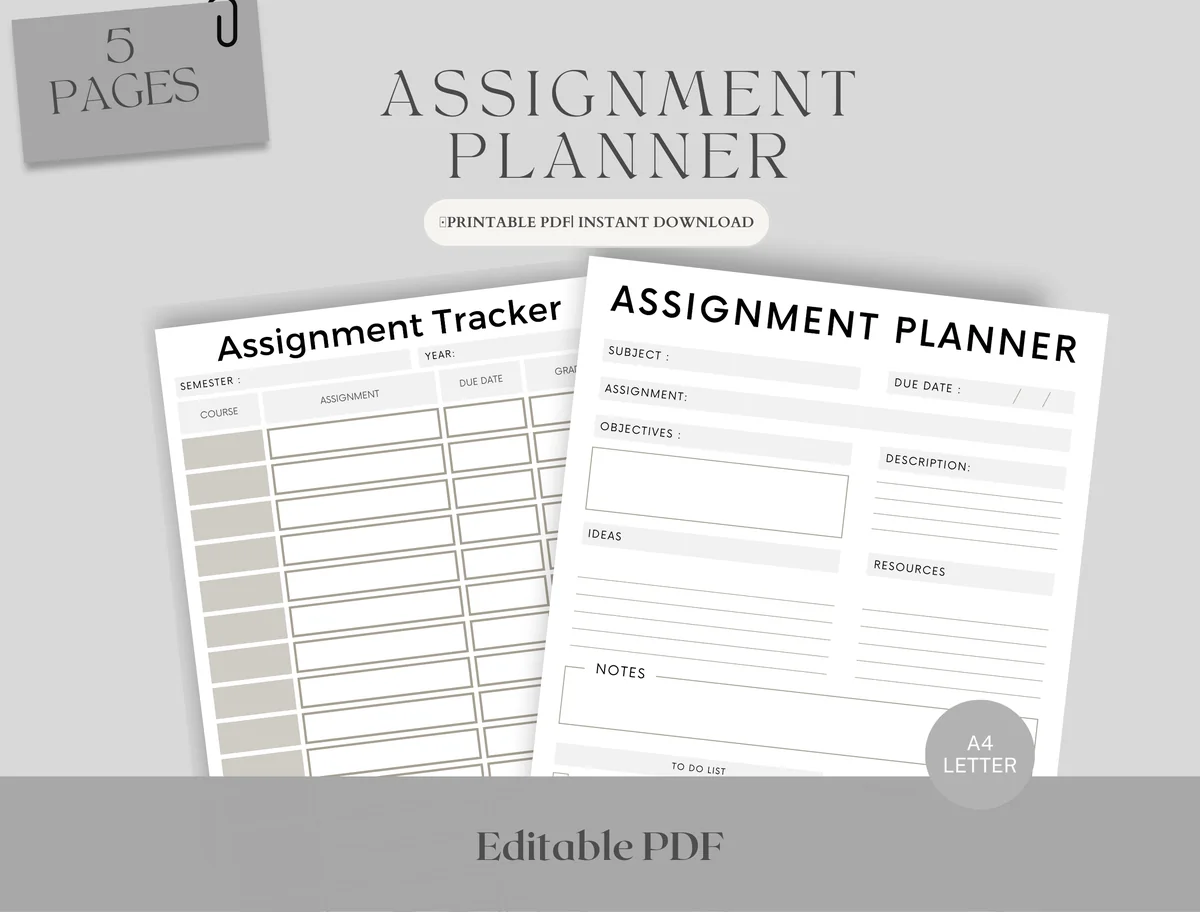
Best for a focused assignment workflow
1. Editable Student Planner
Layouts: 5; assignment tracker and planner, weekly and monthlyPaper: A4 and LetterFormat: Fillable PDF
Best for: high school students, college students, deadline jugglers. Designed by Upbeat.
- Five pages: assignment tracker, assignment planner, two weekly schedules and a monthly planner
- PDF files in A4 and Letter sizes; printable and fillable
- Digital use with GoodNotes, Notability or another PDF-supported note-taking app
The assignment page puts objectives, resources, a to-do list and status choices together. That is the clearest starting point here if your deadline list is already long but you still struggle to begin. Keep the tracker as the overview and use a separate assignment page for a substantial essay or project.
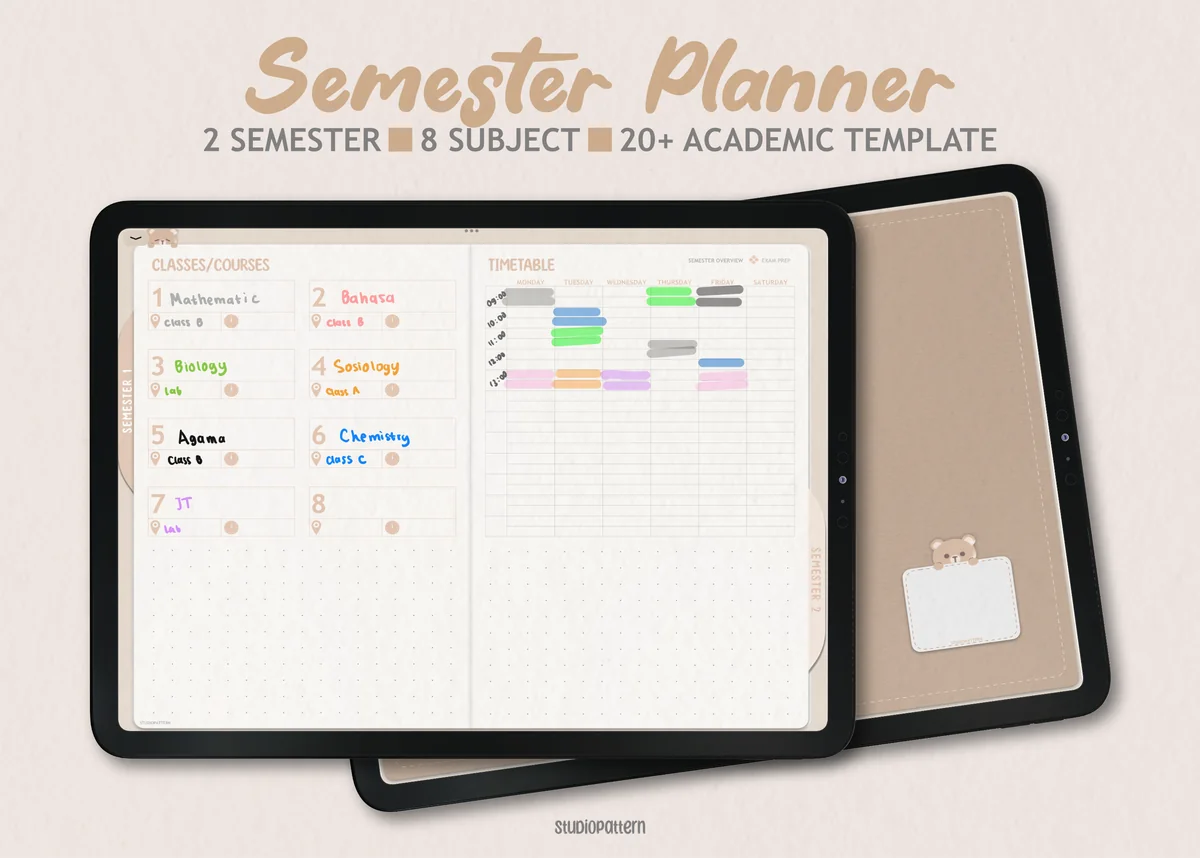
Best for subject-by-subject organization
2. Digital Semester Planner for Goodnotes
Sections: 2 semesters; up to 8 classes eachFormat: Hyperlinked PDFWeek start: Monday calendar shown
Best for: college students, high school students, exam season. Designed by studiopattern.
- Two semesters with up to eight classes per semester
- Class overview with assignment, reading and grade trackers
- Hyperlinked semester PDF, PDF manual and GoodNotes-only .collection calendar elements
A separate home for each class makes sense when the supporting notes matter as much as the deadline. The class overview links to its trackers, while the semester spread gives the timetable a wider view. The seller recommends a tablet with Apple Pencil or a stylus; annotation apps may require a separate purchase.
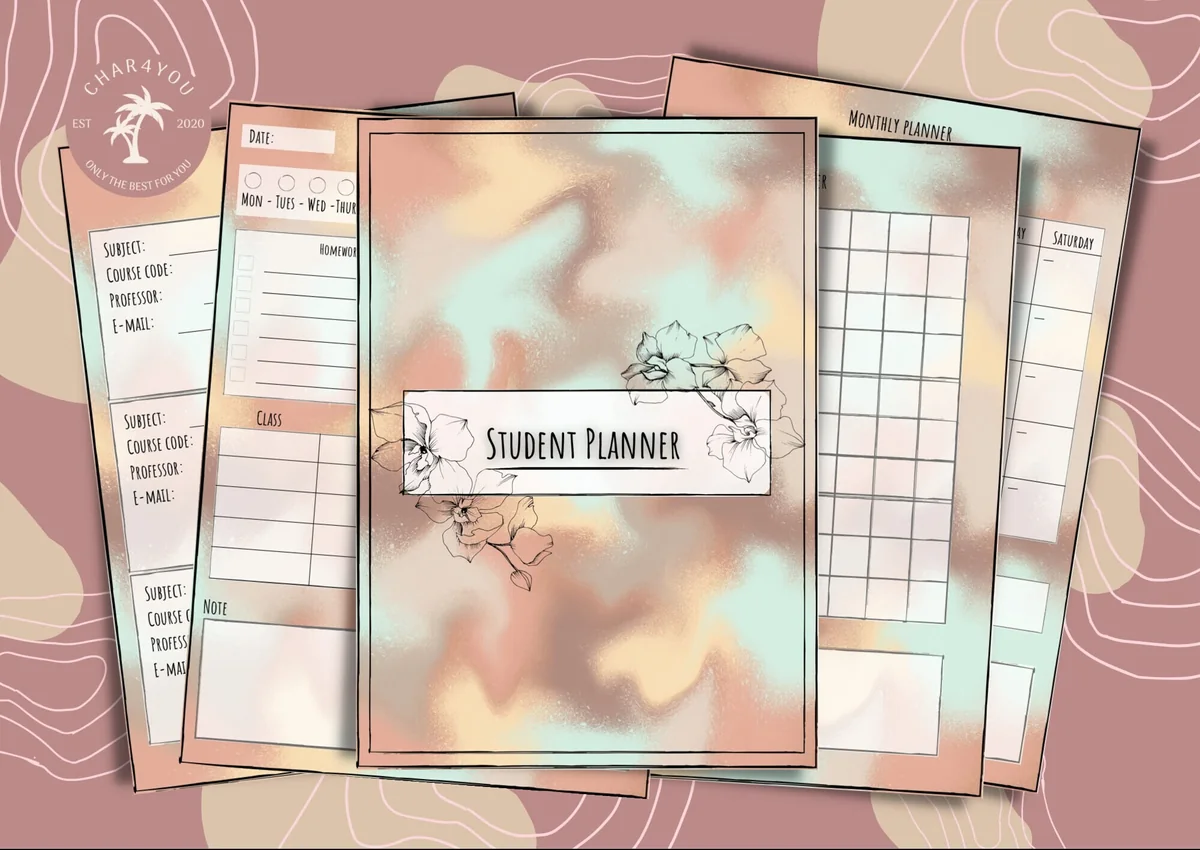
Best for matching deadlines to study time
3. Simple Student Planner
Layouts: Daily, weekly, monthly and study trackerFormat: PDF; color and black-and-whiteWeek start: Monday or Sunday monthly options
Best for: high school students, college students, budget shoppers. Designed by Char4You.
- Class schedules, class information and grade tracking
- Daily, weekly and monthly planning plus a study tracker
- PDF for apps such as GoodNotes; color and black-and-white versions
A due date only helps if you also decide when to work. I like this option for the daily and weekly context around assignments, especially when lecture hours and study sessions compete for the same afternoon. Its description gives a choice of 12- or 24-hour time and Monday- or Sunday-start monthly planners.
Best for planning the next study session
4. STUDENT DIGITAL PLANNER for Goodnotes
Layouts: Study planner, subject overview, schedules and lesson pagesFormat: Digital PDF planner
Best for: high school students, student teachers, simple planners. Designed by mixxdigitaldesign.
- Hyperlinked index, tabs and buttons
- Study planner, subject overview, class schedule and school timetable
- Daily lesson plan, six lesson-planner pages, notes and extra pages
The study spread has room for priorities and a checklist, making it useful for planning the next work session alongside a subject overview. Use these pages to plan work sessions and keep a separate master deadline list.
Best for a single daily action list
5. Study Planner • Coffee Latte
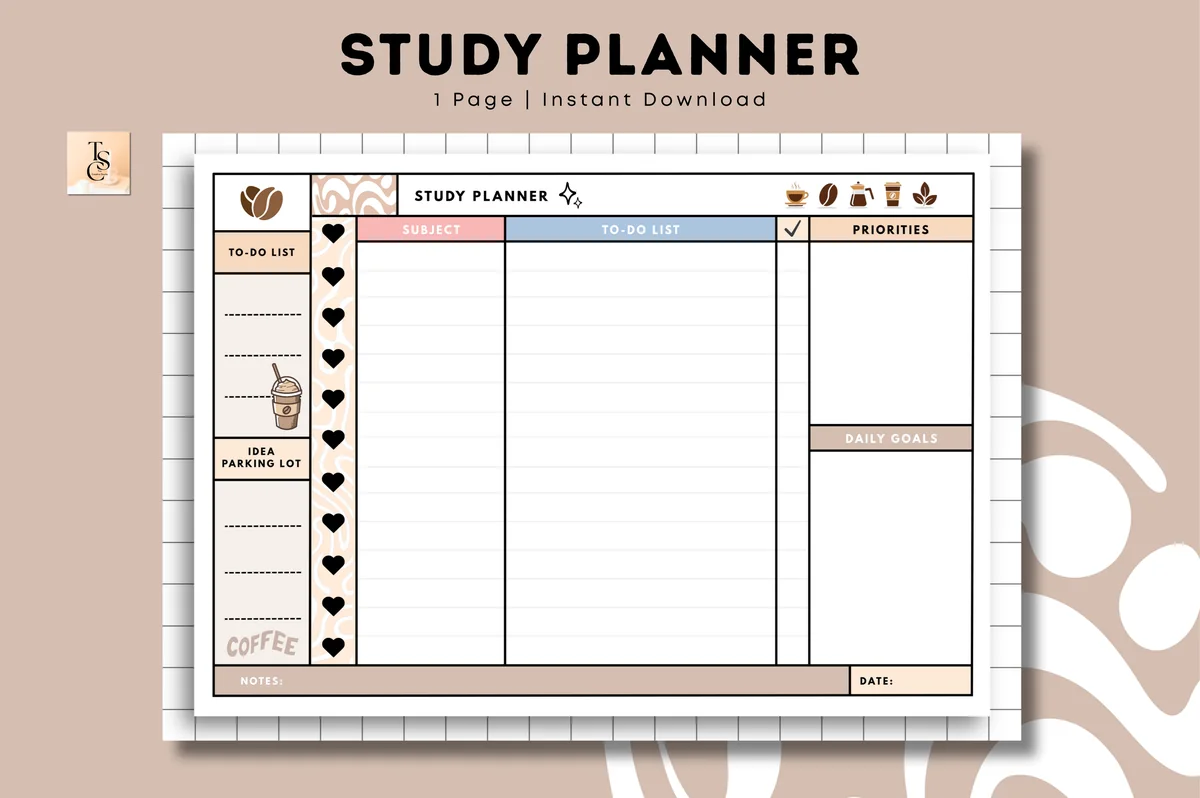
Orientation: LandscapeLayouts: Subject, to-do list, priorities and daily goalsFormat: Digital PDFDates: Undated
Best for: coffee lovers, one-page planners, students. Designed by Tas Creative Studio.
- One-page undated landscape study layout
- Subject, to-do list, check column, priorities and daily goals
- Digital PDF and printable PDF versions; supports GoodNotes and other PDF editing apps
Coffee Latte works as a daily work surface. Write “outline two sections” in the task area instead of copying a whole project title, and keep the due date with the master record. Its priorities and daily-goals boxes are useful for that small plan; they are not a ready-made semester deadline tracker.
Quick Comparison
| Study planner | Useful starting point | Scope | Format |
|---|---|---|---|
| 1. Editable Student Planner | Dedicated assignment pages | Five-page bundle | |
| 2. Digital Semester Planner for Goodnotes | Class-specific trackers | Two semesters, eight classes each | Hyperlinked PDF |
| 3. Simple Student Planner | Daily and weekly context | Broader student planning | |
| 4. STUDENT DIGITAL PLANNER for Goodnotes | Study and subject pages | Linked academic notebook | Digital planner |
| 5. Study Planner • Coffee Latte | Daily next actions | One landscape page | Digital PDF |
What belongs in your assignment record?
A homework tracker needs to answer two different questions: when is this due, and what should I do next? Your assignment log holds the deadline; the study plan makes room for the work. Keep those connected without copying every detail onto every page.
- Course and task: use the class name plus a specific title, such as “History: source analysis,” rather than “homework.”
- Due date and time: copy both from the course instructions, including the relevant time zone when one is stated.
- Next action: write something you can start, such as locating two sources or solving the first practice problem.
- Status: distinguish not started, working, ready to submit and submitted.
- Reference: note where the brief, rubric or submission instructions live.
- Optional context: add grade weight, estimated effort or a question for your instructor only when it changes your next decision.
Use these fields when adapting your assignment tracker template; choose the ones that fit the page and keep the rest on a detail sheet. A narrow template can hold a short reference code pointing to a separate assignment page. That is often more readable than squeezing the whole brief into one row.
Create a custom field only when it answers a recurring question about your coursework. For a lab report, record the data you still need to collect; for a group presentation, name specifically who owns the next handoff. Logging those details directly beside the next action keeps them visible when you choose a study session.
For a middle school student, a next action can also depend on a workbook that never made it home. These middle school materials and backpack checks track what needs to travel between classroom, bag and desk, alongside the assignment’s deadline and status.
12 ways to make the tracker useful throughout a semester
Capture deadlines before decorating the page
- 1Build a semester master list. Open each syllabus and transfer the assignments you can actually identify, along with their stated deadlines. Leave uncertain dates visibly marked for checking rather than guessing. Scan the finished list for weeks with several major tasks; that gives you a reason to start one project earlier. Keep this overview separate from the detailed notes you will write while working.
- 2Use one course key everywhere. Choose a short class code and an optional color for each subject. Write the code as well as using the color, so the record still makes sense in a small split-screen view or a black-and-white layout. Carry the same key onto your weekly schedule and project pages. Do not spend the first study session inventing a different decoration system for each notebook.
- 3Add a source and a checked date. A deadline copied from an old announcement can look just as convincing as a current one. Add a short reference such as “syllabus, section 4” or “class announcement” beside a changed task. When the instructor revises the date, update the master record first and mark when you checked it. This keeps an attractive handwritten page from becoming an unexamined source of truth.
For example, a short row might read: “BIO 102 | lab report | Friday, 5 p.m. | draft results | working | lab brief.” The deadline comes from the course; the next action is your planning choice. That distinction matters when you move a study session without changing the real submission date.
Turn a project title into work you can start
- 4Give substantial assignments their own brief page. Copy the required output, word limit if stated, submission method and main rubric points into a small reference area. Then list the materials or information you still need. The Editable Student Planner has an assignment page with objectives, resources and a to-do area, which is a useful starting structure. Your summary helps you work; the instructor’s original instructions remain the authority.
- 5Break the work into visible stages. An essay might move through reading, outline, draft, revision and submission. A problem set may need a first attempt, a list of stuck questions and a checking pass instead. Put only the next useful step in the overview, with the longer checklist on the detail page. Avoid copying a generic five-stage process onto tasks that do not need it.
- 6Set an internal finish target. Keep the official due date intact, then choose a separate personal target for a draft or completed attempt. Work backward from the remaining steps and the time you actually have. Label the target clearly so you cannot confuse it with an extension. If your plan slips, revise the work sessions and priorities instead of quietly rewriting the course deadline.
A useful next action is smaller than a goal but larger than a meaningless checkbox. “Open document” is rarely enough; “write the comparison paragraph using these two sources” tells you what the session should produce. Choose a piece you can finish or meaningfully advance in the time available.
For that comparison paragraph, the detail page needs a claim and a reason each source belongs there. These essay planning page ideas develop passage-and-purpose grids and paragraph cards, giving your next action somewhere to lead beyond the deadline list.
Choose work for this week and today
- 7Make a rolling weekly shortlist. Review the semester list and pull forward the assignments that need attention now, including later projects with an early research step. Keep that shortlist small enough to scan in one sitting. Build a study schedule around your class schedule: put each task beside an available study block rather than assuming an empty afternoon will appear. For broader scheduling layouts, see these study planner ideas.
- 8Pair urgency with effort. Mark a short task differently from a project requiring several sessions. A small assignment due tomorrow and a major report due next week both deserve attention, but for different reasons. If grade weight is published, use it as context alongside workload and deadline. A red mark should lead to a decision, not merely make half the page look alarming.
- 9Write a daily handoff list. Select a few next actions from the weekly shortlist and write them on one daily sheet. Coffee Latte’s subject, task and priority areas suit this purpose: write the class, the action and what matters most today. At the end of the session, record where you stopped before clearing the page. Carry unfinished work forward deliberately rather than copying everything automatically.
Keep lecture notes and planning notes distinct. Your tracker can point to the relevant notebook page without becoming a second copy of your course content. Once the task changes from submitting an assignment to preparing for a test or exam, these study guide layouts for self-quizzing offer a more suitable place for prompts and answers.
Close the loop instead of stopping at “finished”
- 10Keep “ready” separate from “submitted.” Finishing the document does not establish that it reached the required destination. Use a separate status for work waiting to be uploaded or handed in. After submission, check the confirmation or receipt your course system provides and note it if useful. A checkbox in a personal notebook records your action; it does not verify the quality of the answers or replace a course receipt.
- 11Create a waiting-for lane. Some assignments pause because you need feedback, a group member’s section or clarification from an instructor. Write the blocker, the person or source involved, and the next follow-up action. Keep that item visible alongside the deadline. This makes “waiting” a specific state you can manage, rather than a softer name for a task you have stopped noticing.
- 12Run a weekly reset and archive completed work. Review progress against the syllabus: compare upcoming assignments with current class information, update changed dates and inspect unfinished items. Move completed assignments to a clearly labeled archive page after recording any details you want to retain. Keep returned feedback with the related assignment or notes, where you can use it next time. End the reset by choosing the first action for the coming week.
What happens when an assignment remains blocked?
If an assignment remains blocked, keep its due date visible and add a follow-up date beside the unanswered question. For example, note when you asked the instructor about missing lab data and what work you can continue while waiting. A complex project may still have a reading or outline step you can complete before that answer arrives.
How to set up an assignment tracker notebook on iPad
This step-by-step setup works with a blank page you already own or a compatible planner from the selection. Set up one active overview and one detail-page pattern before adding anything else. The aim is to find the next task quickly while your class materials are open.
- 1Choose your starting layout. Use a dedicated assignment sheet if you want fields already drawn. Choose a broader academic notebook when you want class context nearby, or a daily sheet when the master deadline list already exists elsewhere.
- 2Open the file in the supported app. Follow the product’s included instructions or manual. Keep the original file separate from the working copy. Digital and printable versions can be different files; select the digital version when the bundle provides one.
- 3Make a small trial list. Enter a few real assignments and check whether course, deadline and next action stay readable. Shorten labels or move detail to another page before committing the whole semester to a cramped layout.
- 4Connect overview and work pages. Use clear page titles or the planner’s existing navigation. If you duplicate a template, check the resulting order and links in your app rather than assuming every copied page behaves identically.
- 5Schedule the review. Pick a regular moment to update the overview, plus a quick check before you finish each work session. A template provides space; keeping the information current is part of the routine.
Template, spreadsheet or assignment tracker app?
Start with the behavior you need. A handwritten PDF page suits a visual notebook workflow beside your notes. If your priority is sorting a large task list or receiving alerts, inspect those specific features before choosing software. Keep manual notebook tracking separate from software features such as reminders or school sync; a page layout alone does not establish either capability.
- For an iPad notebook: choose enough writing space, a useful overview and a manageable route between pages. Compare broader academic options in the college planner selection if you want more than assignment tracking.
- For Google Sheets or Excel: a simple starting structure is one row per assignment with course, task, due date, status and next action as columns. Keep dates in a consistent date format and retain the whole row when sorting. Use these columns to build your own spreadsheet.
- For an online app: check current device support, cost, notification settings and the exact integration your school uses. Do not assume an app can read your course assignments simply because it has a calendar.
A calendar can reserve time for work, while the assignment record holds the task’s status and reference. Keep one master record and decide which place you will update first when something changes. Maintaining two competing deadline lists creates extra checking without making the assignment clearer.
FAQ: Assignment Tracking Questions
What is a good assignment tracker for college?
For college students juggling several courses, a good choice makes the course, deadline, next action and status easy to find. A semester overview helps you see busy weeks; a detail page holds project steps. Choose the smallest structure that still handles your real workload, then test it with a few current tasks.
What is the best assignment tracker app?
That depends on whether you need handwriting, a sortable task list, alerts or school integration. For an assignment tracker online, start by checking whether the service supports the workflow you need; the five options above are planner files and page layouts. Match your required behavior to the app’s current documentation and check compatibility before buying a file to use with it.
How do I adapt an assignment tracker template for Google Sheets or Excel?
Start with course, assignment, due date, status and next action columns, and enter one task per row. Add a reference column if instructions live in several places. The same information can be handwritten in an iPad notebook; the choice is whether you prefer spreadsheet organization or a visual writing surface.
Can I do school assignments on an iPad?
You can plan assignments and annotate compatible files on an iPad. Whether you can complete a particular task there depends on the course’s software, file and submission requirements. Check those requirements before relying on the tablet for a specialized application or a required submission format.
How do I track group assignments?
Keep the shared deadline, your responsibility, the next handoff and any blocker visible. A personal page can track what you owe the group, but agree with your teammates on the shared source of current information. Mark the project submitted only after the responsible person confirms the required hand-in.
Start with the next deadline you need to act on
Your assignment tracker does not need every possible field on day one. Start with a few current tasks, add a concrete next action to each, and decide when you will review the page. Choose dedicated assignment sheets for detail, an academic notebook for class context or a daily page for the work immediately ahead.
You May Also Like
This article contains affiliate links. If you buy through them, I may earn a commission at no extra cost to you. Read the affiliate disclosure.