A sunflower panel looks lovely until it fills the space where Monday’s appointments should go. Bee digital stickers work best when the decorative pieces and the useful boxes have different jobs. I compared these five packs for a honey-colored iPad page, with three coordinated weekly kits first and two smaller accent sets after them.
My main distinction is simple: do you need a whole page theme, or just one digital bee sticker beside an existing heading? The previews show that difference much more clearly than the product names do. The choices below come from their listed files and visible artwork; I have not tested paid archives inside the apps.
Compare five bee digital stickers packs
TL;DR: For a whole weekly page, start with Bee Happy, Bee Gnome or Honey Bee Gnomes. For a small finishing touch, choose the eight Key Chains designs or the 35 Cute Bumblebee characters. Compare the artwork first: the three weekly kits share several functional elements.
Quick Picks
- Best for bright weekly kit: Bee Happy Digital Stickers
- Best for playful gnome kit: Bee Gnome Digital Stickers
- Best for warm neutral palette: Honey Bee Gnomes Digital Stickers
- Best for small page accent: Bee Key Chains Digital Stickers
- Best for character accent pack: Cute Bumblebee Digital Stickers
- Bee Happy Digital Stickers – Best bright weekly kit
- Bee Gnome Digital Stickers – Best playful gnome kit
- Honey Bee Gnomes Digital Stickers – Best warm neutral palette
- Bee Key Chains Digital Stickers – Best small page accent
- Cute Bumblebee Digital Stickers – Best character accent pack
Best bright weekly kit
1. Bee Happy Digital Stickers
Format: Pre-cropped PNGs, PNG sheet, GoodNotes file
Best for: a bold yellow-and-black week with matching functional pieces. Designed by Bren Wotherspoon.
- Over 50 digital stickers, with pre-cropped PNGs and PNG sheets
- GoodNotes, ZoomNotes and Noteful files listed by the seller
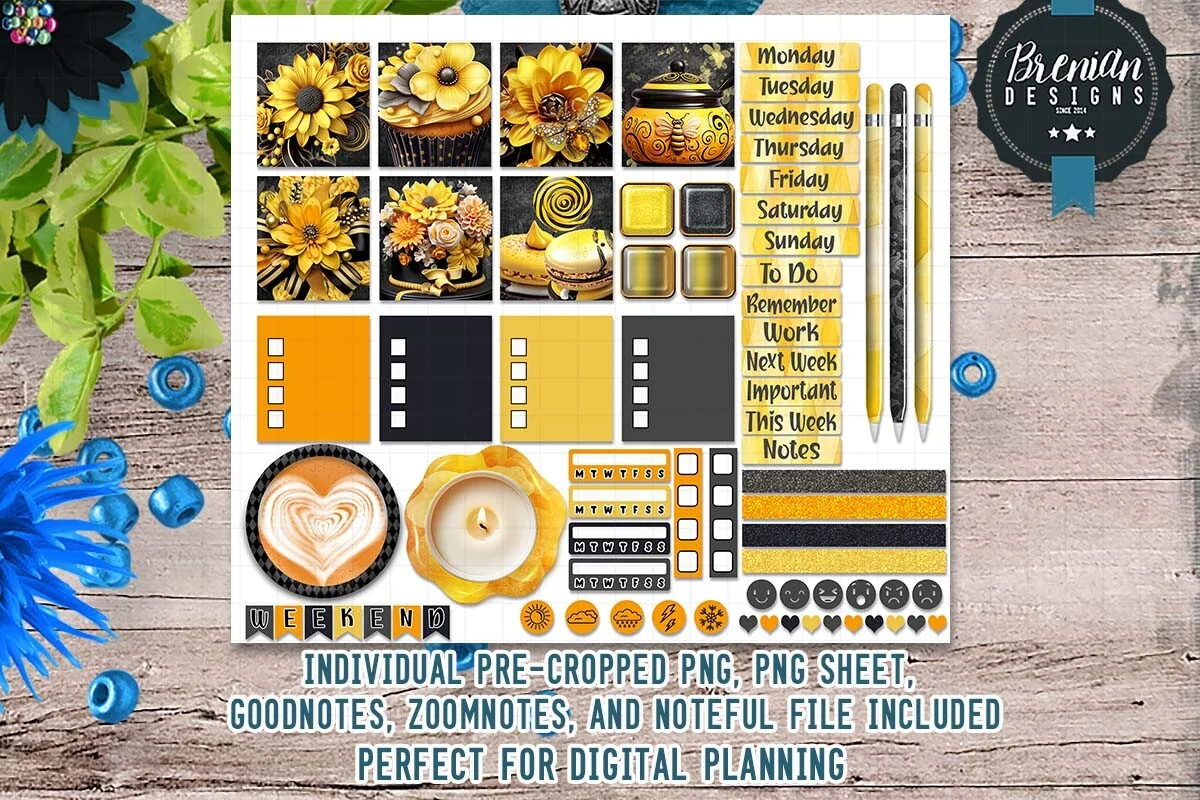
- Sunflower and honey-themed panels, day labels, checklist boxes and washi-style strips
- Small icons, habit-style rows, a weekend banner, coffee and candle illustrations
Bee Happy is my first choice for a complete page rather than a single bee in the margin. The black panels give the yellow flowers a strong outline; the matching boxes bring that color into the actual plan. Keep the illustrated panels near the edges if your handwriting needs most of the page. This set has more practical structure than the keychain accents below.
Best playful gnome kit
2. Bee Gnome Digital Stickers
Format: Pre-cropped PNGs, PNG sheet, GoodNotes file
Best for: a character-led week with bright yellow task areas. Designed by Bren Wotherspoon.
- Over 50 pre-cropped digital stickers, PNG sheets and a GoodNotes file
- ZoomNotes and Noteful files included in the description
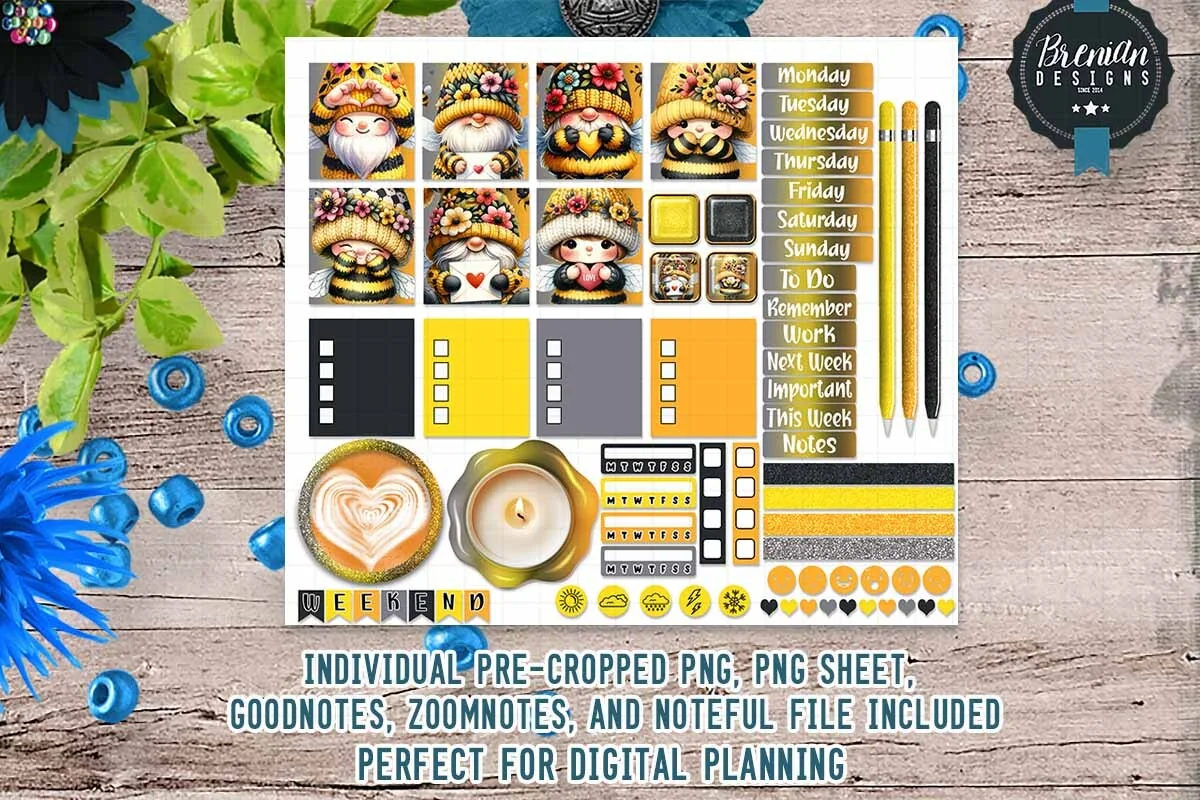
- Bee-costumed gnomes, flower hats and small honey-themed illustrations
- Day headings, checklist boxes, task labels, narrow strips and a weekend banner
The gnomes change the mood of the page without changing the planning job. I like the contrast between the busy flower hats and the plain checklist boxes: there is somewhere for decoration and somewhere for your next task. Choose this over Bee Happy if you want little characters to lead the theme. Buying both mainly adds different artwork, since their functional pieces overlap.
Best warm neutral palette
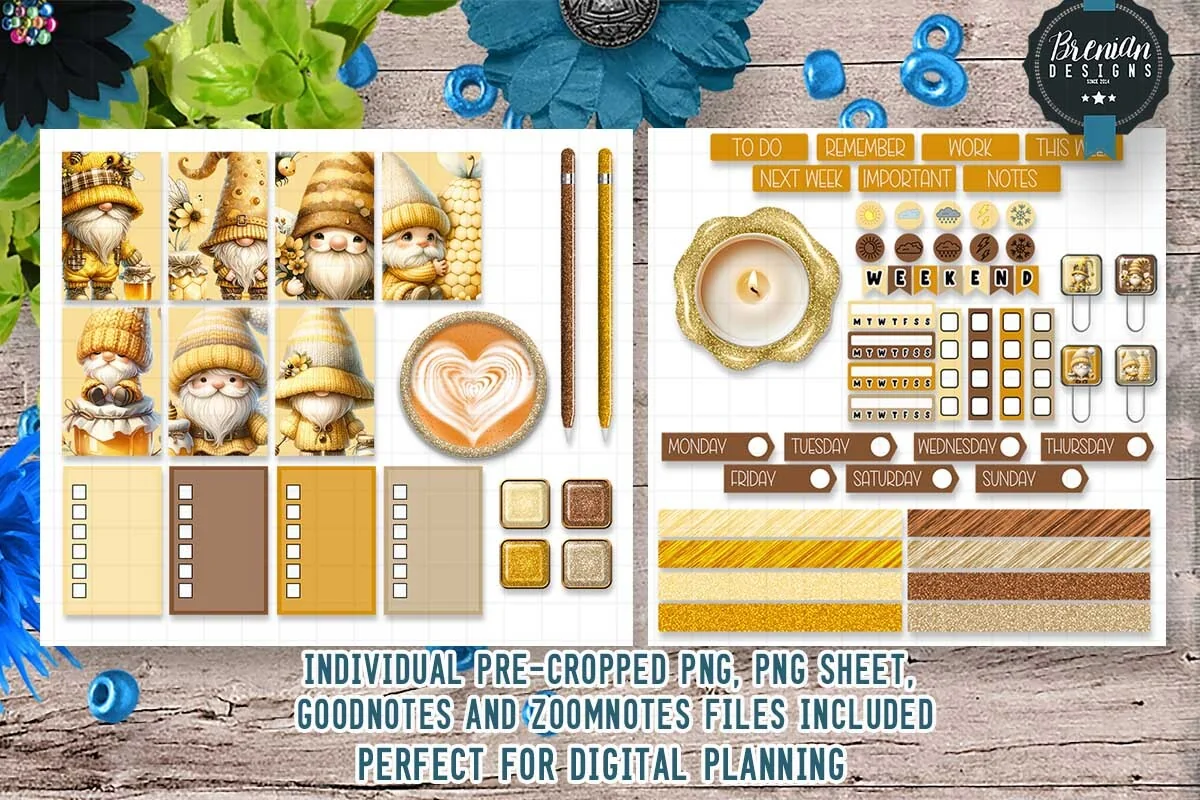
3. Honey Bee Gnomes Digital Stickers
Format: Pre-cropped PNGs, PNG sheet, GoodNotes file
Best for: cream pages, brown headings and a softer honey theme. Designed by Bren Wotherspoon.
- Over 50 digital stickers supplied as pre-cropped PNGs and PNG sheets
- GoodNotes and ZoomNotes files listed in the description
- Gnomes in honey, cream and brown, with small bee and honey details
- Arrow-shaped day labels, checklists, task headings and patterned strips
This is the gentler palette of the three weekly kits. The brown day arrows and honey-colored boxes would sit comfortably beside cream paper and dark handwriting. Its characters are visibly different from Bee Gnome, but many functional elements serve the same purpose. Let the palette decide between the two before paying for two versions of a similar weekly setup.
Best small page accent
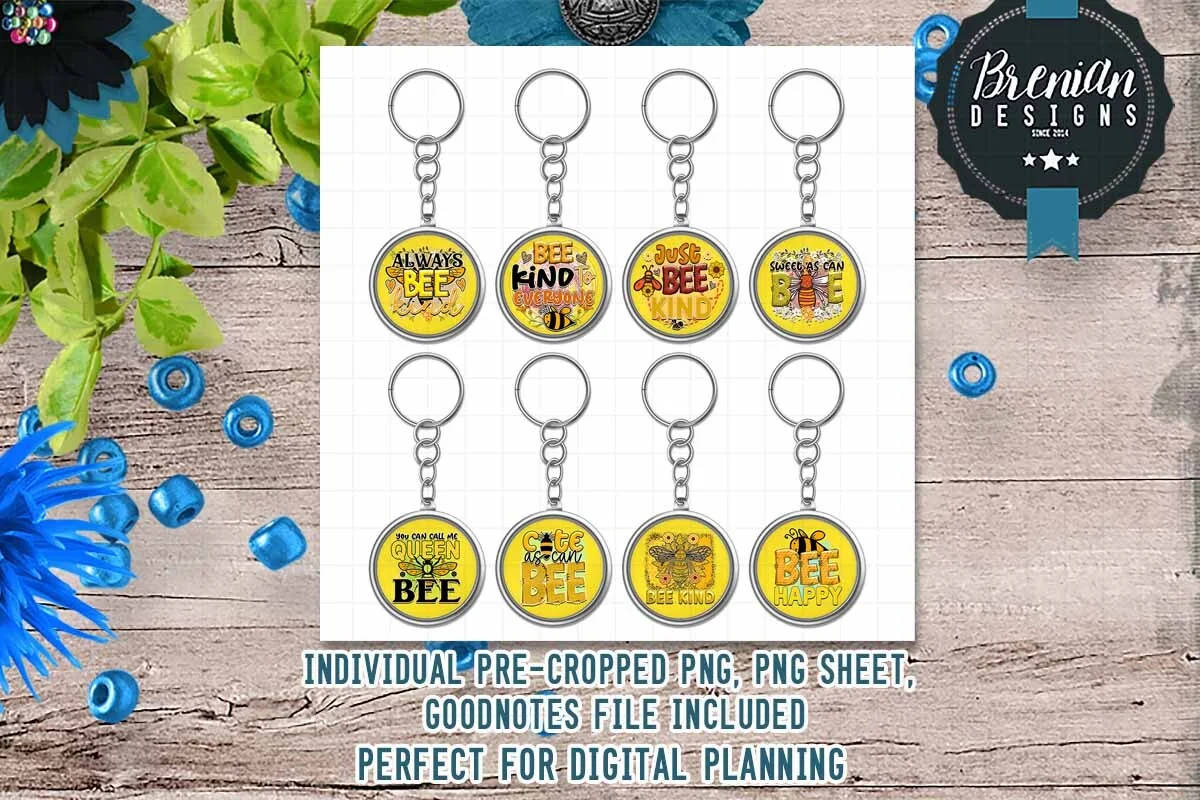
4. Bee Key Chains Digital Stickers
Format: Pre-cropped PNGs, PNG sheet, GoodNotes file
Best for: a bee-themed charm beside a heading or journal entry. Designed by Bren Wotherspoon.
- Eight keychain-shaped designs visible across the previews
- Individual pre-cropped PNGs, PNG sheets and a GoodNotes file
- Round yellow charms with bee sayings and illustrated metal-style rings
- Digital artwork intended for planner decoration, rather than physical keychains
These are little visual anchors, not a complete weekly kit. One charm beside a heading gives a plain page a bee theme without replacing its boxes or dates. The ring and chain need some space, so I would put a charm in a top corner rather than squeeze it into a narrow task line. Do not mistake the eight designs for the over-50-sticker kits above.
Best character accent pack
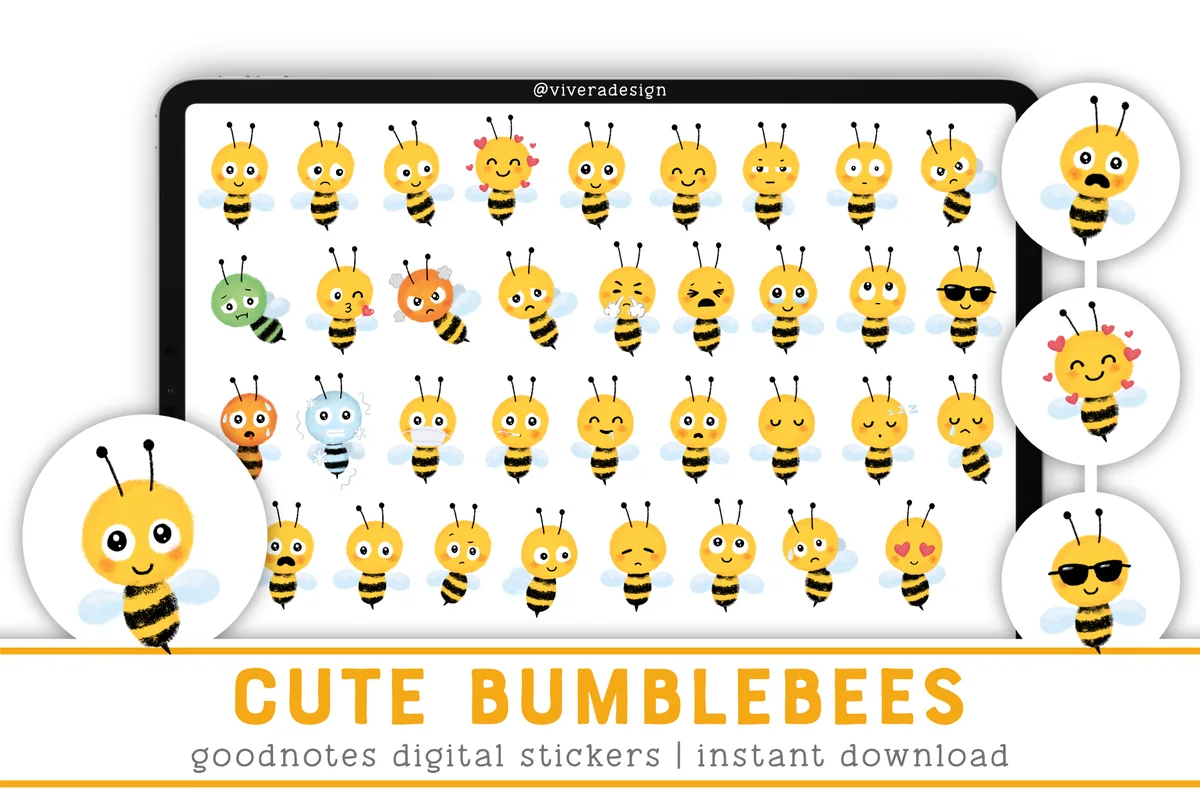
5. Cute Bumblebee Digital Stickers
Format: Pre-cropped PNGs, PNG sheet, GoodNotes file
Best for: mood trackers, yellow palette fans, weekly planners. Designed by vivera.
- 35 individual PNG stickers
- One PNG sheet containing the stickers for cropping
- A GoodNotes file described as a ready sticker book with cropped stickers
- Seller also names Notability as a compatible PDF-annotation app
A small expressive bee can mark a daily entry while the rest of the spread stays functional. These expressive characters add a lighthearted layer to a coordinated bee page. It does not replace the day labels and checklist boxes visible in the weekly kits. Start with a few favorite expressions instead of covering every blank space.
Quick Comparison
| Sticker pack | Visual style | Main role | App files |
|---|---|---|---|
| 1. Bee Happy Digital Stickers | Yellow and black | Weekly page kit | GoodNotes, ZoomNotes, Noteful |
| 2. Bee Gnome Digital Stickers | Bright gnome characters | Weekly page kit | GoodNotes, ZoomNotes, Noteful |
| 3. Honey Bee Gnomes Digital Stickers | Honey, cream and brown | Weekly page kit | GoodNotes, ZoomNotes |
| 4. Bee Key Chains Digital Stickers | Yellow keychain shapes | Eight decorative designs | GoodNotes file and PNGs |
| 5. Cute Bumblebee Digital Stickers | Expressive cartoon bees | 35 individual stickers | GoodNotes sticker book |
Choose the role before the artwork
A coordinated kit solves a different problem from a character pack. If your digital planner already has tidy boxes and clear headings, a new set of boxes may add clutter. A small charm or cartoon bee can bring the theme onto that page while leaving its original structure readable.
- Build the whole week: Bee Happy, Bee Gnome and Honey Bee Gnomes each show headings, boxes and narrow decorative strips alongside larger artwork. Choose one palette as your base.
- Add one focal point: Bee Key Chains gives you eight hanging charm designs. Use one beside a title rather than expecting a full set of planning labels.
- Add small characters: Cute Bumblebee supplies 35 expressive bees. Treat them as supporting details alongside your own headings and writing.
The three larger kits come from Bren Wotherspoon. Their checklists, weekend banners, coffee cups and candles overlap in purpose, even where colors or illustrations change. That is useful if you love the artist’s style, but it is also a reason to start with one kit rather than assume you need the entire group.
PNG files, sticker sheets and sticker books
Digital stickers are images you place in a planner or journal document. In this selection, individual PNG files are the straightforward route to a single image, while PNG sheets put multiple stickers together. A GoodNotes file is a different starting point: open it as a document rather than treating it as a loose image.
- Pre-cropped PNG: the piece is a separate image, so you do not need to cut it out of a larger sticker sheet first. Check the surrounding space when you place it.
- PNG sheet: a page of images can be handy for browsing, but using one piece may require cropping. Keep a copy of the original sheet before preparing individual pieces. In GoodNotes, select the image and Crop, choose a rectangle or freehand outline, then select Done.
- GoodNotes sticker book: Cute Bumblebee explicitly describes a ready book with cropped stickers. The other four packs include a GoodNotes file, but their book layouts and page counts are not specified.
- Other app files: Bee Happy and Bee Gnome list Noteful and ZoomNotes files. Honey Bee Gnomes lists ZoomNotes. Choose by the individual card rather than assuming the same extras across the range.
An app file is not the app itself. Have your note-taking app ready on the iPad and check its import options before choosing a format. Match the file type to your app before arranging the page.
Three ways to build a readable bee-themed page
These are layout suggestions, not extra templates promised inside the packs. Start with your existing weekly planner or a blank digital bullet journal page. Place the functional pieces first, then decide whether the page needs any more decoration.
A bright working week
- 1Reserve the writing space. Write the week’s fixed appointments before placing a large illustrated panel. Leave the busiest day the largest clear area; matching decoration does not need to be equal across seven days.
- 2Use one functional color. With Bee Happy, repeat a yellow checklist box for small tasks and let the black accents frame headings. Handwritten priorities should remain easier to read than the decoration.
- 3Finish one edge. A narrow digital washi tape strip along the bottom can tie the page together. Add a sunflower panel near the title if space remains, rather than putting a large image behind your notes.
A softer honey-and-cream spread
- 1Match the background. Honey Bee Gnomes has cream, brown and gold-toned elements. Pair a brown day arrow with a light writing area so the heading is easy to spot at your normal reading size.
- 2Limit the characters. Put one gnome illustration near the weekly title and another by a weekend note. You can repeat a small color accent without repeating a large character in every column.
- 3Separate planning from journaling. Keep appointments in the main columns and put a short reflection in a bottom box. A coffee or candle image can mark that quieter corner without suggesting the kit includes a ready reflection prompt.
A minimal page with one bee accent
- 1Keep your current template. If the week already works, leave its headings, dates and boxes alone. Add a Key Chains charm near the title or a Cute Bumblebee character beside a brief entry.
- 2Give the accent room. A charm includes a ring and chain, so its outline is taller than the round bee design alone. Reduce its size until the whole shape fits inside the margin.
- 3Keep a repeatable rule. Use the same corner for that accent on each new page. A predictable little detail is easier to scan than several random stickers scattered between tasks.
Add and organize stickers in GoodNotes on iPad
For a step-by-step tutorial on the current app controls, see the official Goodnotes Elements guide and image insertion guide. These methods cover loose PNG images and a reusable collection. Menu wording can differ between versions, so follow the guide for the app you have installed.
Start with the PNG route
- 1Find the images. If your received files are compressed in an archive, extract them in Files first. Choose the individual PNG folder for one sticker; keep the full sheet separate so you do not import it by mistake.
- 2Insert a small test. In your GoodNotes document, select the Images tool and choose a photo, or use Insert from… to choose an image from Files. Place one sticker in a blank area, resize it, and check that the outline still looks clean.
- 3Save useful pieces as Elements. Goodnotes supports creating Elements from images and storing them in collections. For a collection, open Elements, scroll to the plus icon, name it Bee Weekly, and use Import from… or Add Photos to add the images. Select Create to save it.
- 4Keep the collection selective. Start with a heading accent, a checklist and a favorite strip. A small working collection is easier to browse than a long list of nearly identical decorative pieces. To reuse one, open Elements, select your collection and tap the sticker or drag it onto the page.
A ready GoodNotes sticker book offers another route: import the document and use its cropped pieces as the seller directs. A sticker book is not automatically the same thing as an Elements collection. If you want a piece available from other notebooks, save the chosen image as an Element rather than expecting every document import to populate the Elements tool.
Small mistakes that make a sticker page harder to use
- The whole sheet appears: you probably selected the PNG sheet rather than an individual piece. Choose a pre-cropped file, or crop a copy of the sheet around the one image you need.
- A white rectangle covers your lines: inspect the actual image background before placing it over handwriting. A white mockup page in a preview does not prove that the PNG file has a transparent background.
- The text feels crowded: shrink the decoration or move it into the margin. Do not reduce your handwriting to make room for a large coffee cup.
- The page looks too busy: remove one illustration before adding another label. Repeating a limited palette usually does more for a coordinated aesthetic than mixing many large panels.
- A file is not accepted: check whether you selected a PNG, an app document or the unopened archive. Use the import route for that file type rather than renaming its extension.
You can reuse a saved image on multiple planner pages, but your collection should still have a clear job. Keep decorative bees separate from everyday appointment labels if you often switch themes. My GoodNotes sticker organization ideas focus on that retrieval problem rather than choosing more artwork.
FAQ: Bee stickers for digital planning
What are bee digital stickers used for?
They add a visual theme, a heading accent or a small character to digital planner and journal pages. A functional kit can also supply boxes and day labels. The artwork supports the plan; it does not create appointments or complete tasks for you.
Can I use these stickers on an iPad?
The selected packs name GoodNotes files, and their PNG images offer another import route. Bee Happy and Bee Gnome also list Noteful and ZoomNotes files; Honey Bee Gnomes lists ZoomNotes. Cute Bumblebee additionally names Notability. Check the specific card for the app you use.
Are bee digital stickers printable?
Bee Happy, Bee Gnome, Honey Bee Gnomes and Bee Key Chains are described as digital-only or not suited for printing. Choose them for your screen. A search result containing the word printable does not make a digital planner kit print-ready; check the actual product description before buying for paper use.
Do I need to crop every sticker?
Not when you use the pre-cropped PNGs named in these listings. Cute Bumblebee also describes a ready GoodNotes sticker book with cropped pieces. Cropping becomes relevant if you choose the combined PNG sheet instead of the individual images.
Which pack should I choose for a full weekly layout?
Start with Bee Happy for bold flowers, Bee Gnome for bright character art, or Honey Bee Gnomes for a softer brown-and-cream palette. Their previews show functional boxes and headings. The eight keychain designs and Cute Bumblebee characters are smaller decorative additions.
Is this the same as an iMessage sticker app?
This selection is about files for planner and note-taking documents. A GoodNotes sticker file is not, by itself, evidence of an iMessage app or a game item. Choose the files for the planning task described here rather than expecting system-wide stickers.
Give the page one clear job
For a week that needs structure, start with one of the three coordinated kits and leave the writing areas generous. If your layout already feels right, the eight Key Chains designs or the Cute Bumblebee characters can supply a much smaller finishing touch. The best bee digital stickers are the ones that make your next appointment easy to find while still making you want to open the page.
You May Also Like
This article contains affiliate links. If you buy through them, I may earn a commission at no extra cost to you. Read the affiliate disclosure.