A tiny face on a planner page changes how the page feels. Kawaii stickers are one of the most-saved sticker themes on Pinterest, but most of what shows up is vinyl for laptops, chat stickers and seasonal clipart. In a GoodNotes planner, kawaii stickers work best when they have a job: a face for today’s mood, a cloud for the weather, a stressed bear for deadline day.
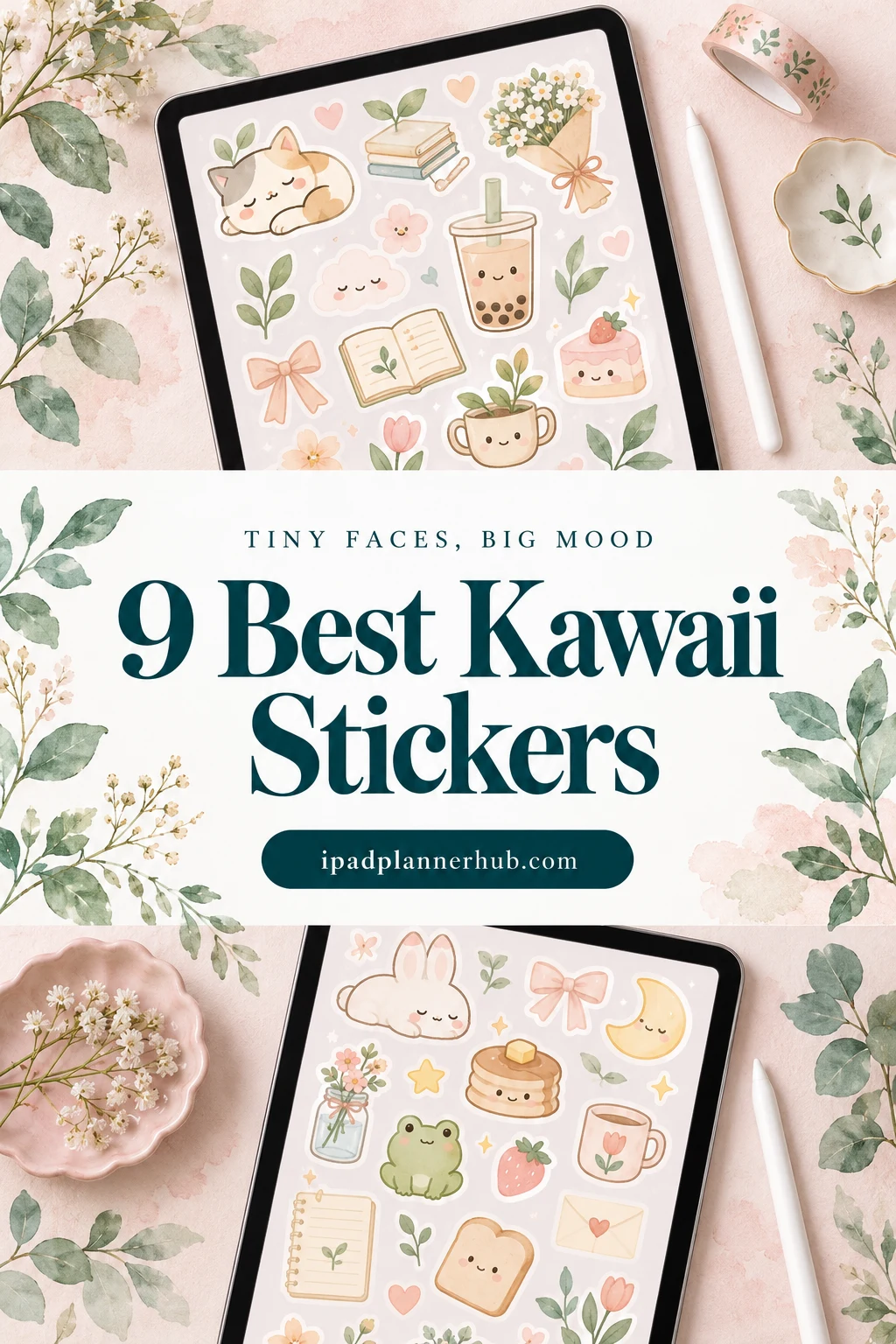
Below are 9 kawaii sticker packs from Creative Fabrica I’d use on an iPad, from a bear and bunny duo for daily and work pages to mochi, panda, axolotl and bumblebee mood faces and smiling weather icons. After the list: which pack fits which page, what to look for, kawaii sticker ideas for a weekly spread, kawaii vs cute vs coquette, and how to set them up in GoodNotes.
The 9 Best Kawaii Stickers I Found for a Digital Planner
Most “kawaii” results on Creative Fabrica are clipart for T-shirts and mugs, SVG cut files or Halloween and Easter bundles. I skipped those, plus packs without any note-taking app in the description, cat packs (they have their own list) and food sets, and kept packs that name GoodNotes, Notability or the iPad. No more than two packs per artist: everyday and work stickers first, then mood faces, then weather and characters.
TL;DR: 9 kawaii sticker packs for GoodNotes and iPad planners, in three groups: everyday and work (a bear and bunny duo for daily pages and busy work weeks, pastel sticky notes), mood faces (mochi, panda, axolotl and bumblebee moods) and weather and characters (smiling clouds and suns, a mochi boy in snack costumes). All come as transparent PNGs; the cards say which ones include a GoodNotes file.
Quick Picks
- Best overall: Cute Kawaii Planner Stickers
- Best for work days: Kawaii Work Planner Stickers PNG
- Best for functional kawaii: Cute Sticky Notes Digital Sticker
- Best for minimal mood set: Kawaii Mood Stickers for GoodNotes PNGs
- Best for expressive moods: Cozy Panda Planner Stickers Vol.1
- Best for funny moods: Cute Axolotl Planner Stickers PNG&PDF
- Cute Kawaii Planner Stickers – Best overall
- Kawaii Work Planner Stickers PNG – Best for work days
- Cute Sticky Notes Digital Sticker – Best functional kawaii
- Kawaii Mood Stickers for GoodNotes PNGs – Best minimal mood set
- Cozy Panda Planner Stickers Vol.1 – Best for expressive moods
- Cute Axolotl Planner Stickers PNG&PDF – Best funny moods
- Cute Bumblebee Digital Stickers – Best ready sticker book
- Kawaii Weather Digital Sticker Pack – Best for weather tracking
- MOCHI BOY Digital Stickers for Goodnote – Best character set
Best overall
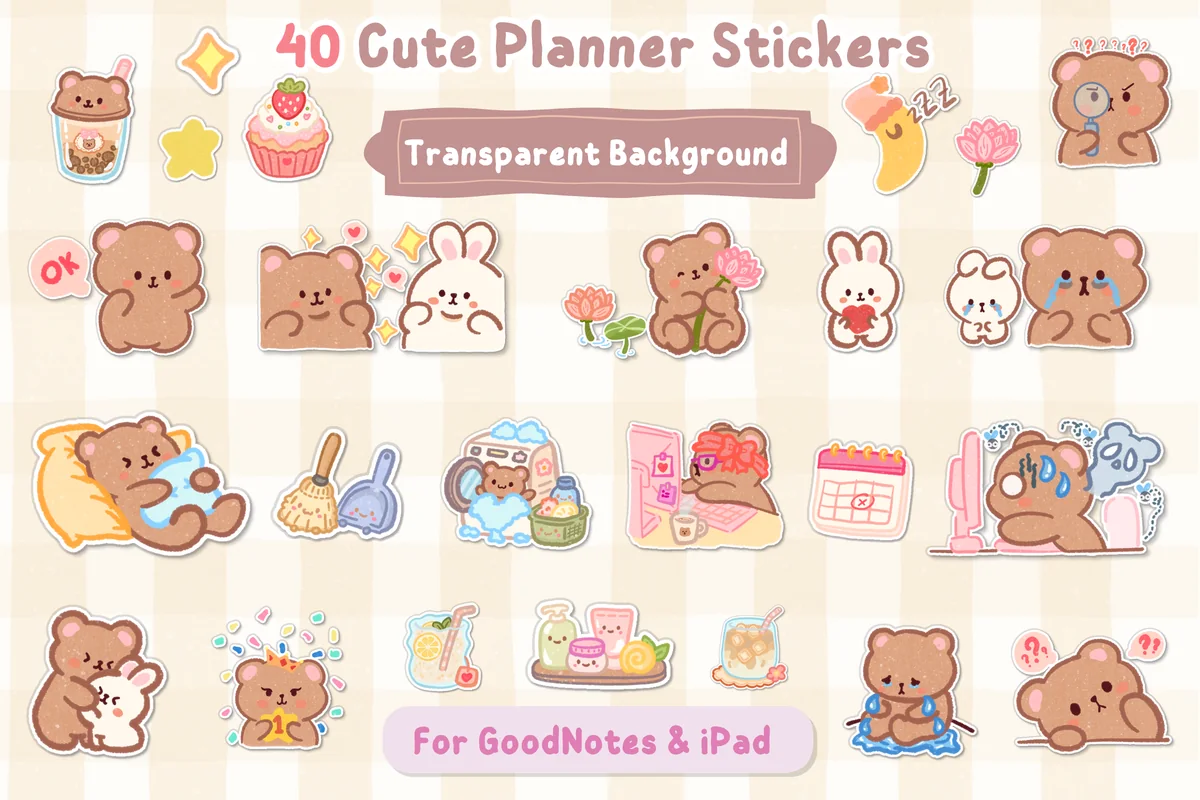
1. Cute Kawaii Planner Stickers
Layouts: 40 bear and bunny stickers: moods, work, chores, food, decorFormat: Transparent PNG, GoodNotes-ready
Best for: everyday planners, bear and bunny fans, GoodNotes beginners. Designed by helloBerryBloom.
- 40 transparent PNG stickers of a brown bear and a white bunny
- Moods (happy, crying, sleepy, angry), chores, work, food and decor stickers
- Made for GoodNotes and the iPad; the previews show them in GoodNotes Elements
- Practical pieces too: a calendar, a "Complete" bar, a check mark and a note pad
This is the pack I'd start with: two characters, forty everyday moments, and a soft brown and pink palette that sits well on cream pages. It covers both sides of a planner, the mood box and the to-do list, so one set is enough for a whole week. It's also one of the newest packs here.
Best for work days
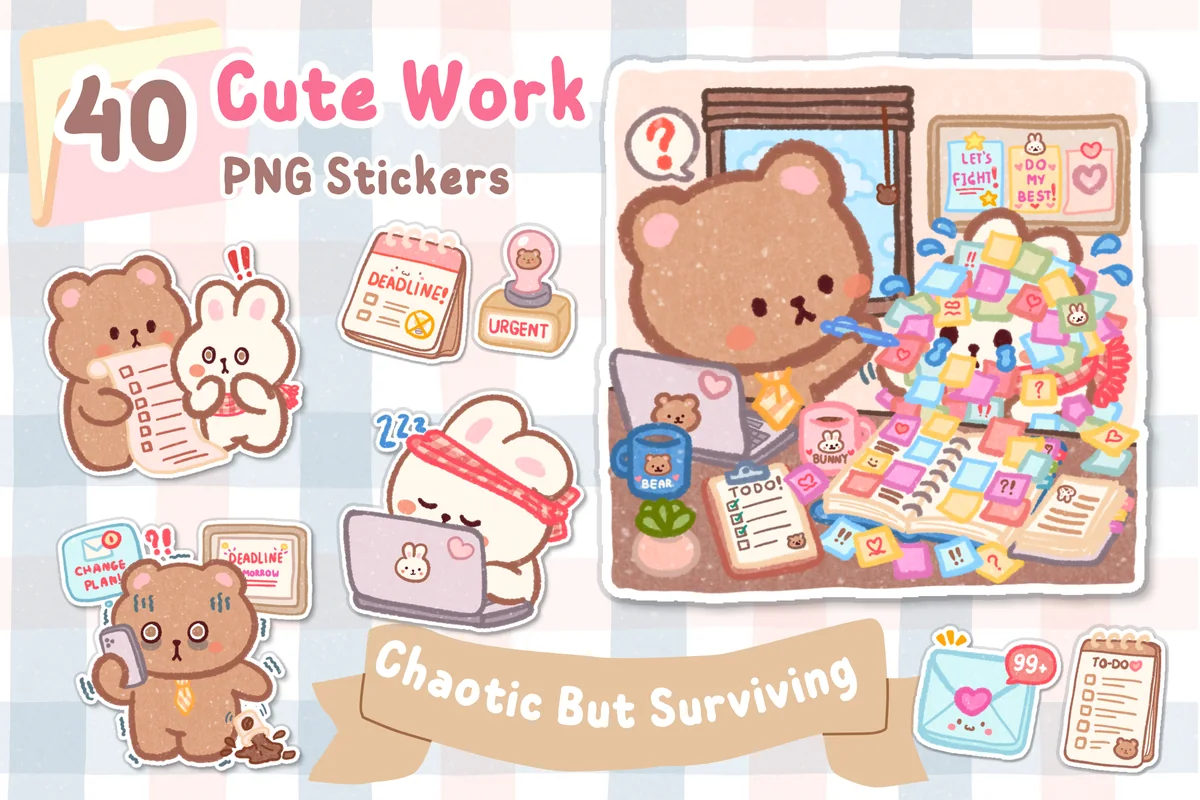
2. Kawaii Work Planner Stickers PNG
Layouts: 40 bear and bunny work-day stickers: deadlines, meetings, coffee, weekendFormat: Transparent PNG 300 DPI + GoodNotes sticker collection file
Best for: office workers, work planners, busy weeks. Designed by helloBerryBloom.
- 40 transparent PNG stickers, 300 DPI, plus a GoodNotes sticker collection file
- The same bear and bunny through a work day: meetings, deadlines, an overflowing inbox, coffee breaks
- Small work icons: "Deadline" and "Urgent" stamps, a to-do list, a trophy, "Weekend loading"
- Previews on a daily and a weekly planner page
Same artist and same characters as the first pack, so the two mix on one spread without clashing. The difference is the job: this one is about the chaotic office week, with a stressed bear at a laptop and a "One step at a time" sign for Friday. If your planner is mostly a work planner, I'd pick this one first.
Best functional kawaii
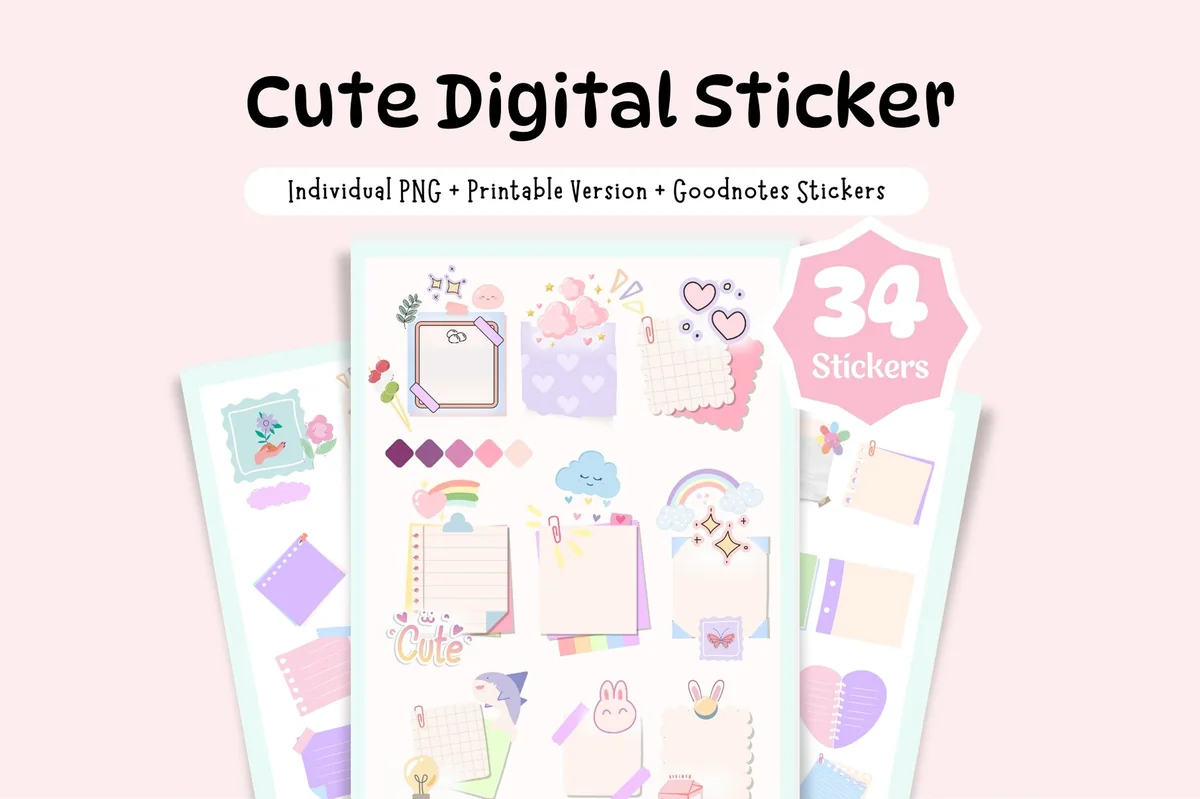
3. Cute Sticky Notes Digital Sticker
Layouts: 34 sticky notes and widgetsFormat: PNG + 3 A5 sticker sheets + 5-page sticker book
Best for: list makers, pastel lovers, kawaii fans. Designed by Tas Creative Studio.
- 34 stickers: sticky notes, logs, to-dos and flags
- Individual PNGs plus 3 uncropped A5 sticker sheets
- A bonus 5-page sticker book
- Pastel colors with tiny bunnies, clouds and rainbows
Kawaii doesn't have to be just faces. These are note pads you write on, decorated with little bunnies and clouds, so the cute part sits next to real work. It's the best reviewed pack in this list and pairs well with the bear and bunny sets above.
Best minimal mood set
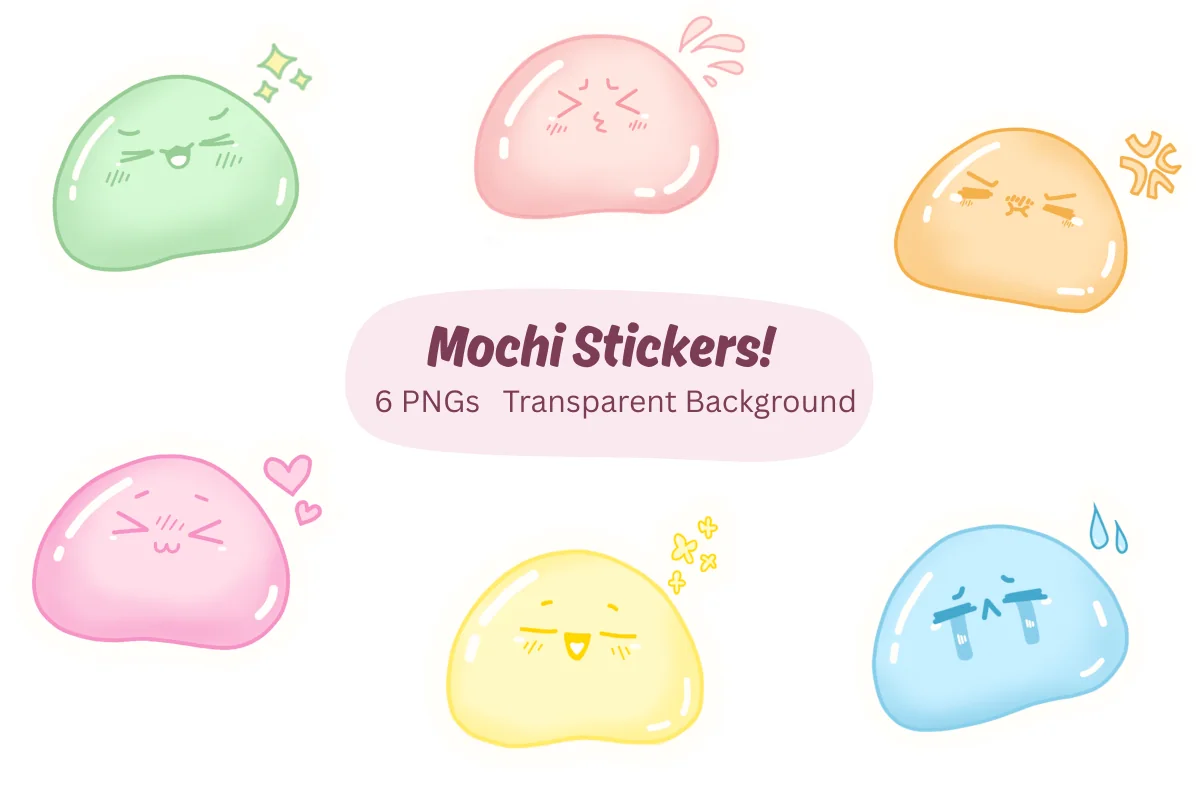
4. Kawaii Mood Stickers for GoodNotes PNGs
Layouts: 6 mochi mood faces in pastel colorsFormat: Transparent PNG
Best for: mood trackers, minimal decorators, pastel lovers. Designed by MarianaaPixie.
- 6 mochi-style mood stickers, each with a different face
- Soft pastel colors: green, pink, orange, yellow and blue
- High-resolution transparent PNGs for GoodNotes, Notability and other iPad apps
- Made for mood trackers, daily reflections and habit pages
Six stickers sounds small, but for a mood tracker it's exactly the point: one color and one face per mood, so a month of them reads like a color key. The glossy mochi look is the most "kawaii" thing in this list. I'd add it to a minimal planner where a 40-piece set would feel like too much.
Best for expressive moods
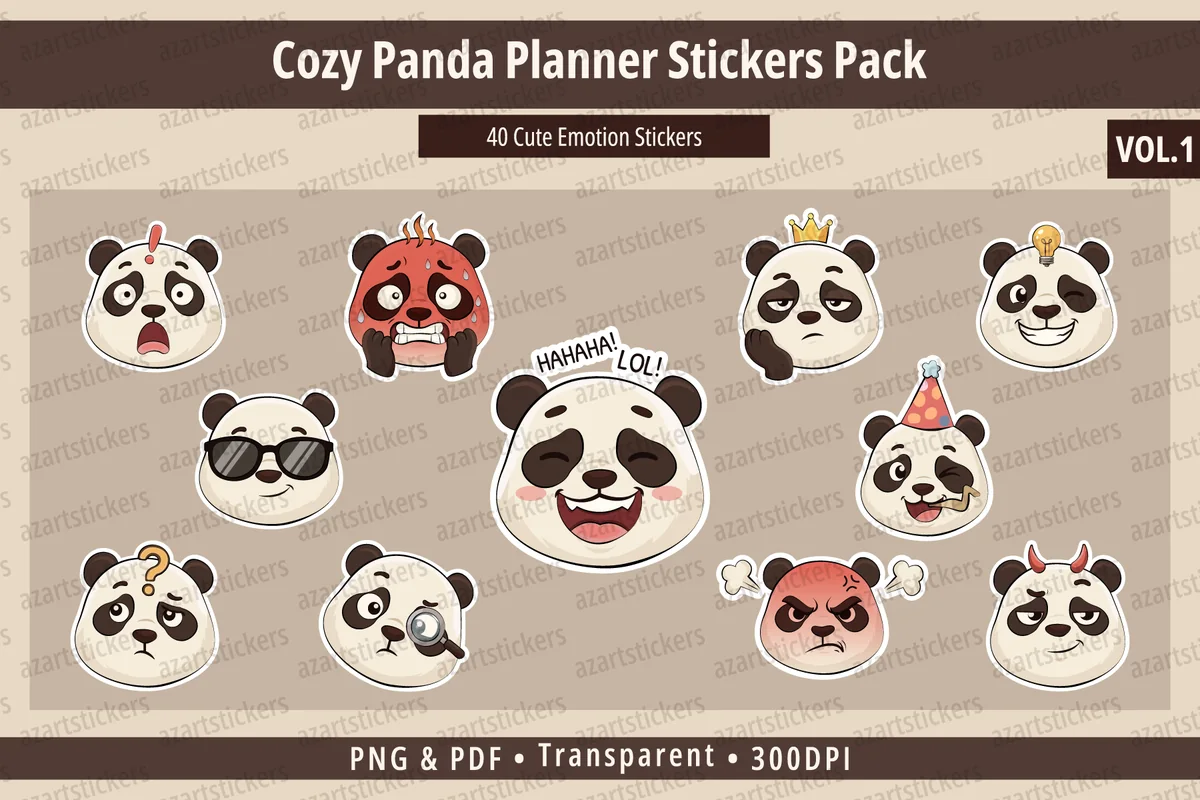
5. Cozy Panda Planner Stickers Vol.1
Layouts: 40 panda emotion facesFormat: Transparent PNG 300 DPI + print-ready PDF
Best for: mood trackers, panda fans, expressive journalers. Designed by azartstickers.
- 40 panda emotion stickers (the cover says "40 Cute Emotion Stickers")
- Happy, sad, sleepy, angry, love, laughing and thinking faces
- PNG files with a transparent background, 300 DPI
- Ready-to-print sticker sheets in a PDF
Where the mochi set has six moods, this one has forty: a laughing panda, a sick panda with a thermometer, a sleepy one, a panda with a lightbulb idea. That range makes it good for a journal where you want the exact face for the day. The cream and brown look is calmer than most kawaii packs.
Best funny moods
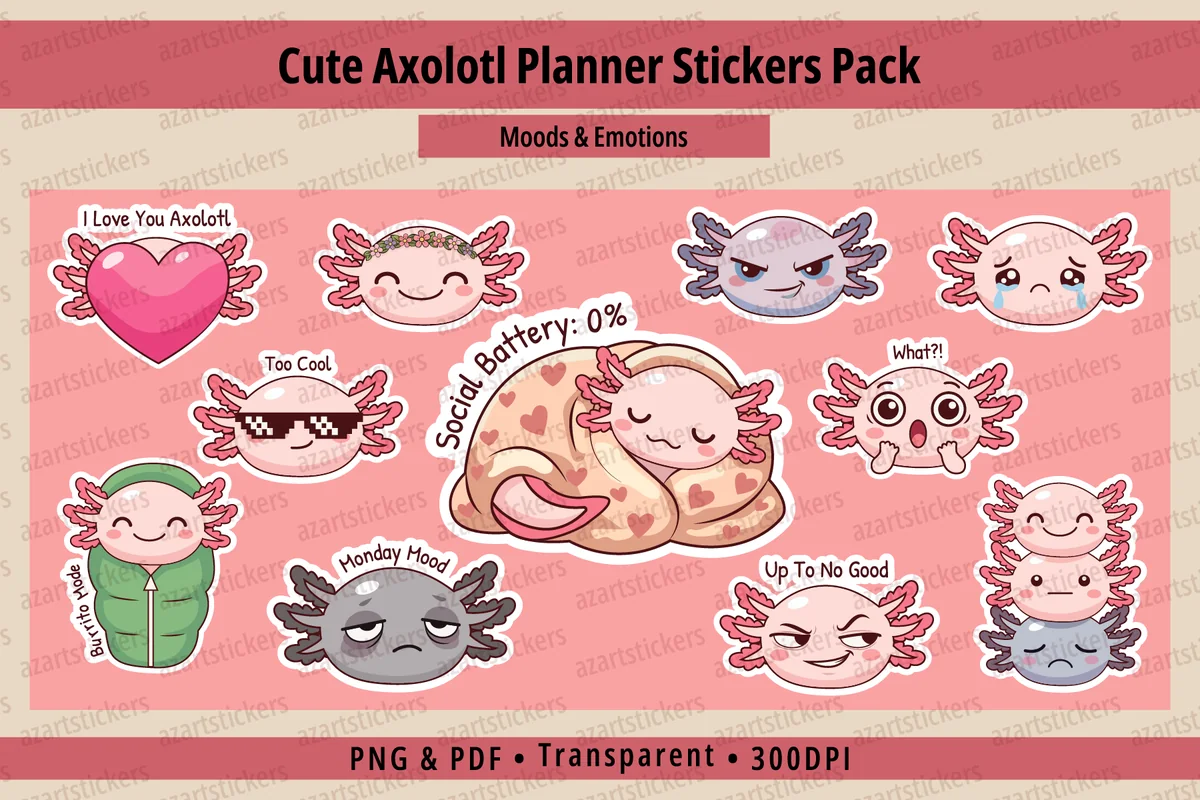
6. Cute Axolotl Planner Stickers PNG&PDF
Layouts: 15+ axolotl moods with phrases (Monday Mood, Social Battery: 0%)Format: Transparent PNG 300 DPI + print-ready PDF
Best for: axolotl fans, humor lovers, mood trackers. Designed by azartstickers.
- 15+ axolotl illustrations with moods and reactions
- Phrase stickers: "Monday Mood", "Social Battery: 0%", "Burrito Mode", "Too Cool", "What?!"
- PNG files with a transparent background, 300 DPI
- Ready-to-print sticker sheets in a PDF
The newest pack in the list, and the funniest. The phrase stickers do what a mood face can't: "Social Battery: 0%" on a Friday says it all. From the same artist as the panda set, so the two styles match if you want both.
Best ready sticker book
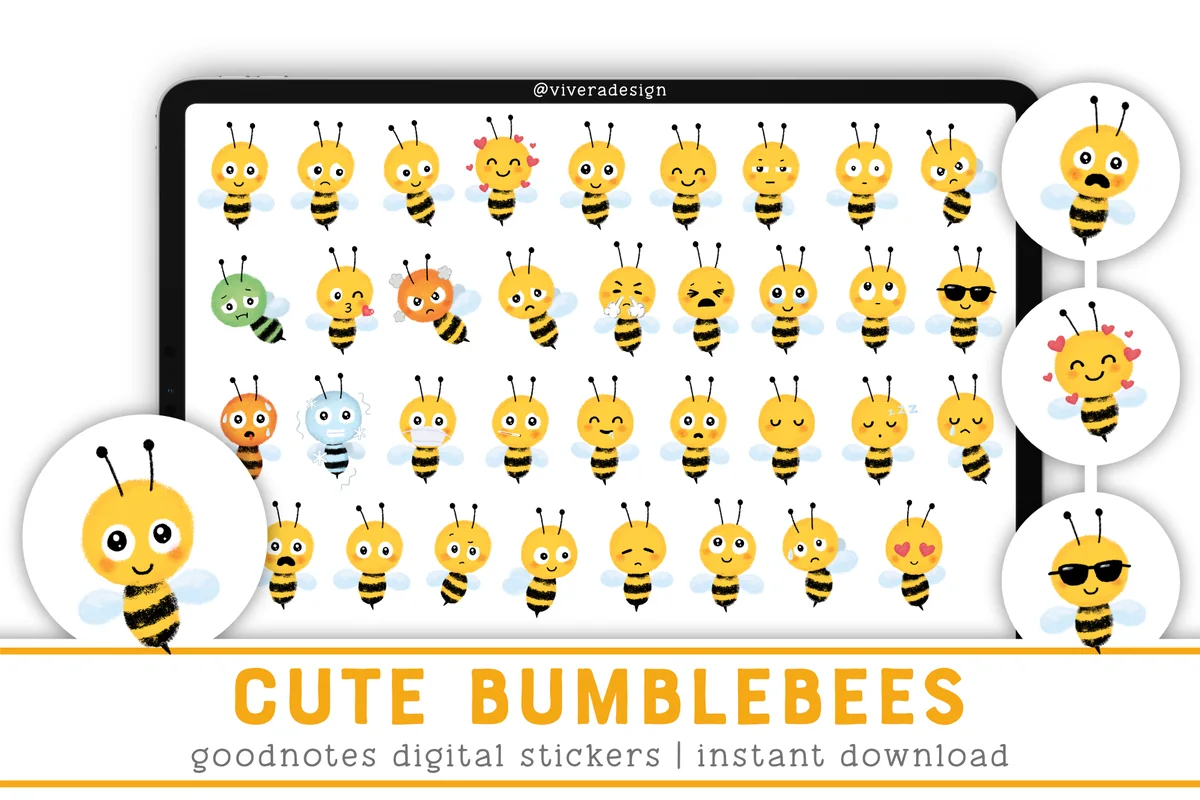
7. Cute Bumblebee Digital Stickers
Layouts: 35 bumblebee mood stickersFormat: PNG + sticker sheet + GoodNotes sticker book
Best for: mood trackers, yellow palette fans, weekly planners. Designed by vivera.
- 35 bumblebee mood stickers as individual PNGs
- One sticker sheet with all the bees for cropping
- A GoodNotes file: a ready sticker book with cropped stickers
- Works in other PDF apps like Notability
Thirty-five little bees with every mood you can think of, including a sick one with a mask and a cool one in sunglasses. The GoodNotes sticker book means no cropping at all. The bright yellow looks great on white pages; on a pink pastel planner I'd go with the mochi set instead.
Best for weather tracking
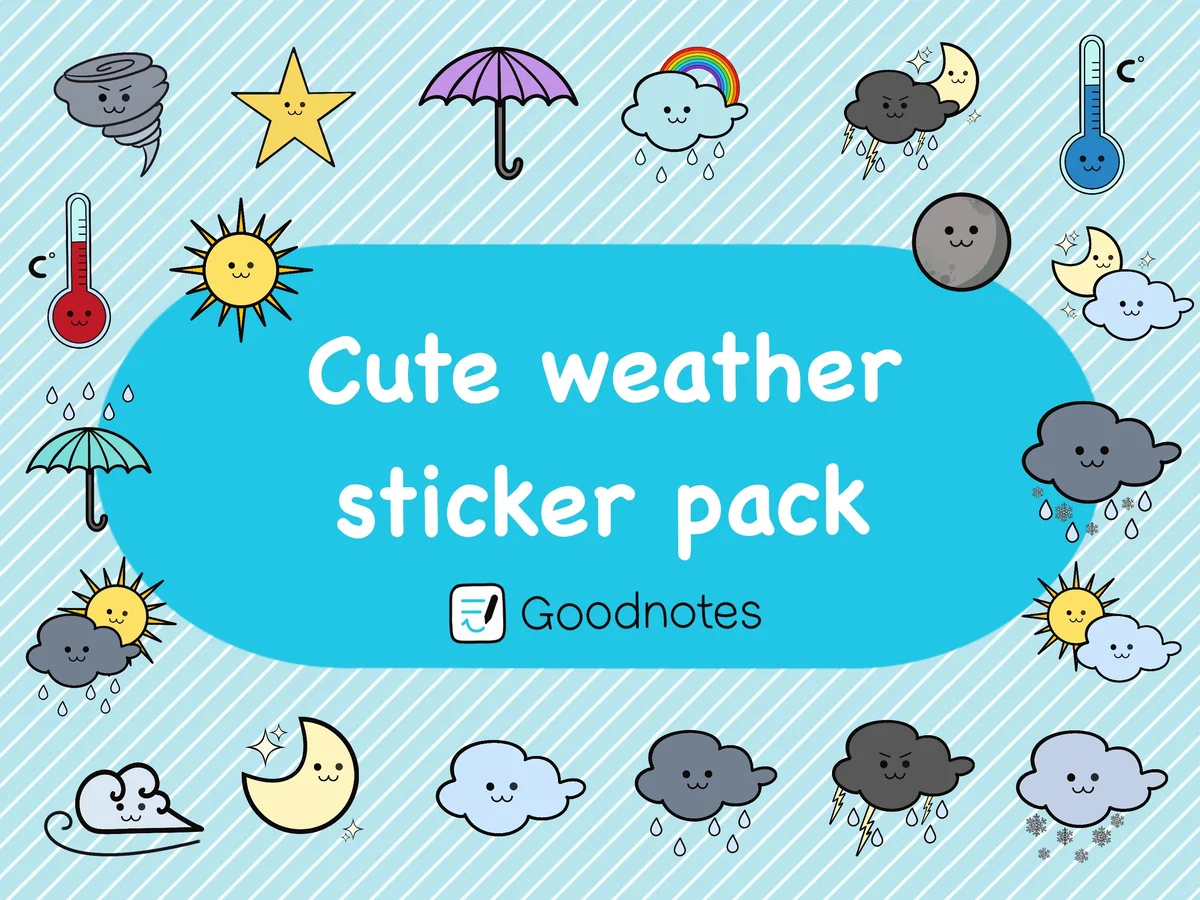
8. Kawaii Weather Digital Sticker Pack
Layouts: 20 weather stickers with faces: sun, clouds, rain, snow, moon, thermometersFormat: Transparent PNG + GoodNotes sticker file
Best for: daily planners, weather trackers, journalers. Designed by Milana Rosenwald.
- 20 kawaii weather stickers for GoodNotes
- Smiling sun, clouds, rain, snow, thunder, a rainbow, a moon and a tornado
- Hot and cold thermometers and two umbrellas
- High-resolution PNGs with a clear background plus a GoodNotes sticker file
A weather sticker is the quickest way to fill a daily page, and these all have tiny faces, from a grumpy thundercloud to a sleepy moon. Twenty pieces cover every kind of day, and the GoodNotes file keeps them one tap away. It's a small, simple set, which is what a weather box needs.

Best character set
9. MOCHI BOY Digital Stickers for Goodnote
Layouts: 20 mochi boy character stickers in snack and animal costumesFormat: Transparent PNG, 700 x 700 px
Best for: character fans, note takers, pastel lovers. Designed by 119winterstudio.
- 20 PNG stickers with a transparent background (700 x 700 px)
- One round-cheeked mochi boy in costumes: strawberry, pizza, milk carton, bee, sheep, chick
- Pastel lilac and pink palette
- Step-by-step tips in the description for adding them to a GoodNotes sticker book
This is kawaii in the classic sense: one tiny character dressed up as a strawberry, a pizza slice or a sheep. The files are small (700 px), so they're best as small stickers in margins and corners, not as big cover art. I'd use it to make lecture or meeting notes a little less plain.
Quick Comparison
| Sticker pack | Style | What you get | Stand-out extra |
|---|---|---|---|
| 1. Cute Kawaii Planner Stickers | Soft bear and bunny | 40 stickers | Moods + to-do pieces |
| 2. Kawaii Work Planner Stickers PNG | Office-life bear and bunny | 40 stickers | GoodNotes collection file |
| 3. Cute Sticky Notes Digital Sticker | Pastel sticky notes | 34 stickers | Bonus sticker book |
| 4. Kawaii Mood Stickers for GoodNotes PNGs | Glossy pastel mochi | 6 stickers | One face per mood |
| 5. Cozy Panda Planner Stickers Vol.1 | Cream panda faces | 40 stickers | Widest mood range |
| 6. Cute Axolotl Planner Stickers PNG&PDF | Pink axolotl humor | 15+ stickers | Phrase stickers |
| 7. Cute Bumblebee Digital Stickers | Yellow bumblebees | 35 stickers | GoodNotes sticker book |
| 8. Kawaii Weather Digital Sticker Pack | Smiling weather icons | 20 stickers | GoodNotes sticker file |
| 9. MOCHI BOY Digital Stickers for Goodnote | Pastel mochi character | 20 stickers | Costume variety |
Everyday, Mood or Weather: Which Kawaii Stickers Fit Your Pages
The packs above split into three jobs. Pick one pack per job instead of five packs in one style, and the planner stays tidy.
Everyday and work stickers
Characters doing ordinary things: sweeping, answering email, drinking boba, collapsing on a pillow. They decorate a daily page and label it at the same time. In this list: the bear and bunny planner set, the work-day version with deadlines and meetings, and the pastel sticky notes you write on.
Kawaii mood stickers
One face per day replaces a color key in a mood tracker. Choose by range: the six mochi faces for a minimal tracker, the 40 panda emotions when you want the exact feeling, the axolotl phrases for humor, the bumblebees if you want a ready GoodNotes sticker book.
Weather and character stickers
Small icons that fill a corner: the smiling weather set for the weather box on a daily page, and the mochi boy for margins of notes and lists.
What I Look For in Kawaii Stickers for a Planner
- Transparent PNGs, ideally with a GoodNotes file. A white background leaves a box on a cream or pastel page. A ready GoodNotes sticker book (like the bumblebee, weather and work packs) saves the cropping.
- One character or one style per page. Kawaii looks cute in small doses and messy in large ones. A set built around one character, like the bear and bunny, keeps a spread consistent.
- Faces that mean something. For a mood tracker you need clearly different expressions: happy, tired, angry, sick, in love. Packs with only “happy” faces are decoration, not a tracker.
- Size and resolution. 300 DPI files stay sharp when you scale them. Smaller files (the mochi boy is 700 px) are fine for margins, not for a cover.
- Not seasonal. Pumpkin and bunny-with-eggs sets are cute for one month. For a planner you use all year, pick stickers without holiday props.
Kawaii Sticker Ideas for a Weekly Spread
The fun part of digital stickers is that one face can be reused every day. A few ways to give kawaii stickers a job on a weekly spread:
- A mood face in each day’s box
- A smiling sun or rain cloud next to the date
- A stressed bear on the deadline day
- A sleepy face on rest days
- A sticky note for the top 3 to-dos
- A “Monday Mood” axolotl at the top of the week
- A “Weekend loading” bar on Friday
- A trophy or “Complete” sticker for a finished project
- A sick panda when you take a day off
- A bee with sunglasses for a good day
- A mochi boy in the margin of meeting notes
- One sticker as a reward for every habit streak
For layouts where one sticker per day replaces a color key, see my mood tracker ideas. For weekly spreads to put the stickers on, see my weekly planner ideas.
Kawaii vs Cute vs Coquette Stickers
These three words get mixed up on Pinterest, but they look different on a page:
- Kawaii comes from the Japanese word for “cute” and has its own look: round shapes, big heads, tiny dot eyes, blush on the cheeks, and faces on everything, even clouds and milk cartons. Every pack in this list follows that style.
- Cute is wider: any soft, friendly illustration, including realistic animals and flowers without faces.
- Coquette is about bows, lace, pearls and pale pink, usually without characters. It suits a romantic journal more than a mood tracker.
If your planner leans aesthetic rather than playful, the pastel sticky notes and the mochi faces are the calmest kawaii stickers here. For a broader mix of styles, my GoodNotes stickers guide covers functional, aesthetic and seasonal packs.
Digital vs Printable Kawaii Stickers
A lot of people search for printable kawaii stickers for a paper journal or for vinyl to put on a laptop. The packs above are digital first: you place them on pages in GoodNotes or Notability as often as you like and never run out. Some of them print too:
- Digital and print: the panda and axolotl packs (print-ready PDF sheets), the bumblebees and the sticky notes (sticker sheets).
- Best on screen: the bear and bunny sets, the mochi faces, the weather icons and the mochi boy, which come as PNGs or GoodNotes files for digital planners.
How to Add Kawaii Stickers in GoodNotes
- Unzip the pack in the Files app. Depending on the pack, you’ll see single PNGs, sticker sheets or a GoodNotes file.
- If there is a GoodNotes file, import it: it’s your sticker book. Open it in a second tab next to your planner.
- For single PNGs, tap the image tool on a planner page, add the sticker from Photos or Files and resize it.
- For sticker sheets, add the sheet to a sticker notebook, then cut out one sticker at a time with the lasso and copy it to your planner.
- Save favorites as Elements. Select a sticker with the lasso and add it to a GoodNotes Elements collection, for example “Moods” and “Weather”, so the faces you use daily are one tap away.
Using Notability instead? PNG stickers go onto the page as images there, which takes a few more taps; my GoodNotes vs Notability comparison covers the differences in how each app handles stickers.
FAQ
What are kawaii stickers?
Stickers in the Japanese “kawaii” (cute) style: round characters with big heads, small dot eyes and blushing cheeks, often with faces on objects like clouds, food or sticky notes. Digital kawaii stickers are transparent PNG images or GoodNotes sticker books that you place on planner and journal pages on an iPad.
Where can I get kawaii stickers for my iPad?
Digital sticker shops on Creative Fabrica, Etsy and independent planner sites sell packs made for GoodNotes and Notability; the 9 packs above are all on Creative Fabrica. Look for “transparent PNG” or “GoodNotes file” in the description, not “SVG cut file” or “sublimation”, which are for craft machines and printing on fabric.
How do I import kawaii stickers into GoodNotes?
Unzip the pack in Files. A GoodNotes file opens as a sticker notebook; single PNGs go onto a page with the image tool. Save the ones you use most to Elements, and they stay one tap away in every notebook. The full steps are in the section above.
How do I make my own kawaii stickers on an iPad?
Draw a simple round character in a drawing app, keep the face small and low on the head (that’s the kawaii proportion), add blush, and export it as a PNG with a transparent background. You can also lift any object out of a photo in the Photos app (touch and hold, then Copy) and paste it into GoodNotes, then draw a tiny face on it.
Are there free kawaii stickers for GoodNotes?
Some artists and the GoodNotes blog share small free cute sticker packs. Free sets are usually a handful of stickers in mixed styles; a paid pack built around one character or one job (moods, weather) keeps a planner consistent for longer.
Do these kawaii stickers work in Notability?
Yes. Transparent PNGs work in any app that lets you add images: Notability, Noteshelf, ZoomNotes and GoodNotes. Only the GoodNotes files inside some packs are GoodNotes-specific; the PNGs in the same pack work everywhere.
Final Thoughts
The best kawaii stickers are the ones you reach for every day: start with one everyday set, like the Cute Kawaii Planner Stickers, add one mood pack for your tracker, such as the panda emotions, and save both to Elements. For a planner to put them in, see my cute aesthetic digital planners; for pretty note pages, my aesthetic notes ideas; for more styles, all planner stickers. For February pages, my valentine stickers keep the same cute look without cluttering the spread.
For a different decorative mood, these coquette digital stickers lean toward bows, borders and pretty page accents.
You May Also Like
Prefer loose lines and sketchbook details alongside cute characters? Browse these doodle digital stickers for hand-drawn accents.
For a cute page dedicated to your pup, compare these dog digital stickers, from playful puppy scenes to small portrait accents.
This post contains affiliate links. If you buy through them, I may earn a small commission at no extra cost to you. Learn more.