Birthdays are the easiest dates to forget in a planner because they don’t feel urgent until the day before. Birthday stickers fix that in a small way: a cupcake on the 14th or a balloon with a name on it is hard to miss on a monthly page, and on the iPad you place them once for the whole year in a few minutes.

Below are 6 birthday sticker packs from Creative Fabrica I’d use in a digital planner, from date number cupcakes that turn the date itself into a reminder to a watercolor party set, cozy teddy bears, a birthday week kit, cake postage stamps and pastel kittens. After the list: a simple birthday tracker page, how to mark birthdays across a digital planner, what to look for and how to set the stickers up in GoodNotes.
The 6 Best Birthday Stickers I Found for GoodNotes
Most birthday packs on Creative Fabrica are made for printing, Cricut cutting, invitations or kids’ party decor. I skipped those, along with SVG cut files and sets uploaded back in 2019. Every pack below names GoodNotes or the iPad in its description, and no designer appears more than twice. The first four are made for planners. The last two, the cake stamps and the kittens, are general PNG clipart that lists GoodNotes stickers among other uses like junk journals and mugs: no GoodNotes file, you place the PNGs yourself once.
TL;DR: 6 birthday sticker packs for GoodNotes and iPad planners: date number cupcakes and balloons for marking birthdays, a watercolor party set with a GoodNotes sticker book, cozy teddy bear and cake stickers, a bright birthday week kit, birthday cake postage stamps and watercolor kittens with gifts. The cards say which packs come as a ready GoodNotes file.
Quick Picks
- Best for marking birthdays: Birthday Date Buddies Digital Stickers
- Best for party set: Birthday Celebration Digital Stickers
- Best for cozy set: Birthday Planner Stickers PNG & PDF
- Best for birthday week kit: Happy Birthday Kitty Digital Stickers
- Best for minimal option: BirthdayCake Birthday Stamps 24 PNG
- Best for cat lovers: Birthday Card Clipart Tiny Kitten 24 Png
- Birthday Date Buddies Digital Stickers – Best for marking birthdays
- Birthday Celebration Digital Stickers – Best party set
- Birthday Planner Stickers PNG & PDF – Best cozy set
- Happy Birthday Kitty Digital Stickers – Best birthday week kit
- BirthdayCake Birthday Stamps 24 PNG – Best minimal option
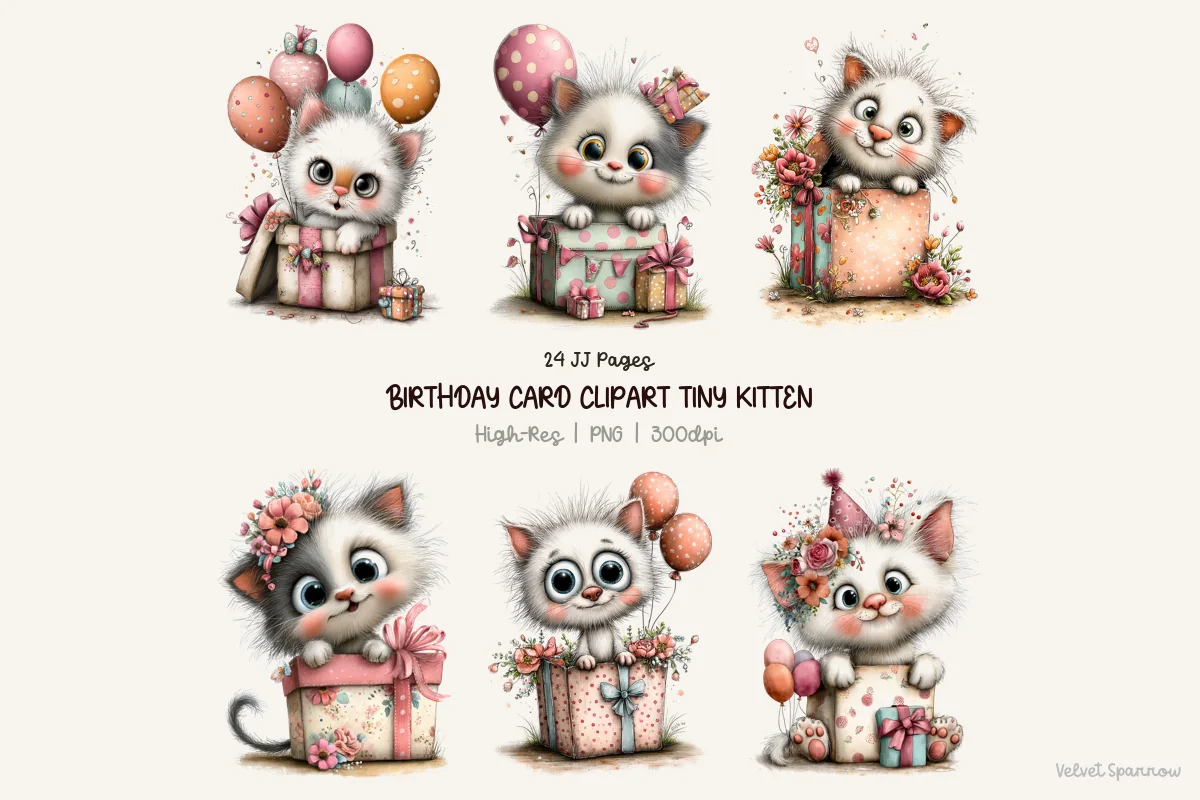
- Birthday Card Clipart Tiny Kitten 24 Png – Best for cat lovers
Best for marking birthdays
1. Birthday Date Buddies Digital Stickers
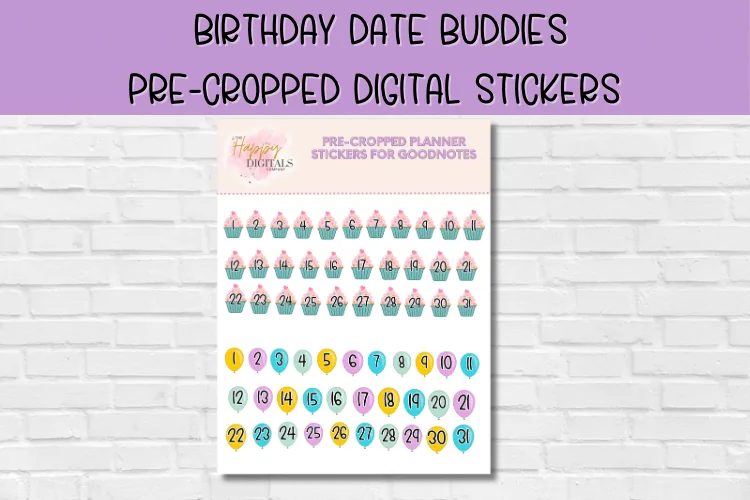
Layouts: Date number stickers 1 to 31 on cupcakes and on balloons, characters with space for a name and dateFormat: Pre-cropped stickers in a GoodNotes file
Best for: birthday trackers, monthly spread planners, GoodNotes beginners. Designed by Happy Digitals Co.
- Date numbers 1 to 31 on little cupcakes and on balloons (as shown in the previews)
- Pre-cropped and made for GoodNotes, also usable in other note-taking apps
- Comes as a GoodNotes file: open it, then lift stickers with the lasso tool
- The description mentions character stickers with space for a name and a date
- 21 favorites on Creative Fabrica
This is the most practical pack here and the one I'd start with. Instead of a cake sticker floating next to the date, the date itself becomes the cupcake or the balloon, so a birthday is visible at a glance on a monthly page. Two styles of numbers mean you could keep one for family and one for friends.
Best party set
2. Birthday Celebration Digital Stickers
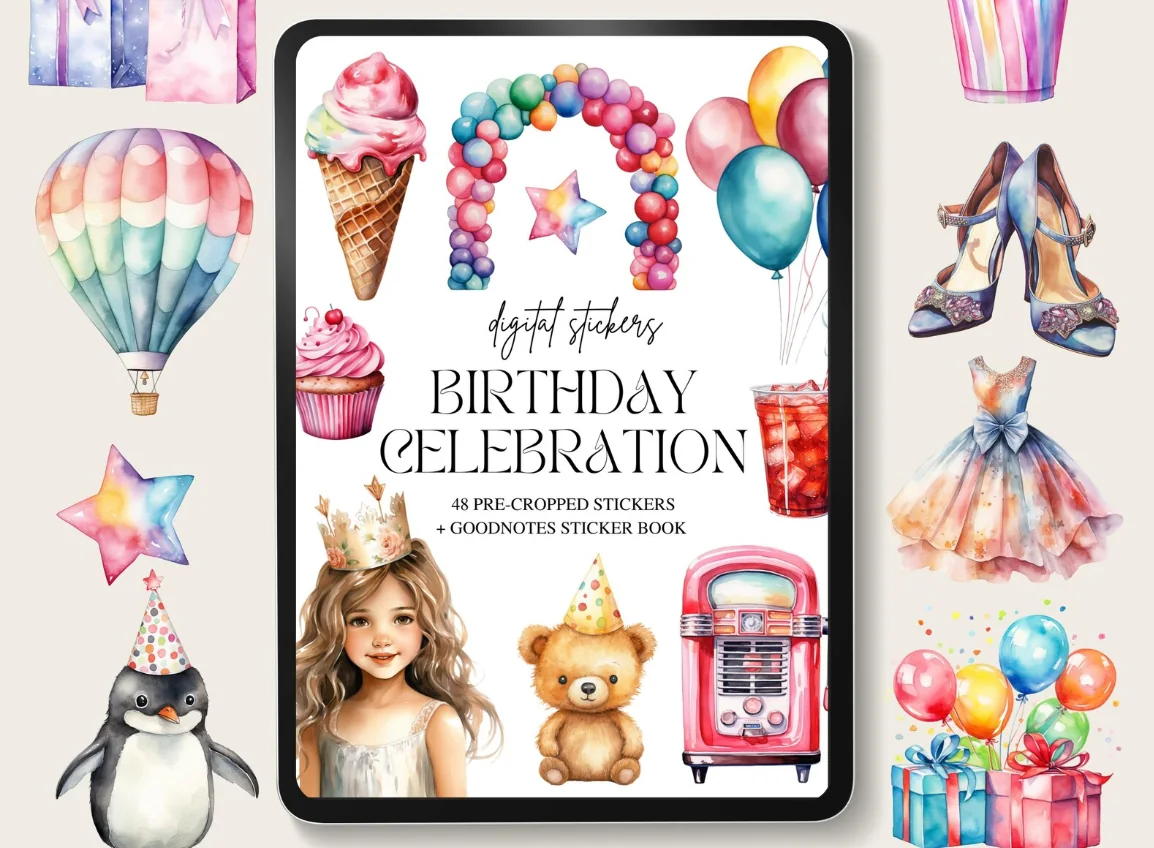
Layouts: 48 watercolor party stickers in pink and blue: cakes, balloons, balloon arch, gifts, party hats, "Let's Celebrate" and "Party Time" letteringFormat: Pre-cropped PNG + GoodNotes sticker book
Best for: party planners, watercolor fans, memory page makers. Designed by Youssef Artist.
- 48 stickers in pink and blue: cakes, balloons, flowers and decorations
- The cover lists 48 pre-cropped stickers plus a GoodNotes sticker book
- Watercolor style with a balloon arch, gift boxes, party hats, ice cream and "Let's Celebrate" and "Party Time" lettering (as shown in the previews)
- PNG files; the designer says the art is made with AI and checked by hand
The biggest choice of party things in the list: arch, presents, drinks, hats and two lettering stickers. It suits a party prep page or the page you fill in after the day. A few stickers show children and a pair of heels, so it reads more "party" than "planner", which is why it sits second.
Best cozy set
3. Birthday Planner Stickers PNG & PDF
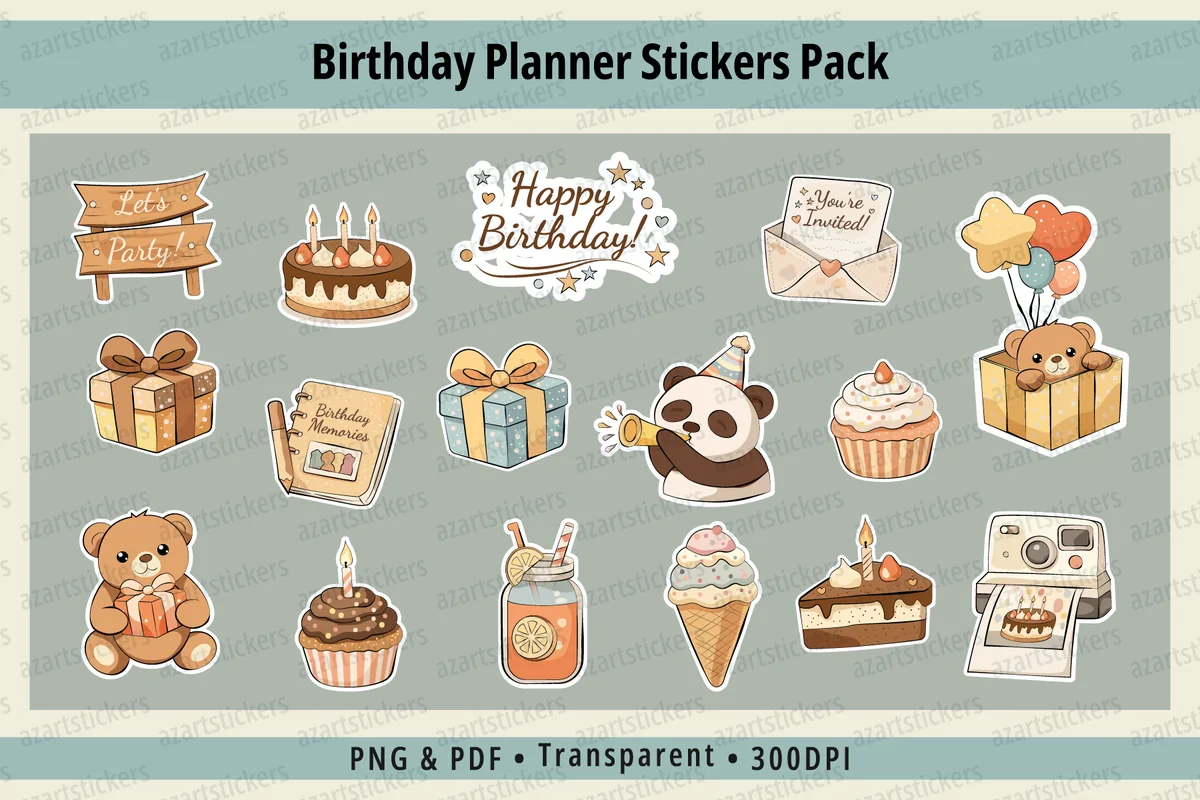
Layouts: 35+ cozy stickers: cakes, cupcakes, gifts, teddy bears, balloons, a Birthday calendar page, Make a Wish and You're Invited labelsFormat: Single transparent PNG (300 dpi) + print-ready PDF sheets
Best for: cozy aesthetic fans, birthday month spreads, gift planners. Designed by azartstickers.
- 35+ cozy illustrations: cakes, gifts, teddy bears, balloons, cupcakes and more
- Made for digital planners, GoodNotes and iPad planning, according to the designer
- Single transparent PNGs at 300 dpi plus print-ready PDF sheets
- Includes a "Birthday" calendar page, a "Make a Wish" banner and a "You're Invited" envelope (as shown in the previews)
- Listed in February 2026, 11 favorites
If bright pink isn't your planner, this one is calm: caramel, peach and dusty blue, with teddy bears peeking out of gift boxes. The little "Birthday" calendar sticker is made for marking the day, and the gift boxes work as a reminder to buy a present a week before.
Best birthday week kit
4. Happy Birthday Kitty Digital Stickers
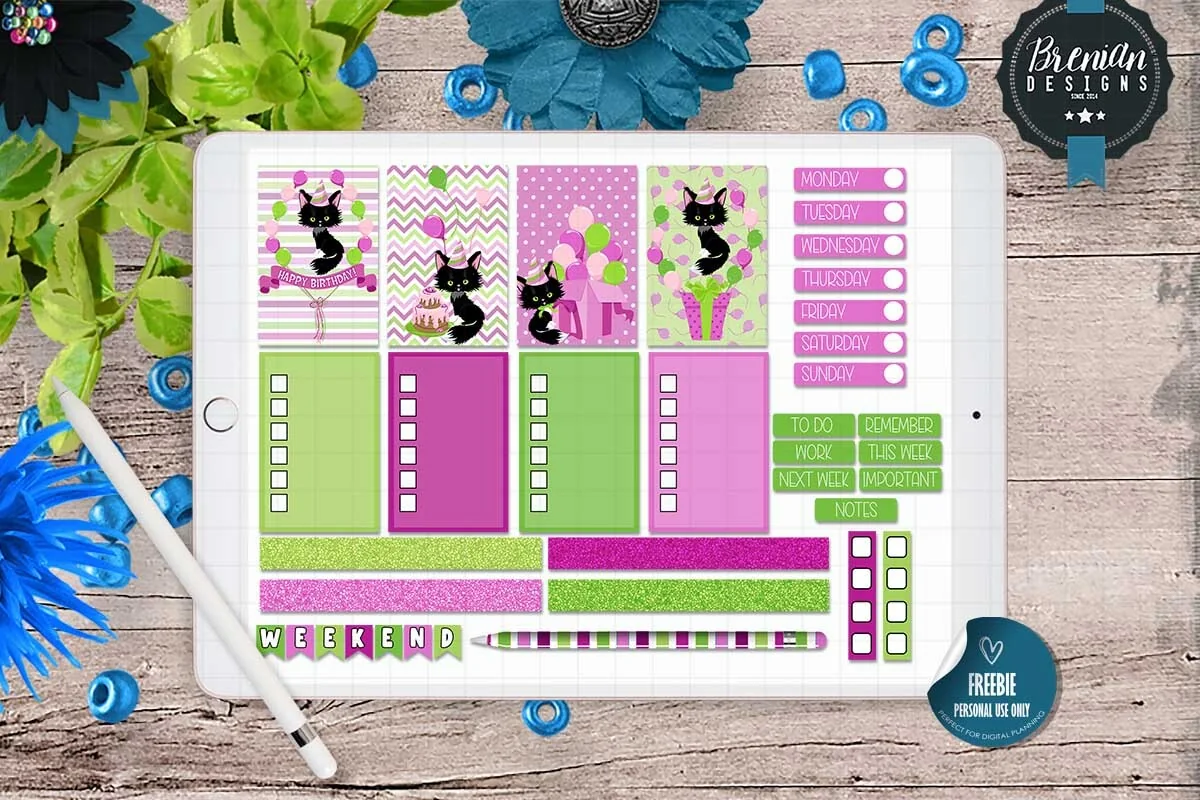
Layouts: 25+ stickers for a birthday week: black kitty scenes, checklist boxes, weekday labels, To Do, Remember, Notes and Weekend headers, glitter stripsFormat: Pre-cropped PNG + GoodNotes file + PNG sheets (screen only)
Best for: weekly spread planners, cat lovers, bright color fans. Designed by Bren Wotherspoon.
- Over 25 pre-cropped stickers for a daily or weekly layout
- Black kitty scenes with a cake, balloons and gifts, plus checklist boxes in green and pink
- Weekday labels, "To Do", "Remember", "Notes" and "Weekend" headers and glitter strips (as shown in the previews)
- Pre-cropped PNG, a GoodNotes file and PNG sheets; not made for printing
This is a classic weekly kit with a birthday theme, so it does more than decorate: the boxes hold the party to-do list and the labels fill the week. The colors are loud lime and magenta, which I like for one special week, not for every page.
Best minimal option
5. BirthdayCake Birthday Stamps 24 PNG
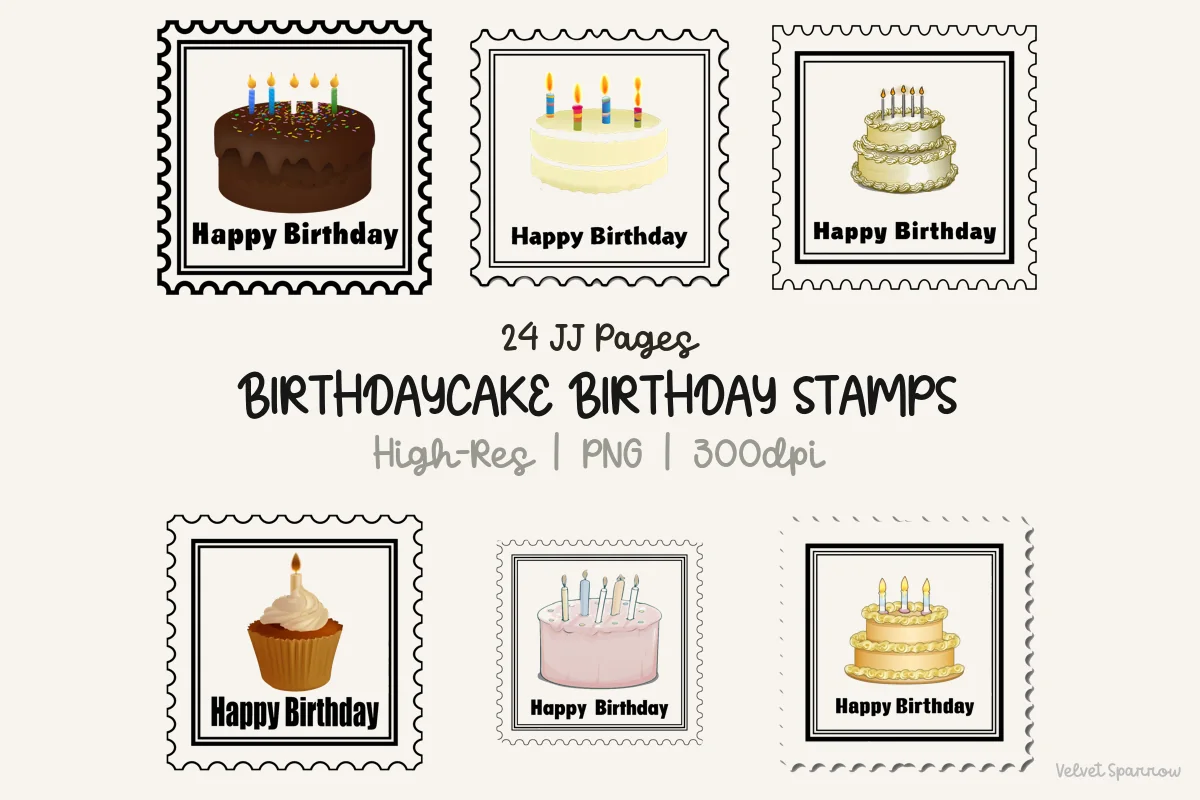
Layouts: 24 postage stamp stickers with a birthday cake or cupcake and "Happy Birthday"Format: High-res PNG, 300 dpi
Best for: junk journal fans, minimal birthday lists, vintage stamp lovers. Designed by Velvet.Sparrow.
- 24 postage stamp stickers, each with a birthday cake or cupcake and "Happy Birthday"
- High-resolution 300 dpi PNG
- Black stamp frames with perforated edges (as shown in the previews)
- The designer lists digital planner GoodNotes stickers among the uses
- Listed in March 2026
The quietest pack in the list: black frames, one cake each, no characters. A stamp next to a name in a birthday list looks tidy, and it fits neutral or vintage planners where cute stickers would feel out of place.
Best for cat lovers
6. Birthday Card Clipart Tiny Kitten 24 Png
Layouts: 24 watercolor kittens with gift boxes, balloons and party hatsFormat: Transparent PNG, 300 dpi
Best for: cat lovers, soft pastel spreads, birthday card pages. Designed by Velvet.Sparrow.
- 24 watercolor kittens with gift boxes, balloons, bows and party hats (as shown in the previews)
- 300 dpi PNG with transparent backgrounds
- The designer lists digital planner GoodNotes stickers among the uses
- Listed in March 2026, same designer as the stamps above
Pastel kittens sitting in gift boxes: sweet without being neon. One kitten per birthday on a monthly page works, and a large one makes a nice "card" on a journal page for someone's day. Scale one kitten to the size you like once and save it to Elements.
Quick Comparison
| Sticker pack | Style | What you get | Stand-out extra |
|---|---|---|---|
| 1. Birthday Date Buddies Digital Stickers | Pastel cupcakes and balloons | Date numbers 1 to 31, GoodNotes file | The date itself is the sticker |
| 2. Birthday Celebration Digital Stickers | Soft watercolor, pink and blue | 48 stickers, GoodNotes sticker book | Two lettering stickers for headers |
| 3. Birthday Planner Stickers PNG & PDF | Cozy, muted browns and blues | 35+ single PNGs + PDF sheets | "Birthday" calendar sticker |
| 4. Happy Birthday Kitty Digital Stickers | Bright lime and magenta | 25+ stickers, GoodNotes file | Weekday labels and checklists |
| 5. BirthdayCake Birthday Stamps 24 PNG | Postage stamps, black frames | 24 PNG stamps | Works in neutral planners |
| 6. Birthday Card Clipart Tiny Kitten 24 Png | Pastel watercolor kittens | 24 PNGs | Card-style kitten scenes |
Never Miss a Cake: a Birthday Tracker Page for Your Digital Planner
Stickers make birthdays visible, but they work best with one page that holds all of them. Add a blank or lined page at the front of your planner (or use the yearly overview if it has room) and set it up like this:
- Twelve small boxes, one per month. A 3 x 4 grid fits on one page. Write the month name at the top of each box, or use month title stickers if you have them.
- One line per birthday: the date, the name and, if you like, the age they’re turning this year.
- A gift idea column. Write ideas the moment you hear them during the year; by December you’ll be glad you did.
- A reminder mark a week before. A small gift box sticker on the weekly page seven days ahead is your cue to buy a present or send a card.
- A check when it’s done. Card sent, call made, gift given.
Once the page is filled, it takes about ten minutes at the start of each month to copy that month’s birthdays onto the monthly spread with stickers. That’s the whole system: one list, one sticker per date, one reminder a week before.
How to Mark Birthdays in a Digital Planner
- Yearly overview: a tiny dot or a mini cake on each birthday, nothing more. It shows which months are busy with celebrations.
- Monthly page: the main place for birthday stickers. Date number cupcakes like the Birthday Date Buddies replace the date, and a cake stamp or a kitten next to the name works on any layout.
- Weekly spread: the reminder (a gift box a week before) and, in the birthday week itself, a small party plan: what to buy, who to invite, what to bake.
- Daily page: one bigger sticker on the day, plus the call or message you want to send.
If your planner doesn’t have a monthly layout you like, my list of digital monthly planners has calendars with enough room in each date box for a sticker and a name.
What I Look For in Birthday Stickers
- Made for the screen. “Pre-cropped”, “GoodNotes file” or “for iPad planning” in the description. “Print then cut”, “Cricut” and “sublimation” mean paper or T-shirt first.
- Small, simple shapes. A birthday sticker usually sits inside a date box, so a cupcake or a stamp works better than a busy scene.
- Something functional. Date numbers, a “Birthday” calendar sticker, a “To Do” label or checklist boxes make a pack useful beyond decoration.
- A style you can live with all year. Birthdays come every month. If neon pink tires you by March, pick muted colors or stamps.
- No dated content. Birthday packs rarely carry a year, but check the previews anyway.
Birthday Sticker Ideas for Your Planner
- Balloon with an age: write the age on a balloon sticker for milestone birthdays.
- Gift box reminder on the weekly page seven days before.
- Party prep checklist with a birthday week kit: invitations, cake order, decorations, playlist.
- Your own birthday page: a cake sticker, three wishes for the year ahead and one photo.
- Memory page after the party: a photo, the menu, who came, the best moment, framed with two or three party stickers.
- Card-style greeting: a large kitten or cake sticker and a short note, exported as an image and sent as a message.
- Color by circle: one sticker style for family, another for friends, a third for colleagues.
Why Use Birthday Stickers in a Digital Planner
- Visibility. A picture stands out from handwriting on a full monthly page.
- Reuse. One pack covers every birthday of the year; a digital sticker never runs out.
- Easy changes. Moved the party to Saturday? Drag the sticker, no peeling.
- A nicer planner. Small celebrations through the year make the planner more fun to open.
Digital vs printable birthday stickers
Many searches for birthday stickers are about labels for gift bags and party favors. Those are printable sheets for a sticker printer or a cutting machine. One pack above also includes print-ready PDF sheets (the cozy set), while the kitty kit is made for the screen only. If you plan only on the iPad, pick packs with pre-cropped PNGs or a GoodNotes file.
How to Set Up Birthday Stickers in GoodNotes
- Unzip the pack in the Files app. Depending on the pack you’ll find single PNGs, PNG sheets or a GoodNotes file.
- If there is a GoodNotes file, import it: that’s your birthday sticker book. Open it in Split View next to your planner and copy stickers across with the lasso tool.
- For single PNGs, make a new notebook called “Stickers”, add a page called “Birthdays” and insert the images there.
- Resize once. Shrink a sticker to fit a date box in your monthly layout, then save that size.
- Save your favorites as Elements. A cupcake, a gift box and a balloon are enough for most months and stay one tap away.
Using Notability or Noteshelf? PNG stickers go onto the page as images in either app. My GoodNotes vs Notability comparison covers how each app handles stickers, and my main list of GoodNotes stickers has everyday packs to go with these.
FAQ
What are digital birthday stickers?
Images with a transparent background (PNG) or ready sticker books for apps like GoodNotes: cakes, balloons, gifts, party hats and “Happy Birthday” lettering. You place them on a planner or journal page on the iPad, move and resize them, and reuse them as often as you like.
How do I get digital stickers into GoodNotes?
Save the files from the store to the Files app. A GoodNotes file opens straight in GoodNotes as a sticker book; single PNGs go in through the image tool. Then copy stickers with the lasso tool or save them as Elements.
Are there free birthday digital stickers?
Some planner blogs and sticker shops share a few free ones, often a single sheet. Creative Fabrica also has a free section and a subscription that includes many sticker packs. A full pack gives you one style for the whole year, which matters for stickers you’ll see every month.
Can I print these birthday stickers?
Some of them. The cozy set includes print-ready PDF sheets and the 300 dpi PNGs can be printed, while the Happy Birthday Kitty pack is made for the screen only, as its designer says. Check the license on each product page before using them for gifts you sell.
Do birthday stickers work in Notability?
Yes. Transparent PNGs work in any app that lets you add images: Notability, Noteshelf, ZoomNotes and GoodNotes. Only the GoodNotes files inside some packs are GoodNotes-specific.
How do I remember birthdays in a digital planner?
Keep one birthday tracker page with all dates, copy each month’s birthdays onto the monthly spread with a sticker, and put a gift reminder on the weekly page a week before. If you also want an alert on your phone, add the dates to your phone’s calendar: a PDF planner doesn’t send notifications.
Final Thoughts
The best birthday stickers are the ones that make a date impossible to miss without cluttering the page. I’d start with the date number cupcakes for the monthly calendar, add a mood set like the cozy teddy bears or the cake stamps, and keep a birthday tracker page at the front of the planner. For a yearly page with room for birthdays and holidays, see my yearly planner ideas, and for more cats, my cute cat digital stickers.
You May Also Like
This post contains affiliate links. If you buy through them, I may earn a small commission at no extra cost to you. Learn more.