An empty habit tracker is a strange thing: dozens of little boxes and no idea what to put next to them. Track too much and you quit by week two; track too little and nothing changes. These habit tracker ideas fix the blank-page part: 50 habits grouped by goal, so you can pick the three to five that actually matter to you this month.
Below are the ideas first, by goal: health, mind, money, study and work, home and relationships. Then the iPad templates from Creative Fabrica I’d use to track them, from a simple one-page tracker to planners with yearly habit grids. At the end: how many habits to track, and how to keep going after a missed day.
50 Habit Tracker Ideas, by Goal
Every idea here is something you can tick off in a few seconds: either you did it today or you didn’t. That’s what makes a habit trackable. “Be healthier” isn’t; “10-minute walk” is.
Health and Body 1–12
- 1Drink 8 glasses of water
- 2Walk 10,000 steps (or a 20-minute walk)
- 3Work out or move for 30 minutes
- 4Stretch for 5 minutes
- 5Sleep 7–8 hours
- 6In bed by 11 p.m.
- 7Eat a vegetable with every meal
- 8Take vitamins or medication
- 9No sugary drinks
- 10Cook at home instead of ordering in
- 11Skincare morning and night
- 12Floss
Mind and Mood 13–22
- 13Meditate for 5 minutes
- 14Write one line in a journal
- 15Note three things you’re grateful for
- 16No phone for the first 30 minutes of the day
- 17Screen time under 2 hours
- 18Read 10 pages
- 19Spend 15 minutes outside
- 20Log your mood (a color or an emoji is enough)
- 21Do one thing just for fun
- 22Screens off an hour before bed
Money 23–30
- 23No-spend day
- 24Log every expense
- 25Bring lunch from home
- 26Move a small amount to savings
- 27No online shopping
- 28Check your bank balance
- 29Pay a bill on time (or a debt payment)
- 30Make coffee at home
Study and Work 31–39
- 31Study for 30 minutes (or two Pomodoro sessions)
- 32Review today’s notes
- 33Practice a language for 10 minutes
- 34Plan tomorrow before you finish today
- 35Inbox to zero
- 36One hour of deep work, no notifications
- 37Learn one new thing
- 38Write 300 words
- 39Practice an instrument or a skill
Home 40–45
- 40Make the bed
- 4115-minute tidy
- 42Dishes done before bed
- 43One load of laundry
- 44Water the plants
- 45Prep tomorrow’s clothes and bag
Relationships and Self-Care 46–50
- 46Text or call a friend or family member
- 47Phone-free dinner
- 48Give one honest compliment
- 49Quality time with your partner or kids
- 50Rest without guilt: a nap, a bath, a slow evening
Habit Tracker Ideas for Students
If school or college is your main focus, pick from these:
- Study for 30 minutes
- Review lecture notes the same day
- Start assignments the day they’re set
- Read one chapter
- Sleep before midnight
- Drink water during study sessions
- One class-free hour for yourself
For exam season, add a countdown and a “topics reviewed” tracker; I cover those in my digital study planners.
Monthly Habits to Track as an Adult
Some habits don’t need a daily box. Once a month is enough for these:
- A budget review
- A deep clean of one room
- A doctor or dentist check, if one is due
- A call with an old friend
- Backing up your photos
- A short reflection on what worked
A monthly habit tracker or a monthly checklist page keeps them from slipping.
The Best iPad Habit Tracker Templates I Found
I kept only digital templates for the iPad, no printables. First come dedicated habit trackers; after them, planners with a real habit tracker section, for when you want your habits next to your days and goals.
TL;DR: 50 habit tracker ideas grouped by goal (health, mind, money, study, home, relationships), then 6 iPad templates to track them: 2 dedicated habit trackers and 4 planners with habit, mood and goal pages. Each card lists orientation, layouts and dates, plus who it suits.
Quick Picks
- Best for tracking up to 12 habits: Habit Tracker for IPad Goodnotes
- Best for habits with a reason: Digital Habit Tracker + Freebie Sticky
- Best for yearly goals and habits: 2027 Bundle Digital Planner, Goodnotes
- Best for health habits: ADHD Undated Digital Planner Goodnotes
- Best for habits and hydration: All in One Cute Digital Planner
- Best for habits plus sleep: Self-care Tracker
- Habit Tracker for IPad Goodnotes – Best for tracking up to 12 habits
- Digital Habit Tracker + Freebie Sticky – Best for habits with a reason
- 2027 Bundle Digital Planner, Goodnotes – Best for yearly goals and habits
- ADHD Undated Digital Planner Goodnotes – Best for health habits
- All in One Cute Digital Planner – Best for habits and hydration
- Self-care Tracker – Best for habits plus sleep
Best for tracking up to 12 habits
1. Habit Tracker for IPad Goodnotes
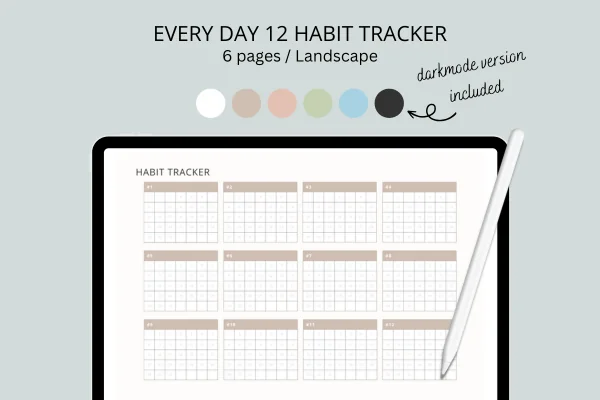
Orientation: LandscapeLayouts: Habit tracker (12 habits)Dates: Undated
Best for: minimalists, dark mode fans, goal setters. Designed by sleekdarling.
- One page tracks 12 habits or goals, each with its own month grid
- 6 PDF files: white, cocoa, champagne, matcha, smokey blue and dark mode
- US Letter, landscape, made for tablets
- Works in GoodNotes, Notability and Xodo on the iPad
Twelve habits on one calm page, with room for the whole month next to each. I'd fill only five boxes at first (see the list above) and leave the rest for habits you add later. The dark mode version is perfect for ticking boxes at night.

Best for habits with a reason
2. Digital Habit Tracker + Freebie Sticky
Layouts: Monthly habit trackerDates: Undated
Best for: habit beginners, pink lovers, budget shoppers. Designed by MOMAT THIRTYONE.
- A pink two-page spread with blocks for 6 habits
- Each block has columns for the habit, its benefit and a reward
- Target and achieved boxes plus a 1–31 day grid
- 100+ digital sticky notes; PDF for GoodNotes and Notability, undated
This is the one I'd pair with the ideas above: next to each habit you write why it matters and how you'll reward yourself. That small "why" is often what gets you through day 12. And it costs less than a coffee.
Best for yearly goals and habits
3. 2027 Bundle Digital Planner, Goodnotes
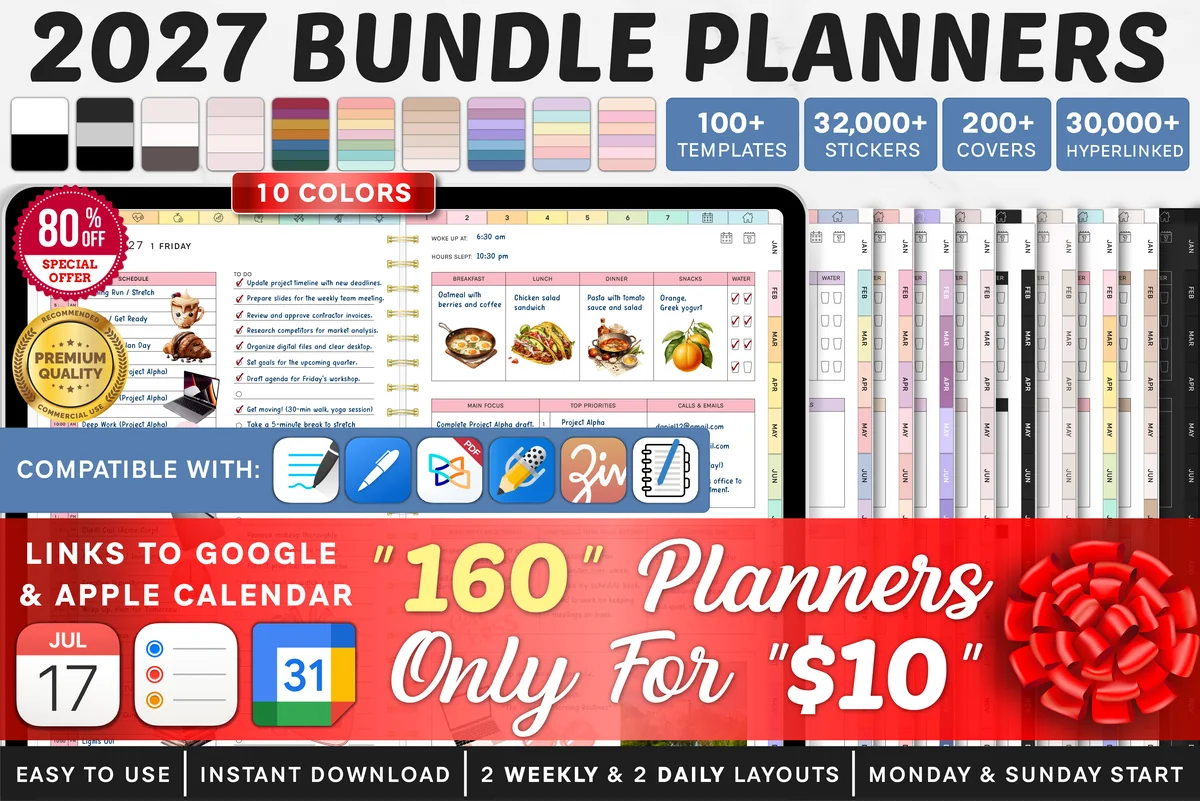
Orientation: LandscapeLayouts: Yearly, Quarterly, Monthly, Weekly, DailyDates: 2027Week start: Monday or Sunday
Best for: goal setters, challenge fans, color lovers. Designed by SuperDigitalPlanners.
- Monthly habit tracker plus a separate habit tracker page
- Yearly goals, monthly goals and a monthly vision board
- Mood tracker, 30-day challenge and no-spend challenge
- Dated 2027, 10 color themes, Monday and Sunday start, calendar links
Habits work best when they serve a goal, and this planner connects the two: yearly goal, monthly goal, then the daily habit that gets you there. The 30-day challenge page is great for testing a new habit before it joins the tracker.
Best for health habits
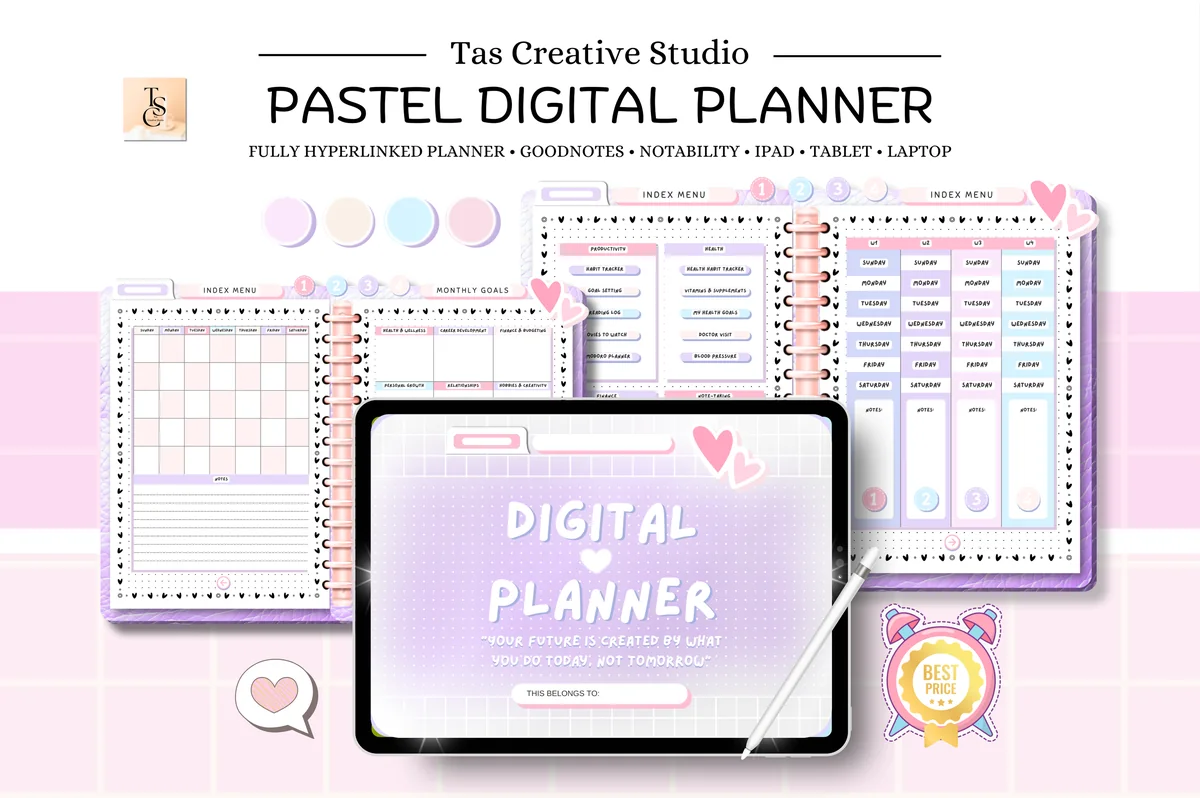
4. ADHD Undated Digital Planner Goodnotes
Orientation: LandscapeLayouts: Monthly, Weekly, DailyDates: Undated
Best for: ADHD planners, health trackers, pastel lovers. Designed by Tas Creative Studio.
- Habit tracker and a separate health habit tracker
- Weekly vitamins and supplements page and health goals
- Pomodoro planner and goal setting for focus habits
- 60 undated hyperlinked pages, landscape, rated 5.0
Two habit trackers in one: a general one and a health one, plus a weekly page for vitamins and supplements, the habit everyone forgets. The Pomodoro page is a nice tool for study or work habits from the list.

Best for habits and hydration
5. All in One Cute Digital Planner
Orientation: LandscapeLayouts: Monthly, Weekly, DailyDates: Undated
Best for: kawaii lovers, pastel planners, people who want everything in one. Designed by Tas Creative Studio.
- Habit tracker and water tracker
- Mood tracker and self-care tracker
- Goal planner, vision board and bucket list
- Undated monthly modules, landscape, with a free sticker book
Water is the most popular habit in any list, and here it gets its own tracker next to habits and mood. Cute without being childish, and undated, so a missed month never wastes pages.
Best for habits plus sleep
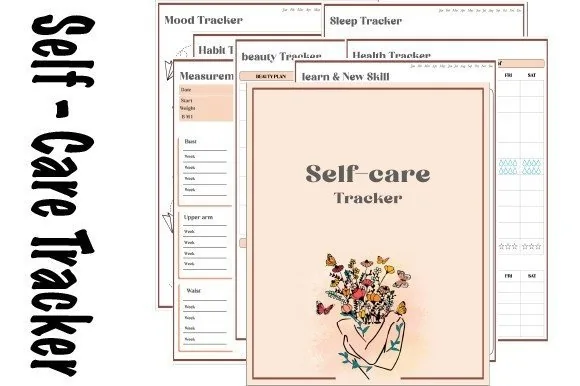
6. Self-care Tracker
Orientation: PortraitLayouts: Habit, sleep, mood, health, beauty and skill trackers
Best for: self-care trackers, mood trackers, illustration lovers. Designed by dolce_gioia.
- 7 tracker types: habit, sleep, measurement, health, beauty, mood and skill or learning
- 6 mood tracker designs
- A year of trackers; tap a title to jump to the index
- Made for GoodNotes, Notability and Noteshelf on the iPad
The habit tracker sits next to sleep and mood pages, so at the end of the month you can see whether the bad-sleep weeks were also the skipped-habit weeks. Coloring in the trackers makes the nightly check-in feel calm, not like homework.
Quick Comparison
| Template | Best for | Habit pages | Stand-out extra |
|---|---|---|---|
| 1. Habit Tracker for IPad Goodnotes | Many habits, one page | 12 habit grids | 6 colors incl. dark mode |
| 2. Digital Habit Tracker + Freebie Sticky | Motivation built in | 6 habits: benefit + reward | Target vs achieved |
| 3. 2027 Bundle Digital Planner, Goodnotes | Goals → habits | Monthly habit tracker | 30-day challenge |
| 4. ADHD Undated Digital Planner Goodnotes | Health + focus habits | 2 habit trackers | Supplements page |
| 5. All in One Cute Digital Planner | Habits in a life planner | Habit + water + mood | Free sticker book |
| 6. Self-care Tracker | Habits + sleep | Habit + sleep + mood trackers | 6 mood designs |
How Many Habits Should You Track?
Three to five. Fewer than three and the tracker feels pointless; more than five and every evening turns into a report card. Start with one habit you already do most days (an easy win), one you want to build, and one you want to cut back on. When a habit feels automatic for a month, retire it from the tracker and add the next one.
How to Choose What to Track
- Start from a goal, not a list. “Feel less tired” turns into sleep by 11 and water. “Save $1,000” turns into a no-spend day and lunch from home.
- Make it small enough to do on a bad day. “Read 10 pages” survives a busy week; “read for an hour” doesn’t.
- Make it yes-or-no. If you can’t tick it in two seconds, rewrite it.
- Mix daily and weekly habits. Workouts three times a week belong in a weekly row, not seven daily boxes you’ll never fill.
How to Keep Going After a Missed Day
Missing one day is normal; missing two in a row is where habits quietly end. A simple rule helps: never miss twice. If a box stays empty, make tomorrow’s version tiny (one page, one glass, five minutes) just to keep the chain alive. And a fresh tracker page every month is a built-in restart, which is one reason monthly trackers work so well on an iPad: duplicate the page and begin again.
Habit Tracker Template or Habit App?
Apps send reminders and count streaks for you, which is handy. A handwritten tracker on the iPad gives you something apps don’t: the whole month on one page, in your own handwriting and colors, right next to your planner. Ticking a box with an Apple Pencil is also more satisfying than tapping a button. Many people use both: an app reminder for the time, the planner for the record.
How to Set Up a Habit Tracker in GoodNotes
- Import the PDF into GoodNotes (Share → GoodNotes → Import as New Document).
- Write your 3–5 habits on the first page of the month.
- Pick one color per area (health green, money gold, study blue) so the month reads at a glance.
- Bookmark the tracker page and tick it at the same time every evening, for example while you plan tomorrow.
- At the end of the month, duplicate the page, keep what worked and swap one habit.
Winter Arc Habit Tracker Ideas
Winter Arc is a social media trend: instead of waiting for January, you treat the last stretch of the year, usually from October or November to December 31, as your own training arc. It’s about 90 days of a few habits done quietly every day, like sleep, movement, study and less scrolling. A habit tracker suits it well, because the point is to watch the streak grow while the evenings get darker.
Winter Arc habit tracker ideas to pick from (three to five is plenty):
- Up at the same time every day
- Lights out before 11
- A workout or a 20-minute walk
- 8 glasses of water
- No phone for the first hour
- Social media under 30 minutes
- One hour of study or deep work
- Read 10 pages
- Cook at home on weekdays
- A two-line evening check-in
How to Make a 90-Day Winter Arc Tracker in GoodNotes
- Pick your start date. Starting on October 3, the arc ends on December 31 after exactly 90 days; starting on November 1 gives you 61 days.
- Take the monthly habit tracker page from your planner and duplicate it once for every month of the arc.
- Write the same 3–5 habits in the rows of each page and give every habit its own color.
- Add a small “day __ of 90” line at the top and a one-line review every Sunday.
- Bookmark the current month so the tracker opens in one tap, and tick it every evening.
Missed a day? The same rule applies here: never miss twice. A Winter Arc is about the trend over three months, not a perfect grid.
FAQ
What is a Winter Arc habit tracker?
It’s a habit tracker for the Winter Arc trend: about 90 days at the end of the year when you focus on a few daily habits, such as sleep, workouts, study and less screen time, before the new year starts. A monthly habit tracker page duplicated for October, November and December works as a Winter Arc tracker.
What are good habits to track for beginners?
Pick easy, daily yes-or-no habits: drink water, a 10-minute walk, make the bed, read 10 pages, in bed by a set time. Start with three, and add more only when those feel automatic.
What should I put in my habit tracker?
Habits that support a goal you care about right now, small enough to do even on a busy day. Use the list above by goal: health, mind, money, study, home or relationships, and choose one or two from each area that matters to you.
Do habit trackers really work?
They work because they make a habit visible: you see the streak and don’t want to break it, and you see the gaps and can ask why. They don’t work if you track too many things or treat a missed day as failure. Keep the list short and follow the “never miss twice” rule.
What is the 21/90 rule for habits?
It’s a popular rule of thumb: do something for 21 days to start a habit and for 90 days to make it part of your life. Real habits take more or less time depending on the person and the habit, but a 90-day view is a nice reason to use a tracker with a quarterly or yearly grid.
Does Apple have a habit tracker?
There’s no dedicated habit tracker app from Apple, though the Health and Fitness apps count steps, sleep and workouts, and Reminders can repeat daily tasks. For everything else, a habit tracker template in GoodNotes or Notability on the iPad does the job.
Final Thoughts
The best habit tracker is a short one. Pick three to five ideas from the list above, put them on a monthly page in your iPad planner and tick them every evening (my monthly habit tracker ideas show how to lay one out). For more trackers, see my digital habit trackers for iPad, the self-care planners, or browse all habit trackers. If your habits serve a bigger goal, see the digital goal planners. Want to track feelings too? See my mood tracker ideas for a color-a-day page. For exercise habits with sets and reps, my workout planners have proper logs.
Still looking for an all-in-one setup? See my top digital planner picks for 2027, dated and undated.
You May Also Like
This post contains affiliate links. If you buy through them, I may earn a small commission at no extra cost to you. Learn more.