December gets busy fast: gifts, cards, parties, school events, a menu for twelve and that one tradition everyone expects. A Christmas planner puts all of it on a few pages, so you plan once and then just follow the list. On the iPad it’s even easier: duplicate a gift list, move a party, check off a card, and nothing gets lost in a pile of sticky notes.
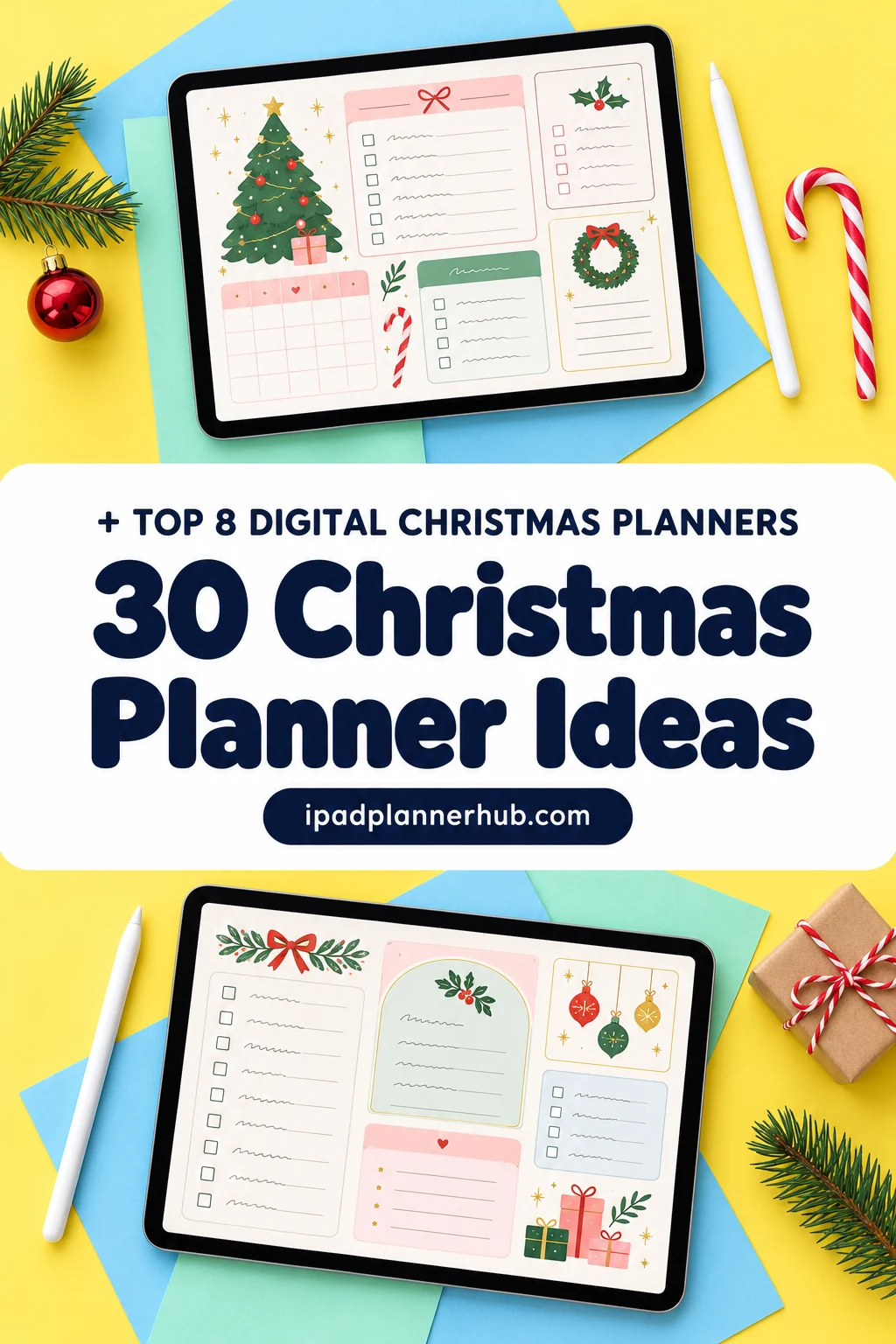
Below are 8 digital Christmas planners, gift lists and festive calendars from Creative Fabrica I’d use on my iPad, including all-in-one planners with real gift, event and holiday pages. After the list: 30 Christmas planner ideas, what to include, a week-by-week countdown from early November and how to set it all up in GoodNotes.
The 8 Best Digital Christmas Planners I Found
Most Christmas planners on the market are printables, so I kept only files made for GoodNotes and other iPad apps or shown on an iPad. Dated planners for past years and Canva templates are left out. Planners with real Christmas planning pages (gift and event budgets, gift lists, holiday dates) come first, then festive calendars and a weekly page.
TL;DR: 8 digital Christmas planning picks for iPad and GoodNotes: an all-in-one planner with gift and event budgets, a full Christmas-themed planner, a one-page gift giving list, two dated 2027 planners with holiday and event pages, two festive undated monthly calendars and a Christmas weekly page.
Quick Picks
- Best for gift and event budgets: All-in-One Digital Planner
- Best for a Christmas theme: Christmas Lover Digital Planner
- Best for a one-page gift list: Gift Giving List • Coffee Latte
- Best for holiday dates and events: 2027 Bundle Digital Planner, Goodnotes
- Best for next year's holidays: All-in-One Digital Planner 2027
- Best for a festive monthly calendar: Christmas Wonder Digital Calendar
- All-in-One Digital Planner – Best for gift and event budgets
- Christmas Lover Digital Planner – Best for a Christmas theme
- Gift Giving List • Coffee Latte – Best for a one-page gift list
- 2027 Bundle Digital Planner, Goodnotes – Best for holiday dates and events
- All-in-One Digital Planner 2027 – Best for next year's holidays
- Christmas Wonder Digital Calendar – Best for a festive monthly calendar
- Digital Calendar – Classy Christmas – Best for a dark-mode calendar
- Christmas Digital Weekly Planner – Best for a Christmas week page
Best for gift and event budgets
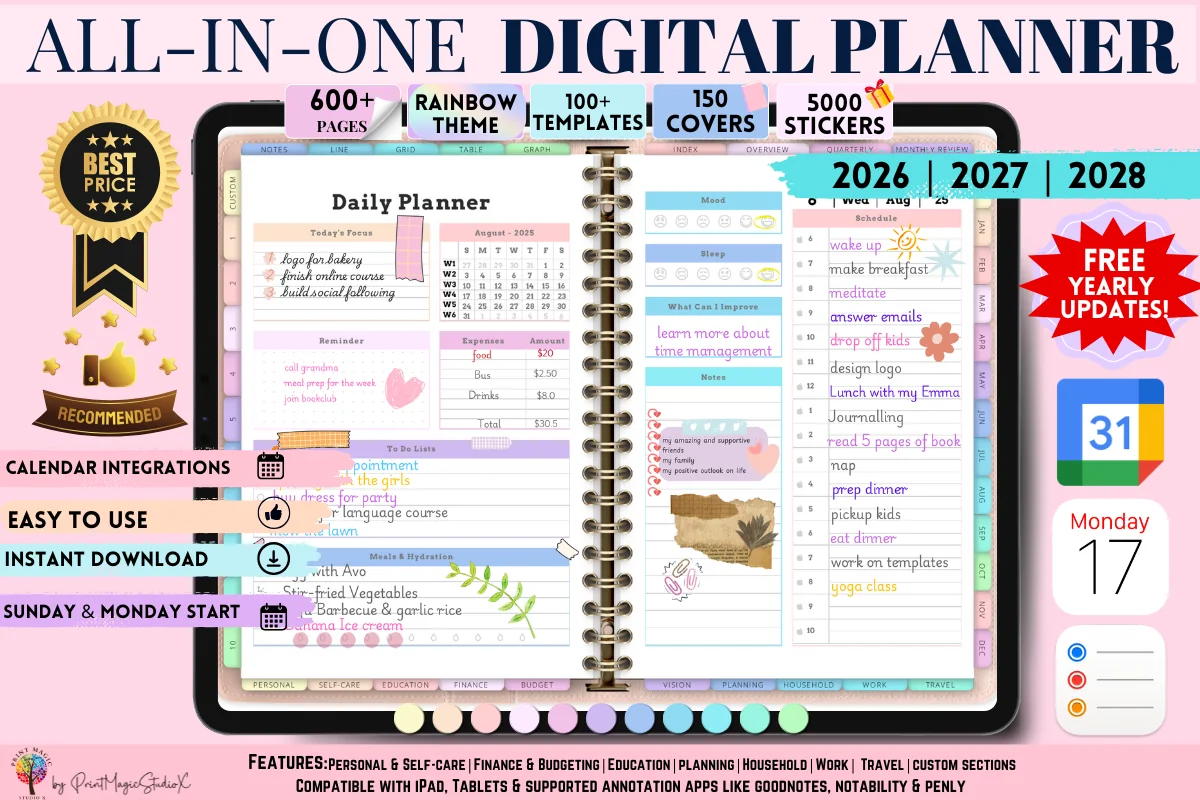
1. All-in-One Digital Planner
Orientation: LandscapeLayouts: Yearly, Monthly, Weekly, Daily, 86 templatesDates: 2026–2028
Best for: people who want one planner for everything, sticker lovers, colorful planners. Designed by Print Magic StudioX.
- 86 templates across personal, finance, budget, household, work and travel sections
- A Gift Budget Planner and an Event Budget Planner for holiday shopping and parties
- An Event Planner to organize a gathering from start to finish, plus a Holiday/Travel Budget and a Grocery Budget
- Dated 2026, 2027 and 2028; the seller notes a paid GoodNotes account may be needed for the large file
The most saved planner in this list by far, and for December it has exactly the pages that keep the season from getting expensive: a gift budget, an event budget and an event planner for the dinner you're hosting. Everything else in your life stays in the same file, so the Christmas plans don't get lost in a separate notebook.

Best for a Christmas theme
2. Christmas Lover Digital Planner
Layouts: Yearly, Monthly, Weekly, Daily (81 pages)Week start: Monday
Best for: Christmas lovers, all-in-one planners, list makers. Designed by andreea.nijloveanu.
- 81-page hyperlinked PDF with colorful tabs, Monday start
- 1 yearly, 12 monthly, 5 weekly and 7 daily pages
- Habit, health, money, goals, notes and list pages
- Templates you can duplicate, copy or delete
If you want one festive notebook for the whole season, this is it: monthly pages for the big dates, daily pages for the busy week before Christmas and list pages for gifts and groceries. The cozy sock-and-pine design is the fun part.
Best for a one-page gift list
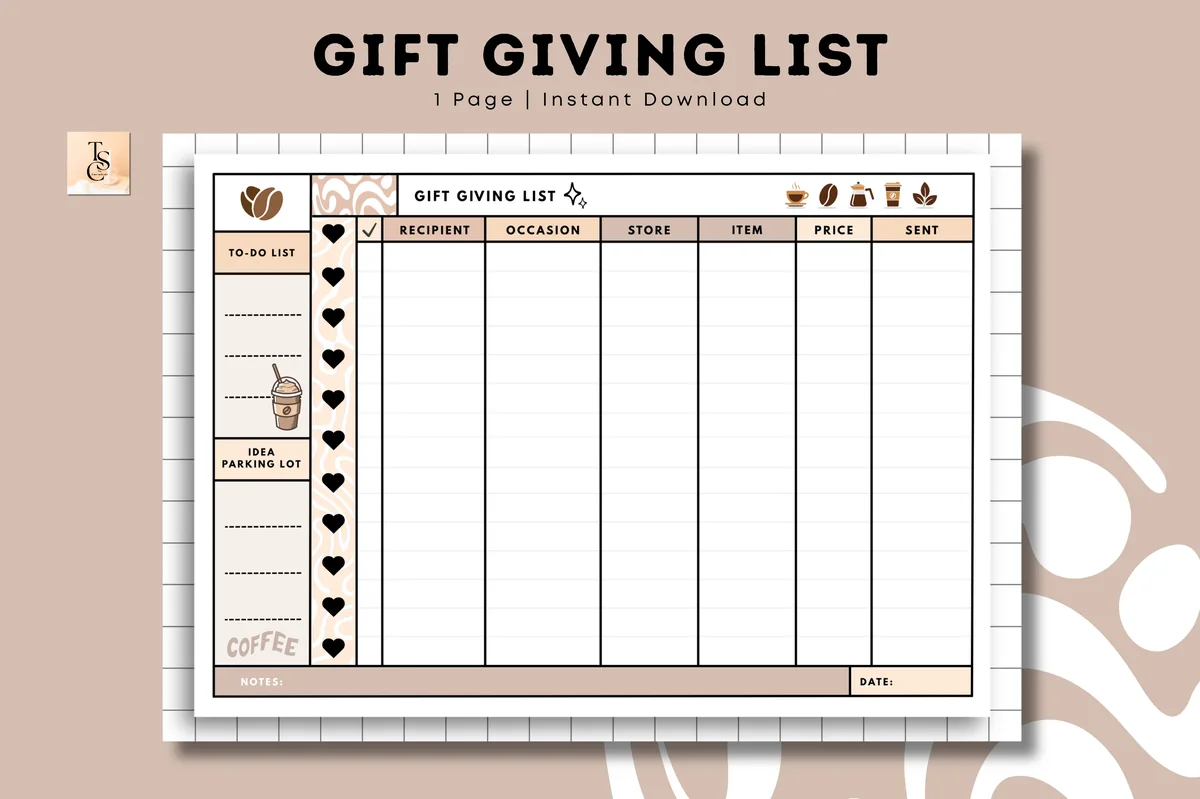
3. Gift Giving List • Coffee Latte
Orientation: LandscapeLayouts: One-page gift giving listDates: Undated
Best for: gift givers, holiday organizers, budget shoppers. Designed by Tas Creative Studio.
- Undated one-page gift giving list in A4 landscape
- Columns for recipient, occasion, store, item, price and sent (per the cover)
- A to-do list and an idea parking lot on the side (per the cover)
- Digital PDF for GoodNotes, Notability, Noteshelf and XODO, plus a printable version
This is the page I'd open first in November. One row per person, a price column to keep the total honest and a "sent" box so nothing gets double-bought or forgotten in the mail. Duplicate it for birthdays the rest of the year.
Best for holiday dates and events
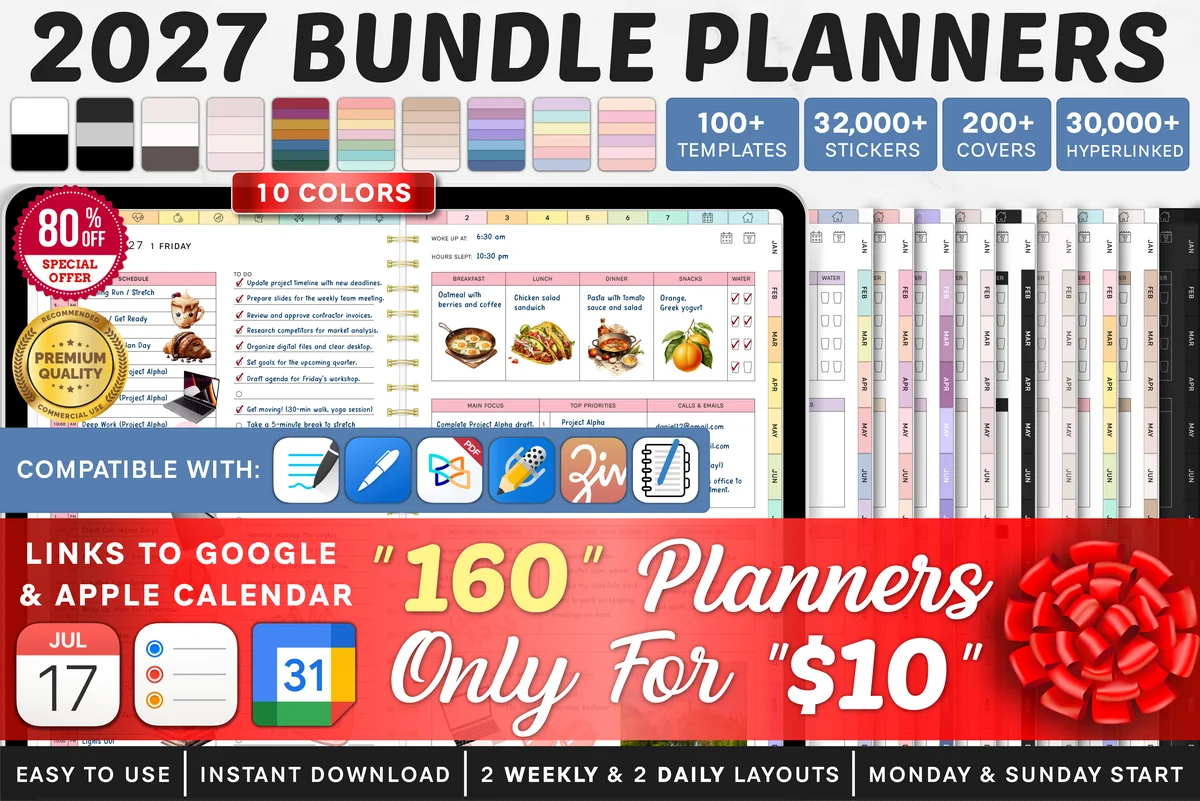
4. 2027 Bundle Digital Planner, Goodnotes
Orientation: LandscapeLayouts: Yearly, Quarterly, Monthly, Weekly, DailyDates: 2027Week start: Monday or Sunday
Best for: goal setters, challenge fans, color lovers. Designed by SuperDigitalPlanners.
- Yearly Key Dates page for birthdays, anniversaries and holidays
- Monthly Overview with tasks and events, and a Monthly Budget
- An Event Planner for the details of special events
- Dated 2027 with Monday and Sunday start versions, for GoodNotes, Notability, Xodo and Noteshelf
Christmas planning is easier when next year's dates are already in place. The Key Dates page and the Event Planner turn this into a holiday-season command center, and the monthly budget sits right next to it for December spending.

Best for next year's holidays
5. All-in-One Digital Planner 2027
Orientation: LandscapeLayouts: Yearly, Monthly, Weekly, DailyDates: 2027Week start: Monday
Best for: busy professionals, budgeters, people who want one planner for everything. Designed by Heartcraft Studio.
- 2027 Year at a Glance and an Important Holidays page
- Monthly and weekly budget pages in a Finance & Budget section
- Goal setting, wellness and lifestyle sections in one hyperlinked file
- Works in GoodNotes, Notability, Noteshelf, Xodo, ZoomNotes and other PDF apps on iPad
Use it in December to close out the year and set up the next one: mark the important holidays for 2027, set a monthly budget and move your Christmas list into it once the season is done. A good pick if you want one planner that carries you from this Christmas into the new year.

Best for a festive monthly calendar
6. Christmas Wonder Digital Calendar
Orientation: LandscapeLayouts: Monthly (12 pages, 6 weeks)Dates: UndatedWeek start: Monday or Sunday
Best for: month-at-a-glance planners, festive design fans, families. Designed by ZaraRozaDesigns.
- 12 undated monthly pages, 6 weeks per month
- Monday and Sunday start versions
- Landscape, hyperlinked, red and green painted design
- Works in GoodNotes, Notability, Noteshelf, OneNote and Xodo
A month on one page is what holiday planning really needs: school concerts, parties, shipping deadlines and travel all on the same grid. Undated, so the same file works next December too.

Best for a dark-mode calendar
7. Digital Calendar – Classy Christmas
Orientation: LandscapeLayouts: Monthly (12 pages, 6 weeks)Dates: UndatedWeek start: Monday or Sunday
Best for: dark mode fans, evening planners, elegant design lovers. Designed by ZaraRozaDesigns.
- 12 undated monthly pages, 6 weeks per month
- Monday and Sunday start versions
- Dark crimson and emerald design with white text, landscape
- For GoodNotes, Notability, Noteshelf, OneNote and Xodo
The darker sibling of the calendar above, for anyone who plans in the evening. White writing on deep red and green is easy on the eyes and still looks festive when you open it in December.
Best for a Christmas week page
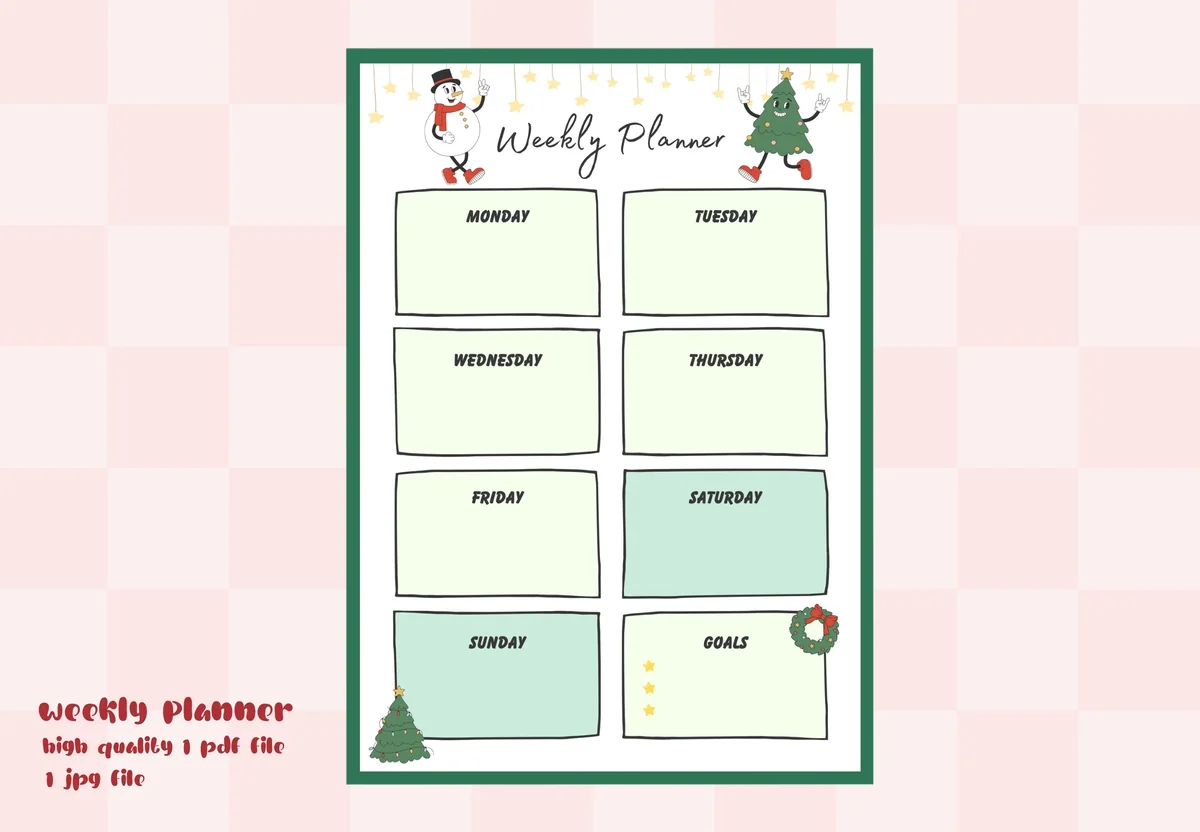
8. Christmas Digital Weekly Planner
Orientation: PortraitLayouts: Weekly (1 page)Dates: Undated
Best for: seasonal planners, holiday organizers, budget shoppers. Designed by Namm.WS.
- Christmas weekly planner page for GoodNotes
- Boxes for every day plus notes
- Festive red and green with a little snowman
- PDF and JPEG
One page per week is enough for most of December: gift shopping, parties, school events and the day you bake. Duplicate it four times and you have the whole countdown.
Quick Comparison
| Planner | Best for | What you get | Stand-out extra |
|---|---|---|---|
| 1. All-in-One Digital Planner | All-in-one + holiday pages | 86 templates | Gift and event budgets |
| 2. Christmas Lover Digital Planner | Full planner | 81 pages | Money + list pages |
| 3. Gift Giving List • Coffee Latte | Gift list | One-page tracker | Price + sent columns |
| 4. 2027 Bundle Digital Planner, Goodnotes | Dated 2027 planner | Key dates + event planner | Monday or Sunday start |
| 5. All-in-One Digital Planner 2027 | Dated 2027 all-in-one | Important Holidays page | Monthly + weekly budget |
| 6. Christmas Wonder Digital Calendar | Monthly calendar | 12 undated months | Mon or Sun start |
| 7. Digital Calendar – Classy Christmas | Monthly calendar | 12 undated months | Night-mode look |
| 8. Christmas Digital Weekly Planner | Weekly page | One-page week | Very low price |
30 Christmas Planner Ideas for a Calm December
Pick the groups that matter to your family and turn each one into a page. You don’t need all thirty: five or six good lists are what make December feel organized.
Gifts and Budget 1–5
- 1Set one total gift budget before you buy anything
- 2List every person, then a gift idea and a price limit
- 3Keep a “bought, wrapped, given” column so nothing is missed
- 4Track stocking stuffers on a separate short list
- 5Note sizes, favorite colors and wish-list links for each person
Cards and Mail 6–10
- 6Update your Christmas card list and addresses in one place
- 7Mark who gets a photo card and who gets a note
- 8Write the last shipping dates for cards and parcels on your calendar
- 9Plan one evening for writing cards, with music and cocoa
- 10Keep a “cards received” list to update next year’s addresses
Menu and Baking 11–15
- 11Plan the Christmas Eve and Christmas Day menus on one page
- 12Make a bake-ahead list: what can be frozen in early December
- 13Write a shopping list by store, not by recipe
- 14Note who brings what if you host a potluck
- 15Save the recipes that worked this year for next December
December Calendar and Countdown 16–20
- 16Put every party, concert and school event on one monthly page
- 17Block one quiet evening a week with nothing planned
- 18Plan a simple advent: one small activity a day
- 19Schedule wrapping sessions instead of wrapping on December 24
- 20Add travel days and who picks up whom from the airport
Decorating and Home 21–25
- 21List decorations to check, fix or replace before you unpack
- 22Plan a tree day and who does what
- 23Make a pre-guest cleaning checklist for the week before
- 24Note where everything is stored for easy packing in January
- 25Keep a short list of DIY decor ideas you actually want to try
Traditions and Memories 26–30
- 26Write down your family traditions so none get skipped
- 27Add one new tradition to try this year
- 28Plan a gratitude moment for the end of December
- 29Paste in a few photos and a note about the best day
- 30Write a short “what to do differently next year” list
What to Include in a Christmas Planner
A useful Christmas planner is short. These are the pages I’d set up, in this order:
- A monthly calendar for November and December with every event, deadline and travel day.
- A gift list with a budget: person, idea, price, bought, wrapped. One total at the top keeps spending honest.
- A card list with addresses and a sent column.
- A menu and shopping list for the big days, plus a bake-ahead list.
- A weekly page for each December week, with to-dos for that week only.
- A traditions and memories page to fill in after the holidays.
If you also want a tracker for saving up before the holidays, my savings challenges include small challenges that fit a December budget, and the menu pages work well with a digital meal planner.
A Christmas Countdown: What to Plan Week by Week
Starting in early November spreads the work out, so December is for the fun part. A simple countdown:
- Early November: set the gift budget, write the gift and card lists, check decorations.
- Mid-November: order gifts that need shipping, book travel and any holiday help, update card addresses.
- Late November: buy the rest of the gifts, plan the December calendar, write cards.
- First week of December: mail cards and parcels before the shipping deadlines, decorate, start baking what freezes.
- Second and third weeks: wrap in two or three sessions, finalize menus, shop for non-perishables.
- Christmas week: fresh food shopping, prep ahead, then put the planner down and enjoy it.
How to Set Up a Christmas Planner in GoodNotes
- Create a notebook called “Christmas” and import the planner PDF, or add single pages (a gift list, a calendar) to the planner you already use.
- Duplicate the gift list page so each family group gets its own page.
- Add the November and December monthly pages first and fill in every fixed date.
- Drag your favorite Christmas stickers into GoodNotes Elements so headers and gift tags are one tap away.
- Star the gift list and the current week so they open from the Favorites view.
- After the holidays, export the notebook as a PDF and keep it: next year’s lists start from this one.
Want more festive decorations for these pages? See my Christmas digital stickers picks. If you draw in Procreate, Christmas Procreate stamps fill the same pages in a few taps.
Christmas Planner or App?
Apps are good at reminders and sharing a list with family. A PDF Christmas planner in GoodNotes doesn’t send notifications, but it’s better for thinking: you see the whole month, write with a pencil and keep everything in one notebook you can reuse next year. I’d use the planner for the plan and the phone’s reminders for the two or three hard deadlines, like the last shipping day.
FAQ
What is a Christmas planner?
A small set of pages for the holiday season: a calendar, a gift list and budget, a card list, menus and to-dos. A digital Christmas planner is the same thing as a PDF you write in on an iPad with an app like GoodNotes.
What should I include in a Christmas planner?
At minimum a November–December calendar, a gift list with a budget and a card list. Add menus, a shopping list, weekly to-dos and a traditions page if you host or travel.
When should I start planning for Christmas?
Early November is a comfortable start: enough time to order gifts that ship, update the card list and spread the costs over several weeks instead of one.
How do I make a Christmas planner on my iPad?
Import a Christmas planner PDF or single pages into GoodNotes or Notability, duplicate the pages you need, and fill in the calendar first. The setup steps above take about fifteen minutes.
What is the best app for planning Christmas?
For lists you share with family, a reminders or list app works well. For planning the whole season in one place, a PDF planner in GoodNotes or Notability is easier to see at a glance; many people use both.
How do I keep Christmas spending under control?
Set one total budget before shopping, give each person a price limit and track actual costs as you buy. If holiday bills are already a source of stress, a nonprofit credit counselor can help you make a plan before the season starts.
Final Thoughts
A Christmas planner doesn’t need to be big. Start with a gift list, a calendar and one weekly page, add the Christmas planner ideas that fit your family, and let the countdown do the rest. For the rest of the year, see my digital monthly planners and the best iPad planners for 2027, or browse all life event planners. Holiday baking on the list? Keep the family recipes together in one of my digital recipe books. If you keep a journal too, my December bullet journal ideas cover the cover page, calendar and year-end spreads. Want to plan November in the same spirit? See my November bullet journal ideas with a Thanksgiving page and a gratitude log. To decorate that page, my Thanksgiving digital stickers have pumpkin pie, turkey and gratitude sets.
You May Also Like
This post contains affiliate links. If you buy through them, I may earn a small commission at no extra cost to you. Learn more.