Drink more water, read before bed, walk every day: the habits are easy to name and hard to keep past the second week. What helps most is surprisingly small: seeing your progress. A digital habit tracker on your iPad turns each day into a box you fill with your Apple Pencil, and after a while the row of filled boxes becomes the reason you don’t want to skip today.

Below are the 10 habit trackers from Creative Fabrica I’d use on my iPad: three simple trackers you can start today, and seven planners with habit tracker pages built in, for when you want habits next to your calendar. After the list: which habits to track, how to set up your tracker and how to build streaks that last.
The 10 Best Digital Habit Trackers for iPad I Found
Most habit trackers on marketplaces are printables, so I kept only digital versions that work on the iPad in GoodNotes or Notability. The first three and #7 are standalone trackers; the rest are planners where the habit section is strong enough to rely on.
TL;DR: 10 digital habit trackers for iPad: 4 simple monthly and weekly trackers and 6 planners with habit pages built in. Each card lists orientation, layouts and dates, plus who it suits.
Quick Picks
- Best for monthly grid: Digital Habit Tracker,Goodnotes Template
- Best for weekly tracker: Weekly Habit Tracker • Cozy Pastel
- Best for budget pick: Digital Habit Tracker + Freebie Sticky
- Best for habits section in a planner: Undated Digital Planner, Life Planner
- Best for health habits: 2027 Digital Planner | Monday and Sunday
- Best for daily habit check-in: Undated Yearly Daily Digital Planner
- Digital Habit Tracker,Goodnotes Template – Best monthly grid
- Weekly Habit Tracker • Cozy Pastel – Best weekly tracker
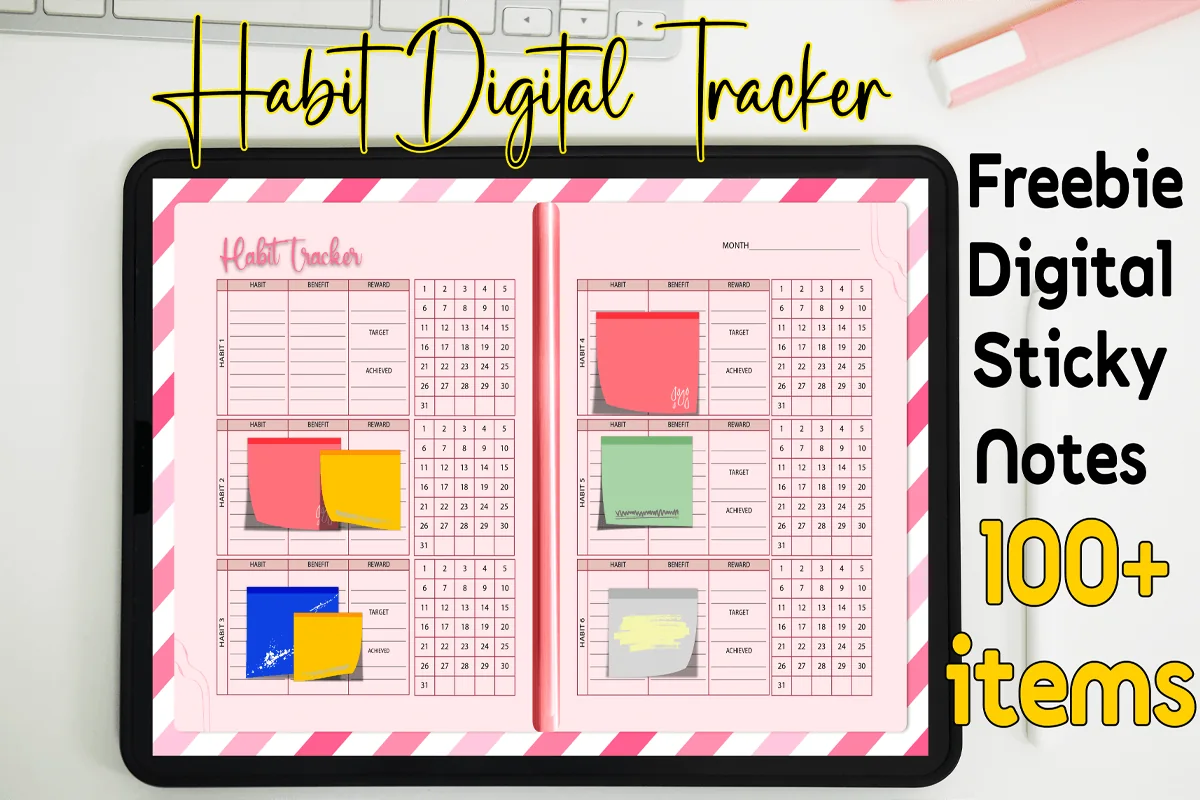
- Digital Habit Tracker + Freebie Sticky – Best budget pick
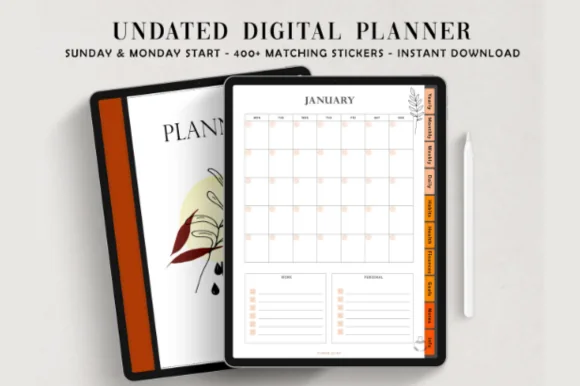
- Undated Digital Planner, Life Planner – Best habits section in a planner
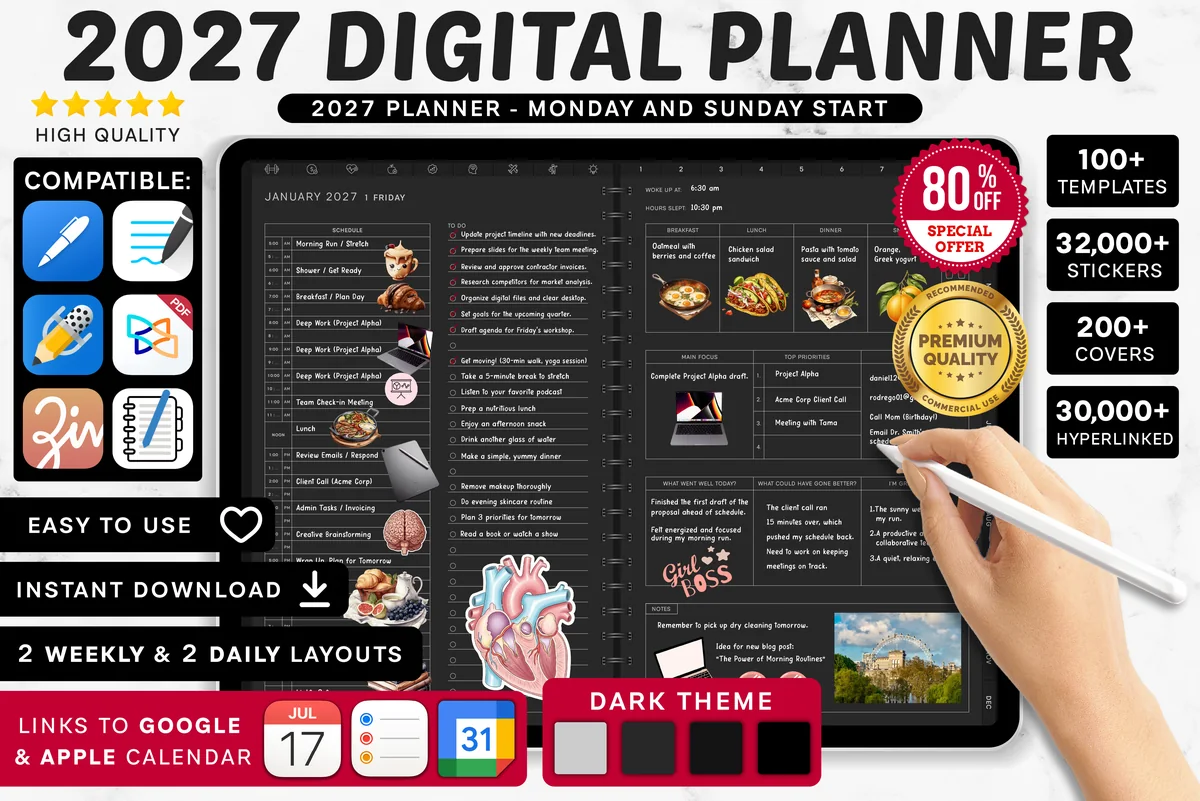
- 2027 Digital Planner | Monday and Sunday – Best for health habits
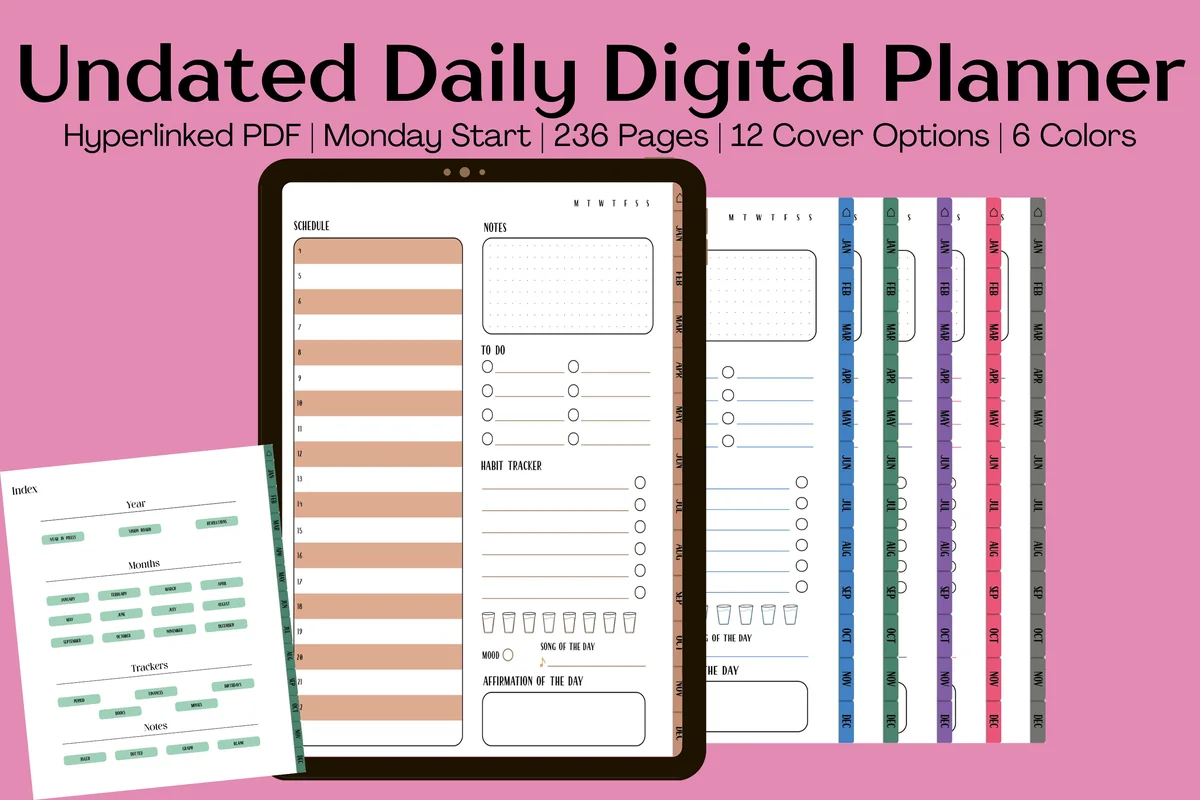
- Undated Yearly Daily Digital Planner – Best daily habit check-in
- Habit Tracker for IPad Goodnotes – Best for tracking up to 12 habits
- Digital Planner Cute Pastel ( Undated ) – Best for 30-day challenges
- All-in-One Digital Planner 2027 – Best dated 2027
- Habit Builder Planner 2027 Portrait – Best habit planner for 2027
Best monthly grid
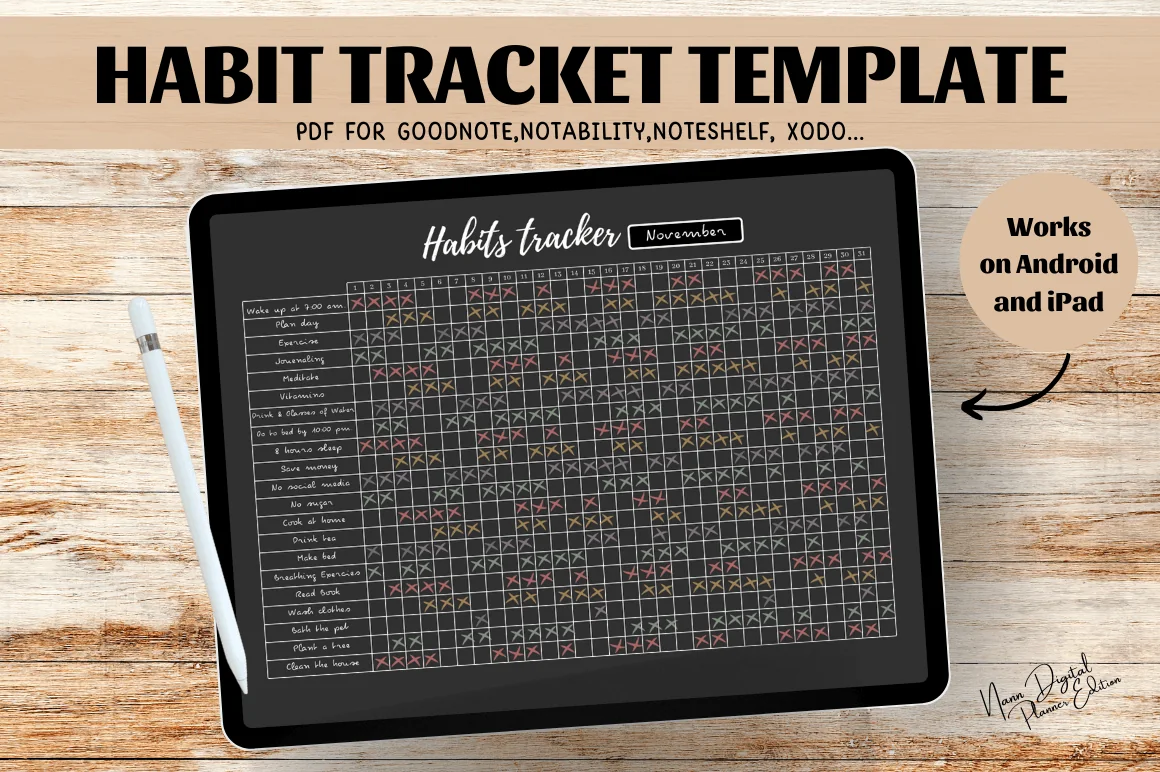
1. Digital Habit Tracker,Goodnotes Template
Orientation: LandscapeLayouts: Monthly habit gridDates: Undated
Best for: habit builders, minimalists. Designed by Nann Digital Art.
- Undated monthly habit tracker in A4 landscape
- A large grid with rows for habits and a column for every day
- Dark background with soft colored dots
- Works in GoodNotes, Notability, Noteshelf and Xodo on iPad
Simple and effective: list your habits down the side and fill a dot each day. The dark page makes colored dots pop, so a good month really looks like one. Duplicate the page each month and you have a tracker that never runs out.
Best weekly tracker
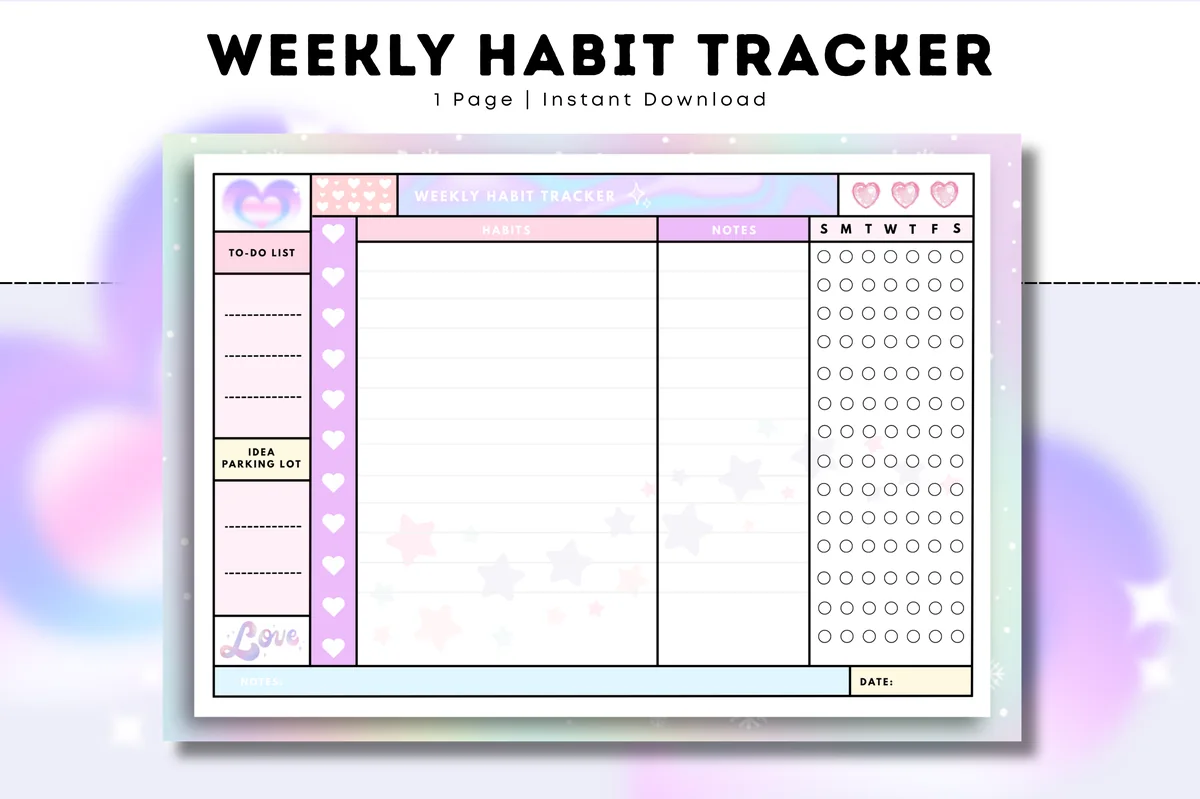
2. Weekly Habit Tracker • Cozy Pastel
Orientation: LandscapeLayouts: Weekly habit trackerDates: Undated
Best for: habit beginners, pastel lovers. Designed by Tas Creative Studio.
- Undated weekly habit tracker, one page per week
- Habit rows with a box for each day plus a to-do list and idea space
- Cute pastel design in A4 landscape
- Digital PDF version for GoodNotes, Notability and Noteshelf
A month can feel long when you're building a new habit; a week feels doable. This page keeps the week's habits, tasks and a few ideas together, and the pastel hearts make it a nice page to open every morning.
Best budget pick
3. Digital Habit Tracker + Freebie Sticky
Layouts: Monthly habit trackerDates: Undated
Best for: habit beginners, budget shoppers. Designed by MOMAT THIRTYONE.
- A pink two-page habit tracker spread
- 100+ digital sticky notes included
- PDF for GoodNotes, Notability, Noteshelf and Xodo on iPad
- Undated, so you can reuse it every month
It costs less than a coffee, so it's the easiest way to test whether habit tracking on the iPad is for you. The sticky notes are a fun extra for writing why each habit matters to you.
Best habits section in a planner
4. Undated Digital Planner, Life Planner
Layouts: Yearly, Monthly, Weekly, DailyDates: UndatedWeek start: Monday or Sunday
Best for: organized planners, autumn aesthetic lovers, habit trackers. Designed by ThePlannersDelight.
- 3 sets of habit pages: a monthly habit tracker and a habits page
- Mood tracker, meal planner and workout log in the health section
- 12 monthly, weekly and daily pages, undated
- Monday and Sunday start; 1,800+ stickers
If you want habits to live next to your calendar, this planner gives them a proper section, not just one page. The monthly habit tracker sits close to the mood tracker, so you can see how your habits and your mood move together.
Best for health habits
5. 2027 Digital Planner | Monday and Sunday
Orientation: LandscapeLayouts: Yearly, Quarterly, Monthly, Weekly, DailyDates: 2027Week start: Monday or Sunday
Best for: dark mode fans, calendar app users, finance trackers. Designed by SuperDigitalPlanners.
- Monthly habit tracker and monthly hydration tracker
- 9 wellness trackers in total
- 2027 planner, Monday and Sunday start, dark theme
- Links to Apple Calendar, Reminders and Google Calendar
Good if your habits are mostly about health: there's a monthly habit tracker plus a separate water tracker and several more wellness pages. It's dated 2027, so each month's tracker is ready to go.
Best daily habit check-in
6. Undated Yearly Daily Digital Planner
Orientation: PortraitLayouts: Yearly, Monthly, DailyDates: UndatedWeek start: Monday
Best for: daily planners, mood trackers, habit builders. Designed by Kinu Planners.
- Daily pages with a habit, mood and hydration tracker
- Monthly habit tracker and Year in Pixels for your mood
- Vision board, resolutions, period and finance trackers
- 236 undated pages, Monday start, 6 colors and 12 covers
Here, habits are part of every daily page, so tracking happens while you plan the day. The Year in Pixels is a lovely way to look back at the whole year at once. A good pick if you plan daily anyway.

Best for tracking up to 12 habits
7. Habit Tracker for IPad Goodnotes
Orientation: LandscapeLayouts: Habit tracker (12 habits)Dates: Undated
Best for: minimalists, dark mode fans, goal setters. Designed by sleekdarling.
- One page tracks 12 habits or goals, each with its own month grid
- 6 PDF files: white, cocoa, champagne, matcha, smokey blue and dark mode
- US Letter, landscape, made for tablets
- Works in GoodNotes, Notability and Xodo on the iPad
Twelve habits on one landscape page, each with its own grid for the month. I'd start with three to five and leave the rest for habits you add later. The dark mode version is nice for ticking boxes at night.
Best for 30-day challenges
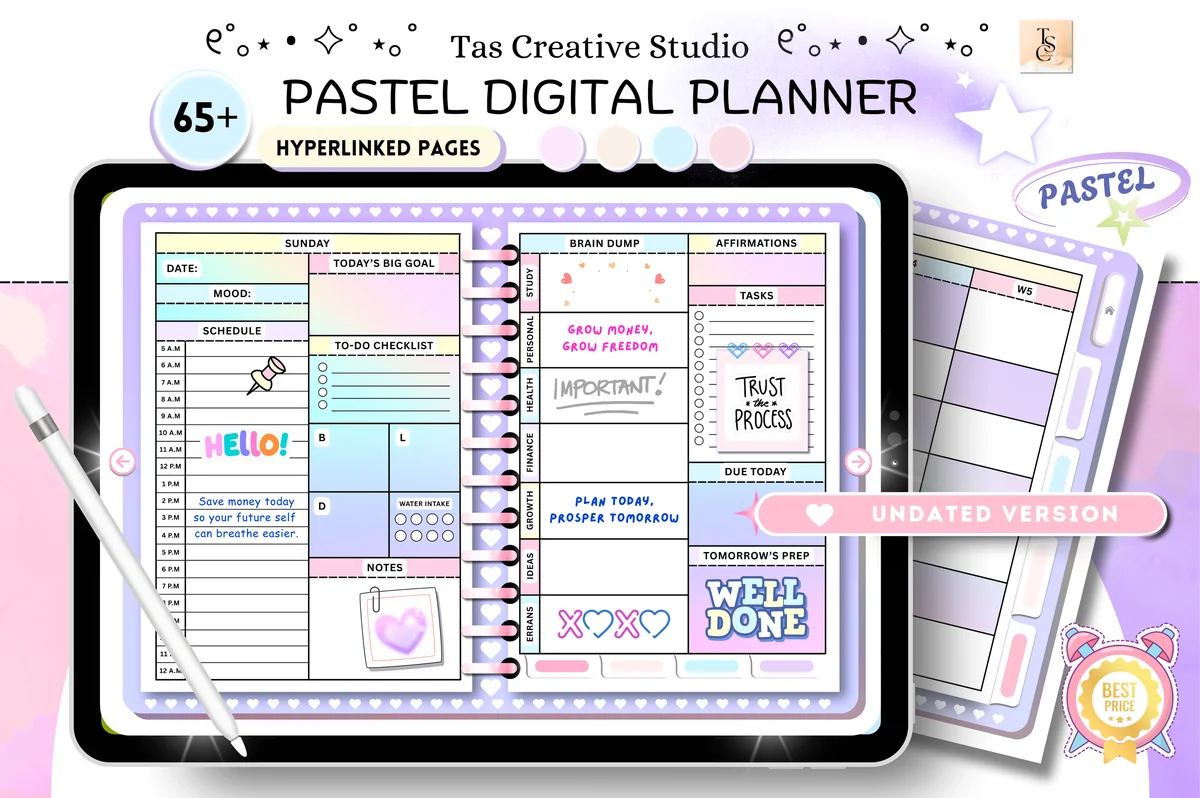
8. Digital Planner Cute Pastel ( Undated )
Orientation: LandscapeLayouts: Monthly, Weekly, DailyDates: Undated
Best for: pastel lovers, wellness planners, challenge fans. Designed by Tas Creative Studio.
- Habit tracker and daily routines pages
- 30-day fitness challenge and 30-day mental health challenge
- Self-care checklist and weekly vitamins tracker
- 68 undated pages in landscape; rated 5.0
If you like a clear start and finish, the 30-day challenges are a great way to kick off a habit, and the regular habit tracker takes over once it sticks. Cute, pastel and undated, so you can start any month.
Best dated 2027
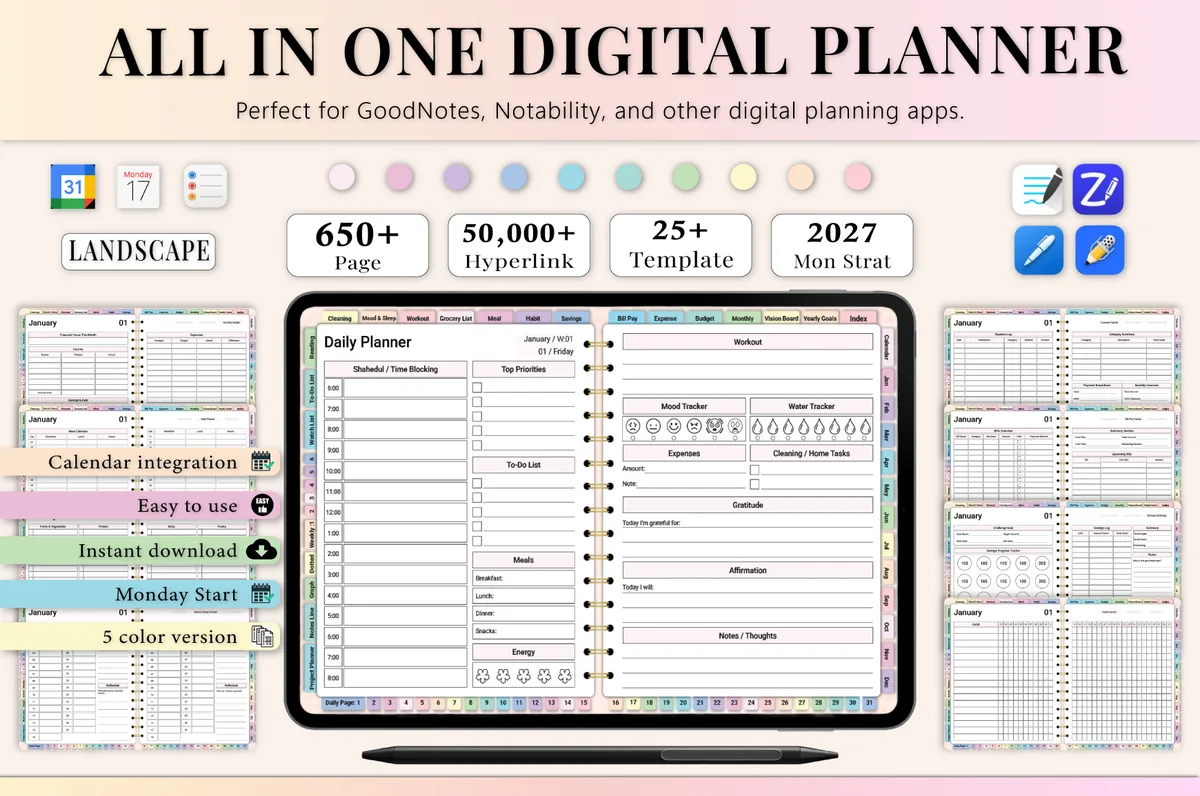
9. All-in-One Digital Planner 2027
Orientation: LandscapeLayouts: Yearly, Monthly, Weekly, DailyDates: 2027Week start: Monday
Best for: busy professionals, budgeters, people who want one planner for everything. Designed by Heartcraft Studio.
- Monthly habit tracker plus mood and sleep trackers
- Workout log and meal planner in the same month
- 2027 dated, landscape, Monday start, 650+ pages
- Works in GoodNotes, Notability, Noteshelf and ZoomNotes
Each month comes with its own habit tracker next to mood, sleep and workouts, so your habits sit with everything they affect. A good choice if you want a full dated planner and habits are only part of the plan.
Best habit planner for 2027
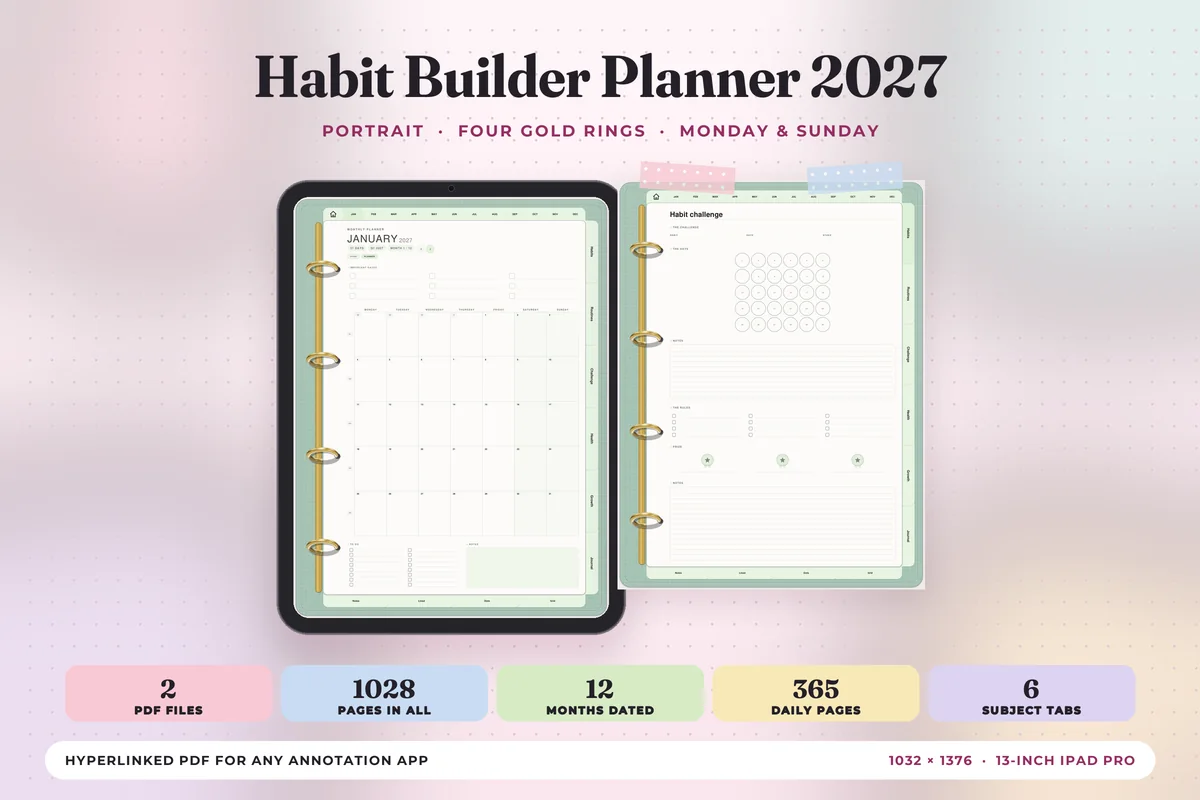
10. Habit Builder Planner 2027 Portrait
Orientation: PortraitLayouts: Yearly, Monthly, Weekly, Daily + 24 habit templatesDates: 2027Week start: Monday or Sunday
Best for: habit builders, routine lovers, pastel lovers. Designed by Print Magic StudioX.
- Dated 2027 with 6 tabs: Habits, Routines, Challenge, Health, Growth and Journal
- 24 habit and routine templates, 4 under each tab
- 12 monthly planners, a weekly page for every week and 365 daily pages
- 2 hyperlinked PDF files, Monday or Sunday start, portrait
A whole planner built around habits: the Habits, Routines and Challenge tabs sit next to your calendar, so new habits get planned on the same pages as your days. Start the year with one habit per tab, not six.
Quick Comparison
| Tracker | Best for | Tracker type | Stand-out extra |
|---|---|---|---|
| 1. Digital Habit Tracker,Goodnotes Template | All habits on one page | Monthly, undated | Dark, colorful grid |
| 2. Weekly Habit Tracker • Cozy Pastel | One week at a time | Weekly, undated | To-do + ideas on the page |
| 3. Digital Habit Tracker + Freebie Sticky | A cheap first try | Monthly, undated | 100+ sticky notes |
| 4. Undated Digital Planner, Life Planner | Habits inside a life planner | Monthly habit tracker | Mood tracker nearby |
| 5. 2027 Digital Planner | Monday and Sunday | Health and wellness habits | Monthly, dated 2027 | Hydration tracker |
| 6. Undated Yearly Daily Digital Planner | Habits on every daily page | Daily + monthly | Year in Pixels |
| 7. Habit Tracker for IPad Goodnotes | Many habits at once | Monthly habit grid | 6 colors incl. dark mode |
| 8. Digital Planner Cute Pastel ( Undated ) | Habits + 30-day challenges | Monthly, undated | Fitness & mind challenges |
| 9. All-in-One Digital Planner 2027 | Habits in a 2027 planner | Monthly, dated 2027 | Mood + sleep trackers |
| 10. Habit Builder Planner 2027 Portrait | Habits + routines | Habit planner | 6 habit tabs |
What I Look For in a Habit Tracker
- The right time frame. Monthly grids show streaks best; weekly pages feel more doable; daily check-ins suit people who plan every day.
- Room for 5–10 habits. More than that and the page gets crowded (and so does your day).
- Undated pages. Habits don’t wait for January. An undated tracker lets you start this week.
- Easy to reach. If the tracker is buried deep in a planner, bookmark it or keep it as a separate document.
- A look you enjoy. It sounds minor, but a pretty tracker gets opened more often.
Habit Tracker Ideas: What to Track
- Health: water, steps or a walk, sleep by 11, vitamins, stretching, no phone in bed.
- Mind: reading 10 pages, journaling, meditation, a gratitude line, a screen-free hour.
- Home: make the bed, 10-minute tidy, dishes before bed, plan tomorrow’s meals.
- Money: no-spend day, log expenses, check the bank app, pack lunch.
- Growth: 15 minutes of a language, practice an instrument, study session, learn a skill.
- Self-care: skincare, call a friend, time outside, something just for fun.
Pick three to five to start. You can always add more next month.
A checkmark can record an evening habit, but it leaves little room for the night itself. The sleep tracker PDF comparison separates monthly grids from written logs when you want to record times and brief observations alongside your habit list.
Small Boxes, Big Streaks: How to Build Habits That Last
- Make it tiny. “Read one page” beats “read for an hour”. Tiny habits survive busy days, and you’ll often do more anyway.
- Stack it. Attach the new habit to something you already do: “after I make coffee, I fill in my tracker and drink a glass of water.”
- Track right away. Fill the box the moment you finish. Keep the tracker bookmarked so it takes two taps.
- Never miss twice. One empty box is life; two in a row is the start of a new (bad) habit. After a miss, make tomorrow non-negotiable.
- Use color. One color per habit, or a darker shade on great days. A colorful month is satisfying to look at.
- Review monthly. Look at the grid at the end of the month: keep what stuck, drop what didn’t, add one new habit.
Daily, Weekly or Monthly Habit Tracker?
- Monthly trackers put 30 days in one grid, so streaks and gaps are easy to see. The most popular choice.
- Weekly trackers reset every Monday, which feels lighter if you’re just starting or your weeks are unpredictable.
- Daily check-ins live on your daily planner page, so tracking happens while you plan the day.
- Yearly trackers, like a “year in pixels”, are great for one key habit or your mood across the whole year.
Habit Tracker Template or Habit Tracking App?
Habit apps send reminders and count streaks for you, and they’re handy on the phone. A habit tracker template is slower on purpose: you fill the box by hand, which many people find more rewarding, and it lives right next to your plans, journal and budget. If reminders matter, set one daily alarm on your phone and keep the tracking itself in your iPad planner.
How to Set Up a Habit Tracker in GoodNotes
- Save the tracker on your iPad and open the PDF.
- Tap Share → GoodNotes → Import as New Document (or add the pages to your existing planner).
- Duplicate the blank page before you write, so next month starts clean.
- Write your habits in pencil-gray first; you can change them after a week.
- Add the tracker to your favorites and pick a highlighter color for each habit.
FAQ
What is a digital habit tracker?
It’s a habit tracker PDF, either a single page or a section of a planner, with rows for your habits and a box for each day. You use it on a tablet in an app like GoodNotes and fill in the boxes with a stylus as you complete each habit.
What is the best habit tracker for iPad?
For a simple start, the monthly Digital Habit Tracker GoodNotes template: one page, all your habits, a box for every day. If you want habits inside a planner, the Undated Life Planner and the Undated Yearly Daily Planner have the strongest habit sections on my list.
How many habits should I track?
Three to five at the start. It’s much easier to build a streak on a few habits and add more later than to keep ten going from day one.
Can I use a habit tracker on iPhone?
If your app syncs, yes: GoodNotes and Notability can open the same tracker on iPhone, so you can tick a box on the go. Writing is easiest on the iPad, but a quick tap with your finger works too.
Should I get a planner with a habit tracker or a separate tracker?
If you already plan your days on the iPad, a planner with a habit tracker keeps everything in one file: the habit page sits next to your monthly calendar, so you see it every time you plan. If you only want to track habits, or you change planners often, a separate habit tracker is simpler and lasts longer. The first three on the list are standalone trackers; the other seven are habit tracker planners.
What if I miss a day?
Leave the box empty and carry on tomorrow. The goal is a mostly-filled month, not a perfect one. Many people mark a missed day with a small dot instead of leaving it blank, which feels kinder.
How long does it take to form a habit?
Longer than the popular 21 days: research from University College London found it took 66 days on average, with a range of about 2 to 8 months depending on the habit and the person. That’s why a monthly habit tracker works well: you see two or three months of progress side by side instead of judging yourself after a week.
How do I build good habits that last?
Start with one or two habits, make them small enough to do on a bad day, and tie each one to something you already do (after coffee, before bed). Track them where you look every day and don’t aim for a perfect streak: missing one day doesn’t break a habit, quitting after it does.
Final Thoughts
A digital habit tracker works because it makes progress visible. Start with a few tiny habits, fill the box right after you do them and never miss twice. Want habits inside a bigger system? See my all-in-one life planners. Prefer a fresh grid every month? Try these monthly habit tracker ideas, or browse all habit trackers. Want more than a checkmark for your workouts? See my digital fitness journals. To plan the workouts themselves, see my digital workout planners.
If you’re choosing your main planner for next year, start with my list of the 10 best iPad digital planners for 2027.
You May Also Like
This post contains affiliate links. If you buy through them, I may earn a small commission at no extra cost to you. Learn more.