Writing down goals for the new year takes ten minutes. Remembering them in March is the hard part. A goal planner, or goal setting planner, fixes that by giving each goal a path: from the year to the quarter, from the quarter to the month and from the month to one small step this week. On an iPad, that path is a few taps long instead of a stack of notebooks.
For a month of small actions rather than another annual goal list, these glow up challenge ideas offer choices you can place in the weekly plan. Pick the actions that fit your own priorities rather than treating the whole list as a requirement.
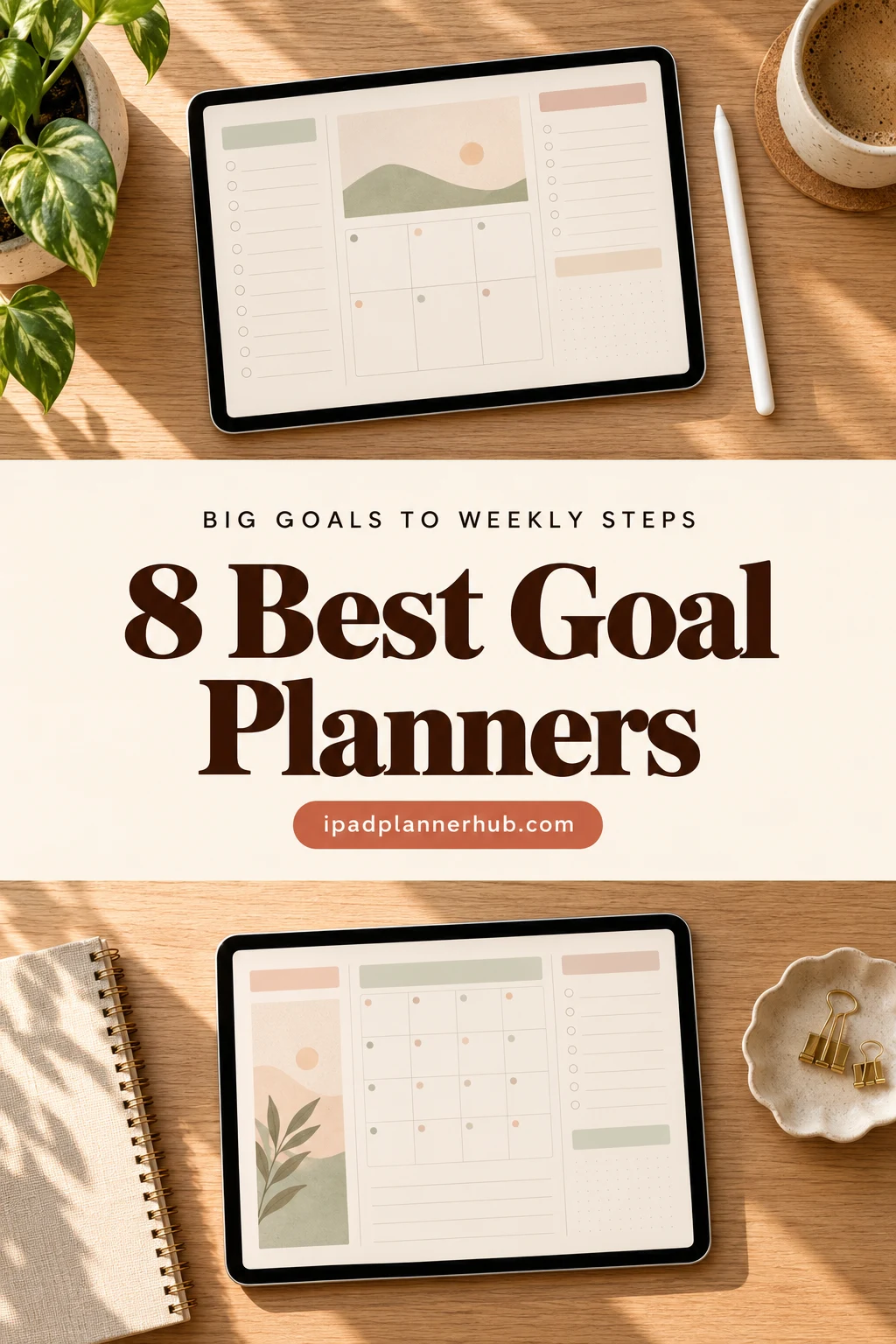
Below are the 8 digital goal planners from Creative Fabrica I’d use to plan 2027. After the list: what to look for, how to turn yearly goals into weekly steps, SMART goals and vision boards, and how to set a goal planner up in GoodNotes.
The 8 Best Digital Goal Planners for iPad I Found
The first six are made for goals; the last two are all-in-one planners with a goal section strong enough to stand on its own. I skipped single printable worksheets, Canva templates and anything with past-year pages. All eight work on the iPad in GoodNotes or Notability.
TL;DR: 8 digital goal planners for iPad: two dated 2027 planners with goal tabs, a quarterly planner, a vision board, a guided journal for long-term goals, a SMART goal workbook and two all-in-one planners with strong goal sections. Each card lists orientation, layouts, dates and week start.
Quick Picks
- Best overall: Goal Getter Planner 2027
- Best for 90-day goals: Quarterly Planner – 3-Month Goal Planner
- Best for vision board: Vision Board Planner
- Best for long-term goals: FUTURE ME – Guided Journal for Vision & Growth
- Best for money goals: Savings Goal Planner 2027
- Best for SMART goals: Goal Setting Kit: Inner Power Workbook
- Goal Getter Planner 2027 – Best overall
- Quarterly Planner – 3-Month Goal Planner – Best for 90-day goals
- Vision Board Planner – Best vision board
- FUTURE ME – Guided Journal for Vision & Growth – Best for long-term goals
- Savings Goal Planner 2027 – Best for money goals
- Goal Setting Kit: Inner Power Workbook – Best for SMART goals
- 2027 Bundle Digital Planner – Best yearly-to-monthly system
- Law of Attraction Self Care Digital Planner – Best for manifestation
Best overall
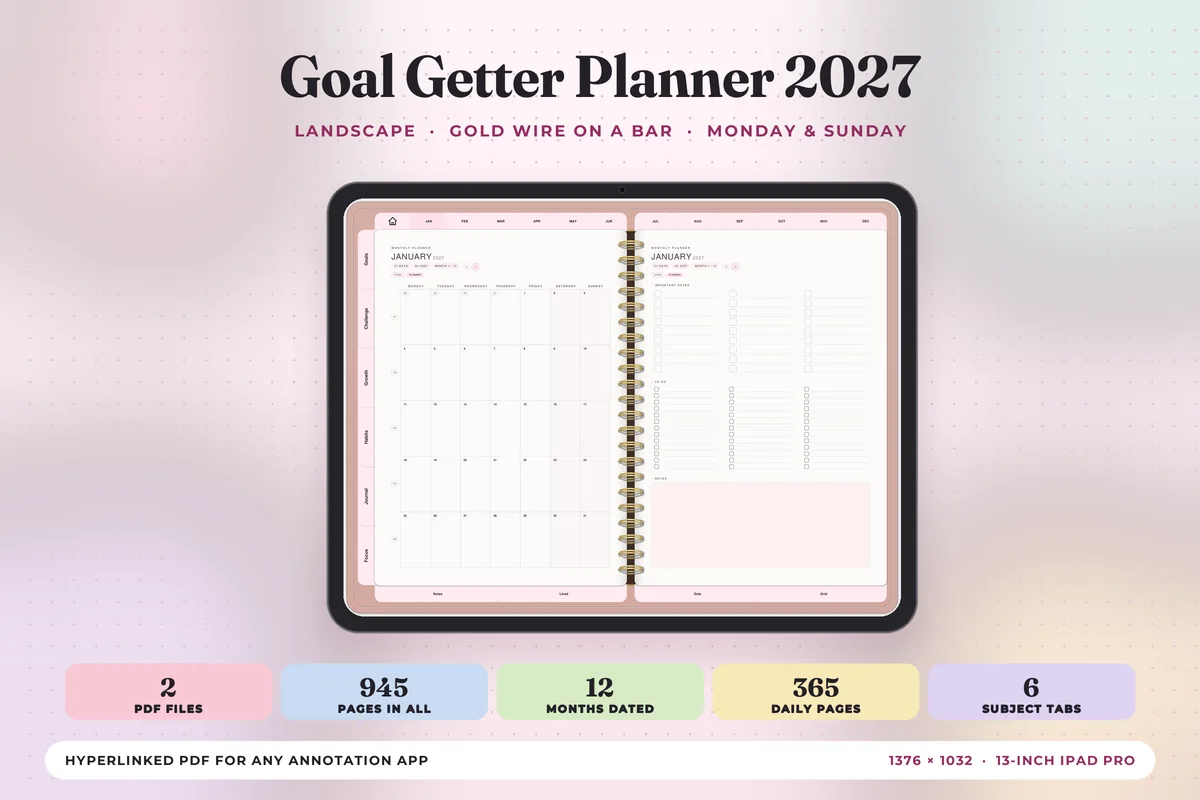
1. Goal Getter Planner 2027
Orientation: LandscapeLayouts: Yearly, Monthly, Weekly, DailyDates: 2027Week start: Monday or Sunday
Best for: new year goal setters, habit builders, two-page spread fans. Designed by Print Magic StudioX.
- Dated January to December 2027, Monday and Sunday start files
- 6 subject tabs: Goals, Challenge, Growth, Habits, Journal and Focus, with 4 templates under each
- A weekly page for every week with "the week's one thing" at the top, wins and what rolls over
- 365 daily pages with an hourly schedule, top 3 and to-do list
- Landscape two-page spreads sized for the iPad Pro; a portrait version is sold separately
This is the one that matches the idea of this whole list: goals live in their own tabs, and every weekly page asks for one main thing, so the big goal keeps showing up in the week. It's a complete calendar too, which means one file instead of a goal planner plus a regular planner. The soft pink design won't suit everyone.
Best for 90-day goals
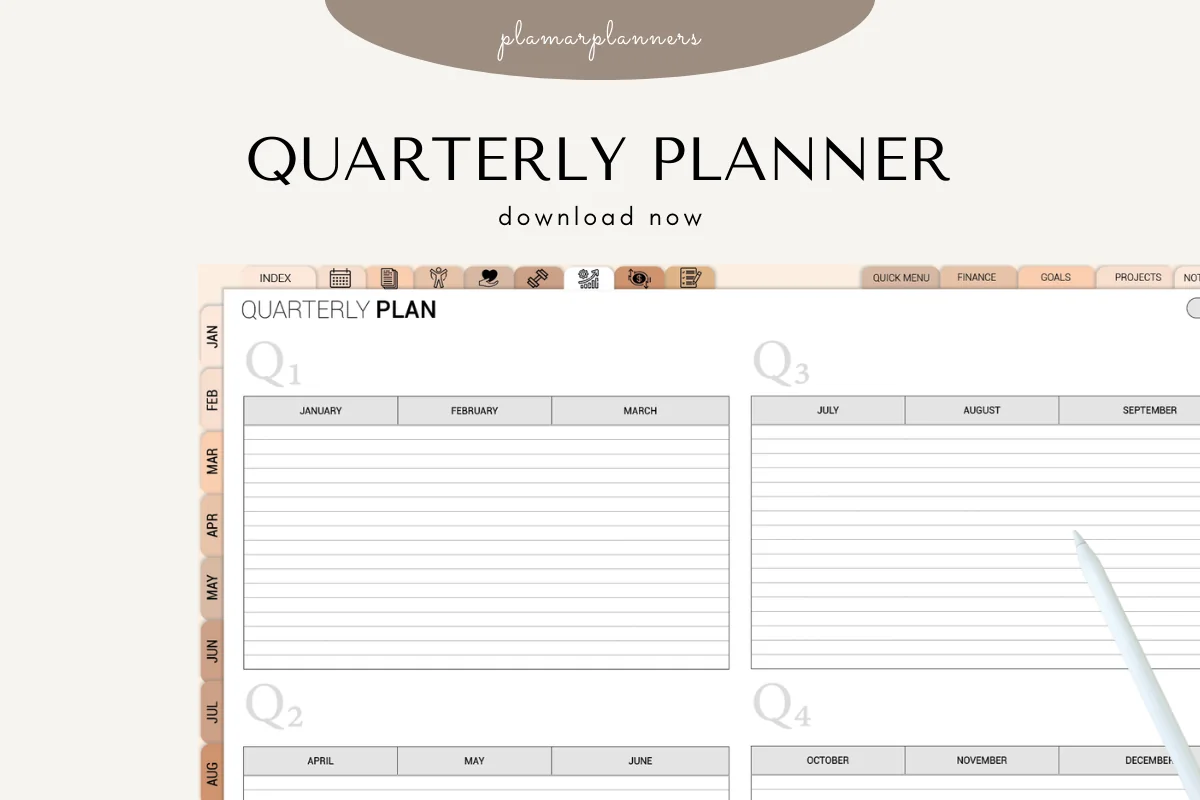
2. Quarterly Planner – 3-Month Goal Planner
Orientation: LandscapeLayouts: Quarterly, Monthly, WeeklyDates: Undated
Best for: 12-week year fans, entrepreneurs, students. Designed by Plamarplanners.
- Quarterly overview, then a 3-month breakdown and weekly planning pages
- Goal setting and milestone tracker, action step planner
- Review and reflection pages, success highlights and challenges
- Undated, so you can start in any quarter
- Hyperlinked side tabs; works in GoodNotes and Notability
A year is long enough to put a goal off until November. Ninety days isn't, and that's the whole point of this planner: one quarter, three months, the weeks inside them and a review at the end. I'd pick it if you like the 12-week year idea or plan around school terms or business quarters.
Best vision board
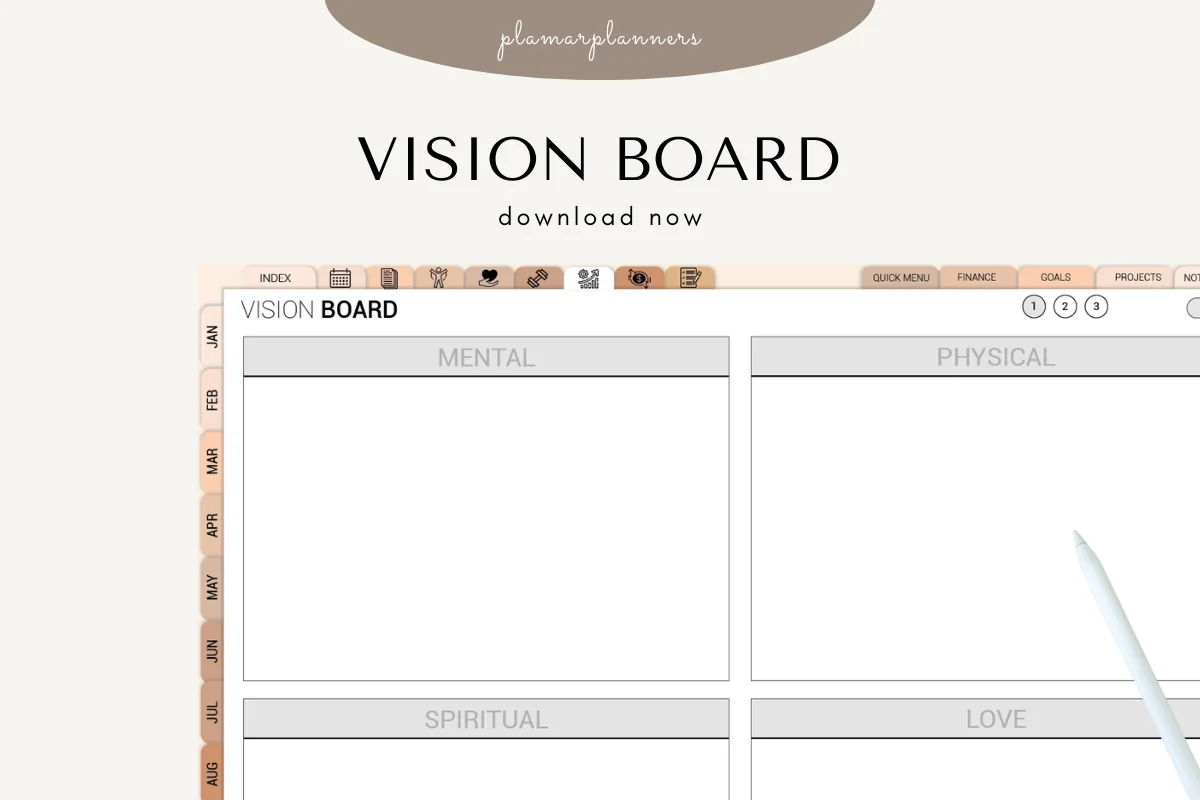
3. Vision Board Planner
Orientation: LandscapeLayouts: Vision board, Goal grid, Yearly intentionDates: Undated
Best for: vision board makers, manifestation fans, new year planners. Designed by Plamarplanners.
- Vision board template with collage spaces for images, words and quotes
- Goal-setting grid and dream life categories: career, health, wealth, relationships, travel
- Positive affirmations section and a yearly intention page
- Tablet-optimized digital version plus A4 and US Letter PDFs
- Same tabbed design as the quarterly planner above
A vision board is the fun first step, and on an iPad you can drop in photos instead of cutting up magazines. This one keeps it organized by life area, so the pictures turn into goals you can actually write down. It pairs well with the quarterly planner from the same designer.
Best for long-term goals
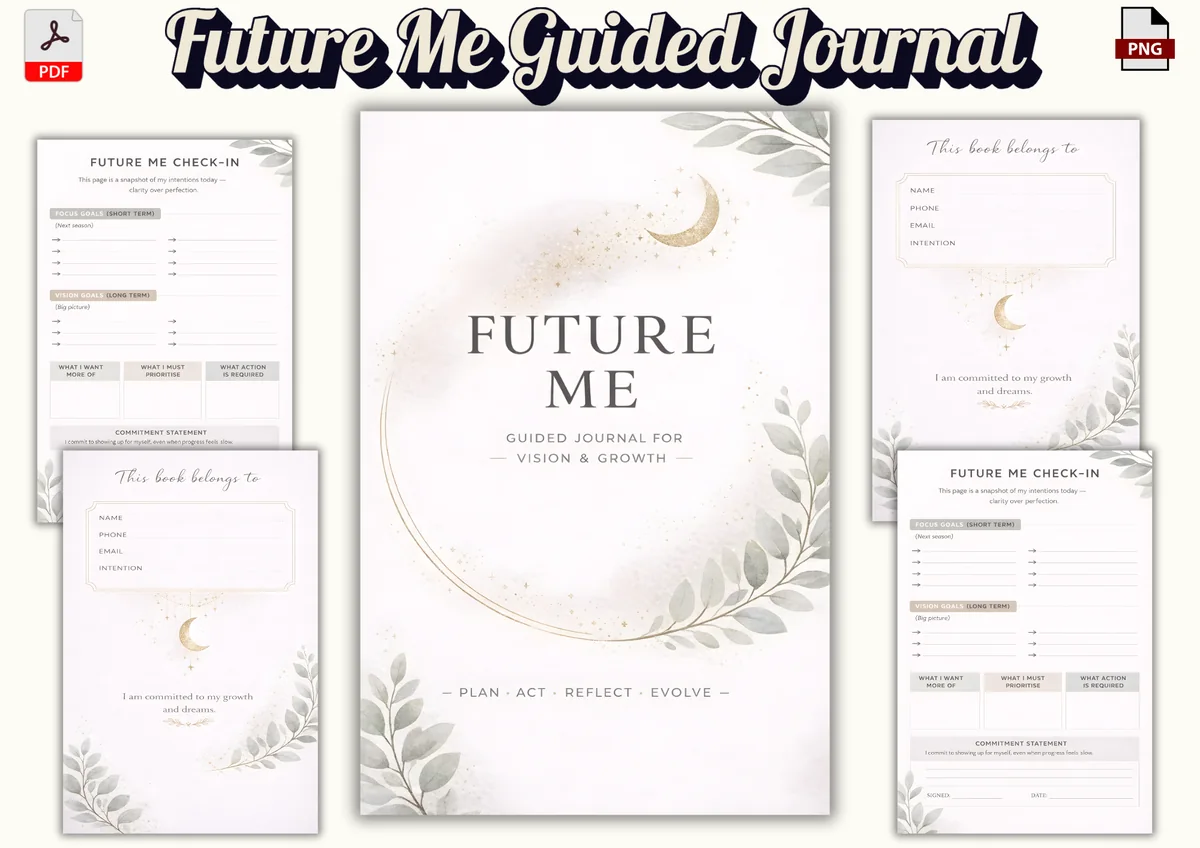
4. FUTURE ME – Guided Journal for Vision & Growth
Orientation: PortraitLayouts: 59 guided pages: goals, intentions, letter to future selfFormat: PDF + PNG, 6 x 9 inDates: Undated
Best for: personal growth seekers, minimalists, reflective journalers. Designed by Nora as.
- Future Me check-in page: short-term focus goals for the next season and long-term vision goals for the big picture
- "What I want more of", "what I must prioritise" and "what action is required" boxes
- Commitment statement with a signature line, plus a letter to your future self
- Future-self reflection prompts and intention-setting pages
- 59 pages, 6 x 9 inches, PDF + PNG for GoodNotes or Notability
Long-term goals are easy to write once and forget. This journal puts the big-picture vision goals on the same check-in page as the goals for the next season, so the long view and the next step sit together. It's undated, so I'd fill in a new check-in each quarter. The 6 x 9 page is small on an iPad, so zoom in to write.
Best for money goals
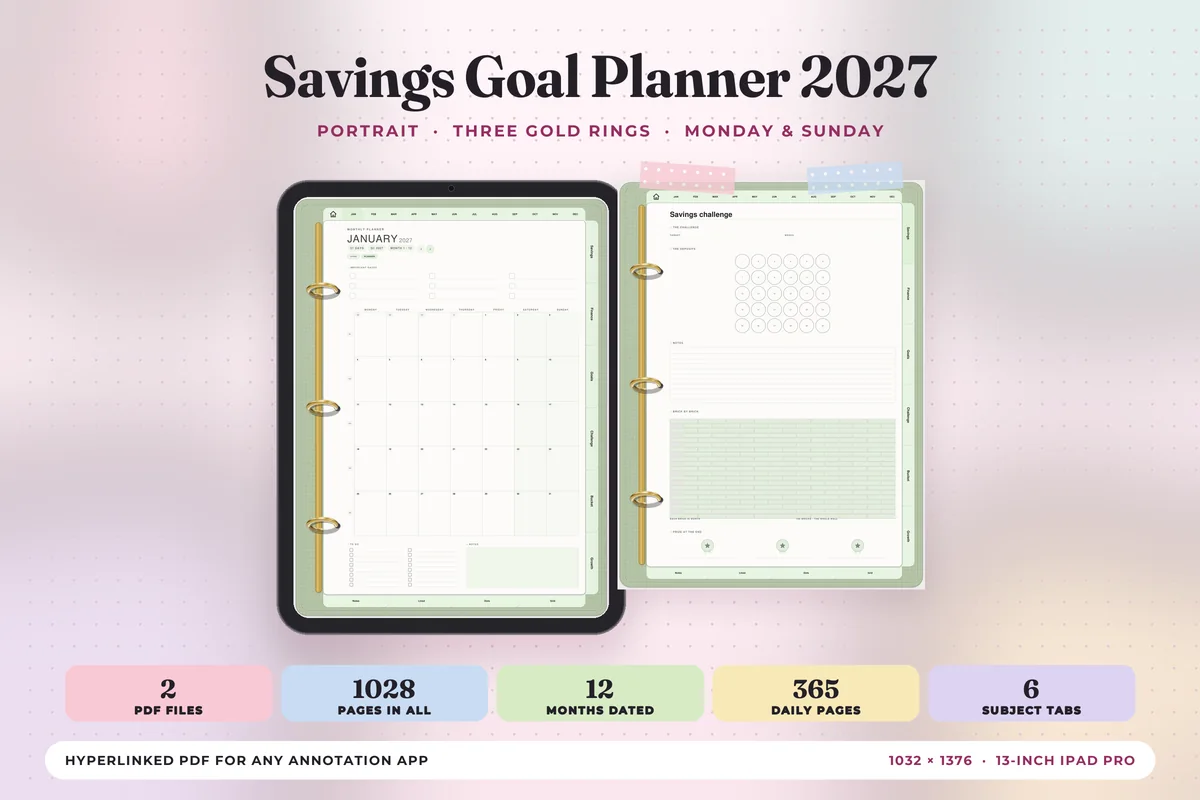
5. Savings Goal Planner 2027
Orientation: PortraitLayouts: Yearly, Monthly, Weekly, DailyDates: 2027Week start: Monday or Sunday
Best for: savers, money goals, bucket list planners. Designed by Print Magic StudioX.
- Dated 2027, Monday and Sunday start files
- 6 subject tabs: Savings, Finance, Goals, Challenge, Bucket and Growth
- Weekly page for every week with the week's one thing, wins and what rolls over
- 365 daily pages, 12 month-at-a-glance pages and 30 note pages
- Portrait pages with three gold rings, sized for the iPad Pro
Most money goals are really savings goals: an emergency fund, a trip, a down payment. This planner puts savings and finance tabs next to a goals tab and a bucket list, inside a full 2027 calendar. It's from the same designer as my top pick, so choose this one if your biggest goal for the year has a dollar amount.
Best for SMART goals
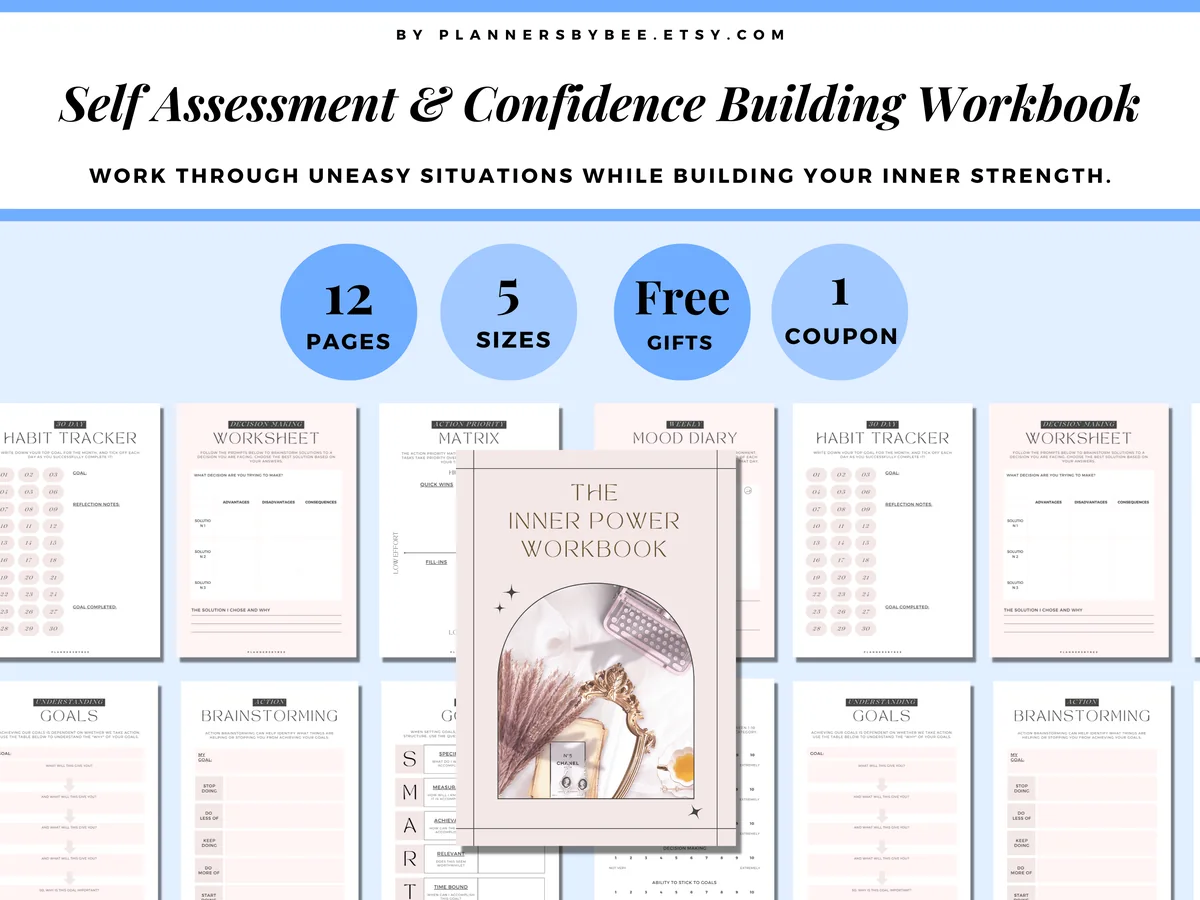
6. Goal Setting Kit: Inner Power Workbook
Orientation: PortraitLayouts: 12 workbook pages: SMART goals, 30-day habit tracker, priority matrixFormat: PDF for GoodNotes, printable in 5 sizesDates: Undated
Best for: goal setters, SMART planners, self-reflection fans. Designed by PlannersByBee.
- 12 pages: understanding your goals ("what will this give you?"), SMART goals, action brainstorming (stop, do less, keep, do more, start)
- 30-day habit tracker with goal and reflection notes
- Action priority matrix, decision worksheet and a weekly mood diary
- Self-assessment and "rate your thinking" pages; for GoodNotes on iPad, also printable in 5 sizes
This is a small workbook, not a planner, and that is the point: it sits in front of whatever planner you already use. The "what will this give you?" page and the SMART page do the hard part of goal setting, and the 30-day tracker gives the goal its first month. The pages are undated, so you can reuse them for each new goal.
Best yearly-to-monthly system
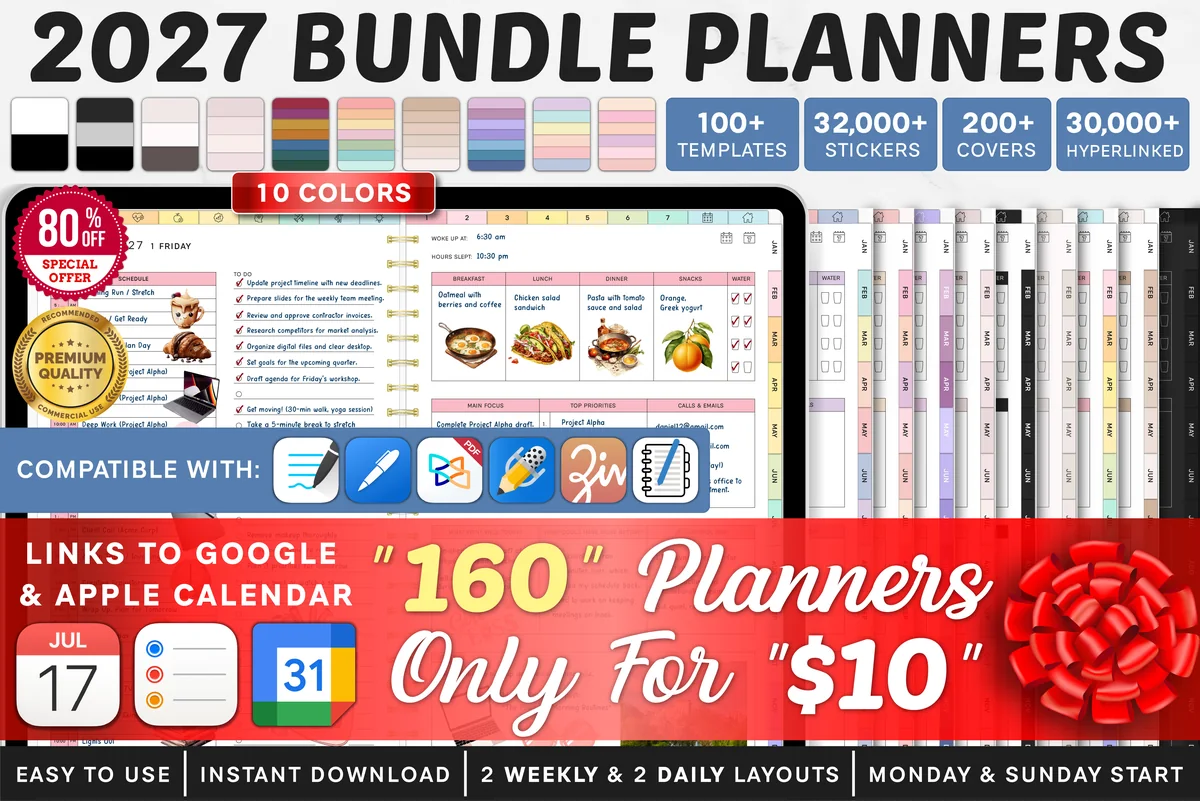
7. 2027 Bundle Digital Planner
Orientation: LandscapeLayouts: Yearly, Quarterly, Monthly, Weekly, DailyDates: 2027Week start: Monday or Sunday
Best for: goal setters, challenge fans, color lovers. Designed by SuperDigitalPlanners.
- Yearly goals and quarterly overview pages
- Monthly goals, monthly vision board and monthly reflection for every month
- Weekly plan and weekly reflection; fitness goals, savings tracker and 30-day challenge templates
- Links to Apple Calendar, Reminders and Google Calendar
- Dated 2027, Monday and Sunday start, 200+ covers
This is a big all-in-one planner, but its goal pages follow exactly the chain I recommend below: yearly goals, then monthly goals and a monthly vision board, then the weekly plan. If you'd rather have goals inside your everyday planner than in a separate notebook, this is the one I'd start with.
Best for manifestation
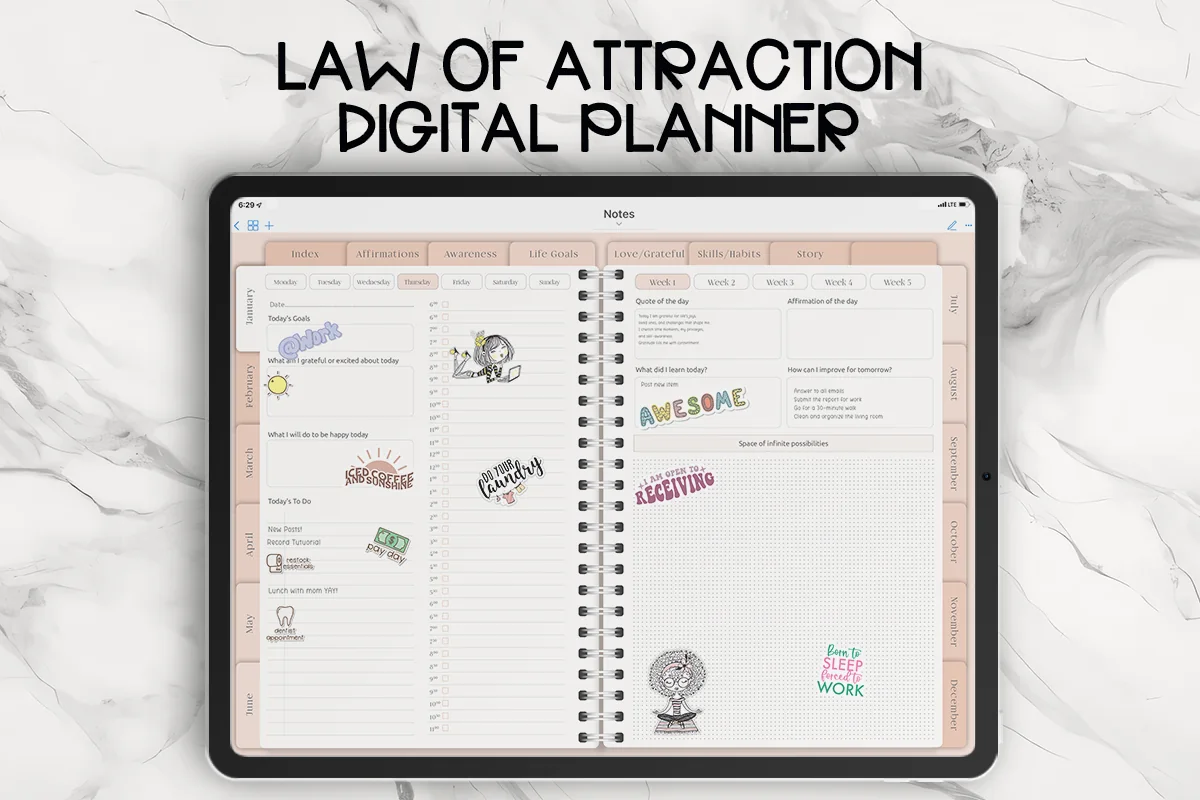
8. Law of Attraction Self Care Digital Planner
Orientation: LandscapeLayouts: Monthly, Weekly, DailyDates: Undated
Best for: manifestation fans, self-care planners, goal setters. Designed by PlannerNook.
- Life goals section: 50 goals for all areas of life, 1-year goals, mind map, most important goals
- "How will I make it happen" and skills and habits pages, with an accountability prompt
- Affirmations page and daily intentions
- Undated monthly, weekly and daily pages, 30k stickers included
If you like manifestation and affirmations, this planner keeps them, but it also asks the practical questions: which skills you need, which habits support the goal and who keeps you accountable. That balance is why it made the list over more purely spiritual planners.
Quick Comparison
| Planner | Best for | Dates | Goal pages |
|---|---|---|---|
| 1. Goal Getter Planner 2027 | Goals inside a full 2027 calendar | 2027 | 6 tabs: goals, habits, focus… |
| 2. Quarterly Planner – 3-Month Goal Planner | 12-week year, business quarters | Undated | Quarter → month → week |
| 3. Vision Board Planner | Vision boards and yearly intentions | Undated | Vision board, goal grid |
| 4. FUTURE ME – Guided Journal for Vision & Growth | Long-term vision goals | Undated | Short- and long-term goals |
| 5. Savings Goal Planner 2027 | Savings and finance goals | 2027 | Savings, goals, bucket list |
| 6. Goal Setting Kit: Inner Power Workbook | One goal, made SMART | Undated | SMART goals, 30-day tracker |
| 7. 2027 Bundle Digital Planner | Goals inside an everyday planner | 2027 | Yearly → monthly goals |
| 8. Law of Attraction Self Care Digital Planner | Manifestation with a plan | Undated | 50 life goals, 1-year goals |
What I Look For in a Goal Planner
- A path from big to small. Yearly goals alone don’t work. Look for quarterly or monthly goal pages and a weekly page with room for the next step.
- A review page. Monthly or quarterly reflection is where goals get adjusted instead of quietly dropped.
- Goals next to your calendar. If the goal pages live in the same file as your weekly plan, you’ll see them. A separate goal notebook needs a weekly habit of opening it.
- Room for the why. Vision boards, life areas or a wheel of life help you pick goals that matter, not just goals that sound good in January.
- Dated or undated on purpose. Dated 2027 pages save setup; undated ones let you start any month or reuse the planner for years.
- Made for the iPad. Hyperlinked tabs and a listing that mentions GoodNotes, Notability or the iPad. A single worksheet you print is not a planner.
How to Turn Yearly Goals Into Weekly Steps
This is the part most goal setting skips, and it’s what a goal planner is for. Here’s the chain I’d follow, with one goal as an example: save $3,000 in 2027.
- Year: pick 3 goals, not 10. One per life area you care about most this year, written on the yearly goals page. Example: save $3,000.
- Quarter: set a milestone. What would “on track” look like by the end of March? Example: $750 saved and an automatic transfer set up.
- Month: choose the actions. On the monthly goals page, list 2–3 actions that move the milestone. Example: open a savings account, cut one subscription, save $250.
- Week: one step. At the top of the weekly page, write the one thing that moves the goal this week. Example: compare savings accounts on Sunday.
- Day: put it on the schedule. The step gets a time on a daily page, or it stays a wish.
- Review: monthly and quarterly. Check what moved, what didn’t and why. Adjust the next month instead of starting over.
The Goal Getter and Savings Goal planners build this in with a “one thing” box on every weekly page, the 2027 Bundle has yearly, monthly and weekly goal pages, and the Quarterly Planner covers the quarter-to-week part for any year. For ways to lay out the year itself, from a year at a glance to a yearly review, see my yearly planner ideas.
For a job-search goal, the weekly step might be revising one resume example or preparing questions for a particular role. The job search planner pages keep application IDs, document versions and next actions together, giving that weekly step a specific record to return to.
Goal Planner Ideas: Pages Worth Adding
- Yearly goals page. Three goals, one line each on why they matter.
- Vision board. Photos, words and quotes for the year; on an iPad you can paste images straight in.
- Wheel of life. Rate each life area from 1 to 10 to see where a goal would help most.
- SMART goal sheet. One page per goal, turning a wish into something measurable.
- Quarterly milestones. Four checkpoints for each yearly goal.
- Monthly goals and review. Two or three actions for the month, then what worked.
- Habit tracker. Many goals are really habits: walk daily, read 10 pages, save every payday. See my habit tracker ideas for more.
- Savings or debt tracker. A progress bar or coloring chart for money goals.
- Bucket list. Goals without a deadline that still deserve a place.
SMART Goals in a Digital Planner
SMART stands for Specific, Measurable, Achievable, Relevant and Time-bound. “Get fit” becomes “walk 8,000 steps 5 days a week until June 30”. The point isn’t the acronym; it’s that you can tell whether you’re on track. A SMART goal page fits naturally in front of the monthly pages, and the Goal Setting Kit workbook has one ready to fill in.
Vision Board or Goal List?
Both, in that order. A vision board helps you notice what you actually want; the goal list and the weekly steps make it happen. A vision board on its own is a mood board, and a goal list without a why is easy to abandon.
Who a Digital Goal Planner Is For
- New year planners who want 2027 goals that survive past February.
- Savers with a money goal and a deadline.
- Students and professionals who think in terms, quarters or 12-week sprints.
- Anyone starting over after a busy or difficult year and not sure what to aim for yet.
- Long-term thinkers who want to see progress over five years, not just one.
Goal Planner Template or Goal Tracker App?
Goal tracker apps send reminders, count streaks and sync across devices, usually for a subscription. A goal planner template is a PDF you write in by hand in GoodNotes or Notability: you buy it once, it works offline and the act of writing makes you think the goal through. A template won’t remind you, so pair it with a weekly calendar reminder to open the planner.
What You Need to Use a Goal Planner on iPad
- An iPad and an Apple Pencil, or any stylus that works with it.
- A note-taking app that keeps PDF links working: GoodNotes, Notability, Noteshelf or ZoomNotes.
- Enough storage for large dated planners; 2027 planners with daily pages run to several hundred pages.
How to Set Up a Goal Planner in GoodNotes
- Save the planner on your iPad and unzip it if it comes as a ZIP.
- Open the PDF, tap Share → GoodNotes → Import as New Document.
- Duplicate the document so you keep a clean copy.
- Fill in the yearly goals and vision board first, then the milestones for the first quarter.
- Bookmark this week’s page so the planner opens where your next step is.
- Set a recurring reminder for your monthly review.
FAQ
What is a goal planner?
A goal planner is a planner built around goals instead of appointments: yearly goals, milestones, monthly actions, weekly steps and review pages. A digital goal planner is a hyperlinked PDF version you use on a tablet in an app like GoodNotes.
What is the best goal planner for iPad?
For 2027, I’d pick the Goal Getter Planner 2027: a full calendar with goal, habit and focus tabs and a “one thing” box on every weekly page. If you’d rather plan in 90-day blocks, choose the Quarterly Planner; for money goals, the Savings Goal Planner 2027.
How do I set up a goal planner?
Start with no more than three yearly goals, give each a quarterly milestone, choose two or three monthly actions and write one step per week at the top of your weekly page. Then put a monthly review in your calendar; that review is what keeps the planner working.
Is there a free goal planner for iPad?
Free goal templates exist, but they’re usually one worksheet rather than a planner with linked monthly and weekly pages. If one free page is enough, a blank GoodNotes notebook with a SMART goal sheet will do; for the whole year-to-week system, a paid planner is the easier route.
Should a goal planner be dated or undated?
Dated if you’re starting in January and want a ready-made 2027; undated if you start mid-year, plan in quarters or want to reuse the planner. A guided goal journal is undated by nature, since you start a new check-in whenever a new goal begins.
How is a goal setting planner different from a regular planner?
A regular planner is built around dates: appointments, tasks and the week ahead. A goal setting planner, sometimes called a goal planning planner, is built around outcomes: yearly goals, milestones, action steps and reviews. The planners at the top of my list combine both, so the goal and the calendar live in one file.
Is a 5 year planner worth it?
It is if you like to look back. A 5 year planner or journal shows the same days across several years, so slow progress becomes visible. It works best next to a yearly goal planner rather than instead of one: the 5-year view keeps the direction, the yearly planner handles the weekly steps. If you want the long view without a 5-year diary, the FUTURE ME journal in my list puts long-term vision goals next to short-term goals on one check-in page.
How many goals should I set for a year?
Three is a good number: enough to cover the areas that matter, few enough that each gets a weekly step. Anything else can wait on a bucket list page until a goal is done.
Final Thoughts
A goal planner works when the goal shows up in your week. Pick the planner that matches how you think, whether that’s a full year, a quarter or the long term, set up three goals and give each one a step this week. Want goals inside a bigger system? See the best digital planners for 2027, a digital vision board to keep the goals in sight and the all-in-one life planners. For money goals, my savings challenges pair well with a savings goal planner, and the digital habit trackers help with goals that are really habits. Still choosing what to aim for? See my New Year goals ideas for 40 goals that last past January. For fitness goals, my digital workout planners turn the goal into weekly sessions.
You May Also Like
This post contains affiliate links. If you buy through them, I may earn a small commission at no extra cost to you. Learn more.