You open a new Procreate canvas in November, sketch a sofa and a window, then stop because the room does not feel like a holiday scene yet. These procreate christmas drawing ideas give the space a practical order: build the room first, then compare daylight, evening glow, frost and snow depth on your iPad.

Treat this as a room-scene exercise, not another card catalog. You can draw the walls and furniture yourself or start from a stamped outline, then change the light and palette. The twenty ideas below move from structure to atmosphere, followed by six Procreate tools for the steps that benefit from brushes and a limited color set.
Procreate Christmas drawing ideas start with one room
Pick one room where the holiday detail can happen naturally: a living room with a sofa, a bedroom corner, or a small studio with a window seat. Keep the structure simple before adding ornaments. A clean line version will help you test color and light without losing the original drawing.
- Keep the perspective consistent: decide on the wall, floor and window lines before adding furniture.
- Choose one main light source: lamp, fireplace or window. Every later glow depends on that choice.
- Leave a clean copy: duplicate the line art so a failed color test does not ruin the room.
Build the room structure
- 1.Draw one room box first. Use a simple one-point or two-point perspective to place floor, back wall and side wall. Try a horizon near seated eye level, then leave enough space for the window and furniture.
- 2.Anchor two furniture pieces. A sofa and a small table, or a bed and chair, give scale. Draw them as simple boxes before adding cushions or ornaments.
- 3.Place the largest light source. Decide if the main light comes from a lamp, a fireplace or the window. Keep that direction consistent before adding any glow.
- 4.Block in the tree with three layered shapes. Use three triangles or a silhouette brush to make a fir shape. Place the tree where it overlaps furniture, not floating alone.
- 5.Use overlap to create depth. Put a chair in front of the tree, a gift beside the sofa, and a garland crossing the top of the wall. Each overlap tells the eye which object is closer.
- 6.Keep one clean line version. Duplicate the line art before painting. The clean copy becomes your value check and a place to test one change without ruining the whole room.
Add holiday atmosphere and local light
- 7.Add string lights as small bright dots. On a dark layer or a bright pale layer, tap small round lights along a mantel or window frame. Leave uneven spacing; a perfect row looks less like draped wire.
- 8.Compare one warm lamp and one cool window. Paint the lamp side with soft orange and the window side with blue or violet. Keep the boundary between them slightly blended, not a hard split.
- 9.Build fireplace or candle glow with a low-opacity layer. Add a warm soft circle near the flame, reduce opacity, and use a darker orange edge. The goal is a local glow, not a full room flood.
- 10.Clip warm light to the tree. Duplicate the tree silhouette, fill it with a warm color, and clip or mask the glow to the tree shape. This gives the ornaments and branches a gathered light without repainting every needle.
- 11.Draw the same room at noon and after dark. Use one line art and two palettes: daylight clears the space, evening adds dark walls and small bright spots. Set the two versions side by side to see what changes.
- 12.Treat tinsel as a thin scatter. Use a few small glitter dots or short thread-like strokes near branches and garlands. Do not cover the whole tree; the shine works best where the light would catch it.
Work with snow, frost and depth
- 13.Layer falling snow in three sizes. Put tiny dots on the far background, medium flakes in the middle ground, and larger soft flakes in front. Keep sharpness lower on the nearest flakes to suggest camera focus.
- 14.Draw frost branching from the window edges. Start with thin icy lines that spread from the corners and meet in the middle. Keep the center clearer so you can still see the outdoor color.
- 15.Shape snowdrifts with light tops and cool shadows. Build a mound from pale blue or lavender, add a white top plane, and keep the shadow side slightly deeper. Avoid filling the whole shape with flat white.
- 16.Separate foreground snow and distant snow. More contrast and larger marks belong in front; lower contrast and smaller dots belong behind. This is a size game more than a color game.
- 17.Light a few outdoor flakes. Outside the window, place a porch light near the falling snow and give the closest flakes a little yellow. Keep most flakes cool, but make two or three catch the light.
- 18.Frame an outdoor winter scene through the window. Draw a dark blue or cool white street, tree or fence beyond the glass. Keep it lighter and lower in detail than the interior so the eye comes back into the room.
Compare palettes and finish
- 19.Duplicate the scene and switch palettes. Keep the same drawing and test one warm version with red, gold and cream, then one cool version with blue, mint and gray. Limit each version to five or six colors.
- 20.Make a small review page. Note which brushes helped, which contour was stamped, and what you would change next. A short review makes the next room easier to start.
Six iPad tools for winter room scenes
The tools below are Procreate brushes, stamps and a color palette for iPad. I selected them for separate tasks: a ready room outline, local light accents, two snow and frost approaches, tree shapes and a limited warm or cool palette. They are not a full scene generator, and none of them is required for every exercise.
TL;DR: These six Procreate tools cover distinct room-scene tasks: a finished room outline, string-light accents, two snow and frost brush sets, tree shapes and a 30-color palette. You can use any combination, and the ideas do not require all six.
Quick Picks
- Best for tracing a finished room outline: 120 Christmas Room Stamps for Procreate
- Best for local string-light glow: Christmas Lights Procreate Brush Set
- Best for snowdrifts and frost textures: Winter Snow and Ice Procreate Brushes
- Best for foreground and background snow contrast: Snow Procreate Brushes
- Best for tree silhouettes and repeated shapes: Procreate Brushes 54 Christmas Tree Set
- Best for limited warm and cool palettes: Christmas Tinsel Procreate Color Palette
- 120 Christmas Room Stamps for Procreate – Best for tracing a finished room outline
- Christmas Lights Procreate Brush Set – Best for local string-light glow
- Winter Snow and Ice Procreate Brushes – Best for snowdrifts and frost textures
- Snow Procreate Brushes – Best for foreground and background snow contrast
- Procreate Brushes 54 Christmas Tree Set – Best for tree silhouettes and repeated shapes
- Christmas Tinsel Procreate Color Palette – Best for limited warm and cool palettes
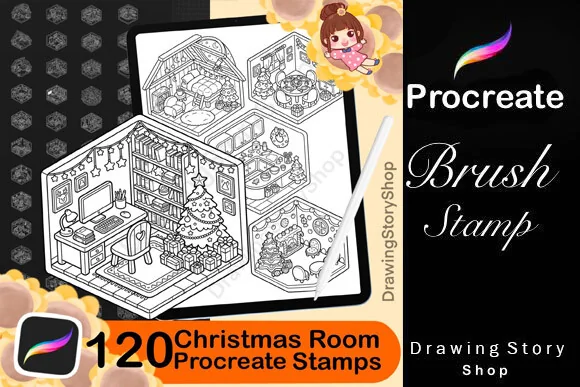
Best for tracing a finished room outline
1. 120 Christmas Room Stamps for Procreate
Layouts: 120 room brushes and an import PDF
Best for: practicing palette, light and local accents on a complete line-art interior. Designed by DrawingStoryShop.
- 120 Christmas room brushes for Procreate
- A PDF with instructions for importing the brushes
- Preview scenes include a bedroom, living room, dining room, laundry room and miniature rooms with furniture and garlands
- The outlines are complete room scenes, not separate movable furniture pieces
Use this set when your focus is lighting and color, not constructing original architecture. The seller's outline gives you a clean room silhouette to practice glow and shadow; do not present the stamped outline as your own hand-drawn architecture. It is a practice surface, not a set of loose furniture elements.

Best for local string-light glow
2. Christmas Lights Procreate Brush Set
Layouts: Filled and transparent light brushes
Best for: adding small bright light accents and confetti sparkle on dark evening layers. Designed by illuztrate.
- Filled and transparent versions of each brush
- Glitter small and large plus five light families: string lights, sparkle lights, scatter dots, sparkle confetti and scattered confetti
- Rainbow or single-colour versions
- Seller notes the brushes work better on dark backgrounds
This adds the quick decorative sparkle that makes a night scene feel lived in: a warm dot of a string-light bulb, a tiny star-shaped glint on an ornament, or a light dusting of confetti near the floor. It does not calculate how light casts shadows across the room. Keep it on a dark layer and pick pale colors for a pastel version.
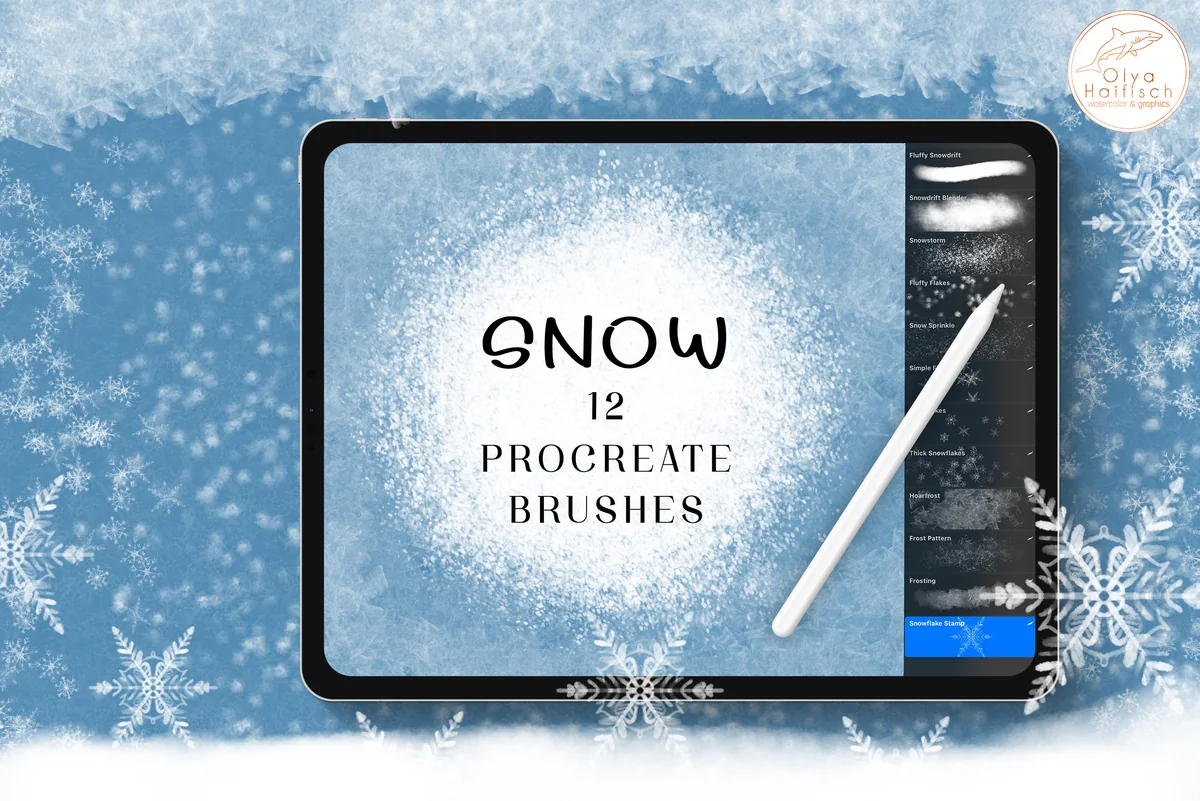
Best for snowdrifts and frost textures
3. Winter Snow and Ice Procreate Brushes
Layouts: 12 brushes plus a tips PDF
Best for: drawing snowdrifts, window frost and three densities of snowfall. Designed by Olya Haifisch.
- Twelve Procreate brushes in one .brushset file
- Two snowdrift brushes, three snowfall brushes, three snowflake brushes, three ice brushes and one snowflake stamp
- A PDF with descriptions and drawing tips
- Procreate only for iPad
This set covers the natural cold texture that can make a room scene believable: a soft snowbank at the windowsill, branching frost on glass, or a heavy storm outside. It is a texture and weather tool, not a source of finished scenery or fonts.
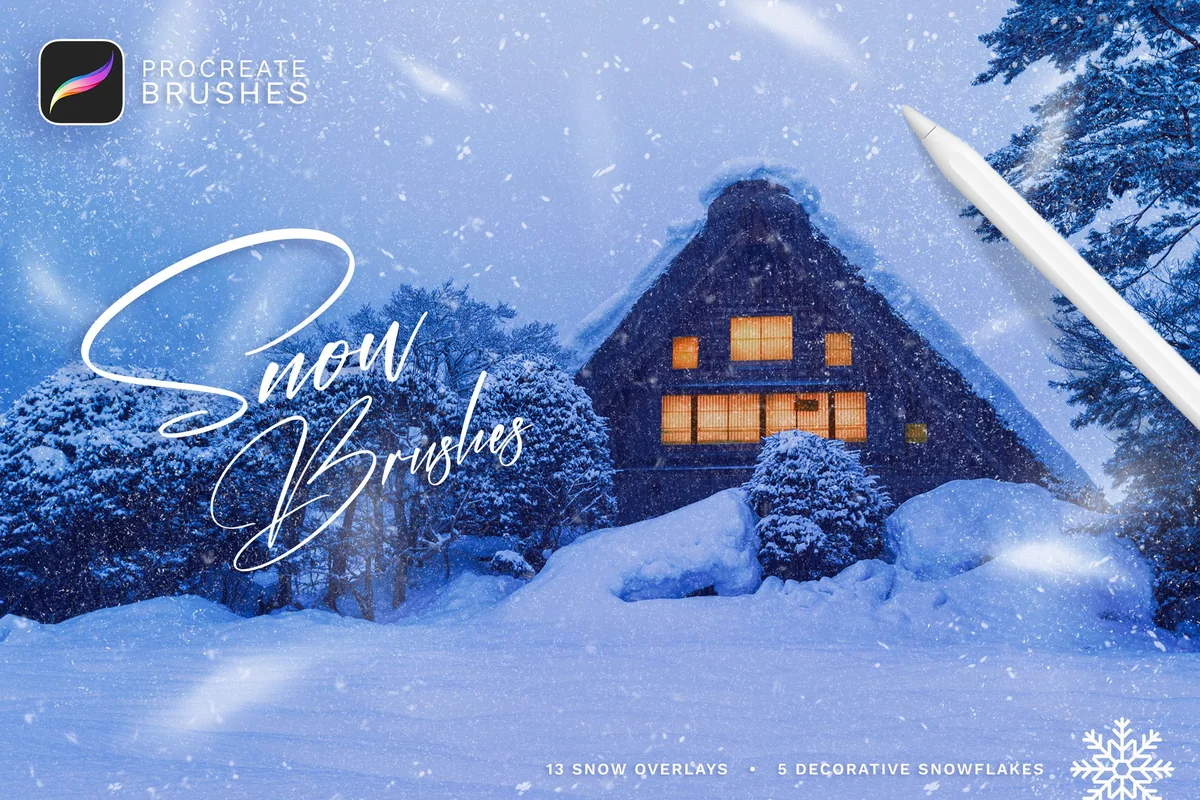
Best for foreground and background snow contrast
4. Snow Procreate Brushes
Layouts: 18 snow overlay and snowflake brushes
Best for: separating small background snow from large blurred flakes and decorative flakes. Designed by Sko4.
- Eighteen Procreate brushes in a Snow_[by_Sko4].brushset file
- Thirteen snow overlay brushes and five decorative snowflakes
- Pen pressure sensitivity and a video tutorial
- Procreate only for Apple iPad
Use this alongside the previous snow set or on its own when depth is the problem. The small overlay flakes can sit far away and the larger flakes can push the foreground closer. It includes decorative snowflakes, not finished street scenes or background photographs.

Best for tree silhouettes and repeated shapes
5. Procreate Brushes 54 Christmas Tree Set
Layouts: 54 tree, pot, geometric, pattern and star brushes
Best for: building fir trees, pots, stars and repeated patterns within your own room scene. Designed by Pui Pui.
- Fifty-four simple and fun Procreate stamp brushes
- Twelve Christmas tree shapes, six pot shapes, ten abstract geometric shapes, sixteen pattern shapes and ten star shapes
- One ZIP file with the brush set
- Seller requires iPad Pro, Apple Pencil or a compatible pressure-sensitive stylus
Build a stylized tree from a fir silhouette, pot and star, then adjust scale and opacity to fit your room. The 54 stamps include 12 tree shapes; the remaining stamps supply pots, patterns, stars and geometric accents.
Best for limited warm and cool palettes
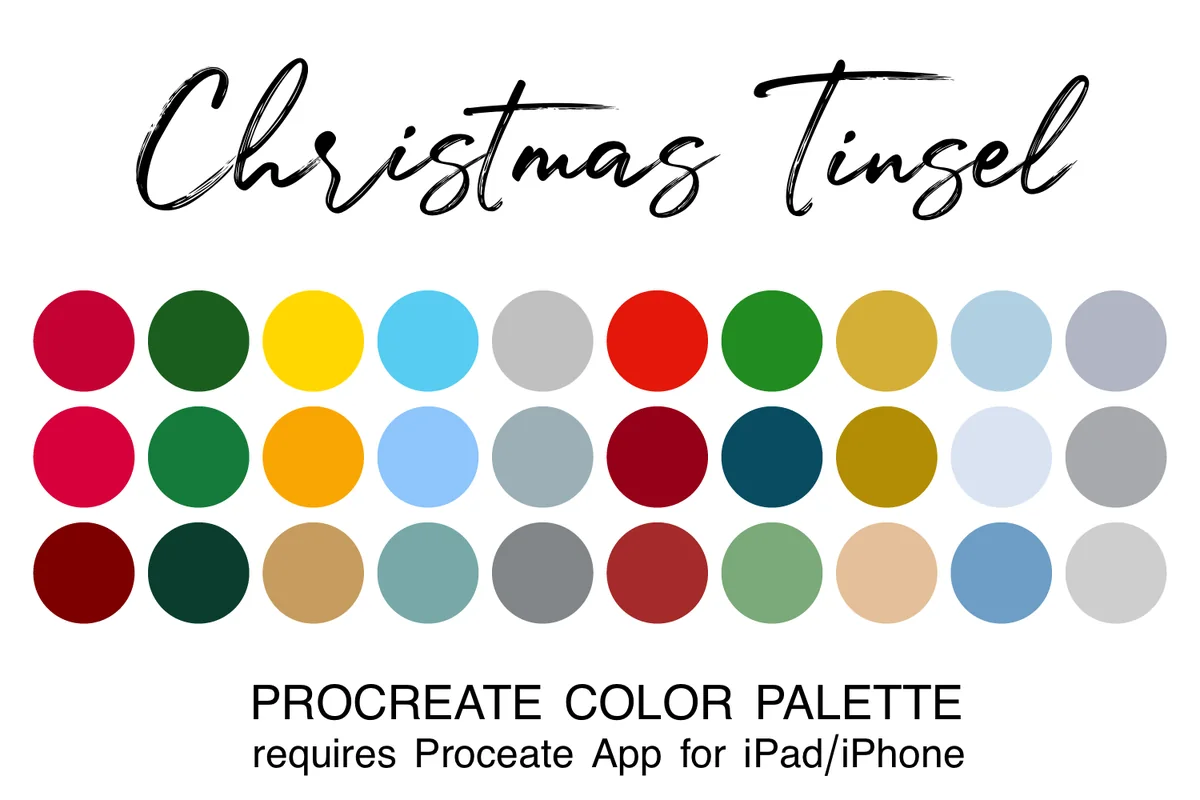
6. Christmas Tinsel Procreate Color Palette
Layouts: 30-color .swatch file
Best for: testing a warm evening scene against a cool daylight version with 30 curated colors. Designed by JulieCampbellDesigns.
- Thirty festive shades in one .swatch file
- Reds, greens, yellows, blues, grays and pastel tones across preview swatches
- For Procreate; this exercise uses the iPad version
- A palette file, not a texture or metallic effect
The real value is restraint. Instead of picking from an unlimited wheel, you can test the same room in a warm gold and red group and a cool blue and gray group. The name and metallic marketing do not mean the palette includes a true metallic texture, so treat it as color planning rather than a shine effect.
Quick Comparison
| Tool | Focus | Room-scene use | What the listing includes | Main distinction |
|---|---|---|---|---|
| 1. 120 Christmas Room Stamps for Procreate | Room outlines | Complete line-art rooms for light exercises | 120 Procreate brushes plus import PDF | A finished room scene to color, not separate furniture |
| 2. Christmas Lights Procreate Brush Set | Light accents | Small bright lamps, string lights, sparkle and confetti | Filled and transparent light brushes | Works better on dark backgrounds |
| 3. Winter Snow and Ice Procreate Brushes | Snow and frost | Snowdrifts, snowfall, snowflakes and icy window textures | 12 brushes plus a tips PDF | Broadest winter weather coverage |
| 4. Snow Procreate Brushes | Snow depth | Foreground blur, background scatter and decorative flakes | 18 brushes | Overlay-focused snow contrast |
| 5. Procreate Brushes 54 Christmas Tree Set | Tree and decor shapes | Fir silhouettes, pots, stars and patterns | 54 brushes | Reusable modular tree pieces |
| 6. Christmas Tinsel Procreate Color Palette | Palette | Warm and cool limited color tests | 30 colors | No metallic texture guaranteed |
Use stamps as a starting point, not as the whole drawing
The room stamps give you a finished contour, so label it as a practice base if you share the work. Build your own room box when structure is the skill you want to practice. The snow and light brushes add texture and accents, but they do not calculate light and shadow. You still decide layer order, color and placement.
A small scene to test first
Use a simple living room: a back wall, one window, a sofa, a small tree and a lamp. In the daylight version, keep the walls pale, the window cool and the tree green with no strong glow. In the evening version, lower the wall value, add orange near the lamp and tree, and scatter a few cool flakes outside the window. Compare the two versions to see how light changes the same room.
Procreate Christmas drawing ideas for beginners: simplify the room
For a first attempt, use the small room above and leave out the sofa and lamp so you can focus on the tree beside the window. Sketch the window as a rectangle and the tree as a triangle, then add a star and a few round ornaments. Keep the background pale while you practice the shapes, and try the evening lighting after the outline feels clear.
FAQ: Procreate Christmas room scenes
Do I need all six iPad tools to follow these Procreate Christmas drawing ideas?
No. The ideas are drawing steps, and you can follow them with basic Procreate brushes. The recommended tools help with specific tasks such as string lights, snow variation, tree silhouettes, room outlines or a limited palette, but the scene still depends on your choices for structure, light and color.
Are the room stamps ready-made finished rooms?
The 120 Christmas Room Stamps show complete line-art rooms for coloring and light practice, not separate movable furniture pieces. They are useful for testing glow and palette on a finished contour. If you share the result, be clear that the base outline came from the set rather than claiming it as your own drawing.
Will the snow brushes draw the outdoor world for me?
Winter Snow and Ice Procreate Brushes includes snowdrift, snowfall, snowflake and ice brushes, plus a snowflake stamp. Snow Procreate Brushes by Sko4 includes thirteen snow overlay brushes and five decorative snowflakes. Draw the fence or trees beyond your window first, then add snow in separate layers to compare distant flakes with those closer to the glass.
Can the tinsel palette create a metallic effect?
The palette provides thirty curated colors, but the listing does not guarantee a metal or shine texture. Use it for warm and cool color planning, not for a ready-made metallic tinsel finish. For a shine effect, draw the highlight separately with a smaller bright brush.
Will these Procreate tools work in other apps or on a non-iPad tablet?
These are Procreate-specific tools, and this exercise uses an iPad. The Tinsel palette also lists iPhone support; that does not establish compatibility for the brush sets. The tree set specifies iPad Pro and Apple Pencil or a compatible pressure-sensitive stylus. Check each listing against your device before purchasing.
Finish the room, not the product list
Even though the list has twenty options, the strongest procreate christmas drawing ideas stay simple: one room, two light states, a clear palette and a few deliberate snow and glow touches. Pick one room, keep a clean line version, and stop before every surface asks for decoration.
You May Also Like
For more step-by-step idea lists and ready-to-import tools, visit the how-to guides archive.
Purchases through selected links may earn this site a commission without changing your price. Our affiliate disclosure explains the arrangement.