You scatter snowflakes over a winter sketch, but they look like stickers pasted on the sky rather than falling snow. These Procreate snow brushes give you different starting points for fine flurries, soft snowbanks and decorative flakes. I compared eleven brush packs and single-brush options on Creative Fabrica, separating weather effects from decorative snowflakes so you can choose for the picture you want to make.
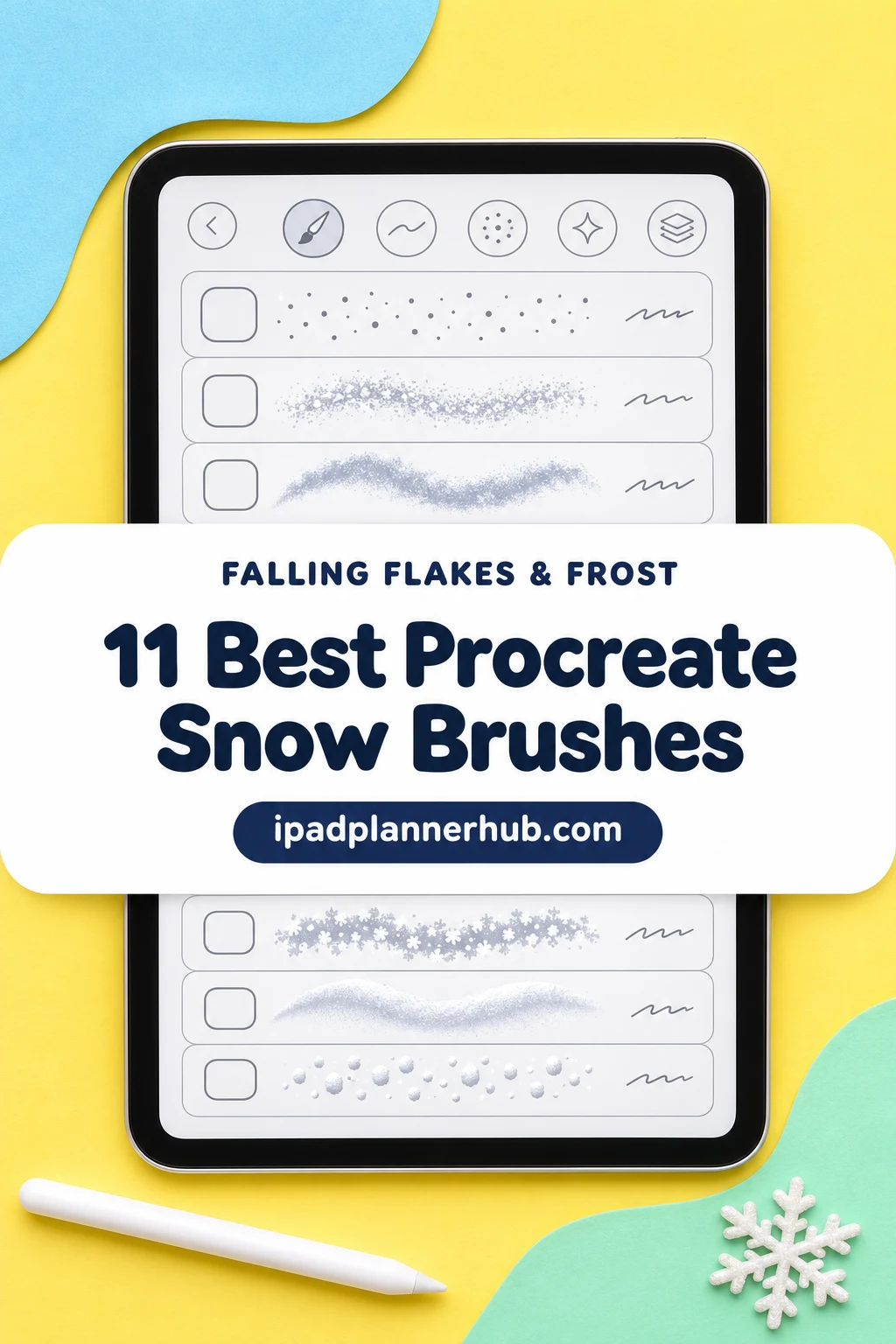
My starting question is simple: does the scene need snow in the air, snow on a surface or a recognizable flake? A huge stamp collection will not automatically help with a soft drift. A compact snowfall set may be all you need when the landscape is finished and only the atmosphere is missing.
Choose Procreate Snow Brushes by the Mark You Need
Look at the brush swatches before the finished scene. The finished illustration may include trees, lettering or photography that the brush pack does not supply. A labeled sheet gives you a better basis for comparing scattered specks, soft strokes and single stamped shapes.
- Falling snow: Look for scattered marks at several sizes. Small flecks can sit behind the subject; larger soft flakes can suggest snow close to the viewer.
- Settled snow: Look for a brush that makes a bank, ledge or textured mass. This needs a more continuous mark than a spray of dots.
- Frost and ice: Compare the actual frozen textures or shaped stamps. An icicle and a frosted-window texture have different jobs.
- Decorative flakes: Choose the silhouette, line weight and stamp behavior. These can work as graphic accents even when they are too crisp for realistic weather.
The first five offers below address snowy scenes and surfaces. The next five are individual snowflake stamp collections; the final offer makes a repeating flake border. You do not need one from every group. In particular, compare the two similarly named Ginkean listings by their blue or purple cover and their individual preview sheets.
TL;DR: For falling snow, start with Sko4; for snowbanks and frost, compare Olya Haifisch. The remaining options range from compact atmosphere tools to decorative snowflake stamps and one repeating border brush. Eleven offers, with different jobs.
Quick Picks
- Best for layered snowfall: Snow Procreate Brushes
- Best for snowbanks and frost: Winter Snow and Ice Procreate Brushes
- Best for compact atmosphere set: 4 Realistic Snow Procreate Brushes
- Best for ice forms and snowy shapes: Snow and Ice Procreate Brushes
- Best for small illustrated snow kit: Snow Brush Pattern for Procreate
- Best for fine branching snowflakes: 50 Snowflake Brush Stamps for Procreate
- Snow Procreate Brushes – Best for layered snowfall
- Winter Snow and Ice Procreate Brushes – Best for snowbanks and frost
- 4 Realistic Snow Procreate Brushes – Best compact atmosphere set
- Snow and Ice Procreate Brushes – Best for ice forms and snowy shapes
- Snow Brush Pattern for Procreate – Best small illustrated snow kit
- 50 Snowflake Brush Stamps for Procreate – Best for fine branching snowflakes
- 50 Snowflake Brush Stamps for Procreate – Best for bold geometric accents
- Snowflake Procreate Stamp Brush Set – Best for stamps without pressure control
- Procreate 24 Snowflakes Brushes Stamps – Best for a smaller motif library
- 30 Snow Flakes Brush Stamp – Best for a medium-size flake selection
- Snowflakes Single Procreate Brush – Best for a repeating flake border
Snowfall, Snowbanks and Frozen Surfaces

Best for layered snowfall
1. Snow Procreate Brushes
Sections: 18 brushesFormat: Procreate on iPad
Best for: snowy atmosphere over a landscape or photo. Designed by Sko4.
- 18 brushes: 13 snow overlays and 5 decorative snowflakes
- Pressure-sensitive tools; a video tutorial is listed
- One .brushset file for Procreate on Apple iPad
Sko4 is my first stop for falling snow. The gallery separates fine background flurries from much larger, soft foreground flakes, which makes the depth effect easier to understand before choosing a brush. Its five decorative snowflakes are an extra style within the same pack, rather than five more realistic weather overlays. Start here if the landscape is already drawn and you mainly want atmosphere; choose Olya Haifisch below if building the snowbanks matters too.

Best for snowbanks and frost
2. Winter Snow and Ice Procreate Brushes
Sections: 12 brushesFormat: Procreate on iPad
Best for: building a scene from settled snow to icy edges. Designed by Olya Haifisch.
- 12 brushes in one .brushset, plus a PDF guide
- 2 snowdrift, 3 snowfall, 3 snowflake and 3 ice brushes
- 1 additional snowflake stamp completes the 12-tool total
- Demo photos, fonts, mockups and scenes are not included
This is the most clearly divided scene-building kit in the selection. I like being able to trace every part of the twelve-tool count: a snowdrift blender belongs to the ground, while Hoarfrost and Frost Pattern belong to frozen surfaces. The preview sheets show those differences rather than relying only on a finished winter picture. For a bare branch beside a frosty window, this range is more useful than a large library of decorative flake silhouettes.

Best compact atmosphere set
3. 4 Realistic Snow Procreate Brushes
Sections: 4 brushesFormat: Procreate on iPad
Best for: adding flurries, haze and a soft-focus winter finish. Designed by opal.yagley.
- 4 brushes in the 4_Snow.brushset file
- Preview swatches labeled Snowfall, Whiteout, ICE Crystal and Winter Bokeh
- ZIP archive containing the brush set
Four tools make this an approachable choice when you do not want a long brush menu. Snowfall is a field of scattered marks; Whiteout is a broad cloudy haze; Winter Bokeh has large soft circles. Those are visibly different treatments, so choose by the mood of the picture instead of applying all four together. The trees on the cover demonstrate the scene, but the listed contents promise the brush set, not a tree-stamp collection.

Best for ice forms and snowy shapes
4. Snow and Ice Procreate Brushes
Sections: 50 advertised on previewFormat: Procreate on iPad
Best for: combining snowfall with ready-made ice and snow forms. Designed by SvgOcean.
- One .brushset file for Procreate and Apple Pencil
- Gallery advertises 50 snow and ice brushes
- Preview sheets show falling snow, snowy ledges, snow mounds, icicles and ice forms
SvgOcean has a broader visual vocabulary than snowflakes alone. The gallery includes icicles, chunks of ice and shaped piles of snow alongside scattered weather marks, so it suits an illustration that needs several frozen objects. The 50-brush count appears on the cover; the description itself specifies the file rather than itemizing all fifty. Check the preview sheets for the particular ice form or snow shape your illustration needs before buying.
Best small illustrated snow kit
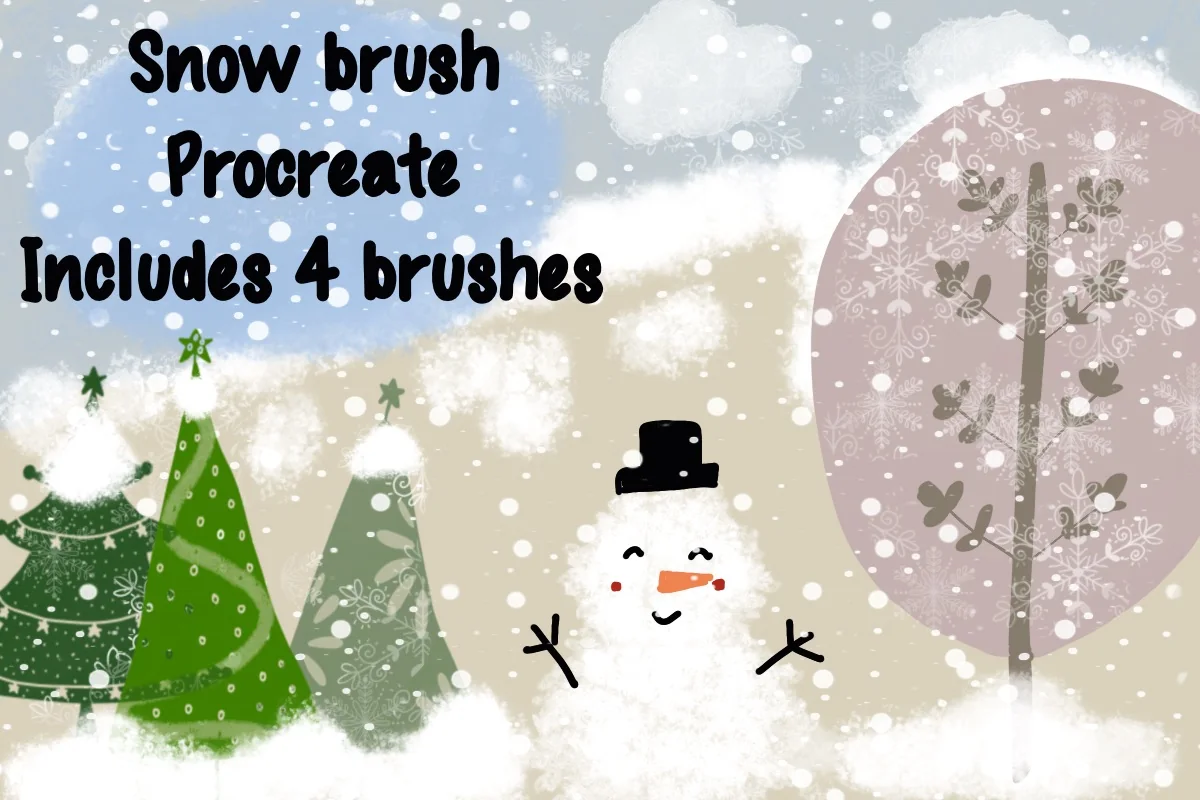
5. Snow Brush Pattern for Procreate
Sections: 4 brush filesFormat: Procreate on iPad
Best for: soft snow cover and simple falling flakes in stylized art. Designed by Temtemdesign.
- 4 brush files in a ZIP archive
- Preview names: Snow Falling, Fluffy Snow, Fluffy Snow Flakes and Snowflakes
- Brush swatches show both soft texture strokes and patterned flakes
Temtemdesign makes more sense to me as a small illustrated-snow kit than as a library of realistic overlays. The fluffy strokes can suggest snow resting on a ledge, while the patterned flake stroke adds an obviously drawn border. Although several mockups use holiday scenes, the four brush marks themselves work in a plain winter illustration. Do not assume the finished snowman or tree artwork is included: the contents specify four brush files.
Individual Snowflake Stamps
Best for fine branching snowflakes
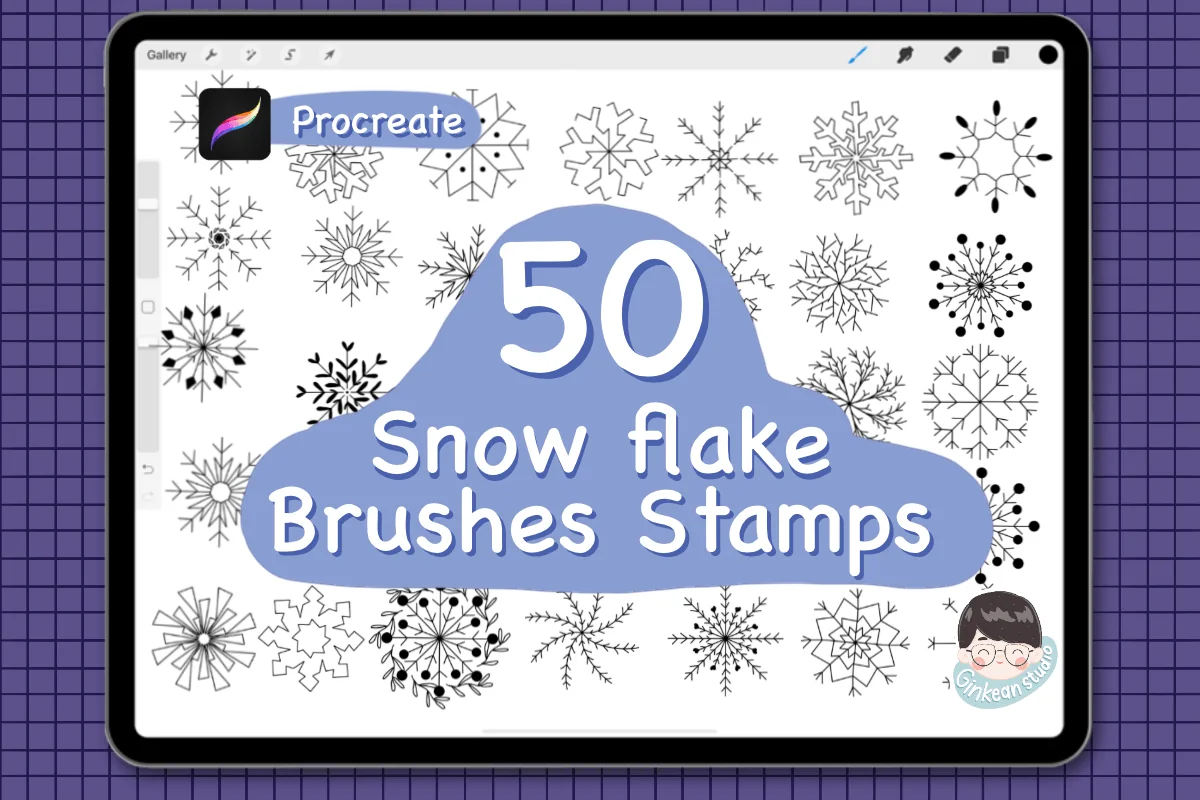
6. 50 Snowflake Brush Stamps for Procreate
Sections: 50 snowflake stampsFormat: Procreate on iPad
Best for: placing individual geometric flakes with delicate branching lines. Designed by Ginkean.
- 50 snowflake icon stamps in a ZIP archive
- Purple-cover gallery with a full brush sheet and enlarged individual designs
- Digital files arrive without the preview watermark or shadow
The purple-cover Ginkean pack is a stamp library, best suited to a few intentionally placed flakes; a natural blizzard needs a different kind of mark. Its preview sheets include fine branching shapes, open outlines and darker accents. That variety is useful when a large foreground snowflake needs to hold its shape. The designer does not offer help importing the files, which is worth considering if this would be your first third-party brush pack.

Best for bold geometric accents
7. 50 Snowflake Brush Stamps for Procreate
Sections: 50 snowflake stampsFormat: Procreate on iPad
Best for: mixing fuller snowflake silhouettes with open line designs. Designed by Ginkean.
- 50 snowflake icon stamps in a ZIP archive
- Blue-cover gallery with a separate 50-stamp brush sheet
- Preview sheets mix open shapes and denser radial motifs
This blue-cover listing has the same title and designer as the purple-cover option, so use the gallery, not the name alone, when comparing them. I see a mix of bold radial forms and fine outlines that would suit a graphic winter composition. These are separate listings, not a promise of one combined hundred-stamp library. If you only need one style, choose the preview sheet closest to your artwork instead of buying both for the number.

Best for stamps without pressure control
8. Snowflake Procreate Stamp Brush Set
Sections: 45 hand-drawn stampsFormat: Procreate on iPad
Best for: placing hand-drawn flakes with consistent stamped shapes. Designed by HalieKStudio.
- 45 hand-drawn snowflake stamps for Procreate
- Description explicitly states non-pressure-sensitive tools
- Designer says the stamps can be used without an Apple Pencil
- Gallery separates the flake sheets from product mockups
HalieKStudio answers an equipment question the other stamp listings often leave open: these stamps are non-pressure-sensitive. That makes it a more relevant option if you want repeatable motifs without relying on Pencil pressure. The sheets show both densely filled flakes and airy outlines, all intended as hand-drawn decorative forms. A few large shapes can frame a title or a small winter sketch. For a soft bank of settled snow, compare the surface brushes above.

Best for a smaller motif library
9. Procreate 24 Snowflakes Brushes Stamps
Sections: 24 individual stampsFormat: Procreate on iPad
Best for: choosing a decorative flake from a clearly numbered sheet. Designed by TANVARA DIGITAL ART.
- 24 individual stamps in one Procreate brush set
- Two preview sheets label the snowflakes from 1 through 24
- Listing allows size, opacity and color adjustments in Procreate
Twenty-four is enough variety to compare without scrolling past dozens of similar motifs. I like the numbered sheets because they make it easy to decide whether the actual shapes, rather than the mockups, suit a project. The designs range from sparse branches to more intricate centers. This is a decorative snowflake choice for iPad art; the shirts, mugs and keychains are examples of finished designs, not physical items or extra files promised with the brushes.
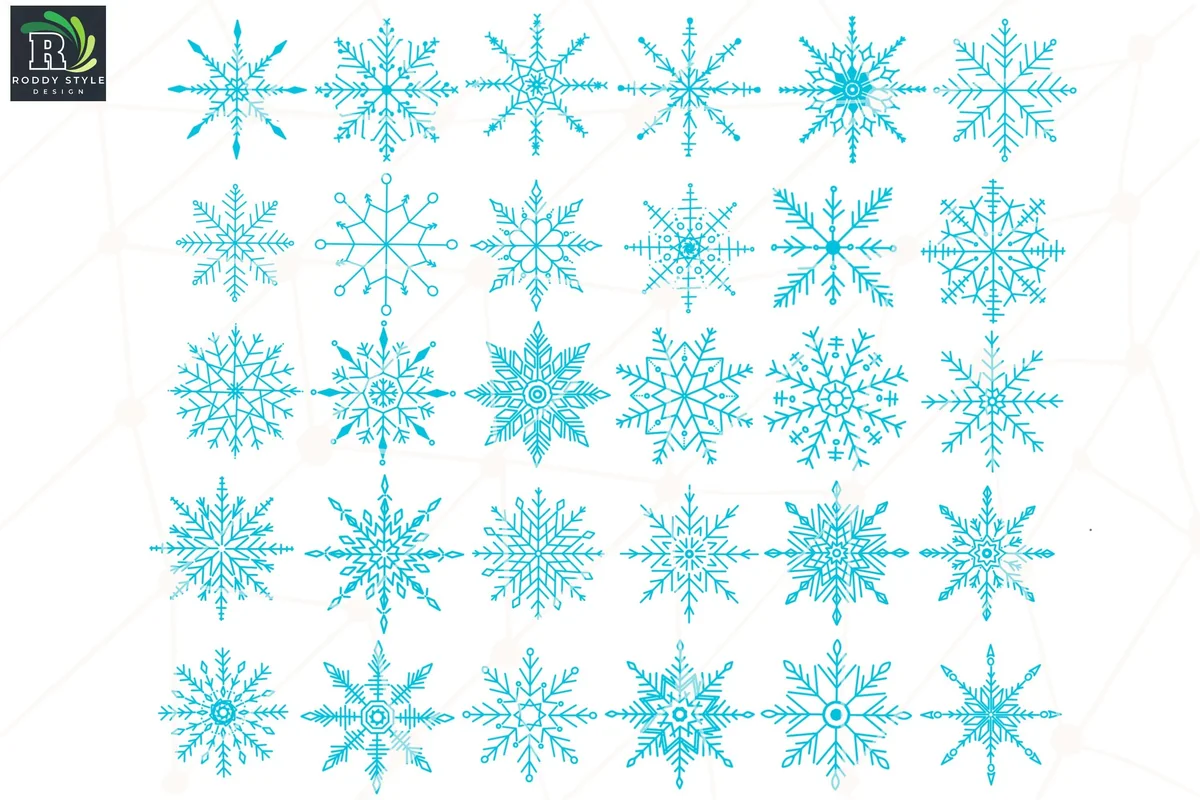
Best for a medium-size flake selection
10. 30 Snow Flakes Brush Stamp
Sections: 30 flake stampsFormat: Procreate on iPad
Best for: adding crisp snowflake accents without a large brush library. Designed by roddy style.
- 30 snowflake brush stamps in one zipped file
- Only compatible with Procreate; the seller recommends using the most updated version
- Single preview displays a grid of the flake shapes
Roddy style sits between the smaller 24-stamp library and the larger 45- or 50-stamp collections. The one preview concentrates on the designs themselves: fine branching lines, star-like centers and more elaborate radial shapes. That is useful for a quick visual comparison, though it gives less application context than the multi-image listings. Choose it for the flake designs you can see, rather than expecting an included snowbank brush or a pressure-sensitive snowfall tool.
A Repeating Snowflake Border

Best for a repeating flake border
11. Snowflakes Single Procreate Brush
Sections: 1 brushFormat: Procreate on iPad; Procreate 5 or higher
Best for: drawing a decorative row of snowflakes with one brush. Designed by myprintscollection.
- 1 Snowflakes brush in a .brushset file
- Requires Procreate 5 or higher
- Preview shows repeated dark snowflake motifs along curved strokes
- The larger border collection pictured separately is an upsell
A single repeating brush solves a different problem from a stamp library: you want a row of flakes, not a new design at every tap. The sample curves make that role clear. Reserve it for a small frame or a decorative edge, keeping it away from realistic foreground snowfall. The second image advertises a larger border set; that collection is not part of this single-brush offer.
Quick Comparison
| Brush pack | Best use | Included | Distinction |
|---|---|---|---|
| 1. Snow Procreate Brushes | Layered snowfall | 18 brushes | 13 overlays + 5 decorative flakes |
| 2. Winter Snow and Ice Procreate Brushes | Snowbanks and frost | 12 brushes + PDF | Separate ground, weather and ice tools |
| 3. 4 Realistic Snow Procreate Brushes | Compact atmosphere | 4 brushes | Snowfall, haze, crystals and bokeh |
| 4. Snow and Ice Procreate Brushes | Ice forms and snow shapes | 50 shown on cover | Icicles, mounds and weather effects |
| 5. Snow Brush Pattern for Procreate | Stylized snow cover | 4 brushes | Soft texture strokes plus patterned flakes |
| 6. 50 Snowflake Brush Stamps for Procreate | Fine decorative flakes | 50 stamps | Purple-cover Ginkean collection |
| 7. 50 Snowflake Brush Stamps for Procreate | Bold decorative flakes | 50 stamps | Blue-cover Ginkean collection |
| 8. Snowflake Procreate Stamp Brush Set | Non-pressure-sensitive motifs | 45 stamps | Apple Pencil not required by listing |
| 9. Procreate 24 Snowflakes Brushes Stamps | Numbered motif sheets | 24 stamps | One brush set; individual shapes |
| 10. 30 Snow Flakes Brush Stamp | Medium-size decorative set | 30 stamps | One shape-grid preview |
| 11. Snowflakes Single Procreate Brush | Repeating flake border | 1 brush | Patterned stroke rather than stamp library |
Make the Snow Belong to the Scene
Decide where the viewer should look before adding the first flake. If a face, cabin window or small handwritten heading is the focal point, the snow should leave enough space to read it. Adding more marks is easy; choosing which marks matter takes more attention.
A window gives that focal point a clear boundary. The Christmas room drawing exercises place an outdoor winter scene beyond the glass and add frost from the corners, offering a setting where snow can support the interior without covering it.
A three-plane snow plan
- Behind the subject: Use a restrained field of smaller flakes to suggest distance. Keep the contrast lower than the main subject so the weather does not flatten everything into one busy layer.
- Across the middle: Add a few clearer marks where they describe the snowfall. Leave some darker patches of sky or trees visible rather than filling every gap.
- Near the viewer: Reserve the biggest soft flakes for a small number of accents. A few are enough to suggest a closer plane; a uniform sheet of large circles can look more like a graphic overlay.
The Sko4 gallery is useful for this distinction because it shows fine background flakes separately from large foreground ones. Opal Yagley’s Winter Bokeh sample goes further toward soft circles. I see these as different visual treatments, not interchangeable reasons to buy the largest pack.
Snowbanks need an edge and a surface
For snow resting on a ledge, start with the shape of the bank. Then decide whether it needs a fluffy edge, a lightly textured surface or an icy crust. Olya Haifisch separates snowdrift tools from ice tools, while Temtemdesign shows soft snow strokes in a smaller four-brush selection.
- A distant roof: A readable strip of settled snow may matter more than detailed flakes. Keep its silhouette clear when viewing the whole composition.
- A close snowbank: Use the texture selectively, letting some areas remain quiet. A continuous patch of equally strong texture can compete with the bank’s outline.
- A frozen window: Treat frost as a surface detail. Hoarfrost or a frost-pattern tool is a closer match than a library of isolated snowflake icons.
Do not infer snow physics or a complete landscape kit from the name of a brush. The purpose here is an illustration choice: the marks should describe the part of the picture you are drawing.
If you need a subject before choosing the snow marks, try the bare-branch exercise in these winter drawing prompts for Procreate. It starts with the dark branch structure and adds uneven snow caps, providing a small surface study without requiring a whole landscape.
How to Draw Snow in Procreate Without Hiding the Landscape
Start with simple hill silhouettes using Studio Pen, then use Soft Brush for the sky gradient. Keep the hills on a separate layer and enable Alpha Lock before shading them; it confines the new paint to pixels already on that layer. Build the trees before adding the falling snow so you can judge how much of their silhouette remains visible.
Paint the falling flakes on a dedicated layer with a round or speckled brush, or choose a snowfall brush from the comparison above. Keep the distant marks small and reserve larger flakes for the foreground. For a grainier surface treatment, use the Smudge tool with a painterly brush on the settled snow rather than adding more decorative flakes.
If the scene needs moonlit shadows, duplicate the tree layer, then flip, distort and blur the copy to shape a shadow across the snow. Keep any glow or sparkle on a separate layer set to Add, and use it sparingly around the light source. These finishing steps support the lighting; the snow brush still needs to make the right mark for the surface or weather you are drawing.
A Small Swatch Exercise Before Your Main Illustration
Before committing to a pack’s style, compare its sample marks at the size your illustration will actually be viewed. Once you have the brushes, a small practice canvas can help you choose a restrained combination. Use these four steps to compare the marks for your own composition.
From swatches to one clear scene
- 1Find one weather mark and one surface mark
Choose a falling-snow brush and, only if your scene needs it, a settled-snow or frost tool. Name the job of each before adding more. If you have a stamp-only collection, begin with two individual flakes of different visual weights instead of expecting it to paint soft snowbanks.
- 2Make light, medium and dense samples
Keep the brush size consistent while comparing a sparse pass with a more crowded area. Label the samples yourself. This gives you a practical reference for how much of the subject remains visible, rather than judging the effect only from a tiny brush thumbnail.
- 3Compare on a quiet and a detailed background
Try the mark over a plain colored area, then beside some lines or a small sketch. A fine flake may be clear against dark blue yet disappear into a pale textured patch. Choose the contrast for your scene; white is not automatically the best visible color everywhere.
- 4Check the composition at its final viewing size
Look at the whole picture and then at its intended small preview. Keep the sample where the subject remains readable. If several flake styles turn into visual noise, reduce the number of styles before reaching for another pack. Save the chosen swatches as your own reference.
For me, the useful outcome is a small set of decisions: one background treatment, a few foreground accents and a surface texture only where the scene calls for it. That is easier to repeat across several illustrations than choosing a different brush for every empty space.
When Snowflake Stamps Are the Better Choice
Procreate winter brushes include decorative flakes meant to be noticed as shapes. They can anchor a winter heading, frame a tiny landscape or add a graphic accent to a journal illustration. That is a different goal from making a viewer believe snow is falling through the air.
Choose a stamp sheet by line weight
- Fine branching lines: Consider the more delicate forms on the Ginkean and TANVARA sheets when the flakes will have enough room to remain legible.
- Denser silhouettes: Compare the fuller HalieKStudio shapes and the bolder Ginkean examples for graphic accents that need to read at a smaller scale.
- A short repeated edge: The single Snowflakes brush is made for a patterned stroke. Choose it when repetition is the point, instead of treating repetition as a substitute for varied weather.
The two Ginkean offers share a name, a designer and a fifty-stamp count. Their sheets present different mixes of forms, but I would not assume the two collections are entirely non-overlapping. Choose one based on its sheet unless you have a specific reason to want both. Neither is a realistic snowfall pack just because snow appears in the title.
Keep decorative motifs out of the focal area
Leave a little breathing room around a heading or small drawing. Choose one dominant motif and use smaller accents to support it. If you are making artwork for a digital journal, the snowflake should decorate the page without making the writing harder to read.
- Use a large motif where its branching shape can be seen.
- Compare a fine outline with a denser shape before repeating either.
- Keep a repeating border away from the densest area of the illustration.
- Treat product mockups as examples; check the contents list for included assets.
Files, Pencil Requirements and What Is Actually Included
Check the requirements on the individual listing rather than assume that every snow pack behaves the same way. Sko4 lists pressure sensitivity, while HalieKStudio explicitly describes its snowflake stamps as non-pressure-sensitive and usable without an Apple Pencil. Other listings do not provide enough information to promise the same behavior.
- App: These selected offers are for Procreate on iPad. Several explicitly exclude other graphics apps. A snowflake drawn in a preview is not evidence that its brush file works in a note-taking app.
- Archive: Some offers package a brush set in a ZIP; Temtemdesign lists four brush files. Read the contents before looking for a particular filename.
- Installation: The Opal Yagley and Sko4 listings describe opening their .brushset files on iPad with Procreate. Follow the instructions for the actual file you receive, after extracting an archive if necessary.
- Hardware: Only rely on a no-Pencil claim where it is stated. A pressure-sensitive snowfall brush and a fixed decorative stamp need not have the same controls.
- Extra assets: A finished cabin scene, a physical mug or a larger collection advertised in a second image is not automatically included in the offer.
Olya Haifisch is especially clear about excluding preview photos, fonts, mockups and scenes. The single Snowflakes brush also illustrates a separate larger border collection as an upsell. Those distinctions matter more to me than a dramatic cover, because they determine what I can actually build from the files.
Keep the Rest of Your Winter Artwork Simple
Snow is easier to judge when the background has a clear structure. If your scene needs a sky first, the cloud brush comparison covers softer sky marks. For silhouettes behind the flurry, compare the shapes in the tree brush selection rather than assume the trees on a snow-pack cover are included.
- Quiet woodland: Start with a few clear tree shapes and fine falling snow. Let the sky show through between the branches.
- Frosty close-up: Give the frozen surface more space and reduce competing decorative motifs.
- Graphic winter page: Use individual snowflake stamps with generous empty space. A repeating border can finish an edge without covering the middle.
Add a paper finish after deciding how much detail the snow already contributes. The paper texture brush comparison helps distinguish a surface treatment from another weather mark. For a repeating decorative fill, the pattern brush guide is the closer next step.
FAQ: Procreate Snow Brushes and Snowflake Stamps
What does this Procreate snow brushes review compare?
This review compares the listed contents and preview marks of eleven offers, separating falling snow, settled snow, frost and decorative snowflakes. The recommendations reflect those descriptions and images rather than hands-on brush tests. Use the comparison to choose the effect your illustration needs, then use the swatch exercise above to judge the brushes on your own canvas.
Which pack would you choose for falling snow?
My first choice is Sko4’s Snow Procreate Brushes for an existing scene because its eighteen tools include thirteen snow overlays and five decorative flakes. Olya Haifisch is the broader choice when the same picture also needs snowbanks and frost. Opal Yagley keeps the atmosphere selection smaller with four distinctly presented effects.
Are snowflake stamps the same as snowfall brushes?
Not in their intended visual role. The selected stamp libraries emphasize recognizable individual shapes; the weather packs show fields of falling marks and, in some cases, soft snow textures. A crisp stamp is useful when you want a visible motif. For a natural-looking flurry, compare the snowfall swatches first.
Can I use these brushes without an Apple Pencil?
HalieKStudio explicitly says its forty-five snowflake stamps are non-pressure-sensitive and can be used without an Apple Pencil. That statement does not extend to every pack here. Check each listing’s hardware and pressure requirements, especially for snowfall effects whose appearance responds to pressure.
Do the packs include the pictures shown on the covers?
Do not assume so. The contents are brush files or brush sets, with a PDF guide in Olya Haifisch’s offer. Its listing explicitly excludes demo scenes and photos. Physical products shown in stamp mockups and the larger border set advertised beside the single brush are not the selected brush offer.
Are any of these snow brushes free?
I am not presenting any of these eleven offers as a verified freebie. Check the current terms on the product page before choosing. A subscription offer and a separately free product are different arrangements, so a prominent access button alone is not enough to call a brush pack free.
My Shortlist for a Snowy Scene
Choose Procreate snow brushes for the missing part of your picture: Sko4 for falling flakes, Olya Haifisch for snowbanks and frost, or Opal Yagley for a compact atmosphere set. For decorative shapes, compare the individual stamp sheets; for a repeated edge, the single Snowflakes brush has a narrower and useful purpose. Begin with one pack whose sample marks fit the scene. Add another only for a specific effect still missing.
You May Also Like
This article contains affiliate links. If you buy through them, I may earn a commission at no extra cost to you. Read the affiliate disclosure.