You choose a word in late December, write it once, and by February it has faded into the rest of your notes. These word of the year ideas help you keep one word visible and usable without turning it into a complicated tracking system.
Choose a word that describes how you want everyday life to feel. Below are thirty possible words, each with an audience and a concrete action to try in your iPad planner. Six optional tools follow the list.
30 word of the year ideas to try in your planner
Read the words with an ordinary week in mind. Choose one whose suggested action fits something you want to change; adapt that action to your own schedule.
Words for a more comfortable pace
- 1.Steady For anyone rebuilding a routine after interruptions. In your iPad habit tracker, mark one manageable daily practice, such as reading a page.
- 2.Calm For busy days that feel crowded with demands. Reserve a ten-minute buffer between two appointments on your digital weekly page.
- 3.Rest For someone who keeps postponing time off. Block an evening without tasks in your iPad calendar and protect that space.
- 4.Enough For readers who keep adding to already full lists. Add an Enough for today box to your daily planner and place three essentials inside.
- 5.Space For a year with more room to think. Leave one empty afternoon on your digital weekly spread before accepting new commitments.
- 6.Simplify For anyone juggling too many systems. On an iPad notes page, list your recurring planning tasks and circle one you can remove.
- 7.Balance For someone whose week has become dominated by one responsibility. Color-code work, care and personal time on a weekly spread to spot what needs room.
- 8.Present For readers who want to notice ordinary moments. Add one sentence about something you saw or heard to the day’s iPad journal entry.
- 9.Gentle For anyone who writes demanding task lists. Edit one overdue task in your digital planner into a smaller, more approachable first step.
- 10.Light For someone ready to reduce everyday burdens. Keep a Things to let go note on iPad and choose one unused commitment to reconsider.
Words for progress and discovery
- 11.Focus For readers pulled between competing projects. Put one priority in a highlighted box at the top of your digital daily page.
- 12.Begin For anyone delaying a project until conditions feel perfect. Schedule its first ten-minute action in your iPad planner today.
- 13.Finish For someone with several half-completed projects. Create a short completion checklist for one project on a digital notes page.
- 14.Build For readers working toward something that takes time. Draw a milestone ladder on iPad and add the next practical step to this week.
- 15.Learn For someone starting a skill or returning to study. Add a question and a brief answer to a dedicated iPad learning log after each session.
- 16.Curious For anyone who wants to explore unfamiliar interests. Save a question in your digital journal and schedule one small experiment to investigate it.
- 17.Brave For readers facing a conversation they have been avoiding. Draft its opening sentence in your iPad notes and set a time to speak.
- 18.Practice For someone who wants regular contact with a craft. Add a recurring sketching, writing or music session to a digital weekly layout.
- 19.Adapt For readers whose plans often change. Keep a second option beside one important appointment in your iPad planner.
- 20.Explore For anyone craving variety in familiar weeks. Add a local place you have never visited to your digital weekend plan.
Words for relationships and everyday joy
- 21.Connect For someone who wants to keep friendships active. Put one message or call beside a friend’s name on your weekly iPad page.
- 22.Listen For readers who want to give conversations more attention. After a call, record one thing the other person said in your private digital journal.
- 23.Kind For anyone seeking a practical way to help others. Add one specific helpful act, such as bringing a meal, to your digital task list.
- 24.Ask For someone who often tries to solve everything alone. Write a specific request for help in your iPad notes before sending it.
- 25.Share For readers who want their interests to include others. Schedule a small exchange, such as sharing a recipe or a sketch, on your digital weekly page.
- 26.Grateful For anyone who wants a record of what went well. Write one specific moment in the gratitude space of your iPad daily planner.
- 27.Create For someone who misses making things for pleasure. Add a small idea bank to your digital notebook and choose one idea for the weekend.
- 28.Play For readers whose leisure has become another task list. Reserve an unstructured hour in your iPad planner and jot down a few enjoyable options.
- 29.Care For someone who wants everyday upkeep to feel manageable. Make a digital checklist for one recurring need, such as preparing tomorrow’s lunch.
- 30.Celebrate For readers who move straight from one deadline to the next. Add a small celebration beside a completed milestone in your iPad project log.
Match the word to your school, work or personal year
Word of the year ideas for students
Try Learn when you want to ask more questions, Begin when assignments feel hard to start, or Connect when you want to talk with classmates. Put the word beside one weekly study action in your iPad planner, such as starting an essay outline before Friday. At the end of the term, record an example of how you used it and which skill you want to develop next.
Word of the year ideas for work
Choose Focus for competing priorities, Finish for unfinished projects or Listen for better connection with colleagues. Define what quality work means in one observable action: for example, Listen could mean asking a follow-up question before proposing a solution. You can keep a separate personal word if your work goals and home life need different attention.
Make a funny word useful
If you want funny word of the year ideas, give a word from the list a playful private meaning. Enough might mean closing the twenty browser tabs you keep saving, while Celebrate might mean doing a tiny victory dance after sending an invoice. Write the joke beneath the word so the reminder still says something useful when the novelty fades.
Christian and biblical word of the year ideas
For a Christian reflection page, consider whether hope, peace or service fits the part of your faith you want to practice in the coming year. If you want a biblical word, choose it from a passage you actually read, keep its reference beside your notes and describe what it means in that context. Add one action, such as offering practical help or writing a prayer of thanks, rather than treating the word as a promise of a particular outcome.
Six iPad tools for a lighter word-of-the-year page
I selected six planners, journals and workbooks. All six are adjacent tools with visual, daily, monthly or reflection pages where you can place the word yourself. The thirty ideas above work in an existing notebook; these tools offer page structures if you prefer a starting point.
TL;DR: Choose Selfcare for monthly reflection, Undated Vision for daily gratitude, Cute Planner for an all-in-one system, or Mindset Reset for guided exercises. Add your chosen word yourself. Choose Vision Board for an image-based page or Future Me for future-self prompts and goal planning.
Quick Picks
- Best for monthly self-care check-ins: The Ultimate Selfcare Planner | Planner
- Best for a daily word-based gratitude note: Undated Digital Vision Planner
- Best for keeping the word beside everyday life: All in One Cute Digital Planner
- Best for a 30-day reflection exercise: Mindset Reset Planner
- Best for a visual word-of-year board: Vision Board: Printable & Digital Manifestation Planner
- Best for future-self reflection: FUTURE ME – GUIDED JOURNAL for VISION
- The Ultimate Selfcare Planner | Planner – Best for monthly self-care check-ins
- Undated Digital Vision Planner – Best for a daily word-based gratitude note
- All in One Cute Digital Planner – Best for keeping the word beside everyday life
- Mindset Reset Planner – Best for a 30-day reflection exercise
- Vision Board: Printable & Digital Manifestation Planner – Best for a visual word-of-year board
- FUTURE ME – GUIDED JOURNAL for VISION – Best for future-self reflection
Best for monthly self-care check-ins
1. The Ultimate Selfcare Planner | Planner
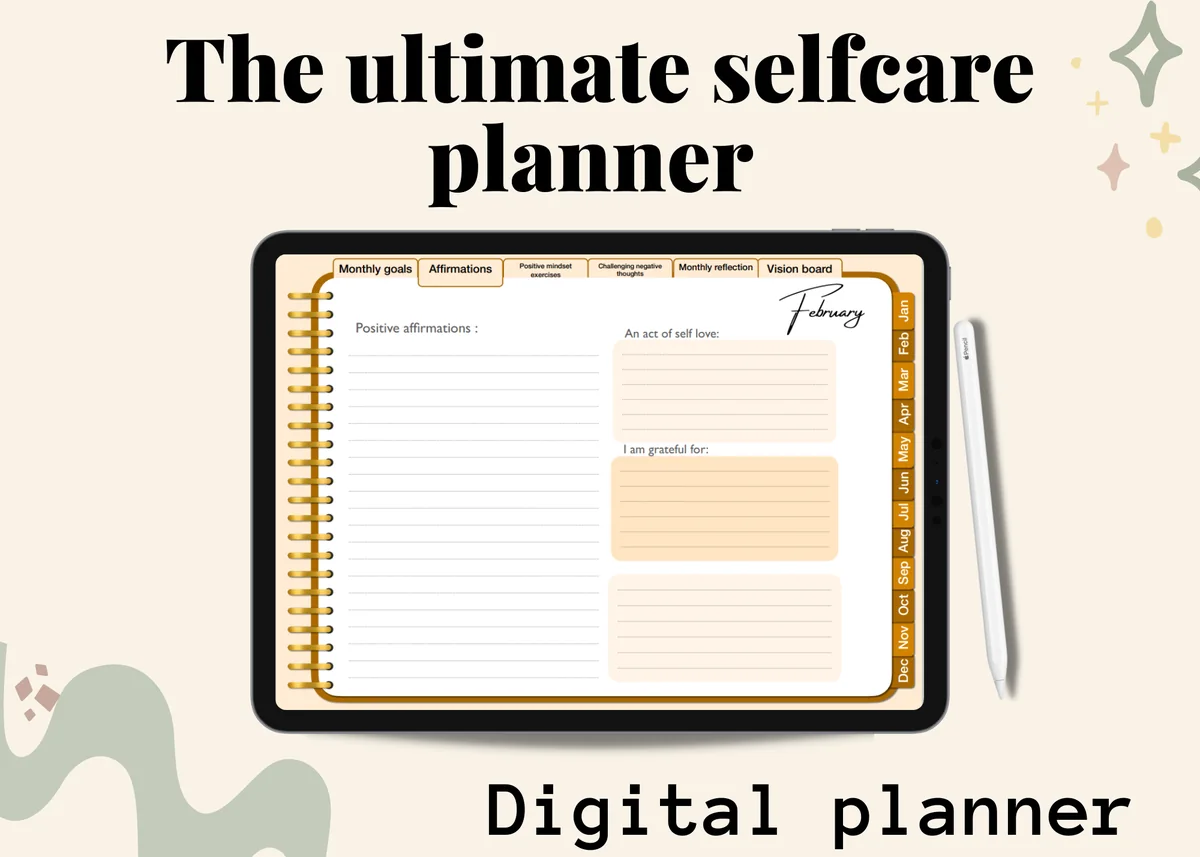
Orientation: Not statedLayouts: Monthly goals, affirmations, reflection, vision boardDates: UndatedWeek start: Monday
Best for: returning to the word through monthly goals, affirmations, mindset exercises and reflection. Designed by yarasdigitalshop.
- 100 pages shown on preview; 12 undated monthly calendars in the description
- GoodNotes and Notability supported; seller also lists OneNote
- Monthly goals, affirmations, positive mindset exercises, monthly reflection and a vision board
- Monday start; pages include Great things I did this month and Things I can do to get better
The monthly reflection page pairs what went well with what could improve. Add a sentence about your chosen word to make that review more specific. This is a monthly self-care layout, with no dedicated word-of-the-year section shown.
Best for a daily word-based gratitude note
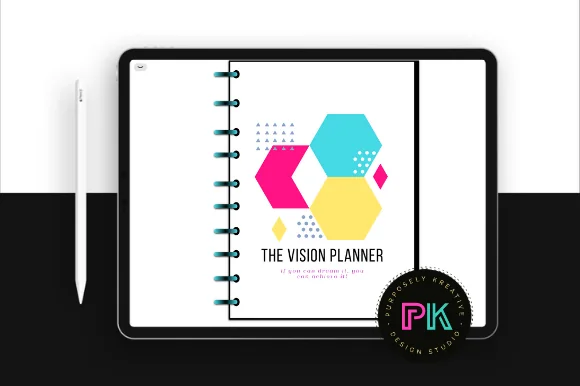
2. Undated Digital Vision Planner
Orientation: Not statedLayouts: Month at a glance, daily pages, vision board listedDates: UndatedWeek start: Not stated
Best for: using daily pages to connect the word with gratitude, inspiration and a to-do list. Designed by PurposelyKreative.
- Made for PDF annotation apps, including GoodNotes
- Month at a glance, Daily Planning Pages and a Vision Board listed
- Daily spread with Today I am grateful for, What inspires you to do more and To Do List
- Undated; no year shown on previews
A daily gratitude line and to-do list keep the word close to ordinary decisions. Try adding one word-based action beside the day’s tasks. The seller also lists a vision board, although that separate page is not shown in the previews.
Best for keeping the word beside everyday life
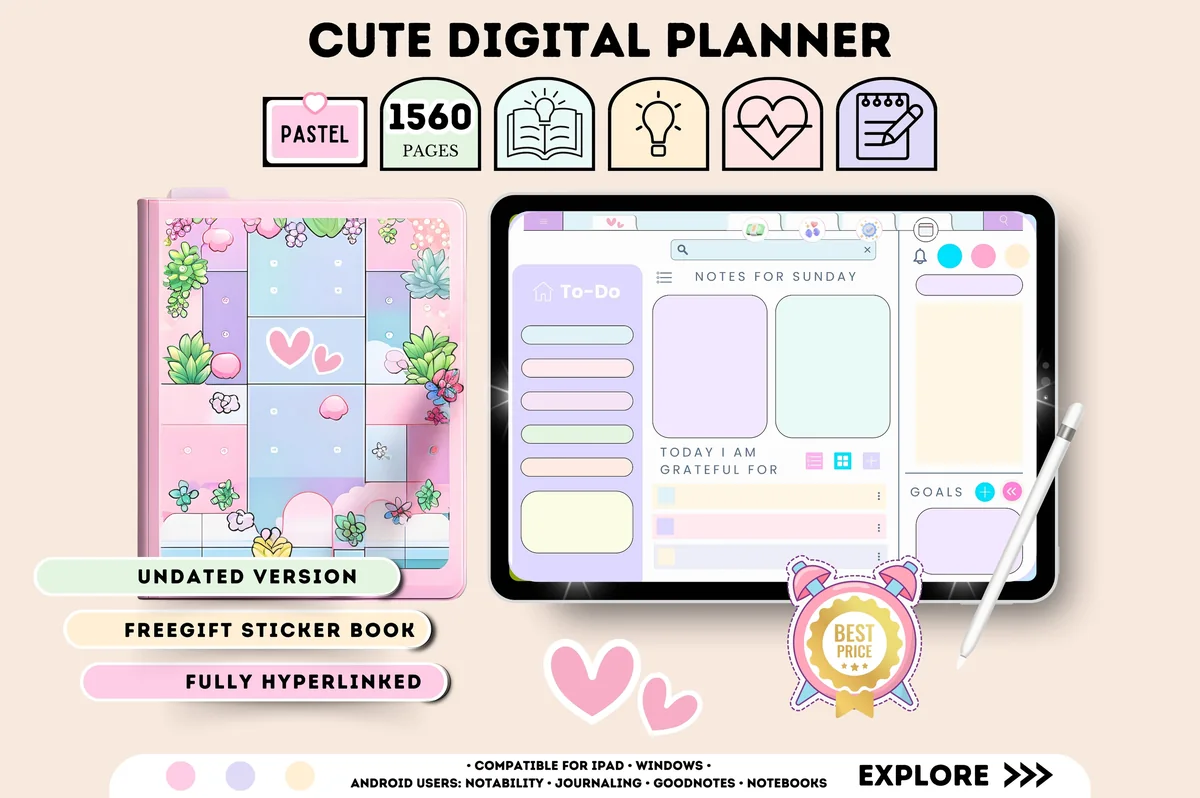
3. All in One Cute Digital Planner
Orientation: Horizontal 11×8.3 inLayouts: Goals, vision board, habits, health, finance, notesDates: UndatedWeek start: Not stated
Best for: storing goals, vision, habits, health, finance and notes in one horizontal hyperlinked system. Designed by Tas Creative Studio.
- Horizontal digital planner for GoodNotes, Notability, Noteshelf, XODO, Samsung Notes and PDF-editing apps
- Undated with 12-month modules; preview shows 1560 pages
- Goal Planner, Vision Board, habit, health, finance and notes sections
- 5-page sticker book and instructions included
This wide planner puts a word-based action beside regular tasks, habits and goals. Its many sections may suit someone who already wants an all-in-one system; they are unnecessary if you only need one reflection page. Add your word to a goals or notes page.
Best for a 30-day reflection exercise
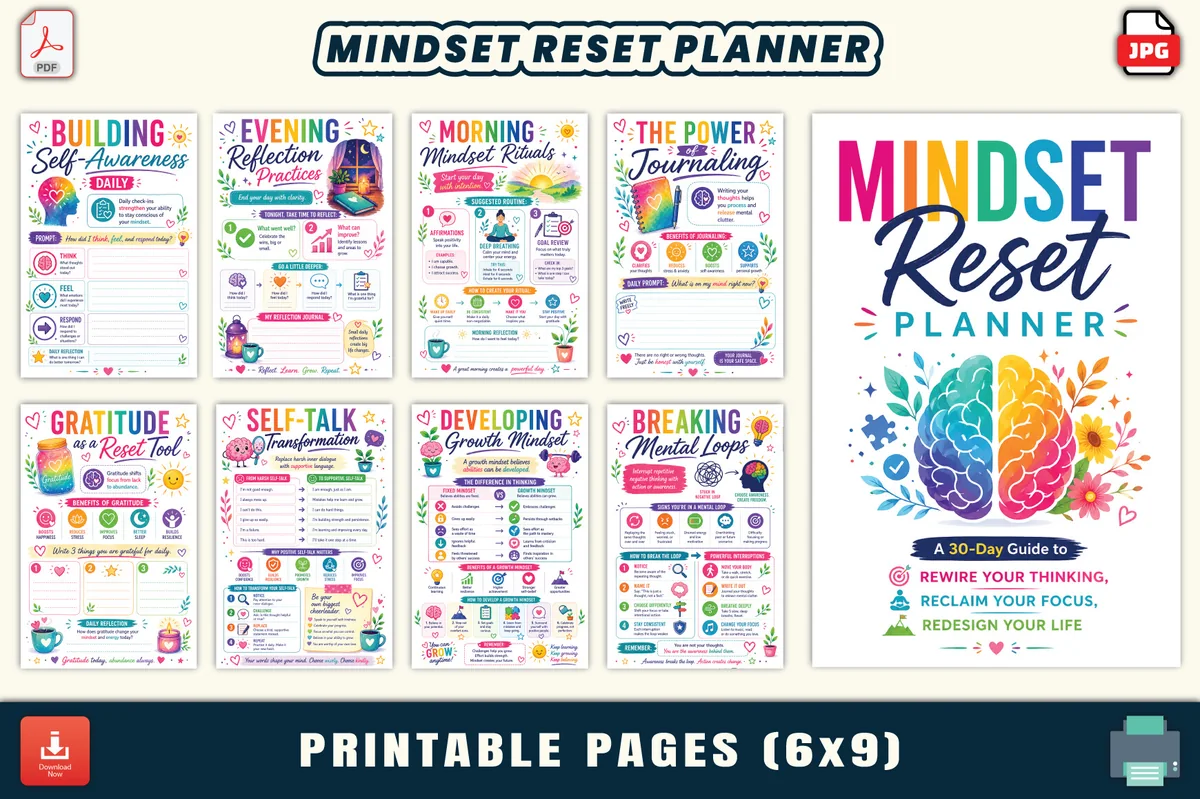
4. Mindset Reset Planner
Orientation: 6×9 inLayouts: Guided exercises, prompts, reflection pagesDates: No year shownWeek start: Not stated
Best for: working through guided prompts when a dense workbook format suits the word. Designed by LR ART.
- JPG + PDF, 30 pages, 6×9 inches
- GoodNotes and Notability supported
- Pages for self-awareness, evening reflection, morning rituals, journaling, gratitude, self-talk, growth mindset and limiting beliefs
- 30-Day practice, not a dated calendar; no hyperlinks stated
The colorful diagrams and guided prompts make this a dense workbook. A 30-day reflection exercise could help you explore a chosen word, but there is no dedicated word field shown. Check the preview at a readable size before choosing it; the seller’s psychological claims have not been independently assessed.
Best for a visual word-of-year board
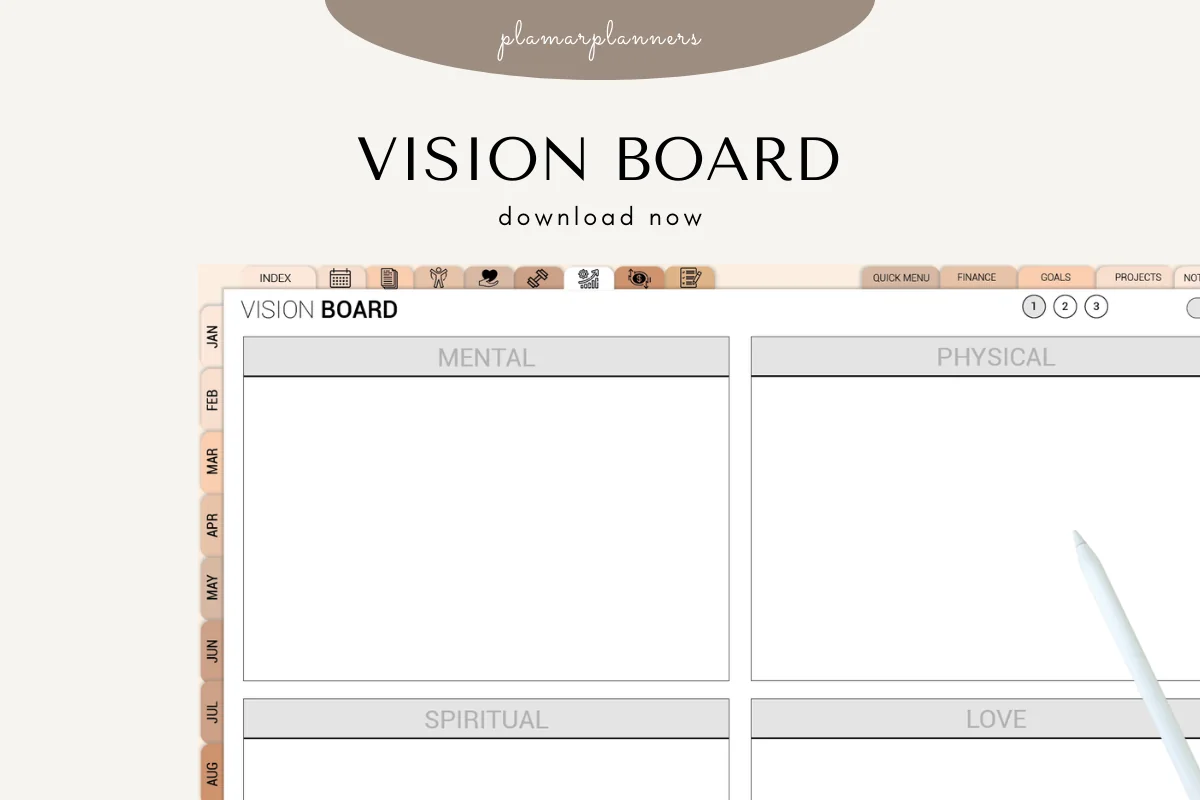
5. Vision Board: Printable & Digital Manifestation Planner
Orientation: Landscape shown on previewLayouts: Vision board; goal grid and intentions listedDates: No year shownWeek start: Not stated
Best for: placing your word beside images and practical goals. Designed by Plamarplanners.
- PDF in A4 and US Letter; tablet-optimized digital version listed
- GoodNotes, Notability and PDF editors supported
- Seller lists a goal-setting grid, visual collage spaces, affirmations and a yearly intention page
- Previews show category boxes for Mental, Physical, Spiritual and Love; no year shown
The open category boxes give images and your chosen word room to sit together. Use the word as a heading and add one practical goal beside each image. The seller lists more sections than the previews display; a dedicated word-of-the-year page is not confirmed.
Best for future-self reflection
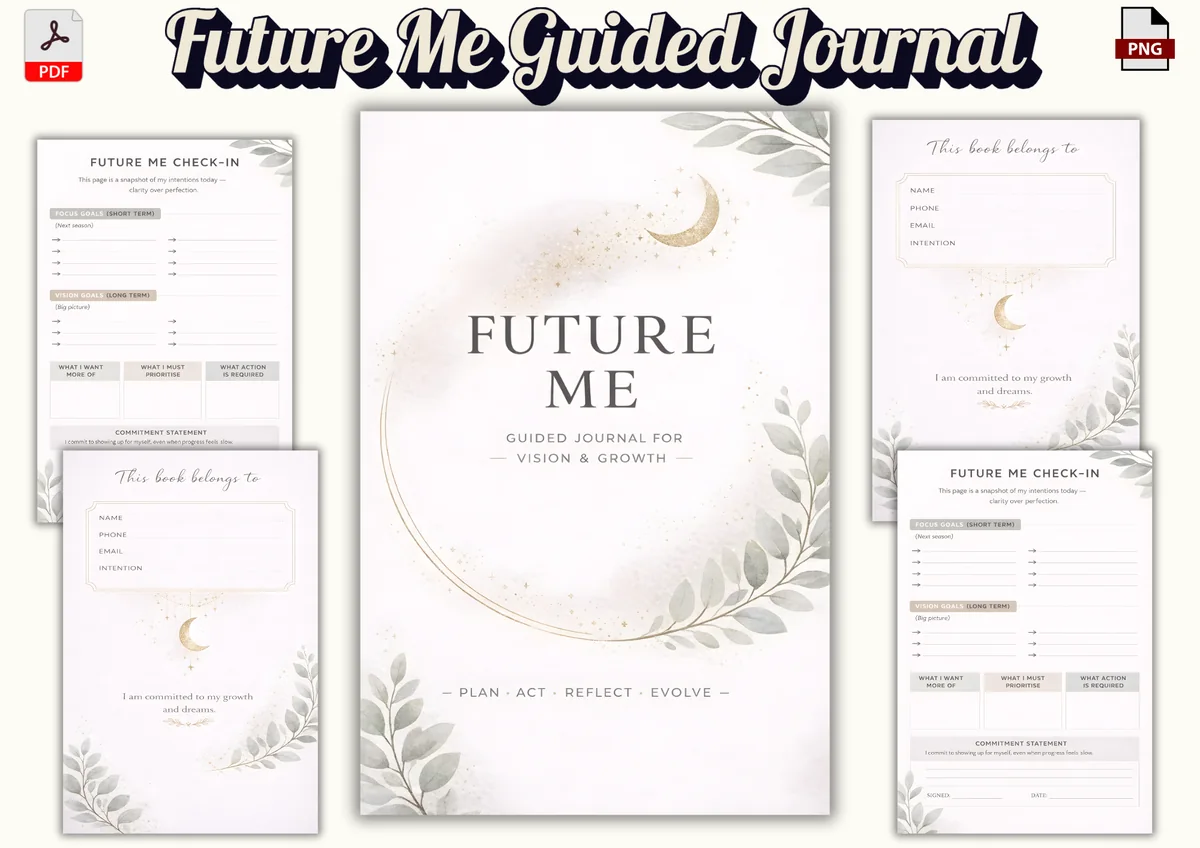
6. FUTURE ME – GUIDED JOURNAL for VISION
Orientation: Vertical 6×9 inLayouts: Future-self prompts, goals, check-in, letterDates: No year shownWeek start: Not stated
Best for: exploring a word through future-self prompts and short- and long-term goals. Designed by Nora as.
- 59 pages; vertical 6×9 inches
- PDF + PNG; GoodNotes and Notability supported
- Future-self prompts, short- and long-term goals, intention-setting and action clarity sections
- Letter to your future self with signature; preview shows a Future Me Check-In and ownership page
The check-in separates short-term focus goals from longer-term vision goals and asks what action is required. Write your word beside a goal, then use the action field to make it concrete. The botanical pages offer guided reflection; no dedicated word-of-the-year field is shown.
Quick Comparison
| Tool | Word-of-year use | Page structure | Main distinction |
|---|---|---|---|
| 1. The Ultimate Selfcare Planner | Planner | Monthly return to the word | 100 pages, 12 undated months | Monday start and vision board |
| 2. Undated Digital Vision Planner | Gratitude and to-do pages | Undated month and daily layouts | Vision board listed |
| 3. All in One Cute Digital Planner | Wide all-in-one system | Horizontal 11×8.3 in | Undated 12-month modules |
| 4. Mindset Reset Planner | Guided 30-day workbook | 30 pages, JPG + PDF | Dense reflection layouts |
| 5. Vision Board: Printable & Digital Manifestation Planner | Visual board for your word | A4, US Letter and tablet version | Category boxes and collage spaces |
| 6. FUTURE ME – GUIDED JOURNAL for VISION | Future-self reflection and action | 59 pages, PDF + PNG | Vertical 6×9 in guided journal |
Choose your word and set up one page
Shortlist three words and try each in a sentence about an ordinary day: Steady means reading one page before bed. Keep the word that gives you a useful action. You can change it as your circumstances change.
- Write the word at the top of an iPad notebook page, with your sentence underneath.
- Add a short weekly note about when it helped. At month end, adjust the action if needed.
- Keep a clean copy of the layout for reuse, and check your app’s export or backup options.
Use “intentional” as your word of the year
An intentional word of the year can remind you to choose where your time goes before saying yes. On your weekly page, write one commitment that serves your purpose and one request you will pause before accepting. Unlike a list of New Year resolutions, this guiding concept can apply to several decisions while you keep specific goals underneath it.
Try three word of the year activities on iPad
Start with a two-column review of the past year: write what went well on one side and what you want to change on the other. Use that perspective when choosing a word for the upcoming year, then leave your shortlist for a day before deciding. Check the meaning of your favorite and test whether its wording suggests an action you can take.
Next, make a small visual page with the word, a sketch and a sentence about how you want daily life to feel. Finally, add a monthly check-in that asks where the word helped and where you need a different approach. A word such as Explore could guide a small local adventure one month and a new creative practice the next.
Choose a 2026 word without a generator
If you are looking for a 2026 word of the year generator, try using the list above as a personal selection exercise. Pick three words, write what each would change in an ordinary week and keep the one with the clearest next step. The date does not determine the right word; use the same exercise whenever you begin a new year or school term.
Template or app: where the word lives
These journals and planners provide pages to write on in an annotation app. Their listings do not promise automatic calendar synchronization. Month tabs and contents links, where listed, are navigation features rather than a calendar integration. Keep the word close to the pages you already open. If you prefer a broader annual plan, see our new year goals ideas. For a visual board, compare our digital vision boards.
FAQ: keeping a word of the year on iPad
Do I need a special word of the year planner?
A simple notebook page works for this exercise. Start with your own page and add a planner or journal only if you want more structure.
What if my word changes before the year ends?
Change it. Let the word reflect your current circumstances. Date the change, write the reason and keep the earlier word as part of your record rather than erasing it.
Are these tools all PDF files for GoodNotes?
No. Mindset Reset includes JPG and PDF, Future Me comes as PDF and PNG, and Vision Board is a PDF in A4 and US Letter sizes. The other three are digital planners whose main-file extension is not stated. Their listings name compatible annotation apps, but file structure and linked navigation vary. Check the current listing before purchasing.
Will the journal sync with my calendar or reminders?
These notebook and planner listings do not establish automatic calendar synchronization. The listed month tabs and contents links help you navigate pages. Treat your word page as a reflection space and keep external reminders in the app you already use.
Can a word of the year replace therapy or medical care?
No. A reflection page can support a practice, but it does not provide diagnosis, treatment or professional advice. Bring health or mental health concerns to a qualified professional.
Keep the word close enough to use
The most useful word of the year ideas are the ones you can still read in June. Choose a small page, return to it weekly, and change the word when it stops helping. Keep the page simple enough to use during an ordinary week.
You May Also Like
Buying a featured tool through an affiliate link can support this site with a commission. The price you pay stays the same. Our affiliate disclosure explains the arrangement.