When you run a small business, the to-do list is never the hard part. The hard part is everything around it: which client is waiting for a reply, how much came in this month, what to post this week and how many items are left on the shelf. A business planner puts all of that in one place, and on the iPad it’s one notebook you can open between calls.

Below are the 6 business planners for iPad from Creative Fabrica I’d use for a small business. After the list: what to look for, small business planner ideas for money, clients, content and stock, how a business planner differs from a personal one and a 20-minute weekly check-in you can copy.
The 6 Best Business Planners for iPad I Found
Two are full 2027 planners with business tabs, two are undated small business planners and two cover one job each: stock and content. I skipped Canva templates, plain printable sheets without a digital version and anything with past-year dates. If you need a planner for a 9-to-5 job rather than your own business, my digital work planners are a better fit.
TL;DR: 6 business planners for iPad from Creative Fabrica: 2 dated 2027 business planners for the whole year, 2 undated small business planners for money and the business plan, 1 order and inventory tracker for makers and 1 content calendar. Each card lists orientation, layouts and dates, plus who it suits.
Quick Picks
- Best overall: Business Owner Planner 2027 (Portrait)
- Best for two-page spread: Business Growth Planner 2027 (Landscape)
- Best for tracking money: Business Digital Planner (Gray & Rose Gold)
- Best for writing a business plan: Small Business Plan Digital Planner
- Best for orders and stock: Handmade Shop Order & Inventory Tracker
- Best for content calendar: Social Media Digital Planner
- Business Owner Planner 2027 (Portrait) – Best overall
- Business Growth Planner 2027 (Landscape) – Best two-page spread
- Business Digital Planner (Gray & Rose Gold) – Best for tracking money
- Small Business Plan Digital Planner – Best for writing a business plan
- Handmade Shop Order & Inventory Tracker – Best for orders and stock
- Social Media Digital Planner – Best content calendar
Best overall
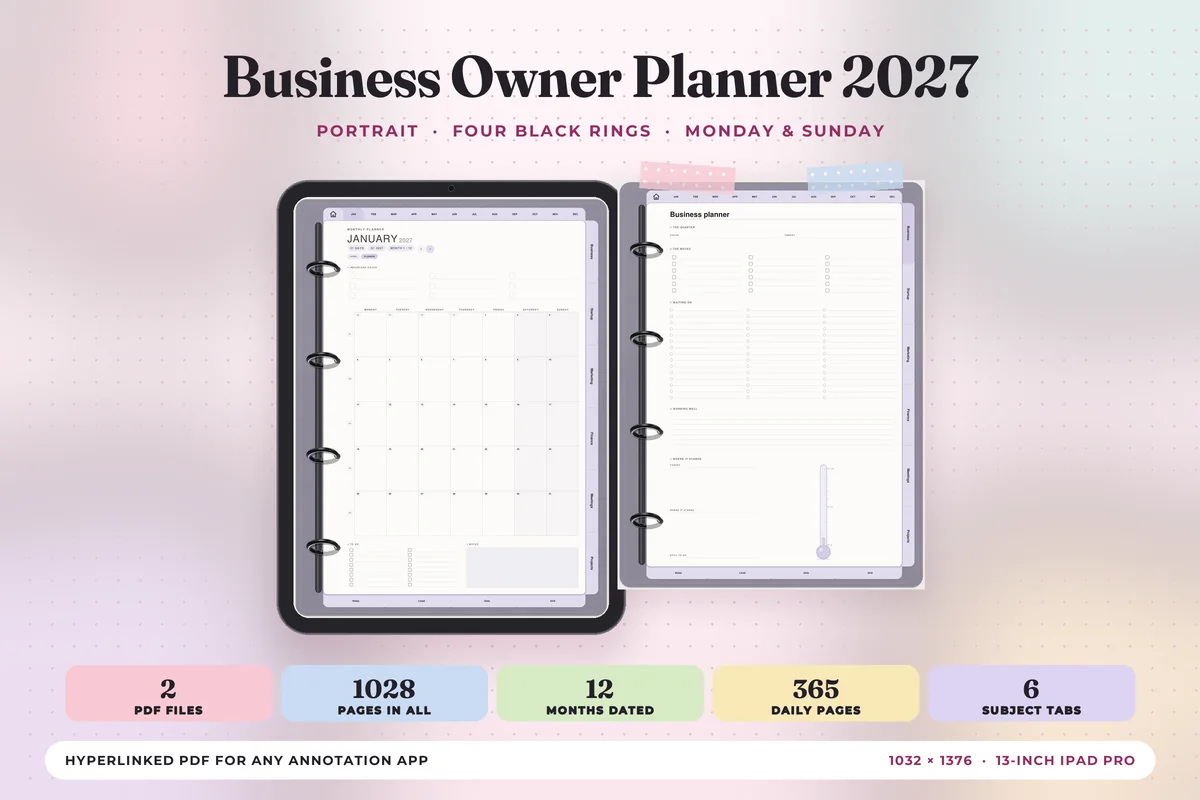
1. Business Owner Planner 2027 (Portrait)
Orientation: PortraitLayouts: Yearly, Monthly, Weekly, Daily + 24 business templatesDates: 2027Week start: Monday or Sunday
Best for: small business owners, new businesses, one-notebook planners. Designed by Print Magic StudioX.
- Dated January to December 2027, with a Monday start and a Sunday start file
- Six business tabs down the side: Business, Startup, Marketing, Finance, Meetings and Projects, with 24 business templates
- 365 daily pages with an hourly schedule from 6 am to 9 pm, top 3 and a to-do list
- A weekly page with the week's one thing at the top, plus wins and what rolls over at the foot
- 513 pages in the Monday file, sized for the 13-inch iPad Pro portrait page
This is the one I'd pick if I wanted a single notebook for the business and the week. The six tabs sit next to a normal calendar, so a meetings page or a finance page is one tap away from today. The wins and rolls-over boxes on the weekly page are a small detail I like for a one-person business.
Best two-page spread
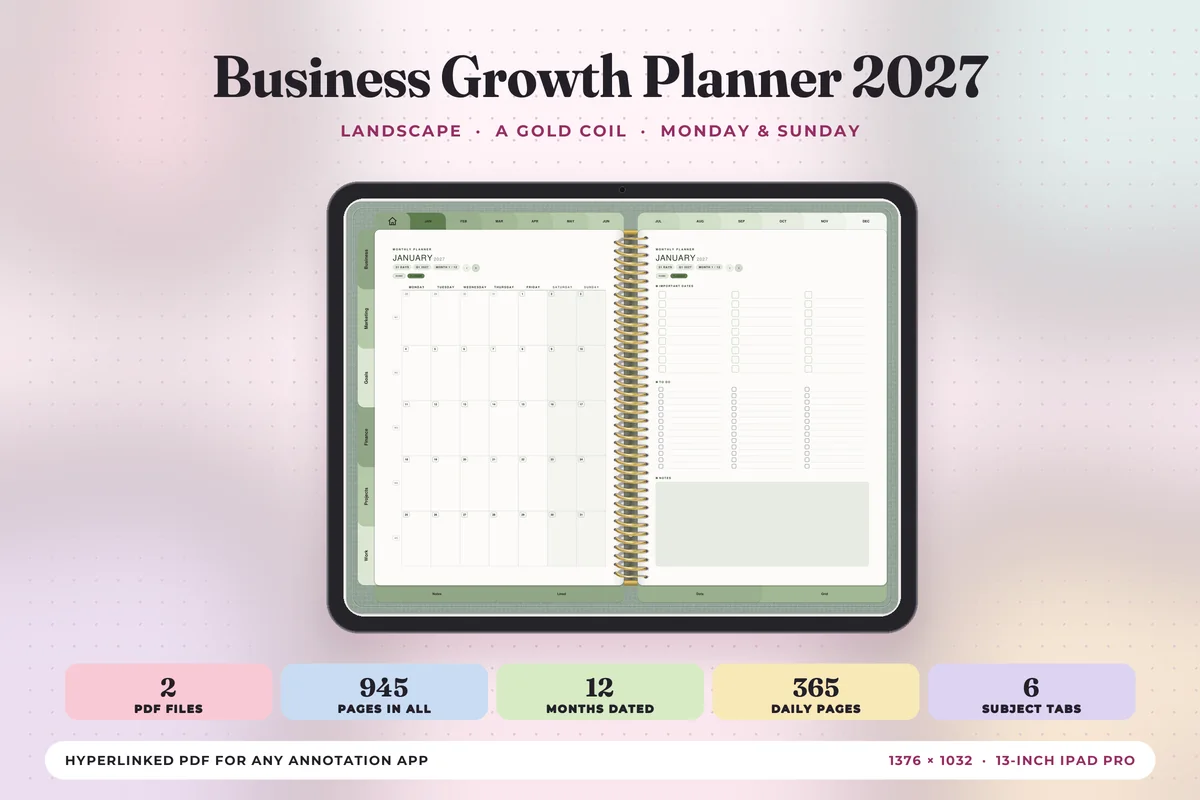
2. Business Growth Planner 2027 (Landscape)
Orientation: LandscapeLayouts: Yearly, Monthly, Weekly, Daily + 24 business templatesDates: 2027Week start: Monday or Sunday
Best for: growing businesses, two-page spread fans, goal setters. Designed by Print Magic StudioX.
- Dated 2027, two files: Monday start and Sunday start
- Six tabs: Business, Marketing, Goals, Finance, Projects and Work, with 24 business templates
- Landscape spreads with a gold coil down the center, two pages to a sheet
- Month-at-a-glance and monthly pages, a weekly page and 365 daily pages with an hourly schedule
- 30 pages of note paper: lined, dot grid and square grid
Same structure as the Business Owner planner, but with a Goals tab instead of Startup and a landscape spread. I'd choose it once the business is already running and the question is how to grow it. If you prefer one page at a time, there's a portrait version of this planner too.
Best for tracking money
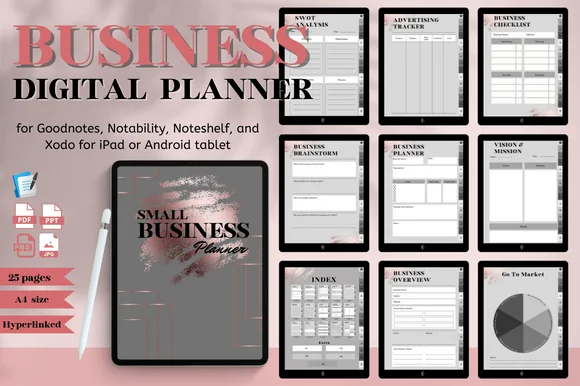
3. Business Digital Planner (Gray & Rose Gold)
Orientation: PortraitLayouts: Goals, Income & expense trackers, Ad tracker, SWOTDates: Undated
Best for: small business owners, online sellers, marketers. Designed by Nann Digital Art.
- Income tracker, expense tracker and an advertising tracker
- Business goals, yearly goals and a business checklist
- Vision and mission, SWOT analysis, target audience and marketing channel pages
- 25 pages in A4 size with an index and hyperlinked tabs
- Works in GoodNotes, Notability, Noteshelf and Xodo, and can also be printed
A short, undated planner that covers the money side well: what came in, what went out and what the ads cost. I'd use it for a side business where a full-year planner is too much. The gray and rose gold design is calm, and with 25 pages it's quick to learn.

Best for writing a business plan
4. Small Business Plan Digital Planner
Orientation: PortraitLayouts: Business plan, SWOT, Marketing plan, Goals
Best for: side hustlers, new business owners, freelancers. Designed by mixxdigitaldesign.
- Executive summary, business overview and core concept
- Value proposition, brand board and business strengths
- Business SWOT, marketing plan and advertising plan
- Business goals and extra pages, with an index and hyperlinked tabs
- For GoodNotes, Notability, Noteshelf and Xodo on iPad or an Android tablet
These pages follow the parts of a classic business plan, from the executive summary to the marketing plan. I'd start here if the business is still an idea and you want to think it through on paper, then move the day-to-day into one of the dated planners above.
Best for orders and stock
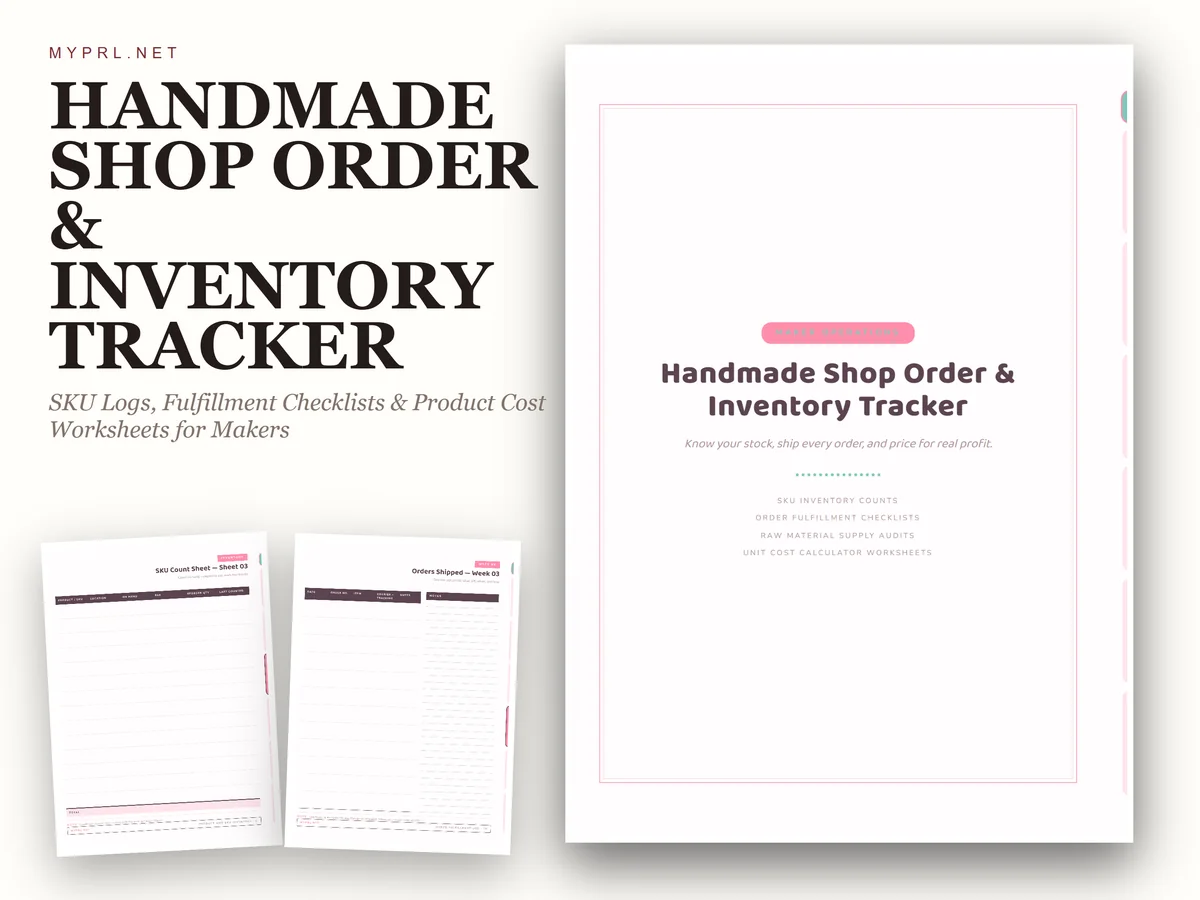
5. Handmade Shop Order & Inventory Tracker
Orientation: PortraitLayouts: SKU inventory, Order fulfillment log, Supply audit, Cost calculatorPaper: US LetterDates: Undated
Best for: makers, handmade sellers, small online shops. Designed by Healers Hub co.
- Product and SKU inventory logs
- An order fulfillment log with checklists
- A supply audit and a cost calculator for pricing your products
- A setup guide at the start
- Hyperlinked side tabs that work in GoodNotes, Notability and Xodo, plus every page as PNG
None of the other planners here has proper stock pages, which is why this one made the list. It's made as much for paper as for the screen (US Letter, print-ready), but the side tabs are hyperlinked, so it works fine on the iPad. I'd pair it with a planner for the calendar side.

Best content calendar
6. Social Media Digital Planner
Orientation: PortraitLayouts: Content calendar, Posting schedule, Social stats, Post plannerDates: Undated
Best for: content creators, small brands, online sellers. Designed by mixxdigitaldesign.
- A content calendar, posting schedule and posts planner
- Core topic ideas, brand goals and a list of contents
- A recycled contents page for posts worth sharing again
- Social media audit, social statistics and monthly statistics
- Hyperlinked tabs, for GoodNotes, Notability, Noteshelf and Xodo
For many small businesses, marketing simply means posting regularly. This planner keeps the content calendar, the topic ideas and the numbers in one place. I like the recycled contents page most: it's a list of posts that did well and deserve a second round.
Quick Comparison
| Planner | Best for | Business pages | Stand-out extra |
|---|---|---|---|
| 1. Business Owner Planner 2027 (Portrait) | One notebook for the year | 6 tabs, 24 business templates | Wins and rolls-over boxes |
| 2. Business Growth Planner 2027 (Landscape) | Growing a business | Goals, Finance, Marketing tabs | Landscape spreads |
| 3. Business Digital Planner (Gray & Rose Gold) | A small side business | Income, expense, ad trackers | SWOT and target audience |
| 4. Small Business Plan Digital Planner | Starting a business | Business plan + SWOT | Brand board page |
| 5. Handmade Shop Order & Inventory Tracker | Handmade and product sellers | SKU inventory, order log | Cost calculator |
| 6. Social Media Digital Planner | Marketing and content | Content calendar + stats | Recycled contents page |
What I Look For in a Business Planner
- Money pages. At least an income tracker and an expense tracker. A business planner without them is just a pretty calendar.
- Pages for the business itself. Goals, marketing, projects or a business plan, not only days and weeks.
- Tabs you can tap. Hyperlinked tabs or an index, so the finance page is one tap away from today.
- The right dates. A dated 2027 planner if you like a ready calendar, an undated one if you start mid-year or only plan a few pages.
- Made for the iPad. A digital PDF for GoodNotes or Notability, not a Canva file or a sheet meant only for printing.
- Your type of business. Makers need stock pages, service businesses need client pages, creators need a content calendar.
Small Business Planner Ideas: Pages for Money, Clients, Content and Stock
Most business planners have far more pages than you need. These are the ones worth filling in, grouped by the part of the business they help with. Pick one or two from each group and you have a working small business planner.
Money
- Income tracker: date, client or product, amount and how it was paid.
- Business expense template: date, what you bought, category and amount. Keep receipts as photos on the same page.
- Monthly profit line: income minus expenses, one number per month.
- Tax set-aside: a running total of what you put away for taxes.
- Ad spend tracker: what each ad or promotion cost and what it brought in.
Clients and Orders
- Client list: name, contact, what they bought and when to follow up.
- Order log: order date, item, status, ship date.
- Invoice tracker: invoice number, amount, due date and paid or not.
- Follow-up list: people waiting for a reply, with the date you promised.
Content and Marketing
- Content calendar: one month, one or two posts a week, the topic for each.
- Topic ideas: a running list you add to whenever a customer asks a question.
- Launch plan: the date, what you’ll post before and after, and the offer.
- Monthly numbers: followers, visits or email signups, written once a month.
Products and Stock
- Inventory list: product, SKU, how many are left and when to restock.
- Supplies list: materials, supplier and price.
- Cost per product: materials, packaging and time, so your price covers them.
- Product ideas: a page for new products with a rough cost and price.
Goals
- A yearly goal in numbers: income, clients or products sold.
- Quarterly goals: three things that would move the business forward this quarter.
- A monthly review: what worked, what didn’t and one thing to change.
For goal pages beyond the business, see my digital goal planners.
Business Planner vs. Personal Planner
A personal planner is about your time: appointments, to-dos, habits. A business planner is about the business: money, clients, marketing and goals in numbers. The calendar part can look the same, but the extra pages are different.
Do you need both? Not necessarily. The two 2027 planners above combine a normal calendar with business tabs, so one notebook can hold both. If you already have a personal planner you like, add a short undated business planner for the money and marketing pages instead.
Which Business Planner Fits Your Business
- Just starting: the Small Business Plan Digital Planner, for the plan itself, then a dated planner once you launch.
- Selling products or handmade items: the Handmade Shop Order & Inventory Tracker for stock and orders, next to a planner for your calendar.
- Selling services: the Business Owner Planner 2027, with its Meetings and Projects tabs, plus a client list on a notes page.
- Content-driven business: the Social Media Digital Planner for the content calendar and the numbers.
- Side business: the Business Digital Planner in gray and rose gold: 25 pages, the money trackers and nothing extra.
- Growing an existing business: the Business Growth Planner 2027, with a Goals tab and landscape spreads.
Why Use a Digital Business Planner on iPad?
- One place for everything. A 500-page planner, a client list and an inventory tracker all fit on the iPad you already carry.
- Tabs instead of flipping. Hyperlinked tabs jump to the finance or marketing page in one tap.
- Pages you can copy. Need another expense page in a busy month? Duplicate it.
- Search. GoodNotes can search your handwriting, so you can find a client’s name months later.
- Receipts and photos. Paste a photo of a receipt or a product right onto the page.
Digital vs. Paper Business Planner
Paper is pleasant to write on and never needs charging. A digital business planner wins on the business side: you can add pages without buying a new book, keep a backup and carry the whole year in one device. Some planners on this list, like the Gray & Rose Gold one and the inventory tracker, can also be printed if you want a paper copy of a few pages.
Business Planner Template or App?
Apps like Notion, Trello or a spreadsheet are good at things a PDF planner can’t do: shared boards with a team, automatic totals and reminders. Accounting software does your books properly. A business planner template is better for thinking: writing goals by hand, planning the week and looking at the month on one page.
Many small business owners use both: an app or spreadsheet for invoices and bookkeeping, and an iPad planner for planning and the weekly review. Keep in mind that a PDF planner doesn’t sync with your calendar app or calculate totals for you.
What You Need to Use a Business Planner on iPad
- An iPad that works with an Apple Pencil (or another stylus).
- A note-taking app that opens PDFs: GoodNotes, Notability, Noteshelf or Xodo. The planners on this list name these apps in their descriptions.
- The planner PDF from Creative Fabrica.
- Optional: stickers for color-coding clients or projects.
How to Set Up a Business Planner in GoodNotes
- Save the PDF from Creative Fabrica and unzip it if needed.
- In GoodNotes, tap New → Import and choose the PDF. It opens as a new notebook.
- Test a tab. Hyperlinks work when you’re not in writing mode, so switch to read-only or tap with your finger.
- Fill in the yearly goal page and the income and expense pages first. Those are the pages you’ll use every week.
- Duplicate the pages you’ll need more of, like expense trackers or order logs.
- Add a bookmark or a favorite on the page you open most, so it’s there when you start the week.
A 20-Minute Weekly Business Check-In: Money, Clients, Content
A planner only helps if you open it on a regular day. Pick one time each week, Monday morning or Friday afternoon, and go through these four steps.
- Money (5 minutes). Write this week’s income and expenses into the trackers. Check unpaid invoices.
- Clients and orders (5 minutes). Look at the order log or client list. Who needs a reply, a delivery or a follow-up this week?
- Content (5 minutes). Look at the content calendar. Is next week’s post planned? Add one topic idea.
- Next week (5 minutes). Choose the week’s one most important task and write it at the top of the weekly page. Move everything else to the days.
Once a month, add a short review: the profit line, stock levels and one thing to change next month. For the daily side of the week, my to-do list templates pair well with any of these planners.
FAQ
What does a business planner do?
A business planner (the notebook, not the job title) keeps the running of a business in one place: goals, money, clients, marketing and the calendar. It helps you see what’s coming up and how the business is doing, week by week.
What should a small business planner include?
At minimum: a calendar, income and expense trackers, a goals page and a place for clients or orders. Product businesses add inventory pages, and content-driven businesses add a content calendar.
Can a business planner replace a business plan?
Not if a bank or investor needs a formal business plan. For a small business you run yourself, though, the business plan pages in a planner (executive summary, SWOT, marketing plan) are often enough to think the idea through. The Small Business Plan Digital Planner above is built around exactly those pages.
What is a business expense template?
A page or sheet where you list business expenses: date, what you paid for, category and amount. Filled in every week, it makes tax time and the monthly profit check much easier. The Gray & Rose Gold planner has one, next to an income tracker.
Should a new business use a dated or undated planner?
If you’re starting in January or close to it, a dated 2027 planner saves time setting up the calendar. If you start mid-year or only need a few pages for money and planning, an undated business planner is simpler and doesn’t waste pages.
Can I use these business planners on an Android tablet?
Several of them, yes. The Gray & Rose Gold planner, the Small Business Plan and the Social Media planner say they work on iPad or Android tablets with apps like Xodo or Noteshelf. Check each description before you buy, because hyperlinks behave a little differently from app to app.
Final Thoughts
The best business planner is the one that matches your business: a dated 2027 planner if you want the whole year in one notebook, a short undated one for money and the business plan, and a separate tracker if you sell products or live on content. Whatever you pick, open it once a week for the money, clients and content check-in. For more, see my digital work planners, the meeting notes templates for client calls and the digital budget planners for your personal money. All everyday planners are in the Everyday Planners category.
You May Also Like
For a dedicated page to break a project into tasks and milestones, compare these project planners for iPad, including focused templates and a broader business planner.
This post contains affiliate links. If you buy through them, I may earn a small commission at no extra cost to you. Learn more.