Old paper has a feel that a clean digital page doesn’t: yellowed edges, faded print, a seed packet from someone’s garden shed. Vintage stickers bring that feel into a GoodNotes journal, and they are one of the biggest sticker themes on Pinterest. Search for them, though, and you mostly get printable sheets for junk journals and vinyl decals. On the iPad you need transparent PNGs or a ready sticker file that you can reuse on every page.

Below are 6 vintage sticker packs from Creative Fabrica I’d use in a digital journal: a 70s retro planner kit, vintage seed packets with checklists, torn newspaper ephemera, an elegant plum and teal faith pack, mid-century borders and retro month titles. After the list: which vintage style fits which page, what to look for, how to build a vintage spread without clutter, ideas and how to add the stickers in GoodNotes.
The 6 Best Vintage Stickers I Found for GoodNotes
I skipped printable-only junk journal sheets, clipart sold for T-shirts and mugs, cut files and seasonal sets like retro Christmas. Every pack below names GoodNotes, the iPad or a pre-cropped digital file in its description or preview. No more than two packs per designer. The vintage florals from my digital scrapbook stickers and the retro flowers from my flower stickers aren’t repeated here.
TL;DR: 6 vintage sticker packs for GoodNotes and iPad journals: a 70s retro planner kit, vintage seed packets with checklist boxes, torn newspaper ephemera, a plum and teal faith pack with digital paper, mid-century borders and retro month titles. The cards say which packs include a GoodNotes file and which also print.
Quick Picks
- Best overall: Retro Vibes Digital Stickers
- Best for vintage botanical: Vintage Florals Digital Stickers
- Best for ephemera: Ripped Vintage Stickers & Digital Stickers
- Best for faith journals: Hello Vintage Digital Sticker Pack
- Best for retro borders: Geometric Retro Pattern & Border Sticker
- Best for month headers: Retro Month Titles Digital Stickers
- Retro Vibes Digital Stickers – Best overall
- Vintage Florals Digital Stickers – Best vintage botanical
- Ripped Vintage Stickers & Digital Stickers – Best ephemera
- Hello Vintage Digital Sticker Pack – Best for faith journals
- Geometric Retro Pattern & Border Sticker – Best retro borders
- Retro Month Titles Digital Stickers – Best month headers
Best overall
1. Retro Vibes Digital Stickers
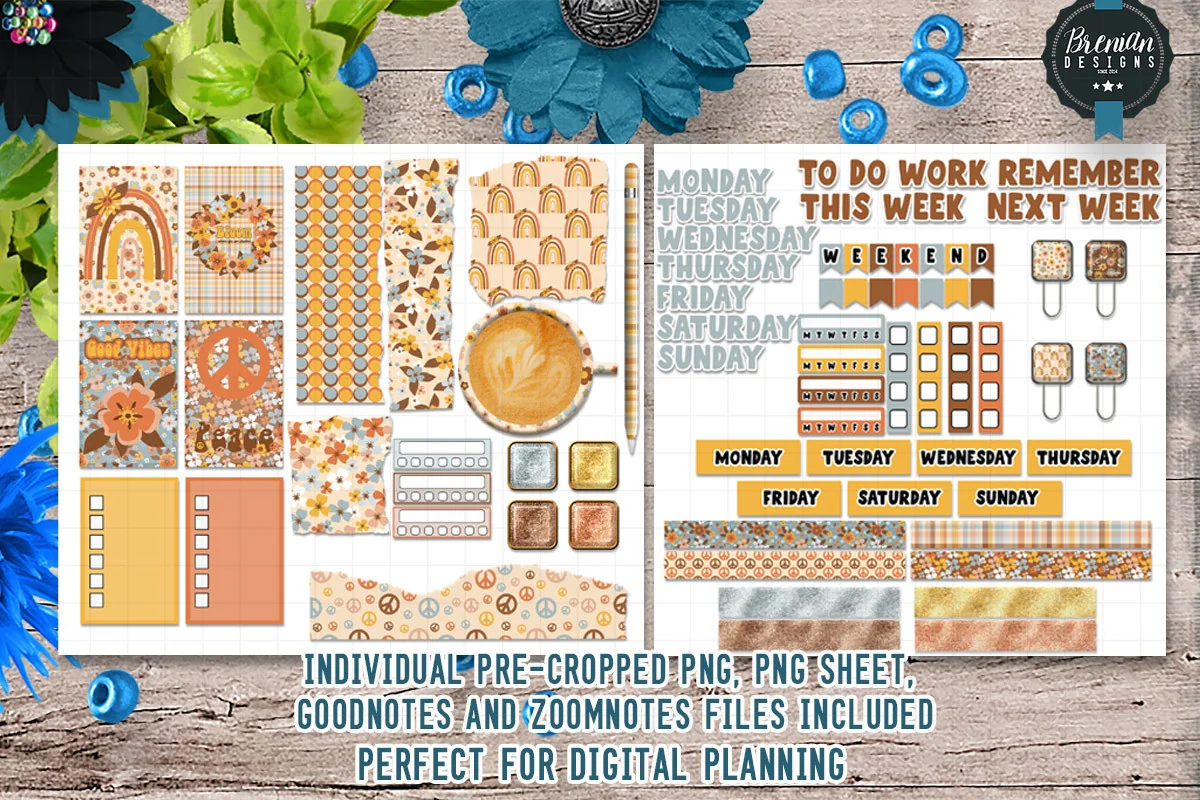
Layouts: 50+ pre-cropped 70s retro stickers: rainbow and daisy boxes, weekday labels, To Do and Next Week headers, Weekend banner, checkbox and washi stripsFormat: Pre-cropped PNG + PNG sheets + GoodNotes and ZoomNotes files (screen only)
Best for: retro 70s fans, weekly spread planners, GoodNotes beginners. Designed by Bren Wotherspoon.
- Over 50 pre-cropped stickers, plus PNG sheets
- Rainbow, daisy and coffee boxes in orange, mustard and brown
- Monday to Sunday labels, "To Do", "Work", "Remember", "This Week" and "Next Week" headers and a "Weekend" banner
- Checkbox strips and patterned washi strips
- GoodNotes and ZoomNotes files; the designer says the stickers are not suited for printing
The most complete pack in the list and one of the most saved: decoration and planning pieces in one warm retro palette, so a whole week matches without mixing sets. If you want the vintage look on a working planner page, not only on a memory page, I'd start here. It's screen only.
Best vintage botanical
2. Vintage Florals Digital Stickers
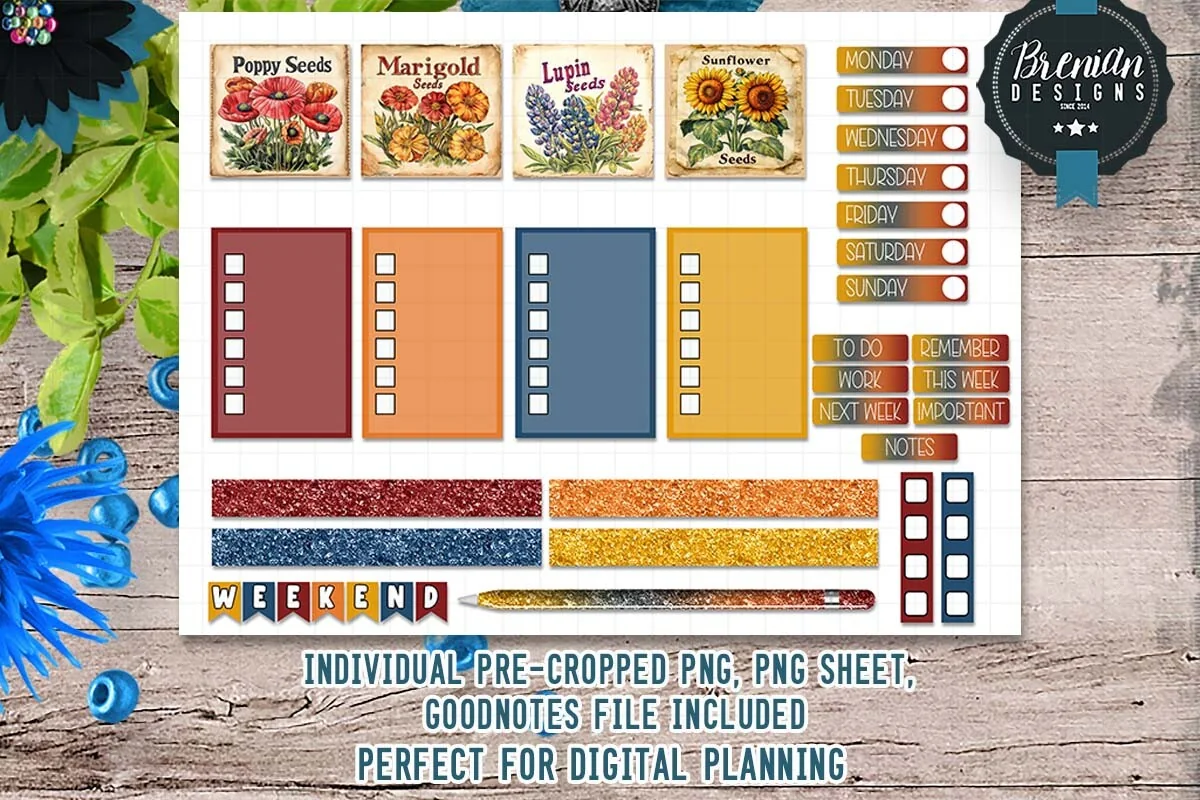
Layouts: Vintage seed packet stickers (poppy, marigold, lupin, sunflower), 4 checklist boxes, weekday labels, To Do and Notes labels, glitter washi stripsFormat: Pre-cropped PNG + PNG sheet + GoodNotes file (screen only)
Best for: vintage botanical fans, garden lovers, weekly planners. Designed by Bren Wotherspoon.
- Four vintage seed packet stickers: Poppy, Marigold, Lupin and Sunflower
- Four checklist boxes in deep red, orange, blue and mustard
- Weekday labels, "To Do", "Work", "Next Week", "Important" and "Notes" labels, a "Weekend" banner
- Glitter washi strips in the same colors
- Pre-cropped PNG GoodNotes file and a PNG sheet, made for digital use only
Old seed packets are one of the prettiest vintage motifs, and here they come with checklists in matching colors, so the page is useful, not only pretty. Same designer as the retro pack above, but a calmer, more botanical mood. The description doesn't give a sticker count; the preview shows one full sheet.
Best ephemera
3. Ripped Vintage Stickers & Digital Stickers
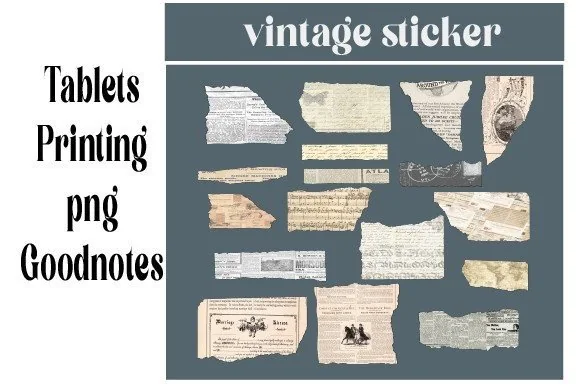
Layouts: Torn vintage paper stickers: old newspaper clippings, printed text scraps and engravingsFormat: PNG + GoodNotes file + sheets for printing
Best for: junk journal fans, collage lovers, digital scrapbookers. Designed by dolce_gioia.
- Torn vintage paper pieces: old newspaper clippings, printed text and small engravings
- Cream, beige and kraft tones with ragged edges
- Digital stickers, a GoodNotes file and sheets for printing
- Made to use on a tablet or print out
The most saved pack in this list, and the one that gives the real old-paper look: torn clippings to layer under photos, quotes or a date. These pieces work best as a background layer, so pair them with one pack that has labels. It also prints, if you keep a paper journal too.
Best for faith journals
4. Hello Vintage Digital Sticker Pack
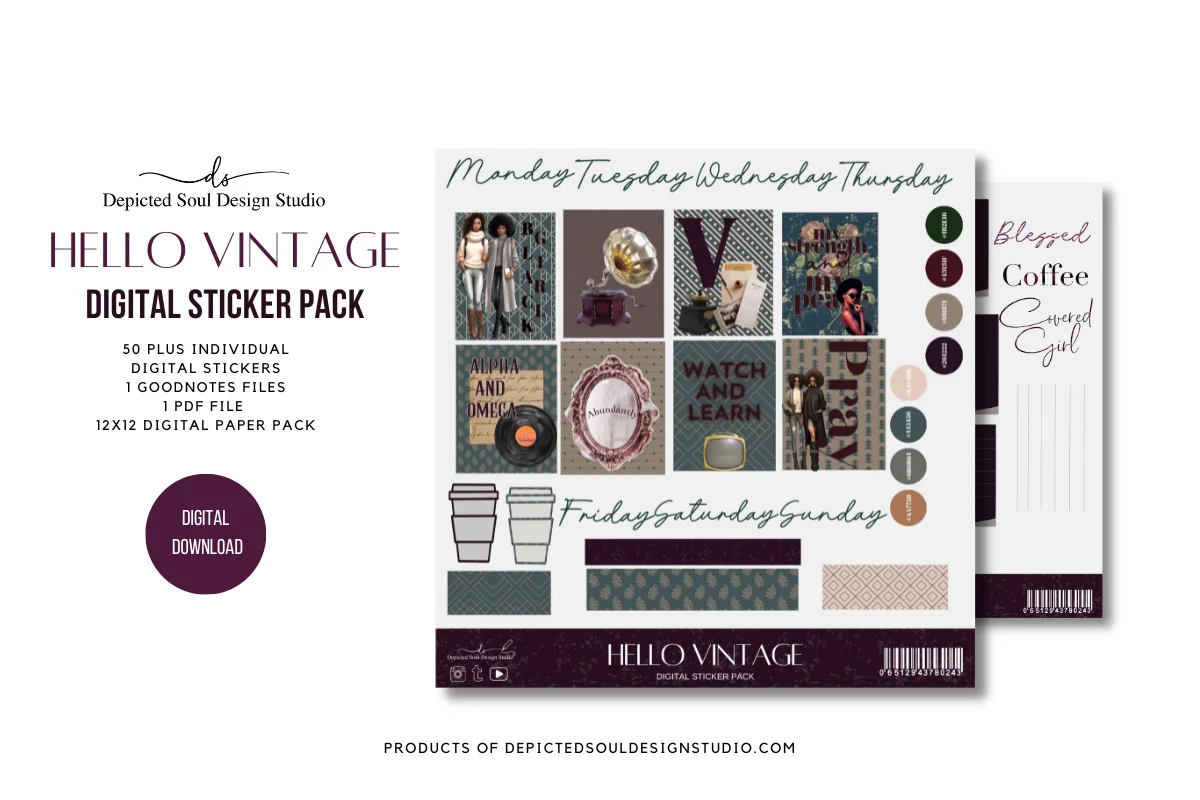
Layouts: 50+ stickers in plum, teal and blush: illustrated women reading and writing, faith quotes, coffee cups, clips, script weekday labels, note cardsFormat: 300 dpi PNG + GoodNotes file + PDF + 12×12 digital paper pack
Best for: prayer journal keepers, faith planners, mood board makers. Designed by Cre8nue Design Studio.
- 50+ high-resolution PNG stickers (300 dpi), one GoodNotes file and one PDF
- A 12×12 digital paper pack in the same palette
- Dark plum, teal and blush colors: illustrated women reading and writing, coffee cups, binder clips, a record and an ornate frame
- Script weekday labels, lined note cards and quotes like "Pray", "Blessed" and "She believed she could"
A moody, elegant take on vintage, very different from the warm 70s packs above. The designer names prayer journals first, and the quotes fit that use best. The digital papers are a bonus: you can make a matching page background and keep the whole spread in one palette.
Best retro borders
5. Geometric Retro Pattern & Border Sticker
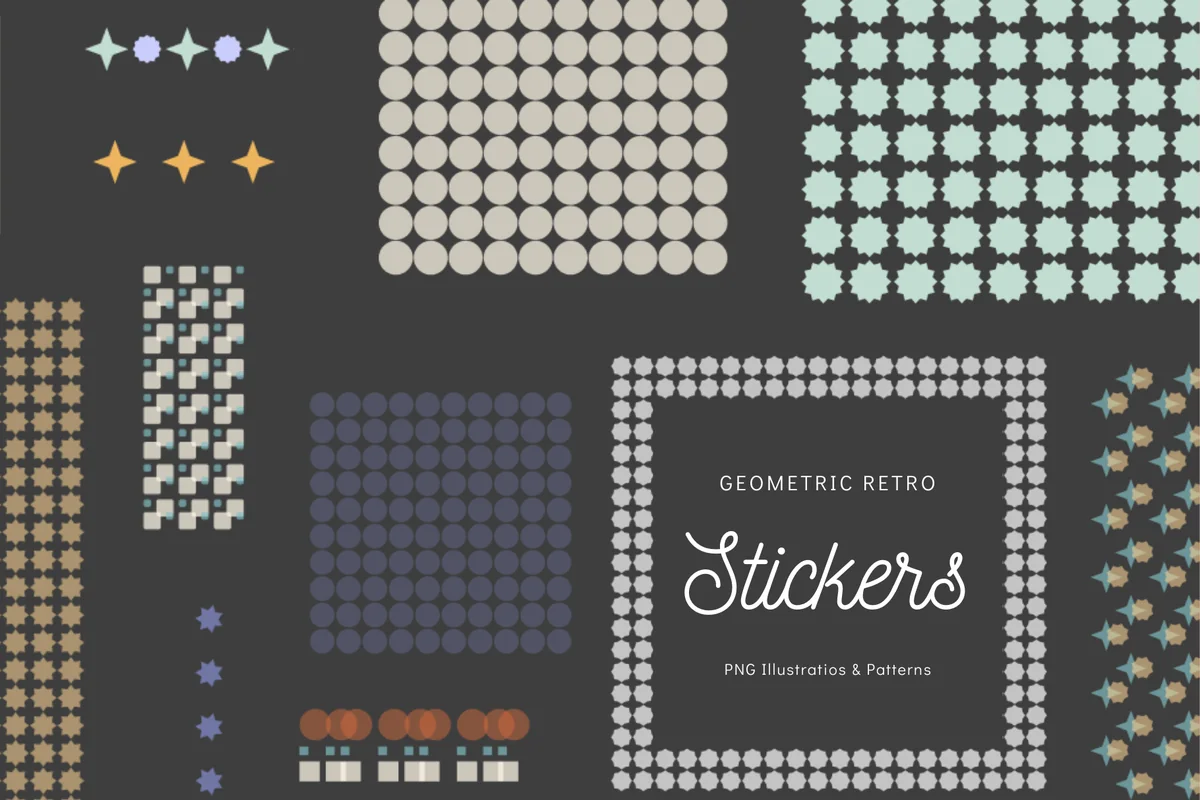
Layouts: 60s and 70s geometric patterns, borders and small stickers: dots, stars, checks, gridsFormat: Transparent PNG (GoodNotes, Defter Notes, Procreate)
Best for: mid-century retro fans, minimalists, page border lovers. Designed by lunarctic.
- Geometric patterns in the style of the 60s and 70s
- Borders, small stickers and pattern blocks: dots, stars, checks and grids
- Muted teal, mustard, rust, cream and lavender
- Transparent PNG files; the designer names GoodNotes, Defter Notes and Procreate on the iPad
No pictures, only shapes, which makes this the quiet option for anyone who likes retro color but not a busy page. A border along the top and a row of stars under the date already give a spread the mid-century look. A good partner for the month titles below.
Best month headers
6. Retro Month Titles Digital Stickers
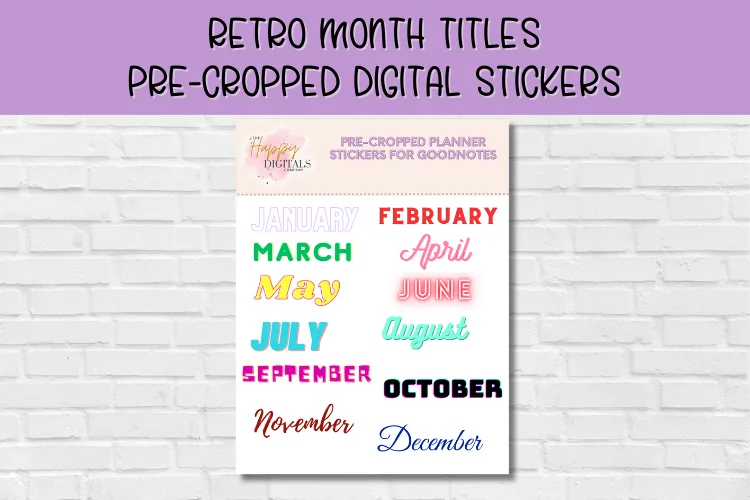
Layouts: 12 month titles, January to December, each in its own retro lettering and colorFormat: Pre-cropped digital stickers for GoodNotes
Best for: monthly spread planners, GoodNotes beginners, retro lettering fans. Designed by Happy Digitals Co.
- 12 month titles, January to December
- Each month in its own retro lettering and color
- Pre-cropped digital stickers, ready to use in GoodNotes
- Made with beginners to digital planning in mind
A small, functional pack: one bold retro title for each monthly spread, nothing to cut or resize much. The styles change from month to month, so it suits a playful journal more than a strict one. Pair it with the borders above for a full retro monthly page.
Quick Comparison
| Sticker pack | Style | What you get | Stand-out extra |
|---|---|---|---|
| 1. Retro Vibes Digital Stickers | 70s retro, warm tones | 50+ pre-cropped + 2 app files | Weekday labels and headers |
| 2. Vintage Florals Digital Stickers | Seed packets, muted colors | Pre-cropped GoodNotes file | Checklist boxes |
| 3. Ripped Vintage Stickers & Digital Stickers | Torn newspaper ephemera | PNG + GoodNotes file | Prints as well |
| 4. Hello Vintage Digital Sticker Pack | Plum and teal, elegant | 50+ PNG + GoodNotes + PDF | 12×12 digital papers |
| 5. Geometric Retro Pattern & Border Sticker | Mid-century geometric | Transparent PNG | Borders and patterns |
| 6. Retro Month Titles Digital Stickers | Retro lettering | 12 pre-cropped titles | One title per month |
Retro, Botanical or Old Paper: Which Vintage Stickers Fit Your Pages
“Vintage” covers very different looks. Picking one of them for a spread is what makes it look intentional rather than random.
Retro 60s and 70s
Warm orange, mustard and brown, rainbows and daisies: the Retro Vibes kit covers a whole week. For a calmer version, geometric borders give the same era with shapes only, and the retro month titles start each monthly spread.
Vintage botanical
Seed packets, pressed flowers and garden labels. The Vintage Florals pack puts them next to checklist boxes, so a garden plan or a weekly to-do list gets the look too.
Ephemera and old paper
Torn newspaper, printed scraps and engravings: the ripped vintage stickers are background layers, the base of a junk journal style page on the iPad.
Moody and elegant
Dark plum, teal and blush with ornate frames and quotes: Hello Vintage suits prayer journals and mood boards, and its digital papers make matching backgrounds.
What I Look For in Vintage Stickers for a Digital Journal
- Made for the screen. “Transparent PNG”, “pre-cropped” or “GoodNotes file” in the description. Most vintage packs on sticker sites are A4 or Letter sheets for printing and fussy cutting; on the iPad you’d have to cut every piece with the lasso.
- A GoodNotes file when possible. Four of the six packs include one: Retro Vibes (with a ZoomNotes file too), Vintage Florals, the ripped vintage pack and Hello Vintage. The month titles come pre-cropped for GoodNotes.
- Some functional pieces. Weekday labels, checklists and month titles let the vintage look work on planning pages, not only on memory pages.
- One era per spread. 70s rainbows and Victorian frames on one page fight each other. Choose the era first, then the stickers.
- Texture you can layer. Torn edges and paper tones are what make a page look old. A pack with background pieces plus a pack with labels is a good pair.
- No dated pieces. I check covers and previews for years, so a pack stays usable in any year.
Old Paper, New Pages: How to Build a Vintage Spread Without Clutter
The idea behind the title: an old-paper look on a page that still works as a planner. Vintage stickers are detailed, so a spread gets busy fast. Here’s the order I’d follow:
- Start with a background. A cream or kraft page, or a digital paper from the Hello Vintage pack, sets the tone before any sticker goes on.
- Add one or two torn paper layers. Put a ripped clipping under the spot where the date or a photo will go. This is the layer that says “old”.
- Place one hero sticker. A seed packet, a frame or a rainbow box: one big piece per page is enough.
- Add the functional pieces. A month title or weekday labels, a checklist box, then the text itself.
- Finish with a strip. A washi strip or a retro border along one edge ties the layers together.
- Stop at five. If a page has more than five stickers, take one away. White space keeps vintage pages readable.
For more layering with tape, see my digital washi tape picks.
Vintage Sticker Ideas for Your Journal
- A garden plan with a seed packet sticker for each flower you want to grow
- A “letters I want to write” page with torn paper notes as the header
- A monthly spread with a retro month title and a geometric border
- A reading log on old newspaper scraps
- A prayer or gratitude page with an ornate frame around one line
- A 70s-style habit tracker with rainbow boxes for each habit
- A memory page: one photo on a torn paper layer, the date on a label
- A recipe page from a family cookbook, styled with kraft tones
- A weekly spread where each day has its own vintage color
- A “things that made me smile” page with one small sticker per line
More page ideas are in my digital journaling ideas.
Digital Vintage Stickers vs Printable and Junk Journal Sheets
Many vintage sticker packs are made for paper: Letter or A4 sheets for printing, “fussy cuts” and junk journal kits. They can work in GoodNotes, but each piece has to be cut out with the lasso. The packs above are ready for the screen; some print too:
- Digital and print: the ripped vintage stickers (sheets for printing included) and Hello Vintage (300 dpi PNGs and a PDF).
- Screen only: Retro Vibes and Vintage Florals, which their designer says are made for digital use, not for printing.
- Not stated: the geometric borders and the month titles; check the file size before printing.
How to Add Vintage Stickers in GoodNotes
- Unzip the pack in the Files app. Depending on the pack, you’ll find single PNGs, PNG sheets or a GoodNotes file.
- If there is a GoodNotes file, import it: it’s your sticker book. Open it in a second tab next to your journal and copy stickers across.
- For single PNGs, tap the image tool on a page, add the sticker from Photos or Files and resize it.
- For PNG sheets, add the sheet to a sticker notebook, cut out one sticker with the lasso and copy it to your page.
- Save favorites as Elements. Select a sticker with the lasso and add it to an Elements collection named after the era (Retro, Botanical, Old Paper), so every look is one tap away.
- Layer in order. Paste the background pieces first; if a sticker lands on top by mistake, cut it and paste it again before the next layer.
Using Notability? PNG stickers go onto the page as images there too. My GoodNotes vs Notability comparison covers how each app handles stickers.
FAQ
What are digital vintage stickers?
They are image files, usually PNGs with a transparent background or a sticker book in GoodNotes format, drawn in an old style: retro colors, old paper, seed packets, frames. You add them to pages in a note app, move and resize them, and reuse them as often as you like.
Where can I get vintage stickers for GoodNotes?
Digital sticker shops on Creative Fabrica, Etsy and planner sites sell them; the 6 packs above are all on Creative Fabrica. Look for “pre-cropped”, “transparent PNG” or “GoodNotes file” in the description, not “print and cut” or “fussy cuts”.
How do I import vintage stickers into GoodNotes?
A GoodNotes file opens as a notebook: copy stickers from it with the lasso. Single PNGs go in through the image tool from Photos or Files. Save the ones you use most as Elements so they’re in the toolbar.
How do I make my own vintage stickers on iPad?
Take a photo of an old postcard, a stamp or a page from a used book, touch and hold the object in the Photos app to lift it out of the background, then tap Copy and paste it into GoodNotes. Only use photos of things you own, and mix them with a pack for labels and borders.
Can I use these vintage stickers in Notability?
Yes. Transparent PNGs work in any app that lets you add images: Notability, Noteful, ZoomNotes and GoodNotes. Only the GoodNotes files inside some packs are GoodNotes-specific; the PNGs in the same pack work everywhere.
Can I print digital vintage stickers?
Some of them. The ripped vintage pack includes sheets for printing and Hello Vintage has 300 dpi files and a PDF. Retro Vibes and Vintage Florals are made for the screen only.
Final Thoughts
The best vintage stickers are the ones that match one era and still leave room for your writing. Start with one main pack, like the Retro Vibes kit or the vintage seed packets, add torn paper ephemera as a background layer and save both to Elements. For more sticker styles, see my digital scrapbook stickers, flower stickers and GoodNotes sticker packs, or browse all planner stickers.
You May Also Like
This post contains affiliate links. If you buy through them, I may earn a small commission at no extra cost to you. Learn more.