You bought a hyperlinked planner, and the product page says “works in GoodNotes and Notability.” So which app do you open it in? GoodNotes vs Notability is the first choice every iPad planner makes, and most comparisons are written for students recording lectures. For planning, the questions are different: how pages turn, how tabs respond, where stickers live and what a whole year of pages costs you on the free plan.
Below are the 7 differences that matter when the file is a planner, the prices of both apps side by side, the student discounts for each, and my pick for different kinds of planners. At the end there are 5 planners whose makers list both GoodNotes and Notability, so you can switch apps later without buying a new planner. Prices are US prices as of October 2026, taken from the official pricing pages and the US App Store.
GoodNotes vs Notability at a Glance
| What matters for planning | GoodNotes | Notability |
|---|---|---|
| Free plan | 3 notebooks, 100 MB | 5 notes (Starter) |
| Cheapest paid plan | Essential, $11.99 a year | Lite, $14.99 a year in the App Store ($11.99 on its website during a sale) |
| One-time option | Special Edition, $35.99 (Apple only) | None on its pricing page; the App Store lists Notability Classic at $49.99 |
| Page turns | Horizontal or vertical, your choice | Known for a continuous vertical scroll |
| Stickers | Elements tool with sticker collections | PNG stickers added as images |
| Audio | Recording synced to your writing (20 min on the free plan) | Recording and transcription from the Plus plan |
| Devices | iPad, iPhone, Mac, Windows, Android, web | iPad, iPhone, Mac, web, and Android since 2026 |
7 Differences That Matter for a Digital Planner
1. A planner is one notebook in GoodNotes and one note in Notability
This is the difference that decides the free plans. GoodNotes counts notebooks: the free plan gives you 3, and a 600-page hyperlinked planner is still just one. Notability counts notes: the free Starter plan keeps 5. A single planner fits in either, but add class notes, a journal and a meal planner and Notability’s limit arrives sooner. So, is Notability free? To try, yes. For a full planning setup, plan on a paid tier.
2. Price: close on paper, different over time
GoodNotes sells Essential at $11.99 a year and Pro at $35.99 a year, plus a one-time Special Edition for $35.99 on Apple devices. Notability lists Lite, Plus and Pro in the US App Store at $14.99, $19.99 and $99.99. When I checked its website in October 2026, it showed a back-to-school sale of up to 20% ($11.99, $15.99 and $79.99 a year), so the website price may change after the sale ends. The App Store also lists a Notability Classic purchase at $49.99.
For planning only, the cheapest tiers are close. Over several years GoodNotes usually costs less because of its one-time option. The full breakdown of GoodNotes plans is in my guide How Much Does GoodNotes Cost?
3. How pages turn: flip or scroll
GoodNotes lets you choose the scrolling direction in the document menu (More → Scrolling Direction): horizontal flips one page at a time like a paper planner, vertical scrolls through pages. Notability is known for its continuous vertical scroll, which many note-takers love for long lecture notes. With a hyperlinked planner you mostly jump by tabs anyway, so this matters less than it sounds. It matters most for landscape planners: a two-page spread feels more natural when pages flip sideways.
4. Hyperlinked tabs work in both, with one habit to learn
Both apps follow the links inside a PDF planner: tap a month tab and you land on that month. The catch is the same in both: links don’t respond while a writing tool is active. Planner makers tell you to switch to read-only mode or put the pen down first, and one of the planners below says exactly that for GoodNotes and Notability. If a tab seems “broken,” check the tool before you blame the file.
5. Stickers and templates: GoodNotes is built for decorating
GoodNotes has the Elements tool: sticker packs live in collections you open from any notebook, and you can import your own PNG stickers into a collection. Some planners even include a ready sticker book as a .goodnotes file, which only opens in GoodNotes. In Notability, PNG stickers go onto the page as images, which works but takes more taps. Notability’s free Starter plan does include its library of 20,000+ templates, which is handy for plain notes but doesn’t replace a hyperlinked planner.
6. Audio and typed notes: Notability’s home turf
Both apps record audio that plays back in sync with your writing. Notability builds its paid plans around it: Plus adds recording and transcription, and Pro adds unlimited real-time transcription and AI summaries. It’s also comfortable mixing typed notes and handwriting on one page. For a planner you rarely record anything, but if the same iPad holds your lecture or meeting notes, this is where Notability earns its price. If you plan mostly by typing, compare GoodNotes with Notion too: Notion vs GoodNotes for planning on iPad.
7. Devices and sync
GoodNotes runs on Apple devices, Windows, Android and the web, and its paid plans add sync across platforms (the one-time Special Edition stays on Apple devices). Notability works on iPad, iPhone, Mac and the web, and it launched an Android app in 2026. If your planner has to open on an iPad and a Windows laptop, GoodNotes has the longer track record there. If you live on Apple devices, GoodNotes syncs through iCloud even on its free plan, while in Notability iCloud sync is part of the paid plans.
GoodNotes Student Discount vs Notability Student Discount
GoodNotes student discount: GoodNotes offers it through Student Beans. You verify your student status there, and the discount is applied to an annual subscription at checkout. Marketplace items aren’t included, and the exact percentage depends on your country, so check the number at checkout rather than trusting old coupon posts. K-12 schools can also get Goodnotes Education for free.
Notability student discount: as of October 2026 I couldn’t find a personal student discount on Notability’s pricing or education pages. What it does have: Notability for Education is free for schools that manage their devices, and seasonal sales like the back-to-school one mentioned above. Before paying, ask your school whether either app comes with your school iPad.
Which One I’d Pick for Planning
- Pick GoodNotes if your iPad is mainly for a planner: one notebook per planner on the free plan, sideways page flips for landscape spreads, an Elements tool for stickers and a one-time purchase if you hate subscriptions.
- Pick Notability if the same iPad is your class or meeting notebook first and your planner second: audio with transcription, typed and handwritten notes together, and a vertical scroll for long notes.
- Not sure? Start both for free with the same planner PDF. A week of real use will tell you more than any comparison, including this one.
For my own kind of planning (a weekly spread, stickers, budget pages, no recordings) I’d choose GoodNotes. If I were in college with three lectures a day, I’d look harder at Notability.
Once you have chosen the app, decide how you will return to the planner during the day. My iPad planning setup ideas cover Home Screen placement, Focus modes and keeping Calendar beside the PDF, so the next step is organizing the workspace around your choice.
Can You Move a Planner From GoodNotes to Notability?
Yes, because the planner itself is a PDF. To start fresh, import the original PDF into the other app. To keep what you’ve already written, export the planner as a PDF from one app and import it into the other: your handwriting comes along as part of the page. App-specific extras don’t travel, so a .goodnotes sticker book stays in GoodNotes and Notability recordings stay in Notability. That’s why I prefer planners whose makers list both apps: you’re not locked in.
5 Planners That Work in Both GoodNotes and Notability
Every planner here names both GoodNotes and Notability in its description, so it moves with you if you switch apps. I skipped printable sheets, Canva templates and anything with past years on the cover, and kept a mix: two planners, a landscape and a portrait one, and two notebooks for the notes side of things.
TL;DR: 5 hyperlinked PDFs whose makers list both GoodNotes and Notability: a dated 2027 all-in-one, a portrait and a landscape undated planner, and two tabbed notebooks for class or meeting notes. Each card lists orientation, layouts and dates, plus who it suits.
Quick Picks
- Best for all-in-one for either app: All-in-One Digital Planner 2027
- Best for portrait planner for scrolling: Undated Digital Daily Life Planner
- Best for landscape planner for page flips: Digital Planner Cute Pastel (Undated)
- Best for notebook for class notes: Digital Student Notebook Hyperlinked
- Best for 5-subject notebook: Digital Notebook 5 Hyperlinked Tab
- All-in-One Digital Planner 2027 – Best all-in-one for either app
- Undated Digital Daily Life Planner – Best portrait planner for scrolling
- Digital Planner Cute Pastel (Undated) – Best landscape planner for page flips
- Digital Student Notebook Hyperlinked – Best notebook for class notes
- Digital Notebook 5 Hyperlinked Tab – Best 5-subject notebook
Best all-in-one for either app
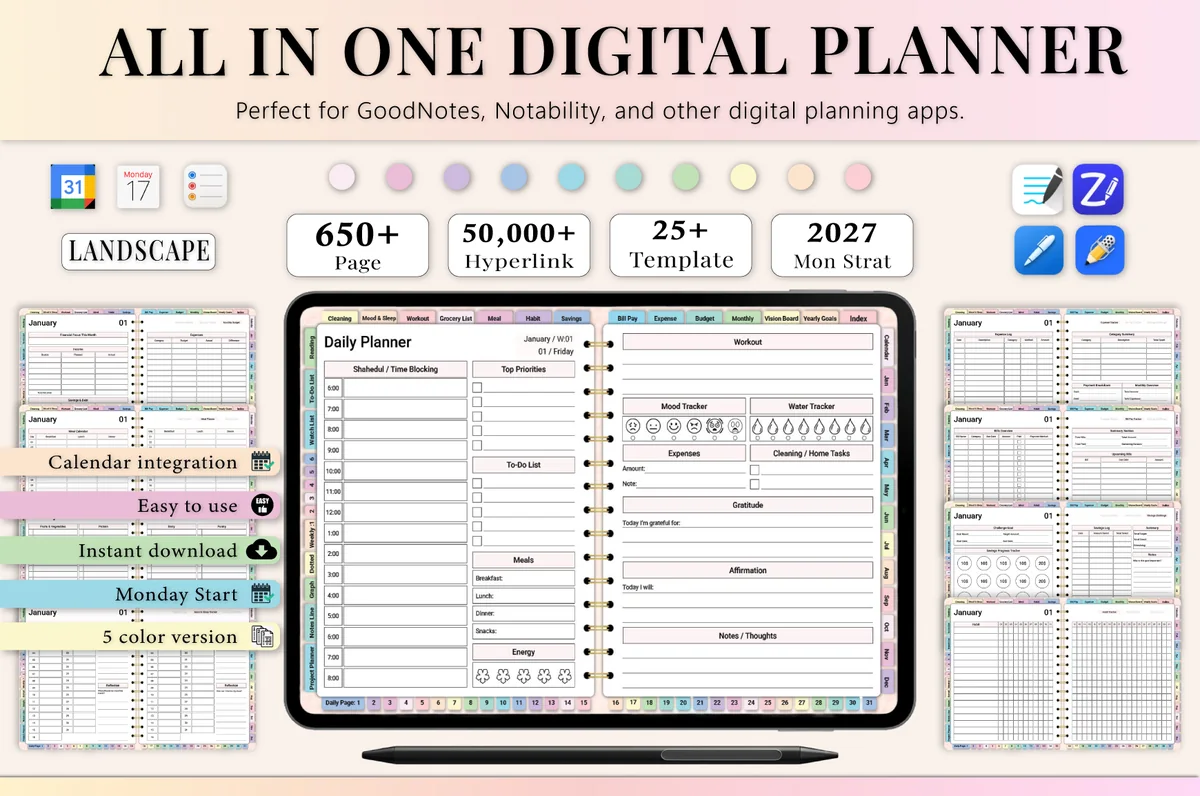
1. All-in-One Digital Planner 2027
Orientation: LandscapeLayouts: Yearly, Monthly, Weekly, DailyDates: 2027Week start: Monday
Best for: busy professionals, budgeters, people who want one planner for everything. Designed by Heartcraft Studio.
- 655 hyperlinked pages, landscape, Monday start, 5 color versions
- 2027 year at a glance, vision board, monthly, weekly and daily pages
- Budget, expense and bill trackers, habit, meal and workout pages
- Lined, dotted and graph note pages
- Made for GoodNotes, Notability, Noteshelf, Xodo, ZoomNotes and more
The maker notes that a paid GoodNotes account may be needed to use large planners smoothly, which is honest and worth knowing. Still, it's one file: one notebook on the GoodNotes free plan, one note in Notability.
Best portrait planner for scrolling
2. Undated Digital Daily Life Planner
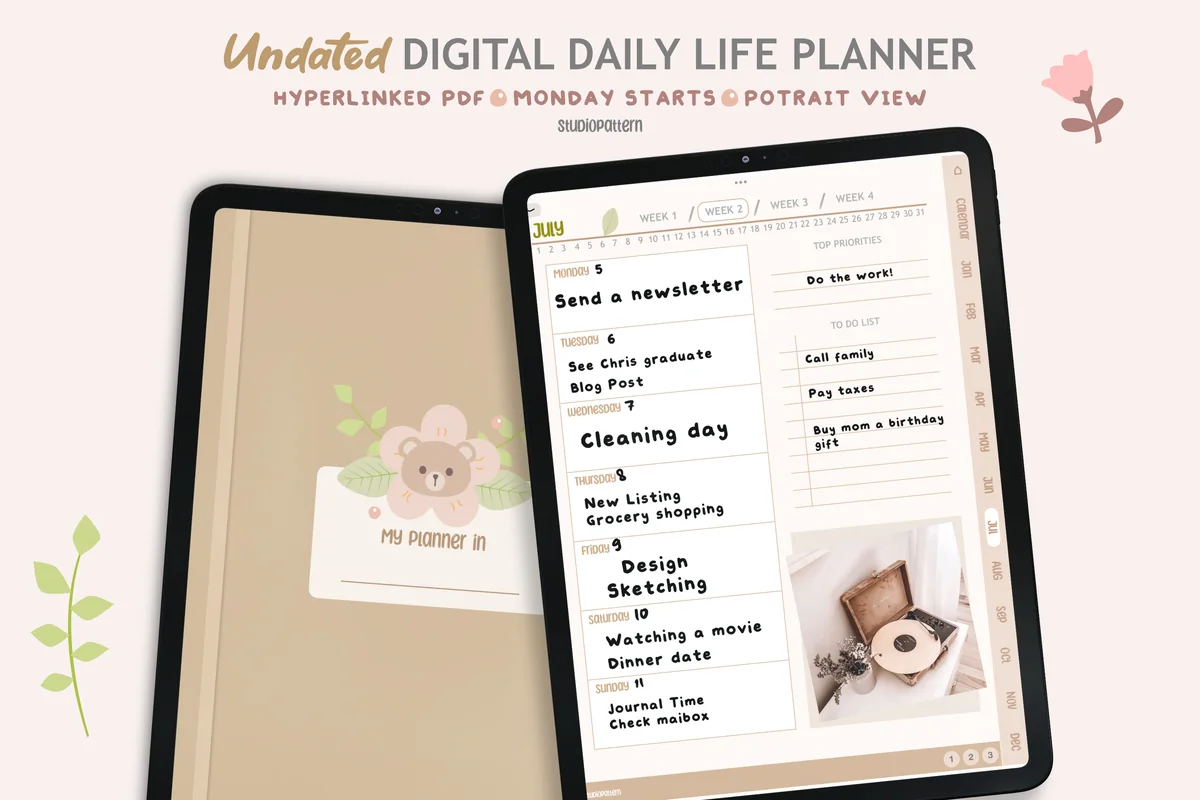
Orientation: PortraitLayouts: Yearly, Monthly, Weekly, DailyDates: UndatedWeek start: Monday
Best for: minimalists, soft neutral lovers, beginners. Designed by studiopattern.
- Undated, Monday start, portrait view
- Calendar, yearly overview, monthly, weekly and daily pages
- 4 note templates and a blank section page
- Hyperlinked; the maker says links work with the read-only tool in GoodNotes and Notability
Portrait pages are the natural fit for Notability's vertical scroll and look just as good in GoodNotes. I like that the maker explains the read-only trick for links up front, because that's the question most new planners ask.
Best landscape planner for page flips
3. Digital Planner Cute Pastel (Undated)
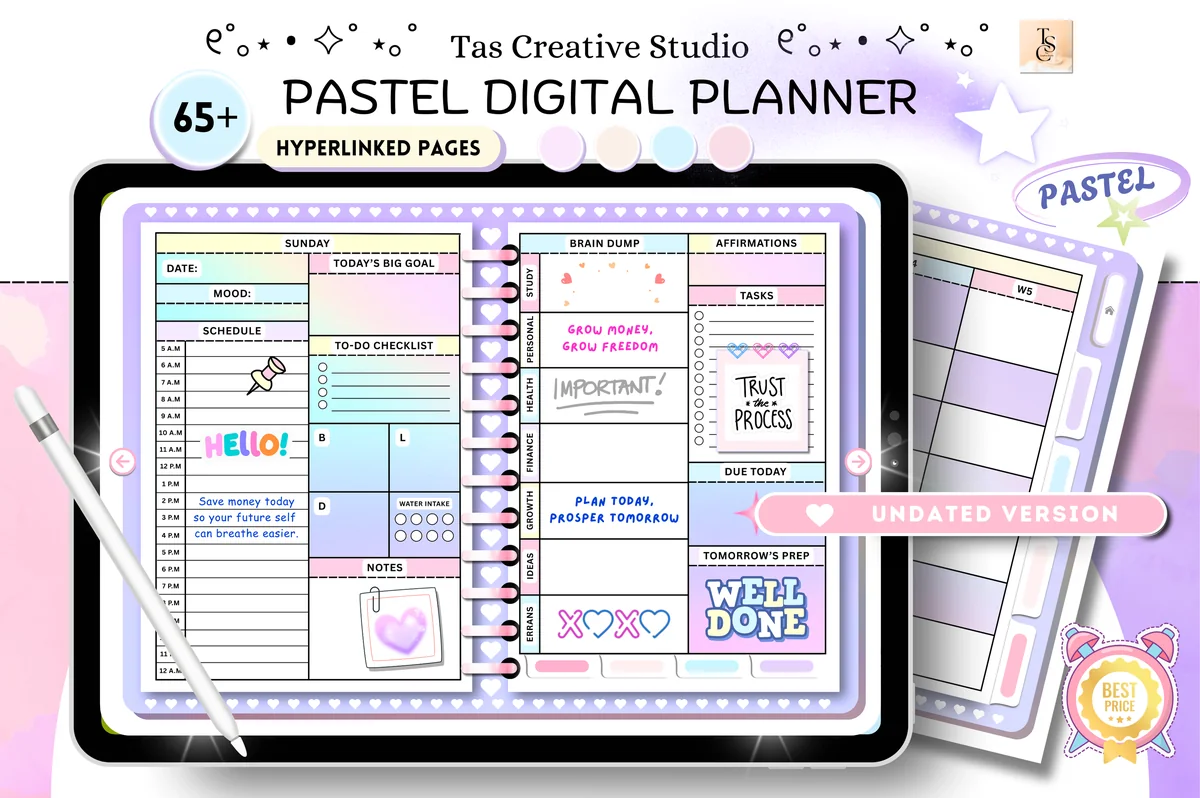
Orientation: LandscapeLayouts: Monthly, Weekly, DailyDates: Undated
Best for: pastel lovers, wellness planners, challenge fans. Designed by Tas Creative Studio.
- 68 hyperlinked pages, landscape (11" x 8.3"), undated
- Daily pages for each weekday, weekly planner and weekly meal tracker
- Habit tracker, monthly budget, savings and subscription trackers
- 30-day fitness, mental health and no-spend challenges
- Supports GoodNotes, Notability, Noteshelf, Xodo and Samsung Notes
Landscape spreads are where GoodNotes' horizontal page flip shines, but nothing here depends on one app. At 68 pages it's light, so it won't strain the free plan in either.
Best notebook for class notes
4. Digital Student Notebook Hyperlinked
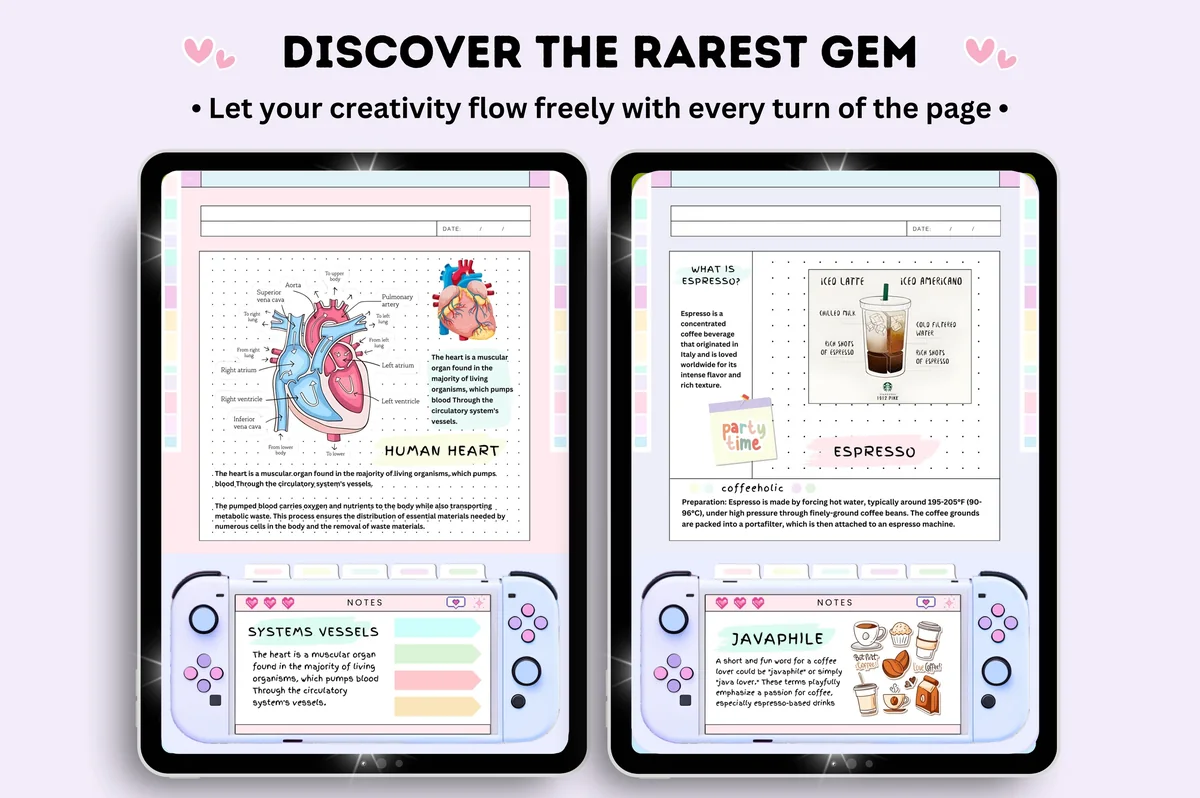
Orientation: PortraitLayouts: 6 subject notebooks, 16 note templatesDates: Undated
Best for: note takers, pastel lovers, sticker lovers. Designed by Tas Creative Studio.
- Undated notebook in 6 pastel colors
- 552 pages and 16 note templates, according to the covers
- Quick menu on every page linking to each template and the index
- Free 5-page sticker book included
- Supports GoodNotes, Notability, Noteshelf, Xodo and Samsung Notes
This is the notes side of the comparison: a tabbed notebook for lectures that opens in either app. If you record classes in Notability, keep this there and your planner wherever you like decorating it.
Best 5-subject notebook
5. Digital Notebook 5 Hyperlinked Tab
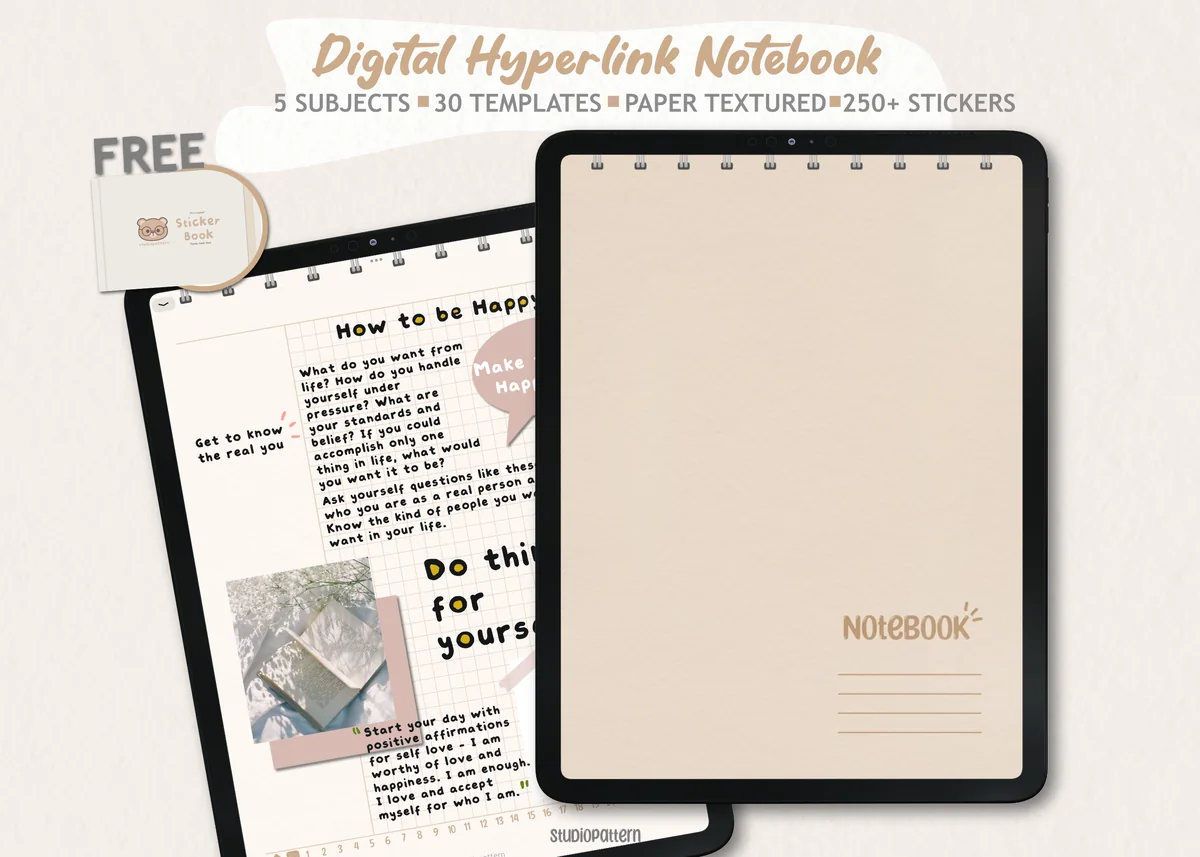
Orientation: PortraitPaper: 30 templatesSections: 5 subjects + contents page
Best for: 5-subject students, sticker lovers, neutral aesthetic fans. Designed by studiopattern.
- 5 section divider tabs with a clickable contents page
- 30 note-taking templates to add behind each section
- 250+ stickers as PNG files plus a pre-cropped .goodnotes sticker book
- Made for GoodNotes, Notability, Xodo, Noteshelf and other PDF apps
A good example of the app difference in one file: the notebook PDF works in both, the PNG stickers too, but the ready sticker book is a .goodnotes file. Notability users still get every page, just not that shortcut.
Quick Comparison
| Planner | Format | Why it suits both apps | Stand-out extra |
|---|---|---|---|
| 1. All-in-One Digital Planner 2027 | Landscape, dated 2027 | One file for everything | 655 pages, 5 colors |
| 2. Undated Digital Daily Life Planner | Portrait, undated | Fits a vertical scroll | Link tip from the maker |
| 3. Digital Planner Cute Pastel (Undated) | Landscape, undated | Light file, 68 pages | Built-in 30-day challenges |
| 4. Digital Student Notebook Hyperlinked | Portrait, undated | For notes, not dates | 6 colors + sticker book |
| 5. Digital Notebook 5 Hyperlinked Tab | Portrait, undated | Tabs work in both apps | 250+ stickers |
FAQ
Is GoodNotes or Notability better for a digital planner?
For most planners, GoodNotes: a whole planner counts as one of its 3 free notebooks, pages can flip sideways for landscape spreads, and stickers live in the Elements tool. Notability is the better pick when the same iPad is mainly for lecture or meeting notes with audio.
Is Notability free?
Partly. The free Starter plan keeps 5 notes and includes the editing tools and template library. Unlimited notes start with the Lite plan, and audio recording with transcription starts with Plus.
Does GoodNotes have a student discount?
Yes, through Student Beans: verify your student status and the discount applies to an annual subscription at checkout. The percentage depends on the country. K-12 schools can use Goodnotes Education for free.
Does Notability have a student discount?
As of October 2026 its pricing and education pages don’t list one for individual students. Schools that manage devices can use Notability for Education for free, and Notability runs seasonal sales, such as a back-to-school sale of up to 20%.
Do digital planners work in both GoodNotes and Notability?
Most hyperlinked PDF planners do, and the product description usually lists the apps. Extras can be app-specific: a sticker book saved as a .goodnotes file only opens in GoodNotes, while PNG stickers work in both.
Why don’t the links in my planner work?
Usually because a pen or highlighter is selected. In both apps, links respond when you’re not writing, so switch to read-only mode or put the writing tool down and tap the tab again.
Can I use GoodNotes or Notability on Android or Windows?
GoodNotes works on Android, Windows and the web, with sync on its paid plans. Notability has a web app and launched on Android in 2026. Both started on the iPad, and that’s still where planners feel most at home.
Final Thoughts
GoodNotes vs Notability isn’t a fight with one winner: GoodNotes is the planner person’s app, Notability the note-taker’s. Choose a planner that works in both and you can change your mind without starting over. When you’re ready to fill it, browse my best digital planners for 2027, the best undated digital planners, GoodNotes note templates for class and GoodNotes sticker packs, or all how-to guides. Whichever app you pick, my digital planner templates open in both, and three of them are free on Creative Fabrica.
You May Also Like
This post contains affiliate links. If you buy through them, I may earn a small commission at no extra cost to you. Learn more.