You open a fresh weekly page in GoodNotes, type three tasks, and the spread still looks like a spreadsheet. Paper journals get their charm from little drawings in the margins, and not everyone has the time or the hand to draw them every Sunday. Doodle stickers fill that gap: hand-drawn PNGs you drop next to a heading or a list, with the wobbly lines of a real pen.
This list covers six packs in three looks: bright pastel doodles you can write on, black-line frames and washi, and themed sets with texture or a single line color. Once you’ve seen them, there are sections on where doodles work best on a page, how each file type behaves in GoodNotes, and how to draw a doodle sticker of your own.
Six Hand-Drawn Doodle Sticker Packs, from Sticky Notes to Line Art
Search Creative Fabrica for doodles and most results are coloring pages, Procreate stamps, Christmas bundles or vector clipart for mugs. I left those out, along with anything that has no PNG file, and kept sets whose description mentions a note app (GoodNotes or Notability) or the iPad itself.
TL;DR: Six sets of hand-drawn doodles for a digital planner on the iPad: a 123-piece sticky note set, doodle frames for headers, line-flower washi tape, Korean snacks, crayon-texture breakfast and minimal summer line art. Every card says what the pack includes and whether it comes pre-cropped for GoodNotes.
Quick Picks
- Best overall: Sticky Note Doodle V2
- Best for headers and quotes: Hand Drawn Doodle Frames and Borders
- Best for doodle washi tape: 12 Doodle Flowers Washi Tape PNG Bundle
- Best for food journals: Handrawn Korean Snacks Doodle Sticker
- Best for crayon texture: Breakfast Doodle Digital Stickers Set
- Best for minimal line art: Summer Pool Party Doodle Clipart Bundle
- Sticky Note Doodle V2 – Best overall
- Hand Drawn Doodle Frames and Borders – Best for headers and quotes
- 12 Doodle Flowers Washi Tape PNG Bundle – Best doodle washi tape
- Handrawn Korean Snacks Doodle Sticker – Best for food journals
- Breakfast Doodle Digital Stickers Set – Best crayon texture
- Summer Pool Party Doodle Clipart Bundle – Best minimal line art
Best overall
1. Sticky Note Doodle V2
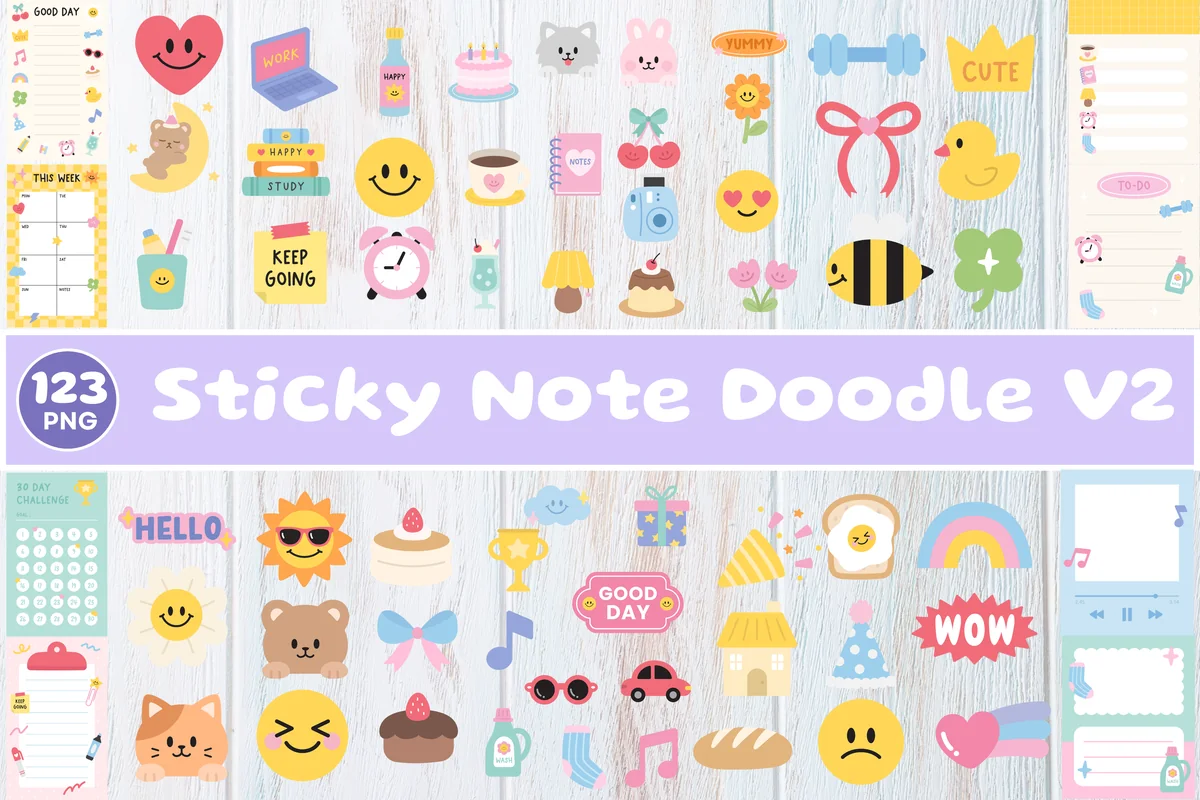
Layouts: 123 hand-drawn doodles: sticky notes (Good Day, This Week, To Do), smileys, animals, food, small objectsFormat: Transparent PNG (+ SVG per the cover)
Best for: everyday planners, pastel spreads, to-do lovers. Designed by Print Magic StudioX.
- 123 hand-drawn sticky note doodles and graphics
- Transparent PNG files (the cover also lists SVG)
- Note pads with headings like Good Day, This Week and To Do, plus smileys, a bear, cake, coffee and small objects
- The listing names GoodNotes and Notability; the preview shows how to drag PNGs onto a planner page
The biggest set here and the one with the most favorites on Creative Fabrica. What makes it more than decoration are the doodled note pads: a Good Day card or a This Week list can hold your actual tasks, and the smileys and tiny objects fill the gaps around them.
Best for headers and quotes
2. Hand Drawn Doodle Frames and Borders
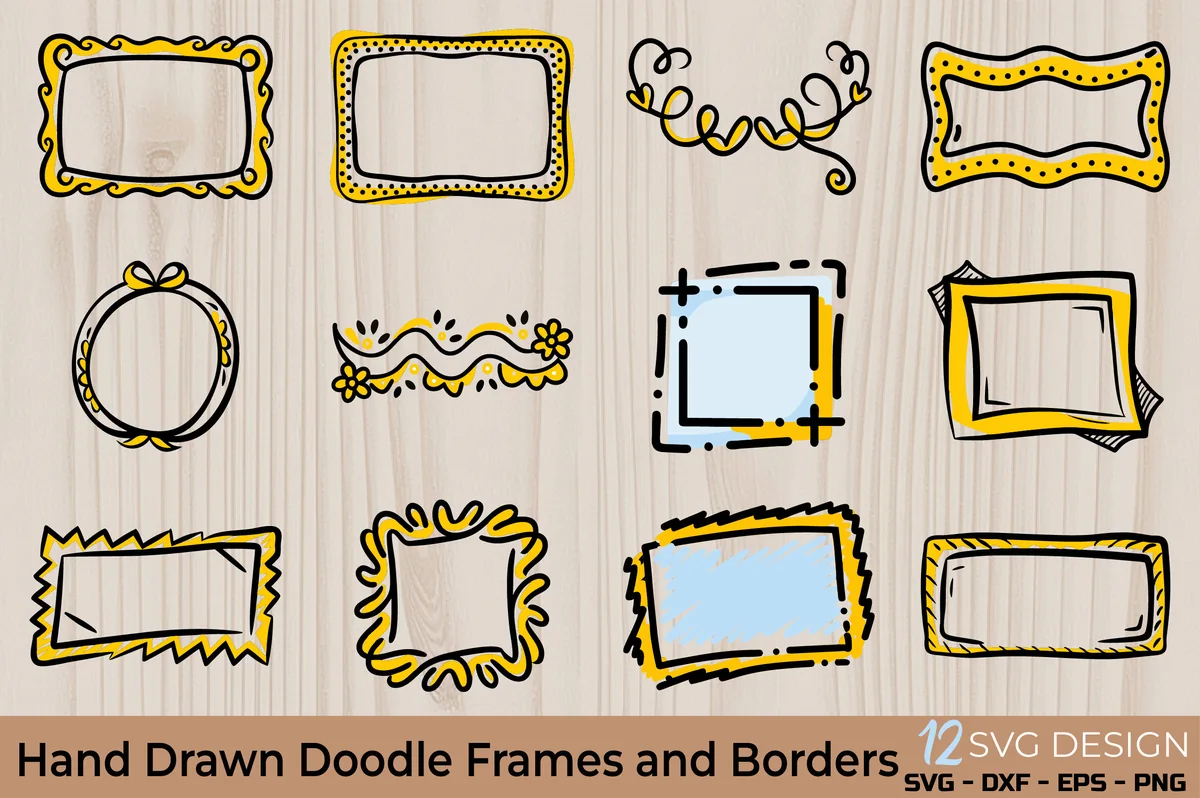
Layouts: 12 sketch-style frames and borders (rectangles, circle, banners)Format: Transparent PNG + SVG, EPS, DXF
Best for: header makers, quote pages, bullet journalers. Designed by OVOYA's GALLERY.
- 12 sketch-style frames and border designs
- SVG, transparent PNG, EPS and DXF files
- Wavy, dotted, curly and spiky frames, an oval with a bow and swirly dividers, in black lines with yellow and light blue fills
- Digital planners in GoodNotes and Notability are on the list of uses
Most of this listing talks about Cricut and sublimation, so it's easy to scroll past, but the transparent PNGs are what a planner needs. Drop a frame on the page and write the month name or a quote inside it. Only 12 designs, so think of it as a header kit, not a full sticker book.
Best doodle washi tape
3. 12 Doodle Flowers Washi Tape PNG Bundle
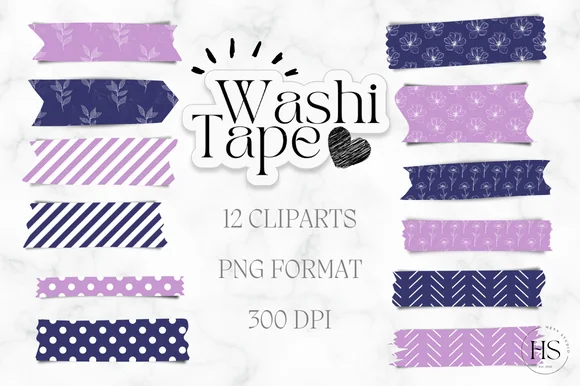
Layouts: 12 washi tape strips: line-drawn flowers, stripes, dots, chevrons in purple and navyFormat: PNG 300 DPI, pre-cropped for GoodNotes
Best for: washi fans, purple palettes, to-do pages. Designed by Heyv Studio.
- 12 washi tape clipart strips
- PNG format, 300 DPI, pre-cropped stickers
- White line-drawn flowers on purple and navy, plus stripes, polka dots and chevrons
- Step-by-step notes for adding the strips in GoodNotes on the iPad
Choose this one if you like doodles but want a calmer page: the flowers are thin white outlines on two colors, so the tape frames a list instead of competing with it. The two-color palette is the limit; on a pink or green spread it will stand out.
Best for food journals
4. Handrawn Korean Snacks Doodle Sticker
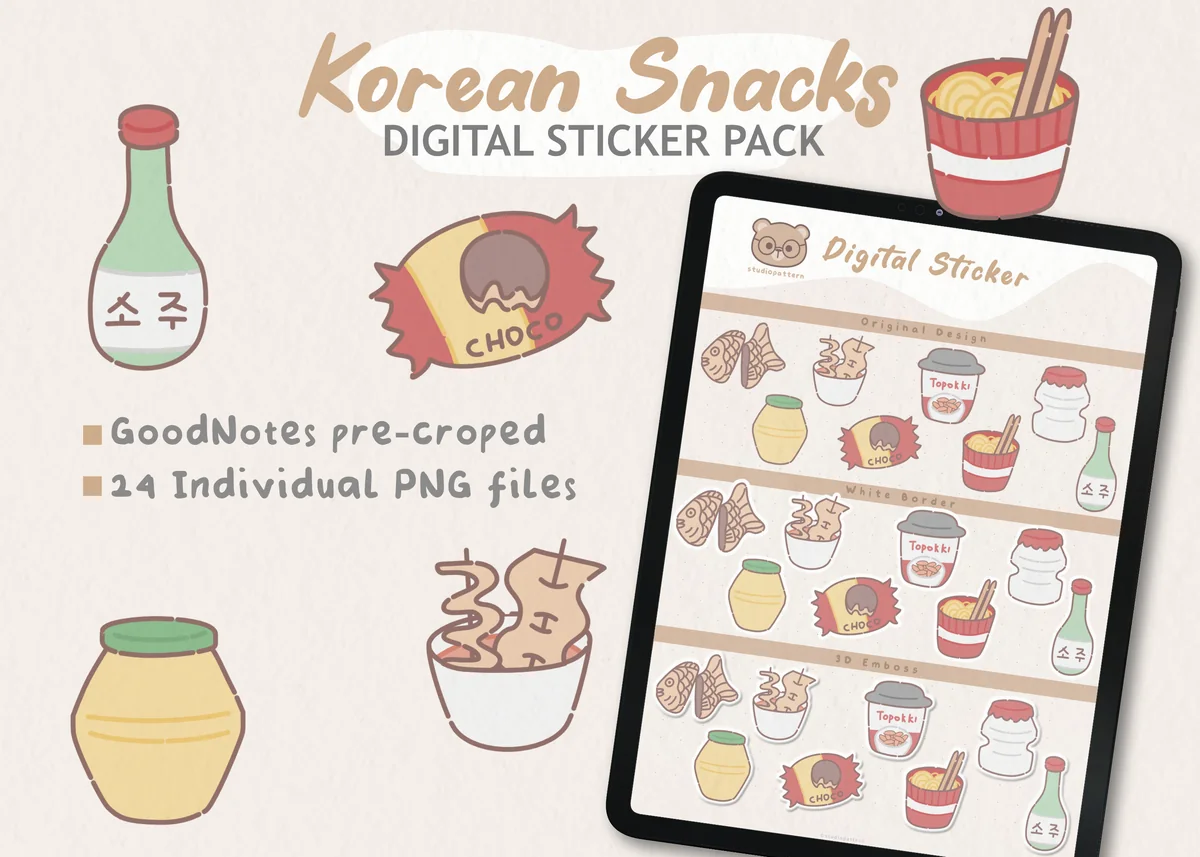
Layouts: 24 Korean snack and drink doodles (cup ramen, fish-shaped pastries, snack wrappers, drink bottles)Format: 24 PNG 300 DPI, GoodNotes pre-cropped
Best for: food journalers, K-culture fans, travel journals. Designed by studiopattern.
- 24 individual PNG files, 300 DPI
- Each sticker about 1000 px on the longest side
- GoodNotes pre-cropped
- Cup ramen, fish-shaped pastries, wrapped sweets and drink bottles in a soft hand-drawn style; the preview shows plain, white-border and emboss looks
A themed pack with real character: muted colors and wobbly lines that look drawn by hand, not traced. I'd keep it for a food diary or a Seoul trip spread rather than everyday pages.

Best crayon texture
5. Breakfast Doodle Digital Stickers Set
Layouts: 20 crayon-texture breakfast doodles (croissant, toast, eggs, jam, teapot, mugs)Format: 20 PNG 1000×1000 px, 300 DPI + pre-cropped GoodNotes file
Best for: morning pages, meal planners, crayon texture fans. Designed by kissoblue.
- 20 PNG stickers with transparent backgrounds
- 1000 x 1000 px, 300 DPI
- A pre-cropped GoodNotes file, ready to use
- Croissant, toast, eggs, bacon, jam jars, a teapot, a smiley mug and a sun, all with a crayon texture
The crayon texture is the reason to pick it: every croissant and mug looks colored in by hand, which plain vector doodles can't fake. Twenty pieces is enough for a breakfast box on a meal plan or the top of a morning routine page.

Best minimal line art
6. Summer Pool Party Doodle Clipart Bundle
Layouts: 30+ minimalist line-art summer doodles (flamingo float, ice cream, disco ball, sunscreen)Format: PNG + JPG + SVG + EPS
Best for: summer spreads, minimal line art, party planners. Designed by JidapaDesign.
- 30+ minimalist line art illustrations
- PNG (transparent background) and JPG, plus SVG and EPS for changing colors
- Flamingo float, ice cream, popsicle, disco ball, DJ decks, sunscreen, nachos and tiki drinks
- GoodNotes and Notability are named for digital planning
The newest pack in the list and the most minimal: single-color outlines, no fills. Only a few figures in the set are people; the rest are objects. It's a summer theme, so I'd save it for June to August spreads, a vacation countdown or a pool party plan.
Quick Comparison
| Sticker pack | Doodle style | What you get | Stand-out extra |
|---|---|---|---|
| 1. Sticky Note Doodle V2 | Colorful pastel doodles | 123 stickers | Writable sticky notes |
| 2. Hand Drawn Doodle Frames and Borders | Black line + yellow fill | 12 frames | Space to write inside |
| 3. 12 Doodle Flowers Washi Tape PNG Bundle | White line flowers | 12 tape strips | GoodNotes how-to included |
| 4. Handrawn Korean Snacks Doodle Sticker | Muted hand-drawn food | 24 stickers | Pre-cropped for GoodNotes |
| 5. Breakfast Doodle Digital Stickers Set | Crayon texture | 20 stickers | GoodNotes file included |
| 6. Summer Pool Party Doodle Clipart Bundle | One-color line art | 30+ doodles | Vector files to recolor |
Colorful, Textured or Line Art? Three Doodle Looks
“Doodle” covers very different drawings. Before buying a second pack, check that it shares a look with the first one, because two clashing doodle styles on one spread look busier than none.
- Colorful pastel doodles. Filled shapes, smiley faces, soft colors. These are the cute doodle stickers most people picture, and they suit everyday planners. In this list: the sticky note doodles and the Korean snacks.
- Black line with one accent. Sketchy outlines with a single fill color or none. If you want aesthetic doodle stickers for cream or white pages and a bullet journal style, start here: the doodle frames and the line-flower washi tape.
- Texture or single-color line art. The crayon breakfast set looks colored in by hand, while the pool party pack is pure outline in one color. Both work best on themed pages rather than every day.
Where Doodles Earn Their Place on a Planner Page
A doodle works hardest where a page has empty space or needs a signpost. A few spots where hand-drawn stickers do more than decorate:
- A doodle frame around the month name
- A washi strip under each day header
- A sticky note doodle for the top 3 tasks
- A small object in the margin next to an event
- A smiley per day as a mood tracker
- A breakfast doodle beside the morning routine
- Food doodles in a meal plan or food diary
- A frame around a quote on a journaling page
- A doodle as a reward after a habit streak
- A themed doodle on a trip or summer countdown
Keep it to two or three doodles per page at first. Hand-drawn stickers are busy by nature, and white space is what makes them look intentional. For layouts that leave room for doodles, see my digital bullet journal ideas, where doodles and headers are one of the idea groups.
PNG, Pre-Cropped or Vector: What the Files Mean in GoodNotes
Sticker listings mix several file types, and only some of them go straight onto a page:
- Transparent PNG. The format to look for. Insert it as an image on any GoodNotes page, then drag a corner to scale it; the background stays see-through on any paper color.
- Pre-cropped GoodNotes file. A notebook where every sticker is already cut out. Keep that notebook open beside your planner, loop around the doodle you want and copy it across. The breakfast set and the Korean snacks list a pre-cropped GoodNotes option; the washi strips are PNGs already cut to shape.
- SVG, EPS and DXF. Vector files for design software and cutting machines. GoodNotes won’t open them as stickers; the PNG folder of that pack is the one to use. They only help if you want to recolor a doodle on a computer first.
- JPG. Has a white background, which shows as a white box on a cream or dark page. Skip it when a PNG is in the same folder.
Whatever the format, save the doodles you reuse as an Elements collection in GoodNotes, so they’re one tap away in any notebook. My GoodNotes stickers guide covers sticker books and Elements in more detail.
How to Draw Your Own Doodle Stickers on the iPad
Bought packs are a quick start, but a doodle of your own mug or your dog is a sticker no shop sells. With Procreate and an Apple Pencil, it takes four steps:
- Draw on a transparent layer. Create a canvas, hide the background layer and sketch with a monoline or pencil brush. Small wobbles are part of the doodle look.
- Add a white outline if you like. Duplicate the drawing, fill the copy with white, enlarge it slightly and put it under the original. It gives the classic die-cut sticker edge.
- Export as PNG. With the background still hidden, share the canvas as a PNG, so the transparency survives.
- Drop the PNG into GoodNotes and save it to Elements next to your bought doodles.
If the line quality is what holds you back, a brush set helps more than practice alone: my Procreate brushes for planners include doodle stamps and lettering brushes.
Doodle Sticker Questions
How do I add doodle stickers in GoodNotes?
Extract the ZIP first (Files on the iPad does this with a tap). Loose PNGs are inserted as images; a pre-cropped GoodNotes file becomes a separate sticker notebook, and doodles travel from it to your pages by lasso and copy.
Do these packs work in Notability?
Yes, the PNG files do: Notability, Noteshelf and other note apps on the iPad all accept images. Only the GoodNotes notebook inside a pack is specific to GoodNotes.
Can I print these doodle stickers?
The PNGs are high resolution, and several listings mention printing, so they work on sticker paper for a paper journal. These packs are chosen for digital planners, though; for vinyl laptop stickers you’d also need a cutting machine.
Can I get doodle stickers for free?
Small free sets turn up on planner blogs and in the free section of Creative Fabrica, usually a handful of doodles in mixed styles. A paid pack gives you one consistent style for a whole planner, and drawing your own (steps above) costs nothing but time.
Which Doodle Stickers to Start With
If you buy only one pack, make it the one that does a job on the page. The Sticky Note Doodle V2 gives you note pads to write in, and the doodle frames turn any month name into a header. Themed doodle stickers like the Korean snacks or the crayon breakfast are a second step, for a food diary or a morning page. For flowers in other styles, see my flower stickers; for more food, my food stickers; for plain tape and notes, my digital washi tape and digital sticky notes; and for every theme, all planner stickers.
You May Also Like
This post contains affiliate links. If you buy through them, I may earn a small commission at no extra cost to you. Learn more.