Most planners start with a week, and that’s why the year gets lost in them. The best yearly planner ideas work the other way around: you put the whole year on one page first, decide what matters, and only then let the weeks fill in. A good yearly section is small (a calendar, a few goals, two or three trackers and a review), but it’s the page that keeps January’s plans alive in October.
Below are 5 iPad planners with real yearly pages that I’d pick for 2027. After the list: 35 yearly planner ideas in 6 groups, from the year at a glance to the year-end review, how to choose between dated and undated, and a 30-minute yearly setup in GoodNotes.
The Best Yearly Planners for iPad I Found
Separate “yearly planner” files on Creative Fabrica are mostly printables, Canva templates or old dated planners. So I kept digital planners for GoodNotes and other iPad apps that have a proper yearly section inside: a year at a glance page, yearly goals, month-at-a-glance pages or a yearly reflection. Anything with pages for past years is out.
TL;DR: 5 iPad planners with real yearly pages: a 2027 bundle with a yearly calendar, quarterly overview and yearly goals, an undated planner with yearly goals and a yearly reflection, two 2027 planners with 12 month-at-a-glance pages and subject tabs, and a simple undated planner with a year at a glance index. Below the list: 35 yearly planner ideas and a 30-minute setup in GoodNotes.
Quick Picks
- Best for overall yearly section for 2027: 2027 Bundle Digital Planner, Goodnotes
- Best for undated pick for goals and reflection: Undated Digital Planner
- Best for a goal-first 2027: Goal Getter Planner 2027 Portrait
- Best for bills and life admin all year: Digital Life Planner 2027 Portrait
- Best for simple start: Simple Undated Digital Planner
- 2027 Bundle Digital Planner, Goodnotes – Best overall yearly section for 2027
- Undated Digital Planner – Best undated pick for goals and reflection
- Goal Getter Planner 2027 Portrait – Best for a goal-first 2027
- Digital Life Planner 2027 Portrait – Best for bills and life admin all year
- Simple Undated Digital Planner – Best simple start
Best overall yearly section for 2027
1. 2027 Bundle Digital Planner, Goodnotes
Orientation: LandscapeLayouts: Yearly, Quarterly, Monthly, Weekly, DailyDates: 2027Week start: Monday or Sunday
Best for: goal setters, challenge fans, color lovers. Designed by SuperDigitalPlanners.
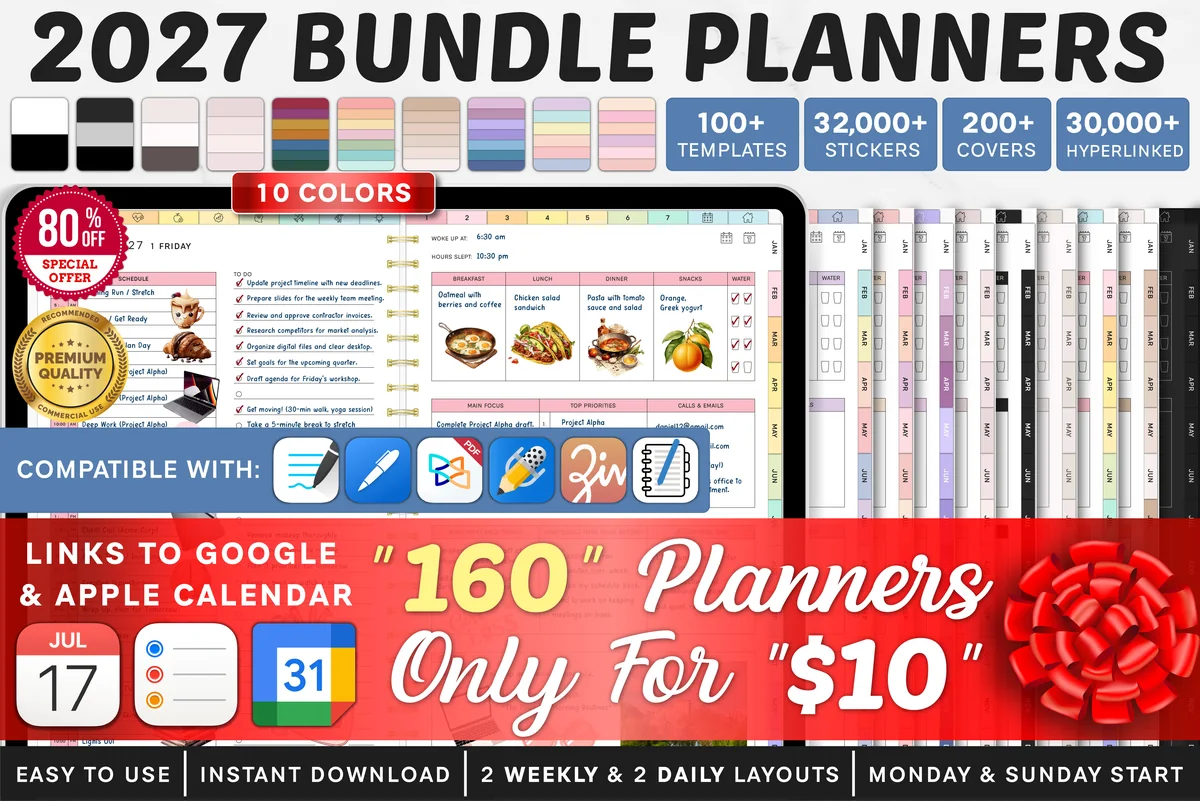
- Yearly section: yearly calendar for the whole year on one page, quarterly overview, yearly goals, year at a glance and yearly key dates
- Monthly goals that break the yearly goals into steps, plus a yearly finance overview
- Dated 2027, landscape, Monday and Sunday start, 10 color themes, 2 weekly and 2 daily layouts
- Links to add events to Apple Calendar, Reminders and Google Calendar; works in GoodNotes and other PDF annotation apps
This is the most complete yearly section I found: a one-page calendar, a quarterly overview and a yearly goals page sit together at the front, so the big picture is one tap from any week. The monthly goals pages then turn the year into twelve smaller plans. With 10 color themes in the bundle, it's easy to find one calm enough to open every day until December.
Best undated pick for goals and reflection
2. Undated Digital Planner
Layouts: Yearly, Monthly, Weekly, DailyDates: UndatedWeek start: Monday or Sunday
Best for: minimalists, reflective planners, goal setters. Designed by Makii.
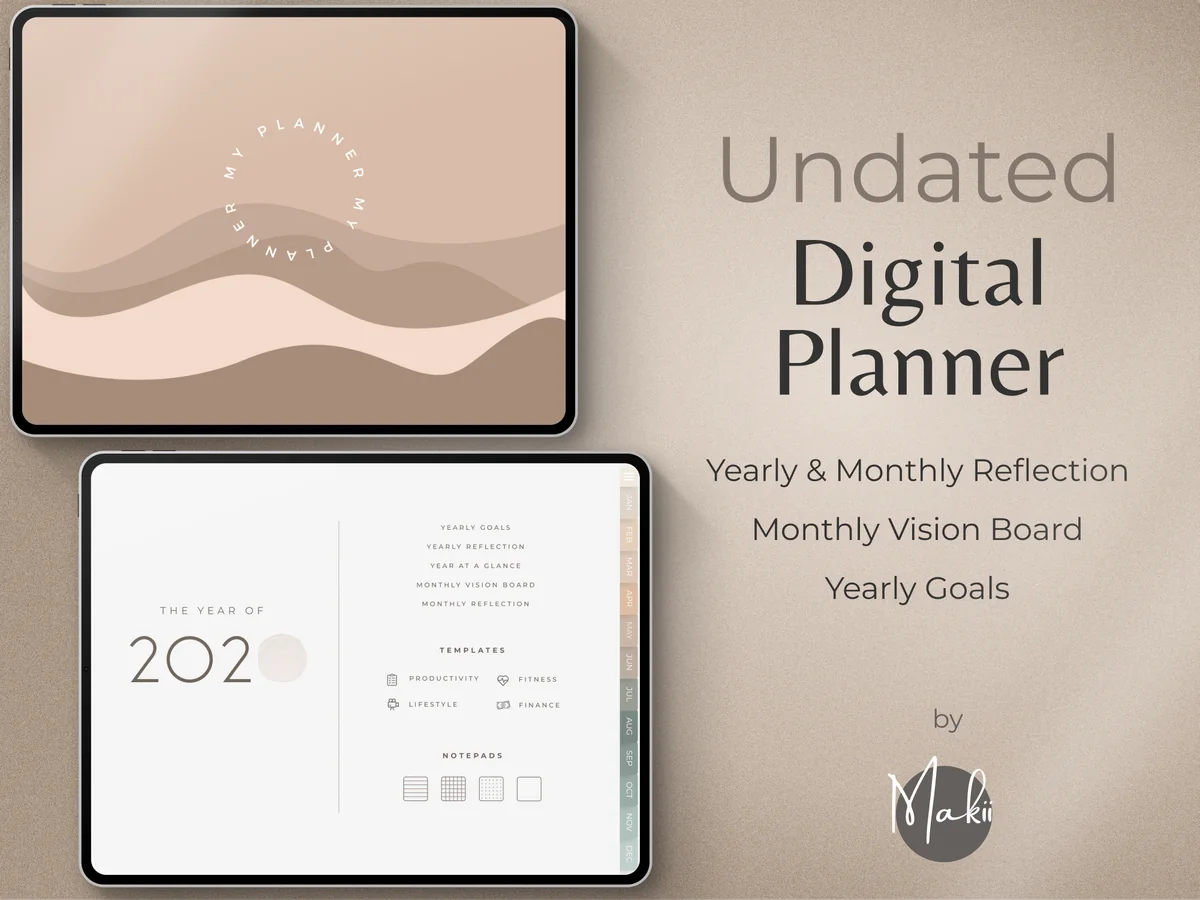
- Yearly pages: Yearly Goals, Year at a Glance and Yearly Reflection
- Undated monthly pages with a Monthly Vision Board and Monthly Reflection, plus weekly and daily pages
- 400+ hyperlinked pages and 42 productivity, fitness, lifestyle and finance templates
- Monday and Sunday start, planner covers and a 250-sticker pack; for GoodNotes, Notability and Xodo
I like that the year starts and ends here: a yearly goals page at the front and a yearly reflection to fill in December. Because it's undated, you write the year yourself on the cover page, so you can begin in any month. The soft neutral design is one of the most popular planners on Creative Fabrica, with 300+ favorites.

Best for a goal-first 2027
3. Goal Getter Planner 2027 Portrait
Orientation: PortraitLayouts: Monthly, Weekly, Daily + 24 goal templatesDates: 2027Week start: Monday or Sunday
Best for: goal setters, 2027 planners, habit builders. Designed by Print Magic StudioX.
- Dated January to December 2027, portrait, separate Monday start and Sunday start files
- 12 month-at-a-glance pages, monthly planners, a weekly page with the week's one thing, wins and what rolls over
- 6 subject tabs with 24 templates: Goals, Challenge, Growth, Habits, Journal and Focus
- 365 daily pages with an hourly schedule from 6 a.m. to 9 p.m.; page size of the 13-inch iPad Pro, scales to any 4:3 tablet
If your yearly planner is really a goals planner, this one keeps the goals in their own tabs instead of one page at the front. The months run across the top of every page, so a month at a glance is one tap away. It's new on Creative Fabrica, so there are no reviews yet, but every page shown in the previews is in the file.

Best for bills and life admin all year
4. Digital Life Planner 2027 Portrait
Orientation: PortraitLayouts: 12 month-at-a-glance pages, Monthly, Weekly, Daily (hourly 6 a.m.–9 p.m.) + 6 subject tabsDates: 2027Week start: Monday or Sunday
Best for: life admin planners, bill payers, habit builders. Designed by Print Magic StudioX.
- Dated January to December 2027, portrait, Monday start and Sunday start files
- 12 month-at-a-glance pages and monthly planners with important dates, to do and notes
- 6 subject tabs with 24 templates: Digital, Focus, Bills, Habits, Work and Life
- Weekly and 365 daily pages, 30 note pages (lined, dot grid, square grid), twin silver wire drawn on every page
Same clean layout as the Goal Getter, but the tabs point at everyday life: Bills, Habits, Work and Life. That makes it a good home for the year-long trackers from the ideas below, like a bill calendar or a habit grid. Pick this one if your year is more about running a household than chasing one big goal.
Best simple start
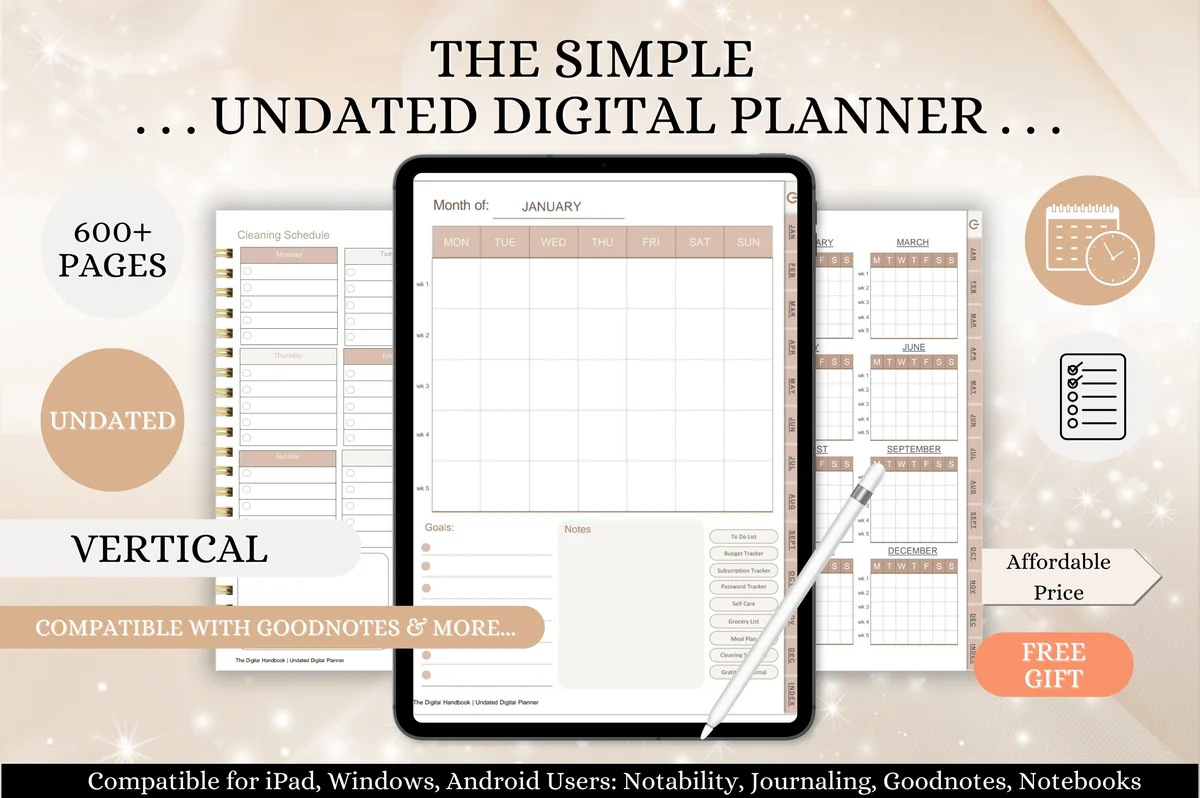
5. Simple Undated Digital Planner
Orientation: PortraitLayouts: Year at a glance, 12 monthly calendars, Weekly, Daily + budget, subscription and cleaning trackersFormat: A4 hyperlinked PDF, 600+ pagesDates: Undated
Best for: beginners, simple planners, budget trackers. Designed by Tas Creative Studio.
- Year at a glance page that links to all 12 months, then monthly calendars, a weekly overview and daily pages
- Extra pages: budget tracker, subscription tracker, password tracker, meal planner, cleaning planner, gratitude journal
- Undated, vertical A4, fully hyperlinked, 600+ pages
- Compatible with GoodNotes, Notability and Noteshelf; a bonus set of printable quote cards
This one is for anyone who wants the year at a glance and nothing complicated. The home page is a grid of the twelve months, so every month is one tap from the start. A subscription tracker and a budget tracker cover the yearly money ideas without a separate finance planner.
Quick Comparison
| Planner | Yearly pages | Dates |
|---|---|---|
| 1. 2027 Bundle Digital Planner, Goodnotes | 2027 Bundle | Yearly calendar, quarterly overview, yearly goals, key dates, finance overview |
| 2. Undated Digital Planner | Undated Digital Planner | Yearly goals, year at a glance, yearly reflection |
| 3. Goal Getter Planner 2027 Portrait | Goal Getter 2027 | 12 month-at-a-glance pages, Goals and Habits tabs |
| 4. Digital Life Planner 2027 Portrait | Digital Life Planner 2027 | 12 month-at-a-glance pages, Bills and Habits tabs |
| 5. Simple Undated Digital Planner | Simple Undated Planner | Year at a glance index, budget and subscription trackers |
Want a full guide to the year ahead? My best iPad planners for 2027 compare dated planners in more depth, and the monthly planners list helps if the month is your main view.
35 Yearly Planner Ideas for 2027
You don’t need all 35. Pick one or two ideas from each group, and keep the yearly section to five or six pages: a year you can see in one swipe is a year you’ll actually look at.
Year at a Glance 1–6
- 1A one-page calendar of all 12 months
- 2Birthdays and anniversaries, one line per month
- 3Holidays, school breaks and days off marked in one color
- 4Trips and big events as colored bars across the months
- 5Key deadlines: taxes, renewals, exams, launches
- 6A “one thing per month” row: the main focus for each month
Yearly Goals 7–12
- 7Word of the year in big letters on the first page
- 8Three yearly goals, each with a first small step
- 9A goal for each life area: health, money, work, home, fun
- 10A yearly vision board with photos or stickers
- 11A 12-month bucket list, one small adventure a month
- 12“Stop doing” list: what you won’t carry into the new year
Yearly Trackers 13–18
- 13Year in Pixels: one colored square for each day’s mood
- 14Yearly habit grid for one habit, 365 boxes
- 15Books read this year, with a star rating
- 16Movies and shows watched
- 17Workout count by month as a simple bar chart
- 18Sleep or step goal checked off week by week
Money for the Year 19–24
- 19Yearly budget overview: income and spending by month
- 20Yearly bill tracker with due dates and check boxes
- 21Subscription list with renewal months
- 22Savings goal thermometer you color in as it grows
- 23Sinking funds for gifts, car, travel and holidays
- 24Debt payoff tracker with one row per month
Quarterly Check-Ins 25–29
- 25Quarterly overview: the year split into four 3-month plans
- 26A 12-week goal for each quarter
- 27End-of-quarter questions: what worked, what to drop
- 28Seasonal reset list for spring, summer, fall and winter
- 29A mid-year review page for June
Yearly Review and Memories 30–35
- 30Best moment of each month, one line each
- 31A yearly photo collage with one photo per month
- 32“Firsts” of the year: new places, foods, skills
- 33Year-end reflection: proud of, learned, let go of
- 34Gratitude list for the year, 12 lines
- 35A letter to yourself to open next December
How to Put the Whole Year on One Page
The year at a glance page is the heart of a yearly planner, so it’s worth getting right. Keep it to dates and short labels; details belong in the monthly pages.
- Fixed dates first. Birthdays, holidays, school breaks and bills that come once a year.
- Then the big blocks. Trips, busy seasons at work, exams, a move. Draw them as colored bars so you can see which months are already full.
- Then one focus per month. A single word under each month (“taxes”, “garden”, “holiday gifts”) keeps the year balanced.
- Leave white space. A page that’s full in January has no room for what the year brings.
Use three or four colors at most: one for family, one for work, one for money and one for fun. In GoodNotes a highlighter in each color is enough, and the colors repeat on the monthly pages so the whole planner reads as one system.
What I Look For in a Yearly Planner
- A real yearly section. At least a year at a glance or yearly goals page, not only 12 monthly calendars.
- Links both ways. From the yearly page to each month and back, so the big picture is one tap away from any week.
- Space for a review. A yearly reflection or quarterly overview turns a calendar into a plan you can adjust.
- Trackers that last 12 months. A yearly habit grid, Year in Pixels or a finance overview, not only monthly ones.
- No past years. A dated planner should cover 2027; an undated one should let you write the year yourself.
Dated 2027 or Undated?
Dated 2027 planners (the 2027 Bundle, Goal Getter and Digital Life Planner above) come with every date already in place. January 1, 2027 is a Friday, the weeks are set, and hyperlinks jump from the year to any day. They’re the easiest option if you start in January and plan every week.
Undated planners (Makii’s Undated Digital Planner and the Simple Undated Planner) let you write the dates yourself. They suit anyone who starts mid-year, skips weeks, or wants to use the same yearly goals and review pages again next year. More undated options are in my undated digital planners list.
Who a Yearly Planner Is For
- Goal setters who want their yearly goals in front of them every month, not in a forgotten note.
- Busy families juggling birthdays, school breaks and trips for several people.
- Budgeters who track bills, subscriptions and savings across the whole year.
- Reflective planners who like to look back each quarter and at the end of the year.
- Anyone who loses track of time: seeing all 12 months at once makes it easier to notice that March is already full.
What You Need to Use a Yearly Planner on iPad
- An iPad and, ideally, an Apple Pencil or another stylus.
- A PDF annotation app: GoodNotes, Notability, Noteshelf or a similar app.
- The planner PDF, imported into the app as a notebook so the hyperlinks work.
Set Up Your Yearly Planner in GoodNotes in 30 Minutes
- Import (2 min). Open the PDF with GoodNotes and import it as a new notebook. Keep an untouched copy for later.
- Year at a glance (10 min). Add fixed dates, then big blocks, then one focus word per month (ideas 1–6).
- Yearly goals (8 min). Write a word of the year and three goals, each with the first step you can take in January (ideas 7–9).
- Trackers (5 min). Choose one or two yearly trackers, for example Year in Pixels and a bill tracker, and bookmark their pages.
- Check-in reminders (5 min). On the last monthly page of each quarter, write “quarterly check-in” and add the same reminder to your phone calendar, because a PDF planner doesn’t send alerts by itself.
How to Keep the Yearly Pages Alive All Year
A yearly section works only if you open it. A simple rhythm is enough: at the start of each month, spend 10 minutes on the year at a glance page and move the month’s focus into the monthly page. At the end of each quarter, take 30 minutes for the check-in questions and adjust the goals. In December, fill in the review pages and copy what’s worth keeping into next year’s planner.
If a yearly goal turns into a daily habit, move it to a tracker; my habit tracker ideas have layouts for that. For goal pages with quarterly and weekly steps, see my digital goal planners.
FAQ
What should go in a yearly planner?
Start with four parts: a year at a glance calendar, a yearly goals page, one or two yearly trackers and a review page for the end of the year. Add a quarterly overview and a yearly budget page if you plan money or long projects.
How do I make a yearly planner?
Take a digital planner with yearly pages, fill in fixed dates first, then big events, then one focus per month. Write three goals with first steps, choose your trackers and set four quarterly check-ins. The 30-minute setup above walks through it step by step.
What’s the difference between a yearly and a monthly planner?
A monthly planner shows one month in detail. A yearly planner adds the view above it: all 12 months on one page, yearly goals and trackers that run the whole year. Most digital planners include both, linked together.
Can I start a yearly planner in the middle of the year?
Yes. With an undated planner, write the current month as month one and plan the next 12 months. With a dated 2027 planner, use the remaining months and treat the first quarterly check-in as your fresh start.
Does a digital yearly planner sync with my calendar?
Not automatically. A PDF planner is a notebook, not a calendar app. Some planners, like the 2027 Bundle above, include links that open Apple Calendar, Reminders or Google Calendar so you can add an event yourself, but dates you write in the planner don’t appear in your calendar on their own.
Can a yearly budget page replace financial advice?
No. A yearly budget or debt payoff page helps you see your numbers, but it can’t tell you what to do with them. If debt feels unmanageable or you’re making a big money decision, talk to a nonprofit credit counselor or a licensed financial professional before you set the goal.
Final Thoughts
The best yearly planner ideas are the ones you’ll see again in June: a year at a glance page, a few goals with first steps, one or two trackers and a review in December. Pick your favorites from the 35 ideas above, set them up in 30 minutes, and let the weeks follow. For goal ideas, see my New Year goals ideas and digital vision board ideas; for money pages, my digital budget planners; or browse all monthly and yearly planners.
To work on one month of your yearly plan at a time, compare these GoodNotes monthly calendars for the calendar view you want.
You May Also Like
If the first monthly spread needs a seasonal accent, browse these New Year digital stickers and keep the writing space clear for the plans themselves.
This post contains affiliate links. If you buy through them, I may earn a small commission at no extra cost to you. Learn more.