Most people quit a bullet journal in the second month, and it’s rarely the method’s fault. It’s the pressure to make every page look like the ones on Pinterest. A digital bullet journal on the iPad takes a lot of that pressure off: dots instead of a printed layout, stickers instead of hand-drawn headers, and an undo button for every wobbly line. The method stays the same. The rules about how it should look don’t.
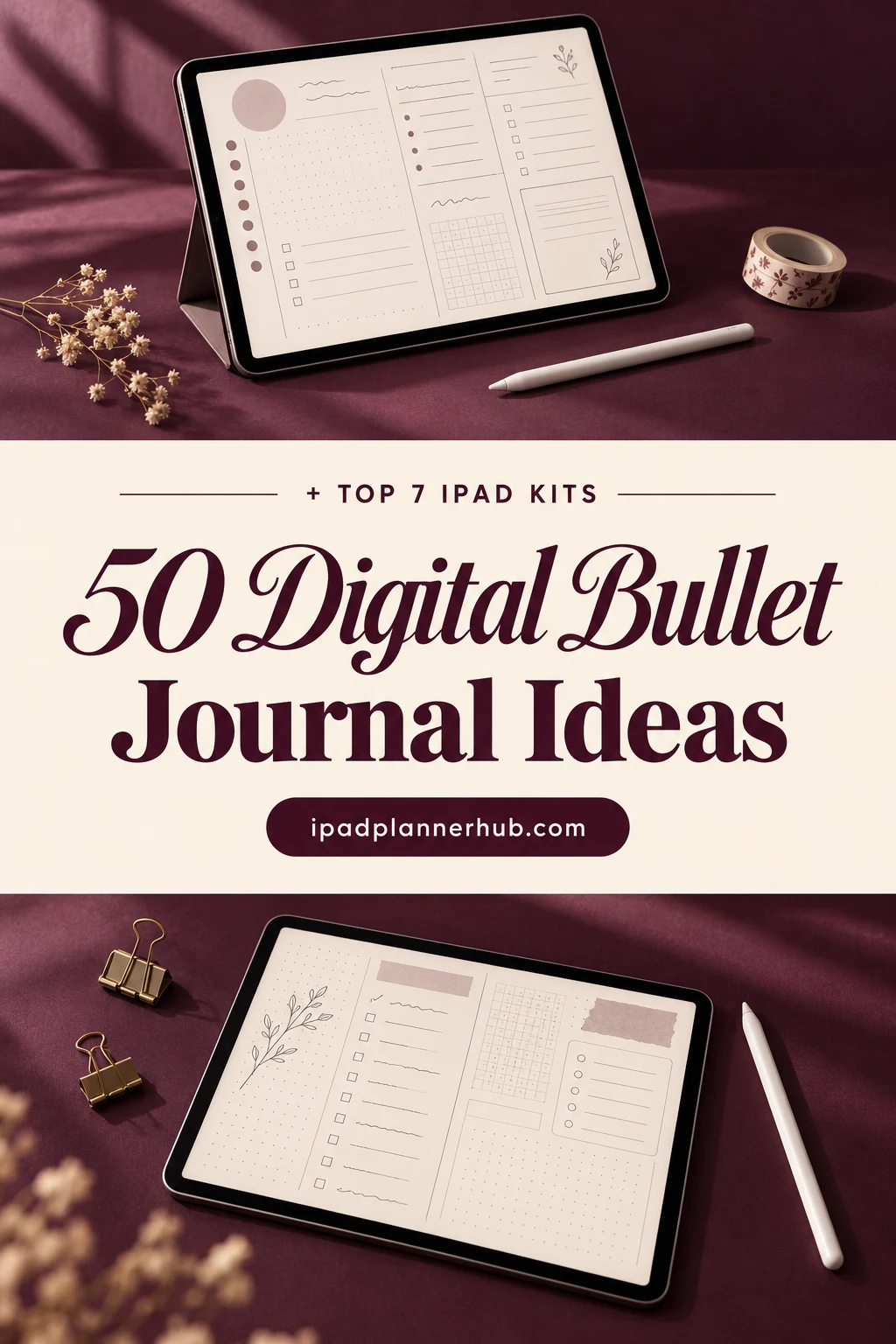
Below are 7 iPad kits I’d use for that: a ready undated bullet journal, a notebook with dot grid pages, two minimal sets of bujo basics, two big sticker kits for monthly and weekly spreads and one set of doodle flowers. After the list: 50 digital bullet journal ideas in 7 groups, how the method works on the iPad, how to journal without perfectionism and how to set it all up in GoodNotes.
The Best Digital Bullet Journal Kits I Found
I searched Creative Fabrica for bullet journal, bujo and dotted journal items and kept only the ones made for iPad apps like GoodNotes, Notability and ZoomNotes. Most results were Canva templates, printable inserts, SVG files for cutting machines or previews showing pages from years that are already over, so those are out. Native dotted bullet journals are rare there, so this list has two journals to write in and five sticker kits to build the pages with.
TL;DR: 7 kits for a digital bullet journal on the iPad: a ready undated bullet journal, a notebook with dot grid pages, two minimal sets of bujo basics, two big decorative sticker kits and one set of doodle flowers. All work in GoodNotes or other iPad note apps; no Canva or KDP files, nothing dated to past years.
Quick Picks
- Best for ready-made bullet journal: Undated Cute Orange Bullet Journal
- Best for dot grid base: Digital Notebook
- Best for minimalist bujo basics: Digital Stickers Bujo
- Best for rapid logging lists: To Do List Planner Stickers PNG
- Best for all-in-one sticker kit: Boss Girl Bullet Journal Stickers
- Best for bold color kit: Purple Paisley Bullet Journal Stickers
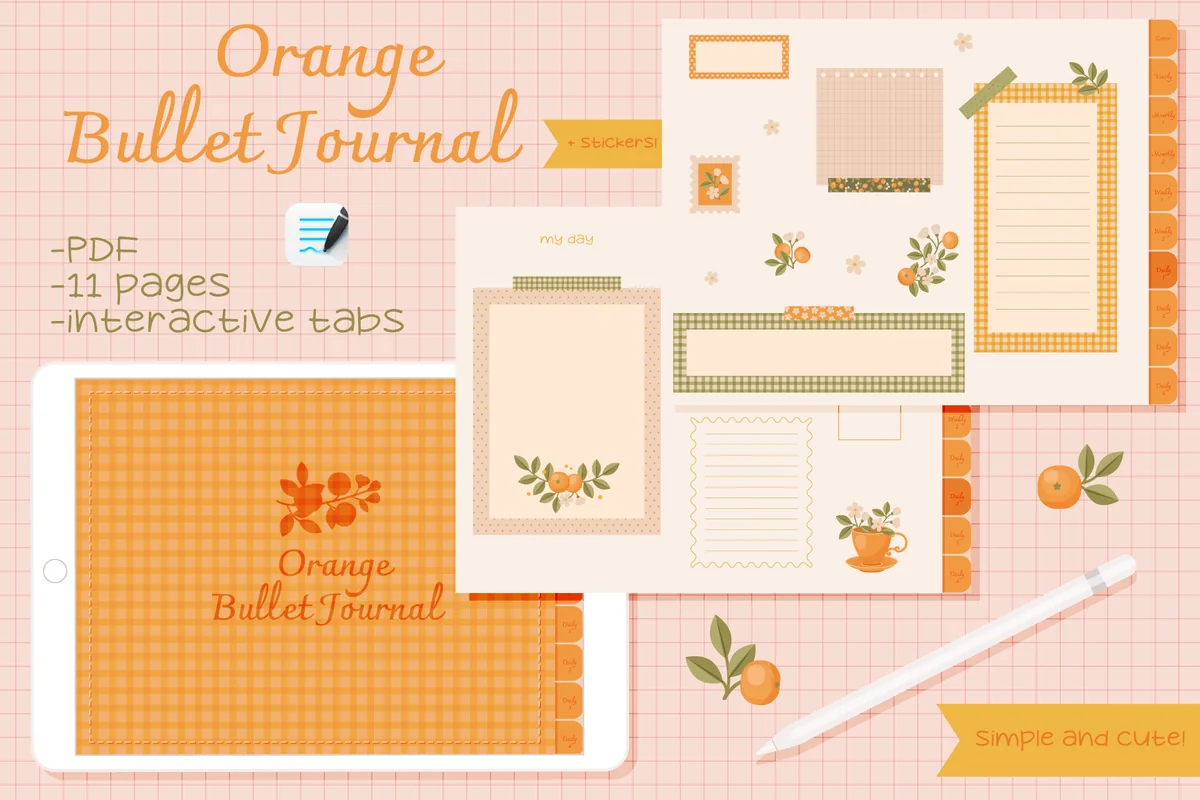
- Undated Cute Orange Bullet Journal – Best ready-made bullet journal
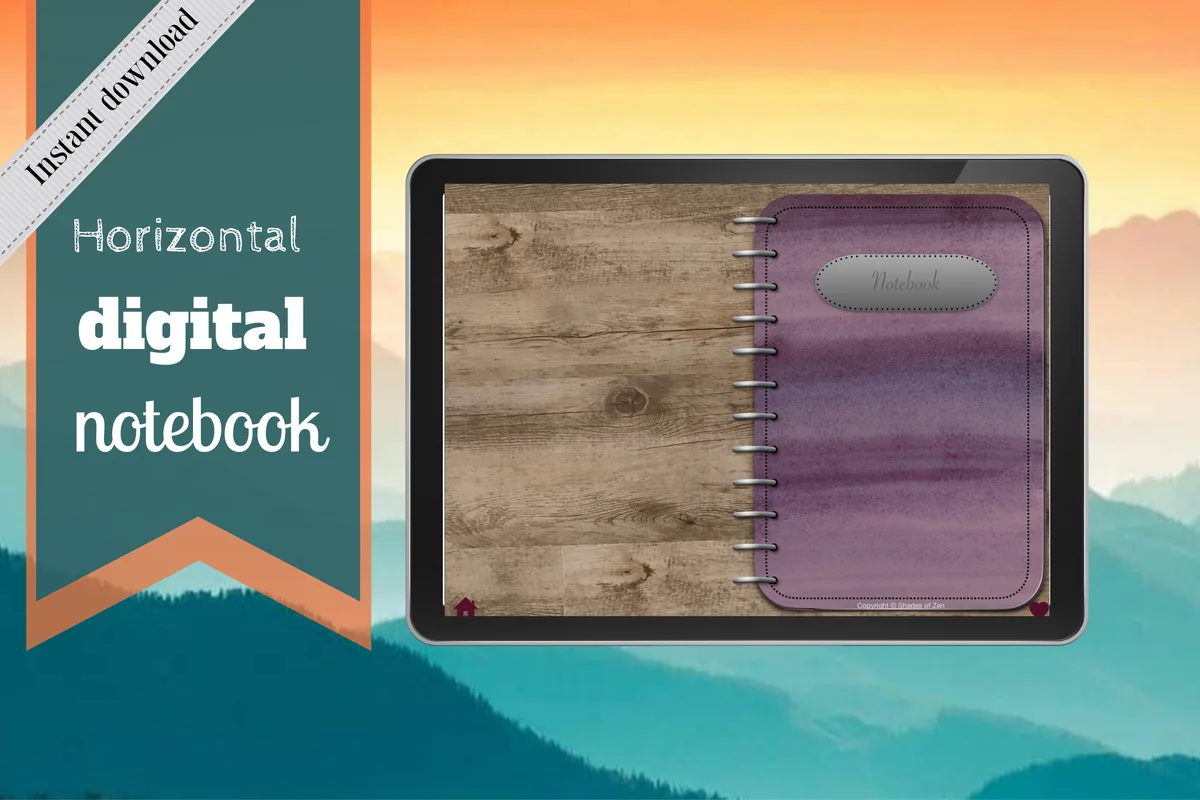
- Digital Notebook – Best dot grid base
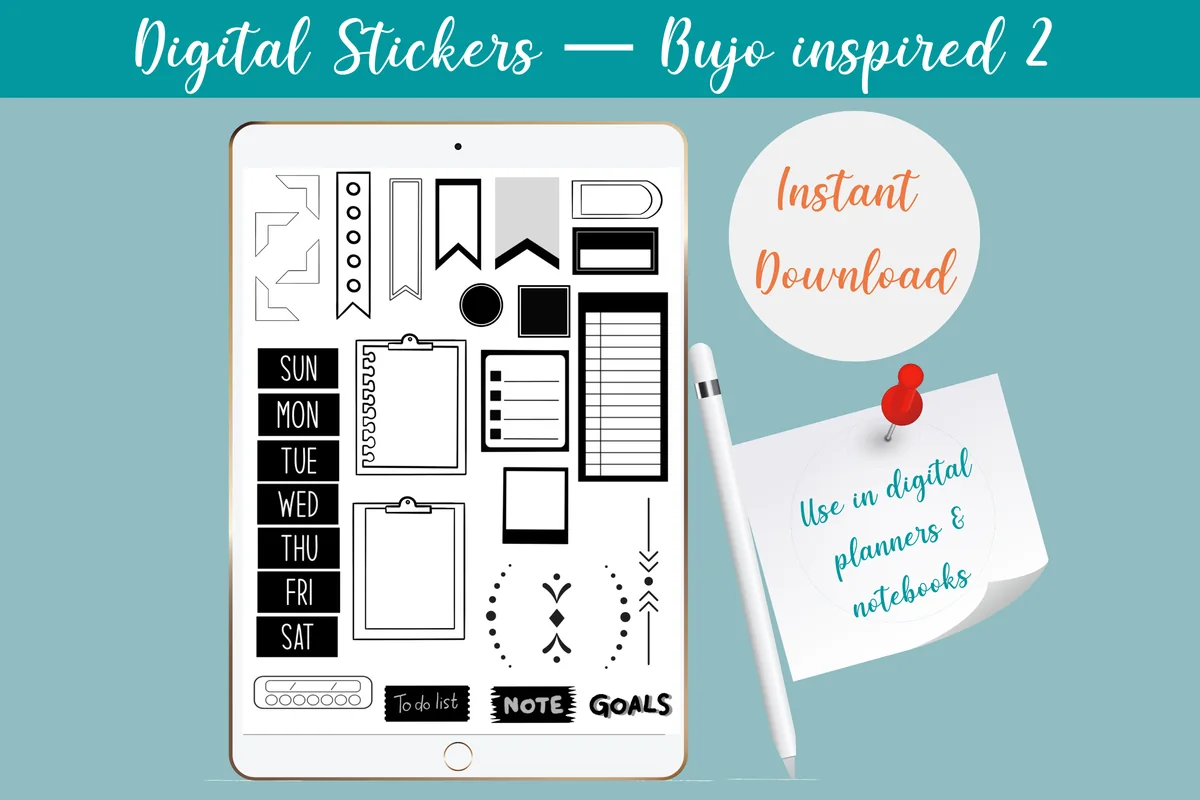
- Digital Stickers Bujo – Best minimalist bujo basics
- To Do List Planner Stickers PNG – Best for rapid logging lists
- Boss Girl Bullet Journal Stickers – Best all-in-one sticker kit
- Purple Paisley Bullet Journal Stickers – Best bold color kit
- Flowers Doodle Digital Stickers Set – Best doodle-style decoration
Best ready-made bullet journal
1. Undated Cute Orange Bullet Journal
Orientation: LandscapeLayouts: 11 pages: monthly calendar, note pages, mind map, clickable tabsFormat: PDF + GoodNotes sticker fileDates: Undated
Best for: bullet journal beginners, minimal planners, monthly resetters. Designed by digitaliya_studio.
- Undated, interactive bullet journal with clickable tabs (PDF)
- 11 pages on the cover list, including a fill-in monthly calendar and note pages
- Matching sticker file in .goodnotes format
- Soft orange and gingham design with small citrus illustrations
This is the closest thing on the list to a classic bullet journal you open and use. The designer calls it cute and simple for beginners, and that's fair: a calendar, a few page types and tabs, nothing more. Being undated, it works from whatever month you start. It also appears in my December ideas post, because it's still one of the few native bujo PDFs on Creative Fabrica.
Best dot grid base
2. Digital Notebook
Orientation: LandscapePaper: 16 templates incl. Cornell, two columns, dot gridSections: 12 hyperlinked
Best for: landscape note-takers, busy students, meeting notes. Designed by Shades of Zen.
- Landscape notebook with 12 hyperlinked sections
- 16 page templates: blank, dot grid in 2 sizes, lined, two columns, Cornell notes and more
- Each section can grow to as many pages as needed
- Instructions for importing into GoodNotes or another PDF note app
A bullet journal really only needs dots and an index, and this notebook gives both: dot grid pages in two sizes and 12 tabbed sections you can name as collections. It isn't sold as a bullet journal, which I like here, because nothing is pre-drawn. Pair it with one of the sticker kits below if blank pages make you freeze.
Best minimalist bujo basics
3. Digital Stickers Bujo
Layouts: 32 black and white bujo banners, arrows, frames, dividers, mini month gridFormat: PNG + GoodNotes sticker file
Best for: minimal bujo fans, black and white lovers, weekly spread makers. Designed by Shades of Zen.
- 32 hand-drawn black and white stickers inspired by bullet journal layouts
- Banners, arrows, frames, dividers, a checkbox column and a small month grid
- Individual PNG files with transparent backgrounds
- Pre-cropped GoodNotes sticker file
These are the little pieces you'd otherwise draw with a ruler every week: boxes, arrows, banners and dividers in plain black ink. Because they're monochrome, they suit the minimal bujo look and sit well on any page color. It's a small set, but it's the kind you reuse every single week.
Best for rapid logging lists
4. To Do List Planner Stickers PNG
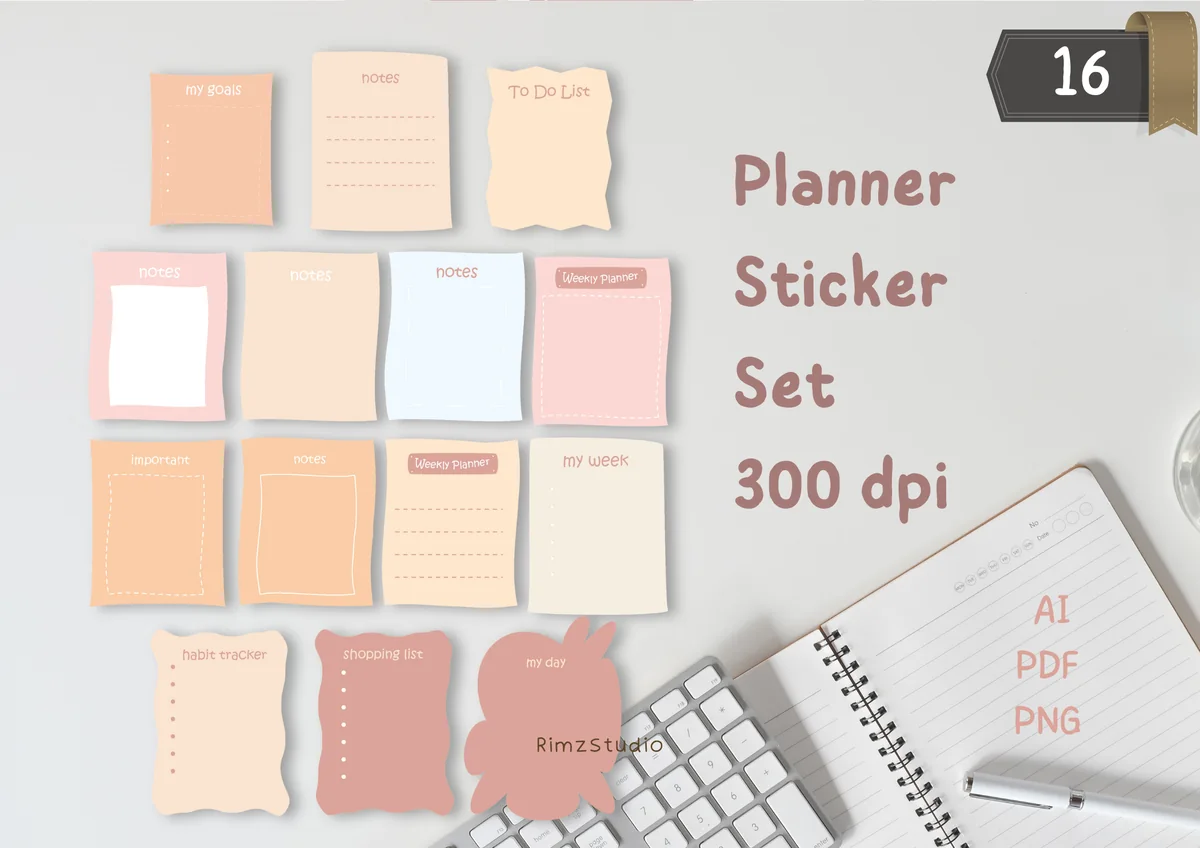
Layouts: 16 note and list cards: goals, to do, notes, habit tracker, shopping, my day, my weekFormat: PNG 300 DPI + AI + PDF
Best for: rapid loggers, list makers, students. Designed by RimzStudio.
- 16 hand-drawn note and list stickers in soft pink and peach tones
- Labels on the cover include my goals, to do list, notes, habit tracker, shopping list, my day and my week
- Transparent PNG files at 300 DPI, plus AI and PDF files
- Named by the designer for GoodNotes, Notability and Noteshelf
Rapid logging works best when each list has a home, and this set is basically a pile of labeled note cards: goals, to-dos, shopping, my day. Drop one into a daily log and write straight into it. The set also includes print and vector files, so not everything inside is for the iPad; the PNGs are the part you'll use. One of the best-reviewed sets here.
Best all-in-one sticker kit
5. Boss Girl Bullet Journal Stickers
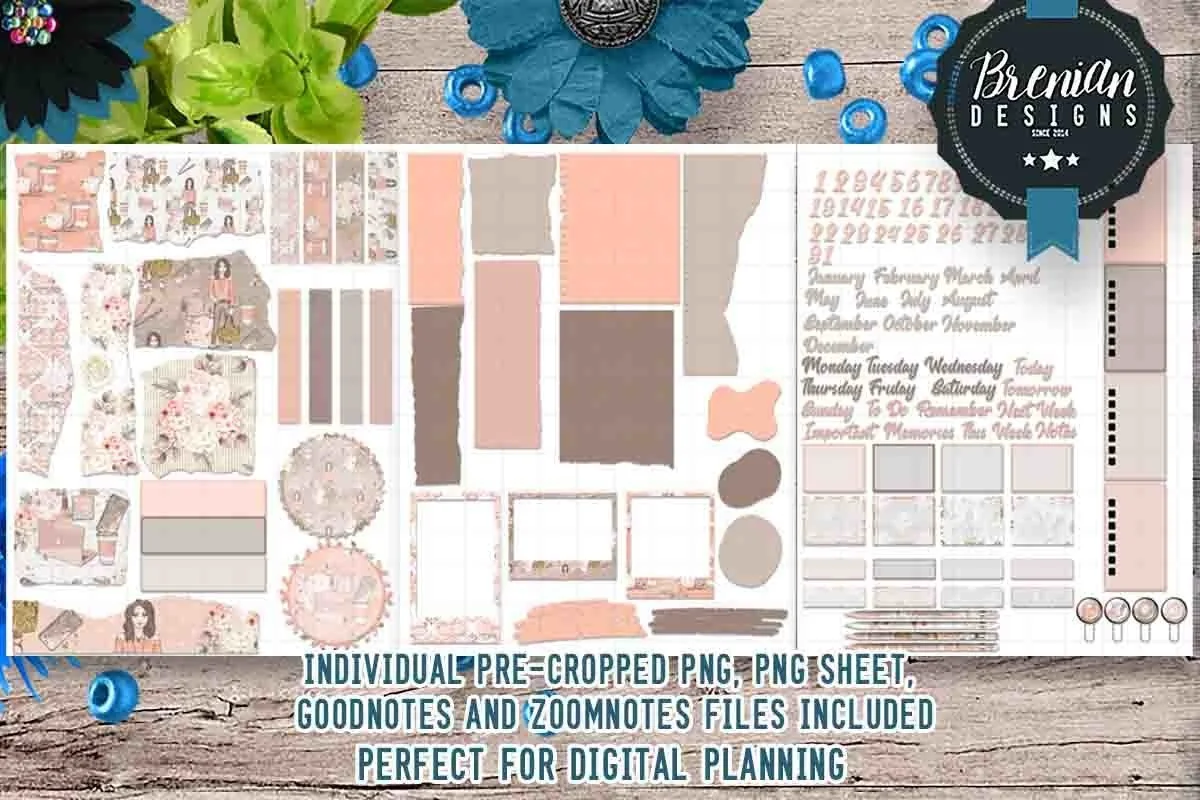
Layouts: 100+ stickers: dates 1 to 31, months, weekdays, page words, torn paper, washiFormat: Pre-cropped PNG + PNG sheets + GoodNotes and ZoomNotes files
Best for: monthly spread makers, blush tone fans, all-in-one kit fans. Designed by Bren Wotherspoon.
- Over 100 pre-cropped stickers
- Date numbers 1 to 31, month and weekday names, words like Today, To Do, Remember and Next Week
- Torn paper, washi strips, frames and small illustrations
- Pre-cropped PNG, PNG sheets, GoodNotes and ZoomNotes files (made for digital use only)
If you want one kit that covers a whole month, this is the one I'd start with: numbers for the calendar, month and day names for headers, and paper scraps and washi for decoration. It's the most-saved item on this list by a wide margin. The theme is soft and feminine, so if that isn't your style, look at the paisley set next.
Best bold color kit
6. Purple Paisley Bullet Journal Stickers
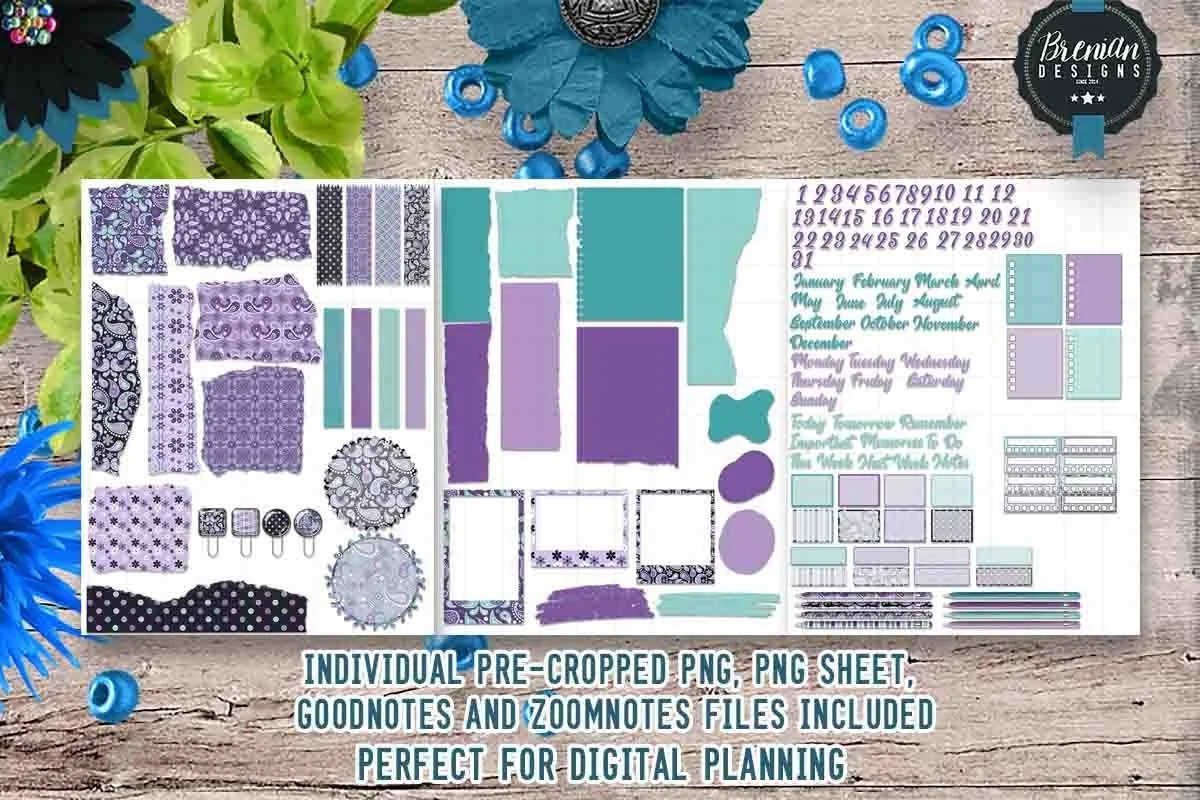
Layouts: 100+ paisley stickers: dates, months, weekdays, page words, washi, paper clipsFormat: Pre-cropped PNG + PNG sheets + GoodNotes and ZoomNotes files
Best for: bold color fans, monthly spread makers, pattern lovers. Designed by Bren Wotherspoon.
- Over 100 pre-cropped stickers in purple, navy and teal paisley
- Date numbers, month and weekday names, page words like Notes and This Week
- Washi strips, torn paper, round patches and paper clips
- Pre-cropped PNG, PNG sheets, GoodNotes and ZoomNotes files
Same designer and same structure as the Boss Girl kit, but in a bolder purple and teal paisley. That makes it the easy choice if you like the all-in-one idea and want a theme with more color than blush and beige. It has a 5-star rating from its reviews.
Best doodle-style decoration
7. Flowers Doodle Digital Stickers Set
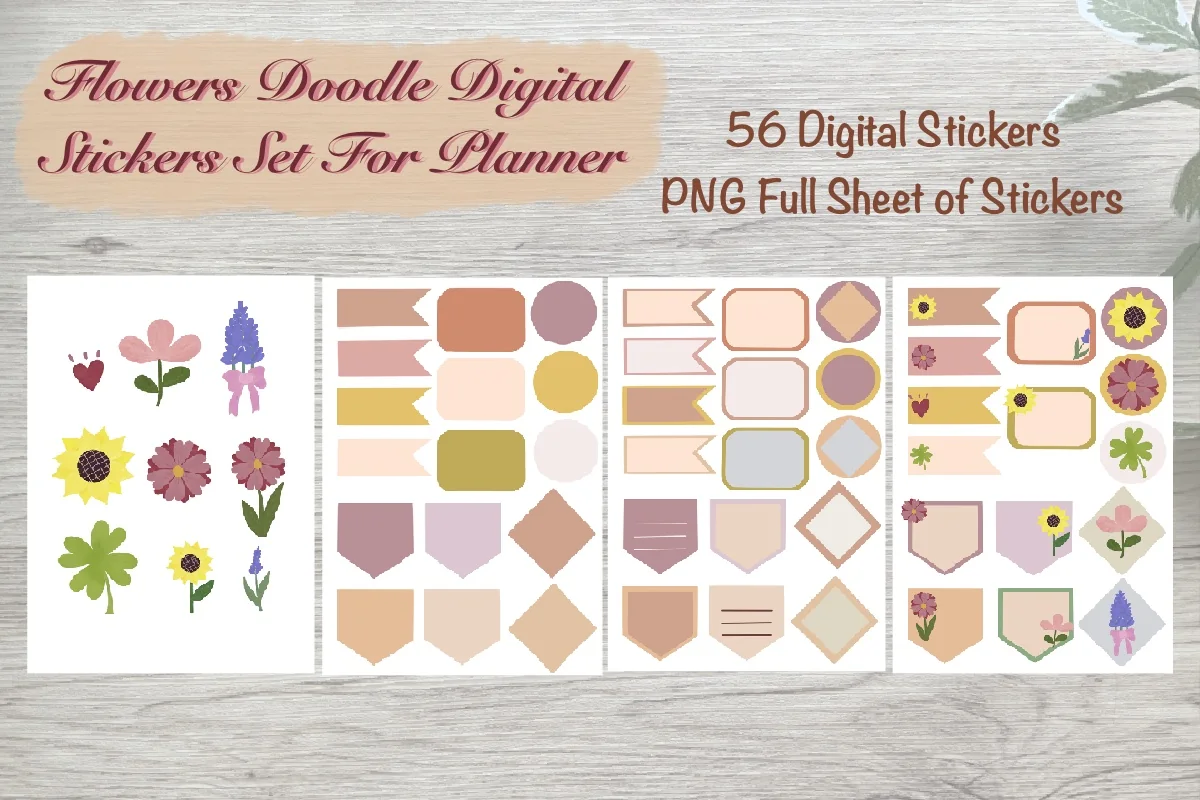
Layouts: 56 doodle flowers, banners, tabs, labels and framesFormat: 4 PNG sheets, 300 DPI
Best for: doodle fans, floral theme lovers, bullet journalers. Designed by Aloe_wannaart.
- 56 hand-drawn stickers on the cover: sunflowers, lavender, cosmos and clover
- Banners, tabs, labels and frames in muted pink, mustard and sage
- 4 PNG sheets with transparent background, 300 DPI
- Made for decorating bullet journals and planners in GoodNotes on the iPad
Doodles are half the charm of a bullet journal, and this set gives you the hand-drawn look without the drawing. Flowers go along the page edges, tabs and banners hold your headers. It comes as full sheets rather than single files, so you cut out the stickers you want with the lasso once and save them.
Quick Comparison
| Kit | What it covers | Size | Stand-out extra |
|---|---|---|---|
| 1. Undated Cute Orange Bullet Journal | Undated bujo PDF with tabs | 11 pages + stickers | Clickable tabs |
| 2. Digital Notebook | Sectioned notebook | 16 templates, 12 tabs | 2 dot grid sizes |
| 3. Digital Stickers Bujo | Bujo frames and dividers | 32 stickers | Black and white |
| 4. To Do List Planner Stickers PNG | Note and list cards | 16 PNG | Labeled boxes |
| 5. Boss Girl Bullet Journal Stickers | Full month and week kit | 100+ stickers | Numbers 1 to 31 |
| 6. Purple Paisley Bullet Journal Stickers | Full month and week kit | 100+ stickers | Paisley patterns |
| 7. Flowers Doodle Digital Stickers Set | Doodle flowers and tabs | 56 stickers | Hand-drawn style |
What Is a Digital Bullet Journal?
A bullet journal is a notebook you build yourself, page by page, around a few simple tools. A digital bullet journal is the same thing in an iPad app: a dot grid notebook in GoodNotes or Notability, written with an Apple Pencil. The core parts are:
- Rapid logging: short lines with a symbol in front. A dot for a task, a circle for an event, a dash for a note.
- The key: one page that explains your symbols, so you can read your notes a month later.
- The index: a table of contents. On the iPad, tabs and links can do this job.
- The future log: a few months on one page for dates further ahead.
- Monthly and weekly spreads: a calendar for the month, then a page for each week.
- Collections: any list that isn’t tied to a date, like books to read or gift ideas.
That’s the whole system. Everything else, from covers to doodles, is decoration you add only if you enjoy it.
A section tab may open the right area without locating a particular collection. These bullet journal index ideas show how to give each collection a recognizable title and a stable written address, with continuation pointers when its notes spread across several pages.
50 Digital Bullet Journal Ideas
Don’t try to set up all 50. Pick the setup pages, one monthly idea, one weekly idea and two trackers, then add a collection when you actually need it.
Setup Pages 1–7
- 1A key page with your task, event and note symbols, plus colors if you use them
- 2An index page that links to every collection with one tap
- 3A 6-month future log, two months per row
- 4A year at a glance with one line per month for big dates
- 5A simple cover: the year, your name and one sticker
- 6A “how I use this journal” page with three rules for yourself
- 7A pen and color test page so your colors stay the same all year
About Me Pages 8–13
- 8An about me page with favorites: book, song, food, place, season
- 9A “this year I want to” list of five small things
- 10A values page: five words that describe how you want to live
- 11A personality page with your zodiac sign, type or anything you find fun
- 12A letter to yourself to read at the end of the year
- 13A photo page with three pictures that sum up the start of the year
Monthly Spreads 14–20
- 14A classic calendar grid with numbers 1 to 31 from a sticker set
- 15A vertical list calendar: one line per day, events on the right
- 16A month cover with a theme, a palette and a short quote
- 17Three monthly goals in boxes next to the calendar
- 18A “last month, next month” box: one thing to keep, one to change
- 19A birthdays and important dates strip at the top
- 20A one-page monthly review: wins, lessons, mood in a word
Weekly Spreads 21–27
- 21Seven equal boxes with a day label sticker in each corner
- 22A Dutch door spread: days on one side, to-dos and notes on the other
- 23A minimal weekly log: the week’s dates and nothing else, then rapid logging
- 24A weekly spread with a small habit tracker along the bottom
- 25A “top 3 this week” box above the days
- 26A meal plan strip under each day
- 27A Sunday reflection corner: what went well, what to drop
Trackers 28–35
- 28A habit tracker grid with five habits and 31 boxes
- 29A mood tracker drawn as one shape you color in each day
- 30A sleep log with bedtime and wake time bars
- 31A water tracker with eight glasses per day
- 32A reading tracker: a bookshelf where each spine is one book
- 33A spending log for one category you want to cut
- 34A workout or steps tracker for the month
- 35A “screen-free hour” tracker for the evenings
Collections 36–43
- 36Books to read, with a column for when you finished them
- 37Movies and shows to watch
- 38A gift ideas list that you fill in all year
- 39A brain dump page for everything on your mind
- 40A packing list you duplicate for each trip
- 41A “someday” list: places, skills, small adventures
- 42A gratitude log with one line a day
- 43A favorite recipes page with links or photos
Doodles and Headers 44–50
- 44Simple doodle flowers along the edge of a weekly spread
- 45Banner headers for each day or collection
- 46Arrows and dividers between sections instead of boxes
- 47A different washi strip at the top of each month
- 48Small icons as bullets: a cup for café plans, a book for reading
- 49A hand-lettered month name, traced over a typed title
- 50One accent color per month, so the year looks like a color wheel
For more tracker layouts, see my habit tracker ideas and mood tracker ideas. If you’d rather draw your own doodles and stamps, my Procreate brushes for planners post has stamp sets, and for prompts to fill the pages, see the journaling prompts ideas.
How to Start a Bullet Journal: 7 Steps for Beginners
Most people quit bullet journaling in the first month because they start with too much: ten trackers, a hand-drawn cover and a spread for every week of the year. Start with the bare system and add pages only when you miss them. This works the same in a paper notebook and on an iPad.
- Pick one notebook. On the iPad that means one GoodNotes or Notability notebook with dotted paper, or an undated bullet journal kit if you’d rather not draw the pages.
- Write a key. Three symbols are enough to begin: a dot for a task, a circle for an event, a dash for a note.
- Make an index page. Leave it almost empty. You will add page numbers or links as you go.
- Set up a future log. Six months on one or two pages, only for dates you already know.
- Start this month. A simple list of dates down the left side with events next to them is a full monthly log.
- Log every day. Write today’s date and add tasks and notes as they come, in short lines. That’s the daily log, and it’s the heart of the method.
- Review at the end of the month. Move unfinished tasks forward or cross them out, then decide which one page you’d like to add next month, like a habit tracker or a reading list.
After a month you will know what you actually use. Then the ideas below become useful instead of overwhelming, and the GoodNotes setup steps further down show how to turn the system into a linked digital notebook.
At that first month-end check, give each unfinished task a reason to stay, wait or leave. The monthly review page ideas turn that choice into a short record of evidence and next actions, rather than another copied task list.
Dots, Not Rules: Bullet Journaling Without Perfectionism
The bullet journal method was made to be fast: write short lines, move on. The pressure to make pretty spreads came later, from photos online. A few habits that keep the journal useful instead of stressful:
- Set up one week at a time. Don’t build the whole month of spreads in advance. Plans change, and empty pages are discouraging.
- Use the dots, not a ruler. Dot grid pages already give you straight lines and boxes. A minimal spread with a date and a list is a complete page.
- Let stickers do the decorating. A header sticker and a washi strip take ten seconds. Save drawing for days you feel like it.
- Skip pages freely. A missed week is not a failure. Duplicate the next week’s page and keep going.
- Keep only what you use. If a tracker stays empty for two weeks, drop it next month.
- Review once a month. Move unfinished tasks forward or let them go. That migration step is where the method actually helps.
Digital makes all of this easier. Undo fixes any mistake, the lasso moves a box that ended up in the wrong place, and a spread you like can be duplicated in two taps.
Digital Bullet Journal Template or App?
Search for a digital bullet journal and you’ll find two different things. Apps, including some built around the bullet journal method, give you typed lists, reminders and sync across devices. A template is a PDF or a dotted notebook you write in by hand in GoodNotes, Notability or Noteshelf. It won’t send reminders or sync with your calendar, but it keeps the handwriting, the freedom of a blank page and the stickers.
If you mostly want task lists and reminders, an app is enough. If the point is to think on paper, design your own spreads and decorate them, a template in a note app is closer to a real bullet journal. Not sure which note app to pick? My GoodNotes vs Notability comparison covers the differences.
What I Look For in Digital Bullet Journal Kits
- Made for the iPad: the description names GoodNotes, Notability, ZoomNotes or the iPad, not only Canva or printing.
- Pre-cropped stickers: a sticker book file or single PNGs, so you don’t cut every piece out by hand.
- Functional pieces: numbers, day and month names, headers and boxes, not only decoration.
- Undated: nothing tied to a past year, so it works from any month.
- A style you’ll reuse: minimal black and white for a classic bujo, or one theme for a whole month.
Digital vs Paper Bullet Journal
Paper has the feel, and many people love the ritual of pens and a fresh notebook. Digital wins on flexibility: you can add pages anywhere, move things around, duplicate a layout instead of redrawing it and keep years of journals on one iPad. Stickers and washi never run out. The trade-off is the screen: if you journal to get away from it, paper may suit you better.
How to Set Up a Digital Bullet Journal in GoodNotes
- Create a new notebook with dotted paper, or import an undated bullet journal PDF (Share → GoodNotes, or + → Import).
- Make the first pages: key, index and future log.
- Open your sticker file (a .goodnotes sticker book or a folder of PNGs) and save the stickers you’ll reuse to the Elements panel, so they’re one tap away.
- Build the monthly spread with number and month stickers, then add your events.
- Make one weekly spread with day labels, then duplicate it for each week.
- Link the index to each collection, or use GoodNotes outlines, so you can jump between pages.
For more sticker sets, see my GoodNotes stickers, and for ready page types, the GoodNotes note templates. Want a palette to keep colors consistent? My GoodNotes color palettes have hex codes ready to paste.
FAQ
What is the best app for a digital bullet journal?
For a handwritten bullet journal on the iPad, GoodNotes and Notability are the most popular choices, with Noteshelf and ZoomNotes as alternatives. All of them support dot grid paper, PDF import and stickers. If you only want typed task lists, a task app may be enough, but it won’t feel like a bullet journal.
Is a bullet journal good for ADHD?
Many people with ADHD like the bullet journal because it’s flexible: short lines, no fixed layout and a monthly review to catch what slipped. A digital version helps further, since pages can be moved and nothing needs to be redrawn. It’s a planning tool, not a treatment, so if focus or organization is a real struggle, talk to a doctor or therapist. My ADHD planner ideas have more layouts.
Is bullet journaling still a thing?
Yes. Bullet journal ideas are still one of the big searches on Pinterest, and searches for bullet journal design ideas and doodles are growing. The difference is that more people now keep it on a tablet instead of paper.
Is there a free digital bullet journal?
Yes: create a new notebook with dot grid paper in GoodNotes or Notability, and you have a free digital bullet journal. Paid kits save time with ready pages, tabs and stickers. Creative Fabrica items are also included in its All Access subscription.
What should I put in a digital bullet journal?
Start with a key, an index, a future log, a monthly spread and weekly spreads. Add two or three trackers and a few collections, like a reading list or a brain dump. Everything else is optional.
Can I use digital bujo stickers in any app?
Pre-cropped PNG stickers work in almost any iPad note app that can insert images. A .goodnotes sticker file opens only in GoodNotes; in other apps, use the PNG folder that comes with most kits.
Final Thoughts
A digital bullet journal works best when it stays simple: dots, a key, a monthly page and a weekly page you set up one Sunday at a time. If you want a journal ready to open, start with the Undated Cute Orange Bullet Journal; if you’d rather build from blank dots, take the Digital Notebook and add the Boss Girl or Purple Paisley kit for headers and numbers. For more, see my digital journaling ideas, the December bullet journal ideas and the undated digital planners if you’d like more structure, or browse all wellness journals. Setting up this month? My November bullet journal ideas have a cozy cover, a gratitude log and Thanksgiving pages. For quick headers and borders, my digital washi tape picks work well on dot grid pages.
You May Also Like
This post contains affiliate links. If you buy through them, I may earn a small commission at no extra cost to you. Learn more.