Your new quarter has room for a course, a home project and a portfolio refresh, until you notice that they all need the same Saturday afternoons. These quarterly planning ideas help you choose what can fit into the next three months, then decide what needs to happen first.

I have grouped 25 ideas around capacity, sequencing and adjusting the plan. Start with the decisions you need, then compare three PDF options for keeping those decisions on your iPad. You can also use a notebook you already own; none of the ideas requires a special planning system.
Quarterly Planning Ideas That Begin with Available Time
Quarterly planning focuses on the next three months; annual planning sets the broader direction. In a personal quarterly planning process, a planning session can connect that direction to your actual evenings, deadlines and energy. Keep the upcoming quarter manageable by leaving room for delays and changing priorities.
Choose What Deserves a Place
- 1Name the quarter’s main result. Write a finish line you could recognize, such as a portfolio ready to send. “Work on my career” leaves the size of the commitment open. A concrete result gives you something to compare against other requests for your time.
- 2Review the previous quarter’s friction. List one thing that moved, one that stalled and what got in the way. If a project stopped because you were waiting for feedback, allow for that waiting time now. This is evidence for the new plan, rather than a score for how disciplined you were.
- 3Separate maintenance from new work. Regular chores, paid work and existing classes continue even when a new quarter begins. Put these commitments on a short baseline list before choosing additional projects. A quiet-looking planner page does not mean those hours are available.
- 4Give each proposed goal a reason. Write why it belongs in this quarter: a real deadline, an opportunity or a need you can explain. “It was on the last list” is a reason to reconsider it. Keep meaningful long-term goals in view without automatically turning every one into current work.
- 5Create a deliberate waiting list. Give appealing projects a place outside the active plan, with a condition for reconsidering them. For example, revisit the bedroom makeover after the course ends. This makes postponement a visible decision instead of leaving five projects half started.
Check Capacity Before Choosing Dates
- 6Mark the unavailable weeks. Travel, exams, family visits and busy work periods belong on the three-month overview first. Include preparation and recovery where you know they matter. A weekend away can also remove the evening you normally use to catch up.
- 7Estimate from a normal week. Look for repeatable work periods rather than your most optimistic free day. If two evenings are usually available, begin there and subtract known clashes. This estimate is a planning assumption you can revise, not a guarantee that every evening will go smoothly.
- 8Give each commitment a rough size. Write a range of work sessions beside the project, then compare it with your available sessions. Keep uncertain estimates visibly marked. If a result requires more time than the quarter holds, reduce its scope or move something else off the active list.
- 9Reserve time for interruptions. Leave some sessions unassigned so a delay has somewhere to go. Choose the amount according to the uncertainty of your work; there is no universal buffer percentage here. Label that space “reserve” so it does not look like an invitation to add another project.
- 10Set a limit on simultaneous projects. Choose how many substantial commitments you can actively move at once. One might suit a busy study term; another person may have room for more. Write down which project must finish or pause before the next one starts.
Capacity planning can change the goal itself. If the work only fits by using every spare evening, I would reduce the planned result before choosing a prettier layout. The page should make that trade-off easier to see.
Before testing what fits, you may need somewhere to gather the competing ideas. The digital brain dump template comparison distinguishes a dedicated thought notebook from journal and planner sections, so you can choose capture space before assigning selected commitments to the quarter.
Put the Work in a Useful Order
- 11Give the months different jobs. Use the first month for preparation, the second for the main work and the third for completion when that sequence fits. Do not force every project into equal thirds. A registration deadline may require a decision before any research sessions happen.
- 12Draw the dependencies. Write a short chain such as choose pieces → revise work → assemble portfolio → request feedback. A dependency tells you what unlocks the next phase. Keep the chain on your overview and leave the detailed task instructions in the project notes.
- 13Start long waits early. Request quotes, book appointments or ask for feedback before you reach the week that needs the answer. Add the date you need a response and a follow-up point. Waiting is part of the timeline even when you are not actively working.
- 14Place milestones before the last day. Set a first complete version before the final deadline so there is room to check it. For a personal project without an external deadline, define what “ready to review” looks like. A milestone should show a changed state, not merely another work session.
- 15Make the first month more specific. Choose its next few actions while leaving later months at the milestone level. This keeps the plan useful without guessing every task three months ahead. Add detail when the work gives you better information about what comes next.
Keep the Plan Usable on an iPad
- 16Make one overview the starting page. Keep the main result, month sequence and reserve space together. Use a bookmark or the app’s page navigation if that helps you return to it. Other notes can be detailed, but this page should answer what matters now without a long search.
- 17Separate fixed dates from estimates. Use a small written key, such as F for an external deadline and E for an estimated finish. Color can help, but the labels should still make sense without it. Moving an estimate should never quietly move a commitment you made to someone else.
- 18Keep a waiting-for column. Record the person or information you need, the request date and the next follow-up. This is especially useful when your quarter includes a collaborator. It also separates a blocked action from one that is ready for your next work session.
- 19Use links between levels sparingly. If your note app supports page links, connect the overview to the project page you need most. Otherwise, a written page name or bookmark can do the job. Check the listing for linked navigation before relying on tabs to move between pages.
- 20Write the next review appointment elsewhere too. Put a reminder in the calendar or reminder app you actually check, then note the review date in the PDF. Handwritten dates on a planning page do not create alerts. Your notebook holds the reasoning; the separate app can prompt you to return.
Adjust Without Restarting the Quarter
- 21Choose a short progress signal. For a portfolio, count pieces revised rather than evenings spent opening the file. Keep the signal close to the desired result. If you also track work sessions, label them separately so activity is not mistaken for completion.
- 22Compare planned and available time monthly. When a month closes, compare the sessions you expected with those you actually had. Then resize the remaining commitment before moving its dates. Repeatedly copying unfinished tasks into the next month hides the capacity problem.
- 23Write a rule for changing course. Decide what would justify a pause, a smaller result or a different sequence. For example, no feedback by the agreed review date might trigger a second reviewer. A decision rule helps you respond to a blocker without treating every inconvenient afternoon as a new strategy.
- 24Save a trace of the original plan. Keep a copy or a brief note of what changed and why, using your app’s available options. You do not need a complicated archive. The point is to learn whether the estimate, the scope or the circumstances changed before planning the next quarter.
- 25Close with a handoff note. Write what is finished, what remains useful and the next decision for each unfinished commitment. Choose whether it continues, waits or ends. A clean handoff gives the next quarter a starting point without making every old task an automatic priority.
Three PDF Options for Keeping the Quarter Visible
These picks serve different levels of the plan: the months, one project and your own supporting notes. Each listing names compatible PDF annotation apps. My comparison is based on the descriptions and gallery images; I have not tested the purchased files. Check current prices and availability on the seller’s page.
TL;DR: Choose the next three months of work before filling individual weeks. The quarterly overview maps months, the project sheet holds one commitment and its constraints, and the notebook gives you space to create your own review pages. These are PDF planning options, with manual updates rather than reminders.
Quick Picks
- Best for seeing the three months together: Quarterly Planner – 3-Month Goal & Produ
- Best for one substantial commitment: Project Planner – Printable & Digital
- Best for making your own planning pages: Digital Notebook
- Quarterly Planner – 3-Month Goal & Produ – Best for seeing the three months together
- Project Planner – Printable & Digital – Best for one substantial commitment
- Digital Notebook – Best for making your own planning pages
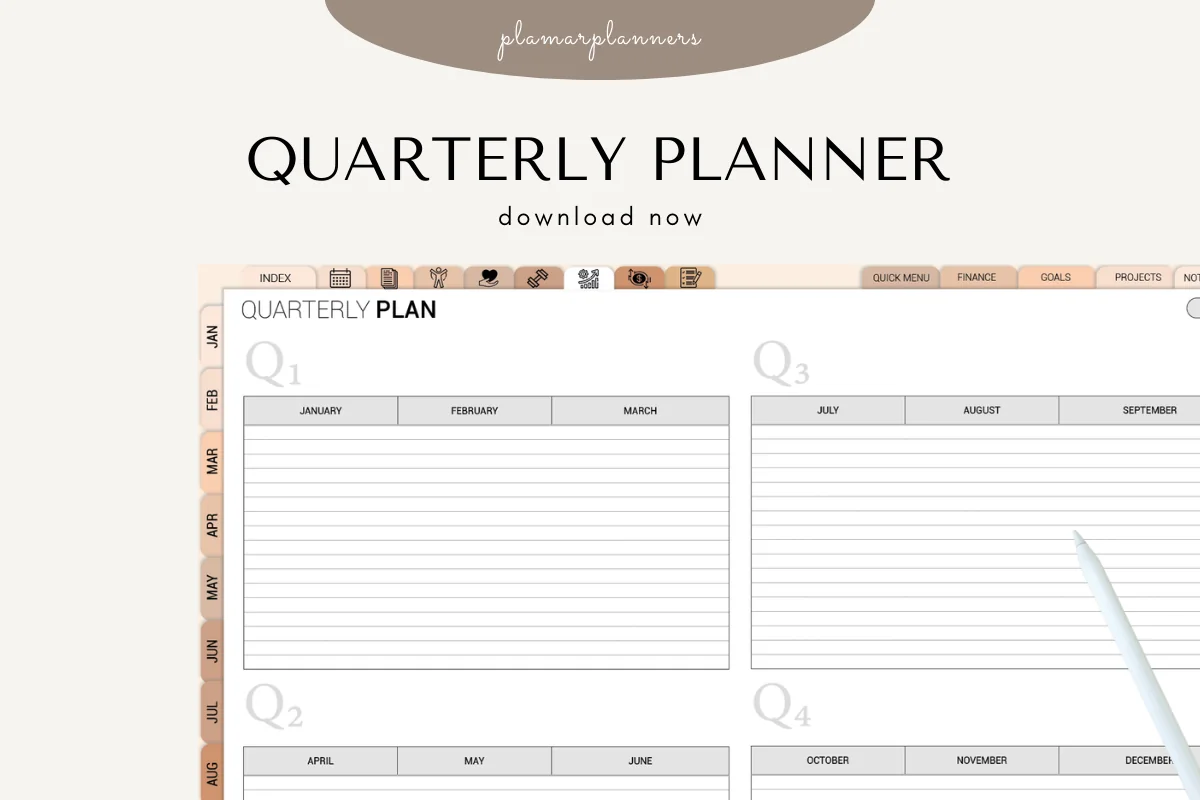
Best for seeing the three months together
1. Quarterly Planner – 3-Month Goal & Produ
Orientation: LandscapeLayouts: Quarter overview with monthly columnsDates: Undated; named calendar months
Best for: placing a few commitments across the months of a calendar quarter. Designed by Plamarplanners.
- Landscape overview with Q1 through Q4 and January through December column headings
- Blank lined writing areas under each month; four color treatments appear in the previews
- The description specifies PDF files, a tablet version, GoodNotes and Notability
The monthly columns make competing commitments visible on one page. I like this for deciding which month can hold a project before writing detailed tasks elsewhere. The gallery shows the overview, but not the weekly and reflection pages advertised in the listing. Ask the seller about those pages if they are essential to your plan.
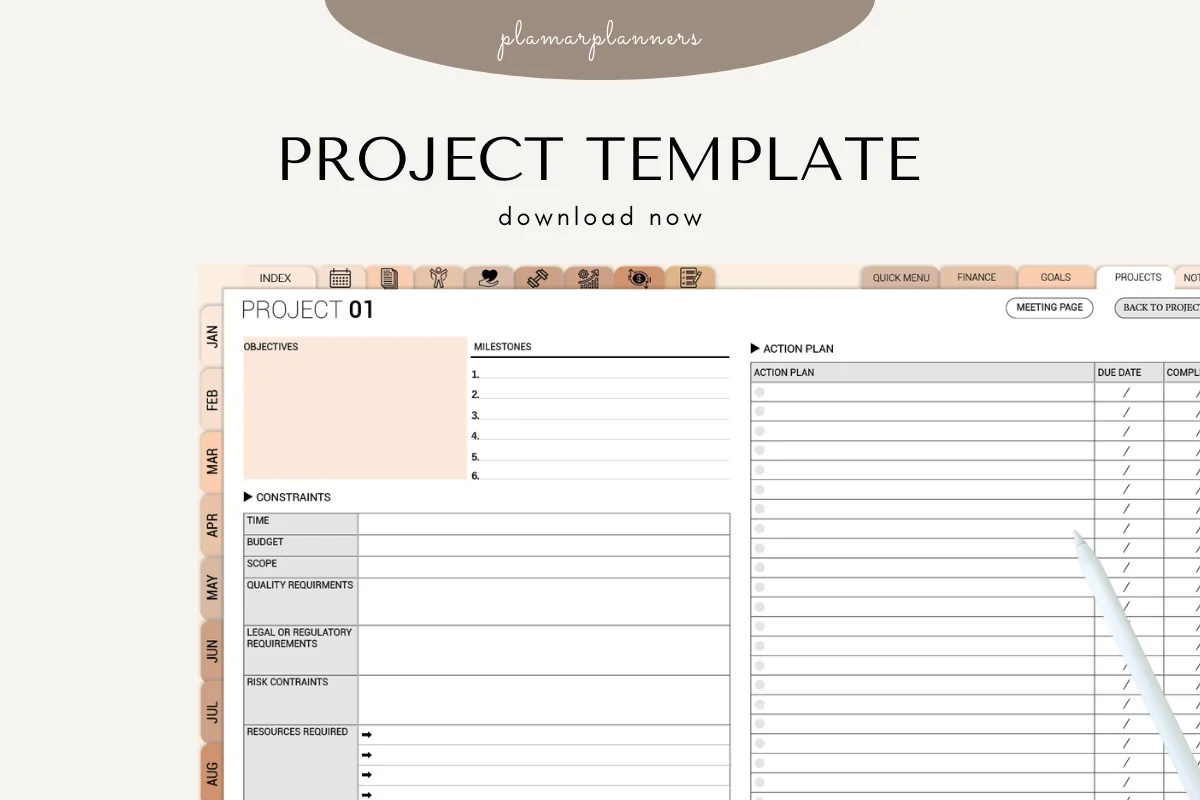
Best for one substantial commitment
2. Project Planner – Printable & Digital
Orientation: LandscapeLayouts: Objectives, milestones, constraints and action planDates: No prefilled dates shown
Best for: keeping the scope and resource limits of one quarterly project beside its actions. Designed by Plamarplanners.
- Objectives, milestones and an action plan are visible on the same landscape overview
- Constraints include time, budget and scope; task rows have due-date and completed-on columns
- Tablet-friendly PDF version described for GoodNotes, Notability and Xodo; four color treatments pictured
A quarter can look comfortably empty until one project consumes the available evenings. This sheet puts time, budget and scope constraints beside the actions, making the cost of that commitment easier to judge. Use it for one project within the quarter; no dedicated quarter calendar is shown in the previews, and the small fields may need zooming.

Best for making your own planning pages
3. Digital Notebook
Orientation: LandscapeLayouts: Blank, lined, grid, columns and Cornell notesDates: No prefilled dates shown
Best for: writing a capacity check, waiting list and quarter-end notes in a flexible notebook. Designed by Shades of Zen.
- Twelve sections with dividers and hyperlinked tabs, according to the listing
- Sixteen note templates described; blank, lined, dot grid, two-column and Cornell options appear in the gallery
- GoodNotes and PDF annotation apps explicitly named in the description
The two-column pages suit a simple planned-versus-actual comparison, while a blank page leaves room for an uneven three-month map. You supply the headings and planning questions. There are no ready-made quarterly prompts shown, and the decorative ring-bound design uses more screen space than the plain overview. Linked navigation is advertised, but I have not tested the purchased file.
Quick Comparison
| Planning option | Use in a quarter | Visible layout | Main limitation |
|---|---|---|---|
| 1. Quarterly Planner – 3-Month Goal & Produ | Monthly commitments | Four-quarter overview | Other advertised page types not shown |
| 2. Project Planner – Printable & Digital | One project within the quarter | Objectives, constraints and actions | No dedicated quarter calendar shown in previews |
| 3. Digital Notebook | Custom notes and reviews | Landscape notebook with template choices | Quarterly headings added by you |
A Personal Quarterly Plan Example with Room for Delays
Imagine a portfolio refresh alongside work and an evening class. The result is a PDF containing six revised pieces, ready to send for feedback. These numbers are an illustration of the planning process, not a recommended workload or a promise of how long creative work takes.
- Available capacity: suppose you identify two possible work sessions per week across twelve working weeks, giving 24 sessions. The class and other commitments are already excluded from those sessions.
- Protected reserve: leave six sessions unassigned in this example, so the planned work uses 18. A more predictable project might need a different reserve.
- Scope check: if revising six pieces looks likely to use all 24 sessions, choose fewer pieces or a later finish. Do not count the reserve twice.
| Phase | Main commitment | Checkpoint | Space to protect |
|---|---|---|---|
| Month 1 | Choose the six pieces and identify revisions | A list with a clear change for each piece | Do not start a second portfolio format |
| Month 2 | Work through the selected revisions | A first complete set for review | Keep unassigned sessions available |
| Month 3 | Assemble the PDF, seek feedback and correct it | A version ready to send | Leave time between feedback and final checks |
If a busy work week removes two sessions, the reserve can absorb them. If the scope doubles, reserve time will not solve the underlying problem. Change the size of the result or the timeline, then record the decision so the next review has context.
A monthly checkpoint gives that scope decision something concrete to work from. These bullet journal monthly review ideas help separate finished work from activity and give unfinished tasks a decision before you revise the remaining quarter.
Keep the Quarter, Project and Weekly List Separate
The quarter overview is for decisions that affect several weeks. A project page carries the details of one commitment; a weekly list chooses what you can act on now. Keeping those jobs separate avoids rewriting a long task list every time you open the three-month map.
A commitment outside the active quarter still needs somewhere to wait. Use these bullet journal future log ideas to record its later month and any earlier preparation cue, keeping the current overview focused on work you have actually chosen.
- Quarter overview: main result, fixed commitments, month sequence, checkpoints and reserve.
- Project notes: scope, resources, dependencies and the actions needed to reach the next milestone.
- Weekly list: the next available actions that fit around existing obligations.
- Review notes: what changed, what blocked progress and which decision needs revisiting.
For a wider calendar view, see my yearly planner ideas. If a single commitment needs more detail, the iPad project planner comparison explains the difference between an overview and a short task template.
When a PDF Is Enough and When You Need an App
A PDF gives you a place to write and compare decisions. It does not, by itself, assign tasks to team members, move dependent dates or synchronize handwritten deadlines with a calendar. Choose your tool according to what must happen after the planning session.
- Personal planning: an annotated PDF can hold your thinking if you are comfortable updating it manually.
- Shared commitments: confirm owners and dates with the people involved outside your private notebook. A copied PDF can become outdated.
- Automatic reminders or live project status: use a calendar, reminder or shared project app for those functions. Keep the PDF for notes if it still helps.
FAQ: Planning Your Next Three Months
What is the difference between quarterly and annual planning?
Annual planning gives a broader direction for the year. A quarterly plan chooses the priorities, resources and sequence for the next three months. You can use both without copying every annual goal onto the current quarter’s active list.
How do you break the year into quarters?
Calendar quarters are January to March, April to June, July to September and October to December. A fiscal year can begin in another month. A rolling three-month personal plan can start when you need it; label the dates clearly instead of assuming that its months match Q1 through Q4.
Is a quarter exactly 90 days?
A calendar quarter is three months, so its exact number of days varies. Use actual start and end dates when a deadline matters. “90-day plan” is a useful general description, but it should not replace the dates on your calendar.
What are good quarterly goals for personal planning?
Choose a result with a visible finish line that fits your circumstances, such as completing a defined course module or preparing a portfolio for review. Break broad goals into a realistic result for the quarter. The number of goals matters less than whether their combined work fits your available time.
Can I start halfway through a calendar quarter?
Yes. Write the time remaining and scale the result to it, or create a rolling three-month window. The pictured quarterly overview uses named calendar months, so a blank notebook may be easier if your chosen window crosses between two printed quarter groups.
Can these PDFs send reminders in GoodNotes?
The PDFs themselves do not create calendar alerts from handwritten dates. Use a separate calendar or reminder app for prompts. Navigation links, where provided by a seller, serve a different purpose from automated scheduling.
Choose What You Will Leave Out
Before adding another goal, look at the month with the least room. Which commitment would move if the current one takes longer? These quarterly planning ideas are most useful when they help you answer that question on the page. Keep the overview short enough that the answer is visible, then return to the next action you can actually complete.
You May Also Like
This article contains affiliate links. If you purchase through them, I may earn a commission at no extra cost to you. Read my affiliate disclosure.