Someone mentions a wedding in August while your journal is still open to March. You tuck the date into today’s notes, then wonder where it went when invitations arrive. These bullet journal future log ideas give later commitments a place to wait until they belong in your current month.
Begin with a plain month list and one rule for moving entries forward. Here are 25 ways to adapt that starting point, followed by three optional PDF notebooks and planners for iPad. You can also use pages you already own; none of these ideas requires a special purchase.
What Belongs Beyond the Current Month?
A future log holds tasks and events for months you have not reached yet. Your monthly log holds what has become current; your daily log is where a task becomes an action for a particular day. That separation lets you capture an appointment without treating it as something to do this afternoon.
When a future date becomes current, a month grid can sit beside the running log. These GoodNotes monthly calendars compare calendar-only files for that date view, rather than another full daily planner.
The official Bullet Journal future-log collection shows multiple layouts, from vertical lists to month panels. That page and the monthly migration explanation both connect future entries with the new monthly log. The adaptations below are my suggestions for applying that principle on iPad.
- Later, with a date: “August 18, wedding” goes under August.
- Later, without a day: “July, arrange car service” can wait under July until you can book.
- No chosen month: “Try pottery” belongs in a separate someday list, so it does not look like a commitment.
- Current: an appointment this month belongs in the monthly calendar or task list.
25 Bullet Journal Future Log Ideas to Capture, Prepare and Move On
Choose one layout from the first group, then borrow only the details that solve a problem you actually have. These are alternatives and small additions, rather than 25 pages to maintain.
Choose the Shape of Your Future Log
- 1Rolling six-month panels. Divide a blank or grid spread into six spaces and label them from the next month onward. Put the year beside each label when the spread crosses December. This keeps the planning horizon useful when you start a journal midway through the year.
- 2Two-month columns. Give two busy months an entire page, with one vertical list for each. Write a day number at the start of each line and leave gaps for additions. Use this instead of tiny calendar boxes when event names need more than a few words.
- 3An annual event strip. Reserve a narrow band for one or two major dates per month, then point to a detail page when necessary. It is a scan of upcoming commitments, rather than a whole-year goals spread. If every month needs a paragraph, widen the layout.
- 4A date-first list. Write “14: passport appointment” beneath a month heading, without drawing a miniature calendar. Add entries as they arrive; they do not need to be chronological. At monthly setup, sort the dates into the calendar you will actually consult.
- 5A separate someday lane. Keep undated possibilities beside the dated log, with a clear “No month chosen” heading. Review them when you have capacity, rather than carrying them into every month automatically. Move one into a month only after making a real decision.
Make the Date Useful Before It Arrives
- 6Month-known, day-unknown entries. Use “June, day TBD: family visit” when the month is agreed but the date is not. Keep the uncertainty in the wording. A blank day field can otherwise look like information you forgot to copy, rather than a date still awaiting confirmation.
- 7An event and its preparation date. Give the occasion and the first preparation task separate lines. A September celebration might need an August gift-order decision. The future log should surface that earlier action when August starts, not wait until the event month to reveal it.
- 8A renewal decision queue. Write the renewal month together with an earlier “keep or cancel?” date based on the provider’s actual terms. Keep account numbers out of the journal. This is a reminder to check the agreement, not a calculation of the notice period.
- 9Booking lead time. If appointments open in advance, record when you need to contact the provider as well as the intended appointment month. Use the booking window you have been given. Do not assume every clinic, class or service opens its calendar on the same schedule.
- 10Enrollment and course-start pairs. Capture the registration deadline separately from the first session. Add a short reference to the course email or your study notes. When registration becomes current, the monthly log receives the enrollment task; the start date stays available for its own month.
Collect the Plans That Tend to Get Lost
- 11Booking versus departure. Give a trip two kinds of entries: decisions that must happen beforehand and the travel dates themselves. An unbooked idea stays marked tentative. Once plans are confirmed, update the dates from the reservation instead of relying on the original penciled-in window.
- 12Birthdays with a preparation cue. Keep the birthday in its month and put a gift or message task earlier if you need one. Avoid filling the log with every possible shopping step. One cue leading to a separate gift list gives you room for the rest of the month.
- 13A seasonal task window. Use a month range for work that has flexibility, such as “April–May: sort outdoor storage.” Choose the range for your circumstances, rather than treating a suggested month as a universal rule. Once you decide when to act, move it into that month’s tasks.
- 14Milestones waiting for their month. Write the next meaningful checkpoint, not the entire project checklist. “October: submit portfolio” is enough here; revisions belong on the project page. If the work needs to begin earlier, add a preparation cue in that earlier month so the deadline is not the first prompt.
- 15School-term boundary notes. Record a confirmed term start, break or registration date from the institution’s calendar, with a reference to that source. Keep optional activities tentative until agreed. A future log can hold the boundary dates while a student planner carries the detailed class schedule.
Show Uncertainty Without Losing the Plan
- 16Family availability windows. Mark a range such as “June 10–17: possible visit” and name the person who still needs to confirm. Keep it visually distinct from a booked event. That makes the month easier to discuss without presenting a suggestion as an agreed family commitment.
- 17An annual reference register. Keep recurring birthdays and anniversaries on a separate reference page, then copy the relevant dates into the active future log. Check movable holidays and events before carrying them over. The reference saves repeated searching; it does not make every event recur on the same date.
- 18A tentative-versus-confirmed key. Choose a tiny written key, such as “T = tentative” and “C = confirmed,” and put it on the spread. Letters remain readable without color. If you also highlight entries, keep the same meaning throughout this log instead of inventing a new code each month.
- 19A source beside the entry. Add “confirmation email” or a short document reference after a date that may change. Keep the actual details in one appropriate place. A handwritten reference does not become a working hyperlink automatically, but it can still tell you where to verify the information.
- 20A capacity cue for crowded months. Add a small mark beside a month with several substantial commitments, using your own simple threshold. Treat it as a prompt to look closer, not as a measured workload score. Several short appointments may require less capacity than one long trip.
Keep the Log Working When Plans Change
- 21An overflow page with a pointer. When a month fills up, write “continued: August notes” at the end of its panel and use another page. Add the reverse pointer on that page. Keep both locations in your monthly review so the extra space does not become another forgotten list.
- 22A moved-event trail. Cross through the old date once and add “moved to October 9,” then enter the new date under October. Keeping a brief trail helps explain why the original reminder exists. Avoid leaving two active-looking entries for the same appointment.
- 23A clear cancellation rule. Strike through a canceled event and label it canceled if a line alone could mean completed. Keep any refund or notification task separate. Canceling the occasion does not automatically finish the actions that follow from it.
- 24A monthly pull-forward check. At the start of a month, review both that month’s panel and earlier preparation cues. Copy only entries that are now relevant into the monthly log. Mark the transfer after writing the destination entry, so the old record does not claim a move that never happened.
- 25A midyear restart. Begin a fresh spread with the next useful month when the old format becomes cramped. Transfer still-active future entries and link back to the old log for history. Leave past months in the archive instead of rebuilding an entire January-to-December calendar.
Three iPad PDFs You Can Turn into a Future Log
I shortlisted these for the pages they give you to write on. Each needs some adaptation: add month headings to the notebook, use the quarterly overview’s existing columns, or keep a short later-plans list in the orange journal. I reviewed their descriptions and all gallery previews, rather than purchasing or testing the files.
TL;DR: Keep future dates in month sections, then move the relevant entries into your monthly log. The 25 ideas below cover layouts, preparation dates and changes of plan. Three optional iPad PDFs follow: a flexible notebook, a quarterly overview and a small decorated journal. You add your own future-log entries.
Quick Picks
- Best for drawing your own month panels: Digital Notebook
- Best for using existing month columns: Quarterly Planner – 3-Month Goal & Produ
- Best for a small decorated planning space: Undated Cute Orange Bullet Journal
- Digital Notebook – Best for drawing your own month panels
- Quarterly Planner – 3-Month Goal & Produ – Best for using existing month columns
- Undated Cute Orange Bullet Journal – Best for a small decorated planning space

Best for drawing your own month panels
1. Digital Notebook
Orientation: LandscapeLayouts: Blank, lined, dot grid, graph, columns and Cornell notesDates: No prefilled calendar dates shown
Best for: building a custom future log with room for overflow and undated plans. Designed by Shades of Zen.
- Twelve notebook sections with dividers and linked tabs
- Sixteen note templates; blank, dotted, graph, two-column and Cornell pages appear in the gallery
- Landscape notebook for GoodNotes or another PDF annotation app
A graph page gives you room to draw six month panels; a two-column page separates dates from preparation notes. This is the most flexible option here for changing the layout or adding overflow pages. You create the month headings yourself. Decorative rings take up some writing space, and the links have not been tested in the purchased file.
Best for using existing month columns
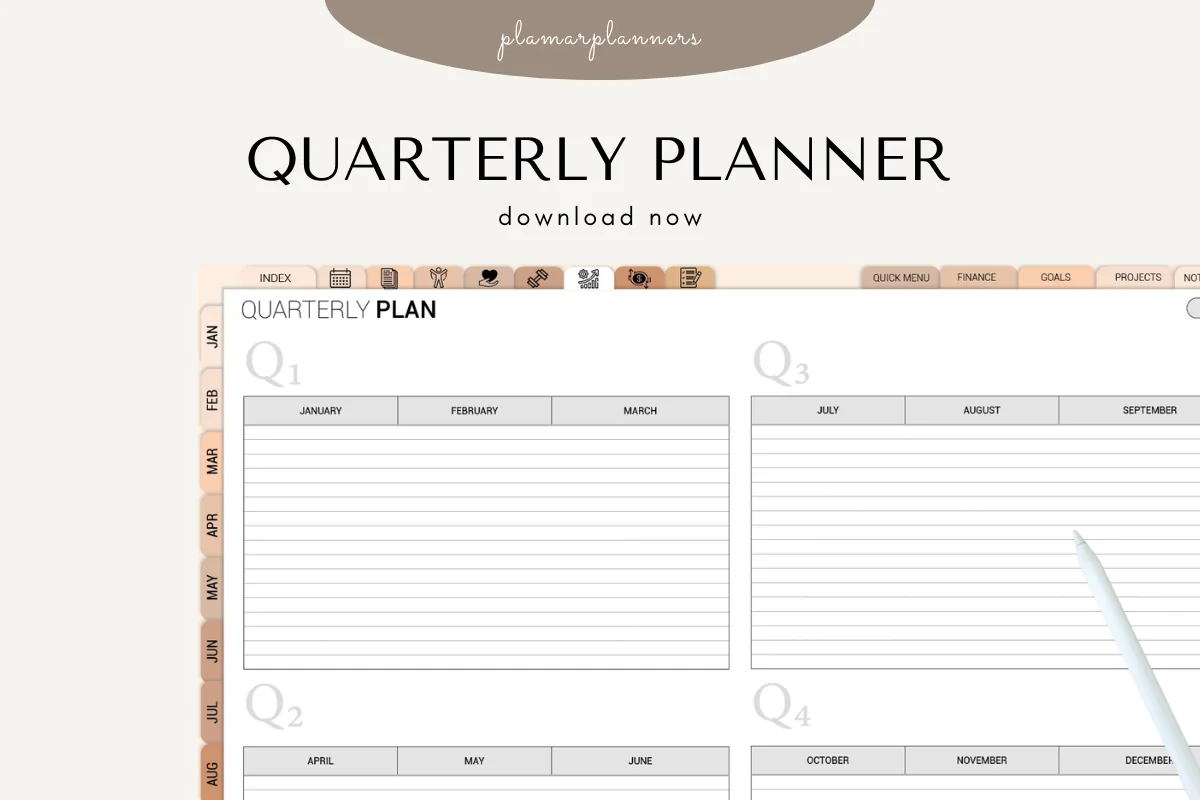
2. Quarterly Planner – 3-Month Goal & Produ
Orientation: LandscapeLayouts: Quarterly overview with monthly writing columnsDates: Undated; calendar month names
Best for: writing short future events beneath named months without drawing a calendar. Designed by Plamarplanners.
- Q1 through Q4 on a landscape overview, with January through December headings
- Lined spaces below the months; the gallery shows the overview in four color treatments
- PDF for tablet annotation, with GoodNotes and Notability named as compatible apps
Existing month columns save the work of drawing a calendar. Write “18: appointment” under the appropriate month and keep longer details on a separate notes page. The fixed January-to-December arrangement is less flexible than a rolling six-month spread. Weekly and reflection pages are advertised but absent from the gallery; ask the seller for a preview if those layouts matter to you.
Best for a small decorated planning space
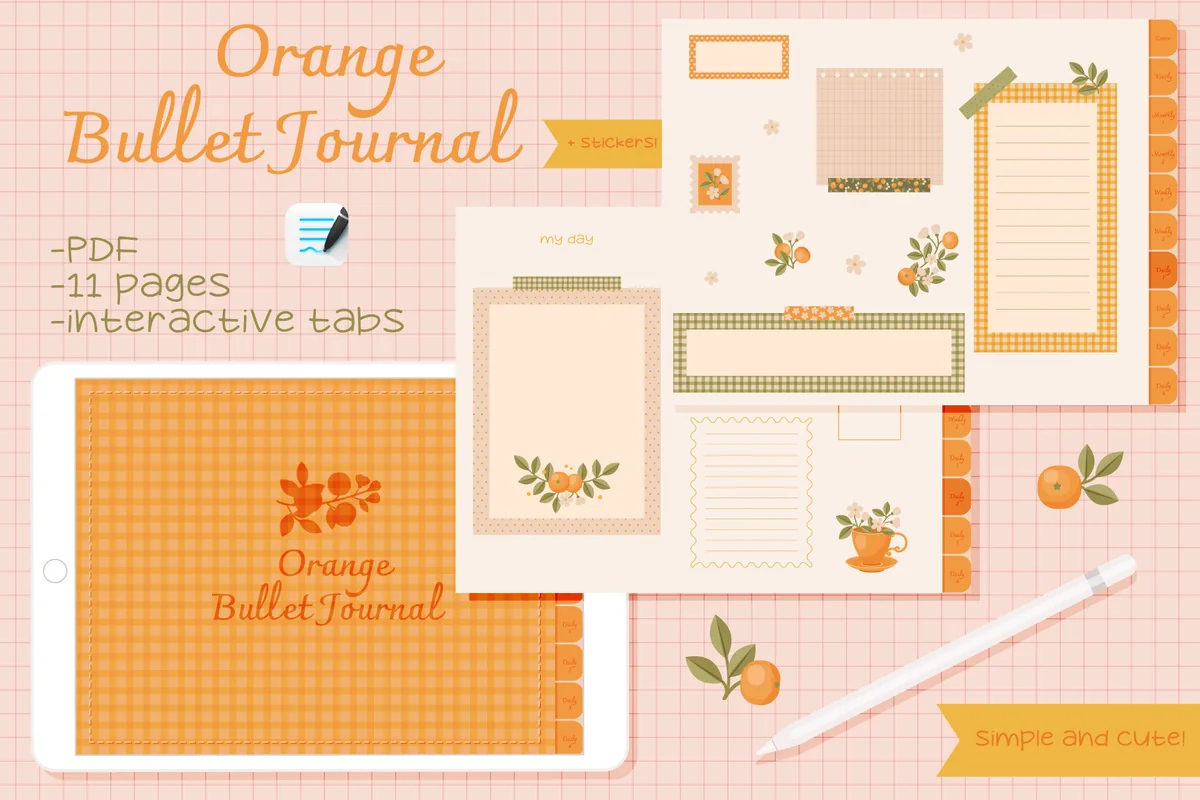
3. Undated Cute Orange Bullet Journal
Orientation: LandscapeLayouts: Fill-in calendar, weekly pages and decorative note framesDates: UndatedWeek start: Monday on the pictured calendar
Best for: a light schedule with a fill-in month calendar and compact notes for later. Designed by digitaliya_studio.
- Undated PDF bullet journal by digitaliya_studio, with GoodNotes import instructions
- Fill-in calendar, weekly arrangements and decorative writing frames visible in the previews
- Clickable navigation; stickers in .goodnotes format
The orange frames suit a short later-plans list beside the calendar, especially if you prefer decorated pages to a blank notebook. Small writing areas make this a limited option for a busy schedule. Use the notebook above for longer multi-month lists. No dedicated six-month future-log spread is shown, and the yearly mini calendars leave little room for detail.
Quick Comparison
| PDF option | Future-log use | Visible starting page | Trade-off |
|---|---|---|---|
| 1. Digital Notebook | Custom month panels and overflow | Blank, grid and column templates | You create every future-log heading |
| 2. Quarterly Planner – 3-Month Goal & Produ | Short dated entries by month | Four-quarter overview with lines | Fixed January-to-December arrangement |
| 3. Undated Cute Orange Bullet Journal | Light calendar plus a short later list | Fill-in calendar and writing frames | Limited writing area; custom future log needed |
From an August Event to a July Action
Here is a worked example using invented dates: a wedding is on August 18, and you decide to arrange the gift by July 10. Put the event under August and the gift task under July. When July becomes current, only the preparation task needs to move into July’s action list.
| Record | Where it waits | What moves forward |
|---|---|---|
| August 18: wedding | August future-log panel | Event goes into August’s monthly calendar when August begins |
| July 10: arrange gift | July future-log panel | Preparation task goes into July’s monthly task list |
| Gift options | Separate gift notes | Only the chosen next action, when needed |
The distinction is the job of each entry. The event reserves a date; the preparation cue creates an earlier action; the notes hold detail. Keeping them separate prevents the future log from growing into a second daily to-do list.
When several future entries involve substantial projects, dates alone do not show whether the work fits. These quarterly planning ideas compare commitments with available sessions and put preparation in sequence, while the future log keeps its simpler role as a place for later dates.
- Future log: what needs attention in a later month.
- Monthly log: the events and tasks that are now relevant.
- Daily log: the specific action you choose for today.
- Collection or notes page: supporting information too long for a month panel.
Make Monthly Migration a Decision, Not a Copying Exercise
A future log only helps if you return to it. The official migration guidance asks you to review what is worth carrying forward, then check whether future tasks or events have become current. On an iPad, rewriting or moving text is still a decision you make; a PDF does not choose the month for you.
Before moving entries into the next month, give unfinished work a reason to stay or leave. These bullet journal monthly review ideas use recorded results and a decision for each remaining task, so migration reflects what still matters rather than reproducing the old list.
A Short Monthly Handoff
- 1Open the destination first. Create or locate the new monthly calendar and task page. You need somewhere to put the entries before marking them transferred. Keep the future log nearby in the page thumbnails or app navigation, without assuming every PDF has a dedicated future-log link.
- 2Review dates and preparation cues. Read the new month’s entries, plus any earlier cues that remain unresolved. Check tentative dates against the original source. Transfer relevant events to the calendar and tasks to the monthly list; keep detail on its notes page instead of copying the entire explanation.
- 3Resolve each old entry. Mark transferred items using your key after the destination is written. Cross out canceled plans, revise changed dates and leave later items in their own months. If a vague someday idea still has no chosen month, keep it separate rather than making it look overdue.
Choose a Layout for Your Actual Writing Space
For a minimalist future log, start with dated lines under month headings. Mini calendars are useful when you want to see the shape of a month, but they leave less room for descriptions. A vertical future log gives longer event names a natural line to sit on.
- Few fixed dates: six small month panels can be enough.
- Long entries: use two months per page or a vertical date list.
- Many unsorted entries: consider the Alastair method, which uses month columns beside a running list. The official inspiration page shows the approach; label each column clearly.
- Lots of event details: use a short reference to a separate page. The Calendex example on the official site uses page references; you do not need that additional system for a simple list.
A year-at-a-glance page is useful for seeing calendar dates together. A future log also needs space to record what is happening. If the calendar has tiny boxes, keep the date overview and a separate event list rather than forcing every detail inside it. Our yearly planner ideas cover the wider annual view.
A PDF Page or a Calendar App?
Use the PDF for a handwritten overview and the reasoning around plans. Use a calendar app when an appointment needs a timed alert, shared invitation or automatic recurrence. None of the three PDF offers above advertises automatic calendar synchronization; writing a date on a page does not schedule a notification.
- Keep appointments consistent: choose the calendar app as the source for confirmed times, then summarize important dates in the journal.
- Avoid two competing task lists: once a future task becomes current, mark its destination rather than leaving it active everywhere.
- Start with what you own: a blank page can serve as a future log template. A paid notebook is optional; it mainly changes the page structure and navigation.
FAQ: Later Dates and Monthly Planning
How far ahead should a future log go?
Use the horizon you can maintain. Six months is one workable starting point, while a full year helps with annual events. Keep a clearly labeled “Beyond this spread” list for dates outside that horizon so they have a destination without squeezing extra months onto the page.
Does the future log have to start in January?
No. You can start with the next month when you open a new journal or restart your system. Add the year to month labels when the spread crosses into another year. There is no need to redraw months that have already passed.
Can I keep tasks without exact dates here?
Yes, if you know the relevant month: “September: compare classes” is enough. Keep completely undated possibilities in a someday collection. That makes it easier to distinguish a plan for September from an idea that simply interests you.
An undated wish needs room for its reason and an eventual memory, rather than a month assigned just to make it look scheduled. These bucket list journal ideas develop that separate collection while leaving the future log for plans with a chosen month.
Where should I put the future log on an iPad?
Choose a place you can return to at monthly setup: an early notebook section or a bookmarked page works. The traditional layout places it near the front. App bookmarks and thumbnails are separate from the PDF’s built-in links; check how your app handles each.
Are the three products ready-made future log templates?
No. They are optional writing spaces for adapting these ideas. The quarterly overview already has month columns, while the notebook and orange journal need your own future-log headings or layout. Use an existing blank page first if you are unsure which format suits your schedule.
Give the Next Date a Reliable Place to Wait
Try these bullet journal future log ideas with the next real date you receive. Write the month, the event and any earlier preparation cue, then check that entry when you open the relevant monthly log. If it reaches the right month without getting lost, the page has done its job.
Keep the rest of the journal as simple as you need. For the surrounding key, index and everyday pages, see the broader digital bullet journal ideas; this page can remain your focused home for later plans.
You May Also Like
This article contains affiliate links. If you purchase through them, I may earn a commission at no extra cost to you. Read the affiliate disclosure.