You reach the checkout with groceries, shampoo and a birthday card, then realize that one receipt belongs to three different pots of money. Clear cash envelope categories make that split easier, especially when you keep a short spending record on your iPad beside the actual cash.
Begin with a few categories you need to watch; there is no need to fill a binder with every label on this list. Below are 20 options, a worked cash-balance example and seven digital budget tools. The tools record your decisions; your envelopes or bank accounts still hold the money.
20 cash envelope categories: a list for everyday spending
These are options to choose from, not 20 envelopes to fund at once. Set one budget period for the categories you select, such as the week ahead, and define each label before the first purchase. The same expense should belong to one category.
Food and home
- 1Groceries. Food you bring home to prepare. Decide whether snacks from a convenience store count here or as treats, so the shop location does not change the rule.
- 2Household supplies. Cleaning products, trash bags and laundry supplies. A separate heading can stop these essentials from making the food total look unusually high.
- 3Dining out. Restaurant meals and takeout. Include the full amount paid, including tips, when you subtract the purchase from the envelope.
- 4Coffee and treats. Small optional drinks or snacks. Keep this separate only if it helps you notice a spending habit; otherwise include it in dining out.
- 5Small home replacements. Light bulbs, batteries and everyday kitchen items. A future appliance purchase belongs in a planned savings pot, outside this current-spending list.
Getting around and staying well
- 6Fuel. Routine fuel purchases during this period. A repair estimate is a different planning job and should not silently use up this week’s travel money.
- 7Transit and parking. Bus fares, train rides and parking paid as you go. Record the payment method if some purchases are cash and others use a card.
- 8Personal care. Toiletries and routine grooming supplies. Choose whether shampoo belongs here or under household supplies, then follow that choice consistently.
- 9Haircuts and grooming visits. An appointment expected during the current period. If you are saving over several months for a later visit, track that separately as a future cost.
- 10Routine pharmacy purchases. Expected items you pay for regularly. Keep necessary care in the budget; an empty envelope is a signal to review the plan, not skip needed treatment.
People, pets and personal spending
- 11Pet food and daily supplies. Regular food, litter and similar items. A future vet bill needs its own plan rather than being hidden in the ordinary food allowance.
- 12Clothing basics. Replacements you expect to buy now, such as socks or a work shirt. Long-term saving for a larger wardrobe purchase is a separate goal.
- 13Laundry services. Laundromat loads, dry cleaning or other services paid this period. Put detergent in one agreed category so it is not counted twice.
- 14Workday extras. Optional spending around the working day that does not fit another chosen category. If this is usually lunch, use dining out instead of duplicating it.
- 15Personal fun money. A clear allowance for your own small choices. In a shared budget, named personal envelopes can keep the rules understandable without recording every preference as a household need.
Leisure and small occasions
- 16Entertainment. Tickets, local activities or a movie night paid during the period. An automatic streaming subscription belongs with scheduled bills in this setup.
- 17Hobbies and craft supplies. Materials for current projects. Distinguish supplies from an ongoing class fee or a larger equipment goal.
- 18Books and stationery. Small purchases you want to watch separately. Combine this with hobbies if the extra heading does not change any decision.
- 19Small gifts and cards. An occasion you are paying for now. Money reserved for a later holiday remains a future-expense fund, even if you keep it in an envelope.
- 20Social outings. Shared activities with friends. If dinner is already in dining out, charge it there; use this envelope only for a genuinely different purpose, such as an event contribution.
Seven iPad tools for keeping the record
I selected the tools below for their envelope page, spending logs or supporting budget sections. Use them to keep your own spending entries and review category totals. Start with the layout closest to the record you need; buying more pages will not make the category rules clearer.
TL;DR: Choose a few categories from the 20 ideas below. These seven tools support a manual spending record; only the first shows a dedicated Cash Envelopes page. A PDF records money movements but does not move or protect your cash.
Quick Picks
- Best for a dedicated cash envelope page: Digital Budget Planner, Financial Planner
- Best for reviewing category totals: Undated Budget Planner for GoodNotes
- Best for separating cash from bills: Budget Digital Planner Hyperlinked Tabs
- Best for a detailed expense log: Gold Budget Digital Planner/Hyperlinked
- Best for a category checklist: Expenses Tracker 4years Interactive PDF
- Best for a compact supporting record: Simple Savings Planner, Digital Planner
- Digital Budget Planner, Financial Planner – Best for a dedicated cash envelope page
- Undated Budget Planner for GoodNotes – Best for reviewing category totals
- Budget Digital Planner Hyperlinked Tabs – Best for separating cash from bills
- Gold Budget Digital Planner/Hyperlinked – Best for a detailed expense log
- Expenses Tracker 4years Interactive PDF – Best for a category checklist
- Simple Savings Planner, Digital Planner – Best for a compact supporting record
- Digital Budget Planner, Finance Tracker – Best for a wider budget overview

Best for a dedicated cash envelope page
1. Digital Budget Planner, Financial Planner
Orientation: PortraitSections: Cash Envelopes and spending logsFormat: Hyperlinked PDF
Best for: recording several cash envelopes beside a daily spending log. Designed by ThePlannersDelight.
- Cash Envelopes pages, Daily Spend Count and weekly check-ins
- Monthly and biweekly budgets, bill and savings trackers
- Hyperlinked PDF for GoodNotes, Noteshelf or Notability; matching PNG stickers
- The seller calls for an Apple tablet that works with a writing stylus, for example Apple Pencil. Apps, the device and the stylus are separate from this file.
Financial Plan is my first choice for an envelope ledger. The preview shows a page specifically labeled Cash Envelopes, rather than a savings jar you have to reinterpret. Keep the envelope balances there and use the daily spending log for the receipt detail. The monthly and biweekly budget pages give those cash amounts a place in the wider plan; none of the balances updates itself.
Best for reviewing category totals
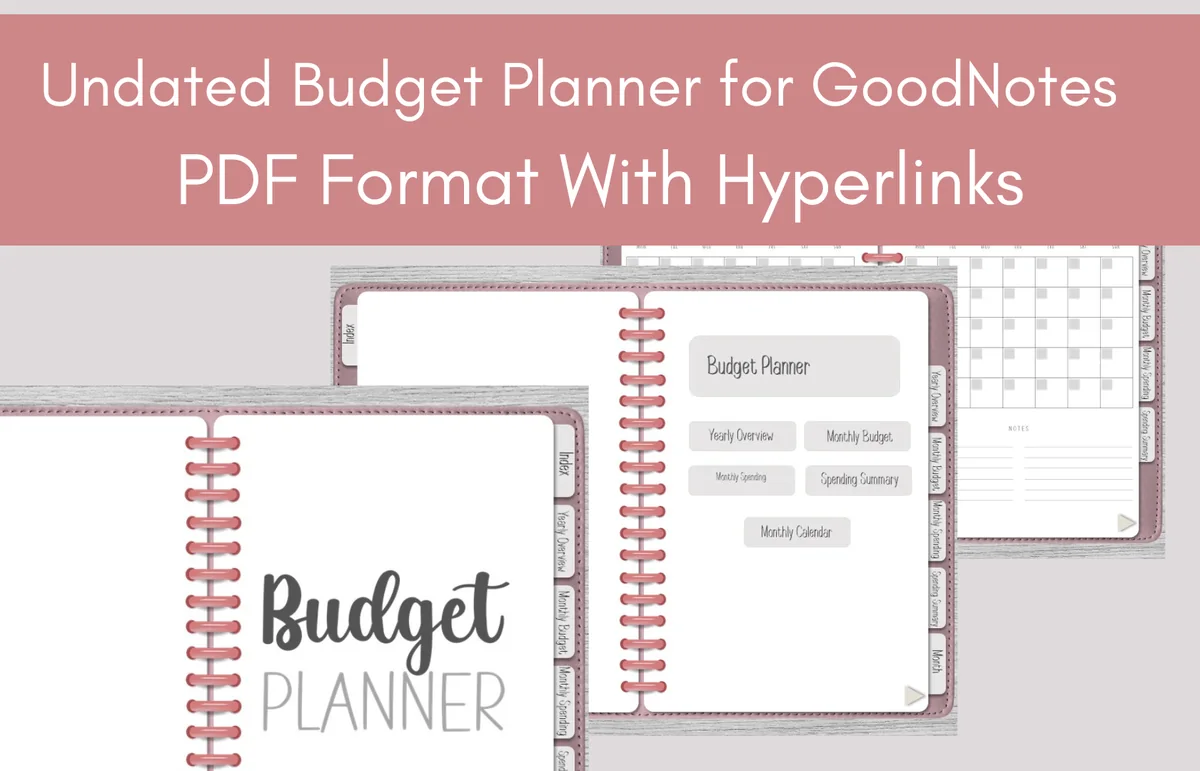
2. Undated Budget Planner for GoodNotes
Sections: 30 pagesFormat: Hyperlinked PDFDates: Undated
Best for: reviewing category spending before choosing next period's cash amounts. Designed by Perla Designs.
- 30-page undated budget PDF for GoodNotes
- Monthly Spending, Spending Summary and Yearly Overview shown in previews
- Hyperlinked navigation listed by the designer
The Spending Summary has date, item, description and total columns, while the Monthly Spending layout breaks costs into named sections. That makes it useful for seeing which category keeps running over before you set the next cash allowance. Keep a separate running-balance note for each physical envelope: this is a budget summary, not a ready-made cash movement register.
Best for separating cash from bills
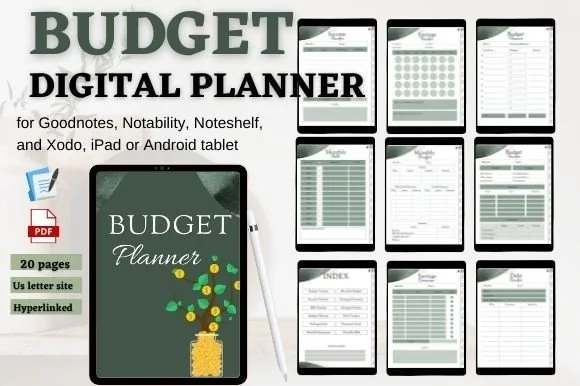
3. Budget Digital Planner Hyperlinked Tabs
Paper: US LetterSections: 20 pagesFormat: Hyperlinked PDF
Best for: keeping current spending apart from monthly bills and future goals. Designed by mixxdigitaldesign.
- 20-page hyperlinked PDF in US Letter size
- Monthly Expenses, Monthly Bills, Budget Tracker and Notes
- Listed for GoodNotes, Notability, Noteshelf and Xodo on iPad
The green layout separates monthly expenses, bills and savings into different pages. That division suits a mixed cash-and-card budget: grocery cash belongs in the spending record, while an automatic phone payment stays with bills. Use Notes or an extra page for your envelope headings and balance formula. The savings circles are for goals, not evidence that money has moved into an envelope.
Best for a detailed expense log
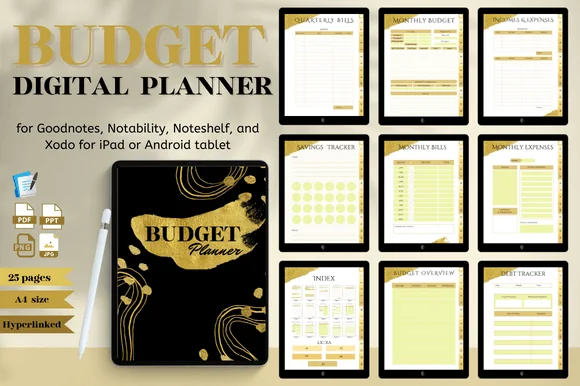
4. Gold Budget Digital Planner/Hyperlinked
Paper: A4Sections: 25 pagesFormat: Hyperlinked PDF
Best for: keeping dated expense detail alongside a monthly category plan. Designed by Nann Digital Art.
- 25-page A4 hyperlinked planner for GoodNotes and other listed iPad apps
- Expense Tracker, Budget Tracker, Monthly Expenses and Monthly Bills
- Five extra pages with lined and grid note layouts visible in previews
The Expense Tracker gives individual purchases more room than a single category total. Its separate Budget Tracker can hold the plan, and an extra notes page can hold the envelope balance calculation. Choose it for the expense-log workflow; it does not include a demonstrated dedicated Cash Envelopes page.
Best for a category checklist
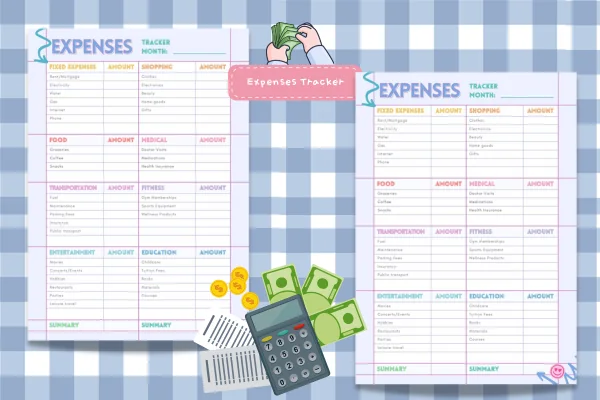
5. Expenses Tracker 4years Interactive PDF
Sections: 48 monthly pagesFormat: Interactive PDF
Best for: checking recurring spending headings when designing an envelope list. Designed by Zoom4Design.
- 48 monthly tracking pages listed in the description
- Groups food, transportation, shopping, medical and other costs
- Interactive PDF listed for iPad/GoodNotes or desktop
The category labels are the useful part here: food, transportation and shopping are already separated, so a missed type of spending is easier to spot. Use this as a monthly reference alongside your cash ledger. A category total is not the amount left in the physical envelope. The listing advertises editable fields. Check whether your intended app supports them before relying on typed entries.
Best for a compact supporting record
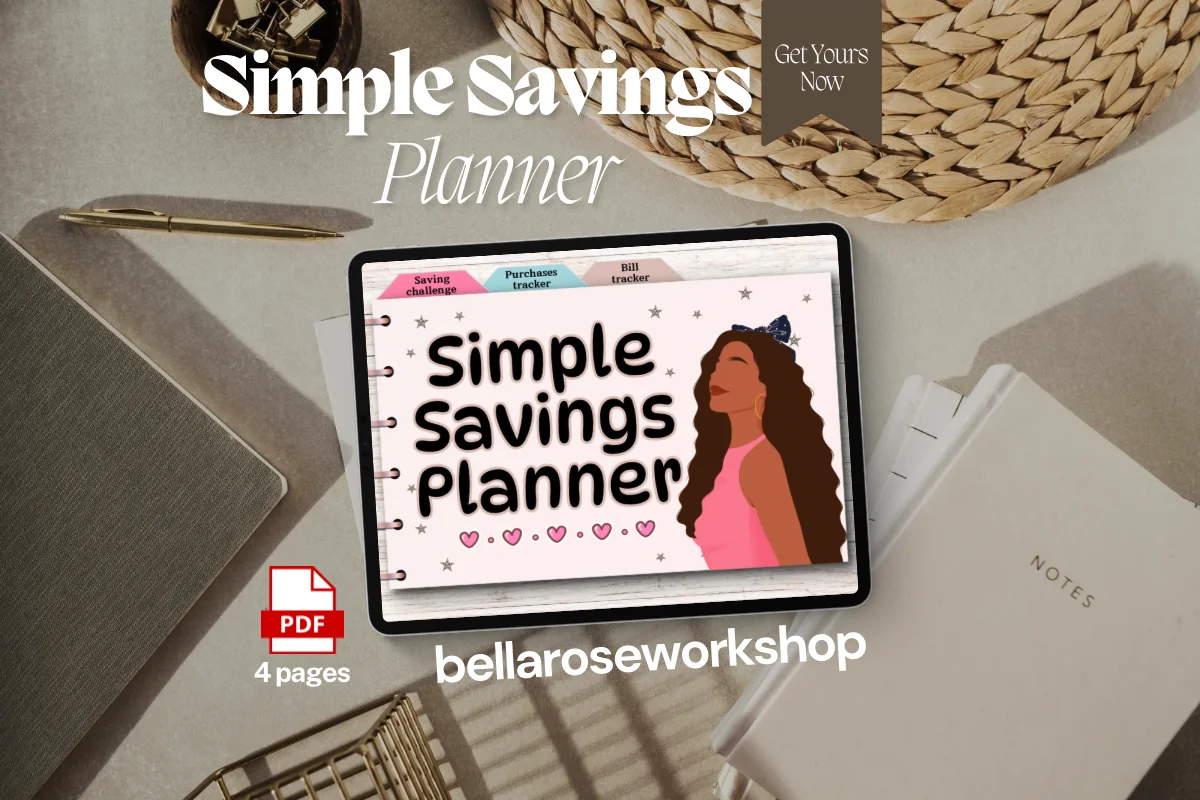
6. Simple Savings Planner, Digital Planner
Sections: 4 pagesFormat: Hyperlinked PDF
Best for: keeping a small purchase record and bills list next to your cash ledger. Designed by bellaROSEworkshop.
- Four-page PDF with hyperlinked navigation shown in previews
- Purchases Tracker and Bill Tracker named in the listing
- Saving Challenge has monthly deposit and balance rows
This small pack suits someone who wants fewer pages to maintain. The Purchases Tracker can support your receipt record, while the bills page keeps non-cash commitments visible. The Saving Challenge is a monthly deposit log, so it cannot stand in for a daily cash-envelope ledger. Its strongest role here is a lightweight companion to a balance note you create yourself.
Best for a wider budget overview
7. Digital Budget Planner, Finance Tracker
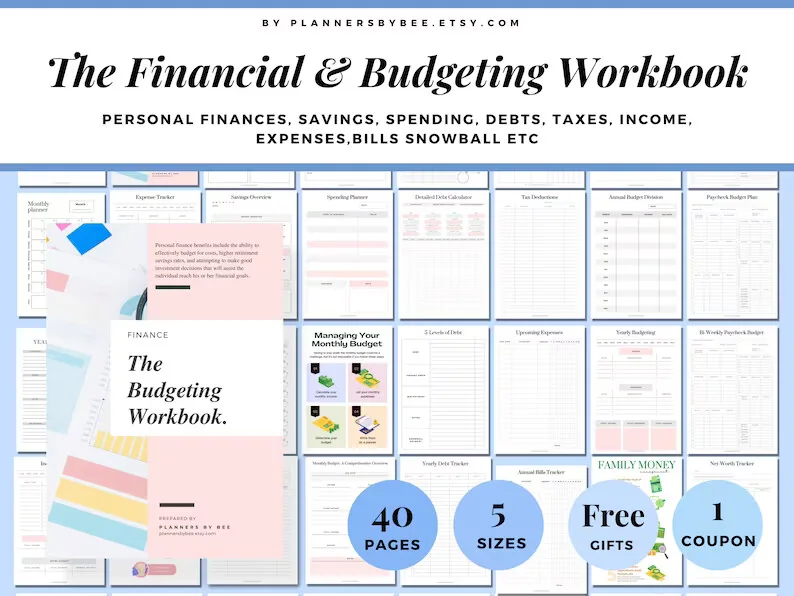
Sections: 40 pages and 5 sizes advertised on cover
Best for: putting envelope spending beside the rest of a household budget. Designed by PlannersByBee.
- GoodNotes budget workbook identified in the listing
- 40 pages and five sizes advertised on the cover
- Expense Tracker, Spending Planner and Annual Bill Tracker shown on the cover
The wider workbook makes sense if cash envelopes are only one small part of your budget. The cover montage shows spending and expense pages beside bill records, which gives the cash category totals some context. Only one public preview is available, so detailed inner columns and a dedicated envelope page are not established. For a clearly shown envelope layout, return to Financial Plan at the top of the list.
Quick Comparison
| Tool | Useful role | Relevant pages | Adaptation or limit |
|---|---|---|---|
| 1. Digital Budget Planner, Financial Planner | Dedicated envelope ledger | Cash Envelopes and daily log | Enter transactions and totals manually |
| 2. Undated Budget Planner for GoodNotes | Category review | Monthly Spending and Spending Summary | Add your own envelope balance log |
| 3. Budget Digital Planner Hyperlinked Tabs | Mixed cash and bills | Monthly Expenses, bills and Notes | Create your own envelope labels |
| 4. Gold Budget Digital Planner/Hyperlinked | Dated expense detail | Expense Tracker and extra pages | Write a separate running balance |
| 5. Expenses Tracker 4years Interactive PDF | Monthly category checklist | Grouped expense headings | No dedicated running cash ledger |
| 6. Simple Savings Planner, Digital Planner | Compact companion | Purchases Tracker and Bill Tracker | Savings log is monthly, not a cash ledger |
| 7. Digital Budget Planner, Finance Tracker | Whole-budget context | Spending and expense pages on cover | One public preview; no envelope page shown |
Choose a short list before allocating cash
A useful category earns its place by helping you make a spending decision. The envelope-budgeting guides from First Citizens Community Bank and Ramsey Solutions both describe assigning cash to named purposes and using the remaining amount as a limit. Their examples include groceries and dining out; your own spending history should decide the final labels.
- Review recent purchases. Mark a few variable categories where you want a visible limit, rather than treating someone else’s list as a requirement.
- Separate the purpose from the payment method. Groceries is a category; cash is how you pay. A card purchase can still belong to groceries, but needs a separate record of how it was funded.
- Write a boundary sentence. For example: “Groceries covers food prepared at home; household supplies covers cleaning and paper products.”
- Combine low-use headings. If books and craft supplies rarely compete for money, one hobbies envelope may be enough. Split them only when seeing separate limits is useful.
How to start a cash envelope system with a payday routine
The cash envelope method assigns real cash to named spending categories before you shop. Start with recent receipts, choose the areas where you want to cut optional spending and give each selected category its own envelope and ledger. Fund only the amounts your budget makes available after accounting for bills and other commitments.
Choose weekly, biweekly or monthly funding dates to match your budget period. On the funding day, count the cash, place each amount in the appropriate envelope and enter the opening balances on your iPad. Before a store visit, bring the envelope for the planned purchase rather than carrying every category with you.
The biggest practical benefit is seeing how much remains before another purchase; the record helps you stay accountable when several receipts compete for the same allowance. Cash can be inconvenient for online purchases, and keeping multiple balances accurate takes regular entries. If you repeatedly borrow from another envelope, record the transfer and review the allowance instead of moving money around without a trail.
Keep current spending, bills and future costs apart
For this setup, an envelope category answers “What can I spend during this period?” A bill record answers “What must be paid, and when?” A future-expense fund answers “What am I setting aside for later?” Physical envelopes can hold any of these, but the ledger should show which job the money has.
- Current spending: groceries for the coming week, parking for planned trips or this month’s optional outings.
- Scheduled bills: rent, utilities and automatic subscriptions. Keep their due dates and payment status in a bills record.
- Future costs: an annual fee, a later holiday or a planned repair. Those need a target and contribution history, rather than being treated as spare current cash.
If you need the whole income plan first, the budget planner ideas guide covers the wider structure. Here, keep the task smaller: define a few current-spending labels and make their balances trustworthy.
Give creative envelope names a clear spending rule
Funny cash envelope categories can use labels such as “Bean There, Spent That” for coffee or “Plot Twist” for books. Keep the ordinary category name beside the joke in your ledger so you can still classify a receipt quickly. A pretty label is helpful only when you know what belongs inside.
For a random-purchases envelope, define a small allowance and state which purchases it covers, rather than using it to hide every unexplained difference. Keep vacation savings, annual insurance and debt payoff in the future-cost or payment records described above. Those purposes need their own dates and targets instead of sharing the current fun-money balance.
Set up a cash envelope template on your iPad
Use a dedicated envelope page if your planner has one, or create a simple record on a notes page. Give each envelope a name and a start and end date. Keep the same unit throughout: dollars of actual cash, rather than a mixture of cash, expected income and card spending.
A cash envelope binder or cash envelope wallet holds the physical envelopes; the digital template records what you put in and take out. Keep the labels consistent across both so a purchase reduces the correct balance.
Set up the record
- 1Write the opening amount. Count the cash already assigned to this envelope. Expected pay is not an opening cash balance.
- 2Record each movement. Add a date, short note, money in, money out and the new running balance. Keep the receipt until the entry is checked.
- 3Recalculate after a purchase. Opening cash + cash added − cash spent = expected cash remaining. Use a calculator if needed; a handwritten PDF does not do the arithmetic for you.
- 4Count and compare. Match the expected balance against the notes and coins actually in the envelope. Investigate a difference before carrying a number into the next period.
Worked example: a grocery envelope with a $12 adjustment
This is an invented arithmetic example, not a recommended food budget. Start with $120 of grocery cash for one period. A $36 purchase leaves $84; moving $12 to household supplies leaves $72; a later $22 grocery purchase leaves $50. The receiving household envelope also needs a matching $12 addition.
| Movement | Cash in | Cash out | Grocery balance |
|---|---|---|---|
| Opening cash | $120 | $0 | $120 |
| Grocery purchase | $0 | $36 | $84 |
| Transfer to household supplies | $0 | $12 | $72 |
| Second grocery purchase | $0 | $22 | $50 |
After the final purchase, count the actual grocery cash. If it is $50, the ledger and envelope agree. If it is $45, the $5 difference needs an explanation, such as a missed purchase or change placed elsewhere. Do not label the difference “savings” just to make the totals match.
- For a deliberate transfer: note the reason and both category names. Update the giving and receiving records together.
- For a mixed receipt: assign each item once. For example, a $30 receipt containing $24 of food and $6 of cleaner reduces groceries by $24 and household supplies by $6.
- For returned items: record the refund when it is actually received. A pending card refund is not extra physical cash in the envelope.
Handle credit card purchases without counting money twice
If you pay $18 online from a category whose allowance is still sitting in a cash envelope, the cash has not physically left. Mark the $18 as committed and separate it from spendable cash until you settle the cash-to-bank movement. A PDF entry alone cannot repay a card or make a deposit.
- Track the purchase once: record its category, amount and card payment method in the spending record.
- Mark cash awaiting settlement: make clear which notes are reserved to cover the card purchase, so you do not spend them again.
- Close the loop: after the actual deposit or payment, record the physical cash movement. Do not classify that settlement as a second shopping expense.
Close the period and change categories deliberately
Review a category before refilling it. Repeated shortages might mean its allowance is unrealistic, the boundary is unclear or the category includes purchases you meant to limit elsewhere. Rename or adjust it for the next period with a short note, rather than rewriting past entries.
- Cash left over: decide whether to carry it forward or move it to another planned purpose. Record the actual decision and movement.
- Cash missing: compare receipts, change and transfers. Leave an explanation of any unresolved difference rather than inventing a purchase.
- A category you never use: combine it with a related one at the next reset, keeping the old closing balance visible.
- An essential category running short: review the wider budget and arrange a deliberate adjustment. Do not let a tracking rule prevent necessary food, medicine or transport.
For allowances tied to payday, see the biweekly budget template guide. The cash record here starts only when money is actually allocated; it should not treat an upcoming paycheck as cash already available.
Keep envelope records separate from bank transactions
For the handwritten envelope record described here, enter purchases, review receipts and recalculate the remaining cash yourself. Reconcile that record with the physical envelopes and any bank transactions used to settle card purchases. If you need bank synchronization, automatic transfers or calendar integration, establish those features separately from the provider’s documentation; the manual routine here does not depend on them.
- PDF ledger: flexible handwritten notes; you enter, total and reconcile every movement.
- Physical envelope: contains actual cash; the iPad page is a separate record of that cash.
- Bank or budgeting app: features vary by provider; a digital label is not proof of a separate bank balance or insured cash account.
FAQ
What cash envelope categories should beginners start with?
Choose a few variable spending areas where a visible limit would help, such as groceries, dining out and personal fun money. The 20 ideas above are a menu. You do not need to fund them all, and no fixed list fits every household.
Are cash stuffing categories different from cash envelope categories?
In this article, both phrases refer to the spending labels assigned to cash envelopes. The important details are what each label includes, how much cash was actually assigned and when the budget period ends.
Should rent and subscriptions have cash envelopes?
They can be part of a wider envelope budget, but this setup keeps scheduled bills in a separate payment record. If you pay them from a bank account, do not show the same funds as available cash in a spending envelope.
Can I use these planners without handling cash?
You can use their spending pages to record category allowances and card purchases manually. Call those figures category balances, and reconcile them with the actual account records. Writing an amount in a PDF does not create or move money.
What if one envelope runs out before the period ends?
Pause optional spending in that category and review what happened. If an essential cost needs an adjustment, decide where the money will come from and record both sides of any transfer. Review the allowance before the next period rather than hiding the shortage.
Is keeping cash and financial information on an iPad safe?
Limit the cash you carry, store remaining cash securely and avoid writing passwords, full card numbers or account credentials in a planner. Protect the device and its backups. If essentials or debt payments cannot be met, seek help from a qualified financial counselor or adviser; these category examples are organizational ideas, not personal financial advice.
Start with the categories you can keep accurate
The most useful cash envelope categories are the ones you understand at checkout and can reconcile afterward. Pick a short list, define each boundary and count the cash before the next reset. Financial Plan is my pick for a dedicated envelope page; the other six tools suit different supporting records when you are comfortable adding your own balance notes.
For a broader layout comparison, explore the digital budget planner roundup. Keep the first step here simple: one clearly named envelope, one honest opening amount and a record you can maintain.
You May Also Like
Some links are affiliate links. If you buy through them, I may earn a commission at no extra cost to you. Read the affiliate disclosure.