The ticket is still in your phone, but you can no longer remember which song came before the encore. These concert journal ideas give each evening a place on your iPad: the show details, your own photographs and the small moments a setlist cannot explain.
Start with one show and three details before designing an entire concert scrapbook. Below are 25 page ideas, followed by five adaptable digital journals. They are ordinary notebooks and journals you label yourself, not ready-made concert kits, ticket organizers or automatic setlist tools.
Give Each Concert Its Own Entry
Use one visit as the unit of your concert log, even when you see the same artist twice. Put the artist, full date, venue and city at the top. Those details separate two nights of a tour; the rest of the page can show why this particular evening mattered to you.
The Concerts Remembered writing guide and Memory in the Making’s concert journal article both suggest preserving the venue, company and personal highlights. The layouts below are my own ways to arrange those details on digital pages. You can keep them short, and you do not need all 25 for every show.
25 Concert Journal Ideas, From Ticket to Tour Archive
Choose a few ideas from the groups that fit what you actually kept. A gig journal can be mostly words, a concert scrapbook mostly images, or a mixture. Leave uncertain details labeled as uncertain rather than making a page look complete at the expense of accuracy.
Identify the evening before adding decoration1–5
- 1Make a show identity card. Write the artist, full date, venue and city in a repeatable order. Add the tour name only if you know it. Give the entry a short reference such as “Show 07” so a photo page or longer account can point back to it. This little header keeps a festival appearance separate from a headline show in the same city.
- 2Keep a ticket image with a useful caption. Place a cropped image of your own ticket beside the entry, then caption it with the artist and date. For a page you might share, make a separate copy without a barcode, QR code, order number or other personal details. A journal image is a keepsake, not a replacement for the valid ticket in the original ticketing service.
- 3Draw where you stood or sat. Sketch a rough stage and mark your position: balcony, left side, near the back or a numbered section. Add a sentence about your view from that spot. A rough sketch gives a blurry stage photograph context; it does not need measured distances.
- 4Put your concert company on the page. Record who came with you and a small shared detail, such as meeting outside a familiar station or recognizing a song together. If you attended alone, write that too; the entry does not need a group portrait. Ask before sharing somebody else’s photograph or private story.
- 5Save the lineup as it actually happened. Give opening acts their own small lines beneath the headliner. Record who you saw, rather than assuming you watched everyone on the advertised bill. If you arrived halfway through a support set, say so. That distinction is useful when an opener becomes a favorite later and you want to remember your first encounter with their live performance.
Preserve the performance in your own words6–10
- 6Build a setlist with confidence marks. Make two areas: songs you remember hearing and an order you have checked for that exact show. Use a question mark for a title or position you cannot establish. If you consult an external setlist, record the page and date checked. A list from another night of the tour should not silently become the setlist for yours.
- 7Choose three songs that defined your night. Beside each title, finish “This stayed with me because…” with a concrete detail. You might remember a quiet introduction, the people around you joining in or a change in the arrangement. Three specific notes can say more than a page of unexplained star ratings.
- 8Give the encore a separate box. Record the moment the main set ended, what happened next and the encore songs you can identify. If there was no encore, that is a valid entry. A little gap on the page can mirror the break in the evening. Do not add a familiar closing song simply because the artist often plays it elsewhere.
- 9Describe a surprise without upgrading a guess. Reserve a few lines for an unexpected cover, guest appearance or unusual arrangement. Write what you actually noticed. If you could not identify the guest, leave a check note instead of supplying a name from a fan comment about another date. Later, add a dated correction beside the original note so the two versions remain understandable.
- 10Sketch one lighting or stage moment. Draw a simple shape, color block or arrangement that reminds you of the performance. Caption it with what was happening: the start of a song, a quiet break or the final bow. Artistic accuracy is optional. A caption ties even a rough drawing to that particular show.
Make a small, readable concert scrapbook11–15
- 11Choose a three-photo sequence. Pick an arrival image, one performance image and a photograph from afterward, if you have them. Add a different caption to each so they tell a small story rather than repeat the artist’s name. Use your own images or ones you have permission to use. An empty third space is fine when you put the phone away during the show.
- 12Give a wristband or stub its own label. Photograph the keepsake on a plain surface and write what it is, which event it belongs to and where the physical item lives. A bracelet without a caption can become difficult to identify later. Leave enough space around the image to read the label. Digital pages preserve an image of the object, not its texture or physical storage.
- 13Record the outfit through one meaningful detail. A small sketch of a patched jacket, homemade bracelet or much-worn tour shirt can stand in for a full outfit photograph. Explain why you chose it or what happened to it that night. Skip it if clothing was not part of what made the evening memorable.
- 14Capture a tiny scene around the venue. Describe a sign outside, the queue moving around a corner or the street after the show. Pair one image with two or three lines about your own experience there. That surrounding scene can distinguish two visits to the same venue. Avoid turning the memory into current travel advice; opening hours, entrances and transport arrangements can change.
- 15Write an honest merchandise caption. If you bought a poster or shirt, include a small image and what you liked about it. You can note a price from your receipt, but label any remembered amount as an estimate. Keep the caption about the object and the show. Buying merchandise is optional; a page with only a ticket and a handwritten account is equally complete.
Keep the part that only you could write16–20
- 16Pair an expectation with what happened. Write one sentence about what you expected before the show and one about what surprised you afterward. Perhaps the quiet songs mattered more than the big finale, or a small venue changed the experience. Keep the comparison personal and specific.
- 17Describe the crowd from your own spot. Note what you saw or heard around you: a row singing, a quiet room during one song or people making space for someone to pass. Use “around me” rather than declaring how the entire audience felt. This keeps the description grounded in the part of the crowd you could observe.
- 18Give one ordinary conversation a place. Record a funny exchange with your friend or a kind interaction you remember. Paraphrase if you cannot recall exact words, and avoid copying private details into a shareable page. The conversation may be unrelated to the music and still belong to this particular night. It helps the journal hold an evening, rather than just reproduce publicly available show information.
- 19Write the walk-home ending. Finish the entry at the point the evening ended for you: meeting your ride, returning to a hotel or talking over breakfast the next morning. Add one concrete detail instead of a generic “amazing night.” If the show itself already fills the page, a single closing sentence is enough.
- 20Ask your companion for a second highlight. If they want to contribute, add their favorite moment beside yours and label whose note is whose. Different answers are worth keeping without deciding which version wins. Leave a direct quotation only when they approve those words; otherwise use a labeled paraphrase. An optional second perspective can make a shared page interesting without turning the journal into homework for friends.
Turn separate nights into a browsable archive21–25
- 21Compare two nights of the same tour. Put two show references beside each other, then compare the venue, your position, company and the moments you noticed. Include setlist differences only when both lists have been checked. Keep the original pages intact so the comparison points back to two complete experiences instead of replacing them.
- 22Create a venue-return page. List your visits to one venue with entry references and a short impression from each. “Could see the drummer from the balcony” is more useful than a single unexplained score. Keep historical observations separate from anything you would need to check before returning. Your old page cannot establish current access arrangements, bag rules or where a future ticket will place you.
- 23Make a first-show milestone strip. Mark your first concert, first solo visit or first time seeing a particular artist, using events you can identify. Give each marker a date or an honest approximate period, plus a reference to its entry. You do not have to rank them. A short strip can show how your concert-going story developed without expanding into a catalog of every album you have heard.
- 24Rebuild an older show with an uncertainty column. Separate what you remember from what you found in your own receipts, photographs or messages. Write the source beside a recovered date and leave gaps where nothing settles the question. For example, an email receipt may identify the event without proving who stood beside you. A partial entry is more useful than a polished reconstruction that mixes evidence with guesses.
- 25Keep a master concert index. Use one row per attended show: date, artist, venue and page reference. Add a small mark for an entry that still needs a photograph or date check. Update the row after you finish a page, and keep future wish-list shows separate so the index continues to mean “I was there.”
Five Digital Journals You Can Adapt for Concert Entries
The useful difference between these options is how you want to file the nights: by artist, by date or as a few visual keepsakes. Choose one foundation rather than buying five. I reviewed their listing descriptions and preview images; I have not purchased or tested their files. Concert headings, captions and setlists need to be added by you.
TL;DR: For a growing archive, choose the 12-section notebook. For one long account, choose ruled pages. Orange suits a small visual keepsake, DaisyNotes a brief entry, and Art Deco monthly filing. All five need your own concert headings.
Quick Picks
- Best for an archive by artist: Digital Notebook
- Best for the story of the night: Digital Ruled Journal
- Best for a small concert scrapbook: Undated Cute Orange Bullet Journal
- Best for a short after-show entry: DaisyNotes | Digital Notebook | Purple
- Best for filing shows by month: Digital GoodNotes Journal – Art Deco
- Digital Notebook – Best for an archive by artist
- Digital Ruled Journal – Best for the story of the night
- Undated Cute Orange Bullet Journal – Best for a small concert scrapbook
- DaisyNotes | Digital Notebook | Purple – Best for a short after-show entry
- Digital GoodNotes Journal – Art Deco – Best for filing shows by month
Best for an archive by artist
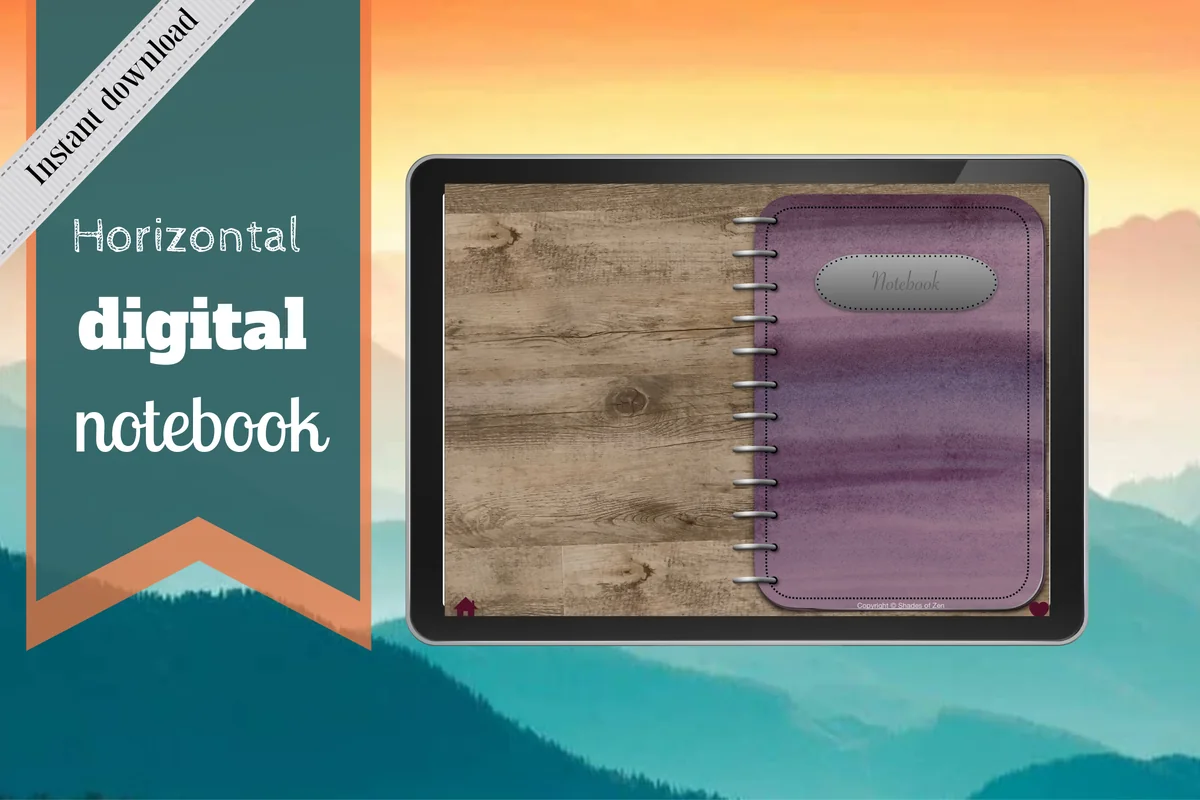
1. Digital Notebook
Orientation: LandscapeLayouts: 16 note templates; 12 sections
Best for: separating artists or tours while keeping individual show entries together. Designed by Shades of Zen.
- 12 expandable sections with hyperlinked tabs and individual dividers
- 16 note templates including lined, dotted, graph and Cornell pages
- Blank and two-column layouts shown in the previews; designed for GoodNotes and PDF annotation apps
This has the strongest filing structure here for a concert archive that keeps growing. Put one artist in a section, then give each visit its own heading and page reference. The two-column layout offers a practical split between the setlist and your memories, while a blank page leaves more freedom for a ticket image. Use the existing tabs for navigation and create your own concert index and labels.
Best for the story of the night
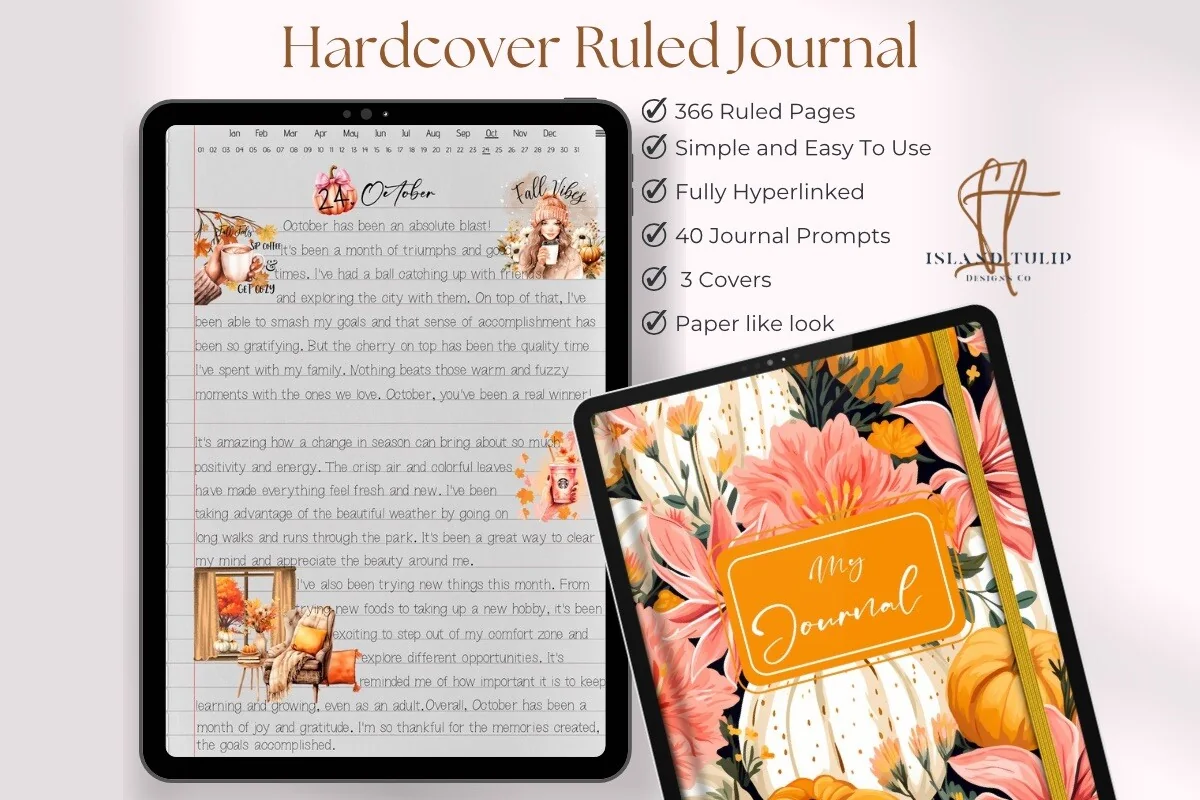
2. Digital Ruled Journal
Orientation: PortraitLayouts: 366 ruled pages; month and day index
Best for: longer accounts of a show filed by the date you attended. Designed by Island Tulip Designs Co.
- 366 ruled pages and three floral cover choices
- Hyperlinked month and numbered-day navigation
- 40 general journal prompts in PNG and precropped GoodNotes formats
Some nights need more than a neat grid. Ruled space gives a conversation before the show or an unexpected encore room to become a proper story. The date-based navigation suits that approach; add a separate artist list when you want to find all your visits again. The included prompts are general extras, not concert questions, and the numbered-day structure alone does not distinguish multiple calendar years.
Best for a small concert scrapbook
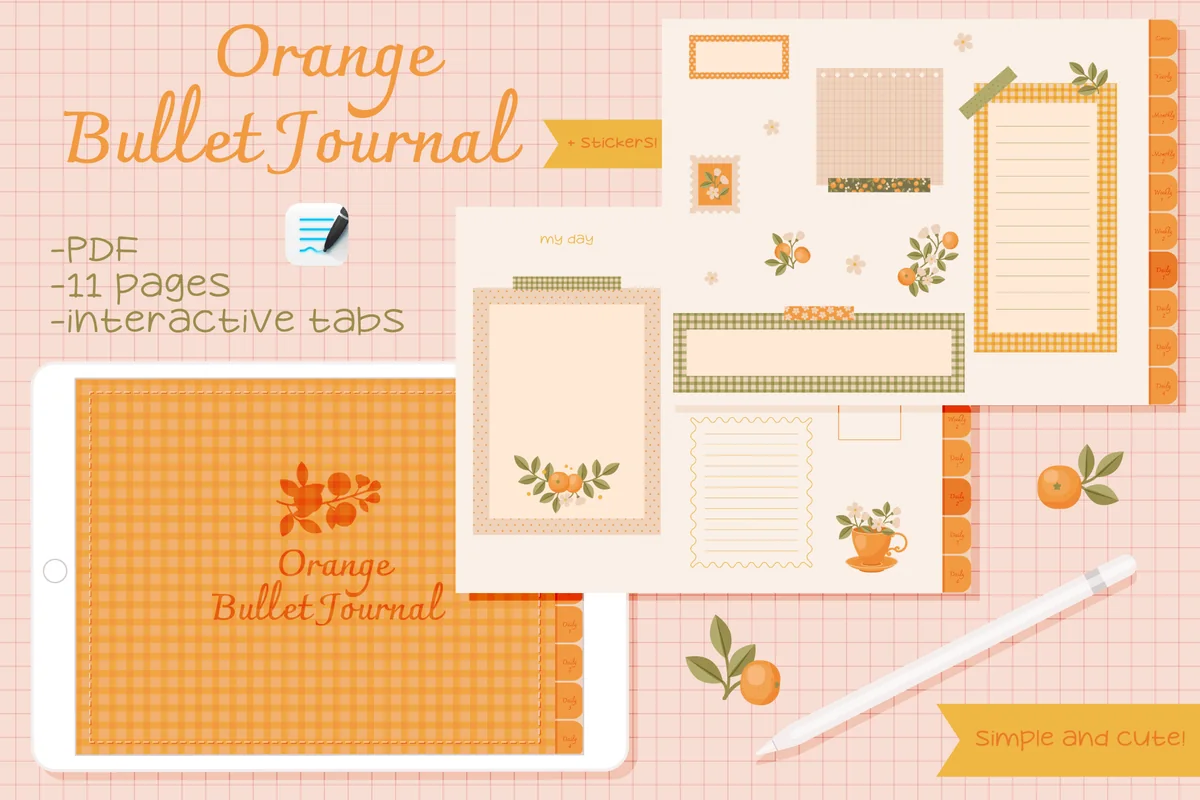
3. Undated Cute Orange Bullet Journal
Orientation: LandscapeLayouts: Decorated notes, calendar and tracker pagesDates: Undated
Best for: a few captioned keepsakes and a hand-filled show calendar. Designed by digitaliya_studio.
- Interactive PDF bullet journal with clickable tabs
- Blank calendar, framed note spaces and tracker layouts visible in previews
- Matching stickers in GoodNotes format
The orange frames suggest a compact keepsake: one favorite photograph, one short caption and a small note about the song you keep thinking of. I like the blank calendar for seeing which evenings you attended at a glance. The decorative areas take up space, so this is less comfortable for a complete long setlist or several large ticket images. Fill in the dates yourself; nothing here retrieves show information.
Best for a short after-show entry
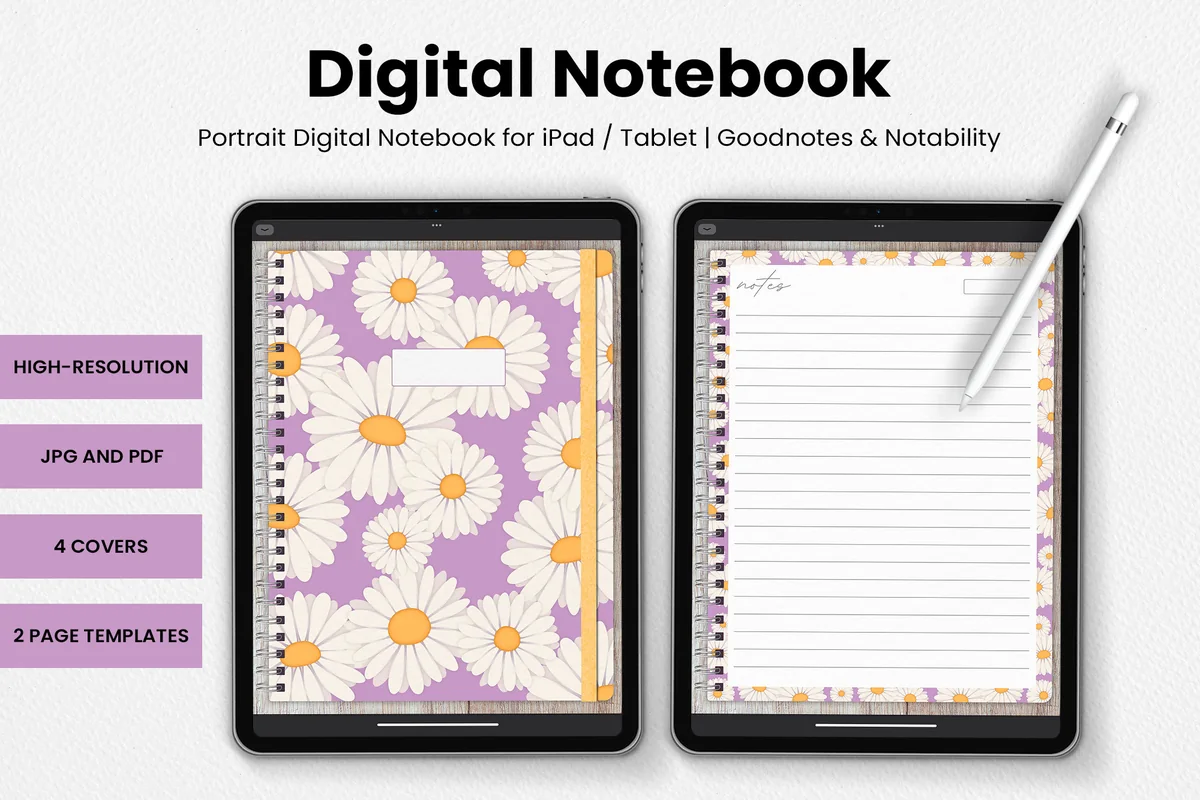
4. DaisyNotes | Digital Notebook | Purple
Orientation: PortraitLayouts: 2 page templates; 4 covers
Best for: a date, show heading and a few lines before the details become another unfinished project. Designed by catsquills.
- Portrait notebook for GoodNotes and Notability
- Four covers and two page templates
- JPG and PDF formats; ruled writing space and a small date box shown in previews
For a three-line entry, a simple ruled page can be enough. Start with the artist and venue, add the date, then describe one moment in your own words. The daisy border brings a softer look without requiring a scrapbook layout. This is a small template set rather than an extensive filing system, so plan your own page order and index if the collection grows.
Best for filing shows by month
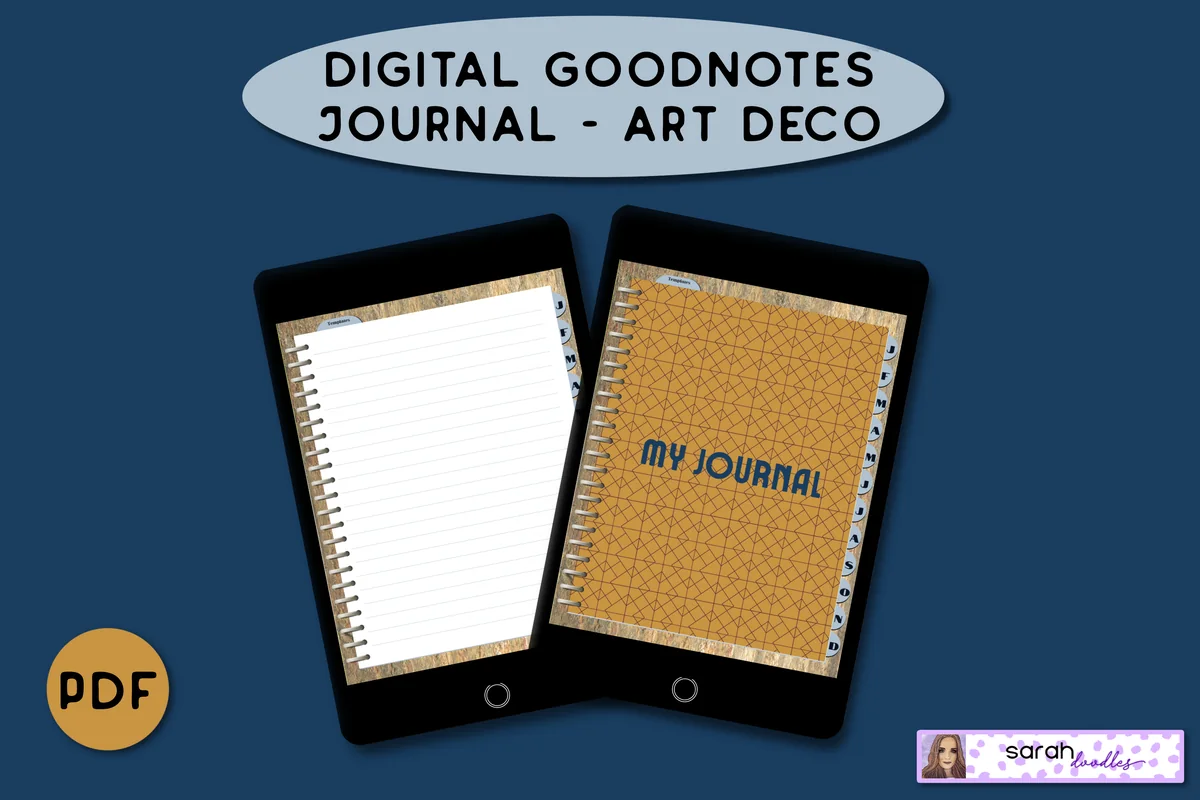
5. Digital GoodNotes Journal – Art Deco
Orientation: PortraitLayouts: 5 lined pages per month; brain-dump templatesDates: Undated
Best for: collecting several concert entries under monthly dividers. Designed by Sarah Doodles.
- Undated hyperlinked PDF for iPad and PDF annotation apps
- Monthly dividers and five initial lined pages per month
- Brain-dump and priority-column templates; pages can be duplicated in GoodNotes
Monthly tabs are useful when you remember a concert as part of a particular stretch of your life. Collect the shows you attended under that month and keep unfinished recollections on a brain-dump page until you can sort them. Five lined pages are allocated initially to each month, with duplication described for GoodNotes. A tour that crosses several months still needs an artist index, and entries spanning years need their own year labels.
Quick Comparison
| Journal | Page structure | Concert use | Main limitation |
|---|---|---|---|
| 1. Digital Notebook | Sectioned notebook | Several artists or tours | Build your own show index |
| 2. Digital Ruled Journal | Ruled daily pages | A detailed evening entry | Artist lookup needs an index |
| 3. Undated Cute Orange Bullet Journal | Decorated bullet journal | A few visual highlights | Small writing areas |
| 4. DaisyNotes | Digital Notebook | Purple | Simple decorated notebook | Brief show entries | Create your own artist or tour index |
| 5. Digital GoodNotes Journal – Art Deco | Monthly journal | A month of live shows | Tours across months need cross-references |
Match the Page to What You Want to Keep
- Several artists and repeated tour visits: use the sectioned Digital Notebook and make a master index.
- A long account with only one or two images: choose the Digital Ruled Journal for its writing space.
- A small decorated memory page: try Orange, leaving room for readable captions around the frames.
- Just a date and a few lines: DaisyNotes keeps the page structure simple.
- Shows filed under the month you attended: Art Deco offers monthly dividers, with a separate index for tours that cross them.
If you already keep a digital journal, try one entry there before choosing another file. Decoration can wait until the essentials are readable. For optional embellishments, the digital scrapbook sticker guide gives you a separate place to explore that part of the page.
Make Your First Entry in Three Passes
A small workflow for an unfinished concert page
- 1Capture the minimum. Give the page an artist, date and venue heading. Add one remembered moment and the names of your companions, if relevant. When a detail is uncertain, mark it now instead of delaying the entire entry. You can stop with this small record and still have a useful concert log.
- 2Add only what serves this show. Choose one ticket image or photograph and write its caption. A long setlist can occupy another page with the same show reference. Keep words and images large enough to read on your iPad; do not shrink everything simply to make the entry fit one decorative spread.
- 3Check, index and leave it. Verify a date or setlist if you have a suitable source, preserving anything still uncertain. Add the entry to your master concert index. Save the journal through your app’s usual backup process, and inspect a copy before sharing it. Your personal page can keep richer details than the public version.
For example, an imaginary entry for “The Lanterns at Harbor Hall” might contain a date heading, a sketch of the balcony and “the quiet introduction to the second encore song.” That is enough to begin. You can add a song title later if you establish it, without rewriting the original memory as though you knew it all along.
FAQ: Building a Personal Concert Archive
What should I write if I do not remember the whole show?
Start with the artist, venue, approximate date and one detail you remember. Label the date as approximate until you check it. You can use your own ticket receipt or photographs to fill gaps, but keep recovered facts separate from personal recollections. A partial page does not need an invented ending.
Do I need a complete setlist?
No. A short list of songs you remember can sit beside a note about why one stood out. If you add a list from elsewhere, check the artist, date and venue and keep the source with it. These journals do not retrieve or verify setlists automatically.
Can I make a concert journal template on ordinary PDF pages?
Yes. Start with a heading, a details area, space for one image and a few lines for your response. Use your annotation app’s available page tools to reuse the layout, checking its instructions when needed. The five journals here have general pages that you arrange and label for each concert.
How can I include a digital ticket?
Keep a suitable image as a private keepsake and caption it with the event details. Before sharing a journal page, prepare a separate copy without ticket codes, order numbers or personal information. Continue to use the original ticketing service for entry; the journal is your record of the evening.
Should I file concerts by artist or by date?
Use artist sections when repeated visits and tour comparisons matter most. Use date or month filing when you remember shows through the surrounding season of your life. Either approach benefits from a small master index. Record the full date, including the year, on each entry so monthly tabs do not mix separate years.
Keep One Night Before Planning the Whole Collection
The most useful concert journal ideas give a particular evening enough context to find it again. Choose a show, write the artist and venue, and add the moment you would tell a friend about. A ticket image, a few checked song titles and an index row can come next. The page can be finished without looking like anyone else’s scrapbook.
For broader page-making options, see digital journaling ideas. If the concert was part of a trip, keep transport, accommodation and the rest of that journey in a separate travel journal entry, with a reference back to the concert page.
You May Also Like
This article contains affiliate links. If you purchase through them, I may earn a commission at no extra cost to you. Read the affiliate disclosure.