You open a graph for your class report and cannot remember which session produced it, or why the second trial used a different setting. These research journal ideas for students help you connect a research question to the work you actually did, the files you kept and the results you can explain.

I prefer a dated session page with room for what happened. Below are seven adaptable iPad planners and notebooks, followed by twelve page ideas you can draw yourself. They are personal study companions: use the notebook, storage and recording method required by your instructor or research group for official work.
Seven Digital PDFs for Your Research Notes
The most useful choice depends on what is missing: space for observations, a place for milestones or a way to find older sessions. None of these products supplies a complete research protocol, automatic citations or an institutional audit trail. You can use the ideas below on their general note pages, while the planning pages handle the surrounding workload.
TL;DR: Seven adaptable iPad PDFs: a sectioned notebook for session records, two planners for course or project oversight, three lined journals and a dark-paper notebook. You add the research fields; none is offered here as an approved institutional ELN.
Quick Picks
- Best for a sectioned research notebook: Digital Notebook
- Best for fitting research around classes: Simple Student Planner
- Best for tracking project milestones: Project Planner: Printable & Digital
- Best for daily research narratives: Digital Ruled Journal
- Best for a simple handwritten log: DaisyNotes Digital Notebook: Purple
- Best for filing sessions by month: Digital GoodNotes Journal: Tie Dye
- Digital Notebook – Best for a sectioned research notebook
- Simple Student Planner – Best for fitting research around classes
- Project Planner: Printable & Digital – Best for tracking project milestones
- Digital Ruled Journal – Best for daily research narratives
- DaisyNotes Digital Notebook: Purple – Best for a simple handwritten log
- Digital GoodNotes Journal: Tie Dye – Best for filing sessions by month
- Dark Mode Digital Notebook: Gold Theme – Best for dark observation columns
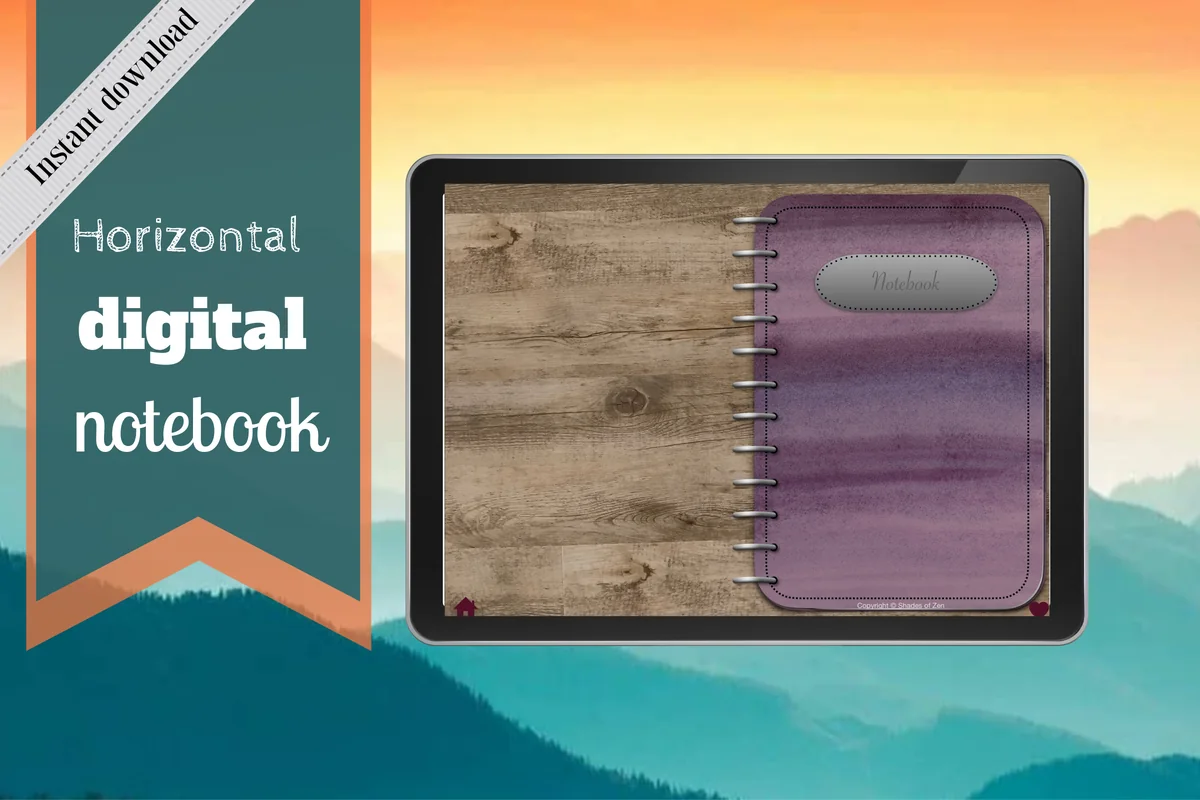
Best for a sectioned research notebook
1. Digital Notebook
Orientation: LandscapeLayouts: 16 note templates; 12 linked sections
Best for: separating methods, session entries and result references. Designed by Shades of Zen.
- 12 expandable sections with individual dividers
- 16 templates including lined, dot grid, graph, two-column and Cornell notes
- Hyperlinked tabs for moving between sections
- For GoodNotes and other PDF annotation apps
This is my first choice for the actual session record. The two-column layout gives observations and interpretations separate space, while grid paper suits a small hand-drawn diagram. Keep a chronological session index even if you use different sections for methods and results. Add file references, method versions and correction notes by hand.
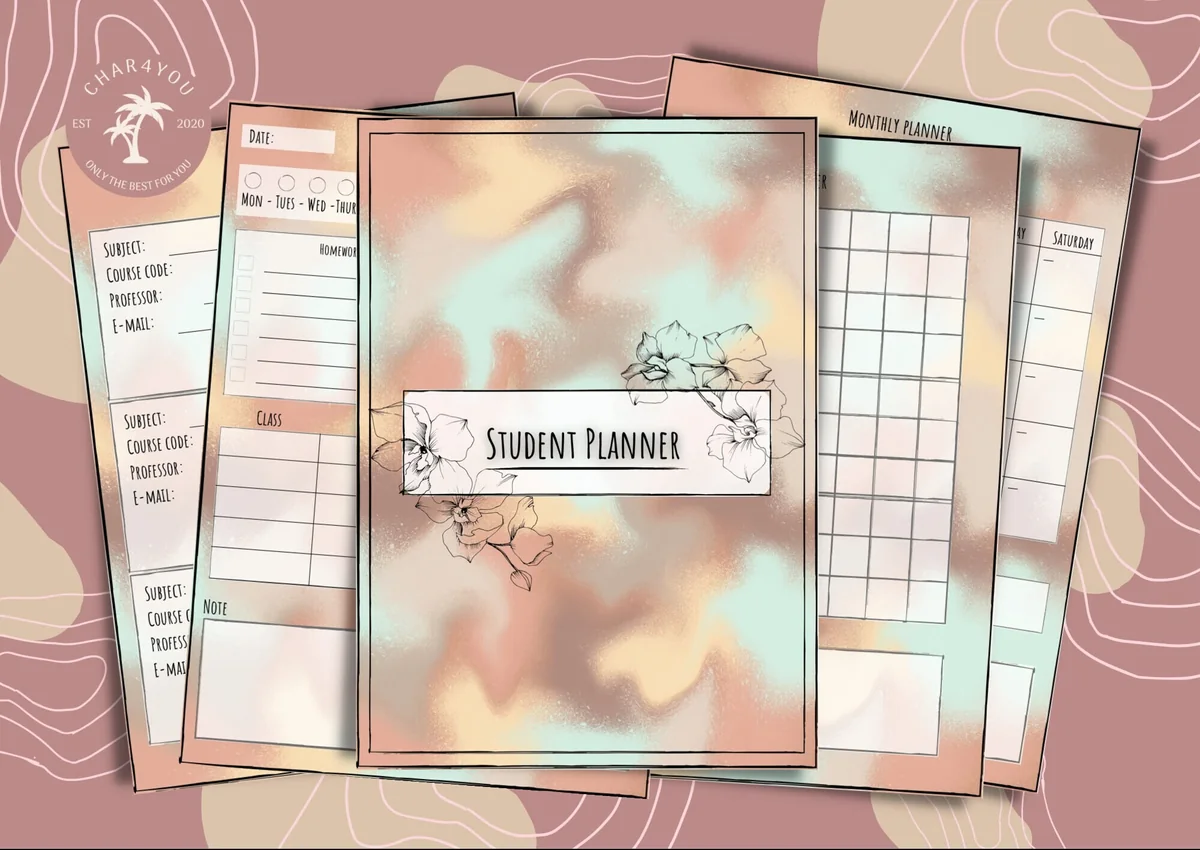
Best for fitting research around classes
2. Simple Student Planner
Orientation: PortraitLayouts: Study tracker; lined and blank notes
Best for: scheduling research work alongside the rest of a course. Designed by Char4You.
- Class schedules and class information pages
- Daily, weekly and monthly planning pages
- Study tracker plus lined and blank note pages
- PDF for GoodNotes; color and black-and-white options
The study tracker makes this useful when research competes with lectures and assignments. Put a short session goal in the planner, then use a dated notes page for the session reference and what happened. A study-hours total cannot tell you which procedure was used or where an observation came from. Keep those details on the notes pages, with a session reference in the weekly box.
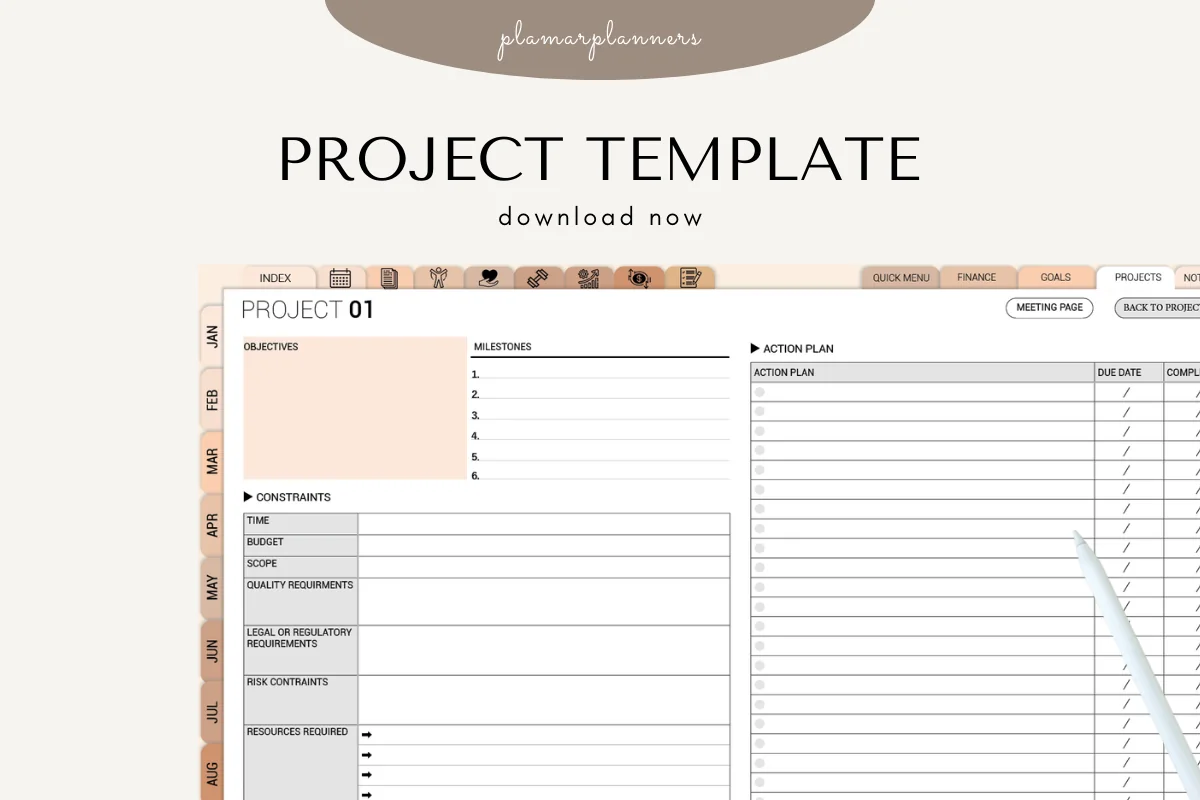
Best for tracking project milestones
3. Project Planner: Printable & Digital
Orientation: LandscapeLayouts: Objectives, milestones and action plan
Best for: seeing the next project action and the constraints around it. Designed by Plamarplanners.
- Project overview and task breakdown
- Milestones, deadlines, resources and budget planning
- Notes and brainstorming section
- Digital version for GoodNotes, Notability or Xodo; printable PDFs also included
The project spread puts objectives, constraints, milestones and an action plan together. That is a useful home for a proposal deadline or a question waiting for your supervisor. It includes a tablet-friendly digital version as well as printable files. Treat it as the project overview: a tick beside “collect observations” still needs a reference to the actual session notes and files.

Best for daily research narratives
4. Digital Ruled Journal
Orientation: PortraitLayouts: 366 ruled pages; month and day navigation
Best for: writing longer accounts of each research day. Designed by Island Tulip Designs Co.
- 366 ruled pages with month and numbered-day navigation
- Three floral cover choices
- Paper-like page design
- 40 general journal prompts in PNG and precropped GoodNotes formats
A continuous ruled page is helpful when a short checklist would leave too much out. Use the daily navigation to find the day, then label every session within it; two sessions on one date still need separate identifiers. The decorative prompts are general journaling extras, not a research method. I prefer this for narrative observations and explanations rather than wide data tables.
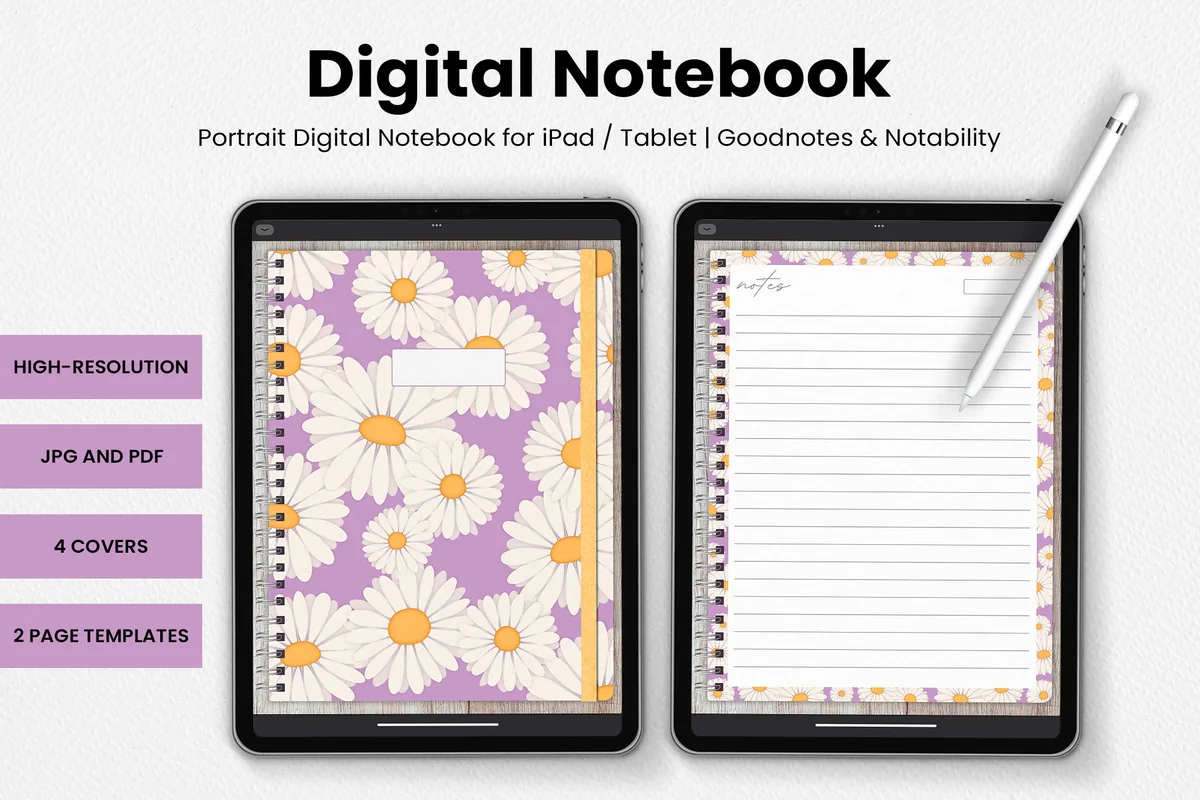
Best for a simple handwritten log
5. DaisyNotes Digital Notebook: Purple
Orientation: PortraitLayouts: Two page templates; four covers
Best for: keeping a small project in one continuous notebook. Designed by catsquills.
- Digital notebook for GoodNotes and Notability
- Four covers and two page templates
- JPG and PDF formats
- Lined pages with purple daisy borders and wood texture
For a small class investigation, a lined notebook may be enough structure. Add the session identifier, date and method reference at the top, then continue onto another page when necessary. A handwritten index matters here because dedicated research tabs are not part of the offer. The floral margins take up some room; choose a wider layout if you need large diagrams or many columns.
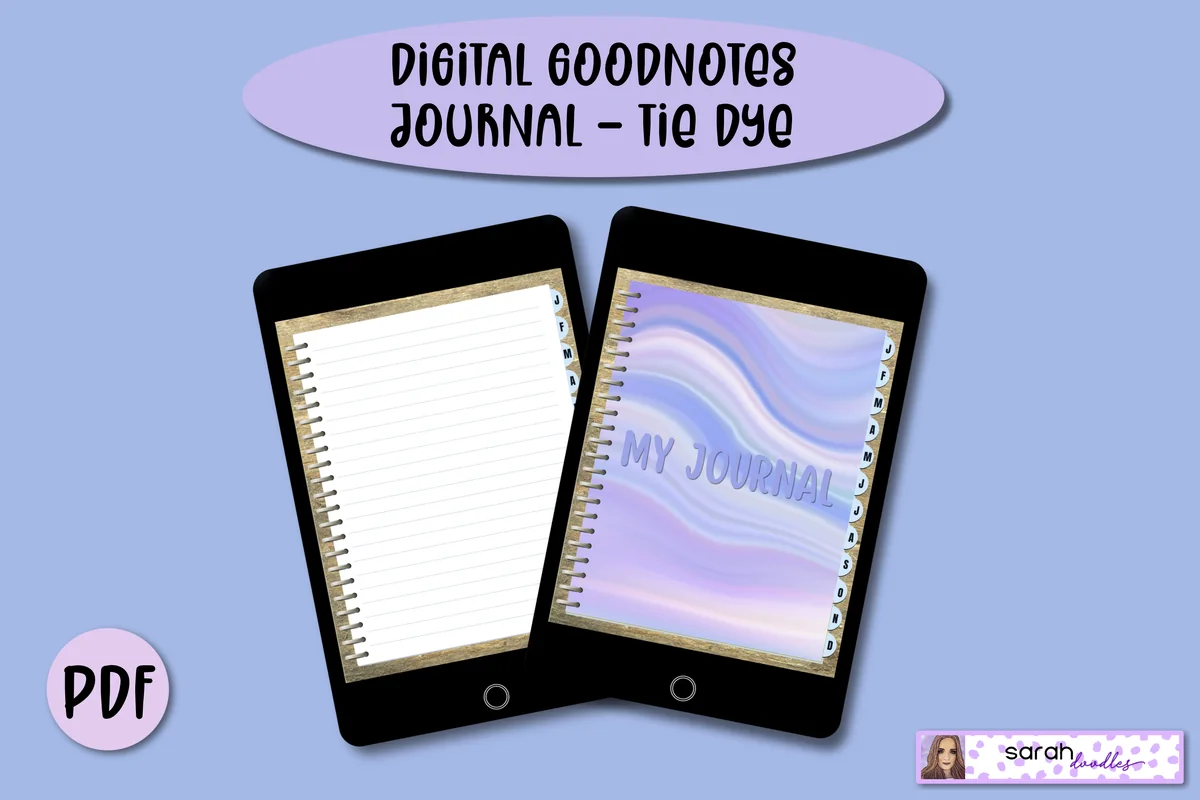
Best for filing sessions by month
6. Digital GoodNotes Journal: Tie Dye
Orientation: PortraitLayouts: Monthly dividers; five starting pages per month
Best for: grouping a term of personal research notes under monthly dividers. Designed by Sarah Doodles.
- Hyperlinked PDF with monthly divider tabs
- Five lined pages initially allocated to each month
- Additional pages can be added in GoodNotes
- Undated journal for PDF annotation apps including GoodNotes, Notability and Xodo
Monthly dividers make a semester easier to browse without a separate section for every activity. Five starting pages per month may run out quickly for detailed sessions, so the ability to add lined pages in GoodNotes is relevant. Keep your session IDs in chronological order across months. The personal-use terms suit a private companion; do not share the journal file with your whole group.
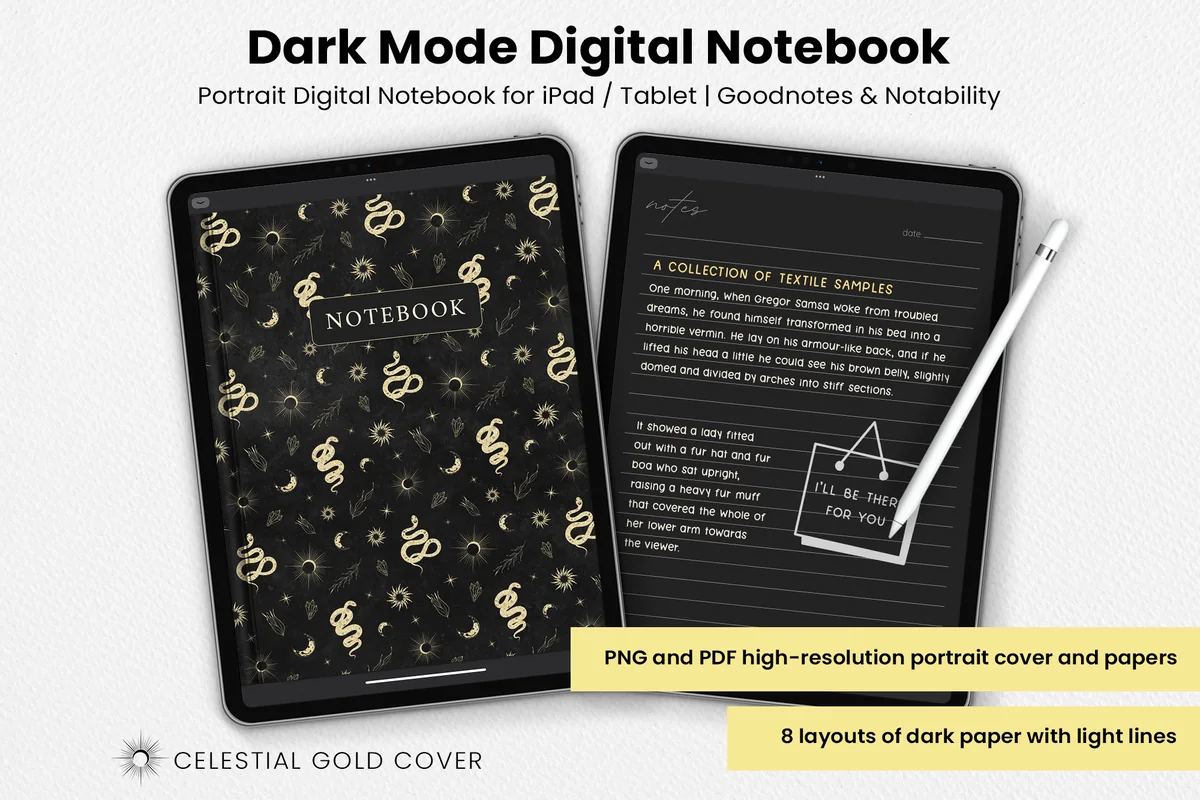
Best for dark observation columns
7. Dark Mode Digital Notebook: Gold Theme
Orientation: PortraitLayouts: Eight dark layouts, including columns and grid
Best for: writing observations and interpretations on separate dark columns. Designed by catsquills.
- Notebook for GoodNotes and Notability
- Eight layouts: columns, habit tracker, to-do, numbered list, dots, square, lines and notes
- PNG and PDF formats
- Dark paper with light ruling and a celestial gold cover
The columns layout offers a clear way to put a raw observation beside a possible explanation. Grid and dotted pages are useful alternatives for sketches and small comparison notes. Use light ink that stays readable on the dark background and check any exported page before relying on it. These are general paper layouts; the product does not provide measurements, automatic analysis or a permanent audit trail.
Quick Comparison
| Digital PDF | Structure | Research role | Limit |
|---|---|---|---|
| 1. Digital Notebook | 12 sections; 16 templates | Detailed session notes | Add your own research fields |
| 2. Simple Student Planner | Study tracker and notes | Course and session planning | No experimental record template |
| 3. Project Planner: Printable & Digital | Project overview and actions | Milestones and next actions | Not a detailed observation log |
| 4. Digital Ruled Journal | 366 ruled pages | Chronological session accounts | Write IDs and units yourself |
| 5. DaisyNotes Digital Notebook: Purple | Two page templates | A compact continuous log | No linked research sections promised |
| 6. Digital GoodNotes Journal: Tie Dye | Monthly dividers | Month-by-month session files | Five initial pages per month |
| 7. Dark Mode Digital Notebook: Gold Theme | Eight dark layouts | Paired observations and notes | Use clearly contrasting ink |
Choose a Page by the Job It Needs to Do
Keep the record of what happened separate from the plan for what happens next. A checked task shows progress; its session reference leads you to the observations behind it. Match the page to the question you will need to answer later:
- What did I actually do? Use the sectioned Digital Notebook, a ruled journal or another roomy notes page for the session record.
- Which step is waiting? Use the Project Planner for milestones, resources and your next action, then add the relevant session reference.
- When can I work on it? Use the Simple Student Planner for study time and course commitments. Put the actual results in the notes, not only in a timetable.
- How do I find the evidence? Keep an index of session IDs and file locations. Monthly tabs and notebook sections help navigation, but you supply the connections.
12 Research Journal Ideas for Students: Follow One Session
These are suggested headings and layouts, not prefilled features of the products. Oregon State University advises asking your research professor which note-taking method they prefer. Its guidance also emphasizes dated entries, recording mistakes and avoiding delayed notes. Adapt the pages only after checking what your course permits.
Set up the study and the session
- 1A one-project research register. Write the question, course or project name, supervisor and the limits of the task. Add the location of your official record if this notebook is a separate personal companion. For a class seedling project, the register might state that you are comparing observations from two assigned conditions, not trying to make claims about every plant. Keep a short change note if your question narrows later.
- 2A dated session header. Give each session an identifier such as S-014, plus the actual date, start time and purpose. “Observe sample group B” tells you more than “work on project.” Use the same identifier on continuation pages so the record stays together. If you write a note later from memory, mark when you wrote it and which details are uncertain instead of presenting it as a contemporaneous entry.
- 3A method version box. Identify the instructor-approved method or procedure reference you used, including its version or revision date when available. Record what you actually followed and where the full method lives. Do not paste a generic procedure into your notebook and assume it is approved. If a supervisor authorizes a change during the session, note that instruction and the related entry rather than silently replacing the original plan.
A section divider can hold the project register; the session header belongs on the working page itself. That small repetition is useful when a single page is exported or viewed away from the rest of the notebook.
Connect observations to their evidence
- 4An observation and file register. List the identifiers for the observations, images or other files produced during the session, with their approved storage locations. For example, OBS-014-A might point to a sketch and IMG-014-B to an image. Use the naming convention your group requires if one exists. A file reference is not a backup: keep the actual files where your course or group requires, and check that the reference opens the intended item.
- 5Two columns for observation and interpretation. Write the directly observed value or description in the first column and your possible explanation in the second. Include units and the relevant sample or item ID beside measurements. “The leaf edge appears yellow” and “the condition may explain it” are different kinds of notes. Keeping them apart makes it easier to revise an explanation without rewriting the original observation. A blank cell is clearer than an invented value.
- 6A conditions and deviations page. Record the conditions that matter to the assigned method, along with any departure from the plan. Be specific about what changed, when you noticed and which observations it may affect. Do not assume two sessions are comparable merely because their headings match. Your supervisor can help decide which conditions are important; a general notebook cannot supply that scientific judgment for every project.
A column layout works for brief notes; a grid page can hold a small observation table. When the table becomes wide, keep the source data in the required system and use the notebook to record the file reference and context.
Keep the inconvenient parts of the work
- 7An incomplete or unsuccessful trial entry. Keep the session in the sequence even when it ends early or produces no usable result. State what happened, what was completed and what is missing. “Image file was not saved” is more useful than deleting the session from your index. Oregon State explicitly recommends recording failures and mistakes. Decide with your instructor whether another attempt is needed; a checklist alone should not make that decision.
- 8A dated correction note. Preserve the earlier entry and add a dated explanation of the correction in the way your course requires. For a personal PDF companion, you might append a correction box that points back to the original session. Do not rely on an eraser to hide the change. This visible note does not turn an editable PDF into a tamper-evident record or replace the correction procedure for an official notebook.
- 9A repeat-session comparison. Reference the earlier session and state what you intended to repeat, what stayed the same and what differed. Keep the new observations under their own identifiers rather than overwriting the first attempt. Add a short comparability note before drawing a conclusion: an altered procedure or missing measurement may mean the two results cannot support the comparison you planned. Retain that limitation beside the result.
The point is to preserve the sequence, not to make every session look successful. A clear account of an interruption can be more useful at the next meeting than an unexplained gap between two polished results.
Carry the trail into a meeting and report
- 10A supervisor question with a reference. Write one precise question and the session, observation or file needed to discuss it. “Can I compare S-014 with S-011 after this change?” gives the conversation a starting point. Leave room for the answer, who gave it and when, plus any agreed next step. A separate question list is convenient, but copy the decision reference back to the affected session so it is not stranded on another page.
- 11A figure-to-source trail. Before adding a graph or image to your class report, write down the source file, relevant sessions and the processing or selection steps you used. Give revised outputs distinct labels rather than using the same filename for several versions. If the report contains a caption or result statement, ask whether you can trace it back to the underlying observations. This is a manual reference trail, not automatic analysis or citation management.
- 12A stage-closing handoff page. At the end of a project stage, list the sessions completed, where the files are kept, unresolved questions and the first action for the next session. Mark work that is still provisional. Keep the handoff brief enough to read before you begin again, but link to the detailed entries instead of replacing them with a fresh summary. If the course requires a submission or supervisor review, record that step separately from your personal checklist.
A Research Session Example You Can Copy by Hand
The example below is fictional and shows a record structure, not a suggested experiment. Use it to connect a sentence in your notes to the session and file it refers to.
| Field | Example entry | Why keep it |
|---|---|---|
| Session | S-014; actual date and time | Find this attempt in the chronological index |
| Method | Course procedure v2; see approved location | Identify the procedure actually followed |
| Observation | OBS-014-A; add value, units and item ID | Keep the observation distinct from an explanation |
| File | IMG-014-B; approved folder reference | Locate the underlying image |
| Open question | Ask supervisor whether S-011 is comparable | Record a limitation before drawing a conclusion |
After creating a page like this, check its connections rather than its decoration. A short record can be useful if its references are clear. A long record still leaves a gap when the source file is missing.
- Follow one file reference and check that it points to the intended item.
- Read one observation without the interpretation column. Is it clear what was actually seen or measured?
- Find the method reference and any deviations before comparing sessions.
- Check whether the next action depends on a supervisor answer.
Use the iPad as a Companion to the Required Record
Ward’s World explains that accurate lab notes help others follow the work step by step. Oregon State likewise describes research notes as a resource for reviewing work, troubleshooting and supporting later papers or presentations. Those aims are a useful test for your pages: can you explain the path from the session to the result?
- Keep the official method first. If your course requires a bound notebook or a particular ELN, follow that requirement. A decorative PDF is not automatically an accepted substitute.
- Store only permitted material. Follow your course or group rules for participant information, unpublished work and file storage. Use the approved system for material that does not belong in a personal notebook.
- Keep the original files. A pasted thumbnail may help navigation, but it does not replace the original observation file or its context.
- Check your backup and export. Oregon State recommends a charged device and backed-up electronic notes. Verify that the version you intend to keep is readable, including ink on dark paper.
FAQ: Student Research Notebook Questions
What should a student research journal contain?
Start with a dated session, its purpose, the method reference, what you actually observed and where the related files are kept. Add deviations, unresolved questions and a next action when they apply. The twelve ideas above offer separate places for those details; your course requirements decide which fields are mandatory.
Can I use GoodNotes for my official lab notebook?
Ask your instructor or research supervisor before choosing the recording method. An editable PDF in GoodNotes can support personal notes, but the products here do not establish institutional approval, access controls or a permanent audit trail. Use the required notebook or ELN for official work and decide whether a separate iPad companion is allowed.
How is a research journal different from a study planner or commonplace book?
A research journal follows the work of a particular investigation: sessions, methods, observations, changes and the origin of results. A study planner organizes learning time and assignments. A commonplace book collects ideas from reading and other sources. They can refer to one another, but a reading summary or checked task does not replace a record of what happened in a session.
What do I write when a research session goes wrong?
Record what you attempted, the point where it stopped, what evidence remains and what is uncertain. Keep the session identifier and ask your supervisor what to do next when needed. Do not invent missing values, silently remove the session or replace it with the results of a later attempt.
Do these PDFs include ready-made research forms?
No dedicated research forms are promised here. The notebooks offer general ruled, grid or column pages, while the planners provide course or project organization. You write the research headings and references yourself. If you need a course-specific form, use the one your instructor provides.
Start With the Next Session You Need to Explain
My starting point is a roomy notes page; a separate overview earns its place when you need to track deadlines or milestones. These research journal ideas for students work best when each entry points to something specific: a method, an observation, a file or a question. Begin with the next dated session and keep the trail clear enough for your future self to follow.
You May Also Like
This article contains affiliate links. If you buy through them, I may earn a commission at no extra cost to you. Read the affiliate disclosure.