You have twenty minutes, three half-finished interviews and a new season waiting in your player. Which episode should you open? These podcast journal ideas give your listening queue a small home on your iPad, with enough context to resume an episode without starting it all over again.
The fifteen ideas below follow the listener’s job: choosing, continuing and occasionally clearing the queue. Five optional digital notebooks and journals follow the page ideas. They are general writing tools you adapt yourself, not ready-made podcast trackers. Start in a notebook you already own if its pages give you enough room.
A Listening Journal Starts Where Your Player’s Queue Gets Vague
A podcast listening journal can record why an episode is waiting and what you need when you return. Your player remains the place for playback. This page system adds your own context: an episode needs concentration, a series must be heard in order, or a paused interview is worth finishing when you have more time.
The Podcast Journal from Absolute Love Publishing illustrates the listener-focused format with an episode tracker, calendars and pages for different kinds of podcasts. My suggestions below adapt the listening workflow to ordinary digital pages; they do not reproduce that journal’s templates. There is no requirement to summarize every episode.
15 Podcast Journal Ideas for Choosing, Resuming and Returning
Treat these as options rather than fifteen sections to maintain. A bullet journal podcast tracker might begin with just a queue, a paused list and a series map. This podcast episode tracker stays focused on listening decisions; quotations and general knowledge notes can go in your commonplace book when they deserve a separate entry.
Build a queue that fits the listening moment1–5
- 1Sort the queue by available time. Draw three bands for a short break, an ordinary walk and a longer stretch at home. Copy the episode duration from your player and place the title in a band that makes sense for you. A 55-minute interview may still belong in the short-break band if you deliberately plan several sittings; mark that choice rather than hiding it. Leave space for one next episode in each band so choosing stays easy.
- 2Separate focused listening from casual browsing. Use two small lists headed “I want to concentrate” and “Fine to sample.” A dense explanation might need a quiet seat, while a familiar conversation may suit a relaxed task. These are your preferences, not permanent labels for the show. Note the context that worked and move the episode if it does not fit. Write or change your journal only when it is safe to stop; the page is not something to manage while driving.
- 3Map a serial story in listening order. Give one ongoing series a simple route: season, episode number and a status box. Use the show’s own episode list to establish order rather than guessing from titles. Put trailers, bonus installments and recaps on a side branch if you do not want them interrupting the main story. A check means you listened, not merely that the episode entered your queue. Keep this route intact even when your listening sessions cross into another month.
- 4Make a small guest-following queue. When you enjoy a guest, write their name beside one specific interview you want to hear next. Add the show name and episode title, then mark whether it is queued, sampled or finished. This is a route to an actual next listen rather than an unlimited list of people to research. If two appearances cover similar ground, sample one before keeping both. Stop when you have enough choices for the time you actually want to spend.
- 5Keep a tentative season-return calendar. Reserve a little calendar space for a season you want to revisit when it returns. Record a date only when the show has announced it, along with where you saw it and when you checked. If the announcement says only “later this year,” preserve that uncertainty instead of inventing a day. The PDF will not update a changed release schedule. A short “check again” note can be more useful than filling every calendar square.
Leave a clear route back into unfinished audio6–10
- 6Keep a paused-episode strip. Use one row per unfinished episode: title, stopping point and why you stopped. “Interrupted by dinner” suggests a different next action from “too detailed for today.” Add a short memory cue such as “guest has just introduced the second example.” The timestamp alone locates the audio but may not restore the conversation. Cross out the row when you finish or consciously drop it; an unfinished entry is not a debt you must repay.
- 7Create a return-to-this-moment queue. Set aside a narrow list for moments you intend to hear again, with the episode link or exact title, timestamp and a specific listening reason. For example: “Replay the explanation before choosing the next episode in the series.” Give each item a next action: replay, check the show notes or leave it. The useful feature is a queue of returns, not simply collecting timestamps. Remove an entry once that return has served its purpose.
- 8Distinguish versions before replaying. If the feed offers a full interview, a short edit and an updated release, put them on one small version card. Copy the visible titles and dates, then mark which one you heard. Add only a distinction you can establish, such as “short edit” in the title; do not assume two similar titles contain identical audio. When a familiar introduction starts, the card helps you decide whether you intentionally chose a replay or opened the wrong version.
- 9Break a long episode at your own stopping points. Draw a progress line for one long episode and mark where each session actually ended. Under the latest mark, note what comes next and roughly how much remains at the playback position you checked. These are your session boundaries, not an official chapter list. You might hear an interview over three evenings without needing three full reviews. When the episode is complete, keep the final mark and clear it from the active paused strip.
- 10Park an unclear passage with a check route. Write a short question when you cannot hear a name, follow an explanation or tell whether the speaker corrected an earlier point. Add a timestamp and a route for checking: replay the passage or inspect the episode’s own notes. Label it unresolved until you check. Avoid filling the gap from memory or presenting your guess as a quotation. When you settle it, record the correction and close the listening task rather than accumulating a second backlog.
Review the shows you still want in your life11–15
- 11Give a new show a small trial card. Choose an episode that interests you and write one question before listening: “Do I want more of this kind of conversation?” Afterward, choose continue, try a different episode or leave it. A single sample may not represent a whole show, so distinguish “this episode did not fit” from a judgment about every installment. You do not need a detailed rating scale. The card exists to help you choose your next listen without keeping every recommendation indefinitely.
- 12Rotate active, paused and between-season shows. Make three short columns for shows you are following now, shows you have paused and shows whose current season has ended. Add a reason beside a move, such as “waiting for the next story” or “too many weekly interviews.” This is a personal overview, not a control panel for subscriptions. You still change following and notification settings in your player. Keep the active column small enough that it describes what you are actually hearing.
- 13Recommend an episode for one person. Instead of a general favorites list, make a brief recommendation note for someone who welcomes suggestions. Record the episode, why it fits that person and whether the context needs a spoiler warning. “You mentioned local history; this interview covers the station you asked about” is more useful than “everyone should hear this.” Mark when you shared it so you do not repeatedly send the same link. No response or listening report is owed in return.
- 14Plan a replay for a stated reason. Keep a short replay list with a reason and a useful moment to return. You might revisit a season recap before continuing the story, or hear an interview again after trying the activity discussed. Separate this from the unfinished list: you already completed these episodes and are choosing another listen. If the reason disappears, release the item. A favorite can remain a favorite without occupying a permanent place in your next queue.
- 15Clear the queue without grading your leisure. At an interval that suits you, scan the waiting and paused lists. Keep a few episodes you still want, release stale entries and close any series you have decided to stop. Look for a mismatch such as collecting long interviews when you mostly have short breaks. Change the queue to fit your listening time rather than setting a higher completion target. Finish with one clear next listen, or leave the next space blank if you want a break.
Set Up Three Pages Before Buying Another Journal
A new template is optional. Draw this small arrangement on blank or ruled pages first, then see which part feels cramped. The example names below are imaginary; they show how little information each page needs.
A short setup you can reuse1–3
- 1Open a next-listen page. Make three time bands and add no more than a few episodes you genuinely want. For an imaginary 42-minute “Harbor Stories” interview, write the title, duration and “quiet walk” as the context. Use the displayed length rather than treating that number as a promise about how long you will take. This first page answers what you want to open next.
- 2Add a paused page. Write the same title only if you stop before the end. Add “18:40, interrupted, guest is explaining the harbor map” as an example stopping note. Choose your own simple status marks and put their meanings at the top. You now have a route back without producing a transcript or copying the episode’s description into your notebook.
- 3Reserve a review page. Keep a short show list and a space for entries you decide to release. When the imaginary interview is finished, clear its paused row and choose whether the show belongs in your active rotation. Try this with a few real listens before adding any of the other ideas. If a page remains unused, combine it with another instead of maintaining it for appearance.
5 iPad Notebooks and Journals You Can Adapt
Choose by the shape of your notes: columns for a queue, a roomy ruled page for a longer session, or monthly dividers for a review. These five alternatives supply general pages. You add every podcast title, progress mark and listening question; buying all five would not make the system more complete.
TL;DR: Choose one foundation: a sectioned notebook for several shows, a visual queue for short lists, ruled pages for session notes, brief episode entries or monthly listening reviews. Add your own podcast fields.
Quick Picks
- Best for several active shows: Digital Notebook
- Best for a small visual queue: Undated Cute Orange Bullet Journal
- Best for longer listening sessions: Digital Ruled Journal
- Best for brief episode entries: DaisyNotes | Digital Notebook | Purple
- Best for monthly listening reviews: Digital GoodNotes Journal – Art Deco
- Digital Notebook – Best for several active shows
- Undated Cute Orange Bullet Journal – Best for a small visual queue
- Digital Ruled Journal – Best for longer listening sessions
- DaisyNotes | Digital Notebook | Purple – Best for brief episode entries
- Digital GoodNotes Journal – Art Deco – Best for monthly listening reviews

Best for several active shows
1. Digital Notebook
Orientation: LandscapeLayouts: 16 note templates; 12 sections
Best for: keeping queues and series maps in separate sections. Designed by Shades of Zen.
- 12 expandable sections with individual dividers
- 16 note templates, including two-column, Cornell, lined and dot-grid pages
- Designed for GoodNotes and PDF annotation apps
A two-column page can put the next episode beside its listening status, while separate sections keep an ongoing series away from a one-off interview queue. That flexibility makes this my strongest choice for several active shows. Use the numbered tabs to file each show, then add episode titles, a status key and return notes.
Best for a small visual queue
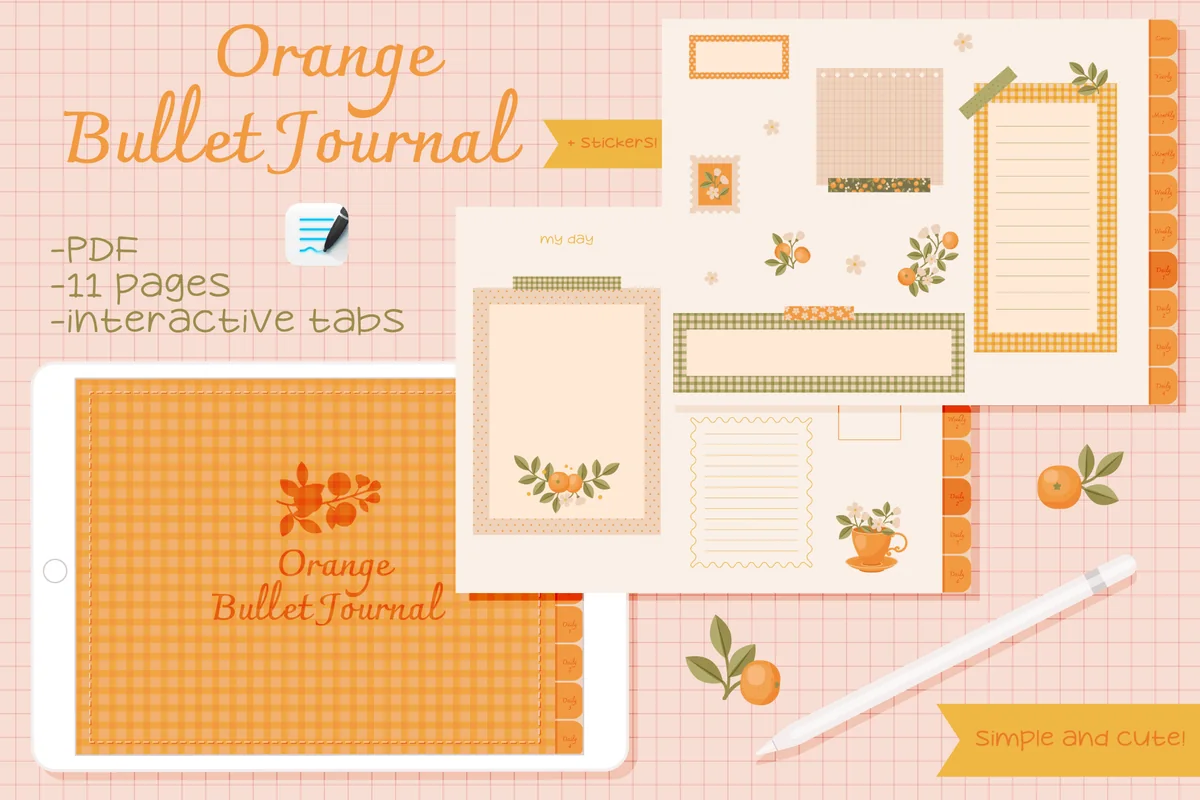
2. Undated Cute Orange Bullet Journal
Orientation: LandscapeLayouts: Decorated notes, calendar and tracker pagesDates: Undated
Best for: short listening lists and a hand-filled release calendar. Designed by digitaliya_studio.
- Interactive PDF journal and GoodNotes sticker file
- Blank calendar, framed writing spaces and tracker layouts
- Orange floral decoration with matching stickers
The little frames work well for a short queue: put one episode in each and mark it paused or finished. A blank calendar also gives anticipated season releases a visible place. This is the decorative alternative, with much less open writing space than the ruled journal. Keep long episode notes elsewhere, and check a release date before adding it; the calendar is filled by hand.
Best for longer listening sessions
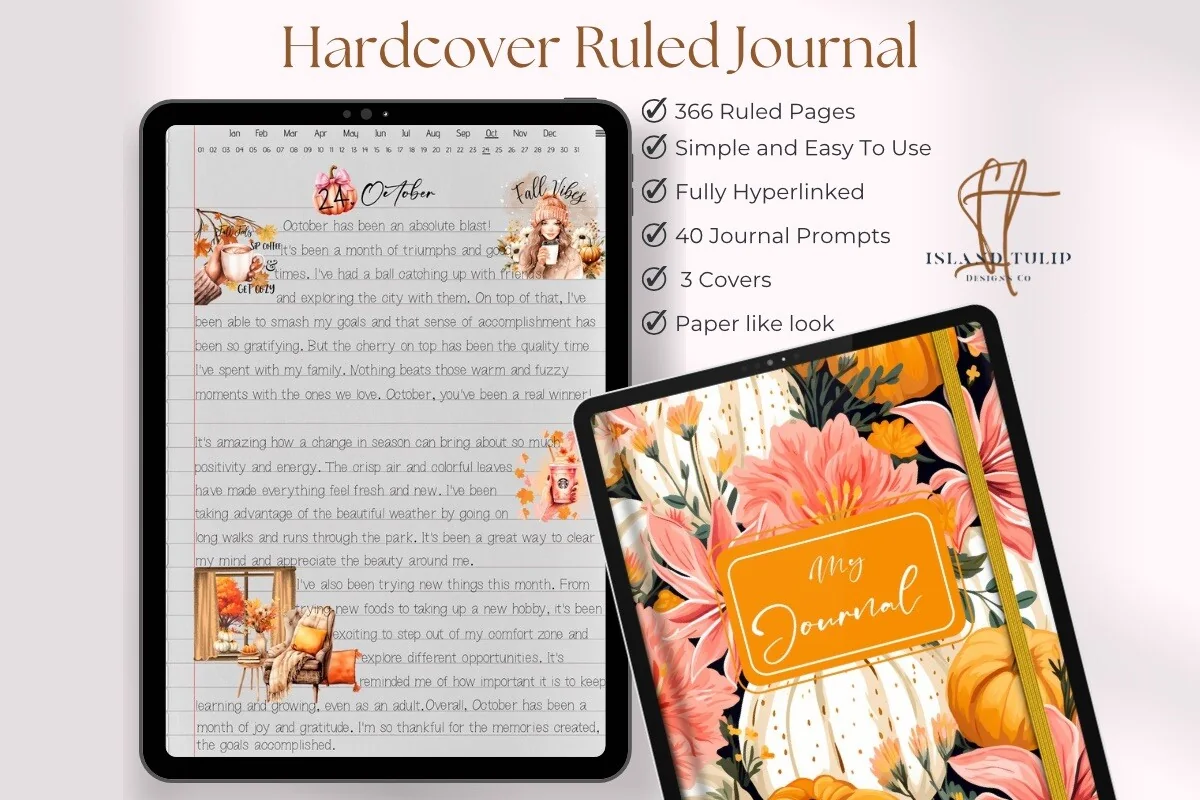
3. Digital Ruled Journal
Orientation: PortraitLayouts: 366 ruled pages; month and day index
Best for: keeping a dated trail through a long episode. Designed by Island Tulip Designs Co.
- 366 ruled pages and three floral covers
- Month and numbered-day navigation
- 40 journal prompts in PNG and precropped GoodNotes formats
For an interview you hear in three sittings, a ruled page gives each session room for a stopping point and a short reminder of the discussion. The month-and-day navigation suits a dated listening trail rather than a list organized by show. Keep a small front-page index if you want to gather all those sessions again. The included prompts are general journaling extras, not a prepared podcast review system.
Best for brief episode entries
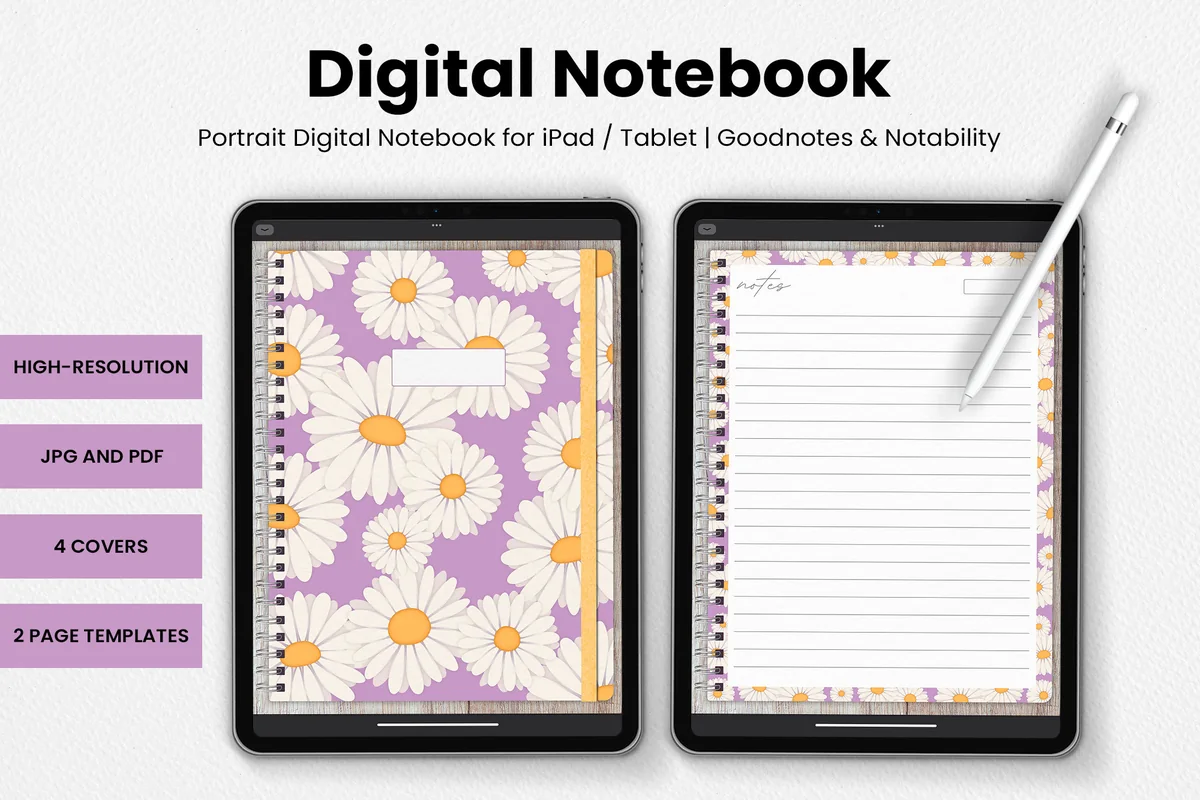
4. DaisyNotes | Digital Notebook | Purple
Orientation: PortraitLayouts: 2 page templates; 4 covers
Best for: a few lines after listening rather than a large tracking system. Designed by catsquills.
- GoodNotes and Notability compatibility
- JPG and PDF formats
- Four covers and two page templates with purple daisy borders
DaisyNotes is the compact option for writing the episode name, whether you want another installment and a sentence about why. Its ruled space and small date box support that simple entry without needing a complicated spread. The floral border takes up some room, so a crowded series map belongs in a roomier notebook. I like this option for a short response rather than a growing show library.
Best for monthly listening reviews
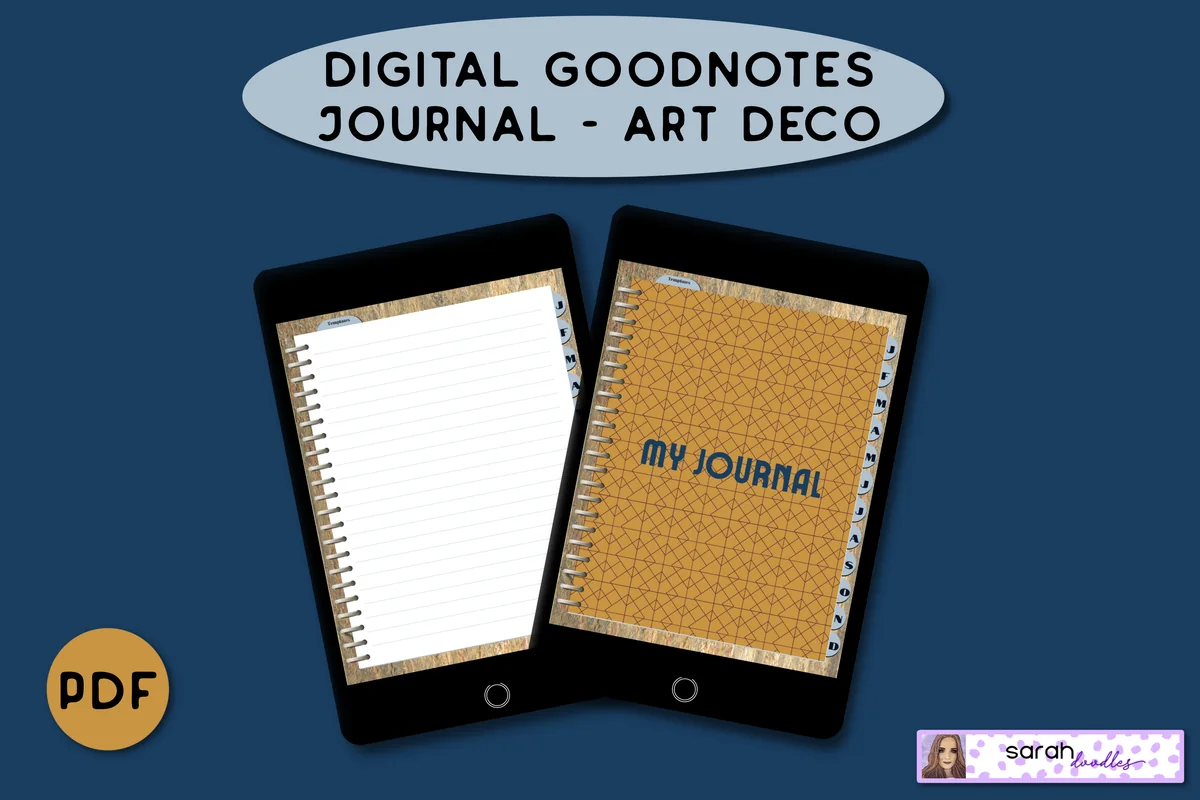
5. Digital GoodNotes Journal – Art Deco
Orientation: PortraitLayouts: 5 lined pages per month; brain-dump templatesDates: Undated
Best for: collecting listening notes under monthly dividers. Designed by Sarah Doodles.
- Hyperlinked PDF for iPad and PDF annotation apps
- Monthly dividers and five initial lined pages per month
- Brain-dump and priority-column layouts
- Pages can be duplicated in GoodNotes
Month tabs make a natural home for a queue review: keep the shows you are following and the episodes you decided to release under the same divider. The brain-dump layout can hold possible listens before you choose a small next queue. Each month starts with five lined pages; duplicate a page in GoodNotes if you need more room. For a serial story spanning months, maintain a separate order list so the monthly filing does not split the story into confusing pieces.
Quick Comparison
| Journal | Structure | Listening use | Keep in mind |
|---|---|---|---|
| 1. Digital Notebook | Sectioned notebook | Several shows at once | Create your own episode fields |
| 2. Undated Cute Orange Bullet Journal | Decorated bullet journal | Small visual queues | Compact writing areas |
| 3. Digital Ruled Journal | Ruled journal | Session-by-session notes | Keep a separate show index |
| 4. DaisyNotes | Digital Notebook | Purple | Decorated notebook | Concise episode entries | Create your own show index |
| 5. Digital GoodNotes Journal – Art Deco | Monthly journal | Queue reviews by month | Season order needs its own list |
Match the Page to the Listening Problem
- Several shows are getting mixed up: the sectioned Digital Notebook gives each series a filing place. Keep a separate short queue for what comes next.
- You want a compact visual overview: the Orange Bullet Journal supplies framed spaces and a blank calendar. Use short labels so decoration does not crowd out the episode title.
- You stop and resume long episodes: the Digital Ruled Journal leaves room for session notes. Its chronological navigation needs your own show index.
- You only want a few lines per listen: DaisyNotes offers decorated ruled pages without requiring a multi-section system.
- You review by month: the Art Deco journal supplies monthly dividers and lined pages. Keep serial order on its own list rather than scattering it across months.
I have not tested the purchased files or their links. Hyperlinks provide navigation within a document. Keep playback and listening history in your player, and update these journal pages by hand.
Keep the Journal from Becoming a Second Inbox
- Use a small status key: waiting, paused, finished and released are enough to begin. A released episode does not need a written defense.
- Put only your next few choices on the active page. A much longer archive can stay in the player until you have a reason to bring an episode into the journal.
- For a useful idea from an episode, keep the listening row short and move the longer response into a separate knowledge note. That keeps your return queue readable.
- For language practice, separate the task from leisure listening. The language-learning journal guide covers listening questions and corrections; this page system tracks which episode you want to resume.
FAQ: Podcast Listening Pages
Is this a listener’s journal or a podcast production planner?
It is a listener’s journal. The ideas organize episodes you want to hear, unfinished series and deliberate replays. They do not provide a recording schedule, guest booking system, script template or publishing checklist for producing a show.
Will these PDFs sync with my podcast player?
These are PDF notebooks for manual entries. Keep playback, subscriptions and notifications in your player. When you record a timestamp, include the episode title or version so you can find the same passage again.
Should I summarize every episode?
Only if a summary serves a purpose for you. A title, status and next listening action may be enough. A detailed summary belongs on a separate page when you actually want to revisit the discussion; it is not a condition for marking an episode finished.
Can I make a podcast tracker in a notebook I already own?
Yes. Start with a short queue, a paused strip and a series-order list on blank or ruled pages. Compare the five options only if you need a different layout. For more general page formats, see these digital journaling ideas.
How do I keep an unfinished episode from sitting there forever?
Add why you stopped and one possible next action. At your next queue review, choose resume, return later for a specific reason or release it. There is no need to finish a show simply because you once saved it.
Leave One Clear Next Listen
Useful podcast journal ideas reduce the moment of indecision when you open your player. Start with one small queue and a reliable stopping note, then add a series map only when you need it. Let the journal hold enough context to return comfortably, with room to decide that an episode no longer belongs in your listening time.
You May Also Like
This article contains affiliate links. If you buy through them, I may earn a commission at no extra cost to you. Read the affiliate disclosure.