The rent is paid, but the grocery receipt is still sitting between two coffee cups because neither of you remembers who covered the last trip. A couples budget planner needs to answer three questions: what is shared, who pays it, and whether anything still needs settling.

I would start with seven small records you can make on a blank notes page before buying a tool. Below, I have also selected nine iPad planning tools with different budget, bill and expense layouts. None is presented as a ready-made two-person system; you add the names, agreements and settlement notes that make it yours.
What your shared budget needs to decide
A budget total and a payment task describe different things. You might agree to share a utility cost while one partner handles the payment. Write down both the contribution agreement and the person responsible for the bill, so paying it does not silently decide who bears the whole cost.
The Financial Consumer Agency of Canada describes several arrangements, including separate finances and a shared account used only for household expenses. It also highlights transfer timing and agreed contributions. These are useful planning questions; this article does not recommend opening an account or changing your legal arrangements.
- Scope: which costs belong in the shared record, and which stay personal?
- Contribution: what has each person agreed to put toward those costs?
- Timing: when will that money be available, and when is each payment due?
- Responsibility: who pays, records and checks each item?
Use initials rather than account numbers. The shared planner needs amounts and decisions, not passwords or banking credentials. If you want a wider category list first, my budget planner ideas article can help you choose categories before dividing responsibilities.
7 couples budget planner pages to create together
These are original page ideas, not pages promised inside every product below. Begin with the records that answer a current question. You can combine the agreement and contribution notes on one page if your shared finances are simple.
Agree on the boundary and the timing
- 1.Shared versus personal agreement. Make three headings: shared, personal and discuss first. Under shared, name the actual items you both accept, such as rent, agreed groceries and internet. Under discuss first, put purchases where the boundary is unclear, perhaps furniture or meals with friends. A mixed receipt can contain both shared food and a personal item, so agree on the shared amount before entering the total. Add a review date rather than treating the first agreement as permanent.
- 2.Two payday calendars. Draw a month with one row for each partner’s expected pay dates and another for shared due dates. Mark income as expected until it arrives. This page answers a timing question: will the planned contributions reach the shared bill pot before rent is due? If pay is irregular, note the amount received and the next decision date. Do not promise a contribution from money that has not arrived or use a monthly average as proof that a particular payment is covered.
- 3.Agreed contributions record. Use columns for partner, amount agreed, due date, amount received and the period covered. Write the agreement in words above the table so both people know what it means. An equal split and an income-related split are possible arrangements, not universal definitions of fairness. Care work, changing income and other commitments may matter to your conversation. Leave a space for changes you both accept, with the date they take effect.
The agreement is a conversation aid. MoneyHelper’s guide to managing money jointly or separately emphasizes clear expectations, regular discussion and understanding the finances together. It also describes different ways to share responsibility. Use those questions to choose your page headings and agree on a split that fits your circumstances.
Keep paying separate from settling
- 4.Who-pays-what list. Give each shared bill a row with amount, due date, payer, payment status and a check date. The payer is the person handling the task; the contribution agreement says how its cost is shared. Use distinct states such as planned, paid and checked. If one partner is away, write the temporary handover next to the bill. Use your normal banking process for the payment and set a calendar alert when needed.
- 5.Reimbursements and transfers log. For a purchase paid from personal money, record the receipt date, shared amount, payer, agreed share and settlement status. Keep personal extras outside that shared amount. When the other partner sends reimbursement, link it to the original row and mark the balance settled. The transfer resolves who funded the purchase; it is not another grocery expense. Record a partial reimbursement as partial, with the amount still open, instead of checking the whole row off.
Give receipts a short identifier such as G1 or U2. Then the bill list, spending entry and settlement row can refer to the same purchase without copying a long explanation into three places. Keep the source receipt wherever you normally store it; a checked box is easier to audit when you can find the amount it refers to.
Leave room for goals and decisions
- 6.Shared goal and personal spending notes. Name one shared goal, the amount you decide to work toward and the contributions actually made. A planned transfer and a completed transfer need different marks. Beside it, record the boundary for personal spending: what stays outside the shared ledger, and what kind of purchase needs discussion first. There is no required allowance in this layout. The aim is to make your own agreement visible without turning the shared notebook into a record of every private purchase.
- 7.Monthly conversation page. Use four prompts: what changed, what is unsettled, what is due next and what do we agree to adjust? Bring the current bill list and open reimbursement rows. Close the conversation with an action, an owner and a date, such as checking a utility amount before the next contribution. Keep the question about the system: did the record make payment and settlement clear? A long list of spending mistakes is less useful than one change both people understand.
A worked example: one purchase, one settlement
Here is a fictional example in dollars, with no suggested spending level or recommended split. Alex and Sam have chosen to share the eligible part of one grocery trip equally. Alex pays $100, but $20 is Alex’s personal item. The shared expense is therefore $80, and Sam’s agreed share is $40.
| Record | Entry | Meaning |
|---|---|---|
| Receipt | $100 paid by Alex | $80 shared + $20 personal |
| Shared spending | $80 groceries | Count this cost once |
| Settlement | Sam sends Alex $40 | Resolves Sam’s share; not new spending |
| Final shared cost | $40 each | Alex also bears the $20 personal item |
After reimbursement, Alex has paid $100 and received $40, leaving $60 out of pocket: $40 shared plus $20 personal. Sam has paid $40. Together they have still spent $100 at the store, with $80 in their shared budget and $20 in Alex’s personal record. The reimbursement changes funding between them, not the store purchase.
- If Sam sends only $25 initially, leave $15 open on the settlement row.
- If a shared pot paid the original $80, do not also create a reimbursement to Alex for that same amount.
- If you change the split, update the share before marking the row settled.
9 iPad tools for the records you choose
Choose a budget PDF if you need allocation pages, a bill planner if payment responsibility is the problem, or an expense record if categories keep getting mixed. Start with one main file and add a small companion only for a clear gap. The comparison describes how each tool can support your own layouts; it does not mean you need nine purchases.
I reviewed the public listings and all available preview images, not purchased files. Any required annotation app is separate. Use the suggested layouts as manual records; check any calculation, synchronization or sharing requirements with the seller and your chosen app before buying. For a broader selection focused on budgeting layouts, compare my digital budget planner picks.
TL;DR: Agree on shared costs first, then pick a tool for the record you need. These nine planning tools offer budget, expense, bill or calendar layouts. The seven couples-specific pages above are original layouts you create yourself.
Quick Picks
- Best for two pay schedules: Digital Budget Planner, Financial Plan
- Best for a single joint goal: Simple Savings Planner, Digital Planner
- Best for contribution notes: Budget Digital Planner Hyperlinked Tab
- Best for payment responsibility: Hyperlinked Bill Tracker Planner
- Best for a monthly review spread: Digital Budget Planner, Finance Tracker
- Best for calendar and money together: All-in-One Digital Planner ( 112 Pages )
- Digital Budget Planner, Financial Plan – Best for two pay schedules
- Simple Savings Planner, Digital Planner – Best for a single joint goal
- Budget Digital Planner Hyperlinked Tab – Best for contribution notes
- Hyperlinked Bill Tracker Planner – Best for payment responsibility
- Digital Budget Planner, Finance Tracker – Best for a monthly review spread
- All-in-One Digital Planner ( 112 Pages ) – Best for calendar and money together
- Undated Digital Planner, Life Planner – Best for income and expense separation
- Undated Budget Planner for GoodNotes – Best for a simple spending recap
- Expenses Tracker 4years Interactive PDF – Best for category boundaries
Budget records for two pay schedules
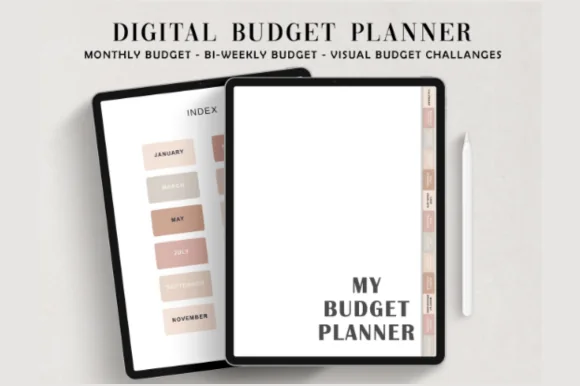
Best for two pay schedules
1. Digital Budget Planner, Financial Plan
Orientation: PortraitFormat: Hyperlinked PDF
Best for: planning shared commitments around different paydays. Designed by ThePlannersDelight.
- Hyperlinked budget PDF for GoodNotes, Noteshelf and Notability
- Monthly and biweekly budgets, daily spending and sinking funds
- Seller specifies an Apple tablet and a stylus such as Apple Pencil; app and hardware are separate
Rent can fall due before the second partner’s payday even when the monthly income covers it. The monthly and biweekly pages give you room to map that gap; I would add initials beside contributions and use the spending log for shared purchases. Add your own split agreement and reimbursement columns. Use the hyperlinks to navigate between pages, and enter your agreed contributions in the record.

Best for a single joint goal
2. Simple Savings Planner, Digital Planner
Orientation: LandscapeFormat: Hyperlinked PDF
Best for: recording deposits toward one agreed purchase. Designed by bellaROSEworkshop.
- Four-page digital-use hyperlinked PDF
- Saving challenge with deposit, balance and notes columns
- Purchases tracker and bill tracker; PDF is not editable
For one agreed goal, such as replacing a shared appliance, put each contributor’s initials in the notes column and record money actually set aside. I like the small four-page scope when a full planner would be unnecessary. Keep the household budget elsewhere, and distinguish annotating the PDF from changing its underlying design.
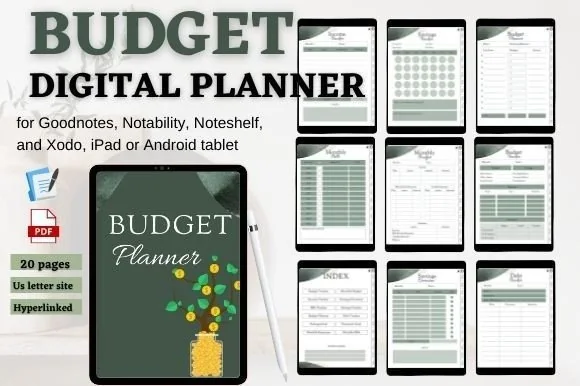
Best for contribution notes
3. Budget Digital Planner Hyperlinked Tab
Orientation: PortraitFormat: Hyperlinked PDF
Best for: keeping received contributions beside the bill plan. Designed by mixxdigitaldesign.
- 20-page hyperlinked digital and printable planner
- Income Tracker, Monthly Budget, Monthly Bills and Savings Goal
- Notes and extra pages; seller lists Goodnotes, Notability, Noteshelf and Xodo
The budget sections and extra notes space make room for a contribution agreement beside the figures. Use the income record for amounts received and specify which shared costs they cover. A partner transfer funds that shared record; it is not another salary in a combined household total. Use the notes space beside the green portrait layouts to write each partner’s name and agreed contribution.
Bills and the monthly conversation
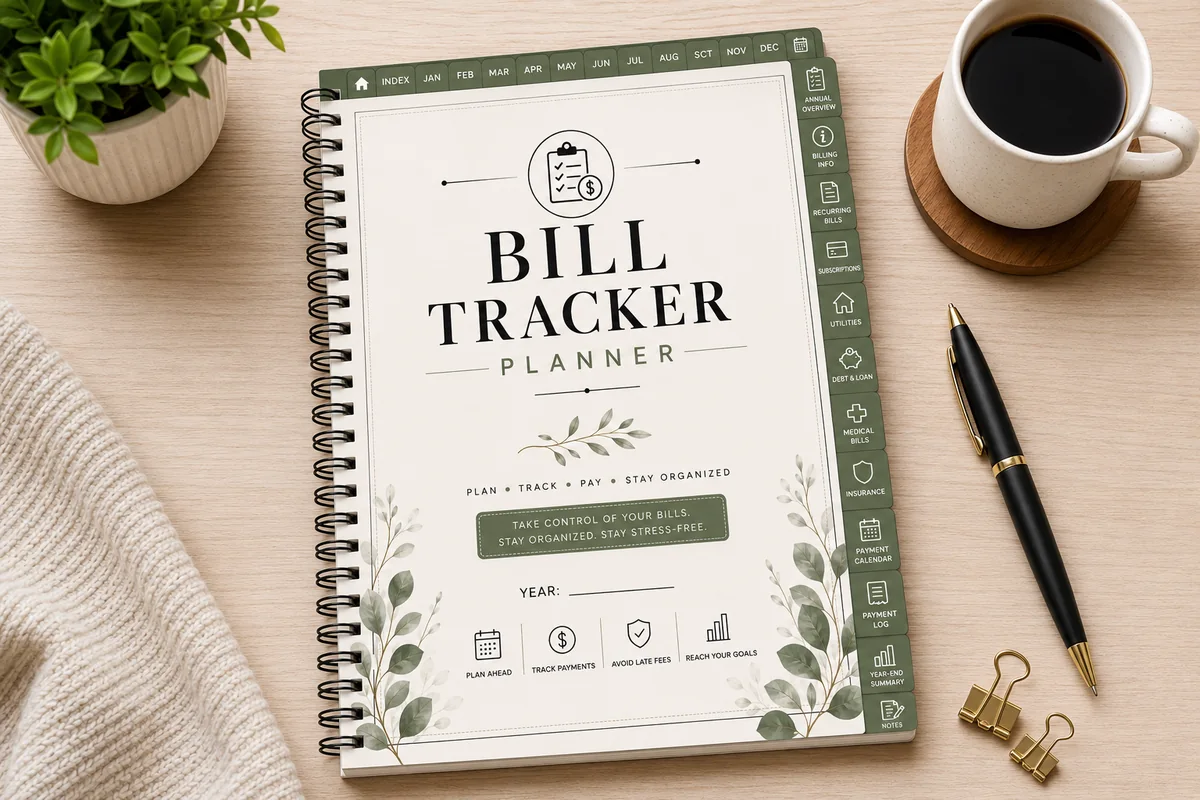
Best for payment responsibility
4. Hyperlinked Bill Tracker Planner
Orientation: Portrait A4Format: Hyperlinked PDF
Best for: checking who handles each recurring bill. Designed by Azhir.
- 52-page undated hyperlinked PDF in portrait A4
- Monthly bill trackers, payment summaries and recurring-bill sections
- PDF annotation app such as Goodnotes or Notability required
Assigning a payer is different from deciding who bears the cost. Write an owner beside each bill and mark the actual payment date, keeping the split agreement alongside it. The listing includes subscriptions, utilities and a payment log, but the public image shows only the cover and tabs. Set a calendar alert for the bill dates you record.
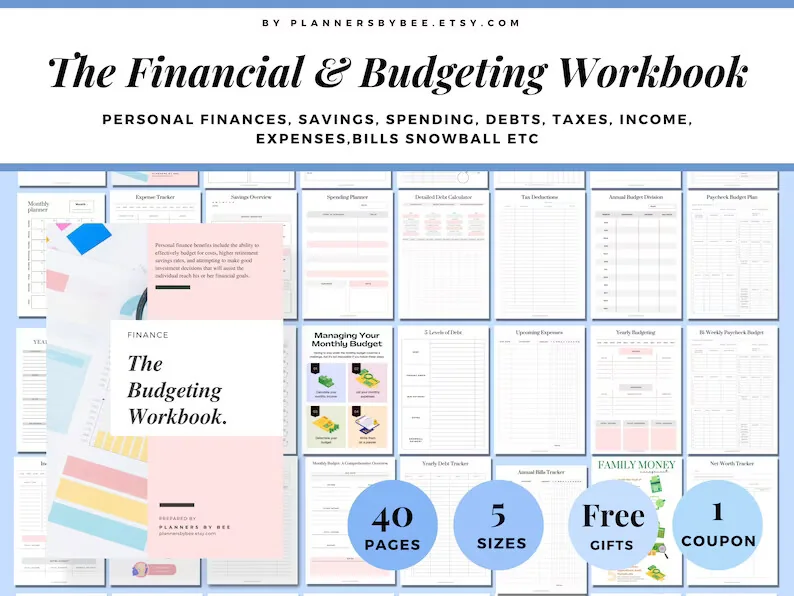
Best for a monthly review spread
5. Digital Budget Planner, Finance Tracker
Orientation: PortraitFormat: Digital GoodNotes workbook
Best for: comparing the month’s spending and bill notes. Designed by PlannersByBee.
- Digital finance workbook marketed for GoodNotes
- Public preview advertises 40 pages and five sizes
- Montage shows Savings Overview, Spending Planner and Annual Bill Tracker
The savings and bill overviews offer a place to bring totals together before the monthly conversation. I would put agreed figures on one page and a question for next month on another, rather than reopen every receipt. The single public montage shows the layouts but does not demonstrate the purchased file. For this monthly review, calculate your totals and record any settlement you have checked.
Calendar, notes and category companions
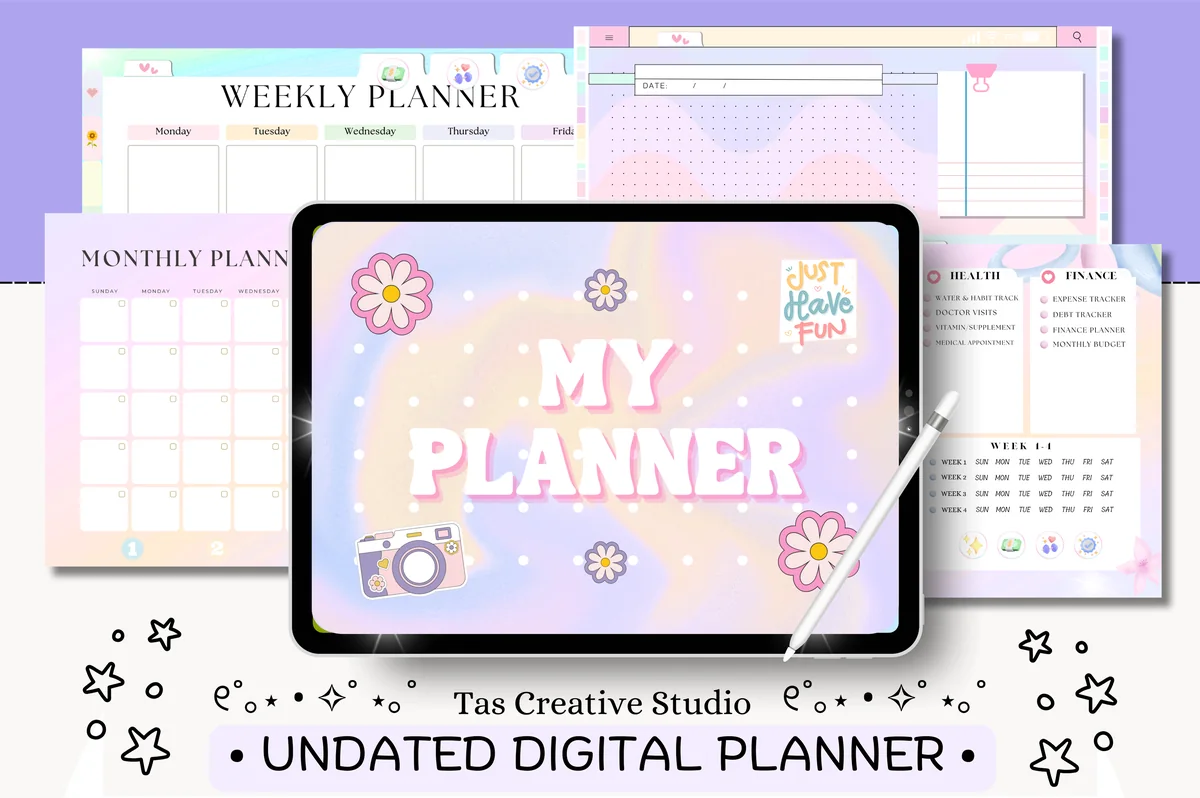
Best for calendar and money together
6. All-in-One Digital Planner ( 112 Pages )
Orientation: LandscapeFormat: Hyperlinked PDF
Best for: pairing payment tasks with the shared week. Designed by Tas Creative Studio.
- 112-page undated horizontal hyperlinked PDF
- Daily, weekly and monthly planning plus finance pages
- Monthly budget, expense, savings and bill trackers; PDF app needed
A missed payment task may need a date as much as a budget category. This pastel landscape planner combines weekly planning and finance pages: put the task in the week, the amount in the finance section and initials beside the person responsible. Choose it when calendar coordination matters too. Create the seven shared-money layouts above yourself, including your couples agreement.
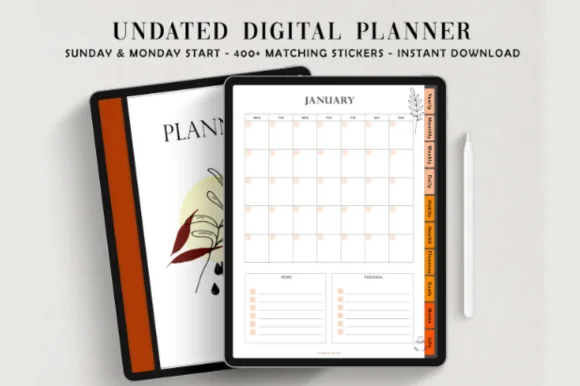
Best for income and expense separation
7. Undated Digital Planner, Life Planner
Orientation: PortraitFormat: Hyperlinked PDF
Best for: keeping incoming funds apart from shared purchases. Designed by ThePlannersDelight.
- 110-page undated hyperlinked life planner
- Monthly Budget, Revenue Tracker and Expense Tracker
- Sunday- and Monday-start PDF versions for GoodNotes or NoteShelf
Autumn Hues keeps revenue, expenses and notes in separate sections. That suits different contribution schedules, provided you label each page’s scope so a partner transfer is not counted again as household earnings. Use the notes for decisions the finance forms do not capture. Use its meal planner to prompt a grocery conversation.

Best for a simple spending recap
8. Undated Budget Planner for GoodNotes
Format: Hyperlinked PDF
Best for: reviewing totals without a large life-planning system. Designed by Perla Designs.
- Undated hyperlinked PDF for GoodNotes
- 30-page layout shown in the public preview
- Yearly Overview, Monthly Budget, Monthly Spending and Spending Summary
The pink monthly and yearly layouts keep the spending recap compact. Record agreed shared costs on the monthly spending page, carry your totals to the summary and keep payer or reimbursement details in a separate note. This is a general budget planner, so choose it for those visible layouts rather than assume it has dedicated couples fields.
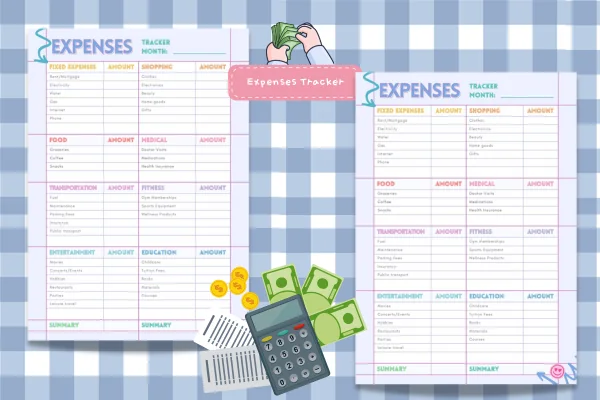
Best for category boundaries
9. Expenses Tracker 4years Interactive PDF
Format: Interactive PDF
Best for: separating the agreed grocery total from personal purchases. Designed by Zoom4Design.
- Interactive PDF with 48 monthly tracking pages advertised
- Preview divides spending into categories including food and transportation
- Seller lists iPad/GoodNotes; interactive field behavior in that app is untested
A categorized page can help separate a mixed shopping receipt: enter only the agreed shared portion under groceries and keep a personal purchase in its own record. The many categories provide prompts, although they may be unnecessary if you share only two bills. No payer or settlement column is visible, so keep a separate transfer log. Interactive field behavior in GoodNotes has not been tested.
Quick Comparison
| Tool | Couples role | Useful layout | Limit |
|---|---|---|---|
| 1. Digital Budget Planner, Financial Plan | Different paydays | Monthly and biweekly budgets | Add partner labels yourself |
| 2. Simple Savings Planner, Digital Planner | One shared goal | Deposit and balance log | Needs a separate budget |
| 3. Budget Digital Planner Hyperlinked Tab | Contribution records | Income, bills and notes | Manual reconciliation |
| 4. Hyperlinked Bill Tracker Planner | Who pays each bill | Bill trackers and payment log | Set your own bill alerts |
| 5. Digital Budget Planner, Finance Tracker | Monthly conversation | Savings and bill overviews | One public montage only |
| 6. All-in-One Digital Planner ( 112 Pages ) | Calendar coordination | Weekly plans and finance | Broader than budgeting |
| 7. Undated Digital Planner, Life Planner | Separate money records | Revenue, expenses and notes | Define each page’s scope |
| 8. Undated Budget Planner for GoodNotes | Simple monthly recap | Spending summary | Add payer details in your own note |
| 9. Expenses Tracker 4years Interactive PDF | Category decisions | Categorized monthly expenses | Separate settlement log needed |
Set up one current version on your iPad
A shared-money record is harder to trust if both people edit different copies. Before you start, decide where the current version lives, who updates it and how the other person checks it. Sharing or exporting an annotated PDF depends on the app and your permissions; none of these product listings establishes simultaneous two-person editing.
A short setup sequence
- 1.Create a clean working copy. Keep the original file separate and name the working copy with the budget period. Use the app and import method the seller lists. For a hyperlinked PDF, open a few section links and write a short test note before entering a month of figures. Hyperlinks may use a navigation mode that differs from the writing tool; consult your app’s own instructions if a tap writes ink instead of opening a section.
- 2.Add your shared-money headings. Use a notes page for the agreement and the existing budget or bill pages for their normal roles. Write partner initials beside contributions and payment tasks. If a page has no payer column, add a simple note rather than forcing a name into an amount box. Check that both people can read the annotations at the size you normally use. Keep the scope visible: shared costs, one person’s costs or the combined household total.
- 3.Choose a handover routine. Agree which person updates the current record after a receipt or transfer, and how the other person will check it. Before either person edits another copy, agree how changes return to the current version. Keep completed months separately from the active one. A saved planning file is a record of your decisions, so check actual payment status through your usual secure banking process rather than treating an annotation as bank confirmation.
Review the next bill before the next month
The most useful review can be small: check the next due date, the contributions received and any unsettled purchase. For two different pay cycles, the calendar matters as much as the monthly total. The biweekly budget templates comparison explains tools for organizing paycheck periods if that is your main gap.
- Before the next bill: is enough of the agreed contribution actually available?
- After a transfer: does it fund the shared pot or settle a specific purchase? Label it accordingly.
- At month end: compare planned and actual shared costs, then carry only genuine open items forward.
- After a change: revisit the agreement when income, responsibilities or shared costs change.
If a record does not answer a useful question, simplify it. A single bill list plus a clear agreement may be enough when you share only rent and utilities. Add a reimbursement log when personal payments make settlement confusing; add categories when mixed receipts make the scope unclear.
Give your money conversation a short agenda
Before the meeting, group shared costs into categories you both recognize, such as utilities, groceries and dining out. Mark whether car payments, credit card bills and other debt payments belong to the household record or to individual spending under your agreement. If you keep individual accounts, record only the contributions and shared purchases needed to settle between you. This gives either partner a way to question an entry without asking for a list of every personal purchase.
Write the contribution approach beside those groups: equal contributions, different agreed amounts or a calculation you both understand. Similar income does not settle the question by itself; use the page to note the responsibilities and commitments you discussed. When a side hustle payment arrives or working hours change, add the date and decide together whether the next contribution changes. Keep expected income separate from money already received, especially when a bill is due before payday.
Give each shared savings goal its own line, whether you are recording an emergency fund or another agreed purpose. If you use separate savings accounts, name the goal and record the relevant transfers without adding account numbers. Close the meeting by choosing one thing to fix, such as an unclear dining category or an unmarked reimbursement. Build the habit of checking that change at your next review so the same unresolved entry does not appear month after month.
FAQ: couples budget planning
Do we need a joint bank account to use these pages?
No. The pages record your chosen arrangement, including separate accounts with agreed shared costs. They do not require a new banking product. Before changing account ownership or borrowing together, ask your financial institution or an appropriate adviser about the implications for your situation and location.
Should we split shared bills 50/50?
Only if that is the arrangement you both choose. Write the agreed amount or calculation and a review date. This article’s equal-share grocery example demonstrates bookkeeping, not a fairness rule. If an arrangement becomes unaffordable for either person, revisit it rather than letting the old percentage decide silently.
Can we use Excel or Google Sheets instead?
Yes. A couples budget template in Excel or Google Sheets can use the same shared-cost, payer and settlement fields. A spreadsheet can calculate formulas you set up; an annotated PDF usually means manual totals. Check sharing permissions and formula accuracy separately. The selection below focuses on digital planning tools; check each seller’s listing for the file formats and app requirements before choosing.
Which page should we start with?
Start with the shared-versus-personal agreement and the next bill. Add the contribution record if the amount or arrival date is unclear. Add the reimbursement log when one person regularly pays from personal funds. You can make these records on a blank page without buying a new planner.
When should we seek professional help?
If you cannot cover essential bills, seek qualified debt or financial guidance appropriate to your location. For questions about joint obligations, separation, taxes or ownership, get relevant professional advice. If money discussions involve threats or control over access to funds, prioritize confidential support and safety; a shared planner cannot resolve that situation.
Start with one agreement you can both explain
A useful couples budget planner leaves you with a clear answer about the next shared payment: what it covers, who handles it and whether anything remains to settle. Create the seven records as needed, choose a planning tool for the layout you will use, and keep the agreement in your own words. The goal is a record both partners can understand and update.
You May Also Like
This article contains affiliate links. If you buy through them, I may earn a commission at no extra cost to you. Read the affiliate disclosure.