A blank daily page looks full of promise at 7 a.m. and strangely empty by noon. The schedule is there, maybe a to-do list, and then nothing that actually helps you get through the day. These daily planner ideas fix that: 40 small blocks you can put on a daily page, grouped by what they do for you, so you can build a page that works instead of one that just looks busy.
First come the ideas, grouped into six blocks: time, priorities, health, home and money, mindset, and a little fun. Then daily page layouts and aesthetic ideas, and the six iPad templates from Creative Fabrica I’d use to try them. At the end: a five-minute routine for filling in the page, and how to set it up in GoodNotes.
40 Daily Planner Ideas, by Block
Don’t use all forty. A good daily page has a time block, a priority block and one or two blocks just for you. Pick three to five blocks below, try them for a week, then swap the ones you keep skipping.
Time and Schedule 1–8
- 1An hourly schedule from wake-up to bedtime
- 2Time blocks for deep work, errands and rest
- 3Appointments and meetings, with times
- 4Wake-up time and lights-out time
- 5A “due today” box for deadlines
- 6School runs, classes and pickups
- 7A buffer block for whatever runs late
- 8Tomorrow’s prep: clothes, bag, lunch
Priorities and Tasks 9–16
- 9Top 3 priorities for the day
- 10A to-do list split into must, should and could
- 11One hard task to do first
- 12Calls and emails to send
- 13Errands and quick shopping
- 14A brain dump or “idea parking lot”
- 15A “don’t forget” box
- 16Waiting on: replies, deliveries, decisions
Health and Wellbeing 17–23
- 17A water tracker with 8 little glasses
- 18Meals: breakfast, lunch, dinner and snacks
- 19Movement of the day (a walk counts)
- 20Hours slept last night
- 21A mood check: one color or emoji
- 22Vitamins or medication, ticked off
- 23One small self-care moment
Home, Meals and Money 24–29
- 24Tonight’s dinner, decided before 4 p.m.
- 25One 15-minute chore
- 26Today’s spending, line by line
- 27A no-spend day checkbox
- 28Bills due today
- 29Grocery top-ups for the week
Mindset and Reflection 30–35
- 30An intention or word for the day
- 31A quote or affirmation
- 32Three things I’m grateful for
- 33The highlight of the day
- 34A small win, however tiny
- 35One thing to do better tomorrow
Fun and Memories 36–40
- 36A photo or sticker of the day
- 37What I read, watched or listened to
- 38Something that made me laugh
- 39A doodle corner for the Apple Pencil
- 40A countdown to something I’m looking forward to
Daily Planner Layout Ideas
The same blocks can sit on the page in very different ways. These are the layouts I see most often on Pinterest and in iPad templates, and what each one is good for:
- Hourly schedule: a column of hours down one side and notes on the other. Best for days full of appointments and classes.
- Time blocking: bigger chunks (“9–11 deep work”, “2–3 errands”) instead of every hour. Best for focused work and studying.
- Priorities first: top three at the top, the full to-do list below. Best for busy days when not everything will get done.
- List only: one long checklist, no times. Best for flexible days at home.
- Routine columns: morning, afternoon, evening and night side by side. Best for building routines, with kids or without.
- Minimal box: date, three tasks and a notes box. Best for days when planning has to take two minutes.
Daily Planner Aesthetic Ideas
On an iPad the look is half the fun, and it changes nothing about how much paper you waste. A few ideas that keep the page pretty without making it harder to read:
- Dark mode for evening planning
- Warm coffee and latte tones
- Soft pastels with hearts
- Black and white minimal
- One color per life area
- A washi strip across the date
- Two or three stickers, not ten
- A photo of the day in the corner
Daily Planner Ideas for Students and Work
For school or college, start with these blocks:
- Class schedule with rooms
- Assignments due today
- Study blocks with breaks
- Reading for tomorrow
- Exam countdown
For a workday, these are the ones that pull their weight:
- Meetings with times
- Top 3 work priorities
- Deep work block
- Calls and emails
- Notes from today’s meetings
- Tomorrow’s first task
The Best Daily Planner Templates to Try These Ideas
I kept only digital daily templates for the iPad and skipped Canva and print-only files. Each card says which blocks from the list the page already has, so you can pick by the ideas you liked.
TL;DR: 40 daily planner ideas grouped by block (time, priorities, health, home and money, mindset, fun), then 6 iPad templates: 5 daily planners with different layouts and 1 planner with daily pages plus meals, mood and budget. Each card lists which ideas the page already has.
Quick Picks
- Best for most ideas on one page: Daily Digital Planner Orange Style
- Best for time blocking: Daily Planner • Coffee Latte
- Best for routine columns: Daily Routine – Cozy Pastel Planner
- Best for planning at night: Digital Daily Planner
- Best for adding blocks with stickers: Undated Daily Digital Planner
- Best for daily pages plus life areas: Deep Blue Undated Digital Planner
- Daily Digital Planner Orange Style – Best for most ideas on one page
- Daily Planner • Coffee Latte – Best for time blocking
- Daily Routine – Cozy Pastel Planner – Best for routine columns
- Digital Daily Planner – Best for planning at night
- Undated Daily Digital Planner – Best for adding blocks with stickers
- Deep Blue Undated Digital Planner – Best for daily pages plus life areas

Best for most ideas on one page
1. Daily Digital Planner Orange Style
Orientation: LandscapeLayouts: Daily (2-page spread)Dates: Undated, 31 pages
Best for: list makers, meal planners, colorful planners. Designed by MOMAT THIRTYONE.
- Two-page daily spread: quote of the day, today's plans by the hour, to-do today and top three priorities
- Boxes for appointments, "don't forget to", calls and emails, activity and shopping
- Breakfast, lunch, dinner and snack, plus a water intake row
- 31 undated hyperlinked pages for one month, with 100+ digital sticky notes
If you liked a little of everything in the list above, this page already has it: ideas 1, 9, 12, 15, 17 and 18 are printed right on it. The warm orange tones make a busy day look friendly. Undated, so one file covers a month and you start again the next.

Best for time blocking
2. Daily Planner • Coffee Latte
Orientation: LandscapeLayouts: Daily (1 page, hourly)Dates: Undated
Best for: time blockers, coffee lovers, one-page planners. Designed by Tas Creative Studio.
- One undated daily page, landscape, in coffee and latte tones
- Schedule from 5 a.m. to 9 p.m. next to priorities and "tomorrow's prep"
- Tasks, "due today", a water tracker and a to-do list with an idea parking lot
- Digital PDF for GoodNotes, Notability and Noteshelf (a printable version is included too)
This is the time-blocking layout in its cleanest form: hours on the left, priorities and "due today" on the right, and a box for tomorrow's prep. It covers ideas 1, 5, 8, 9, 14 and 17 without any extra pages. Duplicate it for each day and it's done.

Best for routine columns
3. Daily Routine – Cozy Pastel Planner
Orientation: LandscapeLayouts: Daily routine (morning to night)Dates: Undated
Best for: routine builders, pastel lovers, families. Designed by Tas Creative Studio.
- One undated daily routine page: morning, afternoon, evening and night columns
- Side panels for a to-do list and an "idea parking lot"
- Cute pastel design with hearts, A4 landscape
- Digital PDF version for GoodNotes, Notability and Noteshelf
Not every day fits into hours. This page uses the routine-column layout from above: four parts of the day, with checkboxes down the side. It's great for school runs, chores and self-care, and the idea parking lot is the brain dump from idea 14.
Best for planning at night
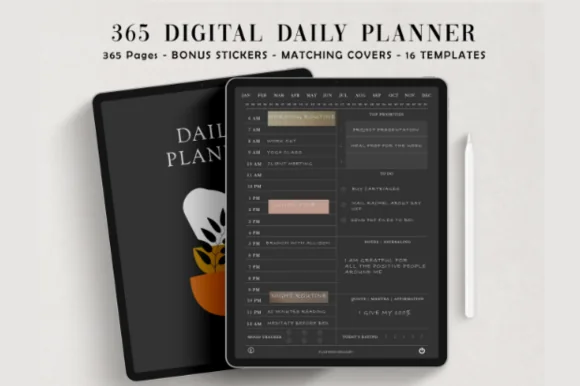
4. Digital Daily Planner
Layouts: DailyDates: Undated
Best for: night owls, dark mode fans, minimalists. Designed by ThePlannersDelight.
- 365 undated, hyperlinked daily pages on a coal-black background
- Hourly schedule with 5 AM and 6 AM start versions
- 16 extra page templates for notes and lists
- Bonus covers and matching digital stickers
If you fill in tomorrow's page in bed, dark mode is much kinder on the eyes. Each day has its own page with an hourly schedule, so you can add a top three and a gratitude line from the ideas above. With 365 pages, you never run out.

Best for adding blocks with stickers
5. Undated Daily Digital Planner
Layouts: DailyDates: UndatedWeek start: Monday or Sunday
Best for: daily planners, minimalists, sticker fans. Designed by studiopattern.
- 2 hyperlinked PDFs: Sunday and Monday start
- Undated, so you can fill in the dates for any year
- Calendar stickers and 16 widget stickers (PNG)
- User manual included; works in GoodNotes, Notability and Xodo
This one fits the "build your own page" approach. The page stays simple, and the widget stickers let you drop in extra blocks when a day needs them, like a water tracker or a mood check. Rated 5.0 on Creative Fabrica.

Best for daily pages plus life areas
6. Deep Blue Undated Digital Planner
Layouts: Yearly, Monthly, Weekly, DailyDates: UndatedWeek start: Monday or Sunday
Best for: life organizers, budgeters, habit trackers. Designed by ThePlannersDelight.
- 112 undated pages in 10 hyperlinked sections, Monday and Sunday start
- Yearly, monthly, weekly and daily planner pages
- Meal planner, mood tracker, workout log and habit tracker
- Monthly budget, expense tracker, goal planner and vision board; 400+ stickers
Some ideas from the list need more room than one daily box: meals for the week, a monthly budget, a mood log. This planner keeps those pages one tap away from the daily page. Rated 5.0 on Creative Fabrica, and the dark cover with leaves feels calm.
Quick Comparison
| Template | Best for | Daily page has | Stand-out extra |
|---|---|---|---|
| 1. Daily Digital Planner Orange Style | Everything on one spread | Hours, top 3, meals, water | 100+ sticky notes |
| 2. Daily Planner • Coffee Latte | Hourly schedule | 5 a.m.–9 p.m., top tasks, due today | Tomorrow's prep box |
| 3. Daily Routine – Cozy Pastel Planner | Routines over hours | 4 parts of the day, to-do | Idea parking lot |
| 4. Digital Daily Planner | Dark mode, every day | Hourly schedule, 365 pages | 5 AM or 6 AM start |
| 5. Undated Daily Digital Planner | Simple + add-on blocks | Daily page, Sun or Mon start | 16 widget stickers |
| 6. Deep Blue Undated Digital Planner | Daily + whole life | Daily, meals, mood, budget | 400+ stickers |
How to Fill In a Daily Page in 5 Minutes
A daily page only helps if filling it in is quicker than skipping it. This is the routine I’d suggest, at night or first thing in the morning:
- Minute 1: copy fixed times from your calendar: meetings, classes, pickups.
- Minute 2: choose the top three. If everything else slips, these still happen.
- Minute 3: put the top three into time blocks, so they have a real slot.
- Minute 4: fill your personal blocks: water, dinner, one chore, mood.
- Minute 5: at the end of the day, tick what’s done, move what isn’t to tomorrow and write one highlight.
Moving unfinished tasks isn’t failure. On an iPad it’s even easier: lasso the line and drag it to the next page.
What Should a Daily Planner Have?
At minimum, three things: a place for time (schedule or time blocks), a place for priorities, and a short to-do list. Everything else from the list above is optional and personal. If you track health or money, add those blocks to the daily page; if you don’t look at them, take them off. The best daily page is the one you open every day.
Daily Planner Template or Planner App?
Apps like Apple Calendar and Reminders are great at alerts and repeating events. A daily planner template in GoodNotes gives you something they don’t: one page where your schedule, priorities, meals and mood sit together in your own handwriting. Many people use both: the calendar app for reminders, the iPad page for thinking the day through. Note that a PDF planner doesn’t sync with your calendar on its own; you copy the fixed times in, which takes a minute.
How to Set Up a Daily Planner in GoodNotes
- Save the PDF from Creative Fabrica and open it on your iPad.
- Tap Share → GoodNotes → Import as New Document (Notability and Noteshelf work the same way).
- Switch to Read Only mode when you want to tap hyperlinked tabs, and back to the pen to write.
- For an undated planner, write the date on the first page and duplicate pages as you need them.
- Save your favorite blocks (water tracker, top three) as stickers or in the Elements tool to drop them on any page.
FAQ
What should I include in my daily planner?
Start with a schedule or time blocks, your top three priorities and a short to-do list. Then add one or two personal blocks that matter to you right now, like a water tracker, meals, spending or three things you’re grateful for.
What is a good daily planning routine?
Five minutes the night before or first thing in the morning: copy fixed appointments, choose three priorities, give them time slots and fill in your personal blocks. In the evening, tick off what’s done and move the rest to tomorrow.
What are some ideas for pages in a planner?
Besides daily pages: a weekly overview, a monthly calendar, a habit tracker, a meal planner, a budget page, a goal page and a notes or brain dump page. Most all-in-one iPad planners include several of these next to the daily pages.
Can I use my iPad as a planner?
Yes. With an Apple Pencil and a note-taking app like GoodNotes, Notability or Noteshelf, a PDF planner works like a paper one: you write by hand, but you can also duplicate pages, move tasks, add stickers and keep years of pages in one file.
Does Apple have a daily planner?
Apple doesn’t make a daily planner template. Calendar, Reminders and Notes cover schedules, tasks and lists. For a handwritten daily page, people import a PDF planner into GoodNotes or Notability on the iPad.
How do I set up a daily planner?
Choose a layout (hourly, time blocks, priorities first or a simple list), pick three to five blocks from the ideas above and use the same page for a week. Keep what you used, drop what you skipped and set the page up again on Sunday.
Final Thoughts
A daily page doesn’t need forty blocks. It needs the three or four that make your day easier: a time block, a top three, and one thing just for you. Try a few daily planner ideas from the list this week. For complete planners, see my best daily digital planners for iPad, the daily routine planners, or browse all daily planners. For the bigger picture, see my weekly planner ideas. If a simple list is all you need, try one of these to-do list templates. Want a pastel page to try these ideas on? See my pink and pastel daily templates, and if you are still choosing a format, these planner layout ideas compare daily, weekly and vertical spreads.
Want one planner for the whole year instead? Here are the best digital planners for 2027 I’d keep all year.
You May Also Like
This post contains affiliate links. If you buy through them, I may earn a small commission at no extra cost to you. Learn more.