A study planner can turn into a pretty notebook you never open, or into the one place that tells you what to study tonight. The difference is what’s inside. These study planner ideas are the pages and trackers that actually earn their spot: 30 ideas grouped by goal, from a class timetable to a mistake log, so you can build a planner that fits your classes and your exams.
First come the ideas by goal: schedule, subjects, assignments, exams, focus and motivation, plus a few aesthetic ideas. Then the iPad study planners from Creative Fabrica I’d use to put them into practice. At the end: how to make a study plan in five steps and how to keep it going every week.
30 Study Planner Ideas, by Goal
Pick the goal that hurts most right now. Missing deadlines? Start with assignments. Exams in six weeks? Go straight to revision. You don’t need all 30; five or six pages you open every day beat a 300-page planner you scroll past.
For the revision pages themselves, use these study guide layout ideas to choose how concepts and questions sit together. That is a separate decision from tracking when you will revise or which exam comes next.
Schedule and Time 1–6
- 1A weekly class timetable, color-coded by subject
- 2Study blocks booked like classes (time blocking)
- 3A semester-at-a-glance page with every exam and due date
- 4Today’s top 3 study tasks
- 5A Pomodoro counter: four boxes per session
- 6A “10-minute list” of small reviews for gaps between classes
Subjects and Notes 7–11
- 7A dashboard page for each subject: teacher, room, grading rules
- 8An index of lecture notes by week
- 9A reading log for assigned chapters
- 10A formula or vocabulary sheet per subject
- 11Questions to ask in class or office hours
Assignments and Grades 12–17
- 12An assignment tracker: subject, task, due date, status
- 13Big projects split into steps with their own mini deadlines
- 14A grade tracker per subject
- 15A GPA or grade average page
- 16A feedback log: what the teacher said and what to fix next time
- 17A group project page: who does what, by when
Exams and Revision 18–23
- 18An exam countdown
- 19A topic checklist with red, amber and green confidence
- 20A spaced repetition schedule: review after 1, 3 and 7 days
- 21A past paper log with scores
- 22A mistake log: the error, why it happened, the fix
- 23An exam-day checklist: ID, pens, calculator, water, snack
Focus and Wellbeing 24–27
- 24A weekly study hours tracker
- 25Sleep and energy logged next to your study hours
- 26A distraction parking lot for thoughts that pop up mid-session
- 27A Sunday reflection: what worked, what to change
Goals and Motivation 28–30
- 28Semester goals with a target grade for each subject
- 29A reward list for finished milestones
- 30A “why I’m studying” page or a small vision board
Ideas for High School vs College
In high school, the timetable is fixed and homework is daily, so ideas 1, 4 and 12 do most of the work. In college, there are fewer classes but bigger deadlines and more self-study, so the semester overview, project steps and study hours tracker (ideas 3, 13 and 24) matter more.
Study Planner Aesthetic Ideas
A planner you like looking at is a planner you open. A few looks that work well on the iPad:
- One pastel color per subject
- Beige and coffee tones
- Dark academia: deep green, brown, serif headings
- Minimal black and white
- Soft pink with bows
- Washi tape and sticker headers
- Handwritten headings in one brush pen color
- A photo of your desk on the cover
Keep the pretty part to covers, headers and stickers. The pages you fill every day work best when they stay clean.
The Best iPad Study Planners for These Ideas
I kept only digital planners for the iPad and skipped the many study planners on Creative Fabrica that are Canva templates, print-only sheets or dated for a school year that’s already over. First come three study and student planners, then an assignment set.
TL;DR: 30 study planner ideas grouped by goal (schedule, subjects, assignments, exams, focus, motivation), then 4 iPad planners to use them in: 3 study and student planners and an assignment set. Each card lists orientation, layouts and dates, plus which ideas it covers.
Quick Picks
- Best for a whole semester: Digital Semester Planner for Goodnotes
- Best for budget pick: Simple Student Planner
- Best for one-page daily study plan: Study Planner • Coffee Latte
- Best for assignments and deadlines: Editable Student Planner
- Digital Semester Planner for Goodnotes – Best for a whole semester
- Simple Student Planner – Best budget pick
- Study Planner • Coffee Latte – Best one-page daily study plan
- Editable Student Planner – Best for assignments and deadlines
Best for a whole semester
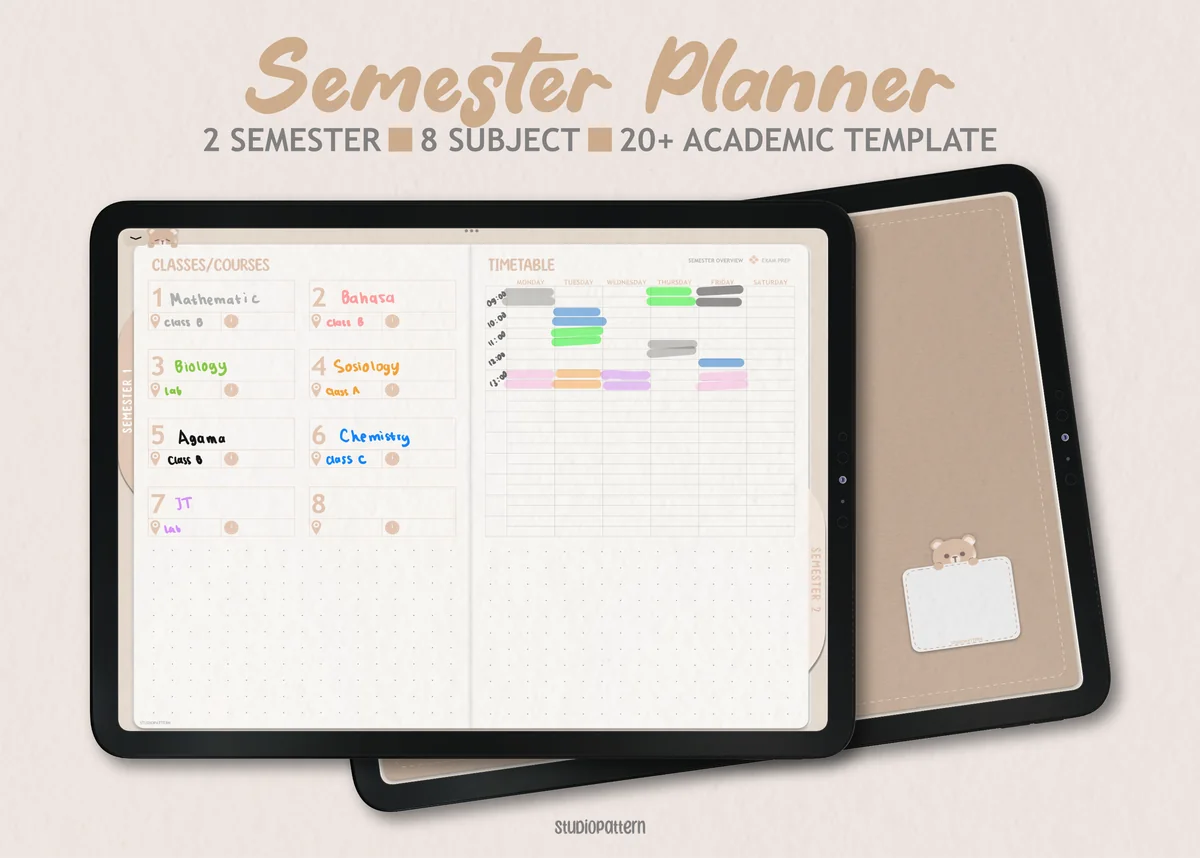
1. Digital Semester Planner for Goodnotes
Orientation: LandscapeLayouts: Semester, Classes (8), Exam timetableDates: Undated
Best for: college students, high school students, exam season. Designed by studiopattern.
- Semester dashboard for up to 8 classes and a semester timetable
- Class overview pages with trackers for assignments, lecture notes, reading and grades
- Exam timetable and exam preparation pages
- Productivity page for time, energy and focus; undated, two semesters
This is the closest thing to the list above in one file: the timetable, a dashboard per subject, reading and grade trackers, and exam prep pages (ideas 1, 7, 9, 14 and 18). I'd start here if the semester is just beginning and every class needs its own space.
Best budget pick
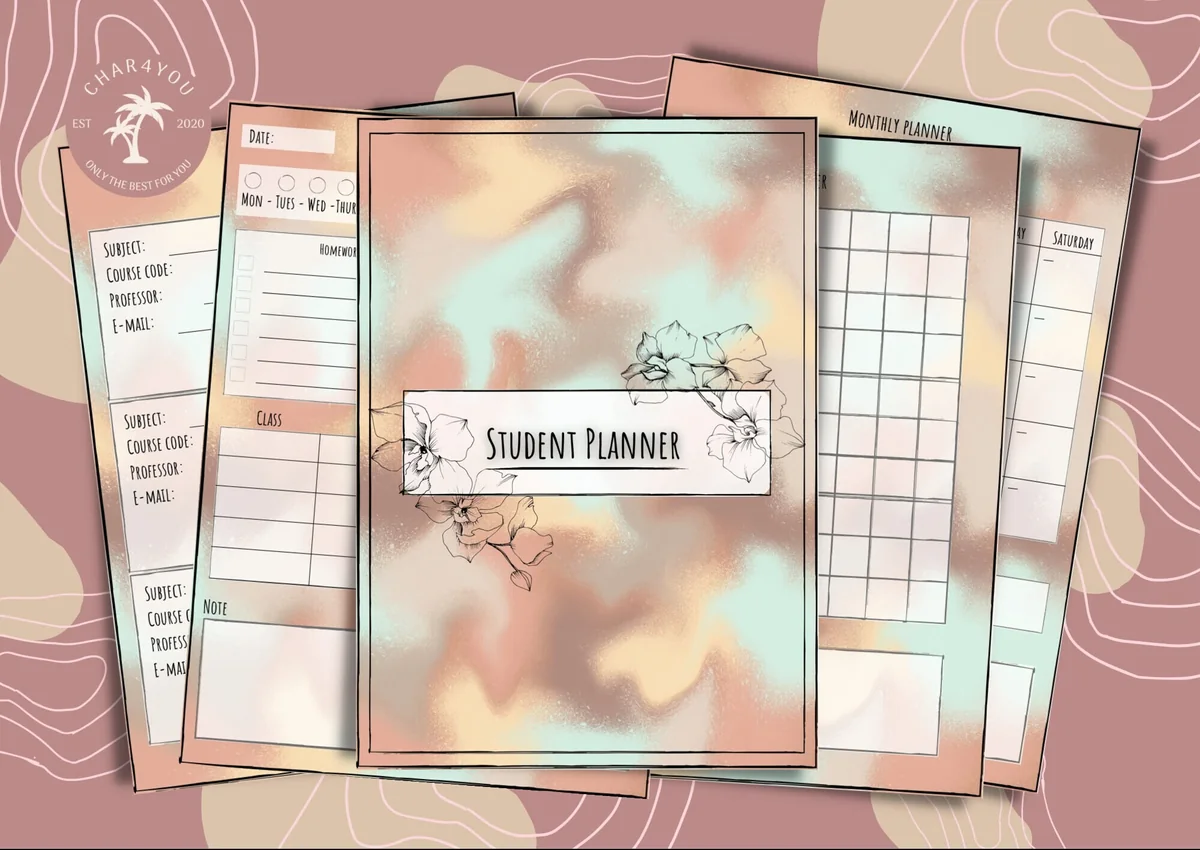
2. Simple Student Planner
Orientation: PortraitLayouts: Monthly, Weekly, Daily, Class schedule, GradesWeek start: Monday or Sunday
Best for: high school students, college students, budget shoppers. Designed by Char4You.
- Class schedule and class information pages
- Grade tracking and a study tracker for your study sessions
- Daily, weekly and monthly pages, Monday or Sunday start
- Lined and blank note pages; color or black-and-white version
Everything a student planner needs and nothing more: timetable, grades, a study tracker and plain note pages. The study tracker is a ready-made home for the weekly study hours idea (24). One of the cheapest planners I found, and the soft pastel cover is a nice extra.
Best one-page daily study plan
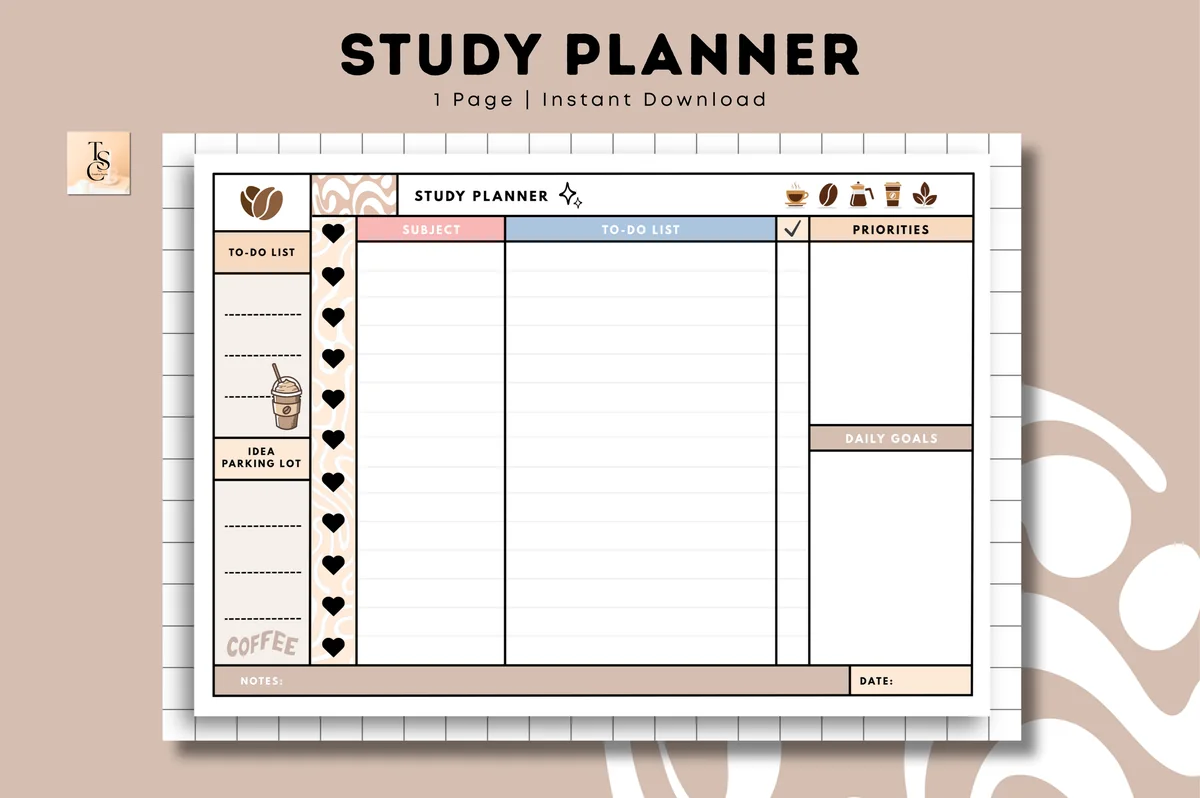
3. Study Planner • Coffee Latte
Orientation: LandscapeLayouts: Study plan (1 page)Dates: Undated
Best for: coffee lovers, one-page planners, students. Designed by Tas Creative Studio.
- One landscape page: a subject column next to a to-do list with check boxes
- Boxes for priorities and daily goals
- A side to-do list and an "idea parking lot"
- Undated; digital PDF for GoodNotes, Notability and Noteshelf, plus a printable version
Not a full planner, just one page, and that's the point. Subjects on the left, tasks in the middle, today's top priorities on the right (idea 4). The idea parking lot is exactly the distraction list from idea 26: write the thought down and get back to work. Duplicate it every morning.
Best for assignments and deadlines
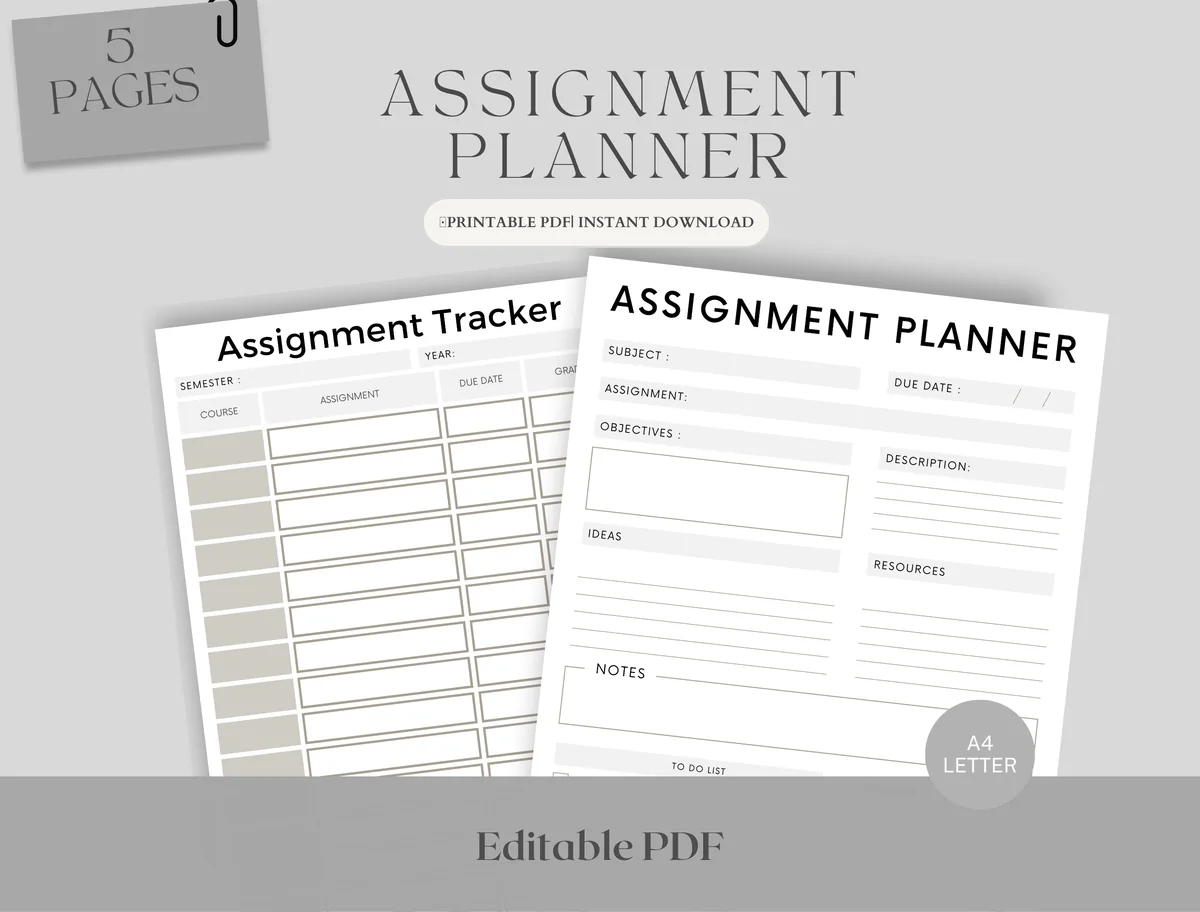
4. Editable Student Planner
Orientation: PortraitLayouts: Monthly, Weekly, AssignmentsDates: Undated
Best for: high school students, college students, deadline jugglers. Designed by Upbeat.
- Assignment tracker: course, assignment and due date for the whole semester
- Assignment planner page with objectives, ideas, resources and notes
- Weekly schedule in two versions: with hourly slots and blank
- Monthly planner for exams and deadlines; fillable PDF that works in GoodNotes and Notability
A small set for the part of school that causes the most stress: deadlines. The tracker covers idea 12, and the planner page with objectives and resources is a ready-made way to break a big project into steps (idea 13). It pairs well with any of the planners above.
Quick Comparison
| Planner | Best for | Ideas it covers | Stand-out extra |
|---|---|---|---|
| 1. Digital Semester Planner for Goodnotes | A full semester system | 1, 7, 9, 12, 14, 18 | Trackers for each class |
| 2. Simple Student Planner | Students on a budget | 1, 7, 14, 24 | Study session tracker |
| 3. Study Planner • Coffee Latte | One page a day | 4, 26 | Idea parking lot |
| 4. Editable Student Planner | Deadline control | 3, 12, 13 | Planner page per assignment |
How to Make a Study Plan in 5 Steps
- Write down every fixed date. Exams, due dates and presentations go on the semester page first (idea 3).
- Count backwards. For each exam, decide when revision starts; for each big assignment, set mini deadlines (idea 13).
- Find your real free time. Block classes, work and travel in the weekly timetable, then see which hours are left for study.
- Book study blocks. Give each block one subject and one task, like “Biology: chapter 4 flashcards” (idea 2).
- Leave a buffer. Keep one or two empty blocks a week for what runs late. A plan with no slack breaks by Wednesday.
How to Use a Study Planner Every Week
Fifteen minutes on Sunday is enough. Check the semester page for what’s due in the next two weeks, fill the weekly timetable, and pick the top 3 tasks for Monday. Then, every evening, tick off what got done, move what didn’t, and write tomorrow’s top 3 before you close the iPad. Once a week, look at the study hours and the mistake log: they show which subject needs more time before the grades do.
Study Planner Template or App?
Study apps are great at reminders and timers. A study planner template in GoodNotes or Notability gives you something different: your timetable, notes, trackers and handwriting in one notebook, without a subscription for the planner itself. Writing a plan by hand also makes you think it through. Many students use both: the planner for planning and revision, a phone alarm for the actual start time.
How to Set Up a Study Planner in GoodNotes
- Import the PDF into GoodNotes (Share → GoodNotes → Import as New Document).
- Fill in the class timetable and give every subject one color; use the same color for its tab, notes and stickers.
- Add every exam and due date to the semester or monthly page.
- Bookmark the pages you’ll use daily: today, this week, the assignment tracker.
- Duplicate the weekly page or the subject page as often as you need; that’s the big advantage over paper.
FAQ
What should I include in a study planner?
At minimum: a class timetable, a semester page with exams and due dates, an assignment tracker and a weekly plan with study blocks. Add a grade tracker and a revision checklist when exams come closer. Everything else from the list above is optional.
What are some good ideas for a student planner?
The most useful ones are a color-coded timetable, a top 3 for each day, an assignment tracker with status, an exam countdown and a mistake log. They are small, quick to fill and they answer the question “what should I do next?”
What is the 1-3-5-7 rule in study?
It’s a spaced repetition schedule: you review new material on day 1, then again on days 3, 5 and 7. Each review is shorter than the last, and the gaps help you remember it longer. A simple table with those four dates (idea 20) makes it easy to follow.
What is the 3-2-1 rule for study?
It usually means a short summary after each session: three things you learned, two things you found interesting and one question you still have. It takes two minutes and fits at the bottom of a daily study page.
Can I use my iPad as a study planner?
Yes. A PDF study planner in GoodNotes, Notability or a similar app works like a paper planner with tabs that jump between pages, and you can duplicate pages as often as you need. All you need is the iPad, an Apple Pencil or a stylus and a note app.
Do iPad study planners need a subscription?
The planner itself is a single file you keep. The note app is separate: some apps have a free version with limits, others are paid, so check the app before you buy the planner.
Final Thoughts
Start small with three study planner ideas: a timetable, an assignment tracker and a top 3 for each day. Add revision pages when exams get close, and drop any page you haven’t opened in two weeks. For more planners, see my digital study planners for iPad, the habit tracker ideas for study habits, or browse all study planners. To plan the whole school year, see my digital academic planners, and for subject colors, the GoodNotes color palettes. In college? These college planner picks add class dashboards and assignment trackers. Labels, sticky notes and to-do flags from my study stickers roundup make these pages faster to fill.
Want one planner for the whole year instead? Here are the best digital planners for 2027 I’d keep all year.
Taking notes in class on your iPad? These GoodNotes note templates include Cornell and lecture layouts.
If you want to compare PDF layouts for those study sessions, see these printable study planners for iPad, with the paper and iPad uses explained.
You May Also Like
This post contains affiliate links. If you buy through them, I may earn a small commission at no extra cost to you. Learn more.