A blank weekly spread looks full of promise on Sunday and half empty by Wednesday. Usually the problem isn’t discipline: it’s that nobody decided what the page is for. These weekly planner ideas give every part of the spread a job, from the top three priorities to meals, habits and a small money line.
Below are 40 ideas grouped by section, so you can build your own weekly page instead of copying someone else’s. After them: the main weekly layouts, a few aesthetic ideas, and 5 iPad templates from Creative Fabrica that leave room for these sections. At the end, a simple Sunday routine to fill it all in.
40 Weekly Planner Ideas, by Section
You don’t need all of them. Pick one or two from each section that matters to you right now; a spread with six to eight sections is already plenty. The numbers make it easy to see which ideas each template below fits.
Plan and Priorities 1–8
- 1Top 3 priorities for the week
- 2One weekly goal, in a single sentence
- 3Must-do vs. nice-to-do list
- 4Appointments and deadlines
- 5A brain dump box for everything on your mind
- 6“If I only do one thing this week” line
- 7Errands to run
- 8A peek at next week
Time and Schedule 9–15
- 9Time blocks for focused work or study
- 10Work shifts or class schedule
- 11Kids’ activities and pickups
- 12Workout slots
- 13Plans with friends and family
- 14Buffer time between busy blocks
- 15A Sunday planning session
Home and Meals 16–22
- 16Dinner plan for every night
- 17Grocery list
- 18A meal prep day
- 19One cleaning zone per day
- 20Laundry day
- 21Bills and home admin
- 22Water the plants
Health and Habits 23–29
- 23A habit row: 3–5 habits, 7 boxes each
- 24Water tracker
- 25Hours of sleep
- 26Steps or movement
- 27Mood of the day (a color is enough)
- 28Screen time
- 29One self-care slot
Money 30–34
- 30Spending log for each day
- 31No-spend days
- 32Bills due this week
- 33A savings deposit
- 34Weekly budget left
Reflection and Fun 35–40
- 35Wins of the week
- 36One thing you’re grateful for each day
- 37Quote or word of the week
- 38A photo or sticker memory
- 39What to change next week
- 40Something to look forward to
What Should Be in a Weekly Planner?
If you want a short answer: the week’s dates and appointments, your top three priorities, a to-do list, and one or two trackers you actually look at (meals, habits or spending). Everything else is optional. A good test is the Wednesday glance: if you can see in five seconds what matters this week and what’s coming next, the spread works.
Weekly Planner Layout Ideas
The same ideas fit very different pages. These are the layouts you’ll see most often, and who they suit:
- Vertical: a column per day, often with hours. Great for time blocking, shifts and appointments.
- Horizontal: a row per day. Best for lists and short notes rather than times.
- Hourly or half-hourly: a time grid for the whole week. For detailed schedules and busy weeks.
- Two-page spread: the week on the left, trackers, meals or notes on the right. In landscape on the iPad it looks like an open paper planner.
- One page + notes: seven boxes and a to-do list. The easiest layout to keep up with.
- Week + daily pages: a weekly overview that links to a page for each day, for people who plan the week and then the details.
On the iPad you don’t have to choose forever: most digital planners let you duplicate pages, so you can keep a one-page week for quiet weeks and an hourly week for busy ones.
Weekly Planner Aesthetic Ideas
Pretty pages aren’t the point, but a spread you like looking at is a spread you open. A few easy ideas:
- One color per area (work, home, health)
- A monthly color theme
- Washi tape or sticker headers
- Minimal black and white with one accent
- Seasonal covers
- Handwritten week title
- A small doodle for each win
- A photo of the week
Digital stickers and highlighters in GoodNotes do most of this in seconds, and nothing is permanent: if a theme gets old, change it next week.
For a birthday week, these birthday digital stickers offer a more specific decorative theme. Keep the birthday note readable and let the celebration marks occupy the spare space around it.
Weekly Planner Ideas for Students and for Work
Students can lean on the time and priority sections: add class times, an assignment list with due dates, a study block per subject and an exam countdown.
- Class schedule
- Assignments due
- Study blocks per subject
- Exam countdown
- Reading list
- Club and sports times
For work, keep personal and work lists apart on the same spread:
- Meetings and calls
- Deadlines this week
- Waiting on others
- One deep work block a day
- Weekly review notes
- Work vs. personal to-dos
The Best iPad Weekly Planner Templates for These Ideas
I picked digital templates for the iPad only, no printables: weekly-first planners with room for the sections above, from a one-page week to hourly grids and planners with meal, habit and money pages.
TL;DR: 40 weekly planner ideas grouped by section (priorities, schedule, home and meals, habits, money, reflection), the main layouts to choose from, then 5 iPad templates that leave room for them. Each card lists orientation, layouts and dates, plus who it suits.
Quick Picks
- Best for colorful all-rounder: The Joy Undated Digital Planner
- Best for minimal week + days: Daily , Weekly ,Monthly Digital Planner
- Best for a full year of weeks: 52 Weekly Digital Planner + Hyperlinks
- Best for time blocking: Half-Hour Weekly Planner
- Best for one-page week: Undated Weekly Digital Planner
- The Joy Undated Digital Planner – Best colorful all-rounder
- Daily , Weekly ,Monthly Digital Planner – Best minimal week + days
- 52 Weekly Digital Planner + Hyperlinks – Best for a full year of weeks
- Half-Hour Weekly Planner – Best for time blocking
- Undated Weekly Digital Planner – Best one-page week
Best colorful all-rounder
1. The Joy Undated Digital Planner
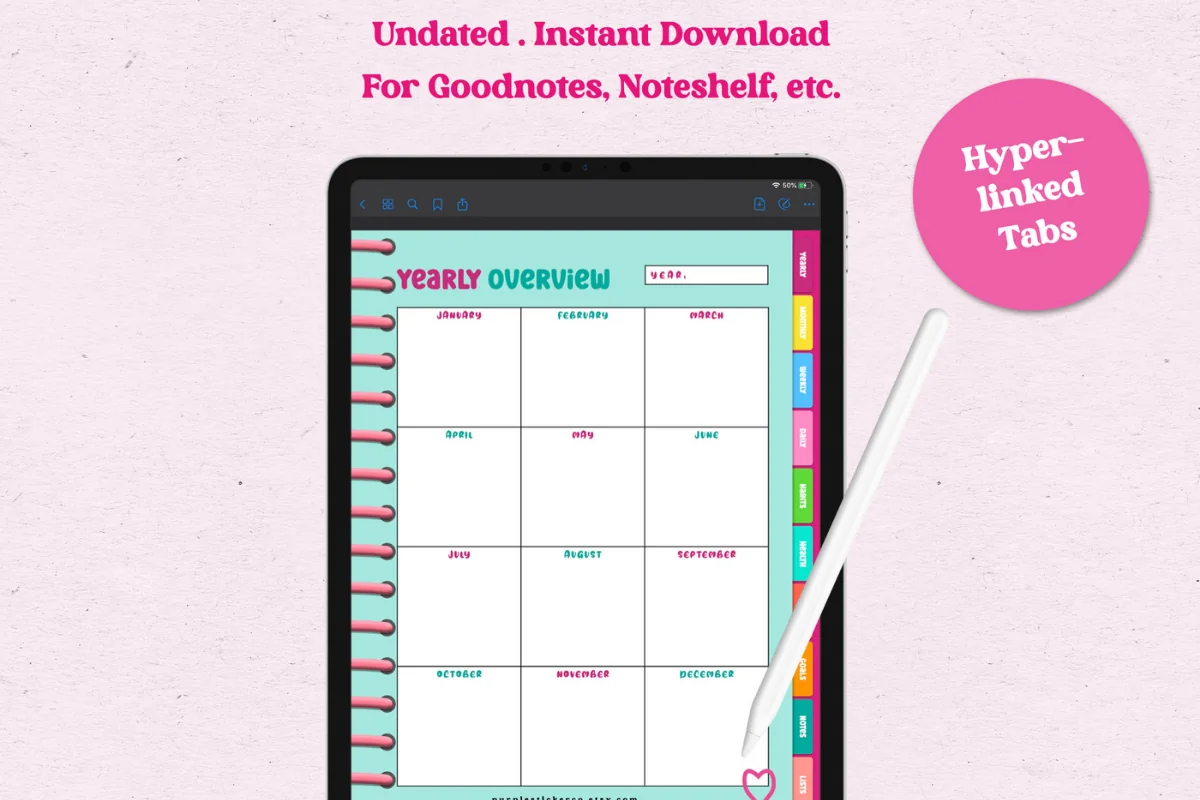
Orientation: PortraitLayouts: Yearly, Monthly, Weekly, DailyDates: UndatedWeek start: Monday
Best for: color lovers, side hustlers, habit trackers. Designed by GIRLIESPREADS.
- 86 hyperlinked pages, Monday start, undated
- Weekly and daily planner pages, plus 12 undated monthly calendars
- Habit and health pages, and money pages for revenue, expenses and budget
- Goals grid and goals planner, notes and to-do pages; rated 5.0
If your weekly spread has to hold a bit of everything, this one has a page for each section of the list: habits, health, money and goals. The revenue page is a nice touch if you run a side hustle. Teal and pink with rainbow tabs, so it's for people who like color, not for minimalists.
Best minimal week + days
2. Daily , Weekly ,Monthly Digital Planner
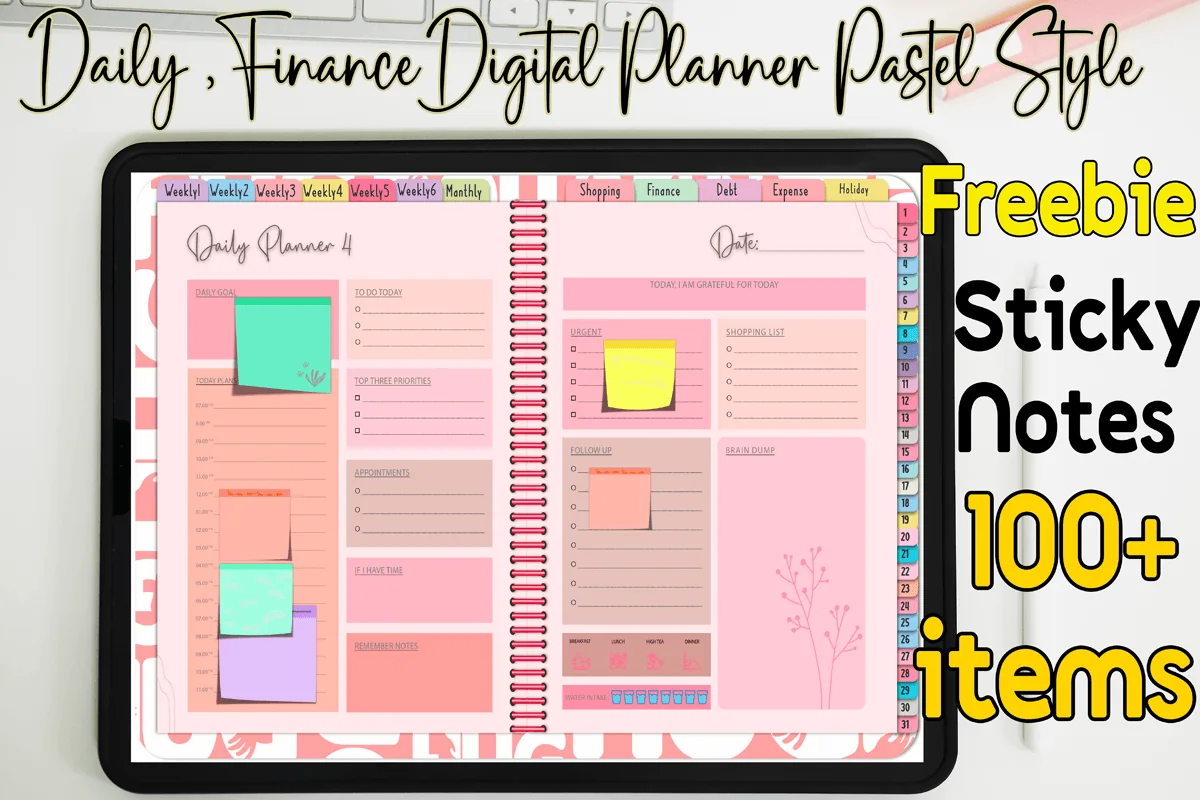
Orientation: LandscapeLayouts: Monthly, Weekly, Daily (31 pages)Dates: Undated
Best for: pastel lovers, one-month planners, budget shoppers. Designed by MOMAT THIRTYONE.
- 31 daily, 6 weekly and 1 monthly page; 56 pages in total
- Pastel colors, hyperlinked, undated
- Shopping, finance, debt, expense and holiday pages
- Bonus: 100+ sticky notes
A short, simple file: the week on one page, with the days linked right next to it. Use the weekly page for the top three and the must-dos, and let the daily pages handle the details.
Best for a full year of weeks
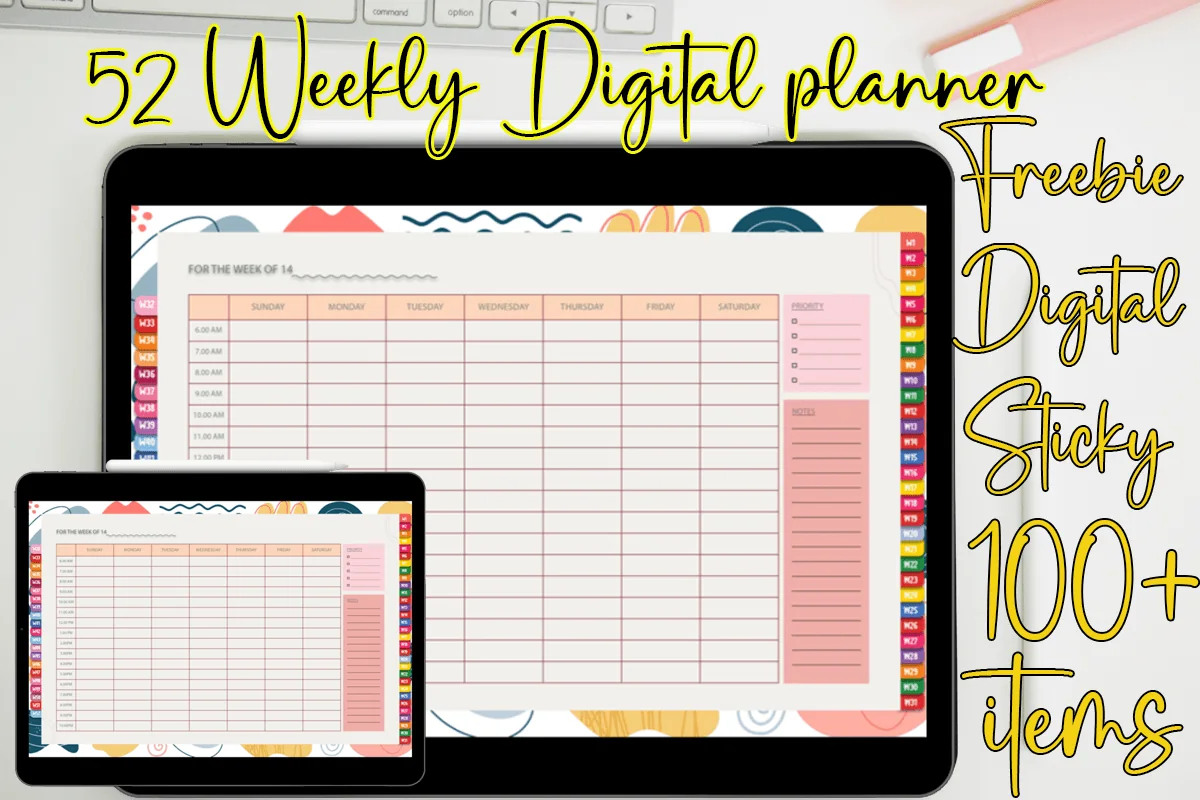
3. 52 Weekly Digital Planner + Hyperlinks
Orientation: LandscapeLayouts: Weekly (hourly, 52 weeks)Dates: UndatedWeek start: Sunday
Best for: time blockers, colorful planners, sticky note fans. Designed by MOMAT THIRTYONE.
- 52 weekly pages, each linked from the side tabs
- Hourly grid from Sunday to Saturday with a priority list and notes column
- Undated, so pages can be reused
- Comes with 100+ digital sticky notes; for GoodNotes, Noteshelf and Xodo
Every week has its own page and its own tab, so there's no duplicating pages every Sunday. The hourly grid suits the schedule ideas (9–15), and the priority column on the side keeps the top three in view. The playful color shapes make the cover, while the pages themselves stay clean.
Best for time blocking
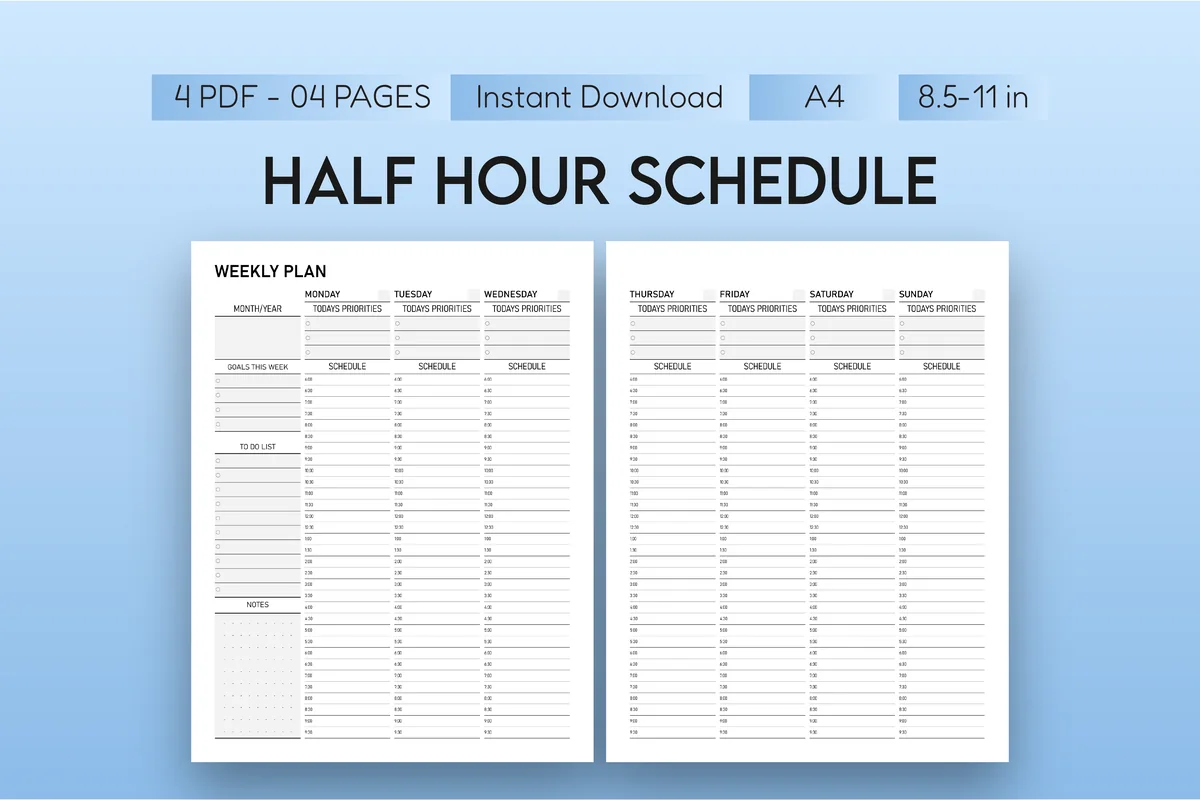
4. Half-Hour Weekly Planner
Orientation: PortraitLayouts: Weekly (30-minute slots)Dates: UndatedWeek start: Monday
Best for: busy professionals, students, time blockers. Designed by Mol Tazime.
- Weekly plan in 30-minute intervals across two pages (Monday–Wednesday, Thursday–Sunday)
- "Today's priorities" at the top of each day
- Columns for goals this week, a to-do list and notes
- Undated; 4 PDFs in A4 and US Letter, for GoodNotes and Notability
This is the one for the time blocking ideas: deep work (9), shifts (10), pickups (11) and the buffer time people forget (14). Half-hour slots are detailed, so I'd use it for busy weeks rather than every week. It's plain black and white, so add color with highlighters.
Best one-page week
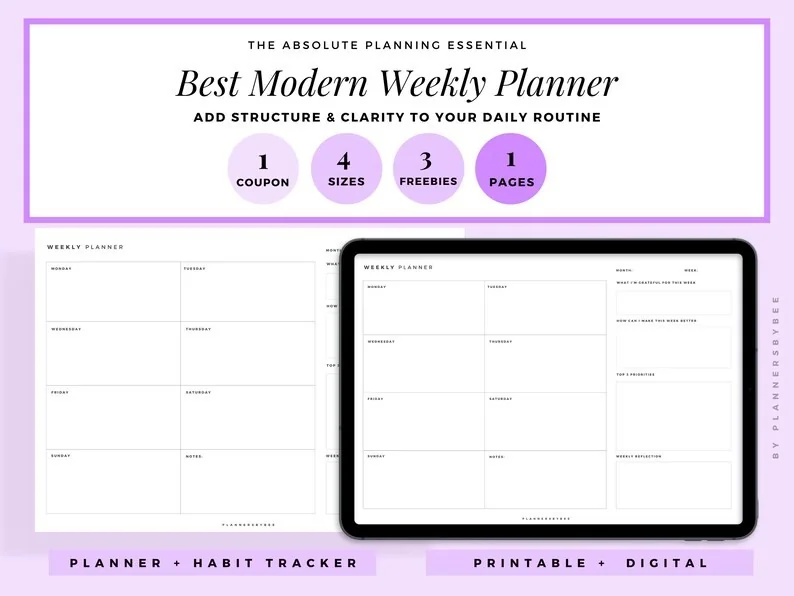
5. Undated Weekly Digital Planner
Orientation: LandscapeLayouts: Weekly (one page)Dates: Undated
Best for: minimalists, office workers, list makers. Designed by PlannersByBee.
- A minimal landscape weekly page with a box for each day
- Room for a to-do list and notes next to the days
- Undated, made for the iPad; 4 page sizes
- Digital and printable versions, plus 3 freebies
The easiest way to start: one page, seven boxes and a list. Good for the plan-and-priorities section and for a habit row or a short money line if you keep it simple. It's the template I'd suggest to anyone who has bought planners before and never filled them.
Quick Comparison
| Template | Best for | Weekly layout | Ideas it fits |
|---|---|---|---|
| 1. The Joy Undated Digital Planner | A bit of everything | Weekly + daily pages | 1–2, 23–29, 30–34 |
| 2. Daily , Weekly ,Monthly Digital Planner | Less is more | Week + daily pages | 1–3, 7 |
| 3. 52 Weekly Digital Planner + Hyperlinks | Hourly week, all year | Hourly grid, Sun–Sat | 1, 9–15 |
| 4. Half-Hour Weekly Planner | Detailed schedules | 30-minute slots | 1, 4, 9–14 |
| 5. Undated Weekly Digital Planner | Beginners | One page per week | 1–8, 30 |
How to Fill Your Weekly Spread Every Sunday
- Look back first. Two minutes on last week: wins (35), what didn’t happen, and what moves to this week.
- Add the fixed things. Appointments, deadlines, shifts, classes and pickups go in before any to-dos.
- Choose the top three. Write them where you’ll see them every day.
- Plan dinners and groceries. Even three planned dinners save a lot of 6 p.m. stress.
- Set up your trackers. Copy the habit row, and add a bills or money line if it’s a payday week.
- Leave white space. Buffer time (14) is what makes the plan survive Wednesday.
The whole routine takes 15–20 minutes. A short daily check in the evening (tick habits, move unfinished tasks) keeps the spread honest.
Weekly Planner Template or a Planner App?
Apps are good at reminders and syncing with your calendar. A weekly template on the iPad is better at the overview: the whole week on one page, in your handwriting, with trackers and notes next to the days. Many people use both: the calendar app for alerts, the PDF planner for thinking and planning. Note that a PDF planner doesn’t sync with your calendar by itself; any “calendar links” in a template are just buttons that open the app.
How to Set Up a Weekly Planner in GoodNotes
- Save the PDF from Creative Fabrica and open it in GoodNotes (Share → GoodNotes → Import as New Document).
- If it’s undated, write the dates on this week’s page and bookmark it.
- Decide your sections once: for example, top three, schedule, meals, habits and a notes box.
- Save your favorite pens and highlighters as Favorites, one color per area.
- Each Sunday, duplicate the blank weekly page (or go to the next week’s tab) and fill it in.
FAQ
What should I include in my weekly planner?
Dates and appointments, your top three priorities, a to-do list and one or two trackers you’ll really use, such as meals, habits or spending. Add sections only when you miss them, not because a template has room for them.
What is the best layout for a weekly planner?
It depends on how you plan. Vertical or hourly layouts suit people with appointments and shifts; horizontal and one-page layouts suit list makers. If you’re unsure, start with a one-page week and a notes box, then switch after a month if it feels cramped.
How do you structure a weekly planner?
Fixed things first (appointments, deadlines), then priorities, then to-dos spread across the days, then trackers. Keep the same structure every week so you know where to look.
What are good weekly planner ideas for beginners?
Start with three sections: top three priorities, a box per day for appointments and to-dos, and a habit row with two or three habits. That’s enough to see results without the spread turning into homework.
Can I use my iPad as a weekly planner?
Yes. With a PDF planner in GoodNotes, Notability or Noteshelf and an Apple Pencil, the iPad works like a paper planner you can duplicate, rearrange and carry everywhere. Hyperlinked tabs make it quick to jump to this week.
Is there a good weekly planner app for iPad?
Calendar apps and to-do apps are great for reminders. For a handwritten weekly overview, most people use a note-taking app like GoodNotes with a weekly planner template instead of a separate planner app.
Final Thoughts
The best weekly spread is the one you’ll still open on Thursday. Pick a few weekly planner ideas from each section, choose a layout that matches how your week really looks, and keep it the same for a month before you change anything. For more templates, see my weekly digital planners for iPad or browse all weekly planners. For the day itself, see my daily planner ideas, and for a one-page week, these weekly to-do list templates. Still deciding between vertical, horizontal and hourly weeks? My guide to 15 planner layouts explains each one. To share chores across the week, try my cleaning schedule ideas. To prepare the spread in one go, try my Sunday reset ideas with a one-hour routine.
Want one planner for the whole year instead? Here are the best digital planners for 2027 I’d keep all year.
For a closer look at PDF layouts you can use on paper or iPad, compare these printable weekly planners for iPad.
You May Also Like
For a family week with school reminders and shared tasks, explore these mom planner ideas and choose a few routines that fit your household.
This post contains affiliate links. If you buy through them, I may earn a small commission at no extra cost to you. Learn more.